
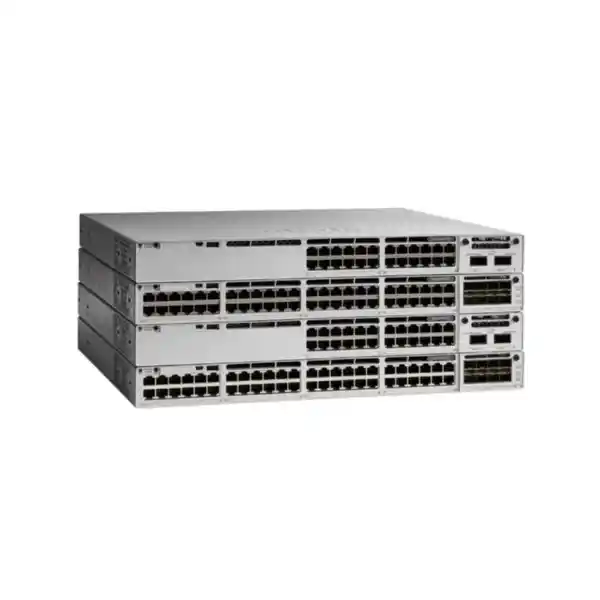
4 × 1G fixed fiber uplinks
890W default PoE budget
StackWise-320 capable
Cisco Catalyst C9300L-48PF-4G Network Switch
The Cisco Catalyst C9300L-48PF-4G is designed for organizations that need a dense, enterprise access-layer switch with substantial Power over Ethernet capacity for phones, wireless access points, cameras and other PoE-powered endpoints. It provides 48 Gigabit Ethernet PoE+ downlink ports, four fixed 1 Gigabit fiber uplinks, an 1100W AC power supply and an available PoE budget of 890W in its default power configuration. For Tanzanian businesses, institutions and project teams evaluating a high-port-density Cisco access switch, the central question is whether 1G uplinks are sufficient for the intended aggregation design and whether the larger PoE budget of the PF model is more valuable than the faster uplinks available on 4X alternatives.
Fast fit check
A 48-port access layer where many endpoints require PoE+, including IP phones, standard-power wireless access points, surveillance endpoints and other IEEE PoE-powered devices.
Projects that would outgrow the 505W default PoE budget of the C9300L-48P-4G and benefit from the PF model’s 890W default PoE budget.
The four fixed uplinks are 1G. If the distribution layer or high-traffic access design requires 10G uplinks, the C9300L-48PF-4X is the closer model to evaluate.
C9300L fixed-uplink switches support optional StackWise-320 stacking with the appropriate Cisco stack kit, providing a path to a multi-switch access stack.
What the C9300L-48PF-4G is built to solve
A modern access switch has to do more than provide forty-eight Ethernet sockets. In an office, campus, hotel, healthcare environment, school, branch facility, retail location or mixed-use building, the switch often becomes the common connection point for data users and powered edge devices. The access layer therefore has to be planned around three linked resources: port count, data capacity and power budget. The C9300L-48PF-4G is especially relevant when the power dimension is important. Cisco lists forty-eight 10/100/1000 Mbps PoE+ access ports and an 890W available PoE budget with the default 1100W AC power supply. That makes it a substantially more power-capable option than a C9300L-48P-4G in its default configuration.
The “4G” part of the model name matters just as much as the “PF” designation. This switch uses four fixed 1 Gigabit fiber uplinks. It is not the 10 Gigabit uplink version. That can be an excellent fit when the upstream architecture is intentionally based on 1G fiber, when the access layer traffic profile is moderate, or when several 1G uplinks are sufficient for the distribution design. It can be the wrong fit when a new deployment expects heavy east-west traffic, high aggregate Wi-Fi throughput, large local backups or other workloads that would make 10G uplinks a better starting point. Buyers should therefore select this model because its combination of PoE density and 1G uplinks matches the design, not simply because it has 48 ports.
For organizations standardizing on Cisco Catalyst switching, the 9300L family also provides a stackable access architecture. Cisco documents StackWise-320 support for the fixed-uplink C9300L models using optional stacking hardware. This allows multiple compatible C9300L or C9300LM switches to operate as a stack, with up to eight members supported by Cisco for StackWise-320. The stack option can simplify access-layer growth and operational consistency, but it should be planned before procurement because the stack kit is separate and C9300L fixed-uplink models do not stack with the modular-uplink C9300 models.
Verified hardware at a glance
| Model | Cisco Catalyst C9300L-48PF-4G |
|---|---|
| Access ports | 48 × 10/100/1000 Mbps copper PoE+ ports |
| Fixed uplinks | 4 × 1 Gigabit fiber uplinks |
| Default power supply | PWR-C1-1100WAC-P, 1100W AC |
| Available PoE power, default configuration | 890W |
| Switching capacity | 104 Gbps standalone; 424 Gbps with stacking |
| Forwarding rate | 77.38 Mpps standalone; 315.48 Mpps with stacking |
| Stacking | Optional StackWise-320; up to 8 supported stack members |
| Memory | 8 GB DRAM and 16 GB flash for Catalyst 9300L/LM fixed-uplink models |
| MAC address scale | 32,000 for Catalyst 9300L/LM fixed-uplink models |
| Dimensions with 1100W PSU | Approximately 4.4 × 44.5 × 48.8 cm (H × W × D) |
| Weight with default power supply | Approximately 7.03 kg |
Software features and routing capabilities depend on the ordered Cisco software license level and current Cisco licensing terms. The base model name alone does not identify whether the final order is Network Essentials or Network Advantage.
Why the 890W PoE budget matters
PoE planning is often where a seemingly suitable 48-port switch becomes unsuitable. Port count only tells you how many devices can be physically connected. It does not tell you whether the switch can supply the combined electrical demand of those devices. Cisco rates the C9300L-48PF-4G with an 890W available PoE budget using its default 1100W AC power supply. That higher budget is the defining reason to choose the PF model over the ordinary C9300L-48P-4G when both use the same 48-port count and four 1G uplinks.
For design purposes, do not simply multiply the maximum PoE+ value by the number of connected ports and assume every endpoint will continuously draw that amount. Real endpoints have different negotiated power classes and different actual consumption patterns. A practical design starts with the exact powered-device list: phone model, access point model, camera model, intercom, small gateway or other powered endpoint. Record the maximum power requirement for each, include expected growth, and compare the total with the switch’s available PoE budget. This prevents late surprises when a location adds more devices or replaces low-power endpoints with newer models that require more power.
The 890W budget also creates room for mixed endpoint environments. A floor may contain desk phones that draw relatively little power, access points with higher requirements, and surveillance devices with different operating profiles. A higher switch-level budget gives the designer more flexibility in how those endpoints are distributed across the forty-eight ports. Even so, PoE+ is not the same as Cisco UPOE or higher-power multigigabit access. If the planned devices require more than standard PoE+ per port, or need multigigabit Ethernet to exceed 1 Gbps on the copper access connection, a C9300L UPOE/multigigabit model may be more appropriate.
Power planning should also include the facility side of the design. A switch with an 1100W power supply and a high PoE load can represent a meaningful rack-level electrical and thermal requirement. Confirm UPS capacity, PDU rating, circuit design, grounding, rack airflow and expected runtime under backup power. In Tanzania, where some installations may place extra emphasis on continuity during utility interruptions, the network design should evaluate the complete power chain rather than treating the switch power supply as the only resilience decision. The switch can only deliver power to edge devices when its own input power remains available.
Understanding the four 1G fixed uplinks
The C9300L-48PF-4G uses four fixed 1 Gigabit fiber uplinks. This is an important architectural constraint and a useful cost-and-fit differentiator. Fixed uplinks make the product straightforward to specify because the uplink type is determined by the switch model, but they are not field-swappable network modules. The buyer should therefore decide the intended upstream speed before ordering the switch. If the distribution or core layer needs 10G per uplink, this 4G model should not be purchased with the assumption that a later network module can turn it into a 4X model.
A 1G-uplink access switch can still be a sensible design. Many office access layers have modest aggregate traffic even when forty-eight ports are available. Voice devices, transaction terminals, general web access, printers and many surveillance or IoT workloads do not necessarily create a sustained multi-gigabit upstream requirement. Multiple uplinks can also be used within supported link aggregation or resiliency designs, subject to the chosen software configuration. What matters is measured or realistically estimated aggregate traffic, not the theoretical sum of every downlink port.
On the other hand, a greenfield Wi-Fi deployment can change the calculation. Modern access points may aggregate substantial client traffic, and a 48-port edge switch can serve many high-usage users. High-volume file services, video production, local storage traffic, imaging, backup windows and dense campus usage can also increase upstream demand. When the access switch is expected to push more than a small number of gigabits toward distribution, the C9300L-48PF-4X, which uses four 10G/1G uplinks, deserves serious evaluation despite having the same downlink and default PoE budget as the PF-4G.
Fiber optics must be treated as a separate design choice. Select transceivers and cabling that are supported for the switch and that match the fiber type, link distance and upstream port. Avoid choosing optics only by connector appearance. The complete link must agree on speed, optical standard and media. For a procurement list, it is useful to specify the switch, the exact uplink optics, patch leads, fiber type and distribution-side interfaces together so the installation team is not left to resolve compatibility during deployment.
StackWise-320: growth without treating every switch as an island
Cisco lists StackWise-320 for the Catalyst 9300L fixed-uplink family. With the appropriate C9300L stack kit, up to eight compatible switches can participate in a StackWise-320 stack. The stack architecture is useful when a project starts with one switch but expects to expand to additional access ports, or when several switches in the same wiring location should be managed as a coordinated system rather than as completely independent devices.
For the C9300L-48PF-4G, Cisco publishes 104 Gbps of standalone switching capacity and 424 Gbps of switching capacity with stacking, together with forwarding figures of 77.38 Mpps standalone and 315.48 Mpps with stacking. These figures help position the model within the 9300L family, but they do not remove the need to plan uplinks and traffic flows. A stack can provide a resilient operational structure and high-speed backplane connectivity among stack members, yet traffic leaving the stack still depends on the configured uplink design.
Compatibility rules are especially important. Cisco states that C9300L fixed-uplink switches use their own stack architecture and cannot be stacked with modular-uplink C9300 models. Current Cisco documentation also describes C9300L/9300LM stacking relationships and the requirement for compatible license levels. Buyers should therefore avoid designing a mixed stack simply because all models carry the Catalyst 9300 name. The suffix and hardware family matter.
Another distinction is StackPower. Cisco’s shared-power StackPower feature applies to modular-uplink Catalyst 9300 and related models, not the C9300L fixed-uplink models. That means a C9300L stack should not be specified on the assumption that the switches will share a common StackPower pool. Each unit’s power supply and PoE capacity should be planned accordingly. This is a good example of why a product page should separate “stackable” from “all Catalyst 9300 stack features”: data stacking support does not imply every power-stacking capability of the broader family.
Performance and access-layer scale
Cisco specifies 104 Gbps switching capacity and 77.38 million packets per second forwarding for the C9300L-48PF-4G in standalone operation. Cisco also states that the Catalyst 9300 family provides wire-speed nonblocking performance for IPv4 and IPv6 in the published forwarding table, with the forwarding rates measured using 64-byte IPv4 packets. For a buyer, these numbers are most useful when comparing close family members and checking that the switch belongs in the intended access role.
The 9300L fixed-uplink platform uses 8 GB DRAM and 16 GB flash according to Cisco’s current series data. Cisco also lists a 16 MB packet buffer for the 24- and 48-port Gigabit Ethernet fixed-uplink models, a 32,000 MAC-address scale for 9300L/LM, up to 4,094 VLAN IDs, and platform routing and policy scale figures for the family. These platform resources support enterprise campus use, but the actual feature set available to a specific deployment depends on the chosen license and software release.
Do not interpret hardware scale figures as a promise that every possible routing, segmentation, telemetry or automation capability is active in every license. Cisco sells C9300L-48PF-4G ordering variants with Network Essentials and Network Advantage. Those suffixes matter because feature entitlement differs. A correct quotation should therefore identify the precise orderable SKU, not only the shared hardware model. If advanced routing or other specific Cisco IOS XE capabilities are mandatory, verify them against the intended license level before purchase.
This licensing check is particularly important in replacement projects. A legacy switch may have features enabled under an older licensing model or may be running a configuration that cannot simply be copied feature-for-feature to a new platform without entitlement review. Before migration, inventory the current VLANs, routing protocols, first-hop redundancy, access-control rules, QoS policies, authentication, monitoring, device tracking, management protocols and automation dependencies. Then map those requirements to the selected 9300L license and target Cisco IOS XE release.
Where this switch fits in a Tanzanian network project
The C9300L-48PF-4G can serve as an access-layer building block for Tanzanian organizations that need many Gigabit Ethernet edge connections and a large PoE reserve. Examples include corporate offices with IP phones and wireless access points, education environments with classroom connectivity, hospitality properties with phones and Wi-Fi infrastructure, healthcare or public-service facilities with mixed endpoint requirements, and surveillance-heavy sites where the switch must power a large number of cameras. These are deployment patterns rather than claims about availability, coverage or service commitments.
Local project planning should account for the practical conditions of the intended site. Confirm stable rack power, UPS sizing, grounding, cooling, secure rack space and cable management. Verify the fiber path from the access rack to the distribution or core location, including strand availability and expected optical distance. If there are multiple buildings, confirm whether each uplink remains within the optical budget of the selected transceivers and whether redundant paths are physically diverse.
For a branch or regional site, the WAN design is separate from the campus switching design. A powerful PoE access switch does not improve an undersized or unstable internet link by itself. If business applications are cloud-based, assess WAN bandwidth, latency, failover and provider diversity independently. If services are hosted locally, consider traffic patterns between user VLANs and local servers when deciding whether the 1G fixed uplinks are sufficient.
The same principle applies to wireless. A switch can provide the wired backhaul and PoE for access points, but Wi-Fi performance depends on the AP model, channel plan, RF environment, client capabilities and controller or management design. Before standardizing on this switch for a new wireless rollout, compare each AP’s wired interface speed and power requirement. If the APs require multigigabit Ethernet or higher-power PoE, a different access-switch model may be a better fit even if the C9300L-48PF-4G has enough total power budget.
Model comparison: choose by power and uplink requirement
| Model | Downlinks | Fixed uplinks | Default PoE budget | Best reason to consider |
|---|---|---|---|---|
| C9300L-48P-4G | 48 × 1G PoE+ | 4 × 1G | 505W | Same 1G uplink profile with lower default PoE requirement |
| C9300L-48PF-4G | 48 × 1G PoE+ | 4 × 1G | 890W | Higher PoE budget while retaining 1G fixed uplinks |
| C9300L-48PF-4X | 48 × 1G PoE+ | 4 × 10G/1G | 890W | Same high PoE budget with faster fixed uplinks |
This comparison is useful because it isolates the two questions that most often drive selection. If 505W is enough, the standard 48P model may satisfy the PoE requirement. If the project needs the larger 890W default power budget, choose between the PF-4G and PF-4X based on uplink demand. Where both high PoE and 10G distribution connectivity are expected, the PF-4X is usually the more natural candidate. Where the distribution layer is intentionally 1G and the priority is powering many endpoints, the PF-4G can be the better-aligned choice.
Licensing: specify the orderable variant, not only the hardware family
Cisco lists C9300L-48PF-4G-E and C9300L-48PF-4G-A as orderable variants of this hardware platform. The “-E” model is associated with Network Essentials and the “-A” model with Network Advantage. Because the user-facing hardware name is often shortened to C9300L-48PF-4G, quotations and project bills of materials should go one step further and state the required license variant. This avoids a situation where the physical switch is correct but the software entitlement does not match the intended configuration.
The correct license depends on the functions the network needs. Rather than assuming the highest tier is automatically necessary, create a feature checklist. Include routing requirements, segmentation design, redundancy protocols, telemetry, policy enforcement, automation, campus fabric plans and any other Cisco capabilities that the operations team intends to use. Compare that checklist against current Cisco licensing documentation for the software release being deployed. Licensing can change over a product’s lifecycle, so current Cisco terms should take precedence over an old project template.
For procurement, it is also useful to distinguish the perpetual network license from any time-based software subscription or support elements that may be part of the Cisco offer. The exact commercial bundle should be confirmed in the formal quotation. This product description intentionally does not state a subscription duration, support contract, warranty term, stock status or local price because those details must be verified for the exact offer presented to the customer.
Deployment checklist before you order
1. Count active and growth ports
List every copper endpoint expected at day one and add a realistic growth reserve. A 48-port switch is only a good fit when the port plan still leaves room for moves, additions and replacement devices.
2. Build a PoE power table
Record the maximum power requirement of each phone, AP, camera or other powered endpoint. Compare the total and expected growth with the 890W available PoE budget.
3. Validate 1G uplinks
Estimate aggregate traffic and check distribution-port speed. If 10G uplinks are part of the architecture, evaluate the 4X model rather than planning an unsupported later conversion.
4. Select optics and fiber
Match Cisco-supported transceivers to the fiber medium, link distance and upstream interface. Include optics and patching in the bill of materials rather than treating them as an afterthought.
5. Decide on stacking now
If the rack may use multiple access switches, decide whether StackWise-320 is part of the design and include the required C9300L stack hardware and appropriate stack-cable lengths.
6. Confirm software entitlement
Choose the Network Essentials or Network Advantage orderable variant based on actual feature requirements. Do not infer licensing from the shortened hardware name.
7. Verify rack and power
Allow for the approximately 48.8 cm depth with the 1100W power supply, adequate rack clearance, airflow, cable bend radius, UPS capacity and the electrical load of powered endpoints.
8. Plan migration and rollback
Document VLANs, trunks, routing, authentication, monitoring and QoS before replacement. Test the target configuration and maintain a rollback plan for production change windows.
Physical installation and power considerations
Cisco lists the C9300L-48PF-4G chassis at roughly 4.4 cm high and 44.5 cm wide. With the 1100W power supply, the depth is approximately 48.8 cm, and the documented weight with the default power supply is about 7.03 kg. The 4.4 cm height corresponds to a 1RU-class rack device. Designers should still verify the specific rack, rail or mounting arrangement, cable clearances and front-to-rear airflow before installation.
The deeper power supply dimension matters in compact wall cabinets. A cabinet that accepts a shallow switch may not provide enough rear clearance for the power supply, power cord and bend radius. Check usable internal depth rather than the nominal cabinet depth. Leave sufficient room for the switch, power connection, copper patching, fiber patch cords and any stack cables. Avoid forcing fiber through sharp bends or positioning stack connectors where the cabinet door will press against them.
Cisco documents field-replaceable fans and N+1 fan redundancy for the Catalyst 9300 Series. Reliable operation still depends on keeping vents clear and managing ambient conditions. Dense PoE environments generate heat not only in the switch but also in cabling bundles and powered endpoints. Keep the rack environment clean, maintain the intended airflow path and confirm that the room cooling design is appropriate for the installed equipment load.
The 1100W AC power supply accepts a broad AC input range according to Cisco’s power-supply specifications, but the installation must use the correct local power cord, socket, protective device and grounding arrangement. For any site where generator or UPS operation is important, validate transfer behavior and runtime under a realistic switch-and-PoE load. An empty switch test does not represent the electrical demand of a fully populated PoE installation.
Migration from an older access switch
A successful upgrade is not simply a hardware swap. Start by documenting the current switch role and every dependency attached to it. Export the configuration and create a human-readable port map showing endpoint type, VLAN, voice VLAN, trunking, port channel membership, authentication, security policy, QoS, spanning-tree settings, monitoring and any special device requirements. Flag ports where the connected device is powered by PoE so those endpoints can be tested explicitly after migration.
Next, normalize the design instead of blindly copying old commands. A previous switch may contain years of unused VLANs, disabled interfaces, legacy authentication methods or temporary exceptions. Confirm which settings are still needed and whether the target IOS XE release implements them in the same way. Review interface numbering and uplink configuration, especially if moving from modular uplinks to the fixed 4G design. If the old switch used 10G uplinks and the new model provides only 1G uplinks, that is an architecture change, not a cosmetic configuration difference.
Test high-impact services during the change window. Confirm DHCP reachability, DNS, default-gateway access, voice registration, wireless AP connectivity, camera streams, authentication, management access, monitoring, logging and uplink redundancy. For a PoE-heavy environment, verify that all powered devices negotiate correctly and that the aggregate power draw remains within the available budget. If a stack is being introduced, test member and uplink failure scenarios that are part of the approved design.
Finally, retain rollback information until the new switch has completed an agreed validation period. Record the final software version, license state, device inventory, serial information, optics, stack hardware, configuration backup and physical patching map. Good documentation turns the hardware purchase into an operationally maintainable platform rather than a one-time installation.
Who should choose this model — and who should look elsewhere
Choose the C9300L-48PF-4G when the design needs forty-eight 1G PoE+ edge ports, a large 890W default PoE budget, enterprise Catalyst access switching and optional StackWise-320, while four 1G fixed fiber uplinks are sufficient for the upstream architecture. This combination is especially attractive when power density is the key constraint and the traffic profile does not justify 10G uplinks.
Consider the C9300L-48P-4G instead when the endpoint count is similar but the PoE load is much lower. Cisco lists a 505W default PoE budget for that model. If a reliable device-power calculation shows that 505W provides enough capacity and growth room, the standard P version may be the more appropriately sized option.
Consider the C9300L-48PF-4X when the project needs the same high 890W default PoE budget but expects 10G uplinks. This is the most direct alternative when the power requirement says “PF” and the traffic requirement says “10G.”
Consider a multigigabit/UPOE model when the connected endpoints require copper speeds above 1G or higher per-port power than PoE+. This can be relevant for newer wireless access points and specialized devices. The C9300L-48PF-4G has generous total PoE capacity, but its downlink ports are Gigabit Ethernet and the product is positioned as PoE+, not as a multigigabit UPOE switch.
Consider modular-uplink Catalyst 9300 models when the architecture requires interchangeable uplink modules or StackPower capabilities. The 9300L family intentionally uses fixed uplinks, and Cisco does not provide StackPower on these fixed-uplink models. Buying the right hardware architecture at the start is preferable to trying to work around a fixed platform choice later.
Frequently asked questions
Does the C9300L-48PF-4G have 10G uplinks?
No. The C9300L-48PF-4G is the version with four fixed 1 Gigabit fiber uplinks. If you require four 10G/1G fixed uplinks, compare the C9300L-48PF-4X.
How much PoE power is available with the default power supply?
Cisco specifies 890W of available PoE power for the C9300L-48PF-4G with its default 1100W AC power supply. Actual endpoint allocation depends on the connected devices and their negotiated power requirements.
Can it be stacked?
Yes. Cisco lists optional StackWise-320 support for C9300L fixed-uplink models using the appropriate C9300L stack kit, with up to eight supported members in a StackWise-320 stack.
Can I stack it with a modular C9300 switch?
No. Cisco states that fixed-uplink C9300L models cannot be stacked with modular-uplink C9300 models. Plan the stack around compatible C9300L/9300LM models and the required license compatibility.
Does the C9300L support StackPower?
No. Cisco documents StackPower for modular-uplink Catalyst 9300/9300X platforms, not the C9300L fixed-uplink family. Each C9300L unit should have its own power design.
Is the switch suitable for IP phones and wireless access points?
It can be, provided the devices use compatible Ethernet speeds and PoE requirements. Verify each endpoint’s maximum power demand and, for access points, confirm whether 1G copper is sufficient or whether multigigabit connectivity is required.
What license does the base hardware name include?
The shortened name does not uniquely identify the license. Cisco lists C9300L-48PF-4G-E for Network Essentials and C9300L-48PF-4G-A for Network Advantage. The exact orderable SKU should be stated in the quote.
What should I verify before requesting a quote in Tanzania?
Prepare the required port count, endpoint PoE load, uplink speed and fiber type, license needs, stacking plan, rack depth, power and UPS constraints, and any required optics or accessories. This makes it much easier to quote the correct hardware variant and supporting components without relying on assumptions.
Request a configuration-based quote
For an accurate Cisco Catalyst C9300L-48PF-4G quotation, provide the required switch quantity, expected PoE endpoints, uplink fiber type and distance, preferred software license level, stacking requirement and any required optics or accessories. This allows the bill of materials to be checked against the actual deployment instead of quoting the switch in isolation.
If the design has not yet been finalized, start with the two decisions that matter most for this model: whether the 890W PoE budget is required and whether four 1G uplinks are enough. Those answers will quickly confirm whether the PF-4G is the right 9300L variant or whether another model should be evaluated.




Reviews
There are no reviews yet.