
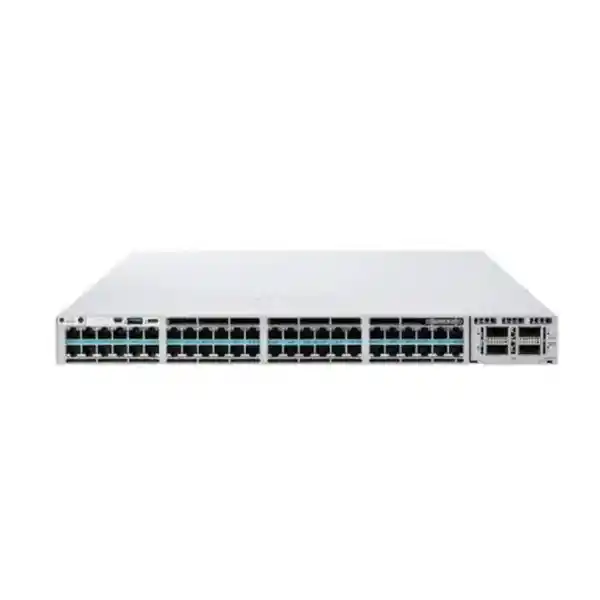
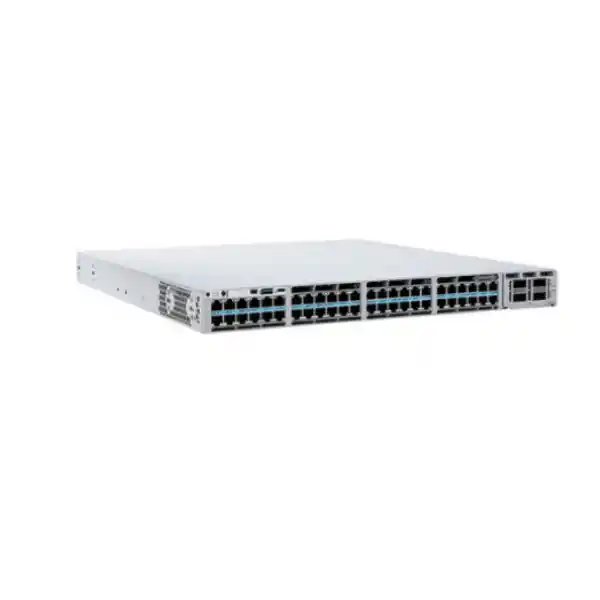
Cisco Catalyst C9300X-48HX: 48-port 10G multigigabit switching with UPOE+ for demanding campus networks
The Cisco Catalyst C9300X-48HX is designed for enterprise access networks that need substantially more edge bandwidth and power than a conventional 1 Gigabit switch can provide. Its 48 copper downlink ports support 100 Mbps, 1G, 2.5G, 5G and 10G Ethernet, making the platform particularly useful where modern wireless access points, high-performance workstations, edge appliances, cameras and other connected systems can exceed 1G. Every access port is UPOE+ capable, while the modular uplink architecture allows the switch to be matched to different aggregation designs rather than locking the deployment to one fixed uplink configuration.
For organizations in Tanzania planning a new campus, refreshing an access layer, expanding Wi-Fi capacity or standardizing on Cisco Catalyst, the key buying question is not simply whether the C9300X-48HX has enough ports. A correct design should also account for PoE demand, uplink module selection, licensing, stack architecture, redundancy, cabling quality and expected endpoint speeds. FourTeck Tanzania can use those requirements to prepare the appropriate configuration for quotation rather than treating the base model number as a complete bill of materials.
Who should consider the C9300X-48HX?
This model fits networks where the access layer is expected to carry high aggregate traffic, provide power to demanding endpoints and remain useful through multiple generations of client devices. A common reason to choose it is a wireless refresh. Newer access points can use multigigabit Ethernet uplinks and may require more power than older PoE or PoE+ switches provide. In those environments, installing a switch that is limited to 1G on every access port can create a wired bottleneck even when the wireless system itself supports much higher aggregate throughput.
The C9300X-48HX can also make sense for high-performance user access, digital media, IP surveillance, collaboration spaces, building systems and edge-compute devices where 2.5G, 5G or 10G copper connections are useful. Because the same RJ-45 access port can negotiate different supported speeds, an organization can connect a mixed estate of legacy and newer endpoints without requiring every connected device to operate at 10G from day one. This helps when a network is being upgraded in phases.
It is not automatically the best option for every 48-port requirement. If most devices are 1G and only need standard PoE+, a lower-tier Catalyst 9300 configuration may be more economical. If no powered devices are required, the C9300X-48TX is the data-only sibling worth comparing. If 10G capability is required on only part of the access layer, the C9300X-48HXN may be relevant because its port mix differs. The C9300X-48HX is strongest when a project has a real requirement for broad 10G multigigabit capability, UPOE+ and high-performance stacking.
48 multigigabit copper ports: why the speed range matters
Cisco specifies 48 multigigabit Ethernet ports on the C9300X-48HX, with supported rates of 100 Mbps, 1G, 2.5G, 5G and 10G. That broad range is important because enterprise edge networks rarely change all endpoints at once. Existing phones, printers, cameras and computers may remain at 100M or 1G, while new Wi-Fi access points, workstations or specialist appliances can use faster links. A multigigabit access switch allows these devices to coexist on one platform while preserving a path to higher speeds where the cabling and endpoint support them.
For wireless deployments, 2.5G and 5G are especially practical because they can increase wired backhaul capacity without forcing every access point connection to 10G. For selected high-throughput endpoints, 10GBASE-T can provide considerably more headroom. The value comes from matching port speed to actual device capability rather than assuming every port must run at the maximum rate. During planning, check the Ethernet interface supported by each endpoint, the cable category and installed channel quality, expected cable length, and whether the endpoint requires PoE. These details influence the speed that can be deployed reliably.
The C9300X-48HX therefore works well as a migration platform. An organization can connect current 1G devices immediately and move selected ports to higher rates when new access points or other equipment are introduced. That can reduce the need for an early switch replacement simply because more endpoints start requiring multigigabit uplinks. It also gives network teams more flexibility when capacity requirements vary by floor, department, building zone or device class.
10G-capable switching does not guarantee that every installed copper link will operate at 10G. Endpoint support, transceiver or interface type, cable category, channel condition and distance still matter. Validate the physical cabling plant before specifying the target speed for each port.
UPOE+ power: design around the total budget, not only the per-port maximum
One of the most important advantages of the C9300X-48HX is Cisco UPOE+ support. Cisco positions this platform for powered devices that can require substantially more power than traditional IP phones or basic access points. The model is capable of delivering up to 90 W on a supported port, which is useful for higher-power wireless access points, advanced cameras, displays, building systems and other equipment that benefits from receiving data and power over the same Ethernet cable.
The per-port capability should not be confused with the total power available across all 48 ports. Cisco specifies a 590 W available PoE budget for the C9300X-48HX when it uses the default 1100 W AC power supply. This means a design cannot assume that all 48 ports can simultaneously draw 90 W. The actual requirement has to be calculated from the expected powered-device population and each device’s maximum or negotiated power demand. A switch serving many high-power endpoints may require a different power-supply configuration and a deliberate redundancy strategy.
This distinction matters during procurement. For example, a floor with dozens of modest-power phones and several high-performance access points may fit comfortably within one budget, while a smart-building deployment with numerous high-power cameras, displays or specialized endpoints can require far more power. A proper bill of materials should therefore include an endpoint power schedule, expected growth and the behavior required if a power supply fails. The switch supports dual redundant power supplies, and Cisco provides different supply combinations that change the available PoE capacity.
Power planning should also include upstream electrical resilience. In business-critical networks, the switch and its powered endpoints may be part of a UPS-backed design. The UPS must be sized for the actual switch load, PoE load, desired runtime and any redundant power arrangement. Cooling and rack power distribution should be checked at the same time. Higher PoE density is operationally valuable because it centralizes power, but it also moves more electrical demand into the network cabinet.
When asking for a quotation, provide the expected number and type of powered devices, their PoE class or maximum wattage where available, whether redundant power is required, and whether future endpoints are likely to increase demand. That information is more useful than requesting “48 ports of 90 W PoE” without a real load model.
Modular uplinks for 10G, 25G, 40G and 100G designs
The C9300X family uses field-replaceable network modules for uplinks, giving the design team more choice than a switch with fixed uplink ports. Cisco lists C9300X network modules that support different combinations of 1G, 10G, 25G, 40G and 100G connectivity. For the C9300X-48HX, available choices include the C9300X-NM-8M for eight 10G/1G multigigabit uplink ports, the C9300X-NM-8Y for eight 25G/10G/1G ports, the C9300X-NM-2C for two 100G/40G ports and the C9300X-NM-4C for four 100G/40G ports. Cisco notes that the default switch configuration does not include the network module.
That last point is commercially important: the base hardware model should not be assumed to arrive with the uplink configuration required by a project. The uplink module needs to be selected as part of the solution. The correct choice depends on the aggregation switch, optics or cabling method, link distance, oversubscription target, redundancy design and expected future traffic. A 48-port access switch filled with multigigabit endpoints can create far more potential aggregate traffic than a traditional 48-port 1G switch, so uplink sizing deserves careful attention.
A 10G uplink design may be sufficient for many access environments where endpoint traffic is bursty and simultaneous utilization is modest. Higher-speed uplinks become more attractive when the switch serves dense Wi-Fi, high-throughput local applications, large data transfers, multiple active uplinks or a distribution role. 25G and 100G options can help maintain useful headroom as the access layer grows, but selecting the fastest module is not automatically the best use of budget. The rest of the network must support that speed, including aggregation ports, optics, fiber type and patching.
For procurement, specify the desired uplink count, target speed, media type, approximate link distance and the model of the upstream switch if known. That makes it possible to validate the network module and transceiver requirements together rather than treating them as separate purchases.
StackWise-1T and StackPower+: build for operational resilience
Cisco lists StackWise-1T support for the Catalyst 9300X platform. Stacking lets multiple compatible switches operate as a coordinated system, which can simplify management and create a more resilient access-layer design than isolated standalone switches. For large wiring closets, stacking can also make it easier to scale port count while maintaining a consistent operational model. The exact stack design should still be engineered carefully, including member count, stack cabling, software compatibility, physical placement and failure scenarios.
The “1T” designation refers to the high-bandwidth stacking architecture available within the 9300X family. Cisco also notes that stacking behavior changes when a Catalyst 9300X is mixed with a Catalyst 9300 model, so a mixed-generation or mixed-model stack should be verified rather than assumed to deliver the same performance as a homogeneous 9300X stack. Standardizing stack members can make lifecycle planning, spare strategy and software operations simpler.
StackPower+ addresses a different requirement: power resiliency and sharing between supported switches. This can be useful when a design needs to make better use of installed power resources across a stack. However, StackPower does not remove the need to calculate the worst-case PoE load, failure behavior and electrical supply. A deployment should define what happens if one PSU, one switch or one utility feed is lost, and which endpoint loads must remain powered.
For critical access layers, resilience should be considered end to end. That can include redundant switch power supplies, dual UPS feeds where available, redundant uplinks to the distribution layer, resilient routing or switching design, and a tested software-upgrade process. The C9300X-48HX provides the platform capabilities, but availability depends on how those capabilities are designed and operated.
Performance headroom for a high-density access layer
Cisco specifies a switching capacity of 1.76 Tbps and a forwarding rate of 1309 Mpps for the C9300X-48HX. Cisco also publishes higher aggregate capacity figures when stacking is included. These numbers indicate that the hardware is designed for a substantially more demanding traffic profile than conventional low-end access switching. They are most useful as architecture data points rather than as a promise that an application will achieve a particular throughput; real application performance depends on traffic patterns, endpoint behavior, uplink design, features enabled and the wider network path.
The model is built around Cisco’s UADP 2.0sec architecture and is positioned for secure enterprise access. Cisco documents MACsec 256-bit support across the Catalyst 9300 family and hardware-anchored security features such as Secure Boot and Secure Unique Device Identification. These capabilities help support designs where infrastructure integrity and link protection are part of the security architecture. Feature use can depend on software, licensing, topology and configuration, so security requirements should be mapped to the exact orderable software edition rather than inferred from the hardware name alone.
Cisco also documents hardware-based IPsec capability on the Catalyst 9300X platform, with the important qualification that the relevant HSEC key is required for that feature. This is a good example of why hardware capability and purchasable configuration are not always the same thing. If an organization needs specific encryption, segmentation, telemetry, automation or advanced routing functions, those requirements should be listed explicitly during solution design so the software and licenses can be validated.
For buyers, the practical benefit of the performance headroom is longevity and flexibility. A switch deployed today for a mixture of 1G and 2.5G endpoints can continue to support selected 5G and 10G requirements later, while high-speed uplink modules and stacking can reduce the chance that the access platform becomes an early bottleneck. That makes the C9300X-48HX especially relevant when the cabling and endpoint roadmap are expected to evolve over several years.
Software and licensing: order the edition that matches the network requirement
The base name C9300X-48HX identifies the hardware platform, but Cisco sells specific orderable variants. Cisco lists C9300X-48HX-E with Network Essentials, C9300X-48HX-A with Network Advantage, and C9300X-48HX-M for Meraki software options. Because these editions are not interchangeable labels, a product request that only says “C9300X-48HX” is incomplete for final procurement. The required software feature set and management approach should be confirmed before an order is placed.
Network Essentials and Network Advantage differ in the feature entitlements they provide, while the Meraki-managed ordering path is intended for customers using the relevant cloud-management experience. The right choice depends on the functions required in the target design. Routing features, segmentation, automation, assurance, policy and management requirements should be assessed against current Cisco licensing documentation for the intended software release. Avoid choosing a license solely because it sounds “advanced”; choose it because the network actually needs the included capabilities.
Software lifecycle planning matters as well. Enterprise switching is normally operated on a controlled software train with defined maintenance windows, tested configurations and an upgrade policy. Before deployment, verify the preferred Cisco IOS XE release, compatibility with existing Catalyst infrastructure, feature requirements and any dependencies on controllers or management platforms. In an existing Cisco environment, keeping switch software and operational tooling aligned can reduce troubleshooting complexity.
When requesting a quote from FourTeck Tanzania, state whether the requirement is Network Essentials, Network Advantage or a Meraki-managed configuration if that decision is already made. If not, provide the required features and management model so the appropriate option can be identified. The quote should also include the selected network module, power supplies, stack accessories, optics or cables and any required software subscriptions rather than only the chassis.
Key technical specifications
| Model | Cisco Catalyst C9300X-48HX |
|---|---|
| Access ports | 48 × RJ-45 multigigabit Ethernet |
| Supported access speeds | 100 Mbps, 1G, 2.5G, 5G and 10G |
| PoE capability | Cisco UPOE+; up to 90 W per supported port, subject to available total power |
| Default AC power supply | 1100 W AC |
| Available PoE with default 1100 W supply | 590 W |
| Uplinks | Modular; C9300X network modules available for multiple 1G/10G/25G/40G/100G configurations |
| Stacking | StackWise-1T; StackPower+ supported |
| Switching capacity | 1.76 Tbps |
| Forwarding rate | 1309 Mpps |
| Dimensions (H × W × D) | 4.4 × 44.5 × 48.3 cm (1.73 × 17.5 × 19 in.) |
| Weight | Approximately 6.62 kg (14.6 lb) with fan FRUs and default power supply installed |
| Operating temperature | Cisco hardware guidance lists -5°C to 45°C up to 1500 m, with derating at higher altitude |
Specifications shown here describe the C9300X-48HX platform and do not imply that every optional module, secondary power supply, transceiver, cable or software entitlement is included. Final configuration should be checked against the requested bill of materials.
Deployment planning for Tanzanian organizations
For an enterprise or institutional network in Tanzania, a successful C9300X-48HX deployment begins with requirements rather than a product code. First estimate current and three-to-five-year port demand. Identify how many ports need 1G only, how many are expected to use 2.5G or 5G, and which endpoints may genuinely require 10G. Then identify every powered endpoint, its expected PoE demand and any planned growth. This produces a realistic access and power profile for each wiring closet.
Next, assess the uplink path. A high-density multigigabit switch can feed significant traffic toward distribution or core infrastructure. The uplink should be sized against realistic usage, redundancy objectives and the capabilities of the upstream platform. If the building has fiber between floors or communications rooms, confirm fiber type, connector format, distance and the optical interfaces supported at both ends. If the project is an upgrade, inspect whether existing patch panels and links can support the intended speeds instead of assuming the new switch alone will deliver them.
Power and environmental readiness deserve equal attention. PoE concentrates endpoint power consumption in the network rack, so UPS capacity, rack power distribution and cooling may need to be reviewed. Cisco specifies operating temperature and altitude ranges for the hardware; the communications room should stay within the supported environment. Dust control, airflow and adequate rack depth are also practical considerations because the chassis is approximately 48.3 cm deep before allowing for cabling and bend radius.
For resilience, decide whether each switch needs a second power supply, whether stacked switches will use StackPower+, and how uplinks will be diversified. A design for a business-critical site may prioritize redundant power and paths, while a small branch may accept a simpler configuration. The correct choice depends on the cost of downtime and the services connected to the switch, not only on the hardware’s maximum capabilities.
Finally, document the software and operational model. Decide who will manage the switches, what monitoring and configuration systems will be used, which software features are required, how configuration backups will be maintained and how upgrades will be tested. These operating decisions affect the appropriate Cisco license option and help prevent a technically capable switch from being deployed without the tooling or processes needed to manage it well.
How the C9300X-48HX compares with nearby Catalyst 9300X options
Cisco offers several 9300X variants because different networks need different mixes of speed, power and port count. Comparing nearby models is useful before finalizing a quote. The table below focuses on practical fit rather than attempting to reproduce the entire Cisco portfolio.
| Model | Access-port profile | PoE | Best fit |
|---|---|---|---|
| C9300X-48HX | 48 × up to 10G mGig copper | UPOE+ | Maximum 48-port copper multigigabit flexibility with high-power PoE capability |
| C9300X-48TX | 48 × up to 10G mGig copper | Data only | High-density multigigabit access where powered endpoints are not required |
| C9300X-48HXN | 40 × up to 5G mGig + 8 × up to 10G mGig | UPOE+ | Deployments needing many multigigabit ports but only a smaller subset at 10G |
| C9300X-24HX | 24 × up to 10G mGig copper | UPOE+ | Smaller high-performance access blocks that do not need 48 ports |
The C9300X-48HX is the strongest choice in this group when the design expects broad use of 10G-capable copper ports and also needs high-power PoE. If only a handful of endpoints require 10G, the 48HXN can be worth evaluating. If powered devices are not part of the design, the 48TX avoids buying a PoE-focused platform unnecessarily. If port count is lower, the 24HX can reduce the amount of unused access capacity. Selection should follow the actual endpoint map and growth plan.
Recommended design checks before requesting a quote
1. Port and speed map
Count active ports and reserve growth. Mark which devices require 1G, 2.5G, 5G or 10G. Include access points, cameras, phones, user devices and specialist systems.
2. PoE load
List powered devices and their maximum expected draw. Compare the result with the 590 W default PoE budget and add headroom for growth and failure conditions.
3. Uplink module
Choose uplink speed and count based on the upstream switch, traffic profile, redundancy plan and media. Remember that the network module is a separate configuration choice.
4. Stacking
Decide whether the switch will run standalone or in a stack. For a stack, plan compatible members, stack cabling, software alignment and physical rack placement.
5. Power redundancy
Determine whether a second PSU is required, whether StackPower+ will be used and how UPS capacity should be sized for the switch plus the real PoE load.
6. License and management
Confirm Network Essentials, Network Advantage or the intended Meraki-managed path based on required features and operational tooling.
Common deployment scenarios
High-density Wi-Fi access
A dense wireless environment can place two simultaneous demands on an access switch: more than 1G of wired throughput per access point and higher PoE consumption. The C9300X-48HX addresses both through multigigabit copper and UPOE+ support. The design team should still calculate the number of access points per switch, their negotiated Ethernet speeds, peak PoE draw and the uplink capacity needed to carry aggregate wireless traffic. This is particularly important when many radios can be busy at the same time.
Converged voice, video, security and building systems
Many organizations prefer one managed access infrastructure for phones, cameras, access control, displays and user devices. The C9300X-48HX offers enough speed and power flexibility to support diverse endpoints, but a converged design should use VLANs, policy, quality of service and security controls appropriate to each device class. It should also reserve PoE capacity for essential systems and define which services must remain powered during outages.
High-performance office or technical workspace
Users moving large datasets, working with media, engineering files or local compute resources can benefit from 2.5G, 5G or 10G desktop connectivity when servers and storage can sustain those rates. The C9300X-48HX can provide that access without requiring fiber to every desk, subject to copper cabling support. In this scenario, uplink sizing becomes especially important because multiple high-speed users can create sustained traffic rather than short wireless bursts.
Campus access-layer standardization
For organizations standardizing on Cisco Catalyst, the 9300X platform can provide a consistent operational foundation for multiple wiring closets. Stacking, modular uplinks and a common software family can simplify operational procedures compared with a mixture of unrelated switch platforms. Standardization should be balanced with cost: not every closet needs 48 10G-capable UPOE+ ports, so use the C9300X-48HX where its capabilities are justified and choose other models where requirements are lighter.
What is not automatically included in the base model request?
A common procurement mistake is to treat the hardware family name as if it represents a fully specified solution. The C9300X-48HX base designation tells you which switch platform is required, but several choices still need to be made. Cisco’s ordering information separates Network Essentials, Network Advantage and Meraki software variants. Cisco also states that the modular uplink network module is not part of the default switch configuration. Redundant power, stack cables, optical transceivers, patching and other accessories depend on the final architecture.
For that reason, a reliable request for quotation should define the complete intended use. At minimum, include quantity, required software edition if known, uplink speed and media, number of switches per stack, redundant-power requirement, total expected PoE draw and the key endpoint types. If the switch will connect to an existing distribution or core platform, include that model too. This allows compatibility and port requirements to be checked before the order is finalized.
FourTeck Tanzania should confirm the final bill of materials for the requested configuration rather than assuming that optional modules or licenses are bundled. Price, stock, lead time and warranty details should be provided in the quotation for the exact configuration because these commercial details can vary and are not stated on this page.
Frequently asked questions
Does the C9300X-48HX really provide 10G on all 48 copper ports?
Yes. Cisco specifies 48 multigigabit RJ-45 access ports capable of 100 Mbps, 1G, 2.5G, 5G and 10G. Each connected device negotiates an appropriate supported speed. Achieving a particular rate also depends on the endpoint and the installed copper cabling.
Can every port deliver 90 W at the same time?
No. UPOE+ gives the platform up-to-90 W capability on supported ports, but the total simultaneous PoE output is limited by the installed power supplies. Cisco specifies a 590 W available PoE budget with the default 1100 W AC supply. Higher overall PoE demand requires power-supply planning, and the total endpoint load should be calculated before ordering.
Is an uplink module included?
Cisco states that the default switch configuration does not include the network module. The appropriate C9300X uplink module must be selected according to the required number of uplinks and the target speeds. Options in the family support combinations that include 10G, 25G, 40G and 100G connectivity.
What is the difference between C9300X-48HX-E and C9300X-48HX-A?
The hardware platform is the same C9300X-48HX family, while Cisco’s orderable suffix identifies the software license level. The -E variant is listed with Network Essentials and the -A variant with Network Advantage. Feature requirements should be checked against current Cisco licensing documentation before selecting one.
Is there a Meraki-managed version?
Cisco lists a C9300X-48HX-M ordering option associated with Meraki software. If cloud management is part of the requirement, specify that clearly during quotation so the correct hardware and software ordering path can be reviewed rather than assuming an -E or -A configuration can simply be treated the same way.
Does the switch support stacking?
Yes. Cisco lists StackWise-1T support for the C9300X-48HX and also supports StackPower+. A stack should be designed with compatible members, appropriate stack accessories, aligned software and a clear resiliency plan. If 9300X and 9300 platforms are mixed, verify the resulting stack behavior and bandwidth.
Is the C9300X-48HX suitable for Wi-Fi 6 and Wi-Fi 6E access points?
It is designed for high-speed access scenarios that include modern wireless deployments. Its multigigabit copper interfaces can provide more than 1G of wired backhaul, and UPOE+ can support higher-power devices. Exact access-point compatibility, required port speed and PoE demand should still be checked for the AP model being deployed.
Can it be used as a distribution switch?
The platform has high switching capacity, advanced software options and high-speed modular uplinks, so it can fit some distribution designs. Whether it is appropriate depends on routing scale, interface requirements, redundancy, uplink density and the wider campus architecture. A design review is preferable to selecting a distribution platform from throughput figures alone.
What cabling is required for 10G copper access?
The switch provides 10GBASE-T-capable multigigabit ports, but supported distance and reliable speed depend on the installed cable category and channel quality. Before a 10G rollout, audit the horizontal cabling and patching. In many upgrades, 2.5G or 5G may be a practical intermediate target for links that do not need or cannot reliably sustain 10G.
How much rack space does the switch require?
The C9300X-48HX is approximately 4.4 cm high, 44.5 cm wide and 48.3 cm deep. The chassis height is approximately 1U, but rack planning should also allow room for front and rear cabling, airflow, power connections and the bend radius of uplink media.
What should I send when requesting a quote?
Provide the quantity of switches, expected software edition if known, required uplink speed and media, stack size, redundancy requirement, estimated PoE load and the main endpoint types. If you are replacing existing switches, include their models and the upstream core or distribution model. This helps produce a more complete bill of materials and reduces the risk of missing modules or accessories.
Request a C9300X-48HX configuration and quote
For a useful quotation, share the intended number of access ports, endpoint speeds, PoE devices, uplink requirement, stack size and software feature needs. FourTeck Tanzania can then prepare the requested configuration around the C9300X-48HX platform instead of quoting an incomplete chassis-only requirement.
Commercial details such as price, stock, lead time, exact included accessories and warranty should be confirmed in the final quotation for the selected Cisco orderable configuration.




Reviews
There are no reviews yet.