
WGB / uWGB / URWB
DIN-Rail & Panel Mount
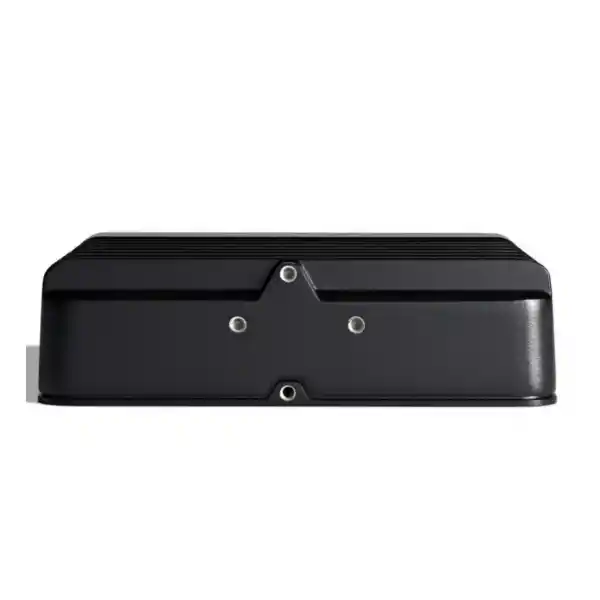
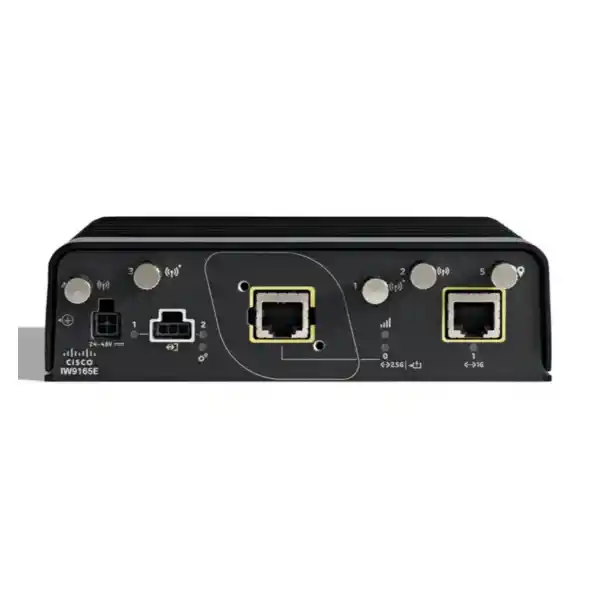
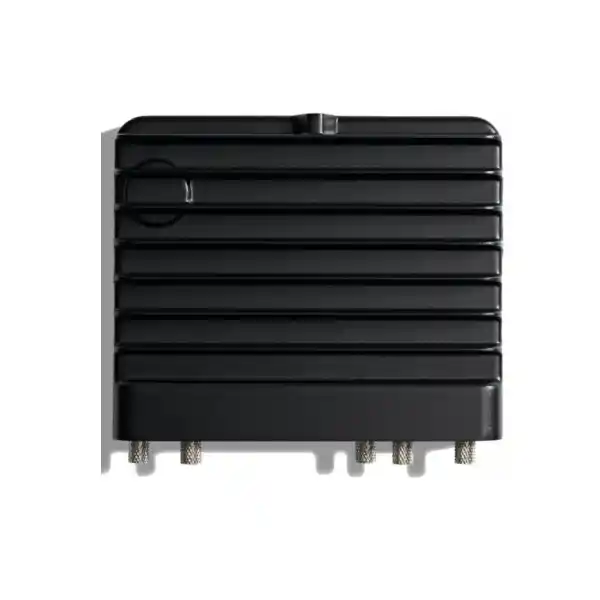
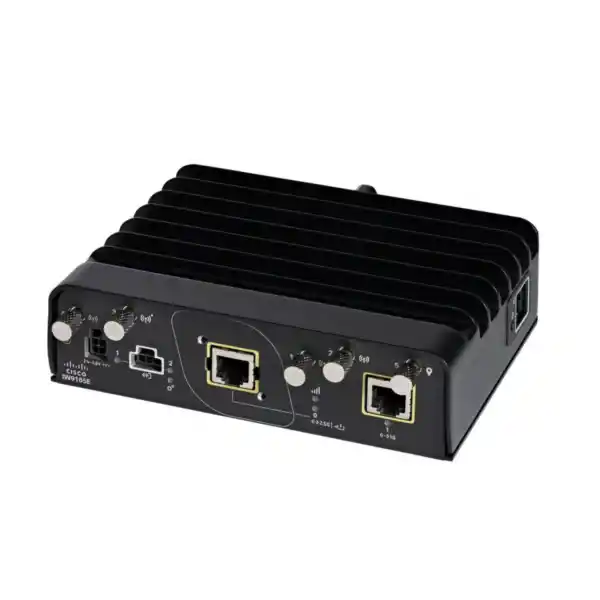
Cisco Catalyst IW9165E Industrial Access Point
The Cisco Catalyst IW9165E is built for operational wireless networks where connectivity must reach machines, vehicles, robots and other moving or space-constrained industrial assets. It is not limited to a single role: the same compact hardware family can be deployed as a Wi‑Fi access point, a Workgroup Bridge client, a Universal Workgroup Bridge client, a Cisco Ultra-Reliable Wireless Backhaul node, or in supported combinations of Wi‑Fi and URWB functions. This flexibility is especially useful when the wireless requirement may evolve from simple cabinet coverage to mobility, machine connectivity or highly resilient industrial backhaul.
For buyers in Tanzania, the main decision is not simply whether the device “has Wi‑Fi.” The correct selection depends on operating mode, regulatory domain, software and licensing, antenna design, power source, mounting environment, enclosure protection and the mobility pattern of the connected equipment. FourTeck Tanzania can help you scope these items before quotation so the proposed IW9165E configuration fits the intended industrial deployment.
Quick fit: when the IW9165E makes sense
Moving industrial assets
Use it where AGVs, AMRs, cranes, mobile machinery, rail equipment or other moving assets need wireless connectivity that follows the machine rather than a fixed desk user.
Cabinets and tight spaces
Its compact industrial form factor and DIN-rail or panel mounting options suit control cabinets and machine enclosures where conventional enterprise access points may be awkward to install.
Wireless client bridging
WGB and uWGB modes can bring wired machine-side devices onto a wireless infrastructure through the IW9165E, reducing the need for every attached device to have its own native Wi‑Fi interface.
Resilient industrial wireless
Cisco URWB options are designed for demanding mobility and backhaul use cases where handoff behaviour, latency and path resilience are more important than ordinary best-effort wireless access.
One industrial platform, several operating roles
The strongest buying advantage of the IW9165E is its role flexibility. Cisco positions the platform for Wi‑Fi, wireless-client and URWB use cases, allowing an industrial network design to standardize on a common hardware family while choosing the software role that matches the application. This can simplify spares strategy and future upgrades, but it also means the operating mode should be specified clearly when requesting a quote. A device ordered for a particular software role or licence should not be assumed to include every feature automatically.
| Operating role | What it does | Typical buyer requirement |
|---|---|---|
| Wi‑Fi access point | Provides industrial Wi‑Fi coverage using dual 802.11ax radios and external antennas. | Coverage inside cabinets, industrial areas or other compact deployments where rugged integration matters. |
| WGB | Associates to Cisco access-point infrastructure as a wireless client and bridges attached wired equipment. | Connect a machine, robot or vehicle with Ethernet devices to an existing Cisco wireless LAN. |
| Universal WGB | Provides a client-bridge approach for compatible third-party access-point infrastructure. | Use industrial Cisco client hardware without replacing every upstream access point at the same time. |
| Cisco URWB | Uses Cisco Ultra-Reliable Wireless Backhaul technology for mission-critical mobility and wireless backhaul designs. | Applications where fast mobility, controlled latency and resilient paths are key design objectives. |
Buying note: confirm the intended role at quotation stage. Cisco lists separate ordering descriptions for WGB, URWB and Wi‑Fi AP software variants, and separate Cisco DNA or URWB licensing applies depending on the design.
Wireless architecture for industrial mobility
The IW9165E uses two 2×2 radios. One radio operates in 5 GHz with 20, 40 and 80 MHz channel support; the second is a 5/6 GHz radio supporting 20, 40, 80 and 160 MHz channels where the selected software, regulatory domain and local rules allow those capabilities. The platform supports up to two spatial streams and provides four RP‑SMA external antenna ports, allowing the RF design to be matched to the machine, aisle, cabinet, track, yard or coverage geometry rather than forcing one integrated antenna pattern.
External antennas are important in industrial deployments because the best access-point location is not always the best antenna location. A radio may need to sit safely inside a panel while the antennas are positioned for line-of-sight, separation from metal surfaces, appropriate polarization and better coverage. Cisco also supports Self-Identifiable Antennas on designated IW9165E ports. Antenna selection should still be treated as part of the RF design: connector type, gain, cable loss, mounting, spacing and the country-specific transmit limits all matter.
Wi‑Fi 6 and Wi‑Fi 6E readiness can improve capacity and channel options compared with older wireless generations, but “6E ready” should not be interpreted as permission to use every 6 GHz channel everywhere. Cisco explicitly makes 6 GHz operation subject to country approval. Tanzania’s current spectrum planning includes licence-exempt WAS/RLAN use in the 5925–6425 MHz range, but the exact IW9165E regulatory domain, device approval, allowed power, antenna configuration and installation conditions should still be verified for the project. If that verification is not complete, the network design should not depend on 6 GHz operation.
URWB for demanding machine and vehicle connectivity
Cisco Ultra-Reliable Wireless Backhaul is designed for industrial applications in which a moving asset cannot tolerate the same roaming behaviour that may be acceptable for ordinary office devices. Cisco describes URWB as providing high availability, ultra-low latency below 10 ms and zero packet loss with seamless handoffs under the supported architecture. These are vendor technology characteristics, not a blanket guarantee for every real-world deployment. Achieving the intended result still depends on RF planning, topology, interference, antenna placement, backhaul design, software configuration and the behaviour of the attached application.
URWB can be relevant when an AGV or AMR moves through a production or warehouse area, when a crane or remote machine changes position, or when a rail or trackside use case needs predictable transitions between coverage zones. The same technology can also extend connectivity where running fibre is impractical or costly. For high-priority traffic, Cisco’s MultiPath Operations feature can duplicate traffic over multiple wireless paths in supported URWB deployments, adding another design tool for resilience.
A useful procurement question is therefore not “Do we need URWB?” in isolation, but “What application behaviour are we trying to protect?” Define the maximum acceptable interruption, traffic type, expected speed of the moving asset, route geometry, number of clients, required throughput and failure scenarios. If the application only needs ordinary wireless LAN connectivity, standard Wi‑Fi or WGB may be simpler. If mobility interruption or link resilience directly affects production, safety processes or machine control, a URWB architecture deserves closer evaluation.
WGB and Universal WGB: connect wired equipment over Wi‑Fi
Many industrial assets already contain PLCs, controllers, cameras, HMIs, sensors or embedded computers with Ethernet interfaces. Replacing each one with a native wireless version may be unnecessary or impractical. In Workgroup Bridge mode, the IW9165E joins a Cisco wireless infrastructure as a client and provides network connectivity to the wired equipment behind it. This creates a practical bridge between machine-side Ethernet and plant or campus Wi‑Fi.
Universal WGB broadens the idea to compatible third-party wireless infrastructure. That can be useful in staged migrations where industrial client hardware is being standardized before the upstream WLAN is replaced. It can also reduce disruption when a machine must connect into a pre-existing network. Compatibility, authentication method, roaming expectations and support boundaries should be reviewed before assuming a third-party design will behave identically to an all-Cisco architecture.
For purchasing, identify how many wired endpoints sit behind each bridge, the required VLAN behaviour, authentication method, IP addressing model, expected mobility pattern and whether the asset is fixed or roaming. Also confirm which Ethernet port will be used, how the unit will be powered and whether the system needs the full dual-radio capability. These questions influence both configuration and power design.
Interfaces, power and installation options
The IW9165E is designed to fit industrial equipment rather than rely on a single ceiling-mount installation pattern. Its enclosure measures approximately 15.2 × 12.4 × 4.3 cm and weighs about 0.75 kg. It can be mounted to a wall or panel and supports DIN-rail mounting in multiple orientations. That makes it practical for machine builders, control-panel integrators and industrial network teams that need the radio close to power, Ethernet and control wiring.
| Item | IW9165E capability | Planning implication |
|---|---|---|
| Primary Ethernet | 100M / 1G / 2.5G multigigabit Ethernet with PoE input support. | Size the switch port, cabling and PoE budget for the required radio operation. |
| Secondary Ethernet | 100M / 1G Ethernet port. | Useful for additional wired connectivity where supported by the chosen mode and design. |
| DC power | 24–48 VDC nominal input. | Useful inside industrial panels or mobile equipment with an existing DC power system. |
| PoE | 802.3af / 802.3at support; Cisco also documents UPOE support. | Lower PoE power can reduce radio and port capability, so do not size power only by connector compatibility. |
| Industrial I/O | GPIO, console, system/RSSI/port indicators, GNSS connection and reset controls. | Consider accessibility for commissioning, maintenance and diagnostics. |
Power design deserves specific attention. Cisco documents full 2×2 operation on both radios with a 20 W power budget when the unit is powered by 24–48 VDC or 802.3at PoE+. Under 802.3af, the documented power budget is 12.95 W and radio operation is reduced to 1×1, with the multigigabit port limited to 1 Gbps and the secondary RJ‑45 unavailable. For projects that need full radio performance and all interfaces, PoE+ or suitable DC power is therefore the safer design assumption.
Rugged does not mean weatherproof: understand the IP30 enclosure
The IW9165E is an industrial product, but its environmental rating is IP30. That distinction matters. It is designed for rugged industrial integration, shock and vibration environments, wide operating temperature and cabinet or vehicle installation, but IP30 is not the same as an IP66 or IP67 outdoor enclosure. The unit should not be treated as a fully sealed access point for direct exposure to rain, washdown, heavy dust or similar conditions.
Cisco specifies an operating temperature range of -40°C to +70°C in still air, operating humidity from 5% to 95% non-condensing, and an operating altitude up to 4,500 m. Those figures make the hardware suitable for a wide range of industrial environments when installed correctly, but the surrounding enclosure, airflow, solar loading, contamination, cable entry, grounding and power system remain part of the complete environmental design.
If the deployment is fully outdoors or exposed to water and dust, evaluate whether a protective industrial enclosure is appropriate or whether a different Cisco industrial access point with a higher ingress-protection rating better matches the location. This is one of the most important differences between the IW9165E and heavier-duty outdoor models in the same broader family.
External antennas give design freedom
The four RP‑SMA antenna ports are a major reason to choose the IW9165E when an integrated-antenna access point cannot deliver the right coverage geometry. Cisco documents two designated antenna pairs for the two radios and supports multiple external antenna options. This allows a project to choose omnidirectional or directional patterns, place antennas outside a cabinet, align them with a vehicle or aisle, and manage the RF path more deliberately.
Antenna freedom also creates responsibility. Antennas should be chosen with the correct frequency range, connector system, gain, polarization and mechanical rating. Cable loss can offset the apparent advantage of a higher-gain antenna, especially when long coaxial runs are used. Metal cabinets, vehicle bodies, machinery, racking, containers and dense industrial structures can alter propagation dramatically. A site survey or controlled field test is therefore preferable to selecting antennas from gain figures alone.
Cisco’s installation guidance notes that when omnidirectional antennas are used on both radios, antennas for each radio should be separated vertically to help reduce interference. The final antenna arrangement must also stay within the regulatory power and approved antenna limits of the selected country domain. FourTeck Tanzania can use your mounting drawings, route maps and coverage requirement to help define the information needed for antenna selection, but the finished RF design should be validated in the real environment.
GNSS, Bluetooth and GPIO add industrial context
The IW9165E is not only a radio bridge. Cisco includes a GNSS receiver, Bluetooth Low Energy radio and GPIO capabilities that can support broader industrial integration scenarios. GNSS can provide location coordinates for the access point, which is useful when the unit is attached to moving equipment and location context is part of monitoring or operations. Bluetooth Low Energy can support location-oriented use cases such as asset tracking, wayfinding or analytics where the surrounding solution supports them.
GPIO can provide a simple interface for external contacts in supported designs. These features should not be treated as a substitute for a PLC, safety system or dedicated positioning platform, but they can reduce the number of separate devices required for certain monitoring and telemetry designs. The value depends on the software mode and the application integration, so confirm feature support in the intended release before making them mandatory requirements.
For projects that only need basic wireless coverage, these functions may be secondary. For machine builders or fleet-style deployments, however, they can make the IW9165E more useful than a standard enterprise access point by combining network connectivity with industrial mounting, positioning and external interface capabilities in one compact platform.
Security and infrastructure integration
Industrial wireless security starts with the platform and continues through authentication, segmentation, management and operational practice. Cisco documents Trust Anchor technologies in the IW9165 series, including image signing, Secure Boot and a Cisco Trust Anchor module. These mechanisms are intended to help protect platform integrity and software authenticity. They do not remove the need for correct network configuration, secure credentials, patching, role-based administration and monitoring.
The platform supports enterprise authentication methods and can participate in Cisco-managed wireless architectures depending on the selected operating mode. When the unit is deployed as a bridge for machine-side Ethernet devices, segmentation becomes particularly important because the downstream equipment may have very different security capabilities from modern enterprise clients. Define VLANs, addressing, authentication, access policy and management reachability before installation rather than treating the bridge as a transparent unmanaged cable replacement.
For operational technology environments, coordination between IT and OT teams is recommended. The OT team understands machine availability, maintenance windows and control dependencies, while the IT or network team manages RF, identity, routing, switching and security policy. The IW9165E sits directly between these disciplines, so a shared deployment plan helps avoid situations where technically valid wireless changes interrupt production equipment.
Common Tanzania deployment scenarios
Manufacturing and process areas
Connect machines, mobile tools or controllers where cable movement is difficult. WGB can bridge Ethernet equipment, while the compact enclosure fits control cabinets and machine panels.
Warehouses and distribution
Support AGVs, AMRs and mobile operational assets that move between aisles or zones. The correct choice between standard Wi‑Fi mobility and URWB depends on the application’s interruption tolerance.
Rail and onboard systems
The IW9165E supports industrial and rail-related certifications documented by Cisco, and its compact form, M12 adapter option and wide operating range suit equipment integration. Exact project compliance still requires specification review.
Ports, yards and mobile machinery
Use external antennas and industrial mounting to connect vehicles or machinery. If equipment is exposed to weather, plan a suitable protected installation because the IW9165E enclosure itself is IP30.
Mining and remote industrial sites
Where fibre is difficult to run or moving machines need connectivity, the platform can form part of a wireless design. The final architecture must account for dust, weather protection, power continuity and RF conditions.
Machine builders and OEM integration
Standardize wireless hardware inside an industrial asset and choose Wi‑Fi, WGB or URWB software according to the target customer environment, subject to licensing and regulatory-domain requirements.
How to design the deployment before ordering
A reliable industrial wireless project starts with requirements rather than a part number. First define the asset that needs connectivity and whether it is fixed, portable or continuously moving. Document its route, speed, dwell points and the physical obstacles along the path. Then define the attached traffic: control packets, telemetry, video, voice, diagnostics or general data may have very different latency and throughput needs.
Next determine the upstream network. If the site already has Cisco Wi‑Fi and the machine simply needs Ethernet-to-wireless bridging, WGB may be a natural fit. If the upstream WLAN is from another vendor, check Universal WGB compatibility and support. If fast mobility and high availability are central requirements, assess whether a URWB topology is more suitable. If the device will provide local Wi‑Fi coverage, define expected client counts, channel plan and controller architecture.
Power and cabling should be designed at the same time. A nearby PoE+ switch can simplify installation, while 24–48 VDC may be more natural inside a vehicle or control panel. If 802.3af is the only available power source, account for Cisco’s documented reduction in radio streams and Ethernet capability. Where the machine uses industrial connectors, review the M12 adapter requirements rather than improvising cable transitions.
Finally, perform an RF survey or pilot test. Industrial sites change: metal stock moves, doors open and close, vehicles block line-of-sight, machinery generates noise and production layouts evolve. A design based only on office-style coverage assumptions may not produce stable mobility. Validate antenna position, signal levels, roaming or handoff behaviour, packet loss, application latency and recovery during planned failure scenarios.
Tanzania spectrum and regulatory planning
Wireless equipment must be ordered and configured for the correct regulatory environment. Cisco supplies the IW9165E in multiple regulatory-domain variants and states that customers are responsible for verifying approval in the country of use. The product supports 5 GHz operation and is Wi‑Fi 6E ready, but the availability of specific 6 GHz channels depends on national rules and the approved device configuration.
Tanzania Communications Regulatory Authority spectrum documentation identifies licence-exempt WAS/RLAN operation in the 5925–6425 MHz range, while separate technical conditions govern power and operation. That supports the broader availability of 6 GHz RLAN in Tanzania, but it does not by itself prove that every Cisco regulatory-domain SKU, antenna combination or transmit setting is approved for a particular installation. Project teams should confirm the exact Cisco domain and local type-approval position before deployment.
This matters most when a design depends on 6 GHz for capacity or interference avoidance. If 6 GHz is only an optional enhancement, the project can often be planned around verified 5 GHz operation first and enable additional spectrum after compliance is confirmed. For procurement, provide the installation country, intended frequencies, indoor or protected-outdoor environment, antenna model and software role so the correct variant can be selected.
Licensing and software: specify the role, not just the chassis
The IW9165E hardware supports several software roles, but those roles have distinct ordering and licensing requirements. Cisco lists Wi‑Fi licensing under Industrial Wireless Cisco DNA Essentials and Advantage, while standalone URWB uses dedicated IW9165 URWB Network licence tiers and associated service options. Cisco also publishes different software baselines for WGB, URWB and Wi‑Fi AP modes.
For a quote, state whether the primary purpose is Wi‑Fi AP, WGB, uWGB or URWB. If the project expects to switch roles later, mention that requirement so the software entitlement and future migration path can be reviewed. Do not assume that purchasing the base hardware automatically activates every operating mode or management feature. Likewise, do not choose a licence tier based only on its name; map it to the required architecture and feature set.
Software planning also matters for lifecycle operations. Industrial networks often remain in service longer than office WLANs, and maintenance windows can be limited. Build a documented process for image upgrades, configuration backup, security review, spare replacement and validation after updates. Cisco’s current documentation provides continuing configuration guidance for the IW9165E, but the exact recommended release should be selected for the wider Cisco wireless environment and validated against the features used by the project.
When the IW9165E may not be the right choice
The IW9165E is a strong fit for protected industrial installations, machine integration and moving assets, but it should not be chosen automatically for every industrial wireless project. Its IP30 enclosure is the clearest limitation for exposed outdoor sites. If the access point will face rain, washdown, heavy airborne contamination or direct outdoor mounting without a protective enclosure, a higher-ingress-protection industrial model may be more appropriate.
It may also be unnecessary when the requirement is ordinary office Wi‑Fi with no industrial mounting, environmental range, machine bridging or mobility requirement. In that case, a conventional enterprise access point could be simpler. Conversely, if the project requires a long-distance directional wireless backhaul link, a model with a purpose-built directional antenna or heavy-duty outdoor enclosure may suit the job better.
The best product choice follows the deployment problem. Compare enclosure rating, antenna architecture, power source, software role, mobility needs, management environment, available mounting space and regulatory requirements before selecting the chassis. This prevents overbuying features that will not be used while also avoiding a device that needs additional protection or accessories to survive the intended location.
Key specifications at a glance
| Wireless architecture | Two 2×2 radios; 5 GHz plus 5/6 GHz capability; Wi‑Fi 6 / Wi‑Fi 6E ready subject to regulation and software. |
|---|---|
| Antenna interfaces | 4 × RP‑SMA RF ports plus SMA GNSS antenna port; external antenna design. |
| Primary wired interface | 100M / 1G / 2.5G multigigabit Ethernet with PoE input. |
| Secondary wired interface | 100M / 1G Ethernet. |
| Power | 24–48 VDC, 802.3af PoE, 802.3at PoE+ and documented Cisco UPOE support; capability varies with available power. |
| Mounting | Wall/panel or DIN rail in supported orientations. |
| Dimensions | Approximately 15.2 × 12.4 × 4.3 cm. |
| Weight | Approximately 0.75 kg. |
| Operating temperature | -40°C to +70°C in still air. |
| Environmental rating | IP30. |
| Additional capabilities | GNSS, Bluetooth Low Energy, GPIO, console access and industrial status indicators. |
Specifications should be matched to the exact regulatory domain, software image and power method selected for the final order. Accessories such as antennas, mounting hardware, M12 adapters, power injectors or power adapters should be confirmed separately rather than assumed to be included.
Procurement checklist for an accurate quotation
To avoid delays and configuration mismatches, include the following information with your enquiry. You do not need to know every Cisco part number in advance; the goal is to describe the operational requirement clearly enough to identify the correct hardware, software and accessories.
- Deployment country and exact site environment in Tanzania.
- Primary role: Wi‑Fi AP, Cisco WGB, Universal WGB, URWB or a supported combined design.
- Whether the connected asset is fixed, portable, vehicle-mounted or continuously moving.
- Existing upstream wireless platform and controller environment.
- Number and type of wired devices to be bridged behind each IW9165E.
- Required throughput, latency and interruption tolerance for the application.
- Available power source: 24–48 VDC, PoE, PoE+ or another supported method.
- Mounting preference, cabinet dimensions and whether M12 connectivity is required.
- Indoor, protected outdoor or fully exposed environment, including dust and moisture conditions.
- Antenna location, coverage geometry, cable length and any preferred antenna type.
- Whether 6 GHz operation is required or simply optional.
- Required Cisco licensing, support and software-management expectations.
With these details, the quotation can focus on the actual deployment rather than a generic chassis. This is especially important because Cisco publishes multiple IW9165E regulatory-domain and software-role product identifiers; the store SKU should not be guessed from the model name alone.
Frequently asked questions
Is the Cisco Catalyst IW9165E an access point or a wireless client?
It can serve both types of use case depending on software and licensing. Cisco supports Wi‑Fi AP operation, WGB and uWGB wireless-client modes, and URWB operation on the IW9165E hardware platform. Specify the intended role when ordering.
Does the IW9165E support Wi‑Fi 6E in Tanzania?
The hardware is Wi‑Fi 6E ready, and Tanzania spectrum planning includes licence-exempt RLAN use in part of the 6 GHz band. However, actual operation depends on the approved Cisco regulatory domain, local device approval, permitted channels, power limits, software and antenna configuration. Confirm compliance before designing around 6 GHz.
Can it connect an Ethernet-only PLC or machine to Wi‑Fi?
Yes, that is a core WGB use case. The IW9165E can associate to wireless infrastructure and bridge attached wired devices. Confirm authentication, VLANs, addressing, number of downstream devices and roaming expectations during design.
Can the IW9165E connect to non-Cisco Wi‑Fi?
Cisco supports Universal WGB mode for connecting to third-party access-point infrastructure. Compatibility and behaviour should be validated against the exact upstream WLAN, security method and mobility requirements.
Is the IW9165E suitable for outdoor mounting?
The device has an IP30 rating, so it should not be assumed suitable for direct exposure to rain, washdown or heavy dust. Outdoor or harsh installations should use suitable environmental protection or a different model with a higher ingress-protection rating.
Does it support DIN-rail mounting?
Yes. Cisco documents DIN-rail mounting as well as wall or panel mounting. This makes the unit practical for control cabinets, machine enclosures and other industrial installations with limited space.
What happens if I power it with standard 802.3af PoE?
Cisco documents reduced capability on 802.3af: the two radios operate at 1×1, the multigigabit interface is limited to 1 Gbps and the secondary RJ‑45 is not available. For full 2×2 radio operation and full wired capability, plan for PoE+ or suitable DC power.
Are antennas built into the IW9165E?
No. The IW9165E uses external antennas through four RP‑SMA ports, plus a separate GNSS antenna connection. This gives more freedom for industrial RF design but requires the correct antennas and mounting to be selected.
What is the operating temperature?
Cisco specifies -40°C to +70°C in still air for the IW9165E. The surrounding enclosure, airflow, solar load, moisture, contamination and power design still need to be suitable for the installation.
Does the IW9165E include URWB automatically?
The hardware supports URWB use cases, but software role and licensing must be selected correctly. Request the quotation based on the intended URWB architecture rather than assuming every base unit ships with all URWB entitlements.
Can the same hardware be repurposed later?
Cisco promotes the IW9165E as a flexible multi-technology platform that can change operating role through software. Future repurposing still depends on compatible software, licensing, controller architecture, regulatory domain and project validation.
What information should I send FourTeck Tanzania for a quote?
Send the intended operating role, site environment, asset mobility, upstream WLAN, power source, antenna and mounting requirements, number of downstream Ethernet devices, required performance, whether 6 GHz is needed, and any Cisco licensing or support requirements. This allows the correct regulatory-domain and software-role variant to be evaluated.
Request an IW9165E configuration review and quotation
The Cisco Catalyst IW9165E is most valuable when its operating mode, power, antennas, software and regulatory domain are chosen around the real machine or mobility requirement. Send FourTeck Tanzania your deployment details and we can prepare the information needed to quote the appropriate configuration without guessing a store SKU or radio domain.
Before requesting the quote: identify whether you need Wi‑Fi AP, WGB/uWGB or URWB; confirm the installation environment and power source; and note whether 6 GHz is a requirement. A short route map, cabinet photo or network diagram can also help clarify the design.




Reviews
There are no reviews yet.