
COMPACT BRANCH SECURITY | TANZANIA
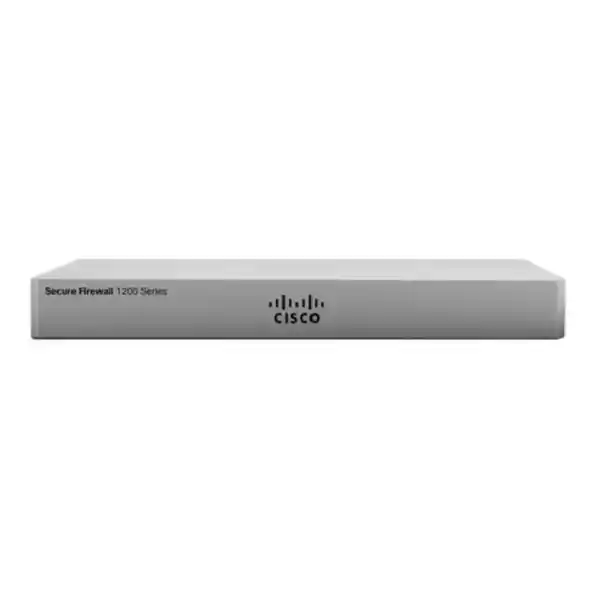
Cisco Secure Firewall 1220CX
Compare software options, plan network connections and request a configuration matched to your business.
Choose the right compact firewall for your network
Cisco Secure Firewall 1220CX is a compact branch security appliance for organisations that need business network protection with both copper connections and faster uplink options. For a Tanzania procurement project, the key decision is how the appliance will fit your network, which software mode you require, and which security subscriptions and management arrangements belong in the quotation. Request a configuration review and a model-specific quote from FourTeck Tanzania before placing an order.
This page is for IT teams and purchasing staff evaluating the hardware rather than a generic firewall installation service. Start with your current internet capacity, application traffic, internal network boundaries and operational responsibilities. A suitable firewall should match those requirements while leaving sensible room for growth. The model name alone does not establish the complete solution, because software, subscriptions, accessories and implementation scope can change what is delivered.
A compact enclosure can be useful where a full-size network appliance would be awkward to accommodate. However, physical size should never determine security sizing by itself. Describe what traffic needs inspection, where encrypted connections terminate, how remote locations connect and who will respond to alerts. These details turn a hardware enquiry into a purchasing decision that can be reviewed against business needs.
Verified hardware at a glance
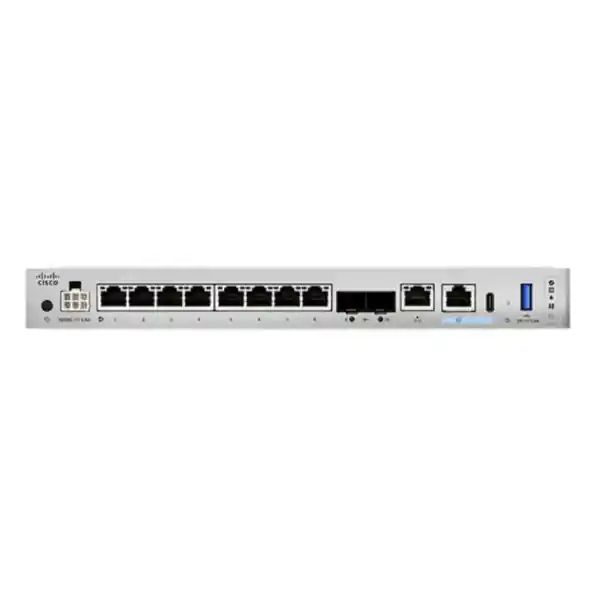
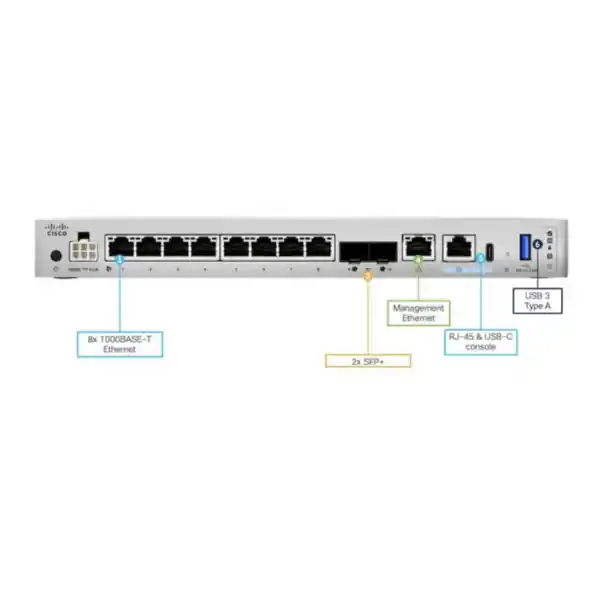
The 1220CX provides eight 10/100/1000BASE-T data ports and two SFP+ interfaces supporting compatible 1Gbps or 10Gbps transceivers. Cisco positions it as a desktop or compact appliance. Published headline figures include 9Gbps firewall throughput, 9Gbps threat defense throughput and 1.5Gbps TLS throughput under Cisco test conditions. These are separate performance measurements, not an assurance that every combination of functions will deliver the same result.
Additional hardware includes a dedicated Gigabit management connection, RJ-45 serial and USB-C console connections, a USB-A port and an internal 480GB NVMe self-encrypting SSD. The appliance uses active cooling and does not provide PoE. Cisco lists desktop placement plus separately orderable wall and rack mounting options. Its internal SSD and fan are not field-replaceable components.
Cisco specifies indoor use. Its hardware guidance lists an operating temperature range of 0–40°C, with altitude-related derating, and noncondensing humidity requirements. The published power figures are 32W typical and 40W maximum system consumption; these should not be confused with the external power adapter rating. Verify the correct power cord, installation conditions and ordered accessories before deployment.
ASA or Threat Defense: settle the software choice first
Cisco lists CSF1220CX-ASA-K9 for the ASA software option and CSF1220CX-TD-K9 for the Threat Defense option. These are manufacturer product identifiers. They are useful for specifying the requested appliance variant, but they should not be treated as a retailer SKU or as proof of a particular subscription bundle. Ask for the selected identifier to appear clearly in the bill of materials.
For buyers, the practical question is which operating environment the network team intends to run and support. If you are replacing an existing security gateway, identify the source platform, active features and management process before deciding. Familiarity with one Cisco product does not establish that its configuration can be copied directly onto another software environment. Treat migration requirements as a separate item in the project brief.
Your quotation should explain the selected software mode, intended release, management approach and the functions included in the proposed entitlement. Request explicit confirmation for any requirement that matters to the business, including inspection, remote access, reporting or integration with existing operations. Avoid approving an order whose description simply says firewall with licenses without naming the intended services and terms.
The software decision should also involve the people responsible for ongoing changes. Ask who will create rules, review events, maintain backups and arrange updates. A technically appropriate appliance can still become difficult to operate if the selected management method does not fit the team’s access, training or support arrangements. Make these responsibilities part of the purchasing discussion rather than leaving them until handover.
Size for inspected traffic and business growth
Begin with a realistic traffic picture. Record current internet circuit speeds, busy-hour utilisation and the applications most likely to run together. Include video meetings, cloud backups, file synchronisation, remote connectivity and scheduled data transfers. A monthly average can hide short periods of heavy demand, so collect peaks and recurring patterns where possible. For a new site, use estimates that distinguish normal operations from exceptional events.
Next, define the traffic that must cross the security boundary. Internet traffic may be only one part of the workload. If your design routes communication between internal networks through the firewall, include those flows in the assessment. A local application server can generate substantial traffic even when internet usage is modest. Conversely, traffic that remains within a switching segment will follow a different path and should not be counted as inspected without checking the topology.
Encrypted traffic deserves its own discussion. State whether the requirement is simply to pass encrypted sessions, terminate a tunnel, or inspect supported encrypted application traffic. Those tasks have different implications. Ask the technical reviewer to assess the intended mix of features together, using relevant vendor guidance and a realistic traffic profile. Do not substitute a headline forwarding figure for an assessment of the security policy you actually intend to enable.
Plan a review point for future growth. Adding a second internet connection, moving backups into the cloud, connecting another office or changing application hosting can alter demand. Document the assumptions behind the selection and the conditions that would trigger reassessment. This gives procurement a clearer explanation of why the proposed model is suitable and helps operations recognise when the original sizing assumptions have changed.
Plan copper connections and optical uplinks
Create a port map before ordering accessories. List each proposed connection, its purpose, the connected device, expected speed and cable type. Separate WAN handoffs, internal switch uplinks, service networks and management connectivity. This prevents a common procurement problem in which the appliance is selected correctly but the project lacks the components needed to connect it to the existing infrastructure.
For an optical connection, confirm the far-end interface as well as the firewall side. The link needs compatible optics, an appropriate fibre type, suitable connectors and a distance within the supported optical budget. For any electrical module or direct-attach cable proposal, check the exact supported combination against current vendor documentation. A shared connector shape is insufficient evidence that a module will work in the intended deployment.
The value of a faster uplink depends on the complete path. Check the switch port, intermediate cabling, any media conversion and the capacity of the destination network. A faster firewall interface does not upgrade a slower internet service, switch or server. This makes uplink planning a network design decision rather than a reason to select the most expensive accessory on a list.
Ask the quotation to identify which transceivers, cables and mounting items are included and which are optional. If you already own suitable components, provide their exact part numbers for review. Record port labels on the deployment diagram so that the installation team and future support staff can trace a physical connection without guessing which cable corresponds to a named security zone.
Decide where segmentation will be enforced
Segmentation starts with a description of which systems need to communicate. Identify staff devices, application servers, guest access, infrastructure management and specialised equipment as separate groups where their access requirements differ. For each group, describe the required destinations and services. This is more useful than beginning with a large collection of rules whose business purpose is unclear.
A VLAN is a useful network boundary, but the security effect depends on how traffic is routed and controlled between networks. Decide which flows should pass through the firewall and which are handled elsewhere. The design should make the enforcement point visible so that an administrator can explain why a particular path is permitted or denied. Avoid assuming that a VLAN label automatically provides the intended isolation.
Consider the support implications of each boundary. A management network may need access from approved administrator devices while remaining inaccessible to general users. Guest connectivity may need internet access with restrictions on internal destinations. A server network may require application-specific communication from selected users. These are examples to assess during design, rather than a ready-made configuration for every organisation.
Review dependencies before tightening access. Authentication, name resolution, time services, printing and monitoring can involve traffic that is easy to overlook. Have application owners identify expected workflows and test them from the relevant network groups. Record both permitted communication and deliberate restrictions so that later troubleshooting does not undo an intentional security boundary merely because a connection was blocked.
Match management to the operating team
Cisco’s documentation for this platform includes Threat Defense deployment paths using Management Center, cloud-delivered Management Center and Device Manager, together with ASA getting-started guidance. Confirm the supported option for the selected software release and deployment before ordering. Management is part of the solution design, not an interchangeable label that can be decided after configuration.
For a single site, discuss the balance between local administration and a broader organisation standard. For multiple sites, identify whether policies, monitoring and software maintenance should be coordinated centrally. State who owns the management platform, who can approve changes and how access will be provided to internal staff or an agreed support provider. Avoid creating a dependency on an account that the customer cannot recover or administer.
Management connectivity should have a documented purpose and access path. Record addressing, permitted administrator sources, required name and time services, and the method used to retain configuration backups. Use named administrative identities where supported and appropriate. Establish a process for removing access when responsibilities change. The aim is to keep routine maintenance practical while retaining accountability for changes.
Ask for a demonstration of the intended operational workflow during handover. The responsible team should know where to view relevant events, how to identify the active configuration, where backups are held and how to escalate a problem. A handover that covers these tasks can be more valuable than a long feature list that does not explain how the organisation will run the firewall.
Define subscriptions, support and ownership
A useful commercial proposal separates hardware, software entitlement, subscriptions, support and professional services. These items serve different purposes and may have different terms. Ask the supplier to state the duration and scope of each line. Where a function is essential, request confirmation that the proposed package includes the required right to use it on the selected platform and release.
Identify the customer organisation that will own the relevant accounts and entitlements. The internal owner should be able to understand what was purchased, which devices it applies to and when renewal decisions are due. Administrative convenience during installation should not leave the customer unclear about who controls the environment. Record escalation contacts and the process for resolving account or entitlement questions.
Compare quotations on equivalent scope. A lower initial price may describe different service coverage, an omitted subscription, a shorter term or fewer deployment activities. Ask for an itemised explanation rather than assuming the difference reflects only a discount on identical equipment. Where requirements remain undecided, request separately priced options so the decision can be made transparently.
Plan for renewal review before a term ends. The review should consider current business needs, changes in usage and the operational value of the services being retained. It should also identify who approves expenditure and who carries out the administrative work. Exact commercial conditions must be confirmed in the quotation; a general product description cannot establish activation dates, renewal rights or support response commitments.
Deployment examples to assess
A professional office replacing an older gateway should begin with an application and access inventory. The purchasing brief might include cloud applications, an internal accounting server, separate guest wireless and remote administration. The important question is whether the proposed configuration protects those workflows without introducing undocumented exceptions. Include a clear migration window and a representative user test plan before approving implementation.
A branch connected to headquarters should describe which services are local and which depend on the remote site. Include protected networks, existing peer equipment, addressing and the applications that need inter-site communication. If a tunnel is required, its design and compatibility need explicit review. Hardware selection should follow the expected workload and operational model rather than an assumed fixed number of users per appliance.
A business with busy guest connectivity should distinguish guest traffic from administrative systems. Capture peak usage patterns and the effect of public-facing connectivity on essential operations. Ask how network boundaries, access policy and reporting responsibilities will be handled in the proposed design. Do not assume that buying a security appliance alone creates the correct separation between guest and business environments.
An organisation consolidating equipment should assess the effect of placing more functions behind one enforcement point. A simple physical layout may create a larger dependency on the firewall, its power supply and the surrounding switching. Discuss acceptable downtime, maintenance arrangements and recovery procedures. These examples describe planning situations; they do not guarantee that a single model or configuration suits every site with similar business activities.
Power, placement and practical installation
Choose a location that allows the equipment to operate within its documented environmental limits and remain accessible for maintenance. Check ventilation, dust exposure, cable routing and the surrounding temperature during normal business hours. A cabinet that feels cool with its door open may behave differently when closed and fully populated. Review the actual proposed location rather than relying only on the room description.
Power continuity should be assessed as a complete connectivity chain. A UPS supporting only the firewall may provide little business benefit if the access switch, upstream handoff or essential wireless equipment loses power immediately. List the devices needed to sustain the required service and calculate backup requirements around that group. Ask an appropriately qualified installer to confirm the electrical arrangement and the correct approved cord.
Mounting choices should reflect the site. If the installation uses a wall or rack accessory, include the required kit in the bill of materials and confirm access for cabling and maintenance. Desktop placement still needs a stable surface and suitable clearance. Avoid balancing equipment on cables or arranging other devices in a way that obstructs ventilation or makes accidental disconnection likely.
Include simple physical records in the handover. Label power connections, identify the UPS outlet where applicable and note the appliance location. Record serial numbers in the asset inventory without publishing them in customer-facing material. These details help support teams respond when someone reports a disconnected cable, a power alarm or an equipment fault, especially when the first person on site is not the firewall administrator.
Migration from an existing firewall
Start migration planning with a backup and an inventory of the current environment. Record interfaces, address objects, routes, access policies, translation rules, tunnels and dependencies. Include published applications and any restrictions maintained for a specific business reason. The objective is to understand the existing service before deciding what should be preserved, improved or removed in the replacement.
Review old exceptions with the application owner. Some rules may describe services that no longer exist, while others may protect an uncommon but essential monthly process. Traffic observations can inform the review, but an absence of recent activity does not automatically prove that a rule is unnecessary. Establish an approval process for removing access rather than silently carrying everything forward or deleting entries without review.
Prepare a sequence for the cutover. Identify cable changes, addressing changes, upstream dependencies, remote-peer coordination and the point at which production traffic will move. Give each action an owner and define how its outcome will be checked. Keep the process understandable enough that the team can follow it during a pressured maintenance window without improvising the core design.
Set rollback conditions before the work begins. Decide which failures justify returning to the previous state, who makes that decision and how much time is reserved for recovery. Ensure the previous configuration and physical connections can be restored if required. A migration quote should distinguish preparation, conversion, testing and documentation so the customer can assess the work beyond the cost of the appliance.
Acceptance tests tied to business outcomes
Build the acceptance checklist from the applications and restrictions identified during discovery. Test internet access from the intended networks, essential internal applications, approved remote communication and required inbound services. Include name resolution and other shared dependencies. A link light or a successful ping is useful evidence of a limited function, but neither demonstrates that the complete business workflow is ready.
Test deliberate restrictions as well as permitted access. For example, confirm that a guest device cannot reach an administrative resource if that separation is part of the design. Run the test from the actual relevant network rather than an administrator’s workstation with broader rights. Record the source, destination, expected outcome and observed result so the evidence can be understood later.
Where continuity features are part of the approved configuration, agree a controlled failure test and the expected behaviour of affected applications. The test should consider new connections, existing sessions and dependencies such as public addressing. Do not assume that a backup path means every application will continue without interruption. Use the results to document realistic recovery expectations for the chosen architecture.
Close the acceptance process with named customer representatives. Record unresolved items, their business impact and who owns the follow-up. Store the final configuration backup and approved design notes securely. This provides a clear baseline for later changes and helps both procurement and IT distinguish a completed deployment from work that is still waiting on a provider, application owner or additional purchase.
Logging, maintenance and day-to-day operation
Decide which events the operations team needs to review and why. Security events, denied connections and system health can support different tasks, so the plan should identify the audience and response process. Collecting information without assigning an owner often produces noise rather than useful oversight. Agree which conditions need prompt investigation and which can be reviewed during routine maintenance.
Set a retention approach appropriate to the organisation’s operational and governance needs. Consider where records will be held, who can access them and how they will be protected. Accurate timestamps are essential for relating an event to a user report or another system record. Avoid making assumptions about retention duration or storage sufficiency from the hardware specification alone.
Create a change record for meaningful policy modifications. Include the business request, approver, affected networks, intended result and validation steps. Set an expiry or review date for temporary exceptions. When a rule is no longer needed, remove it through the agreed process. Over time, this keeps the configuration understandable and reduces dependence on the memory of a particular administrator.
Maintenance should include review of supported software, applicable vendor advisories, backups and recovery arrangements. Schedule updates with appropriate testing and an agreed maintenance window. Confirm the exact procedures against the installed platform and release. The product purchase is the beginning of an operating lifecycle, so a realistic maintenance plan should be part of the decision about whether the proposed solution fits your team.
What to include in a Tanzania quotation request
Send a short technical brief with the site location, appliance quantity and whether this is a new deployment or replacement. Add current and planned internet capacity, the number of connected locations, key applications and the network groups that need separate access policies. If some details are unknown, identify them as discovery questions rather than filling the brief with assumptions.
Provide the preferred software option if it has already been selected. Otherwise, ask for help comparing the operating requirements before a bill of materials is finalised. Include any existing management platform, support arrangement or organisational standard that the proposed appliance must fit. If central management or remote connectivity is required, describe the desired outcome and request verification of the necessary licenses and compatibility.
List physical and commercial requirements separately. Physical items may include supported optics, patch leads, mounting accessories and power arrangements. Commercial items should identify subscription terms, support expectations, implementation activities and handover requirements. Ask for the proposed hardware and software identifiers to be written clearly so that technical and purchasing reviewers are evaluating the same configuration.
Request confirmation of current price, supply availability, delivery arrangements and the applicable warranty or support terms in the formal quotation. This page does not establish local stock, a delivery commitment or a fixed TZS price. A complete written offer should also identify exclusions and customer responsibilities, making it easier to compare options and approve a purchase without hidden assumptions about what the installation includes.
Avoid gaps in the bill of materials
Ask each reviewer to check a different part of the proposed order. The network administrator should confirm interfaces and traffic assumptions. The security owner should confirm the intended controls and response responsibilities. Procurement should confirm quantities, terms and exclusions. The person responsible for the installation site should confirm space, power and access. This division of attention helps expose gaps that a single generic approval may miss.
Record assumptions explicitly when a requirement is still being investigated. For example, an unknown optical handoff should appear as an item awaiting provider confirmation, with a named owner and a decision deadline. It should not disappear from the quotation because nobody has supplied a part number yet. The same discipline applies to remote-peer information, public addressing and any software entitlement that depends on a final design choice.
Distinguish a required purchase from a recommended option. A suitable proposal should explain why each optional item is being offered and what happens if the customer declines it. This allows the organisation to make a deliberate budget decision without accidentally removing something essential to the agreed design. It also makes future expansion easier because deferred items have a recorded purpose.
Before acceptance, compare the delivered configuration with the approved scope. Check the appliance identity, ordered accessories, documented entitlements and completed implementation tasks. Resolve differences through a written record so that asset information and support expectations match the actual environment. Keep the final purchase documents alongside the technical handover in an appropriately controlled location. This creates a useful reference for renewals, later upgrades and troubleshooting without relying on scattered messages or individual recollection.
Frequently asked buying questions
Is the 1220CX appropriate for a small office or a larger branch? The answer depends on inspected traffic, interfaces, enabled services and operational needs rather than a universal staff count. Share actual circuit speeds, usage patterns, application flows and growth expectations for a sizing review. A small office with intensive data movement can have different requirements from a larger office using lighter applications.
Does purchasing the appliance include every security function? Do not assume a complete subscription bundle from the model name. Ask for an itemised proposal covering the chosen software environment, required entitlements, management and support. Any function essential to your procurement decision should be confirmed for the proposed configuration before approval.
Can existing cables and modules be reused? Some components may be suitable, but reuse should follow verification of exact part numbers, supported combinations and link requirements. Provide an inventory of the existing items rather than describing them only as fibre modules or network cables. Include the connected switch or provider equipment so the entire link can be assessed.
Will replacing the firewall automatically improve application speed? Performance depends on the traffic path and the underlying cause of the problem. Slow DNS, an overloaded circuit, server delays, wireless congestion or an unsuitable policy can affect users independently of appliance capacity. A replacement assessment should identify the actual bottleneck and test the intended improvement after deployment.
Should installation be included in the purchase? Include it when your team requires assistance with design, migration, configuration, validation or handover. Define the required outcomes and exclusions clearly. An equipment-only order can be appropriate for a prepared internal team, while a migration may need coordinated engineering work and a maintenance plan. The right scope follows the customer’s available skills and operational responsibilities.
Request a model-specific proposal
Ask FourTeck Tanzania for a Cisco Secure Firewall 1220CX proposal matched to your network. Include your preferred software mode, internet speeds, application requirements, network diagram and any optics or mounting needs. Request a separate explanation of licensing, management, support and implementation so that the complete scope can be reviewed before purchase.
If deployment assistance is required, review the Tanzania Cisco firewall installation and configuration service and describe whether you need a new installation, replacement, policy review or migration. Confirm the exact service scope and location arrangements during quotation. A clear requirement brief gives the technical team a practical basis for assessing fit and gives purchasing a configuration that can be compared line by line.




Reviews
There are no reviews yet.