
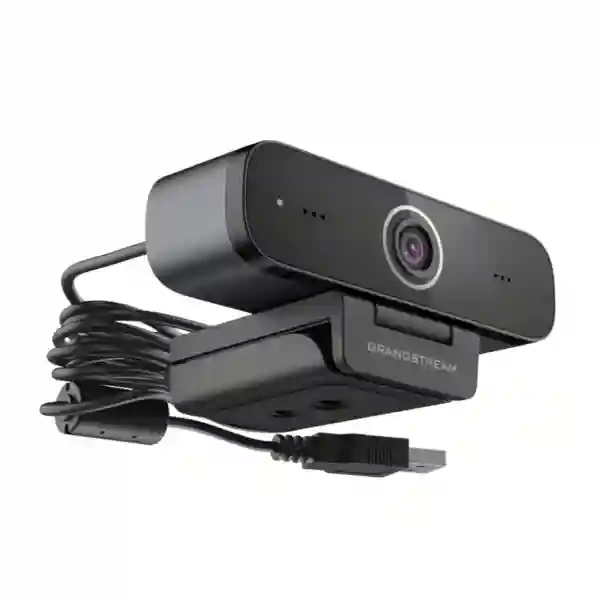
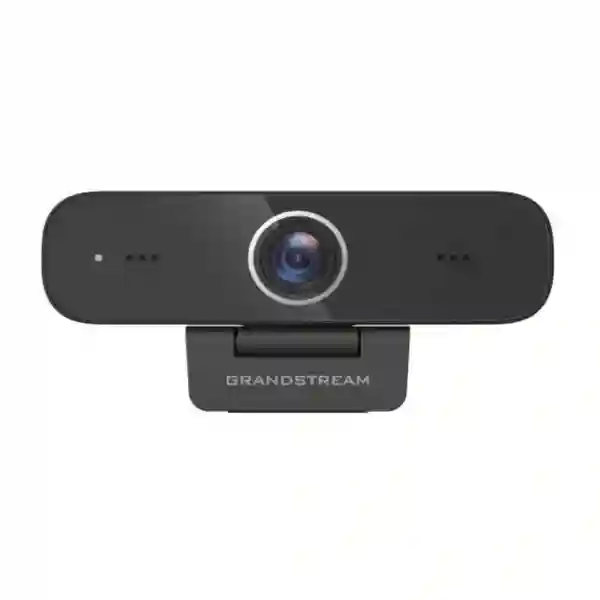
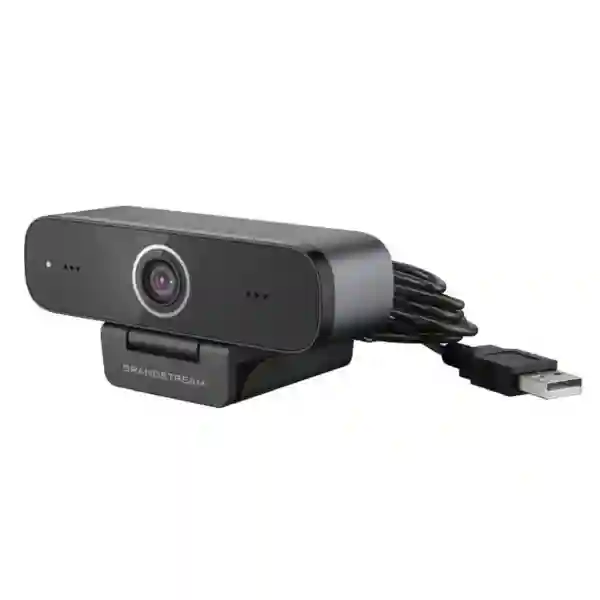
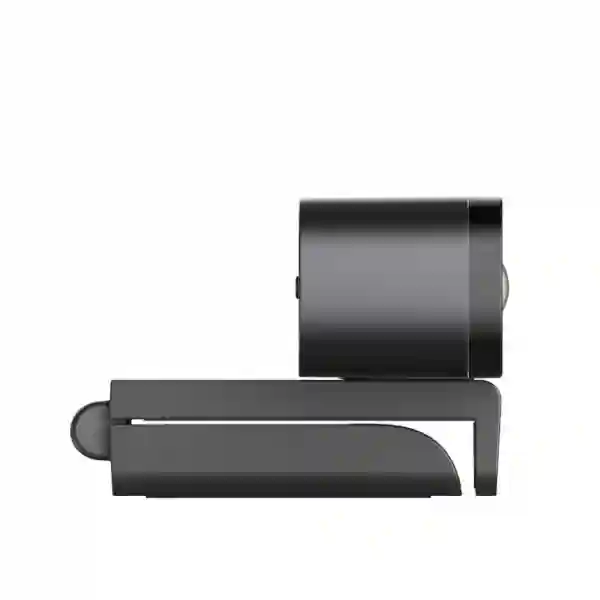
Grandstream personal collaboration camera for business and professional users
Grandstream GUV3100 Tanzania
The Grandstream GUV3100 is a compact Full HD USB webcam designed for laptop and desktop collaboration. Grandstream specifies a 2-megapixel CMOS image sensor, a maximum resolution of 1920×1080 at 30 frames per second, two integrated omnidirectional microphones with more than one metre of voice pickup, and USB 2.0 plug-and-play operation. It is intended for web meetings, video conferences, remote work, online learning and other personal collaboration situations where users need a straightforward camera and microphone combination without building a complete room system.
For organisations in Tanzania, the practical value of the GUV3100 is not simply that it delivers 1080p video. The wider buying question is whether a USB webcam fits the user’s workstation, meeting style, room lighting, seating distance, preferred application and audio expectations. FourTeck can help buyers define quantities, standardise desktop collaboration equipment and plan related requirements such as headsets, displays, laptops, IP telephony and meeting-room systems. A quotation should therefore specify the exact model, quantity and use environment rather than relying on a generic webcam request.
1080p at 30fps
Grandstream lists Full HD video up to 1920×1080 at 30fps, suitable for normal business calls, training sessions and one-person desktop meetings.
Dual microphones
Two built-in omnidirectional microphones provide more than one metre of voice pickup and support noise suppression and cancellation.
USB 2.0 plug and play
The USB 2.0 interface provides power and connectivity with no separate software installation required for basic operation.
Grandstream GUV3100 verified technical specifications
Grandstream’s published datasheet identifies the GUV3100 as a fixed-focus 2MP, 16:9 webcam using a CMOS image sensor. Video compression support includes MJPEG, YUV2, H.264 and H.265. The listed angle of view is 88° diagonal, 80° horizontal and 50° vertical, with a 3.24 mm focal length. The suggested focus-distance range is 0.3 to 1.7 metres. These characteristics make the unit best suited to personal and small-workspace video rather than distant boardroom participants.
The camera supports multiple selectable video resolutions up to 1920×1080 and a maximum 30fps. Grandstream also lists manual anti-flicker control, backlight contrast on/off and adjustments for brightness, resolution, saturation, contrast, gain, low-light compensation, exposure and white balance. Minimum illumination is specified at 0.5 lux with F1.8 and AGC enabled. Those controls matter when a user faces a window, works under mixed office lighting or needs to balance detail against available bandwidth.
Electrical specifications are modest: 5V input, up to 500mA and 2.5W maximum power, delivered through USB 2.0. The cable length is 1.8 metres. Grandstream lists dimensions of 102 × 46 × 30 mm and weight of 0.15 kg. Published environmental limits are -10°C to +50°C operating temperature and -10°C to +60°C storage temperature. For office deployments, the more immediate consideration is stable workstation USB connectivity and sensible camera placement at eye level.
Compatibility, applications and deployment fit
Grandstream states that the GUV3100 is compatible with major third-party communication platforms, applications and softphones. Its datasheet names Microsoft Teams, Zoom, Cisco Webex, Grandstream IPVideoTalk Meetings, Grandstream Wave, Bria and 3CX softphone among examples. Application compatibility does not remove the need to check the user’s operating environment, USB policy, meeting software permissions and audio-device selection. In many organisations, the webcam works immediately but the meeting application may still need the GUV3100 chosen as the active camera or microphone.
The unit is especially practical for remote workers, reception or administrative staff, sales users, teachers, trainers and professionals who join video calls from a personal workstation. For a meeting room with several participants seated farther from the camera, a dedicated conference camera or room system can provide better framing, microphone coverage and speaker integration. Buyers should match the device type to the number of people and the room layout instead of choosing by resolution alone.
A good deployment also considers lighting. A 1080p sensor cannot compensate for every poorly lit office. Placing the user so that the face is lit from the front or side, avoiding a bright window directly behind the user and keeping the camera close to eye level usually improves perceived quality. A headset may also be preferable when the user works in an open office, because microphone pickup and loudspeaker echo can become more difficult in noisy shared spaces.
Remote work
A simple USB camera helps standardise video quality for employees using business laptops or desktops from home or branch offices.
Education and training
Teachers, trainers and learners can use the camera for virtual classes, demonstrations and live discussion where a desktop-based view is appropriate.
Sales and support
Customer-facing staff can add video to softphone, meeting and collaboration workflows without installing a larger conference system.
Grandstream GUV3100 Tanzania
For buyers searching for the Grandstream GUV3100 in Tanzania, the first task is to define how many workstations need a camera and what type of calls those users normally join. A single remote executive, a sales department, a school computer lab and a distributed customer-service team can all use webcams, but the procurement details are different. Quantity affects how strongly standardisation matters, while user environment affects whether the built-in microphones are sufficient or whether headsets should be included. Because the GUV3100 is powered and connected over USB 2.0, it can be evaluated as a workstation peripheral rather than as a network endpoint requiring PoE, an IP address or switch configuration.
Tanzanian organisations should also distinguish between personal collaboration and room collaboration. The GUV3100’s suggested focus range of roughly 0.3 to 1.7 metres suits a user seated near a laptop or monitor. In a boardroom or training room, participants may be outside that range and the integrated microphones may not capture every speaker equally. In those cases, ask for a purpose-built conferencing design instead of simply purchasing more webcams. This avoids a common procurement mistake in which a desktop device is expected to solve a multi-person room problem.
When requesting a quotation, include the exact model GUV3100, required quantity, intended computers, primary meeting platform and whether users need headsets, monitors or docking accessories. For large deployments, it is useful to specify whether the equipment will be issued to named users, installed permanently at desks or kept as shared accessories. That information helps with cable management, asset labelling and replacement planning. FourTeck’s Tanzania team can also discuss broader collaboration and workstation requirements through the FourTeck Tanzania contact page, which is the appropriate route for product-selection and quotation enquiries.
Network quality remains part of the meeting experience even though the webcam itself is USB-based. Video conferencing depends on the application, internet connection, Wi-Fi or LAN performance and cloud service path. If users report frozen video or poor audio, replacing the camera may not solve a bandwidth or wireless problem. Procurement teams should therefore separate camera quality from connectivity quality when evaluating the overall collaboration experience.
Grandstream GUV3100 Dar es Salaam
Dar es Salaam organisations often have a mix of office-based and mobile staff, making desktop collaboration equipment useful for branches, headquarters, sales desks and hybrid-working teams. For a GUV3100 deployment, begin by mapping users to actual meeting behaviour. Staff who spend much of the day on Teams, Zoom, Webex or softphone video calls benefit from a dedicated camera positioned above a monitor, while occasional users may be adequately served by a laptop’s integrated camera. The GUV3100 becomes more compelling where a desktop monitor is the main work surface and the laptop camera is poorly positioned or unavailable.
Open-plan offices need more attention to audio than private rooms. The GUV3100 includes two omnidirectional microphones with noise suppression and cancellation, but omnidirectional pickup is designed to capture sound around the device. In a busy shared office, that can still include surrounding voices. A USB or Bluetooth headset may provide better privacy and speech isolation for users who make frequent calls. For managers in quieter offices, the integrated microphones can simplify the desk by removing the need for another input device.
Procurement teams in Dar es Salaam should include workstation details in their request: operating platform, available USB ports, monitor arrangement, quantity and whether the cameras will be permanently attached. The 1.8-metre cable gives useful placement flexibility, but cable routing still matters when desktops are under desks or monitors are mounted. If a USB hub or dock sits between the camera and computer, the deployment should be tested with that exact accessory before rolling out to a large team.
For offices that are also upgrading meeting rooms, avoid treating the GUV3100 as a universal camera for every space. It excels as a personal collaboration webcam; larger rooms can require wider camera control, speaker tracking, stronger microphone coverage and dedicated room audio. A combined procurement plan can therefore include GUV3100 units for desks and separate conferencing equipment for shared spaces. This creates a more consistent user experience than trying to force one device category into every scenario.
Grandstream GUV3100 Mwanza
Businesses and institutions in Mwanza can use the Grandstream GUV3100 where dependable desktop video is needed for supplier calls, remote management, training, interviews and collaboration with teams outside the city. The device’s plug-and-play USB design makes it relatively simple to standardise across ordinary Windows or other compatible workstations without adding a network-managed camera infrastructure. That simplicity is helpful when IT teams want peripherals that can be deployed, moved between desks and replaced with minimal configuration.
The camera’s 1080p maximum resolution should be considered alongside available internet quality. A meeting platform may lower the transmitted resolution automatically when bandwidth, congestion or CPU resources are constrained. Therefore, a user seeing lower-than-expected video quality should not assume the webcam is malfunctioning. First check the application’s video settings, the selected camera, local lighting and the network connection. Wired Ethernet can be useful for fixed desks where Wi-Fi quality is inconsistent or heavily shared.
For schools, training providers and professional-services firms, the fixed-focus design is another important point. The GUV3100 is intended for users within its stated focus range, making it suitable for a presenter seated or standing relatively close to a workstation. It is less suited to filming a large classroom from the rear of the room. If a training space needs room-wide framing or distant subjects, a PTZ or dedicated conferencing camera should be evaluated instead.
A Mwanza quotation request should list model and quantity plus the intended user profile. For example, twenty office users with individual PCs represent a straightforward webcam deployment, while a training centre with ten rooms may actually require a mixture of webcams, speakerphones and room cameras. Clarifying the scenario before ordering helps avoid purchasing the right specification for the wrong use. IT managers can also specify whether they want consistent accessories, spare units and deployment documentation for easier ongoing support.
Grandstream GUV3100 Arusha
Arusha has a wide variety of organisations that depend on communication with partners, customers and teams in other regions. A personal USB webcam such as the Grandstream GUV3100 can support administrative offices, tourism-related operations, professional services, education and branch coordination when the main requirement is clear one-person video from a workstation. Its 2MP sensor and 1080p/30fps capability provide a practical baseline for business calls without requiring a dedicated codec or room appliance.
Because many users now work with laptops connected to external displays, camera placement deserves attention. Mounting the webcam near the centre of the primary screen produces more natural eye contact than leaving a laptop camera off to one side. The GUV3100’s fixed focus is appropriate when the user remains within normal desk distance. Lighting should illuminate the face rather than the background, and bright windows should be managed with blinds or repositioning where possible. These low-cost environmental improvements can make more difference than increasing nominal resolution.
For hospitality and travel businesses, front-desk or reservations teams may join regular video meetings while working in acoustically active areas. The integrated microphones support noise suppression, yet a headset can still be the better choice when privacy and background-noise control are important. A procurement request can therefore pair the GUV3100 with compatible headsets for selected users while leaving quieter offices on the camera’s built-in microphones.
Arusha buyers should also plan for the number of USB peripherals already attached to each workstation. Docks, headsets, keyboards, external drives and charging devices can compete for ports. The GUV3100 itself uses USB 2.0 for power and communication, so a simple audit of available ports can prevent deployment delays. If docks or hubs are used, sample-test the exact workstation configuration before ordering at scale. This is especially useful for organisations standardising a large set of desktops or hotel back-office stations.
Grandstream GUV3100 Dodoma
The Grandstream GUV3100 can suit Dodoma offices that need dependable video for inter-office meetings, government-related administration, consulting, education, project coordination or remote interviews. Its strongest fit is a single user positioned close to a monitor or laptop. Grandstream’s published focus guidance of approximately 0.3 to 1.7 metres reinforces that personal-collaboration role. Buyers planning a room for several participants should treat the GUV3100 as a different product category from a room camera, even though both may advertise 1080p resolution.
For central administrative teams, standardisation can simplify support. Using the same webcam model across a department gives help-desk staff a common set of video settings, cable arrangements and known application behaviour. It also makes spare allocation easier. Before rolling out a standard, test the camera with the organisation’s main collaboration application, endpoint-security policies, USB restrictions and any docking station commonly issued to staff. A five-minute pilot on one workstation can reveal practical compatibility issues before a larger order.
Meeting quality is also affected by room acoustics. Hard walls, glass and sparse furnishings can create echo, while fans and air-conditioning add continuous background sound. The GUV3100’s dual microphones and noise-processing features help, but the device cannot change the physical acoustics of a space. Users who need consistent speech quality can combine the camera with a headset or appropriate external audio device. Procurement should therefore evaluate video and audio requirements separately rather than assuming one integrated peripheral will suit every desk.
A useful Dodoma request for quotation includes quantity, user type, device platform and whether the order is part of a wider workplace refresh. If laptops, displays, headsets or IP phones are being replaced at the same time, combining the requirements can make compatibility and rollout planning clearer. The goal is not just to purchase a webcam but to create a workstation where video calls can start quickly and behave predictably for the user.
Grandstream GUV3100 UAE
UAE buyers considering the Grandstream GUV3100 often compare it with webcams bundled into monitors, laptops and meeting-room kits. The GUV3100 is best assessed as a dedicated personal-collaboration peripheral: 1080p at up to 30fps, dual omnidirectional microphones, USB 2.0 connectivity, fixed focus and broad third-party application compatibility. It offers a straightforward way to equip desks where integrated laptop cameras are not well positioned or where desktop PCs have no camera at all.
For companies operating between Tanzania and the UAE, using common endpoint models can reduce variation in user support. Standard camera placement, video settings and replacement procedures are easier to document when branches use the same peripheral. However, local procurement, stock and commercial terms should always be checked at the time of quotation rather than assumed. Buyers with UAE requirements can review the wider FourTeck regional capability through FourTeck UAE while keeping the Tanzania project scoped separately.
In modern UAE offices, docking stations and USB-C laptops are common. Because the GUV3100 uses USB 2.0, deployment teams should confirm the appropriate port or adapter arrangement on the target device. A webcam connected through a dock may work perfectly, but enterprise IT teams should still pilot the exact combination. They should also ensure Teams, Zoom, Webex or the preferred softphone is permitted to access the camera and microphone through operating-system privacy controls.
For executive suites and meeting rooms, a dedicated room system may be more appropriate than a fixed-focus personal webcam. The distinction becomes important when several people need to be framed, when participants sit more than a couple of metres away, or when ceiling microphones and room speakers are part of the design. The GUV3100 remains attractive for individual workstations because its simple USB architecture avoids unnecessary complexity for one-person calling.
Grandstream GUV3100 Uganda
Ugandan organisations can consider the Grandstream GUV3100 for branch collaboration, hybrid work, education, customer meetings and desktop softphone video. The principal buying decision is whether users require a personal webcam or a shared-room system. For one-person use, the GUV3100’s 1080p maximum resolution, 30fps frame rate and integrated microphones give a compact all-in-one starting point. For a conference table with several participants, buyers should evaluate a camera and audio system designed specifically for room coverage.
A cross-border organisation with sites in Tanzania and Uganda may gain value by standardising personal collaboration accessories. A common model simplifies imaging guides, application instructions, spare planning and help-desk support. It also allows training material to show one camera interface and one recommended placement. FourTeck’s regional Uganda site at FourTeck Uganda can be used for Uganda-specific technology enquiries while Tanzania requests remain directed to the Tanzania contact channel.
Connectivity should be assessed separately from camera specifications. If a call is limited by internet throughput, packet loss or unstable Wi-Fi, the meeting platform may dynamically reduce video quality. Teams with fixed desks can benefit from wired Ethernet where practical, while home users should position close to a stable access point. IT support should first determine whether the problem is camera selection, local lighting, application configuration or network performance before replacing equipment.
For procurement, provide quantity and user role, plus whether the webcam will be used with desktops, notebooks or docks. Ask users whether they need privacy, headphones or microphones for open-plan areas. The integrated dual microphones are convenient, but a dedicated headset can improve voice isolation. A complete bill of materials may therefore include GUV3100 units, headsets and any required USB adapters rather than treating the webcam as the only component of the collaboration experience.
Grandstream GUV3100 Kampala
Kampala businesses frequently operate in connected office environments where staff participate in supplier calls, regional meetings, remote interviews and virtual training. The GUV3100 fits users who work from personal laptops or desktop stations and need a camera independent of the computer’s built-in webcam. A dedicated camera mounted at eye level can improve framing, especially when a laptop is closed in a dock or positioned below the user’s main display.
The webcam’s 80° horizontal field of view is broad enough for a normal desktop composition but should not be confused with a wide conference-room camera. It is designed to show an individual user and some surroundings rather than capture a long table. The fixed lens also means there is no optical zoom or motorised pan-tilt function to reframe a room. Those distinctions matter for procurement teams comparing specifications solely by 1080p labels.
In busy Kampala offices, the integrated microphones can provide convenient desk audio, but ambient conversations can still affect intelligibility. Teams handling frequent customer calls should compare the built-in microphones with a headset during a pilot. A user who mainly listens and speaks from a quiet private office may prefer the simplicity of one USB device, while a contact-centre or open-plan user may need more directional audio.
For larger deployments, document the standard meeting-app configuration, preferred camera resolution and troubleshooting steps. Users should know how to select the GUV3100 in their application, check microphone level and confirm the correct speaker. This reduces support calls caused by the operating system choosing a laptop’s internal camera after a restart or dock change. A small amount of rollout guidance can therefore be as valuable as the hardware itself.
Grandstream GUV3100 Arua
For organisations in Arua that need video links with headquarters, suppliers, training providers or external specialists, the Grandstream GUV3100 offers a relatively simple USB-based approach. It does not require an IP address or network provisioning of its own; instead, the computer and meeting application handle the online session. This separation can make deployment easier for branch offices where IT staff want a peripheral that is largely independent of the network architecture.
That simplicity does not eliminate the need for a stable internet connection. The webcam can generate Full HD video, but the meeting platform chooses the actual transmitted quality based on connection conditions, account settings and other factors. Where connectivity is limited, users may see lower resolution even though the camera supports 1080p. For important calls, a wired connection or carefully positioned Wi-Fi workstation can reduce avoidable variability.
Arua buyers should also think about physical durability and storage. Shared webcams that are moved between rooms can be more vulnerable to cable strain, dropped equipment and lost accessories than cameras mounted permanently to monitors. If the device will be shared, define who stores it, how it is labelled and how users connect it. For a permanent desk installation, secure cable routing and consistent monitor placement make day-to-day use easier.
When obtaining a quotation, specify whether the requirement is for individual employees or shared spaces. This distinction can change the recommended mix of webcams, headsets and conferencing equipment. A webcam that is excellent for a branch manager’s desk may be unsuitable for a group training room. By describing the room size, number of participants, computer type and primary meeting platform, an organisation can receive a proposal aligned with how people actually communicate rather than simply the product name.
Grandstream GUV3100 Mbarara
The Grandstream GUV3100 can support Mbarara offices, clinics, education providers and commercial teams that need straightforward desktop video for consultations, coordination, learning or supplier communication. Its USB 2.0 plug-and-play design reduces setup work because there is no separate network configuration for the camera. The user connects it to a compatible computer, selects it in the collaboration application if necessary and can begin using video and the integrated microphones.
For healthcare or professional consultation contexts, privacy and audio choices deserve close attention. The webcam’s microphones are omnidirectional, so a quiet private room is preferable when sensitive conversations take place. A headset may be more suitable where another person works nearby. Organisations should also follow their own data-protection and platform policies; a webcam is only the capture device, while recording, account security and meeting privacy are controlled elsewhere.
The 1080p sensor can help present documents, products or faces clearly when lighting and distance are appropriate, but it is not a document camera with mechanical positioning or close-focus features. Users who need to show small physical details should pilot the framing and focus distance first. The published focus recommendation starts around 0.3 metres, which is useful guidance for typical desk use but may not fit every demonstration requirement.
Mbarara procurement teams can improve rollout quality by testing one sample workstation under real conditions. Check the chosen meeting application, USB availability, audio output, room lighting and internet path. Once the combination is proven, document a standard installation position and user instructions. For distributed branches, that repeatable process can be more valuable than allowing each user to improvise a different camera position and software configuration.
Grandstream GUV3100 Gulu
In Gulu, a Grandstream GUV3100 deployment can help businesses, NGOs, schools and project teams maintain regular video communication without installing a dedicated conferencing appliance at every desk. The camera is particularly suitable for personal workstations where one user sits within the fixed-focus range and needs a stable 1080p-capable image. Its integrated microphone pair can simplify everyday calls, while more demanding audio environments can add headsets.
Field-oriented organisations should separate office conferencing requirements from mobile or outdoor video capture. The GUV3100 is an indoor desktop webcam, not a rugged field camera. Its operating specifications are appropriate for normal controlled environments, and it should be protected from moisture, severe vibration and unsuitable temperature or humidity. For users travelling between sites, a laptop’s built-in camera may sometimes be more convenient, while the GUV3100 can remain installed at a primary desk.
Where staff rely on cloud meeting applications, IT teams should create a quick troubleshooting checklist. Confirm that the GUV3100 appears in the operating system, verify the meeting application has camera and microphone permission, select the correct devices, check lighting and then evaluate the network. This sequence avoids blaming the webcam for issues caused by privacy controls, application selection or poor connectivity. Standard instructions are especially useful for branches supported remotely.
For a Gulu quotation, provide expected quantity, whether units will be issued per user, and what computers or docking stations are in use. If the organisation also needs IP phones, headsets, switching or Wi-Fi improvements, include those requirements so the broader communications environment can be assessed. A webcam can improve the endpoint experience, but predictable collaboration ultimately depends on the complete path from the user’s desk to the remote meeting service.
Grandstream GUV3100 Kenya
Kenyan buyers can use the Grandstream GUV3100 as a dedicated USB webcam for remote work, branch offices, sales teams, education and softphone video. The published combination of 1080p at up to 30fps, a 2MP CMOS sensor and dual microphones places it in the personal-collaboration category. It is therefore most useful where users sit close to the camera and need a consistent experience across laptops or desktops rather than a shared-room system.
Organisations operating in both Kenya and Tanzania may want a common webcam standard. Standardisation can reduce procurement variation and make IT support documentation easier to reuse. Camera placement, application settings and spare handling can follow a repeatable pattern. For Kenya-specific requirements, buyers can use FourTeck Kenya as a regional point of reference while maintaining separate project scopes and quotations for each country.
A key buying question is whether the user’s existing computer already provides comparable video. The GUV3100 is more valuable where a desktop has no camera, a docked laptop is closed, the integrated camera angle is poor or an organisation wants a standard peripheral across mixed computer brands. It can also remain mounted on an external monitor so users do not need to reposition a laptop for every meeting.
Kenya procurement teams should compare the complete workstation requirement: webcam, audio device, monitor, docking, USB ports and network. A user who spends hours in calls may value a comfortable headset more than microphone integration, while an occasional caller may prefer the simplicity of the built-in microphones. Pilot testing helps reveal these differences before a bulk order and provides evidence for a standard bundle matched to real working patterns.
Grandstream GUV3100 Kuwait
Kuwait organisations evaluating the Grandstream GUV3100 can focus on its role as a personal 1080p USB video endpoint. It does not attempt to be a large-room conferencing camera with motorised tracking, optical zoom or distributed microphones. Instead, it combines a fixed-focus Full HD camera and two microphones in a compact form for individual desks and small personal workspaces. That straightforward scope is useful when a business wants a repeatable webcam standard rather than a complex room solution.
Many corporate laptops now use USB-C ports and docking stations, so teams should confirm the physical connection plan during procurement. The GUV3100 uses USB 2.0; where a workstation lacks a suitable native port, the dock or adapter becomes part of the supported configuration. Testing the camera, dock, operating system and meeting software together before a large rollout avoids surprises caused by peripheral compatibility or endpoint-security controls.
For hot-climate markets, indoor electronics should still be operated in suitable conditioned environments. Grandstream publishes an operating range up to +50°C, but that is not a reason to expose the camera to direct sun, vehicles or outdoor installations. The correct environment is a normal office or workstation setting. Users should also avoid leaving the lens facing intense light sources for extended periods and should keep the lens clean with appropriate soft materials.
If a Kuwait branch and Tanzania headquarters need common collaboration standards, specify both functional and operational requirements: model, quantity, user role, primary platforms, available ports and audio preference. FourTeck’s broader regional network, including FourTeck Africa, can provide context for multi-country technology planning, but each quotation should still confirm current availability and commercial terms for the destination market.
Grandstream GUV3100 Ghana
For businesses and institutions in Ghana, the Grandstream GUV3100 can provide a simple camera upgrade for employees who need regular face-to-face communication through online meeting platforms. The value is strongest when staff use desktop computers, docked laptops or external monitors where the built-in camera is unavailable or awkwardly positioned. Mounting a dedicated webcam at eye level can improve presentation quality and help users look toward the screen while speaking.
The device supports Full HD video, but meeting quality should be evaluated as a system. Lighting, local CPU performance, application settings, network latency and internet bandwidth can all affect what the remote participant sees. A 1080p-capable webcam cannot force a conferencing service to transmit Full HD under constrained network conditions. IT teams should therefore monitor call quality separately from camera capability when diagnosing user complaints.
For institutions purchasing many cameras, create a clear asset and support policy. Decide whether each camera remains at a desk, is assigned to an individual or can be borrowed. Permanent installation reduces movement and cable wear, while individually assigned devices can support hybrid workers moving between office and home. Shared equipment needs labelling and a known storage location. These operational details are easy to overlook but affect long-term reliability more than small specification differences.
A Ghana request for quotation should identify the target computers and user environment. If users work in shared rooms, ask whether headsets should be included. If the project involves training rooms with groups, describe room dimensions and seating because a room camera may be more suitable. This requirement-led approach prevents a desktop webcam from being selected simply because it is affordable or convenient when the actual collaboration scenario needs wider coverage.
Grandstream GUV3100 Nigeria
Nigeria-based organisations can deploy the Grandstream GUV3100 for individual video collaboration across corporate, education, professional-services and distributed-office environments. It offers a practical combination of Full HD video, dual microphones and USB connectivity. For large teams, its greatest advantage may be consistency: a standard model can be documented, supported and replaced more easily than a collection of unrelated webcams sourced at different times.
Before standardising, teams should compare their real applications. A salesperson joining short video meetings from a private office has different needs from a support agent in a crowded contact centre or a trainer presenting to a group. In the first case, the built-in microphones may be convenient. In the second, a headset can offer better voice isolation. In the third, a webcam may not provide adequate room coverage at all. One model can support many users, but only when the use case remains within its intended personal-collaboration range.
Power to the camera comes from USB, so there is no separate AC adapter to manage. That reduces desktop clutter, but laptop battery drain and available USB ports remain considerations for mobile users. At fixed desks, the 1.8-metre cable provides flexibility for monitor mounting and desktop placement. Cable routing should avoid tight bends or tension, particularly where sit-stand desks or monitor arms move through a wide range.
A Nigeria quotation request should state quantity and whether the project is an immediate replacement, new staff rollout or wider collaboration refresh. If an organisation manages multiple African branches, a common endpoint policy can reduce support variation. Regional planning can be coordinated with the appropriate FourTeck country or network resources, while stock and pricing should always be confirmed at quotation time rather than inferred from another market.
Grandstream GUV3100 Seychelles
Seychelles organisations with distributed teams, hospitality operations, professional services or education requirements may use the Grandstream GUV3100 for desktop video where simple deployment is a priority. Its USB design means the camera does not depend on a local PBX or IP network configuration to function as a camera; the computer and meeting application manage the session. This makes it suitable for users who need straightforward connection to mainstream video platforms.
For island operations where equipment planning and replacement cycles can require careful coordination, standardising a known peripheral may simplify spares and support. A business can keep a small number of identical units for new users or replacement rather than maintaining several incompatible camera types. This is an operational advantage rather than a product feature, and the appropriate spare quantity depends on the organisation’s criticality and procurement lead times.
Environmental care remains important. The GUV3100 is an office webcam and should not be treated as a weather-resistant device. Keep it indoors, away from moisture and corrosive environments, and use a clean, dry method for lens care. Hospitality sites should consider whether reception, back-office or administrative areas provide a suitable environment and whether guest-facing spaces require a more integrated meeting-room design.
For a Seychelles purchase request, identify whether users work from individual desks or shared meeting spaces, and specify the computers and applications involved. If several people must appear on camera at once, include approximate seating distance so a suitable room solution can be assessed. If the requirement is individual staff video, the GUV3100’s fixed-focus design, 1080p capability and integrated microphones offer a focused, easy-to-understand feature set for quotation comparison.
Buying guidance: when the GUV3100 is the right choice
Choose the GUV3100 when the core requirement is a dedicated personal webcam for one user, with Full HD video, integrated microphones, USB connectivity and broad meeting-platform compatibility. It is particularly logical for desktops without cameras, docked laptops, external-monitor users, home offices and staff who want a stable camera position independent of their notebook screen. It can also be useful as a standard peripheral across mixed computer brands because it creates a common collaboration endpoint.
Consider a different solution when the camera must capture a long conference table, automatically follow speakers, zoom into distant participants or integrate with ceiling microphones and installed room speakers. Those are room-system requirements. Similarly, a headset should be considered alongside the webcam when users work in noisy spaces or need greater privacy. Product selection should therefore start with room size, number of participants and audio conditions rather than resolution alone.
For organisations already using Grandstream communications products, the GUV3100 can sit alongside softphones, IP phones and personal collaboration accessories without requiring a proprietary meeting platform. Grandstream specifically positions it as compatible with major third-party platforms. Buyers with broader Grandstream requirements in the Gulf region can also refer to FourTeck’s Grandstream UAE specialist site for related product context.
Quotation checklist for Grandstream GUV3100
A useful quotation request should include the exact model name Grandstream GUV3100 and the required quantity. Add the city or delivery country, the type of computers in use, whether users connect through docking stations and the primary collaboration applications. Indicate whether the environment is a quiet private office, open workspace, home office, classroom or other setting, because that affects whether integrated microphones are sufficient.
If you are purchasing for several users, explain whether cameras are assigned per person or fixed to desks. Mention any need for compatible headsets, displays, docks or room conferencing systems. For shared meeting spaces, provide room dimensions and typical participant count. This prevents a personal webcam from being quoted where a conference camera would be more appropriate.
Grandstream GUV3100 FAQ
Does the Grandstream GUV3100 support 1080p video?
Yes. Grandstream specifies a maximum resolution of 1920×1080 and a maximum frame rate of 30fps. The actual resolution used in a meeting can still depend on the application, account settings, computer and network conditions.
Does the GUV3100 include microphones?
Yes. It has two integrated omnidirectional microphones with more than one metre of voice pickup according to Grandstream, plus noise suppression and cancellation. For noisy open offices, a headset may still deliver better speech isolation.
Is software installation required?
Grandstream describes the GUV3100 as plug and play over USB 2.0 with no software download or installation required for basic setup. Your meeting application may still require camera and microphone permission and device selection.
Can it be used with Microsoft Teams, Zoom or Webex?
Grandstream lists Microsoft Teams, Zoom and Cisco Webex among compatible third-party communication platforms, along with Grandstream IPVideoTalk Meetings, Wave, Bria and 3CX softphone.
Is the GUV3100 suitable for a boardroom?
It is primarily a personal collaboration webcam. For a boardroom with multiple participants, a dedicated conferencing camera and room-audio system may be more suitable, especially when people sit beyond the webcam’s normal focus and microphone range.
What should I include in a Tanzania quotation request?
Provide the exact model, quantity, user location, computer type, meeting platform and whether the cameras are for individual desks or shared rooms. Mention any need for headsets, displays, docks or other collaboration equipment so the quotation can reflect the complete requirement.
Decision recap
The Grandstream GUV3100 is a strong fit when buyers want a simple, dedicated USB webcam for personal video collaboration. Its verified highlights are 1080p Full HD video at up to 30fps, a 2MP CMOS sensor, dual omnidirectional microphones, USB 2.0 connectivity, fixed focus, adjustable video settings and compatibility with major communication applications. Its strongest use cases are remote work, desktop collaboration, online learning and individual business video calls.
Before ordering, confirm that the user sits within a normal desktop distance, has an available USB connection and works in an environment where the integrated microphones are appropriate. For larger rooms, wider seating, high-noise areas or advanced speaker tracking, request a different collaboration solution. A requirement-based quotation gives a better result than choosing by camera resolution alone.
Consult FourTeck about the GUV3100
Send the product model, quantity and intended use to FourTeck Tanzania for a quotation or product-selection discussion. If your requirement includes several countries, separate the quantities and destinations so regional availability, commercial terms and logistics can be confirmed correctly. For wider technology projects, FourTeck can also discuss webcams alongside laptops, displays, headsets, networking and conferencing systems so endpoint choices fit the workplace rather than being purchased in isolation.




Reviews
There are no reviews yet.