
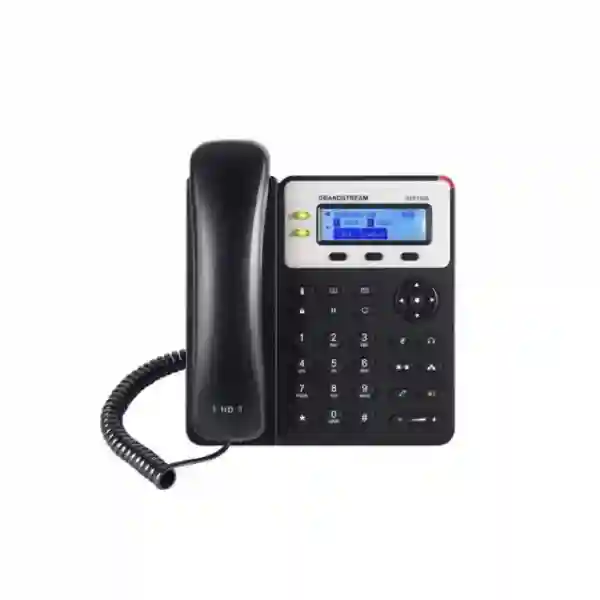
Grandstream GXP1620 IP Phone Tanzania
The Grandstream GXP1620 is a two-line basic IP phone created for small-business desks, shared work areas and general office users who need dependable SIP calling without an unnecessarily complex interface. Grandstream specifies two SIP accounts, two line keys, HD wideband audio on the handset and speakerphone, a 132 × 48 backlit graphical LCD, three XML programmable context-sensitive soft keys and three-way audio conferencing. For organisations in Tanzania planning an IP PBX deployment, refresh or extension rollout, the GXP1620 provides a straightforward endpoint that can be provisioned individually or as part of a centrally managed Grandstream environment.
Best suited to: standard office extensions, administrators, support desks, branch offices, reception overflow positions and users who need two SIP identities.
Power note: the GXP1620 does not include integrated PoE. It is supplied for use with a power adapter. The closely related GXP1625 adds PoE.
What is the Grandstream GXP1620?
The GXP1620 is part of Grandstream’s GXP16xx family of business IP phones. It uses SIP for Voice over IP communication and is positioned as a reliable endpoint for organisations that want familiar desk-phone operation with essential business calling functions. According to Grandstream’s current documentation, the phone supports two lines and two SIP accounts, HD audio, a full-duplex hands-free speakerphone with acoustic echo cancellation, a backlit display and automated provisioning. These capabilities make it suitable for businesses replacing legacy analogue extensions, adding IP extensions to an existing PBX or standardising entry-level desk phones across multiple users.
The value of the GXP1620 is not based on a long list of premium functions. Its strength is that the core features expected from a business SIP phone are presented in a familiar desktop format. Users get dedicated buttons for common activities such as hold, transfer, conference, speakerphone, headset, message, phonebook and volume control. Administrators can configure SIP accounts, network settings, codecs, security parameters and provisioning methods through established Grandstream workflows. When planning a larger rollout, buyers should evaluate the phone together with the PBX, SIP trunk, LAN design, voice VLAN, Quality of Service policy, firewall settings and power arrangements so that the endpoint works as part of a complete voice system rather than as an isolated device.
Two SIP accounts
Two dual-colour line keys and support for two SIP accounts allow a user to handle two configured identities or line appearances within a compact desk-phone design.
HD voice experience
Grandstream specifies HD wideband audio for both the handset and the speakerphone, helping the phone deliver clearer speech when the network and remote endpoint support appropriate codecs.
Simple conference calls
Three-way audio conferencing supports quick collaboration without requiring every short discussion to be moved to a separate meeting platform.
Secure SIP options
TLS, SRTP, HTTPS, 802.1X and encrypted configuration-file support provide administrators with tools for protecting signalling, media and device configuration when deployed correctly.
Grandstream GXP1620 key features
Designed for common small-business call handling where one or two SIP identities are sufficient.
A 2.95-inch graphical display presents line status, menus, caller information and phone functions.
Two switched Fast Ethernet ports can support the phone and a connected workstation in typical desk deployments.
Context-sensitive XML soft keys provide useful flexibility for supported workflows and applications.
Supports wired headset use and EHS with supported Plantronics headsets according to Grandstream documentation.
Firmware and configuration can be managed with methods including HTTP/HTTPS, TFTP, FTP/FTPS, TR-069 and encrypted XML files.
Technical specifications and what they mean for buyers
| Area | Verified GXP1620 specification | Buying relevance |
|---|---|---|
| SIP / lines | 2 SIP accounts, 2 line keys | Appropriate where users do not require a large number of simultaneous line appearances. |
| Display | 132 × 48 backlit graphical LCD | Provides a clear, practical interface for everyday desk-phone functions. |
| Network | Dual switched auto-sensing 10/100 Mbps Ethernet | Useful when the desk has one network outlet and the PC is connected through the phone. |
| PoE | Not integrated on GXP1620 | Plan a local power adapter or choose a PoE-capable alternative such as GXP1625 where suitable. |
| Audio | HD handset and full-duplex HD speakerphone; G.711, G.722, G.723, G.726-32, G.729 A/B and iLBC listed | Supports common voice-codec choices; actual call quality also depends on PBX, carrier, WAN and LAN conditions. |
| Conferencing | 3-way audio conference | Useful for quick internal or external three-party calls. |
| Security | TLS, SRTP, HTTPS, 802.1X, user/admin access control and AES-encrypted configuration files | Allows security-conscious configuration when the PBX and network infrastructure support matching settings. |
| Dimensions | 209 × 184.5 × 76.2 mm with handset; 0.73 kg unit weight | Compact enough for general office desks, counters and wall-mount scenarios. |
Compatibility, PBX integration and deployment planning
The GXP1620 follows SIP standards and includes a broad set of network, provisioning and security protocols. For buyers, standards support is important, but successful integration still depends on the PBX or hosted SIP service implementing the required functions correctly. Before ordering a larger quantity, confirm account registration, codec preferences, DTMF method, voicemail integration, transfer behaviour, call forwarding, directory use, time settings and any required feature codes. A small pilot deployment can reveal differences between theoretical SIP compatibility and the exact experience users will receive in the selected environment.
When used with Grandstream UCM IP PBXs, the GXP16xx family supports Grandstream Zero Config provisioning. That can simplify device onboarding, extension assignment and standardisation across multiple desks. Businesses running other SIP platforms can still use common provisioning techniques, but they should establish a repeatable configuration template instead of programming every phone manually. Centralised provisioning is particularly valuable when phones are distributed across departments, floors or branch locations because it helps keep account settings, security parameters, firmware and dial-plan behaviour consistent.
The local network is equally important. Voice traffic should have stable switching, appropriate VLAN design where used, sensible Quality of Service policies and predictable paths through firewalls and routers. The GXP1620 supports Layer 2 and Layer 3 QoS mechanisms, but those markings are only useful if the rest of the network is configured to honour them. Businesses should also remember that this model does not take power from a PoE switch, so a power outlet is needed at each phone location. If eliminating desk-level power adapters is a requirement, compare the deployment against the GXP1625 or other PoE-enabled Grandstream endpoints.
GXP1620 vs GXP1625: the power difference matters
Grandstream groups the GXP1620 and GXP1625 together because their core voice, display and line capabilities are closely related. The key deployment distinction is PoE: the GXP1625 includes integrated Power over Ethernet while the GXP1620 does not. If your offices already use PoE switches for phones and you want one Ethernet cable to provide both data and power, the GXP1625 may fit that design more directly. If power adapters at desks are acceptable and your purchasing focus is on the core two-line feature set, the GXP1620 remains relevant. The correct choice should be based on the intended network and power architecture rather than model number alone.
Who should consider the GXP1620?
Small and medium offices
For general staff who mainly answer, transfer and place routine business calls, the GXP1620 provides the essential functions without the larger screen, numerous programmable keys or wireless features found on more advanced models.
Branch and satellite locations
Organisations linking branches to a central SIP platform can use a consistent endpoint model for ordinary extensions while reserving advanced phones for reception, management or high-volume call roles.
Shared operational desks
Back offices, stores, dispatch points, workshops and shared desks often need reliable calling, a visible caller display and simple transfer functions more than they need premium collaboration hardware.
Grandstream GXP1620 Tanzania
Businesses in Tanzania searching for the Grandstream GXP1620 are usually solving a broader communication requirement than simply replacing a desk telephone. The device needs a working SIP account, dependable IP connectivity, suitable PBX or hosted-voice integration and an office network prepared to carry voice traffic consistently. For small organisations, the GXP1620 can serve as a practical starting point for moving from analogue extensions to IP telephony. For larger businesses, it can fill standard-user positions within a mixed endpoint estate while reception and executive users receive phones with additional keys, larger displays or integrated PoE.
A Tanzania deployment should begin by counting users and separating ordinary extensions from special roles. A user who mainly makes and receives calls can work effectively with two SIP accounts and two line keys, while a receptionist managing many simultaneous calls may need a different device. Buyers should also confirm how many desk locations have available power sockets because the GXP1620 does not use PoE. Where UPS-backed calling during short power interruptions is important, power for the phone, switch, router and PBX must be considered as one chain rather than individually.
Network readiness can have a greater effect on user experience than the phone itself. Voice quality depends on latency, jitter, packet loss and congestion as well as codec selection. A well-configured business LAN can use voice VLANs and Quality of Service to keep calls stable when file transfers, cloud applications or internet browsing are active. The GXP1620 supports relevant QoS mechanisms, but the switch and router must be configured consistently. If the organisation connects multiple Tanzania sites, the WAN design, VPN architecture and SIP trunk arrangement should also be reviewed before a large handset rollout.
FourTeck Tanzania can be approached for a quotation that includes the required phone quantity, intended PBX platform, SIP service details, deployment location and whether configuration is required. Businesses can also review the broader FourTeck Tanzania IT and telecom portfolio to understand how IP phones fit alongside switches, Wi‑Fi, security and other infrastructure. Providing these details at the quotation stage makes it easier to identify whether GXP1620 is the correct endpoint or whether a PoE-enabled or higher-feature Grandstream model would better match the project.
Grandstream GXP1620 Dar es Salaam
For offices in Dar es Salaam, the GXP1620 can suit companies that need consistent desk calling across administration, finance, operations and support teams. Many business environments now combine cloud services, internet access, Wi‑Fi, CCTV and VoIP on the same network, so introducing IP phones should be coordinated with the switching and routing design. The phone’s dual 10/100 Mbps Ethernet ports can be useful at a desk where one structured-cabling outlet serves both the handset and a workstation, although businesses with high workstation bandwidth requirements should evaluate whether a Fast Ethernet pass-through is appropriate for that user profile.
A Dar es Salaam purchasing plan should specify the PBX or hosted SIP service, extension count, number of sites and user roles. If the business uses a Grandstream UCM platform, zero-configuration functions can simplify rollout. On other SIP systems, a tested provisioning template can reduce repetitive setup. The security profile should include changed administrator credentials, controlled provisioning access, secure signalling and media where supported end to end, and firmware management. These steps are especially valuable when phones are deployed in numbers because one weak default can be repeated across an entire fleet.
Power design is another practical point. Since the GXP1620 does not include PoE, every phone needs its power adapter and a suitable electrical outlet. If a business wants phones to remain active during brief mains interruptions, the adapter sockets may need UPS support in addition to the network switch, router and PBX. Organisations designing a new office from the beginning may therefore compare the GXP1620 with PoE endpoints to decide whether reduced desk cabling is worth the model change.
For projects where the phone is part of a larger voice solution, buyers can review the dedicated FourTeck Tanzania services overview and request a scope covering planning, configuration, installation or troubleshooting as appropriate. The goal should be a usable communications system: extensions should register reliably, transfers should behave as expected, outbound caller identity should be correct, voicemail should be accessible and users should know how to perform routine functions before handover.
Grandstream GXP1620 Mwanza
Organisations in Mwanza considering the Grandstream GXP1620 can use it for standard SIP extensions in offices, retail administration, service counters, logistics operations, education facilities and other workplaces where users need a dependable fixed telephone. The two-account format can be particularly useful when an employee needs access to two identities, such as a direct extension and a departmental account, subject to PBX configuration. Three-way conferencing also provides a simple way to add a third participant to a call without launching a separate collaboration session.
For Mwanza buyers, connectivity planning should be based on the actual site. A small office may have a single internet router and switch, while a larger organisation may have managed switches, segmented VLANs and links between buildings or branches. Voice traffic benefits from low packet loss and controlled congestion. If the same internet link is used for cloud applications, backups, video meetings and SIP trunks, Quality of Service may need to be applied at several network points. The phone supports both Layer 2 and Layer 3 QoS markings, but these features only help when the surrounding infrastructure is configured to use them correctly.
Procurement should also consider future replacement and standardisation. If an organisation buys a few phones now and expects to expand later, recording firmware versions, configuration templates, extension naming rules and network settings can reduce support effort. A standard endpoint such as the GXP1620 can work well for general users while specialists receive different models according to their requirements. This role-based approach avoids paying for unused features at every desk while keeping the fleet manageable.
When requesting pricing, include quantity, preferred deployment timing, PBX type, whether handsets are for a new or existing system, and any need for configuration assistance. Buyers can browse the FourTeck Tanzania shop for related business technology and use the product enquiry process to compare endpoint and infrastructure requirements together rather than treating the phone purchase separately from the network.
Grandstream GXP1620 Arusha
In Arusha, the GXP1620 can be considered for professional offices, hospitality administration, tour operators, educational organisations, branch offices and service businesses that use SIP-based communications. The backlit screen and dedicated function keys give users a familiar telephone experience, while the underlying IP platform allows the extension to participate in modern PBX features such as forwarding, transfer, shared call appearance and directory services when supported by the server.
Businesses with guest-facing operations should pay attention to call-flow design. The desk phone is only one endpoint in a chain that may include an IVR, reception group, departmental queue and after-hours routing. Before deployment, define what should happen when the primary user is busy, unavailable or off duty. The GXP1620 supports core telephony functions, but the PBX determines much of the higher-level routing logic. Clear call flows help avoid missed customer enquiries and unnecessary transfers.
Arusha sites that use shared connectivity for voice and data should measure real network performance, especially when calls travel over internet links to a hosted PBX. Stable latency and low packet loss are more important than raw bandwidth alone. If Wi‑Fi, CCTV uploads, cloud backup and video meetings use the same WAN circuit, prioritisation and capacity planning can protect voice quality. For premises with multiple network cabinets, verify that the phone’s VLAN and DHCP requirements are consistent across all access switches.
The purchasing decision should also include power. GXP1620 relies on an external adapter; the GXP1625 adds PoE. Businesses designing new infrastructure may prefer PoE for centralised UPS backup and cleaner cabling, while existing offices with adequate desk power may find the adapter-powered model practical. A quotation should therefore identify not only the number of phones but also the physical desk and network environment where each phone will be used.
Grandstream GXP1620 Dodoma
For organisations in Dodoma planning a small or medium IP telephony system, the GXP1620 provides a balanced set of everyday functions: two SIP accounts, HD audio, programmable soft keys, call transfer, hold, forwarding, conferencing and directory support. These features are useful for administrative offices where consistent extension-to-extension and external calling is more important than advanced touchscreen or wireless functionality. The phone can also be wall mounted, which may help in counters, shared operational spaces or compact work areas.
A common procurement mistake is to choose all handsets first and design the PBX later. A better sequence is to map extension roles, expected concurrent calls, external number requirements, call queues, voicemail, recording policies and branch connectivity. Once these requirements are clear, endpoint models can be assigned by user type. The GXP1620 is well suited to straightforward users, while high-volume operators may need additional line keys, BLF keys or expansion-module support that this model does not provide.
Security should be part of the commissioning process. Grandstream lists TLS and SRTP support, HTTPS management and encrypted configuration files, but administrators still need to choose appropriate settings, restrict management access and protect PBX credentials. A secure phone connected to a poorly controlled network does not create a secure voice system by itself. Firewalls, remote access policies, SIP trunk restrictions and firmware management should all be addressed together.
Dodoma buyers requesting a GXP1620 quotation should provide the planned quantity, the existing telephone platform if any, the number of physical locations and whether a new IP PBX or SIP service is required. Where a broader infrastructure refresh is involved, the same project may need switching, structured cabling, UPS and firewall work. Bundling those requirements into one technical scope can reduce mismatches that would otherwise appear during installation.
Grandstream GXP1620 UAE
Businesses sourcing the Grandstream GXP1620 for UAE deployments often compare it with other entry-level Grandstream phones and PoE-enabled models. The GXP1620’s defining combination is two SIP accounts, HD audio, a backlit display, Fast Ethernet switching and adapter power. In offices where every desk already has a convenient electrical outlet, this may be acceptable. In structured enterprise deployments where phones are expected to receive centralised power from PoE switches, the GXP1625 or another PoE model may be operationally cleaner.
For branch deployments spanning the UAE and East Africa, standardising provisioning is especially useful. A central configuration policy can set SIP server addresses, codecs, transport security, NTP, language, directory behaviour and device credentials. Grandstream supports TR-069 and encrypted XML provisioning in addition to common firmware delivery methods. Organisations using Grandstream UCM systems can also make use of zero-configuration workflows. These tools reduce manual effort and help the same user experience follow a consistent model across sites.
Voice projects should nevertheless be validated against local carrier and SIP service requirements. DTMF, codec availability, NAT handling, session timers and caller-ID behaviour can vary by provider. A short acceptance test should include inbound and outbound calls, transfers, conference calls, hold, voicemail, call forwarding and failover behaviour if multiple trunks or internet links are involved. This is particularly important when phones will be shipped to several branches and remote remediation would be time consuming.
For broader regional product and solution references, FourTeck’s UAE technology site at FourTeck UAE can be used alongside the Tanzania project discussion. Buyers should request a model-specific quotation rather than relying on general online pricing because quantity, destination, configuration scope and accessories can materially change the project requirement.
Grandstream GXP1620 Uganda
Ugandan businesses looking for a straightforward SIP desk phone can consider the GXP1620 when two accounts and standard office calling functions are sufficient. It can support administrative staff, branch desks, back-office teams and shared operational positions where clear voice, transfer, hold and conferencing are more important than advanced colour displays or wireless connectivity. Because it has dual Ethernet ports, a desktop computer can share the desk’s network connection through the phone in many standard layouts.
Before deploying phones across multiple Uganda sites, test WAN behaviour between branches and the central PBX. A phone can register successfully while still delivering poor quality if jitter, packet loss or routing instability is present. Voice VLANs, QoS, stable DNS and NTP, firewall rules and SIP-aware security policies should be documented. If remote offices use LTE or other variable internet connections, it can be useful to measure performance during busy periods rather than assuming the advertised bandwidth reflects real voice conditions.
The GXP1620 does not include PoE, so each branch must account for local power adapters. If the network equipment is UPS-backed but the desk phones are not, calls will still stop when desk power is lost. Some organisations accept that limitation; others prefer PoE endpoints so phone power can be centralised in the network cabinet. This infrastructure question can influence model choice more than minor feature differences.
For Uganda-oriented procurement and related communication infrastructure, buyers can also consult FourTeck Uganda. When requesting a quote, include the city or branch location, quantity, PBX platform and whether configuration is required so the correct model and accessories can be evaluated together.
Grandstream GXP1620 Kampala
In Kampala, the Grandstream GXP1620 is relevant to SMEs, professional service firms, schools, retail administration and branch offices building or extending a SIP telephony environment. Two SIP accounts are enough for many ordinary users, and the dedicated transfer, conference, hold and message keys reduce dependence on complicated screen menus during routine calls. The backlit display helps staff read extension and caller information in varied office lighting.
Kampala deployments should pay attention to desk connectivity. The handset uses 10/100 Mbps Ethernet ports, so a computer linked through the phone will be limited by that interface. For users who work mainly with email, office applications and cloud portals, that may be entirely adequate. Workstations that regularly move large files or rely on high-speed local storage may be better connected separately to Gigabit infrastructure. Understanding that distinction prevents a telephone purchase from unintentionally becoming a workstation network bottleneck.
A larger rollout can benefit from standard configuration and device inventory. Record MAC addresses, extension assignments, department, user and physical location. Use a central provisioning template where practical and keep firmware at an approved version. These steps make replacement and troubleshooting easier when dozens of endpoints are involved. Users should receive a short guide covering transfer, conference, voicemail and headset use so support tickets are not created for routine operations.
For procurement, buyers should distinguish between hardware supply and a complete telephony solution. A complete project may include IP PBX configuration, SIP trunking, LAN readiness, voice VLANs, switch changes, cabling and user onboarding. Clarifying the required scope allows pricing to reflect the real project rather than only the handset cost.
Grandstream GXP1620 Arua
For businesses and institutions in Arua, the GXP1620 can provide a practical fixed extension where users require standard voice functions and a simple physical interface. Its support for two SIP accounts can help organisations separate lines or service identities, while the full-duplex speakerphone is useful for short hands-free discussions. The device also includes a phonebook and call history functions that can support day-to-day administration without relying on external applications.
Remote and branch connectivity deserves careful attention. If the PBX is located in Kampala, Tanzania, the UAE or a cloud data centre, every call depends on the WAN path between Arua and that service. Packet loss and fluctuating latency can reduce intelligibility even when internet speed appears sufficient. For this reason, a pilot phone should be tested during normal business hours before a larger quantity is commissioned. Network monitoring can also help distinguish endpoint issues from WAN congestion.
Because the GXP1620 uses an external power adapter, site power design matters. Branches that experience frequent short interruptions may consider UPS protection for critical desk locations. Alternatively, a PoE-capable phone can simplify backup power if a managed PoE switch is already protected by UPS. The correct decision depends on the installed network rather than a universal preference for one model.
When preparing an Arua quotation, state whether the requirement is for replacement units in an existing SIP environment or for a new system. Include the intended number of extensions, any remote branches, preferred numbering scheme and expected call features. That information enables a more useful technical recommendation than a model-only request.
Grandstream GXP1620 Mbarara
Mbarara organisations that need an uncomplicated IP phone for daily calling can use the GXP1620 as a standard endpoint in a SIP environment. It is especially suitable where users do not need many programmable keys or multiple active line appearances. The handset and speakerphone support HD audio, and three-way conferencing can help staff bring a colleague or customer into a call without setting up a separate meeting room.
For multi-desk deployments, consistency is valuable. Phones should use standard naming conventions, extension patterns, time settings, firmware and security parameters. Central provisioning can reduce setup time and avoid small configuration differences that become difficult to troubleshoot later. If the PBX is a Grandstream UCM, zero-configuration features can simplify deployment; if another SIP platform is used, administrators should test that platform’s provisioning and feature behaviour with the GXP1620 before rollout.
The office LAN should provide reliable Ethernet connectivity to every phone location. Voice traffic can be separated on a dedicated VLAN and prioritised if the network design calls for it. The GXP1620 supports 802.1Q and 802.1P as well as Layer 3 QoS methods, but switch ports, DHCP scopes and router policies need matching configuration. If the phone is used as a pass-through connection for a PC, remember that its Ethernet interfaces are 10/100 Mbps.
A useful Mbarara procurement request includes quantity, user roles, PBX details, preferred deployment date and power/network conditions. If users spend much of the day on calls, include headset requirements as well. The phone has an RJ9 headset jack and Grandstream documentation lists EHS support for compatible Plantronics headsets, which can be useful for hands-free roles.
Grandstream GXP1620 Gulu
In Gulu, the GXP1620 can fit small offices, institutional administration, branch sites and other workplaces where dependable SIP calling is required without premium endpoint complexity. Users receive physical keys for common functions and a backlit display for caller and menu information. The model’s two SIP accounts can cover many standard extension roles while still giving administrators flexibility to assign a second identity when needed.
A branch phone should be considered as part of the complete communications path. The SIP registrar, DNS, routing, firewall, internet link and power infrastructure all affect whether a call succeeds. For Gulu sites connected to a central PBX across the internet, administrators should monitor latency and packet loss and configure NAT and SIP traversal carefully. Where appropriate, a site-to-site VPN can centralise security, but it also adds overhead and must be sized for voice traffic.
The GXP1620’s security features provide a useful foundation when matched by the server and network. TLS can protect SIP signalling, SRTP can protect voice media and HTTPS can protect management sessions. These features do not replace good password policies, restricted administration, firmware maintenance and properly configured firewalls. A commissioning checklist should therefore include both phone-specific and network-level controls.
For purchasing, distinguish the required quantity from the number of extensions. Some organisations need spare units for faster replacement, while others keep a central pool shared between branches. Recording serial or MAC details and assignment history supports asset management and makes remote support more efficient when a phone is moved between users.
Grandstream GXP1620 Kenya
Kenyan businesses evaluating the Grandstream GXP1620 typically look for a cost-conscious SIP desk phone with a professional feature set. The model covers two accounts, HD audio, three-way conferencing, a backlit LCD and secure provisioning options. It is suitable for standard employee extensions, though businesses with busy reception positions, many BLF keys or a requirement for integrated PoE should compare other Grandstream models before standardising.
For Kenya deployments, confirm compatibility with the selected IP PBX and SIP carrier before ordering at scale. SIP is a standard, but providers can differ in transport, authentication, codecs, DTMF handling, NAT traversal and failover behaviour. A pilot phone should be used to verify outbound and inbound calling, transfer, hold, voicemail access, conferencing and emergency or special dial patterns relevant to the organisation.
Network architecture can also affect the buying choice. GXP1620 has dual 10/100 Mbps Ethernet ports but no built-in PoE. If the organisation wants one Ethernet cable for power and data at each desk, compare it with GXP1625. If desk power is already present and managed, the GXP1620 can remain a practical option. Where users connect computers through the handset, evaluate whether 100 Mbps pass-through is sufficient for their applications.
FourTeck’s regional information at FourTeck Kenya can support Kenya-focused enquiries. A useful quote request should state quantity, destination, PBX environment, required configuration, headset needs and whether the phones are part of a new deployment or an extension of an existing system.
Grandstream GXP1620 Kuwait
For organisations in Kuwait, the GXP1620 is a compact SIP endpoint for ordinary desk users who need business calling features without the cost or administration of a premium handset. It provides two SIP accounts and physical line keys, HD audio, programmable soft keys and a graphical backlit display. Those functions can support administrative, support and branch users in offices where call handling is important but not highly complex.
Kuwait buyers should review the phone in relation to existing switching and power standards. Since the GXP1620 lacks integrated PoE, local power adapters are required. If the organisation has already invested in PoE switches and UPS protection, a PoE-enabled endpoint may simplify desk cabling and power continuity. If desk power is readily available and the endpoint count is modest, the adapter approach may be acceptable.
Central provisioning is useful when phones are deployed across floors, departments or multiple offices. Standard SIP account templates, time zone, NTP, security, firmware and feature settings can reduce support effort. Businesses using Grandstream UCM can use compatible zero-configuration workflows; other PBX environments should establish their own tested provisioning process. User training should cover transfer, conference, hold, voicemail and headset functions so the technology improves workflow rather than adding confusion.
The quotation stage should include intended quantity, PBX platform, extension plan, SIP trunk details and any need for installation or configuration. Price comparisons should be made on the same scope; a handset-only price is not directly comparable to a project that includes provisioning, testing and deployment services.
Grandstream GXP1620 Ghana
Ghanaian organisations looking for a practical Grandstream desk phone can consider the GXP1620 for general SIP extension use. Its two-account design fits many standard employees, while the HD handset and speakerphone provide a clear voice-oriented user experience when the network and remote party support wideband audio. For short team discussions, three-way conferencing can reduce the need for a dedicated bridge.
A Ghana rollout should begin with a voice-system design rather than a handset count. Determine the number of users, concurrent external calls, reception workflow, voicemail, branch calling and reporting requirements. Then assign endpoint types. The GXP1620 can cover standard roles, while users who need many programmable keys, wireless headsets, colour displays or integrated PoE may require another model. This approach creates a more efficient overall bill of materials.
If the PBX is remote or cloud hosted, WAN stability should be measured. SIP traffic uses relatively modest bandwidth, but it is sensitive to delay variation and packet loss. Quality of Service, traffic shaping and resilient connectivity can matter more than headline internet speed. On the LAN, voice VLANs can improve organisation and policy control when managed switches are available.
Regional product enquiries can also be coordinated through FourTeck Ghana. Include the exact model, quantity, location, PBX type and desired service scope in a quotation request. That allows supply-only needs to be separated from projects requiring system design or configuration.
Grandstream GXP1620 Nigeria
Nigerian businesses can use the Grandstream GXP1620 as an entry-level business SIP endpoint for users who need dependable voice calling and straightforward controls. The phone supports two SIP accounts, HD voice, three-way conferencing, phonebook and call history features, secure protocols and automated provisioning. This makes it useful in standardised extension deployments where complex attendant-console functions are not required.
Power resilience can be an important project consideration. The GXP1620 uses an external power adapter, so continuity depends on the power source at the desk. If the network switch, router and PBX are protected but individual phone adapters are not, calls may still be interrupted when power fails locally. A PoE-capable phone can centralise endpoint power through protected switches, but that benefit must be weighed against the selected model and installed infrastructure.
For distributed Nigerian organisations, central provisioning and asset tracking can reduce operational effort. Keep a record of each handset, user, location and extension. Use standard firmware and configuration templates, and control administrator credentials. Where secure SIP is enabled, ensure the PBX, certificate handling and network paths are configured accordingly. Security features should be tested rather than assumed from a checklist.
Nigeria-focused enquiries can also use FourTeck Nigeria for related regional information. A quotation request should specify supply quantity, destination, PBX platform, SIP provider where known and any installation or provisioning requirement.
Grandstream GXP1620 Seychelles
For businesses in Seychelles, the GXP1620 can provide a straightforward wired SIP handset for office extensions, service desks, administrative teams and back-office functions. Its two SIP accounts are often sufficient for users with one primary extension and occasional second-line requirements. The physical controls, HD audio and backlit display keep operation familiar for staff moving from conventional desk phones to an IP-based system.
Island and multi-site deployments should place particular attention on internet dependency when the PBX or SIP provider is hosted outside the local office. Voice calls can be sensitive to WAN outages and routing changes. Businesses should identify what happens when the external link fails: can extensions still call each other locally, is there an alternate trunk, and are critical numbers routed through a backup path? These design decisions are made at the PBX and network level, but they directly affect the practical value of each desk phone.
The GXP1620 can be centrally provisioned using several supported methods, which is useful where local IT resources are limited. A repeatable configuration template should include SIP credentials, NTP, language, firmware, codecs and security settings. Documentation should also show the physical location and extension assigned to each device, making remote assistance easier.
Buyers should request quotations with destination, quantity and configuration scope clearly defined. It is also worth confirming the preferred power approach because this model is adapter-powered. If the wider network is designed around PoE and central UPS protection, the GXP1625 or a different PoE-capable endpoint may fit more naturally.
Buying checklist for a GXP1620 project
1. Confirm user roles: count ordinary users, reception positions, managers, shared desks and high-call-volume teams. Do not assume one phone model should serve every role.
2. Confirm PBX compatibility: identify the Grandstream UCM, third-party IP PBX or hosted SIP platform and test the exact call features that matter.
3. Confirm power: GXP1620 does not provide integrated PoE. Plan power adapters and, where needed, UPS support.
4. Confirm network speed: its dual Ethernet ports are 10/100 Mbps. Check whether any PC connected through the phone needs higher throughput.
5. Confirm SIP and codec settings: verify registration, transport, DTMF, caller ID, codec order and voicemail behaviour with the chosen service.
6. Plan provisioning: decide how configuration and firmware will be distributed so large deployments are not programmed manually one handset at a time.
7. Include accessories: confirm headset needs, replacement adapters, network cabling and mounting requirements in the same procurement scope.
Related infrastructure for a reliable IP phone deployment
An IP phone performs best when the surrounding infrastructure is designed for business voice. The switch should have sufficient ports and support the VLAN and Quality of Service features required by the design. The router or firewall should handle SIP traffic without unnecessary manipulation, and the internet circuit should provide stable latency for hosted voice. The PBX should have a clear extension plan, secure credentials and a defined backup process. UPS protection should cover the equipment that must remain available during short outages.
The broader FourTeck technology network provides regional and specialist context for related networking, security and communications projects. For a Tanzania deployment, the project scope should identify which components are already in place and which need to be supplied or configured. This prevents duplicated purchases and makes it easier to diagnose any call-quality issue after installation.
The GXP1620’s dual network ports can simplify a standard office desk by passing network connectivity to a workstation, but remember the 100 Mbps limit. In new high-performance LANs, some organisations prefer separate Gigabit connections for computers and keep the phone on its own access port. There is no single layout that is correct for every site; the right choice depends on cabling availability, workstation traffic and support practices.
Grandstream GXP1620 FAQs
Does the Grandstream GXP1620 support PoE?
No. Grandstream’s official datasheet states that integrated PoE is available on the GXP1625, not the GXP1620. The GXP1620 uses its power adapter. If PoE is a requirement, compare the GXP1625 or another PoE-enabled model.
How many SIP accounts does the GXP1620 support?
It supports two SIP accounts with two line keys. This is suitable for many standard business users who do not need a large number of simultaneous line appearances.
Can the GXP1620 work with Grandstream UCM IP PBX systems?
Yes. Grandstream documents compatibility with UCM features and Zero Config provisioning. The exact PBX version, firmware and required features should still be validated during deployment.
Does it have HD audio?
Yes. Grandstream specifies HD audio on both the handset and full-duplex speakerphone. End-to-end call quality also depends on the codec used, the PBX, service provider and network conditions.
Can a computer connect through the phone?
The phone has dual switched 10/100 Mbps Ethernet ports, so a typical desk arrangement can connect the LAN to the phone and the phone to a computer. Consider the 100 Mbps interface limit for bandwidth-intensive users.
Does GXP1620 support secure calling?
The phone supports TLS and SRTP along with HTTPS and other access-control features. Secure calling requires compatible configuration on the PBX, certificates and network, so these capabilities must be implemented end to end rather than simply enabled on the handset.
Is the GXP1620 suitable for reception?
It can handle ordinary reception calls in a small environment, but its two-line design and limited programmable keys may not suit a busy receptionist who monitors many extensions or handles several simultaneous calls. In those cases, evaluate a higher-feature model.
What should I include in a quote request?
Include the model name, quantity, delivery location, PBX or hosted SIP platform, whether the phones are for a new or existing system, headset requirements and whether configuration or installation assistance is needed.
Request the right configuration, not just the handset
The Grandstream GXP1620 is most useful when it is matched to the correct user role, PBX and network environment. Tell FourTeck how many users you have, which telephone platform you use, where the phones will be deployed and whether you need configuration. That information supports a more accurate recommendation and helps identify whether the GXP1620 or a PoE-enabled or higher-feature alternative is the better fit.
Before purchasing in quantity, confirm network readiness, power availability, SIP service compatibility and the provisioning method. A small pilot is a practical way to verify everyday tasks such as answering, transferring, conferencing, voicemail and caller identification under real network conditions.
Decision recap
Choose the GXP1620 when the requirement is a reliable two-account wired SIP phone with HD audio, a backlit graphical display, three-way conferencing, common business calling features, secure protocol support and flexible provisioning. It is especially appropriate for ordinary office users who do not need a large set of programmable keys or advanced wireless functions.
Reconsider the model if integrated PoE is mandatory, if the user needs Gigabit pass-through to a workstation, or if the role requires many line appearances and busy-lamp keys. Those are not faults in the GXP1620; they are simply different deployment requirements. Matching the endpoint to the user and network is the most dependable way to build a maintainable business voice system.




Reviews
There are no reviews yet.