
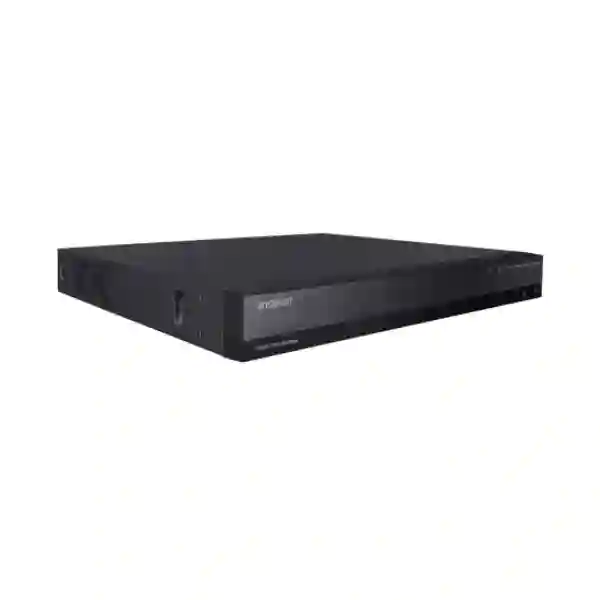
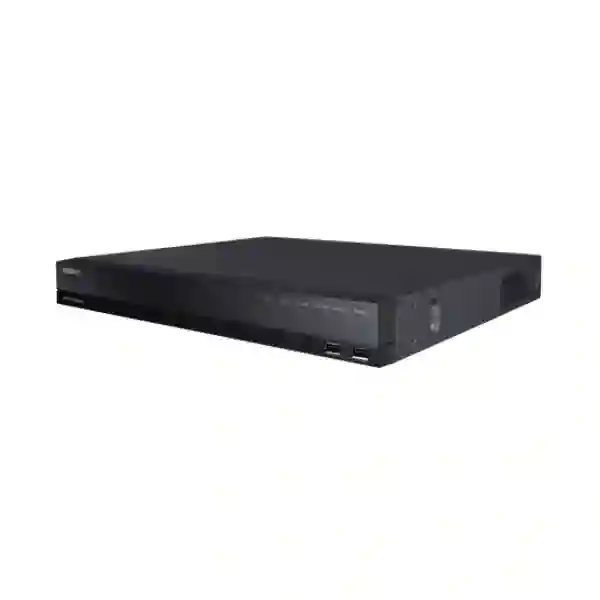
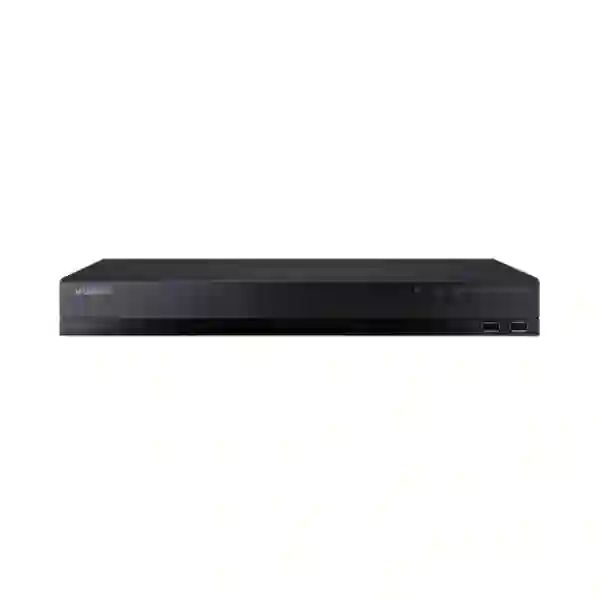
Hanwha HRX-820 8-Channel Pentabrid DVR in Tanzania
Understand whether your existing CCTV cameras can continue to work with the Hanwha HRX-820, what the recorder can actually store and record, and when a supported replacement may be the better choice. Built for hybrid analog and IP installations, this legacy recorder supports several coaxial signal types and limited network camera expansion. Its discontinued status makes correct compatibility and procurement checks essential.
What this model offers — before you decide
Plus 2 additional IP channels in the published mixed layout
AHD, HDTVI, HDCVI, CVBS and IP
Up to 8MP on supported camera formats; 8MP is not 30fps recording
Up to 6TB per supported HDD, total specified installed capacity 12TB
HDMI, VGA, network viewing and mobile functions subject to compatibility
Manufacturer marks the HRX-820 discontinued
A hybrid recorder can preserve suitable analog infrastructure while introducing selected IP cameras, but only when its input format, resolution, network, storage and lifecycle limitations match the project. The following guide explains those decisions in practical terms. It is intended for customers evaluating an installed unit, a replacement requirement, or a carefully qualified legacy purchase.
Verified technical specifications
Values below summarize Hanwha Vision’s model-specific product information. Confirm configuration details and firmware before purchase or replacement.
| Device category | 8-channel Pentabrid digital video recorder |
|---|---|
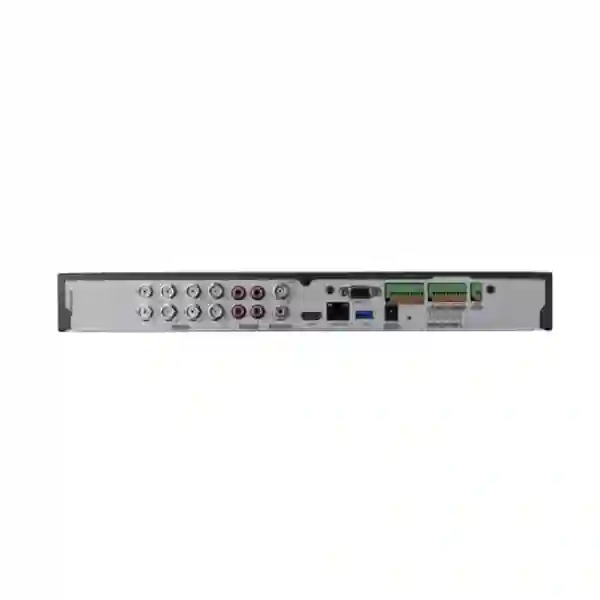
| Analog connections | 8 BNC inputs, 1 BNC spot output |
| Input signal formats | AHD, HDTVI, HDCVI, CVBS and IP |
| Network cameras | 2 additional IP cameras in headline mixed configuration |
| Published analog limits | AHD/HDTVI up to 8MP; HDCVI up to 5MP |
| Analog recording figures | 8fps at 8MP, 12fps at 5MP, up to 30fps at 2MP on relevant NTSC settings |
| Compression | H.265, H.264, MJPEG |
| Internal storage | 2 SATA bays, up to 6TB per supported disk |
| Video outputs | 1 HDMI, 1 VGA, 1 BNC spot output |
| Audio / alarm | 4 line audio inputs / 1 line output; 8 alarm inputs / 4 outputs |
| Networking | RJ-45 10/100/1000 Ethernet; SUNAPI and ONVIF Profile S support |
| USB and control | 2 front USB 2.0, 1 rear USB 3.0; RS-485 for supported PTZ |
| Power / operating environment | 12V DC; up to 32W with two specified 6TB HDDs; 0–40°C; 20–85% RH |
| Form factor | 370 × 44 × 320mm; approximately 2.5kg with one 4TB HDD |
| Lifecycle | Discontinued by manufacturer |
Who this recorder is for and why lifecycle status matters
The Hanwha HRX-820 is a legacy eight-channel Pentabrid digital video recorder for sites that already use coaxial CCTV cameras but also need a limited number of network camera connections. Its central benefit is flexibility: an operator can retain suitable analog cabling and cameras while adding compatible IP devices, rather than assuming that every camera must be replaced at once. The recorder is not a camera, an internet service, or a storage subscription. It is the central device that accepts supported video feeds, manages recordings, supports review, and provides local and network viewing functions.
Hanwha Vision currently labels this exact model discontinued. For a new installation in Tanzania, that status should be treated as a purchasing decision, not hidden as a technical footnote. A discontinued product can still be relevant for maintaining an existing installation, replacing an identical unit, documenting what a system supports, or identifying a compatible migration path. However, the manufacturer status does not establish that any particular replacement unit is available, covered by warranty, or eligible for new firmware. Those matters must be confirmed for the exact offered device.
Start with the actual requirement: how many cameras are installed, what signal types and resolutions do they use, which features are critical, and how long must recordings be kept? Then ask for an assessment of an appropriate current recorder if the HRX-820 cannot meet procurement or support needs. This approach reduces the risk of buying a technically familiar but commercially unsuitable model.
At a glance: strengths and limits
Eight BNC analog inputs are the core of the recorder. The published feature summary also describes two additional network camera channels, bringing a mixed installation to a maximum of ten recording channels under its specified configuration. The accepted families are AHD, HDTVI, HDCVI, conventional CVBS analog video, and IP, which explains the term Pentabrid. These labels describe input signal technologies, not a promise that every camera from every manufacturer will work with every feature.
The recorder supports H.265, H.264, and MJPEG compression, high-resolution camera inputs subject to format-specific limits, HDMI and VGA viewing, coaxial control, event recording, and network access. It provides two internal SATA drive positions, with a published upper specification of 6 TB per drive. A hard drive, monitor, camera, cable, or external power accessory should never be presumed included simply because the recorder supports it; the contents of an individual offer require verification.
Important boundaries are equally clear. High resolution does not mean maximum frame rate at every resolution. Two extra IP channels do not make this a large standalone NVR. Smart search is associated with supported network camera functionality, not an automatic feature on every analog feed. This is a discontinued generation of hardware, so a new buyer should weigh ongoing security maintenance and replacement availability alongside its nominal feature list.
Five signal families, one practical migration strategy
Pentabrid refers to the recorder’s ability to receive several common CCTV video technologies. AHD, HDTVI, and HDCVI are high-definition video formats commonly used with coaxial camera installations. CVBS is the older standard-definition composite format. IP cameras provide video over a data network rather than a direct analog BNC feed. Having support for all five families can make a staged renovation practical when a building contains equipment from different periods or installation phases.
An analog camera usually connects to one of the recorder’s eight BNC inputs. A network camera uses Ethernet and must be discovered and configured within the recorder’s supported protocol and channel rules. The network camera does not take an additional BNC socket, but it does consume network bandwidth and may need a switch, power source, or PoE infrastructure elsewhere in the design. The correct physical connection depends on camera type; changing connector shape does not convert an incompatible video signal into a supported one.
Before retaining old cameras, make an inventory with each camera’s model, output technology, resolution, frame rate, lens purpose, installation location, and whether the equipment is still serviceable. A compatibility review should include the real device setting, not only the brand name on the housing. Many installation problems arise when a camera is configured to output a format or frame rate that the receiving recorder channel does not accept.
Analog camera compatibility and format ceilings
The official HRX-820 specifications list AHD inputs at resolutions including 8 MP, 5 MP, 4 MP, 1080p, and 720p. HDTVI has a comparable published range up to 8 MP. HDCVI support on this specific model is listed up to 5 MP, with lower compatible resolutions also covered. Standard CVBS inputs use NTSC or PAL. These distinctions matter because a broad advertisement saying only “up to 8 MP” can conceal differences between the supported analog technologies.
A site with mixed camera formats should test representative channels before completing a full migration. For example, a camera set to an output mode that is supported by a newer recorder may need reconfiguration for the HRX-820. The presence of an 8 MP sensor does not tell you which physical signal it sends. Likewise, a standard-definition legacy camera can remain operational for a basic view while still being too low in detail for modern identification tasks. Keeping existing equipment should be a deliberate operational choice.
Where a camera is required for evidence rather than general awareness, consider the complete imaging chain: available lighting, distance to the subject, camera angle, compression, recording frame rate, and retention policy. A high nominal pixel count cannot compensate for poor positioning or excessive motion blur. Ask the installer to verify a real recorded playback sample from each critical location instead of relying on a live-view demonstration alone.
Adding IP cameras without overestimating capacity
Hanwha Vision identifies the HRX-820 as an eight-analog-channel recorder with support for two extra network cameras in its headline mixed-channel configuration. The datasheet also identifies SUNAPI and ONVIF network camera protocols. Protocol support helps with integration, but compatibility remains dependent on the particular camera model, its available profiles, codec settings, firmware, supported resolution, and events. ONVIF support should not be interpreted as universal access to every proprietary camera feature.
Use the added IP channels where they deliver a clear result, such as a higher-priority entrance, an area where new network cabling is easier than coaxial cabling, or a camera location requiring a network-based deployment. Plan the network address scheme, power, switch ports, bandwidth, time synchronization, and user credentials before installation. The recorder’s network socket does not mean it replaces a PoE network switch. A network camera still needs a working power arrangement and a stable path to the recorder.
A customer seeking more than a couple of additional network cameras should compare an up-to-date NVR or a current hybrid recorder rather than stretching the HRX-820 beyond its documented mixed-input arrangement. If an installer proposes migrating additional analog allocations to IP on this platform, request written confirmation for the intended firmware, channel configuration, and camera combination. Final acceptance should include simultaneous live view, recording, playback, and export of each required feed.
Understanding 8 MP resolution versus recording frame rate
Resolution and frames per second describe different properties. Resolution concerns how much image detail a recorded frame contains; frame rate concerns how frequently new frames are recorded. The HRX-820’s headline analog recording figures are approximately 8 frames per second at 8 MP, 12 frames per second at 5 MP, and 30 frames per second at 2 MP on the applicable NTSC setting. The official detailed specification also distinguishes PAL and NTSC rates at some resolutions. The camera’s own output rate is another limiting factor.
For a slow-moving overview scene, higher resolution with fewer frames may suit the purpose. A fast doorway or vehicle movement may benefit from a different balance. There is no single setting that delivers maximum detail, maximum motion smoothness, maximum retention, and minimum storage at once. The correct choice depends on the scene and why recordings may later be reviewed. Avoid advertising this model as recording every 8 MP input at 30 frames per second; that would misrepresent its published performance.
Specify the required evidence outcome for each location. A cashier counter, storeroom entrance, building perimeter, and loading area need different framing and motion priorities. Test actual footage during daytime and low light, then confirm the exported file remains usable on the equipment available to the site. The visible live image and archived recording are not necessarily identical in quality.
Storage architecture: two SATA bays and a documented 12 TB ceiling
The official specification provides two internal SATA hard-drive bays, with a maximum listed capacity of 6 TB per compatible drive, for a documented total installed capacity of up to 12 TB. This is a capacity ceiling from the product’s published generation, not a statement that 12 TB is supplied or that every modern 6 TB disk will behave identically. Before changing disks, check the recorder’s supported drive list, firmware requirements, intended workload, physical fit, and current health of the storage system.
Retention depends on the number of active cameras, recording schedule, chosen codec, resolution, frame rate, image complexity, bitrate, event frequency, and actual disk capacity available for video. As a result, it is misleading to promise a particular number of days merely because a recorder has two drive bays. A reasonable design starts with a written minimum retention target and then estimates storage from measured or realistic bitrates for the proposed cameras. The estimate should be validated after commissioning.
Recordings also need an operational policy. Decide who can replay or export footage, how event clips are named and preserved, when old recordings may be overwritten, and what happens if a disk fails. A second disk is additional recording capacity, not automatically a separate backup of the first. Critical incidents should be exported to a protected destination with access control and a documented chain of custody where applicable.
Compression settings and their trade-offs
H.265 and H.264 are both supported video codecs, while MJPEG is also listed among the recorder’s formats. Compression affects the amount of storage and bandwidth consumed by a video stream, but choosing a codec does not guarantee a fixed percentage saving. Different scenes compress differently. A quiet corridor with limited movement behaves differently from an outdoor scene with rain, traffic, moving trees, or repeated lighting changes. Camera encoding settings and recorder-supported profiles must be considered together.
Where compatible, H.265 can be useful for reducing the recording burden at a given visual quality target, while H.264 may be a more practical choice where an older integration or playback application has limitations. Do not set compression purely to the most aggressive level and assume the resulting footage is adequate evidence. Inspect a representative exported clip, especially at night and during motion. Fine details such as labels, faces, vehicle markings, and objects in the background may be affected by the overall imaging and encoding configuration.
A sustainable storage plan balances bitrates, capture quality, retention, network capacity, and the ability to retrieve footage quickly. Document the chosen settings and keep a baseline sample. If the camera list changes or a higher resolution is enabled, revisit storage estimates rather than assuming an old retention calculation will remain correct.
Local viewing with HDMI, VGA, and spot output
The HRX-820 includes HDMI and VGA outputs for local monitoring and a BNC spot output in the published interface specification. HDMI supports display modes up to 3840 × 2160 according to the official sheet, while VGA supports lower stated monitor resolutions. A 4K-capable HDMI output refers to local display capability; it does not mean every channel is recorded at 4K with the highest possible frame rate. Screen resolution and recording performance must be specified separately.
Plan where the monitor will be situated, who can view it, whether two screens are necessary, and which channels should be visible on routine patrol or reception screens. A control-room monitor may need a different layout from a manager’s occasional review display. Position screens so that public visitors are not casually exposed to sensitive images. Provide a secure mounting and cable route, especially where the recorder is stored away from the public-facing desk.
During commissioning, check that the display mode is supported by the actual monitor, that important scenes are legible in the selected split-screen arrangement, and that the operator can switch promptly to full-screen playback. If two monitors are used, verify the expected dual-display behavior on the installed firmware. Local viewing is valuable for operations, but it should not be the only route for obtaining incident footage.
Remote monitoring and mobile access
The manufacturer lists Wisenet mobile support for iOS and Android, along with network viewing functions and a QR-code-based peer-to-peer configuration option. These capabilities can help an authorized manager or security operator review a supported live view or recording away from the physical recorder. They do not, by themselves, establish that a particular mobile application version or remote service remains supported for a discontinued unit in every region.
A reliable remote-viewing setup depends on the local network, internet service, device and application versions, account security, and the site administrator’s policies. Agree on who requires access, what each person may see, whether remote playback is necessary, and how permissions are revoked when responsibilities change. Use unique strong credentials and secure network settings. Avoid giving every staff member the administrator account merely because it simplifies the initial setup.
Before promising remote access in a procurement document, confirm current service compatibility for the exact recorder firmware and proposed mobile client. Test the required functions on the networks people will actually use, and plan for periods when internet service is unavailable. Local recording can remain the primary security requirement even when remote viewing is temporarily inaccessible, provided the installed system is configured and functioning correctly.
Recording schedules, events, and smart search
The HRX-820 supports manual and scheduled recording, continuous or event-related workflows, pre-event and post-event recording concepts, and several event actions. Its specification identifies video loss, motion, and tampering events from analog cameras, plus additional supported network camera events. For network video, the published event examples include analytics-dependent conditions such as line crossing, entry or exit, and other camera-generated detections. Actual availability depends on the installed camera and integration.
The product highlights smart search for network cameras only. Do not assume the same search depth will be present on every analog channel. When an incident occurs, the essential question is not whether a feature sounds intelligent but whether the team can locate the right recording, inspect it in context, and preserve it before overwriting. Test common search paths and train relevant operators using realistic events such as a delivery, a door entry, or an after-hours alert.
Event-based recording can preserve capacity in suitable scenarios, but missed triggers can create gaps. Continuous recording may be preferable for critical entrances or process monitoring. Some installations use both primary continuous recording and event flags to speed review. The decision should follow risk analysis, not a blanket claim that motion detection always saves storage without consequences.
Coaxial control and PTZ operations
The HRX-820 lists coaxial control support across specified analog signal families, with the documented control options including CVBS using Pelco-C and compatible AHD, CVI, and TVI arrangements. It also provides an RS-485 interface for supported PTZ protocols. These capabilities can simplify control of certain cameras where the installed wiring and camera functions match the recorder. However, a camera accepting video from the recorder does not necessarily mean all PTZ, menu, or preset functions will be available.
For any pan, tilt, or zoom camera, confirm the camera model, wiring method, signaling protocol, addressing, power needs, and supported commands. Test manual movement, preset positions, and return-to-home behavior before a security operator depends on it. The PTZ camera’s optical range, field of view, mounting stability, and environmental protection affect results at least as much as the recorder’s control menu.
For fixed cameras, coaxial control may still matter when adjusting supported on-screen camera settings during setup. Use it carefully and document the original working configuration. Keep management permissions limited to staff who need them; an accidental parameter change can affect image quality or recording continuity even though the camera remains connected.
Audio and external alarm integration
The official model datasheet specifies four line-level audio inputs, one line output, and support for two-way audio functionality. It also identifies eight alarm inputs and four alarm outputs. This equipment may therefore fit a design where a recorder must respond to compatible external contacts or notify staff through configured outputs. The actual behavior of a connected device depends on its electrical interface, configured trigger condition, wiring, and recorder settings.
Do not confuse an available audio channel with an automatic right to record conversations. Any audio use should be evaluated against the organization’s policies and applicable privacy requirements. A documented approval process, clear purpose, restricted access, and appropriate notice may be necessary. For alarms, request an input-output schedule showing what each contact represents, what event should be recorded, and what external equipment may be activated. Confirm the electrical ratings before connecting third-party hardware.
Test the whole sequence from trigger to recorded event, screen indication, and any assigned output. Record the test result and any limitations. A system that technically supports alarm wiring is not necessarily a substitute for a dedicated fire, life-safety, or intrusion alarm system, and the recorder should not be described as certified to perform those separate functions without appropriate evidence.
Network planning and camera interoperability
The published specification includes a gigabit-capable RJ-45 Ethernet interface, with networking protocols such as TCP/IP, RTSP, HTTP, HTTPS, NTP, ONVIF Profile S, and Hanwha SUNAPI. Some protocols concern transport or discovery, while others provide application-level control. Their presence is useful for system design, but it does not make the recorder an unrestricted bridge to every application, cloud service, or vendor feature.
Assign addresses and management access deliberately. A dedicated camera network or carefully segmented infrastructure may be appropriate for commercial deployments. Plan how time is synchronized, what happens when the broadband connection drops, and which users can reach the recorder from other parts of the organization. Avoid exposing its administrative interface openly to the internet. When remote access is required, design it around current secure methods supported by the organization’s network environment.
The recorder’s published recording and transmission bandwidth figures should be checked against the proposed stream settings rather than assumed unlimited. The official specification separates recording bandwidth and network transmission figures, so avoid describing one figure as total available capacity for every purpose. During testing, monitor whether all required cameras stay connected and whether simultaneous playback, export, and live viewing cause any practical bottleneck.
Information security and account hygiene
CCTV footage is operationally sensitive. The HRX-820 technical documentation describes controls including user access logs, IP address filtering, authentication options, and encryption-related functions, but the exact behavior depends on setup and firmware. Because the model is discontinued, administrators should not assume current cybersecurity update availability. Verify the supported software revision, configuration guidance, and network exposure before placing an inherited unit into a modern corporate environment.
Give named users access appropriate to their jobs wherever supported. Protect administrator credentials, revoke access when roles change, and use the recorder’s available logs to help investigate unexpected activity. Review remote access settings after a contractor finishes commissioning. Keep the recorder in a secured area with a plan for physical access, disks, USB ports, and exported media. A lockable location and documented account ownership prevent many avoidable service and security problems.
If organizational policy requires a specific patch cadence, identity integration, detailed audit capabilities, or modern encryption baseline, consider whether a current recorder better fits those requirements. Feature descriptions from a historical datasheet are not a substitute for verifying the unit’s current security posture. Procurement should weigh the cost of maintaining an older platform, not only the initial hardware quotation.
Before installation: audit cameras, cables, and viewing needs
Begin with a site worksheet. For each camera, record location, purpose, model, power method, cable route, connector, video signal, resolution, image orientation, and whether it functions reliably. Add the recorder location, proposed monitor, nearby power supply, network switch, available cable entries, and the equipment’s environmental conditions. This simple audit makes it easier to identify incompatible cameras, hidden repair work, and opportunities to improve image coverage before replacing the recorder.
Inspect coaxial connectors for poor terminations or damage; check Ethernet for suitable connectivity and power arrangements. Where an existing installation has experienced intermittent faults, test the actual path rather than assuming a new recorder will correct a camera or cable defect. Label the camera inputs and retain a channel map for maintenance. A tidy channel map is especially helpful when multiple floors, tenants, or departments share an observation point.
Agree on what acceptance looks like: every required channel records at its expected setting, images are intelligible where necessary, the date and time are correct, events are usable, authorized users can review footage, exports play back, and retention is measured. Record this as a handover checklist. It reduces disputes later about whether a successful live camera picture alone constituted a completed installation.
Power supply and environmental suitability in Tanzania
The technical sheet lists 12 V DC input and maximum power consumption of approximately 32 W with two specified 6 TB hard drives. It also lists an operating range of 0°C to 40°C and 20% to 85% relative humidity. These are equipment limits, not proof that the recorder can be installed anywhere without cooling or protection. Temperature inside a locked, crowded cabinet can exceed the surrounding room temperature, and moisture exposure can create faults even in otherwise suitable buildings.
For an installation in Tanzania, examine the actual electrical supply and surrounding environment rather than making broad assumptions about every location. Use the appropriate manufacturer-specified power arrangement, provide ventilation, and consider a properly sized UPS where uninterrupted recording is important. The UPS design must account for the recorder, cameras, switches, and any other devices required for the selected recording path. Backup power for the recorder alone is of limited value if all camera power fails first.
Position the recorder away from direct weather, dripping water, unsecured public access, and excessive dust. Plan cable strain relief and safe service access. Confirm that any selected electrical accessories are suitable for the specific installation and prevailing local requirements; this description does not certify a particular accessory or imply that installation services are available in every Tanzanian region.
Recording retention and evidence readiness
The appropriate retention period is a business and governance choice informed by the purpose of surveillance, applicable rules, operational risk, and storage capacity. A small retail shop may prioritize queue or cash-desk incidents, while a warehouse may need to review events that are discovered only after an inventory cycle. Neither requirement can be translated into a guaranteed number of days without camera settings and a retention calculation. Put the target in writing before selecting drives.
Define a process for saving important clips separately from the normal overwrite cycle. The process should include who may authorize retrieval, how the correct camera and time window are identified, whether related channels should be included, and where the exported file is stored. Confirm date and time accuracy on the recorder and linked cameras; poorly synchronized timestamps can undermine a useful recording even where the images are clear.
Test both routine review and an exceptional incident workflow. Ask an operator who did not configure the recorder to locate a sample event, play it, and export it. If that sequence is difficult, revise the setup and training. Retention capacity is only one part of a functioning evidence workflow; accessibility, integrity, permissions, and documented procedures matter just as much.
Maintaining an existing HRX-820 system
An organization that already operates the HRX-820 may not need an immediate full-camera replacement solely because the recorder is discontinued. First assess condition, remaining business value, drive health, camera compatibility, network exposure, current firmware, and available support options. The sensible question is whether the installed system continues to meet security requirements at an acceptable risk and maintenance cost. A supported replacement becomes more urgent if the hardware is failing or the security posture no longer meets policy.
Perform periodic checks that confirm recording is actually taking place. Verify representative playback from each camera rather than relying only on a green status indicator. Review disk warnings, unexpected reboots, time accuracy, camera disconnections, and recurring network issues. Keep a record of configuration changes and responsible personnel. Do not assume that a large-capacity disk is healthy simply because its reported size appears normal.
When replacing failed components, confirm that the substitute is compatible with this specific model and installed firmware. A change to hard drives, cameras, mobile applications, or network equipment can affect a system that previously worked. Before making disruptive changes, preserve essential footage and document the existing configuration. For older units, test compatibility in a controlled maintenance window when possible.
What to inspect before considering a legacy unit
Because Hanwha Vision marks the HRX-820 discontinued, a buyer evaluating a remaining or previously used unit needs additional checks. Ask whether the proposed item is new old stock, refurbished, or used; whether storage is fitted; whether the power supply and accessories are included; and whether the seller can demonstrate live recording and playback. A listing description alone cannot establish the device’s physical condition, history, or remaining service life.
Request the exact device model, visible unit identification, installed software version where relevant, and a practical test using supported analog and IP inputs. Review fan operation if applicable, physical damage, ports, storage condition, and whether user accounts and settings have been appropriately reset. Ensure previous recordings and credentials are handled securely. Confirm who will provide after-sales assistance, what terms apply to the specific unit, and what happens if a replacement part is unavailable.
Do not assume the discontinued model can be ordered at a particular price or delivered within a fixed period in Tanzania. No stock, price, warranty, or delivery commitment is made here. The safer commercial route is a model-specific availability check together with a documented option for a current alternative. This keeps the decision useful even when original hardware cannot be sourced responsibly.
Comparing a current replacement: HRX-835 considerations
The HRX-835 is a relevant newer Hanwha Vision eight-channel Pentabrid recorder to examine when evaluating a replacement path. Its manufacturer specifications describe the same broad five-family camera input concept and a total of up to ten channels in a supported configuration. They also describe four SATA drive bays instead of the HRX-820’s two. That greater drive-bay count may matter when a customer expects a longer retention period, but a meaningful comparison must include the cameras, bitrate, total usable capacity, and supported disks rather than bay count alone.
A replacement is not automatically plug-and-play. Confirm each existing analog camera’s exact format and resolution, any network camera integration features, alarm and audio wiring, PTZ control, user permissions, remote client compatibility, monitor outputs, and installation footprint. Differences in recorder generation, menus, protocols, and export formats can influence the operational handover. Check current lifecycle status and regional procurement options independently for the offered alternative.
The HRX-835 is an evaluation candidate, not a claim that FourTeck has it in stock or that Hanwha has designated it as a universal direct substitute for every HRX-820 installation. Where the requirements have moved toward mostly IP cameras, a contemporary NVR may be more appropriate than another hybrid DVR. Choose the next recorder around the system you actually need for the coming years.
Choosing between a Pentabrid DVR and an NVR
A Pentabrid DVR makes sense when substantial usable analog cabling and compatible cameras remain in place. It can help preserve previous infrastructure investments and allow a limited expansion into IP without a wholesale redesign. An NVR is generally considered for a network-camera-led project where the design centers on Ethernet connectivity, camera streams, network switching, and current software integrations. The distinction matters because the camera and network plan determines the recorder’s practical role.
For a new site, begin with coverage, evidence quality, storage, security controls, and maintainability rather than choosing a recorder first and building the rest around it. Count cameras that are likely to be added later. Assess whether you need advanced event integration, centralized management, or larger-scale recording. A legacy eight-channel hybrid device may be appropriate for a tightly scoped retrofit but unsuitable for a system expected to expand rapidly across many areas.
The best financial comparison considers the entire installation: cameras retained or replaced, cable repair, drives, displays, network components, backup power, commissioning, training, and future support. An apparently low-cost recorder can be more expensive overall if it requires unusual workarounds or exposes the site to repeat failures. Ask for a proposal that separates essential work from optional upgrades so the trade-offs are visible.
Examples of suitable business scenarios
A small premises with functioning AHD cameras might use a hybrid recorder to retain its current coaxial wiring while reviewing a limited number of strategically placed IP cameras. A shop with older CVBS cameras may seek a staged plan to replace its most important views first. A storeroom or service corridor may require continuous recording without complex analytics. These are examples of potential system design decisions, not guarantees that a specific existing camera or site is compatible.
For offices and business premises, the useful design questions include visitor entry, vehicle access, shared corridors, stock movement, and how staff will retrieve clips when something is reported. In a warehouse, the key question may be the ability to match a shipment time to an intelligible recording rather than the maximum advertised camera resolution. In a reception area, a visible monitor may be helpful for operations but should be positioned with privacy in mind.
For each scenario, define required camera count, viewing location, retention target, permission model, and power continuity. Then determine whether a supported current recorder offers the best value. Because the HRX-820 is discontinued, this page is particularly useful for understanding an installed system or specifying a migration, rather than encouraging an unverified new purchase.
Commissioning checklist: prove the system works
Commissioning should begin with physical checks: camera connectors are secure, each input is labeled, storage is recognized, the correct power supply is installed, and the recorder has suitable ventilation. Next, configure camera signal modes and recording settings. Verify that the configured channel count and frame rates match the documented design. When IP cameras are present, confirm their connectivity, authentication, time synchronization, and supported profiles.
Run practical acceptance tests. Watch the live feeds; inspect archived recordings; confirm overnight or low-light image quality where relevant; search for a known event; export a clip; play it on an independent workstation; and verify that the recorder keeps recording after a restart. Check alarms and PTZ functions only where they are part of the actual scope. If remote viewing is required, test it using authorized users without sharing the administrator credentials.
Document the delivered setup with a camera schedule, storage assumptions, administrator handover method, relevant software versions, backup procedure, and support contact details supplied under the actual contract. A good handover makes future maintenance faster and gives the buyer a clear standard for judging whether the system is still fit for purpose. It also separates genuine product limits from avoidable setup errors.
Common problems and disciplined troubleshooting
If a camera shows no video, identify whether it is analog or IP before changing settings. For analog feeds, check camera power, connectors, cable condition, output signal type, and the corresponding recorder input. For an IP camera, check network link, addressing, credentials, supported protocols, and stream settings. A device being visible on the network does not necessarily mean its video stream is accepted or being recorded.
If playback is missing despite a working live feed, investigate recording schedules, disk status, event settings, date and time, and whether the correct channel and period were selected. If storage fills faster than expected, compare actual bitrates and recording patterns with the original assumptions. If remote viewing fails, distinguish between local recorder operation and external network connectivity. Avoid changing several unrelated parameters at once; controlled testing makes root causes easier to identify.
For intermittent failures, preserve error details and describe precisely when the problem occurs. Document whether it affects a single channel, all channels, local viewing, recording, export, or the mobile connection. This information helps a technician decide whether the fault belongs to the camera, cabling, network, drive, configuration, or legacy recorder hardware.
Lifecycle decisions, privacy, and responsible replacement
A discontinued recorder can remain physically operational while becoming more difficult to maintain. The right response is a planned risk review, not an assumption that every old unit is immediately unusable. Consider spare-part availability, supported client software, configuration security, drive health, and the consequences of losing critical recording coverage. Document which risks are accepted temporarily and which require a replacement date.
Video surveillance also creates responsibilities for the organization using it. Define a legitimate purpose for camera placement, restrict access to recordings, set an appropriate retention policy, and handle requests or incidents through an approved process. Legal obligations can depend on the context and applicable Tanzanian rules, so obtain qualified local guidance for decisions involving personal data, audio recording, employee monitoring, and evidence disclosure rather than relying on generic product copy.
When equipment is decommissioned, protect data on internal drives and removable exports. Remove sensitive information through an appropriate approved process, retire old credentials, update the camera inventory, and confirm that new equipment has been tested before the previous recorder is taken out of service. The objective is continuity of useful coverage while improving maintainability, privacy, and security.
How to request a useful compatibility or replacement assessment
A productive enquiry should identify the target model, current number of analog and IP cameras, each important camera’s signal format and resolution, installed drive sizes, retention objective, monitor arrangements, network setup, and any required audio, alarm, or PTZ functions. Include a brief description of the problem being solved: replacing a failed recorder, expanding an existing site, improving image quality, or planning an orderly migration to IP cameras. This gives a technical reviewer enough context to avoid a superficial model-for-model recommendation.
State whether the purchase must be newly manufactured equipment, whether used or refurbished equipment is acceptable, and which support terms are required. Where photographs or configuration screenshots are useful, remove passwords, private network details, and unrelated sensitive imagery before sharing them through a verified enquiry channel. Never publish administrative credentials or actual surveillance recordings openly in a product review or public form.
Ask the reviewer to distinguish confirmed device specifications from assumptions requiring on-site testing. The outcome should be an appropriate recorder recommendation, identified compatibility questions, a proposed storage specification, and clear next steps for verification. This page does not itself establish local inventory, quotation terms, delivery coverage, or installation availability.
Common business scenarios
Maintain an analog-first system
Retain compatible working coaxial infrastructure while documenting the limitations of a discontinued recorder.
Add one or two IP views
Use network channels selectively where actual camera interoperability and network capacity are confirmed.
Plan a legacy replacement
Compare newer Pentabrid and NVR options against current camera inventory, recording retention and cybersecurity needs.
Improve incident retrieval
Test event search, export playback, operator permissions and preservation procedures rather than judging the solution by its live display alone.
Buyer questions and direct answers
Is the Hanwha HRX-820 still a current model?
No. Hanwha Vision currently identifies HRX-820 as discontinued. An existing unit may still be operational, but procurement, firmware support, and service options need separate verification. A buyer considering a new project should also request an assessment of current products.
How many cameras can it connect?
The published headline arrangement allows eight analog cameras through BNC connectors and two additional IP cameras, for ten channels in total. The supported mix must be checked against the intended channel configuration and exact camera models. This should not be read as permission to connect an unlimited number of IP cameras.
Can it record 8 MP CCTV video?
The product supports up to 8 MP on specified compatible formats, but it does not record 8 MP video at the same frame rate as 2 MP. The manufacturer’s headline figure is eight frames per second per channel at 8 MP. Camera input settings and firmware configuration remain relevant.
Does every analog camera format support 8 MP?
No. The published HRX-820 datasheet lists AHD and HDTVI options up to 8 MP, while HDCVI is listed up to 5 MP. Traditional CVBS is standard-definition analog video. Verify the real camera output mode and recorder support rather than treating all five format names as interchangeable.
What is the maximum hard-drive capacity?
The official specification lists two SATA disk positions, with up to 6 TB per drive, or a total specified installed capacity of up to 12 TB. Whether disks are fitted in a particular unit is a separate commercial question, and supported drive models should be checked before purchase or replacement.
Can it be viewed on a phone?
The manufacturer’s historical specifications include Wisenet mobile support and a QR-code-assisted configuration option. For a discontinued device, verify the current client application, firmware, account configuration, and regional service availability before depending on remote access for daily operations.
Will my existing coaxial cameras work?
They may, provided their output signal, resolution, frame rate, wiring, power, and configuration match the recorder’s supported inputs. Make a camera list and test representative channels. The correct answer depends on the actual model and output mode, not simply whether the cable has a BNC connector.
Is it a PoE network video recorder?
The HRX-820 is a hybrid Pentabrid DVR, not a dedicated PoE switch. Its published design combines analog BNC inputs with network camera support. IP cameras generally need suitable external network and power arrangements, which must be designed as part of the installation.
Can it search for events on all camera types?
Manual, scheduled, and event recording are supported. The manufacturer’s headline smart-search capability is identified specifically for network cameras. Available analytics and events depend on camera support and recorder integration, so confirm the required search workflow using actual recorded footage.
What should I compare with it for a replacement?
The newer Hanwha HRX-835 is one relevant eight-channel Pentabrid option to evaluate; a modern NVR may be preferable for an IP-centered installation. Check each camera signal, channel count, storage requirement, network access, PTZ or alarm use, and support needs. Neither availability nor direct compatibility is assumed.
How many days of recordings will it keep?
No fixed retention period follows from the recorder’s maximum disk capacity. The number of days depends on actual camera bitrates, codec, resolution, frame rates, number of channels, recording schedule, and overwritten-space policy. Have the intended configuration sized and measured against a written target.
Can FourTeck confirm a price and availability in Tanzania?
This product information does not claim a verified Tanzanian price, stock position, warranty, shipping time, or service area. Request a model-specific assessment and quotation through FourTeck’s verified contact or enquiry process, including an option for a current recorder when original units are not suitable.
Request an HRX-820 compatibility or replacement assessment
Share your camera count, signal types, required retention, and any alarm, audio or remote-monitoring needs through FourTeck’s verified enquiry process. Ask for the availability and condition of any proposed legacy unit, or a current recorder recommendation where appropriate. This page makes no claim about current stock, pricing, delivery or installation coverage in Tanzania.




Reviews
There are no reviews yet.