
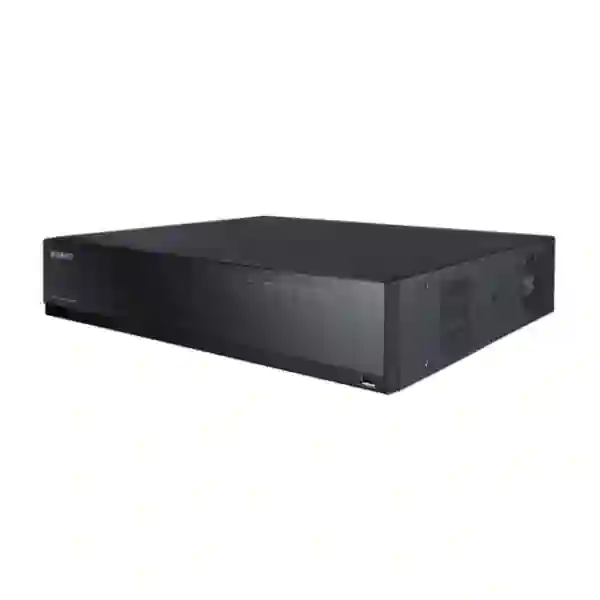
Hanwha HRX-835A 8 Channel DVR
A versatile pentabrid recorder for supported analog CCTV and carefully planned IP camera additions. Keep compatible coaxial infrastructure, evaluate up to 8MP inputs and design recording around the quality, storage and access your operation actually needs.
The buying decision in brief
Choose the HRX-835A when you have up to eight compatible coaxial camera feeds, perhaps want to add two network cameras, and need a configurable recorder with searchable footage and local or authorised remote viewing. First confirm each camera’s format and expected frame rate. Specify compatible hard drives and verify actual recording retention rather than assuming that the maximum drive capacity equals a fixed number of days. For Tanzania orders, request a model-specific quote and confirm local commercial terms separately.
Manufacturer-listed technical specifications
| Specification | HRX-835A |
|---|---|
| Product type | 8-channel 5-in-1 pentabrid DVR |
| Camera input formats | AHD, HDTVI, HDCVI, CVBS and supported IP |
| Camera channel capacity | 8 analog BNC inputs + 2 additional IP channels; up to 10 total |
| Supported input resolution | Up to 8MP on supported cameras and formats |
| Published analog recording rates | 8MP: 8fps; 5MP: 12fps; 4MP: 15/12fps; 2MP: 30/25fps (system dependent) |
| Recording codecs | H.265, H.264, MJPEG |
| Recording bandwidth | Maximum 80 Mbps |
| Storage bays | 4 SATA; up to 6TB per compatible drive, maximum 24TB |
| Local video outputs | HDMI and VGA; HDMI supports up to 3840 × 2160 |
| Network interface | RJ-45 10/100/1000BASE-T |
| Alarm connections | 8 inputs, 4 outputs |
| USB | Front USB 2.0 and rear USB 3.0 |
| Power input | 100–240 VAC ±10%, 50/60 Hz |
| Maximum listed consumption | 100W with four 6TB drives |
| Operating environment | 0°C to +40°C; 20–85% relative humidity |
| Dimensions | 440 × 88 × 384.8 mm |
Values are drawn from Hanwha Vision’s published HRX-835A information; practical settings and compatibility are configuration dependent. Drives, accessories and any local commercial terms must be confirmed for the specific quotation.
Who should consider this recorder
The Hanwha HRX-835A 8 Channel DVR is intended for buyers who need a central place to record, view and retrieve CCTV footage without automatically replacing an entire installed camera system. It is especially relevant when a site already has working coaxial cabling and wants to evaluate an upgrade in stages. A store, warehouse, reception area, office or controlled access point may have cameras from different generations. Instead of assuming every camera needs replacement, the site can first identify its video signal, image quality, recording requirement and physical cable condition. The recorder’s pentabrid inputs provide flexibility, but only within the supported specifications and real installation conditions.
The right purchase decision begins with a camera inventory, not the recorder’s headline resolution. Count installed analog feeds, identify any planned network cameras and reserve realistic capacity for future changes. Ask who will review incidents, how quickly footage must be found, whether an operator needs a local monitor and how long evidence should remain available. If your organisation needs many more than eight analog inputs, the HRX-835A should not be treated as a substitute for a larger recorder. Its strengths are hybrid format support, structured recording and management within a defined channel limit.
A practical meaning of five-in-one
Pentabrid describes the recorder’s ability to work with multiple types of camera video. In this model, the supported families are AHD, HDTVI, HDCVI, traditional composite CVBS and network IP video. That breadth can reduce the need to select an entirely new camera ecosystem during a phased transition. It does not mean every camera on the market will work without testing. Signal type, camera output setting, cable condition, resolution, protocol support and firmware can affect successful operation, so the exact camera models should be checked before procurement.
AHD, HDTVI and HDCVI cameras usually send their pictures over coaxial-style connections, while IP cameras operate on a network. CVBS commonly appears in older analog systems. The HRX-835A is useful when these technologies overlap on a site. However, a connector that physically fits is not proof of compatibility, and IP connectivity is not the same thing as an analog BNC input. Get the equipment list, test sample channels and verify PTZ or special functions separately. This disciplined approach makes the pentabrid capability useful rather than an assumed universal guarantee.
Eight analog inputs and a ten-channel total
The recorder has eight BNC video inputs for supported analog cameras. Hanwha Vision also specifies two additional network camera channels, giving up to ten channels in the described configuration. This distinction matters because a statement such as ten-channel DVR could otherwise be misunderstood as ten coaxial sockets. It is not. An installation with nine analog camera cables cannot simply plug the ninth cable into an IP channel. A conversion strategy or a recorder with more analog inputs would need to be evaluated. Similarly, network channels should be planned with compatible devices and network capacity.
When preparing the equipment schedule, create one row per camera showing its position, current signal format, target resolution, requested frame rate, and desired recording mode. Mark two potential IP camera positions separately rather than mixing them into the BNC count. This helps avoid buying a recorder that is insufficient for physical camera placement. If the long-term plan involves significant migration to IP, compare a dedicated network video recorder or a larger hybrid configuration before finalising the purchase. Channel planning is a capacity decision, not simply a product label.
Resolution and frame rate must be read together
The HRX-835A supports video up to 8MP, but supported camera resolution and recorded frames per second are different specifications. Hanwha’s published analog recording rates include approximately 8 frames per second at 8MP, 12 at 5MP, 15 or 12 at 4MP, and 30 or 25 at 2MP depending on the NTSC or PAL system and input conditions. The camera itself must be capable of providing the intended signal. A buyer who needs smooth capture of fast action should not select 8MP based on pixel count alone and then assume full-frame-rate recording.
Assess the incident types you need to review. For a static entry point, more image detail at a lower frame rate may be useful; for motion through a corridor or a vehicle turning into a loading area, temporal detail may be more important. Camera exposure, scene lighting, lens choice and correct positioning also influence the value of each recorded frame. During commissioning, inspect actual footage at the selected resolution and frame rate rather than relying solely on a live preview. Ask for a short real-site recording test where image detail and motion clarity are essential.
Understand supported IP cameras
Hanwha Vision lists SUNAPI and ONVIF support for network camera integration. These standards and protocols can help a suitable IP camera exchange video and management information with the recorder. Nevertheless, protocol names alone do not ensure that every event, audio track, analytics function, encoding profile or PTZ command will be available. Compatibility should be established for the exact IP camera firmware, stream settings and required functions. Confirm the additional IP channel count and applicable resolution or frame-rate limitations using the latest model documentation and the chosen configuration.
For a hybrid site, sketch the network path between each IP camera and the recorder. Determine whether cameras receive power through a separate PoE switch or another supported supply, because a recorder’s Ethernet port must not be assumed to provide PoE. Set IP addresses carefully, document administrator access and allow sufficient network capacity for camera streams and remote users. If a camera is reachable on the network but not accepted by the recorder, investigate supported protocols, credentials, stream profiles and firmware before replacing hardware.
Recording formats and storage efficiency
The listed recording codecs are H.265, H.264 and MJPEG. Codec choice affects storage demand, network bandwidth and interoperability with viewing or export tools. In a correctly configured environment, efficient compression can help store more footage for a given drive capacity, but the actual savings are not a fixed percentage. A camera looking at moving foliage or an illuminated street can generate different bitrates from one watching a mostly static storeroom. Resolution, frame rate, quality settings and events also change the rate of data written to disk.
Choose the codec using the complete workflow, not only the smallest estimated file. Check which playback devices, evidence viewers and integration software will be used. Compare picture quality under busy scene conditions and confirm that exported files can be opened by the intended recipients. Where operational staff need a particular file format, arrange a test export. Record the settings used, because retention estimates will only remain meaningful if the camera profiles match those assumptions after handover. A professional design balances image quality, usable retention and retrieval convenience.
How to plan recording bandwidth
Hanwha specifies a maximum recording bandwidth of 80 Mbps for this model. That figure is a limit to respect in system design, not a promise that every combination of cameras can run at its highest individual setting. Sum the expected input stream bitrates and allow room for scene variation, event changes and management traffic. For example, eight streams configured around 3 Mbps each would total about 24 Mbps before considering other streams and overhead. This example is arithmetic for planning rather than a tested performance claim for a particular camera arrangement.
Keep recording bandwidth separate from the LAN connection’s nominal speed and from outbound remote viewing traffic. A gigabit Ethernet port does not remove an internal recorder bandwidth limit. The published specifications also distinguish playback and transmission bandwidth. When a system is expected to support concurrent viewing, playback and backup, test a busy operating scenario. If the budget permits, specify camera bitrate targets in a commissioning worksheet so that later maintenance staff can understand why the system was configured in a particular way.
Four SATA bays and the real meaning of 24TB
The HRX-835A provides four SATA hard-drive positions, with published support for compatible drives of up to 6TB each and a stated maximum of 24TB. This is a capacity ceiling across supported bays, not a statement that drives are included with a recorder purchase. The correct storage quantity depends on video bitrates, number of cameras, recording schedules, events and required retention. Hanwha directs users to a compatibility list for supported hard drives, so the selected surveillance drives should be checked against the current approved list before installation.
Do not equate nominal hard-drive size with a guaranteed number of recording days. Disk formatting, file management, recorded audio, bitrate changes and system reserve can affect usable retention. Ask whether continuous recording is necessary on all cameras or whether an event-based schedule is operationally acceptable. Define a minimum evidence-retention target and verify it using real recorded data after the system has operated under normal site conditions. The maximum four-drive arrangement is useful for capacity planning, but storage configuration and disk health still require an operating procedure.
A worked retention-planning method
A transparent calculation is better than choosing a drive by guesswork. Suppose a hypothetical installation records eight cameras at an average 3 Mbps per camera. The combined 24 Mbps corresponds to approximately 3 megabytes per second, or about 259 gigabytes of data over 24 hours using decimal units. A nominal 6TB drive might therefore suggest around 23 days before accounting for overhead and variation. This is only an illustration: it is not a retention commitment, a guaranteed usable capacity or a published Hanwha performance result.
For the actual project, estimate a bitrate for each camera based on its scene, settings and desired evidence quality. Multiply by recorded hours, add appropriate planning headroom and revisit the result after several days of normal activity. Consider peak traffic at a gate or loading zone and footage captured at night, not just a quiet daytime sample. Document the overwrite policy so that staff know when older material may be lost. Where footage must be preserved for an investigation, the export process must happen before routine overwriting.
Local display and control desk design
The recorder provides HDMI and VGA display outputs. Hanwha lists HDMI output up to 3840 by 2160 and VGA output up to 1920 by 1080, subject to supported modes. These output figures describe the display interface, not the resolution of every individual camera recording. Dual-monitor operation can help when staff need to separate a general camera overview from a more focused screen, but the intended monitor layout and features should be verified against the current firmware. Select displays that staff can read comfortably from their actual seating distance.
Plan the viewing station as an operational environment. Identify the operator, required camera grid, screen placement, mouse or controller access, and restricted access to recording settings. A display left on all day must not be the only way to check evidence quality or disk status. Include a routine for reviewing timestamps, camera titles and abnormal video. A simple, tested layout often offers more useful surveillance than a complicated wall of thumbnails that nobody can reliably interpret during an incident.
Remote access and mobile viewing
Hanwha specifies network access, viewer software and a P2P setup option using a QR code. Supported tools include web and mobile viewing methods documented by the manufacturer. This can make authorised remote review practical where an appropriate network connection is available. However, internet access, bandwidth, firewall rules, supported application versions and security policy all influence remote connectivity. QR-based setup is a connection mechanism, not evidence that remote access will function on every mobile network or behind every network policy.
Before enabling off-site viewing, decide who needs access, which functions each person may use and how accounts will be revoked. Test both live and playback workflows over the actual connection. Do not expose administrative access casually or share a single password among staff. If an organisation restricts peer-to-peer services, ask the network administrator to evaluate an approved alternative architecture. Remote viewing is most valuable when usability and control are designed together and when a local procedure remains available during an internet outage.
Network security and user permissions
The product documentation lists security-related functions including access logs, IP address filtering, authentication and encryption capabilities. These are useful building blocks, not a substitute for a complete cybersecurity programme. The recorder should sit on a managed network where practical, with strong unique credentials and access rights assigned by role. Record who can view live images, search history, export footage or change system configuration. Where the organisation has an information security policy, incorporate the recorder into its asset inventory and patch-review process.
A surveillance recorder is often deployed for years, so treat security as ongoing maintenance. Review user accounts when personnel change, document authorised integrations and inspect software updates from the manufacturer. Perform firmware changes only after checking the exact device model, relevant release notes, compatibility and a suitable maintenance window. Preserve configuration records in a controlled location and test recovery after changes. If remote access is required, use a network architecture approved by the responsible IT team rather than assuming that any internet-facing configuration is acceptable.
Event recording and operational alerts
The HRX-835A supports scheduled and event-based recording modes alongside continuous operation. Published event triggers include alarm inputs, video-loss detection and supported motion or camera events; available actions include alerts and relay-related responses. Event logic can make a system easier to manage, especially when operators need to identify unusual activity. It should not be assumed that every camera can generate identical analytics events. Verify what comes from an analog camera, what is detected at the recorder and which network-camera events are passed through.
Start by defining the operational question: what condition should make someone inspect a camera? For an entrance, this might be a configured alarm input; for another area it could be video loss or a motion event. Then define the action and responsible person, rather than collecting notifications without a response plan. Test daytime and night-time behaviour, because shadows, lighting changes and environmental movement can affect event quality. Keep a log of deliberate configuration changes so that alerts are understandable during later reviews.
Alarm interfaces and external systems
Hanwha specifies eight alarm inputs and four alarm outputs on the HRX-835A. These interfaces can support carefully designed interactions with external devices, but electrical characteristics, relay wiring and practical application should be checked against the current installation documentation. The number of alarm terminals does not establish compatibility with a specific fire panel, access-control system, gate controller or third-party automation platform. Integration should be designed by competent personnel who understand the connected system and its safety requirements.
Begin with a signal matrix showing each external input, its normal state, the action expected from the recorder and any operator notification. Include what happens when power or network service is lost. Avoid treating the surveillance recorder as the primary control mechanism for life-safety equipment. Confirm relay ratings, isolation needs and supported functions before connecting hardware. During handover, test each alarm input and output individually, then run an end-to-end scenario with the personnel who will respond. An interface is useful only when its behaviour has been documented and verified.
PTZ and coaxial camera control
The recorder supports coaxial control for certain analog camera formats and has documented PTZ control options through supported interfaces and software. This may simplify operation of compatible cameras where an existing coaxial installation remains in place. It does not mean every manufacturer’s PTZ camera will respond to every command. Required camera protocol, control wiring, firmware, control method and function set must all be checked. If preset tours, zoom, focus or specific movement features are operationally important, obtain a successful demonstration with the actual camera model.
PTZ cameras are most effective when an organisation has a clear use case and someone available to operate them, or when supported events and presets are configured responsibly. A camera moved to inspect one location may no longer show its original overview; static coverage may therefore still be necessary. Set sensible access permissions to prevent accidental changes. During commissioning, test responsiveness, image return, preset accuracy and behaviour after a recorder restart. Document controls in plain language so relief staff can operate the system without improvisation.
Finding footage and exporting evidence
An investigation often depends more on retrieval than on the number of cameras recording. The HRX-835A provides search, playback and backup functions documented by Hanwha. Local playback, remote viewing and simultaneous streams have distinct limits, so a buyer should test the intended review workflow before rollout. Confirm camera names, timestamps, time synchronisation, search speed and the ability to isolate an event. An archive is only useful if authorised staff can locate the correct material and understand exactly when it was recorded.
Create a short evidence-handling procedure. It should cover who requests footage, who has export permission, how the time range is selected, how the file is checked and how a copy is transferred securely to an authorised recipient. Hanwha lists recorder backup formats including SEC and AVI, with supported options varying by viewing method. Test exports on the recipient’s normal workstation rather than assuming every player can open every file. Keep an original where organisational policy requires it, and record the reason for each evidence export.
Installation environment and ventilation
The published operating range is 0 to 40 degrees Celsius with relative humidity from 20 to 85 percent. The recorder is an indoor electronic appliance, not an outdoor weatherproof camera. In Tanzania, the suitability of any equipment room should be assessed against actual temperature, airflow, dust, moisture and equipment load rather than relying on regional generalisations. A poorly ventilated cabinet can become much hotter than the surrounding office, particularly when several drives and other network devices operate in the same enclosure.
Measure the intended installation space under normal operating conditions, including the busiest and warmest periods likely at that site. Allow ventilation, secure physical access and practical clearance for maintenance. Keep the equipment away from water ingress, direct sun, excessive dust and unstable support surfaces. If a rack or enclosed cabinet is planned, verify overall dimensions, mounting requirements and airflow rather than assuming that the presence of a metal chassis makes every rack arrangement suitable. Environmental protection helps preserve recorded evidence and reduce avoidable interruptions.
Power design and continuity
Hanwha lists a 100 to 240 VAC input range at 50 or 60 Hz and a maximum power consumption of approximately 100W in the specified four-drive configuration. This describes the recorder and its documented conditions, not the full electricity demand of cameras, monitors, network switches or other site hardware. Calculate the complete CCTV power budget from the exact devices selected. Where continuity is important, evaluate a properly sized uninterruptible power supply and an orderly shutdown or recovery plan with the responsible electrical professional.
A backup power design should state which components need to remain active. Keeping only the DVR running will not preserve recordings from cameras and switches that have lost their supplies. Decide how long the system should operate during a power interruption and test that objective under representative load. Protect wiring appropriately and document the restart sequence. After power restoration, staff should verify disk health, current time, camera connectivity and active recording. A system that appears powered on may still have missing channels or incomplete coverage until these checks are made.
Cabling and signal integrity
Reuse of coaxial cabling can be economical, but the quality of the existing cable plant matters. Before installing a new recorder, inspect connectors, joints, cable routes and any signs of corrosion or physical damage. Compare cable type, length and operating conditions with the requirements of the chosen camera video format. A camera that worked at a lower resolution may not deliver the same quality at a higher supported mode over a deteriorated path. Electrical interference and poor terminations can also create intermittent faults that are difficult to identify from a product specification alone.
Use a structured acceptance process. Label each cable at both ends, connect a known working camera when troubleshooting, confirm stable video under normal lighting and record the outcome. If multiple camera formats are being retained, document them clearly so future technicians do not accidentally change output modes. Test any coaxial control commands where those are required. Network cameras should have their own cable, switch, power and bandwidth checks. Treat the physical infrastructure as part of the CCTV system, not as an invisible accessory.
Phased migration from older CCTV
A hybrid recorder often makes most sense as a bridge between an installed analog estate and a measured adoption of IP cameras. Start by classifying cameras into retain, repair, replace and reassess groups. An existing camera may still cover a simple corridor adequately while a newer camera is justified at a cash desk or vehicle entrance. Upgrading every device simultaneously is not necessarily the best response to a change in recorder. Equally, retaining a weak camera merely because the recorder accepts its signal does not improve evidence quality.
Define the first phase around critical coverage and predictable operational benefits. Install the recorder, test compatible existing feeds, commission any approved network cameras and confirm retrieval. In a later phase, evaluate further camera replacements against the remaining channel count and future platform needs. If a site will rapidly expand beyond eight analog cameras or two additional IP channels, consider alternatives at the design stage. The important objective is an orderly upgrade path, not forcing an unsuitable capacity into a procurement plan.
A commissioning checklist that protects the project
A useful commissioning record should include the recorder’s exact model and firmware, each camera’s make and model, signal type, selected resolution, frame rate, codec and recording schedule. It should also show drive make and capacity, observed camera bitrate, available disk space, user roles, time configuration, network settings and local monitor arrangement. These details are essential for diagnosing later changes in picture quality or retention. They also let the customer compare delivered operation with the system that was originally approved.
Commissioning should include a real playback test for every channel, a deliberate video-loss test where appropriate, an export test, an authorised remote-viewing test and a restart test. Observe the unit after normal operation to check ventilation, disk status and event behaviour. Photograph or otherwise document labels and connections according to site policy. Ask the receiving staff to perform common tasks themselves before signing off. A technically connected recorder is not fully commissioned until the people responsible can use and maintain the surveillance workflow.
Integrating CCTV with site procedures
Video recording does not replace clear human decisions. A receptionist may need a simple live overview, a supervisor may need incident playback, and an IT administrator may require configuration access. Give each role only the functions it needs and record the process for requesting additional privileges. Decide who checks camera status at the start of a shift, who responds to a missing video signal and who handles requests for retained footage. This helps prevent a common failure: equipment continues to run while nobody realises that an important area is no longer recording.
Create a short operating guide using your site’s own camera names and actual screen layout. Include the actions for locating a time range, saving approved evidence and reporting faults. Train replacement staff as well as the original operators. If several people access the recorder remotely, establish simple procedures for account ownership and incident handover. An HRX-835A system can support these workflows, but procedural clarity is supplied by the organisation. The value of surveillance comes from dependable coverage, timely review and responsible handling of information.
Designing coverage for shops, offices and stores
Different spaces create different recording demands. At a shop entrance, a camera may need to capture movement from a bright exterior to a darker interior. At a loading point, a wide view may be useful for general activity while a closer view may be required for identification. In a small office, appropriate camera positions and privacy considerations can matter more than maximizing channel count. At a storeroom door, a clear time record and reliable playback may be the main operational requirements. These are planning examples, not promises that a particular camera will capture identification-grade footage.
For each camera, write down the question its images should answer. Is the objective to confirm a delivery time, investigate an incident, monitor an access route or view the general state of a workplace? Then match field of view, lighting, lens, resolution and recording rate to that question. A higher megapixel number cannot correct a badly positioned camera. Review actual sample footage from the intended location and make adjustments before committing to the remaining installation.
Choosing the right monitoring arrangement
A small site may have one local operator and occasional management review; another may have a staffed desk and an authorised remote supervisor. The HRX-835A offers local monitor outputs and network-based viewing, but operational expectations should be mapped to its stated concurrent-user and playback limits. Don’t assume every user can simultaneously perform every task at the same resolution. Decide how many people need live images, who needs search access and whether the network has capacity for the intended use during business hours.
The design should also consider how operators notice a problem. A monitor that displays a tiled view can hide a black or frozen image in a large grid. Use camera titles, routine checks and appropriate event notifications to draw attention to changes. Define what happens when the monitor itself fails or the recorder is temporarily unavailable. If the intended monitoring role is much more demanding than the product’s supported capacity, evaluate a larger video management architecture instead of relying on untested workarounds.
Reliability, maintenance and disk health
Recorders are operational systems, not fit-and-forget accessories. A hard drive can fail, a cable can be damaged, a camera can change settings and a password can become inaccessible after personnel changes. Define a maintenance interval based on the site’s risk and recording requirements. Check system alerts, drive status, recording continuity, time accuracy and camera image condition. Keep a configuration record that is stored securely and updated after authorised changes. If footage matters, conduct periodic retrieval and export tests rather than judging health solely by a live picture.
Use compatible surveillance-grade storage where supported by the manufacturer’s hard-drive guidance. A capacity upgrade should consider drive limits, available bays, power load and the consequences of changing the recording configuration. Never assume that a multi-drive recorder automatically provides RAID protection or redundant copies unless the exact model documentation establishes that feature. For evidence that cannot be recreated, develop a suitable export and preservation policy independently of the normal overwrite cycle. Reliable operation requires technical maintenance and accountable procedures together.
What this model does not automatically solve
A hybrid DVR is not a complete substitute for cameras, hard drives, network equipment, cabling, power protection or an incident-response process. The HRX-835A’s support for 8MP video does not make lower-resolution cameras more detailed. Its four drive bays do not guarantee a particular retention period, and its remote-viewing functions do not establish that internet service will be uninterrupted. Broad protocol support is not an unconditional compatibility promise. A sophisticated specification can create disappointment if these distinctions are not addressed before placing an order.
Before choosing this model, identify any requirements that may be outside its natural fit: more analog sockets, a rapidly growing IP camera estate, higher frame rates at maximum resolution, unusually large concurrent viewing demands or a special integration. Confirm those needs against the latest Hanwha specifications and an equipment-level test. Asking these questions is not a reason to reject the recorder; it is how a buyer determines whether its design balances flexibility, cost and operational requirements appropriately.
Tanzania procurement considerations
For a Tanzania-based buyer, a useful enquiry should request the exact HRX-835A configuration rather than a generic quote for an eight-channel recorder. State how many existing analog cameras must be retained, which formats they use, whether two IP channels are needed, the desired recording days and whether hard drives should be included. Ask the seller to identify any storage drives and accessories separately. Confirm the intended power arrangement, site environment and remote-access policy. These details make competing quotations easier to interpret and help prevent scope gaps after purchase.
Commercial matters such as local stock, landed price, warranty, delivery arrangements and installation support require confirmation for the actual offer. They should not be inferred from an online specification or from the fact that a product is advertised internationally. If a business needs a formal bill of materials, include cameras, drive capacities, approved network equipment, monitor requirements, backup power and commissioning labour as separate items. This lets decision-makers compare complete, usable solutions rather than recorder prices alone.
How to prepare a useful quote request
The most efficient request contains a simple site summary and a channel schedule. Include the site type, number of operating cameras, current signal technologies, planned additions, required storage period and any non-negotiable evidence-quality expectations. Explain whether local display, remote viewing, external alarms or PTZ control are required. Where existing cameras cannot be identified from an asset list, request a compatibility survey instead of assuming that the new recorder will work with every installed feed. These steps support accurate configuration and realistic project discussions.
A useful supplier response should distinguish verified model capabilities from proposed accessories and installation assumptions. It should state the hard-drive model and quantity, camera and recorder channel allocations, target recording settings, testing scope and the customer responsibilities for network and power availability. Clarify how successful handover will be measured. If a feature is critical, ask for it to be demonstrated and written into the agreed scope. This avoids relying on ambiguous phrases such as high resolution, remote ready or future proof without defining the operational result.
Technical specifications at a glance
The core manufacturer specifications identify this as an eight-input analog recorder with additional IP channel support, 8MP-class camera input compatibility and multiple recording codecs. Networking is provided through an RJ-45 gigabit Ethernet interface. Local video outputs include HDMI and VGA, while USB ports support device interaction and supported backup procedures. Four SATA bays provide a configurable storage ceiling when populated with compatible drives. The chassis dimensions are approximately 440 by 88 by 384.8 millimetres according to the published specification.
Read the specifications as a design reference and then verify the selected configuration. Maximum values often describe separate limits rather than a promise that all maxima can be reached simultaneously. For instance, 8MP compatibility, ten total channels and the largest supported disk population answer different questions. The right procurement assessment combines these limits with channel allocation, frame rate, bitrates, environmental constraints and the actual operation expected from staff.
A practical comparison: DVR or NVR?
The HRX-835A makes most sense when supported analog cameras and coaxial connections remain important. A dedicated network video recorder can be a more natural fit for a site built entirely around IP cameras, especially if expansion needs exceed the limited additional IP channels on this hybrid recorder. A larger hybrid DVR may suit an installation with more than eight analog camera feeds. The decision should follow the camera inventory and target architecture, not a blanket assumption that one recorder category is always superior.
Compare candidate designs using the same checklist: compatible camera count, recording quality at required frame rates, storage capacity, playback workflows, remote access, supported analytics and lifecycle support. Include the work required to modify cabling and power distribution. Sometimes retaining good analog infrastructure is sensible; sometimes it postpones an upgrade that the site already needs. The useful comparison is total project fit and operational risk, not a single advertised number of channels or megapixels.
Privacy and responsible evidence handling
CCTV footage can contain personal information, so an organisation should decide why it records, who may access it, how long it is retained and when it is disclosed. Those choices depend on the site’s circumstances and applicable requirements, and should be reviewed by the organisation’s responsible personnel. The recorder provides technical controls, but it does not determine lawful purpose or an appropriate retention policy. Avoid using technical storage capacity as the only reason to keep footage indefinitely.
Keep recorder access limited to authorised personnel and document any export or disclosure process. Decide how security incidents involving credentials or recording equipment will be escalated. When a camera is repositioned or the system expanded, reassess whether its view remains appropriate. Where retention needs change, update both the operating policy and the technical recording schedule. A thoughtful surveillance deployment protects the organisation’s evidence needs while treating access and storage as responsibilities rather than unlimited privileges.
Troubleshooting without guesswork
If a newly connected analog camera shows no image, begin by confirming power, cable continuity and its actual video output format. Check the BNC connection and whether the camera is set to a mode supported by the recorder. If an IP camera fails to appear, verify network addressing, reachability, credentials, protocol compatibility and stream settings. A black preview should not immediately trigger replacement of the recorder. Using a known-working camera, cable or input in a controlled test can help isolate the affected part of the chain.
When recording days are shorter than expected, compare actual bitrates and schedules with the original assumptions, then inspect disk health and capacity. When remote viewing fails but local recording works, separate internet, authentication and client-application causes from camera faults. For intermittent loss, review logs and event timestamps. Document observations before making changes, and restore the intended security settings after testing. Troubleshooting should preserve evidence and avoid unplanned configuration changes that introduce additional faults.
Questions to settle before approval
A final purchase meeting should settle the exact number of analog and IP channels, required camera resolutions, minimum usable recorded frame rate, bitrate budget, storage drive compatibility and expected retention. It should also clarify monitor outputs, authorised remote users, event requirements, power arrangements and the indoor installation environment. If any requirement depends on a particular camera or software integration, request an exact-model confirmation. These answers provide a more trustworthy specification than an incomplete product title on a quotation.
The Hanwha HRX-835A 8 Channel DVR offers a practical combination of legacy-video compatibility and controlled network expansion for correctly sized systems. It should be purchased as part of a documented design rather than as an interchangeable eight-channel box. For a quotation, provide the installed camera list, intended recording days and any planned additions. Request a compatibility and capacity review, then confirm local commercial terms separately before placing an order.
Frequently asked questions
Is the HRX-835A a DVR or NVR?
It is a pentabrid DVR primarily designed around eight supported analog BNC inputs, with additional IP camera capability. It can participate in a mixed-camera system, but it is not the same as buying an NVR with ten general-purpose IP ports. Verify the camera mix before ordering.
How many cameras can be recorded?
Hanwha lists eight analog inputs and support for two additional network camera channels, giving up to ten total channels in the documented arrangement. This does not provide ten analog connectors. The exact proposed combination must meet input, resolution, recording and bandwidth limits.
Does it support 8MP cameras?
Yes, supported analog signal formats can include 8MP. The important qualification is that the published recording frame rate at 8MP is lower than at 2MP. Confirm the exact camera format and intended recorded quality before buying high-resolution cameras solely on the basis of the input specification.
Will it work with an existing coaxial camera?
Possibly. It supports several analog formats including AHD, HDTVI, HDCVI and CVBS. Actual compatibility depends on the output mode, resolution and condition of the camera and cable. Compile camera model numbers and test the most important feeds before committing to a complete rollout.
Can IP cameras be added later?
The published specification provides two additional IP camera channels. Supported protocol, firmware, streaming profile and total system limits still matter. If the project plans to migrate many cameras to IP, compare a dedicated NVR or a larger hybrid design early rather than assuming unlimited expansion.
How much hard-drive storage is supported?
There are four SATA drive positions with a published limit of 6TB per compatible drive, or 24TB in total. That is the supported maximum, not an included disk specification. Choose exact drives from the manufacturer’s current compatibility information and calculate retention from the real recording workload.
How many days of video will it keep?
There is no universal number. Retention varies with camera count, bitrates, compression, recorded hours, audio, events and available disk space. Estimate storage before purchase, then verify retention after recording representative scenes on site. Define an overwrite and evidence-export procedure.
Can users watch CCTV on a phone?
The manufacturer documents mobile viewing and QR-code P2P setup options. Actual use depends on supported software, configured permissions, network access and the organisation’s security rules. Test the intended mobile devices and connection before treating remote viewing as part of final acceptance.
Does the recorder supply power to IP cameras?
Do not assume that it does. The listed Ethernet interface is a network connection, not a documented set of camera PoE ports. Specify suitable IP camera power supplies or a compatible PoE switch as separate parts of the installation design.
Can the recorder control PTZ cameras?
Supported coaxial and other PTZ control options are listed. The feature set is camera- and protocol-dependent. Check exact model compatibility, control commands and presets, and test them with the intended camera before the configuration is accepted.
What happens when the power fails?
The recorder and attached devices need an appropriate power-continuity strategy if recordings must continue. An uninterruptible power supply may be considered after sizing the complete camera, switch and recorder load. A recorder alone cannot capture footage from a camera that has lost power.
Is a hard drive included in the quoted unit?
The manufacturer’s drive-bay specification does not establish what a particular seller includes. Ask for a written bill of materials showing the recorder, drive model, drive quantity, accessories and any commissioning services separately. Confirm local price and availability for the exact offer.
Can recordings be exported for an investigation?
Hanwha documents search, playback and file backup features, including supported recorder backup formats. The organisation should verify the format and playback process required by its evidence recipients, control export permissions and record the time range and handling of each export.
What should a Tanzania buyer send for a quotation?
Provide the number and models of existing cameras, whether extra IP cameras are planned, the required recording period, monitor and remote-access requirements, site power conditions and any alarm or PTZ needs. Ask the supplier to confirm compatibility, drives, installation scope and commercial terms for the exact proposed system.
Request an HRX-835A configuration and quotation
Send the existing camera list, required retention days, planned IP additions and access or alarm requirements. Ask for confirmation of camera compatibility, drive selection, installation scope, local availability and price before ordering.




Reviews
There are no reviews yet.