
Public-view security | Tanzania product guide
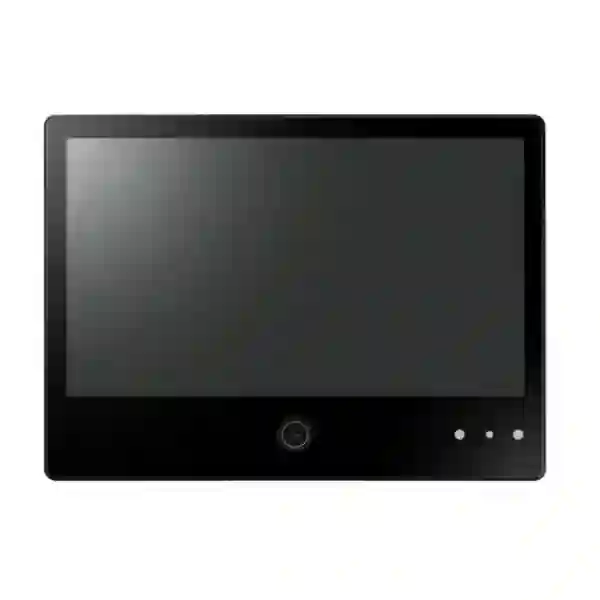
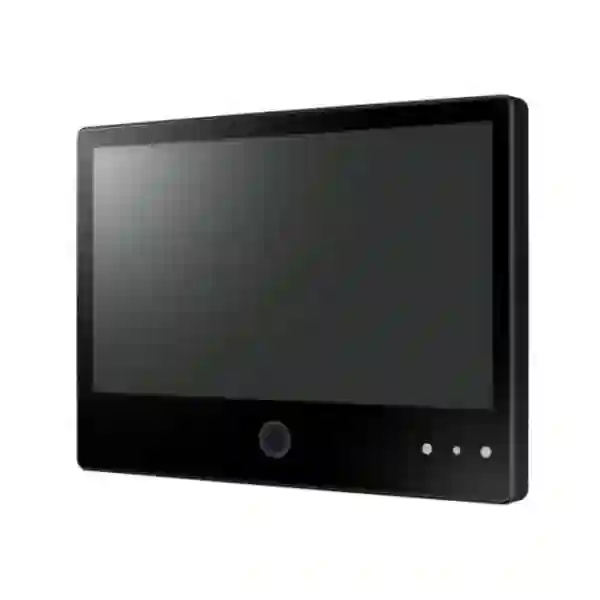
Hanwha SMT-1031PV 10.1-Inch AI Public View Monitor
A compact black security display with a built-in 2MP AI camera, visible visitor-awareness features and configurable analytics. Assess it for indoor entrances, reception locations and other public-facing positions where screen visibility and a well-planned camera view both matter.
Need to evaluate a specific deployment? Request an exact-model quotation that confirms power accessories, mounting, recording requirements, system compatibility and local commercial terms. Product availability and pricing are not assumed.
Key specifications at a glance
| Product type | AI public view monitor, black |
|---|---|
| Screen | 10.1-inch LED; 1024 × 600; 500 cd/m² |
| Built-in camera | 2MP CMOS; 3.06 mm fixed lens; F1.6 |
| Field of view | 107.7° horizontal / 59.0° vertical |
| Analytics | Person/face detection; line/area events; counting and heatmap |
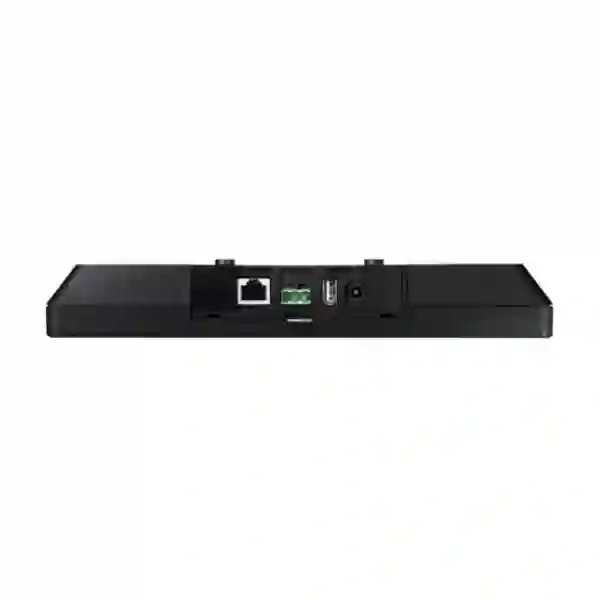
| Network | RJ-45 10/100BASE-T; SUNAPI; ONVIF S/G/T/M |
| Power | IEEE 802.3at PoE+ or 24V DC; 14 W listed |
| Local storage | One microSD/SDHC/SDXC slot, up to 256 GB |
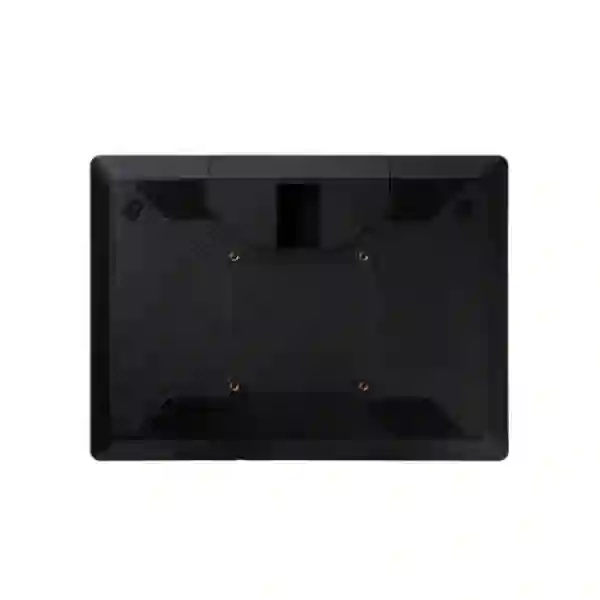
| Mounting | VESA 75 × 75 mm |
| Environment | 0 to +40°C; 10–80% RH, non-condensing |
Published manufacturer specifications are subject to revision. Confirm the exact variant, current documentation and the equipment supplied with the quotation.
What this AI public view monitor is designed to do
A public view monitor places a live view of a camera in a position where customers, visitors or staff can see it. The aim is not simply to add another screen to a security room. It is to make surveillance awareness visible at the point where people enter, wait or pass through a managed space. This model combines the display and camera in one compact assembly, reducing the need to coordinate a separate display, camera and their viewing alignment for a straightforward public-view position.
The screen can present a visitor-facing image and customized messaging. A person approaching the unit can understand that the area is subject to monitoring, while an authorized operator can configure camera and event settings over the network. Those functions are complementary: the display communicates with people at the premises, and the camera contributes an observable view and analytics to a broader security process. Neither function replaces appropriate staffing, recording policy or response procedures.
For buyers, the most useful first question is where the unit will be seen, not merely how many megapixels it contains. Consider the entrance sightline, expected approach distance, lighting direction, network access, power source and desired message. A compact 10.1-inch panel is useful at a close-range decision point; it is not a substitute for a large overview screen intended to be read from the opposite end of a wide hall.
Where it can fit in a Tanzania project
The monitor suits consideration for indoor retail entrances, reception desks, customer-service points, controlled-access lobbies and corridors where a small public-facing display is practical. In a shop, for example, a monitor mounted near a door can show visitors a camera view and a clear recording-awareness message. At a reception point, an operator may prefer a restrained logo or standard message alongside the image. The exact deployment should be chosen to suit how people move through that particular site.
In queue-oriented environments, the analytics capabilities may help operators examine movement patterns rather than relying only on general observation. That does not mean an analytics metric is automatically accurate in every layout. Camera height, overlap between people, obstructions, reflections, illumination and event configuration affect the usefulness of counts or movement information. A small pilot at the actual position is preferable to assuming that a stated feature will produce a particular business result.
For a Tanzania purchase, the commercial review should remain specific to the buyer’s premises. Confirm indoor conditions, a stable supply, the network environment and who will administer user access. No particular city coverage, local stock, delivery time or installed service is assumed here. Request the commercial and deployment details that apply to the intended project before treating this equipment as a confirmed fit.
The combined display and camera: two different specifications
The LED panel and the camera perform different jobs, so their resolutions should not be confused. The display has a published native resolution of 1024 × 600, while the integrated image sensor is a 2MP CMOS camera. A camera’s image resolution does not make the local panel a Full HD display. If a tender specifies a particular screen resolution, check that requirement independently of the image sensor and the video stream.
The 10.1-inch class panel has a 16:9 aspect ratio, a listed brightness of 500 cd/m² and a 500:1 contrast ratio. Published viewing angles are 140 degrees horizontally and 120 degrees vertically. Those figures provide a useful starting point for sightline planning, but visibility still depends on mounting position, reflections, ambient light and the size of the on-screen message. Text that appears clear during bench testing may be difficult to read after installation if the unit is too high or angled away.
The display is specified for 16.7 million colors and a 20 ms response time, with a published panel life figure of 50,000 hours. That life figure is a panel specification rather than a promise of an installed system’s lifespan. Power conditions, environment and maintenance all influence the practical ownership experience, so use the stated rating as one input to a project assessment, not as a replacement for equipment-care planning.
Integrated 2MP camera and field of view
The built-in network camera uses a 1/2.8-inch 2MP CMOS image sensor and a fixed 3.06 mm lens. Hanwha Vision specifies an F1.6 maximum aperture and an approximately 107.7-degree horizontal, 59-degree vertical and 126.7-degree diagonal field of view. This comparatively broad view can be useful for an entrance or nearby customer-facing area, but the outcome depends on how far the mounting point is from people and what must be visible in the scene.
A fixed lens means framing should be planned physically rather than relying on a changeable optical zoom. Before fixing the unit to a wall or bracket, test the expected field of view using the actual approach path. Check where a person first enters the image, where faces or body outlines may be occluded, and whether the screen itself remains legible. If a location calls for a long-distance identification image or specialist coverage, evaluate a dedicated camera arrangement separately.
The published camera data includes a color minimum illumination of 0.03 lux at F1.6 under specified exposure conditions. That figure is a laboratory reference point, not a guarantee that every scene will yield usable detail at that light level. Check the site at its dimmest normal operating period, and consider high-contrast areas such as glass doors opening toward bright daylight.
AI analytics: use the right event for the right problem
The manufacturer lists AI-supported classification for persons and faces, with features including object detection, virtual-line crossing or direction and virtual-area events such as intrusion, entering, exiting and loitering. A detection event is a signal produced when configured conditions are met; it should not be interpreted as conclusive evidence of misconduct. That distinction matters in crowded retail areas, where normal customer activity may resemble a programmed rule.
A virtual line may be relevant where the main question is whether movement crosses a defined boundary. A virtual area may be better where the concern is presence within a particular zone. Motion detection can respond more generally to change, while tampering or defocus alerts address different operational conditions. Selecting a narrowly relevant rule usually provides a more understandable response workflow than enabling every available event without a clear purpose.
The unit also lists face-detection display functionality. Detecting that a face appears in an image is not the same thing as recognizing a named individual or authenticating identity. Do not present this monitor as a biometric identification system. Where a procurement requirement calls for identity matching, access authorization or legally controlled processing of personal information, those requirements must be evaluated separately against verified system capabilities and local obligations.
Visible alerts without treating them as a complete security response
Hanwha Vision describes motion- and event-activated LED and audio alarms. These can add an immediate sensory cue when an event rule is triggered. The monitor also supports configurable text overlays, including a default recording-awareness message, giving administrators a way to present a simple, recognizable notice at the viewing point. The value depends on appropriateness: a message should be comprehensible, relevant to the site’s policy and consistent with what the system actually does.
A visual or audible alert is only one part of a security process. Someone must decide what type of event deserves an alert, when to use an audible signal, who receives notifications and what happens after an event is observed. A busy reception area might require restrained alert settings to avoid unnecessary disruption. A controlled entry point might need different thresholds and procedures. Configure those choices during commissioning rather than assuming the default arrangement suits every customer environment.
Avoid promising that the presence of a public view monitor will eliminate theft, prevent intrusion or guarantee improved compliance. It can support visibility, awareness and monitoring, but outcomes depend on placement, operating procedures, staffing and the wider security system. A sensible purchase decision weighs these practical factors alongside the hardware features.
Messages, logo display and image slideshow
The device supports configurable on-screen text and an on-screen logo image, allowing the display to carry a site-appropriate message. For a customer-facing position, the strongest message is often short: an accurate statement about monitoring, a clear instruction or a simple brand identifier. Long paragraphs on a small panel are unlikely to be useful when people are walking past. Consider readability from the actual viewing distance and avoid placing critical text over busy portions of the live image.
Hanwha Vision also lists an image slideshow mode, described as not requiring additional storage for that display feature. This can be relevant when the screen should communicate selected visual information rather than showing only a conventional camera view. It should not be confused with video retention or long-term event recording; those are different functions with their own configuration and storage requirements.
Before finalizing an on-screen layout, review the contrast between words and background, the language understood by visitors and any information the premises must provide about monitoring. Branding should not hide important details needed by an operator, and any recording notice should reflect the site’s actual recording setup. A display mode is a communication choice, not proof that stored footage exists.
People counting, queue management and heatmaps
The listed business-intelligence functions include people counting, queue management and a heatmap based on the AI engine. These can be useful when a site wants a structured way to observe traffic or waiting patterns. However, the meaning of a count must be defined before it is used. For example, a doorway count, repeated passes, groups entering together and staff movement may all require different interpretation depending on the business question.
Queue analysis is most valuable when the camera has an unobstructed view of the intended waiting area. A low mounting position or furniture that blocks part of the queue can make interpretation difficult. Heatmap information reflects observed activity within the camera view and selected analysis settings; it should not be treated as a full-store behavioral study when only a small portion of the premises is visible.
A project manager should agree in advance on what question an analytics output is meant to answer, what constitutes an acceptable test result and how often the configuration will be reviewed. Compare outputs with manual observations during commissioning, including quiet and busy periods. This helps establish whether the installed viewpoint and rules are useful before reports influence staffing or operational decisions.
Image processing for difficult lighting
The camera feature set includes wide dynamic range rated at 120 dB, backlight compensation and digital noise-reduction functions. These technologies are especially relevant when an entry point includes a strong contrast between outdoor light and the interior. In practical terms, the installer can investigate whether the scene settings preserve information in both brighter and darker parts of the view, but should not assume a single configuration works equally well at all times.
Video processing also includes image rotation options, including a hallway-oriented view. This can help when the monitored scene is tall or narrow, provided the selected orientation fits the physical monitor installation and the camera configuration. Rotation settings may affect how a network viewer presents the image, so verify the end-to-end result rather than treating a menu setting as purely cosmetic.
The system lists H.265, H.264 and MJPEG video encoding options with model-specific frame-rate limits. Actual network behavior depends on configured encoding, frame rate, image content and transport conditions. If video is to be used by a recorder or viewer elsewhere, test its stream settings with the intended software or hardware and record the chosen configuration for support.
Network integration and compatibility checks
The monitor provides a 10/100BASE-T Ethernet connection and lists SUNAPI plus ONVIF Profiles S, G, T and M. These standards and interfaces can support integration work, but a profile listing is not a guarantee that every third-party recorder, software platform or advanced analytics feature will operate without configuration. Integration should be validated against the precise receiving system, its software version and the functionality required by the customer.
Start with the simple questions: will the receiving system need live video, events, metadata, recordings or all of them? Is the monitor expected to appear as a network camera? What network addressing, credentials and permissions can be assigned? Will a device-management tool be used, and who will own its configuration? A clear list prevents a buyer from relying on an ambiguous statement such as “ONVIF compatible” without establishing what must actually work.
Plan the unit as a managed network device. Reserve the necessary switch capacity, identify the network segment and define who may access the web interface. Keep a record of authorized integration endpoints and test after firmware changes or changes to the recorder. If the project requires guaranteed interoperability with a specific VMS or NVR, request confirmation for that named combination and the intended event and metadata functions before purchase.
Access control and device cybersecurity
The published security capabilities include secure boot, signed firmware and firmware encryption, with HTTPS communications and multiple network-authentication features. The manufacturer also lists user authentication, measures intended to resist brute-force attacks, IP-address-based access control and audit logs. These are relevant foundations for a professional deployment, but their benefit depends on secure configuration and an organization’s broader network practices.
During installation, replace any default credentials according to official guidance, create appropriate administrator accounts and restrict management access to people who need it. Consider a dedicated or segmented camera network where the site design requires one. Review supported firmware through official channels and establish a maintenance owner who can evaluate updates and their effect on integration. Do not expose administrative interfaces to the internet simply to make remote setup convenient.
Logs, encrypted information and authentication controls should be considered alongside backup configuration, incident response and retention practice. Where the device processes images of people, a customer should decide how video and event data will be accessed, how long it will be kept, and how requests or incidents will be handled. Device security features assist this work; they do not replace organizational responsibility.
Power planning: PoE+ or 24V DC
Hanwha Vision specifies IEEE 802.3at PoE+ and 24V DC as power options, with listed power consumption of 14 W. For PoE+ deployment, confirm that the selected switch or injector can provide the required standard and that its available power budget accounts for all connected devices. A network socket is not necessarily a PoE+ power source, and a switch with many ports can still have an insufficient shared PoE budget.
For 24V DC operation, the required power adapter is not included according to the manufacturer’s product information. The manufacturer identifies SPU-60240 as a relevant adapter reference, but purchase suitability, plug arrangements and supply should be confirmed for the exact procurement. Do not substitute an unverified adapter simply because its connector appears similar. Follow manufacturer electrical instructions and local site safety procedures.
At locations where utility interruptions are a concern, discuss the power continuity strategy with the buyer. A backed-up network switch, appropriate UPS and protected network infrastructure may matter more than the display’s standalone consumption figure. A power design should consider network equipment, any recorder, the monitor and recovery behavior together. Confirm these details before specifying a complete system.
Mounting, enclosure and operating conditions
The black unit measures approximately 245.5 × 178.2 × 35.5 mm without a stand and weighs about 900 g. Its published mounting pattern is VESA 75 × 75 mm. These details help with early bracket selection and space allocation, but do not establish the suitability of an arbitrary support surface. Use mounting hardware appropriate to the wall, support structure and manufacturer’s instructions, with attention to cable access and serviceability.
The specified operating range is 0 to +40 °C and 10% to 80% relative humidity, non-condensing. This is particularly relevant when selecting a position in a warm indoor environment. Avoid assuming the device is weatherproof or suited to direct rain, exposed outdoor walls or persistent condensation. If a location experiences extreme temperature, direct sun or moisture, evaluate the conditions at the mounting point and choose equipment appropriate for them.
Installers should consider how visitors approach the display, whether it can be accidentally struck, whether a person can tamper with cables and whether the lens can be obscured. A serviceable installation allows authorized personnel to inspect, clean and adjust the unit without disturbing surrounding fixtures. Mounting height also affects both the readability of the panel and the usefulness of analytics, so design for both functions rather than treating either as an afterthought.
Event recording and removable media
The specification lists one microSD/SDHC/SDXC slot with support for media up to 256GB. This gives the designer a local edge-storage option, subject to compatible card selection and the recording configuration. The presence of a slot does not mean a card is included or that a particular retention period can be promised. Retention depends on compression, activity, resolution, frame rate, recording schedule and how events are captured.
The camera features describe event-triggered recording to compatible card storage or NAS arrangements. If the buyer needs continuous evidence retention, investigate that need explicitly instead of assuming event-based storage will fulfill it. A recording policy should define the required footage, retention period, playback process, user roles and recovery method after power or network interruption. These are system requirements, not simply product features.
Before handover, trigger a controlled test event, verify that it was recorded as intended and confirm that an authorized person can retrieve it. If recording to external infrastructure is planned, confirm network reachability, storage permissions and capacity. Where the camera view includes identifiable people, protect footage appropriately and review applicable privacy and workplace practices for the premises.
Alarm input, output and notification workflows
The published interface includes one alarm input and one alarm output. The camera event options also list notifications and event-related actions, which can be useful when a wider system needs to react to configured activity. The correct integration depends on the intended electrical connection, event logic and receiving equipment. The existence of an alarm terminal alone does not establish compatibility with every siren, access-control panel or external device.
Define each event before wiring or configuring alerts. An event that sends an email, saves a snapshot or activates an external response needs a recipient, an escalation procedure and a clear purpose. It should also be clear which alerts are informational and which require timely investigation. Too many low-value alarms can reduce operator attention; overly restrictive rules can miss relevant activity. Commissioning should compare expected and observed behavior.
When alarms depend on network services, verify the required connectivity and the security of any accounts or destinations used. Avoid embedding personal credentials in shared project documents. A documented test matrix covering motion, intrusion, network interruption and any connected alarm contact can make future support easier. Re-test after network or firmware changes that alter a dependency.
Commissioning and the first operational test
A sensible commissioning sequence begins with the environment: check mounting stability, power source, cable integrity, network access and screen visibility. Next verify the camera scene, time settings, administrator access, firmware status and the intended message. Test image quality under representative lighting, including the brightest and darkest routine operating conditions. Record the chosen display mode and configuration so the unit can be restored consistently after maintenance.
Then configure only the analytics and alarm events that have a defined operational purpose. Walk the intended crossing line or occupy the intended detection zone to test that the event is produced, and repeat tests where traffic is dense or sightlines are imperfect. Confirm that the LED, audio or on-screen responses match the premises’ desired behavior. Operators should understand what an alert means and what it does not mean.
Finally, test any downstream software or recorder and the retrieval of any intended recordings. Document network details securely, train authorized users and agree who will own routine maintenance. A handover checklist is more valuable than a demonstration in which a single test succeeds once. The aim is repeatable behavior that the buyer can verify after installation changes.
Choosing a public-view location with useful sightlines
An entrance installation should consider how people enter the camera view and when they are able to notice the monitor. Placing the panel so high that visitors cannot read a message may undermine the public-view purpose. Placing it too low could expose the hardware to accidental contact or make the camera view less useful. A marked-up site photograph and temporary mounting test can resolve these tradeoffs before permanent fixing.
Reflections, glazed doors and changing daylight can influence both the live image and the perceived panel contrast. Test the actual message rather than judging the blank screen. Text that is concise, high contrast and positioned away from important image content is generally easier to understand at a glance. If a long disclaimer is needed, provide it separately at a suitable location instead of attempting to fit it all on the monitor.
Review how signage, access-control devices, shelving, partitions and temporary fixtures may affect the installation. A queue barrier moved after commissioning can change the observed scene. Agree on an owner who will reassess the location if the premises are remodeled. The physical context is a continuing part of system performance.
Use cases to evaluate before requesting a quote
For a small shop entrance, the most important questions may be whether the live view is sufficiently wide, the public-view message is easy to see and the display can be powered from the planned network cabinet. Event alerts may be helpful, but only if someone has a reasonable response process. A simple setup with reliable operation can be more useful than a complicated combination of analytics rules that nobody monitors.
For a reception area, prioritize an appropriate tone and a clear viewing position. The ability to display customized text or a logo may matter as much as recording functionality. The camera’s field of view should be assessed against the actual desk layout, not an ideal drawing. If the organization needs a conventional reception-information screen, confirm whether this security-oriented unit is genuinely suited to that communication requirement.
For a queue or corridor, study the geometry of movement and whether the monitor can observe the relevant area without major blind spots. People counting and queue-related functions may be worth testing, but the analytics should not be sold as a guaranteed staffing optimizer. For high-security or expansive premises, a PVM is generally one component within a wider camera, access and response design.
How to compare this model with alternatives
A conventional CCTV monitor displays an image delivered by other equipment. This AI public view monitor has an integrated camera and is intended for visitor-facing awareness as well as network-camera functions. That distinction matters for budget, wiring and the intended operational experience. If the sole requirement is to display multiple existing feeds at a security desk, a standard monitor and suitable video output equipment may be a more appropriate category to assess.
A standalone network camera may be better when there is no need for a public display, when a specialized lens is required or when the camera must be mounted in a position that people cannot readily see. Conversely, an integrated public-view unit may simplify the physical arrangement at a short-range entrance or reception point. The choice should be driven by location and purpose, rather than by the belief that combining functions automatically makes one product superior.
If a project requires a larger visitor-facing image, compare screen size and viewing distance first. If it requires wide-area forensic detail, compare camera positioning, optics and recording design. If it requires identity verification, do not mistake a face-detection indicator for recognition. These distinctions help avoid purchasing the wrong equipment category and discovering the gap during installation.
Buyer checklist: what to confirm before procurement
Start by specifying the exact black-model reference SMT-1031PV and the required quantity. Record the intended mounting location, panel visibility, desired camera viewpoint, and whether a 10.1-inch display is large enough. Identify whether the objective is a visible recording-awareness message, operator review of video, event-driven alerts, traffic analytics, or some combination. Different objectives create different acceptance tests.
Confirm the power arrangement: an IEEE 802.3at PoE+ source with a sufficient port and overall budget, or an appropriately specified 24V DC supply purchased separately. Ask whether a compatible VESA bracket, installation materials and a recording card are required. Verify any network recorder or VMS integration with the exact software version and event functions. Request a test plan for any analytics values the organization expects to rely on.
Finally, clarify commercial terms through the relevant sales channel: the precise quotation, any accessories, available supply, delivery arrangements and applicable warranty terms. None of those details can be inferred from the model number or a manufacturer’s general brochure. Keep the quotation, installation scope and product specification aligned so a buyer knows exactly what is and is not included.
Maintenance, troubleshooting and responsible ownership
Routine care begins with the basics. Inspect that the camera view is not blocked, the screen remains readable and the mounting hardware is secure. Clean according to the manufacturer’s instructions using materials appropriate for electronic displays and camera surfaces. Check that vents remain unobstructed and that the unit is not subjected to moisture or excessive heat. Record recurring issues instead of repeatedly changing settings without documenting their effect.
For a blank screen or an unreachable camera, investigate the power path, PoE budget, cable and switch status before assuming a hardware failure. For incorrect event behavior, check the configured region, light changes, obstruction and recent scene changes. If footage is missing, review the recording policy, media status, available capacity and permissions. For integration faults, compare actual software versions, authentication and network access with the last working configuration.
Maintain administrator ownership, a secure record of configuration and a planned review of firmware and account access. Where the monitor captures people, ensure the organization has a clear reason for its monitoring and appropriate rules for using and retaining images. A well-maintained public-view monitor is one that remains understandable, testable and appropriately governed throughout its use.
Frequently asked questions
Is the SMT-1031PV an ordinary 10-inch CCTV screen?
No. It is an AI public view monitor combining an LED display with a built-in 2MP network camera. Its visitor-facing display, message and alarm features are core reasons to consider it. A conventional monitor used only to show video from a recorder serves a different purpose. Check the workflow before selecting equipment solely by screen size.
Does the 2MP camera mean the display is Full HD?
No. The camera sensor is specified at 2MP, while the local display resolution is 1024 × 600. Camera image specification and display pixel count are separate. If a project requires a Full HD visitor-facing panel, this particular panel specification should be compared carefully with that requirement. Ask for a live demonstration where text clarity is important.
Can it be powered through a network cable?
Yes, the published power options include IEEE 802.3at PoE+. The network switch or injector must actually support the required power standard and available budget. Having an Ethernet port alone does not mean a switch can supply power. Validate cable condition, the PoE source and the expected load as part of the power plan.
Is the 24V power adapter included?
The manufacturer states that the separate DC power adapter is not included. Its information identifies SPU-60240 as an adapter reference. Verify the required accessory, local electrical fit and the contents of the supplied package in the quotation. Do not assume that a monitor order automatically includes a DC power supply or mounting hardware.
Can the screen show a logo or recording-awareness message?
Yes. The published features include configurable text overlay, on-screen custom logo images and an image slideshow option. Keep the message short enough to be understood from the intended viewing position. Confirm that any monitoring or recording statement accurately reflects the actual installation, and check readability under day and night lighting.
Does face detection identify named customers?
No such identity-recognition capability should be assumed from the listed face-detection box. Face detection indicates that the camera can detect faces in a scene; identity matching is a distinct function requiring separate verification and appropriate safeguards. Do not design a customer-identification workflow on the basis of face-detection wording alone.
What analytics are listed for this monitor?
The manufacturer lists AI-supported object and face classification, motion and area events, crossing or directional rules, tampering and defocus detection, and business-intelligence functions such as people counting, queue management and heatmaps. Availability within a specific workflow depends on configuration and integration. Test any important event at the actual site before using it for operational reporting.
Can the camera work with a third-party video management system?
The camera publishes SUNAPI and ONVIF Profile S, G, T and M support. These interfaces make integration evaluation possible but do not prove that a particular recorder or VMS can use every event, stream or metadata field. Ask the system integrator to confirm the exact receiving product, software version, permissions and required functionality.
Can it record directly to a memory card?
The specification lists one compatible microSD/SDHC/SDXC slot with capacity up to 256GB and describes event-recording options. A card must be selected and supplied separately unless the quotation explicitly says otherwise. Verify recording configuration, retrieval and retention during commissioning. A card capacity does not by itself determine a guaranteed number of recording days.
Is the monitor suitable for outdoor installation?
The published operating conditions are 0 to +40 °C and 10% to 80% relative humidity, non-condensing. These specifications do not establish a weatherproof outdoor rating. Protect the unit from rain, condensation and unsuitable heat exposure, and assess the real mounting environment. For exposed areas, select equipment specifically supported for those conditions.
How is it mounted?
The black 10.1-inch unit is listed with a 75 × 75 mm VESA mounting pattern and an approximate weight of 900 g without a stand. Verify the supporting structure, bracket suitability, hardware, service access and camera sightline. Mounting should follow the manufacturer’s instructions. The correct location balances camera coverage with public readability of the display.
What is the first thing to test after installation?
Verify power, screen visibility and the camera’s scene, then test the configured message and a representative analytics event. If an alarm, recorder or external viewer is involved, confirm its actual response and any footage retrieval. Document the test results and the authorized administrator account. A successful live picture alone is not a complete acceptance test.
Can FourTeck Tanzania provide a price or stock confirmation?
A price, delivery date, stock status, warranty and installation scope require a current project-specific quotation; they are not supplied by a product datasheet. Request a quote for the exact SMT-1031PV black model, quantity and accessories, explaining whether PoE+, DC power, mounting and recording are required. This avoids assumptions about what is included.
What should I provide to request a suitable quote?
Provide the expected quantity, an outline of the premises, the intended mounting position, whether the display will be close to visitors and the network and power arrangement. State whether you need simple public-view messaging, alerts, recording or analytics reports. Note any existing recorder or VMS. These details enable a more useful compatibility and accessories discussion than a model name alone.
Request a Hanwha SMT-1031PV quotation
Share your required quantity, installation setting and intended use. Specify whether the project needs PoE+ infrastructure, a 24V DC adapter, a VESA bracket, removable storage, event integration or connection to an existing recorder. Ask for confirmation of the exact black model and a scope-specific quote for Tanzania.
Discuss mounting suitability, compatibility, technical acceptance tests and commercial terms before ordering. A clear project brief helps establish which hardware and configuration tasks must be included, while avoiding unverified assumptions about supply, price or installation services.




Reviews
There are no reviews yet.