
Hanwha Vision | CCTV Display
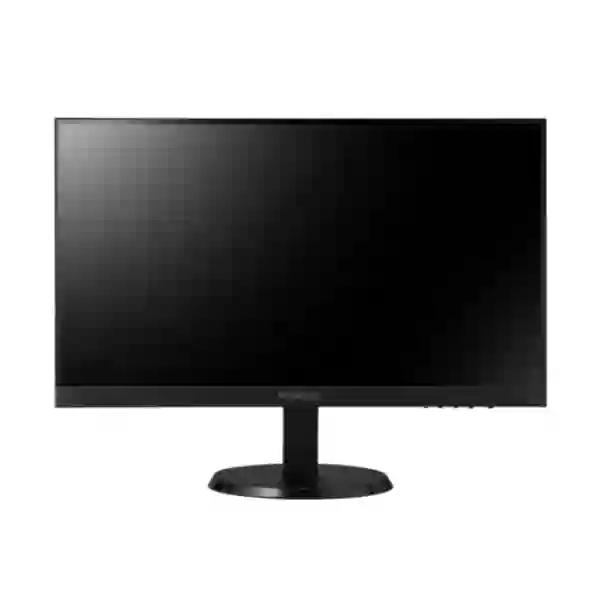
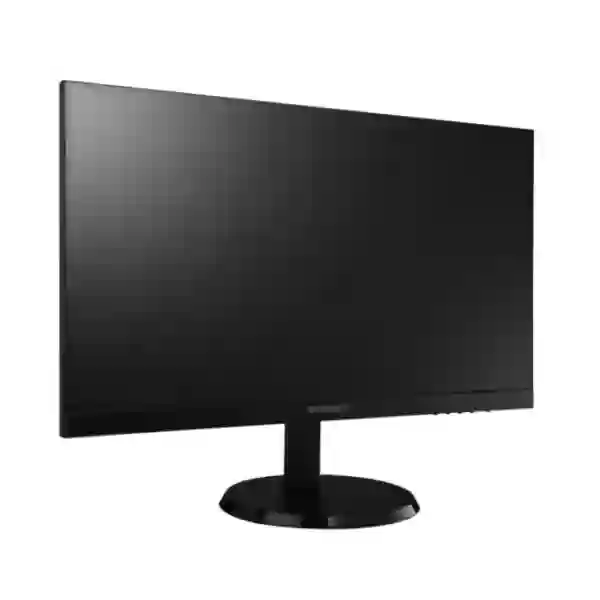
Hanwha SMT-2212 22-Inch Full HD LED Surveillance Monitor
Need a compact monitor to view CCTV footage from an existing recorder? The Hanwha SMT-2212 is a 22-inch class, 1920 × 1080 Full HD LED display with HDMI and VGA inputs, a supplied stand, VESA mounting compatibility, and a manufacturer-stated design for 24/7 operation. It is suitable for evaluation as a dedicated viewing screen wherever the video source, room environment, and operator workflow match its specifications. Ask for confirmation of exact-model availability and compatibility before purchasing for a Tanzania project.
Quick suitability check
The monitor is a display, not an NVR, DVR, IP camera, or video decoder. Choose it when a compatible recorder or PC can provide the required HDMI or VGA output and a Full HD screen is adequate for the viewing task. If you require native 4K display, direct IP-video connection, a weatherproof enclosure, or confirmed stock in Tanzania, check those requirements before accepting this model as the solution.
Useful for
Compact security desks, reception viewing points, and compatible CCTV recorder outputs.
Check before buying
Current regional availability, output mode, room conditions, cabling, mains adapter, and mounting.
Verified manufacturer specifications
| Display type | LED monitor |
|---|---|
| Screen size | 22-inch class |
| Max resolution | 1920 × 1080 at 60 Hz |
| Aspect ratio | 16:9 |
| Brightness | 250 cd/m² typical |
| Contrast | 3000:1 typical; 2000:1 minimum noted |
| Viewing angles | 178° horizontal / 178° vertical |
| Response time | 6.5 ms typical |
| Display colours | 16.7 million |
| Video inputs | 1 × HDMI; 1 × VGA |
| Panel-life specification | 30,000 hours |
| Operating design | Designed and tested for 24/7 operation |
| Power input | DC 12 V, 5 A; adapter included |
| Power consumption | 30 W |
| Operating temperature | 0°C to +40°C |
| Operating humidity | 10–80% non-condensing |
| VESA pattern | 100 × 100 mm |
| With stand (W × H × D) | 491.9 × 371.4 × 186.7 mm |
| Without stand (W × H × D) | 491.9 × 289.4 × 36.1 mm |
| Weight | 2.59 kg |
| Cabinet colour | Black |
Figures above are based on the Hanwha Vision product and support listings for the exact model. Verify the supplied unit and accompanying manufacturer documentation before final installation. No stock, price, warranty, local service coverage, or regulatory approval is inferred from these specifications.
What the SMT-2212 does—and what it does not
The Hanwha SMT-2212 is a dedicated video display rather than a complete CCTV system. Its job is to show a picture produced by another device, such as a network video recorder, digital video recorder, computer, or compatible video decoder. A connected recorder controls camera selection, grid layouts, recorded playback, and export functions. This distinction matters when planning a security desk: a monitor may be the most visible part of the installation, but it cannot replace the recorder, cameras, network infrastructure, storage, or monitoring software. Check the whole signal chain before selecting a screen.
Choose the SMT-2212 when the operator needs a compact Full HD viewing surface with conventional HDMI or VGA inputs and a manufacturer-stated 24/7-use design. A single camera feed or a recorder-generated multiscreen grid can be displayed, provided the source supplies a supported signal. Do not assume the panel itself supports network protocols, camera discovery, video analytics, alarm processing, recording, PoE, or remote access. Those are functions of other products, if present. For procurement in Tanzania, clarify whether the requirement is display only or a complete CCTV monitoring station.
The sensible buying question is not simply whether the monitor can display surveillance pictures. It is whether its size, available inputs, operating environment, and mounting arrangement match the operator’s daily work. A desk used for quick entry checks has different demands from a control room showing many small cameras. Identify the number of simultaneous views, how far the operator sits, whether text such as timestamps must be readable, and the recorder’s actual output mode. Those answers determine whether this 22-inch model fits or whether a larger or higher-resolution display would be more appropriate.
Full HD image resolution explained for CCTV buyers
The native maximum display resolution is 1920 × 1080 pixels at a supported 60 Hz signal. Full HD is a familiar format for recorder outputs and many security workstation desktops. It offers clear handling of conventional menus, live-video tiles, playback controls, and status text when the video source and software are set correctly. The 16:9 aspect ratio suits widescreen layouts without unusual stretching. A recorder that presents a 1080p interface can therefore be a natural candidate, although actual compatibility should still be tested rather than assumed from the connector type alone.
A monitor’s resolution should not be confused with a camera’s recorded resolution. A 4 MP, 5 MP, or 4K camera may capture more detail than a 1080p display can present simultaneously at native pixel scale. The recorder can scale the image down for live viewing while retaining higher-resolution recordings elsewhere, depending on the system. When an incident needs close examination, operators may need to zoom within the viewing software, review the original recording, or use another suitable display. Avoid promising that a Full HD screen reveals every detail present in high-resolution camera footage.
Multicamera grids require particular attention. Showing four, nine, or sixteen cameras on one Full HD screen divides the available display space into smaller tiles, and individual labels or faces may become hard to evaluate at a normal viewing distance. The exact clarity depends on camera framing, stream quality, recorder interface, and scaling. For active incident response, consider a primary enlarged camera view or more than one display rather than relying on a densely packed mosaic. A site walkthrough with sample camera scenes is more valuable than assuming that a nominal diagonal size will suit every operator.
HDMI and VGA connections: check the output first
The verified video interface comprises one HDMI input and one VGA input. Both are listed as accepting up to 1920 × 1080 at 60 Hz. HDMI is often the straightforward choice for a modern recorder or monitoring PC with a matching output. VGA can help when an older recorder or computer still provides an analog video output. Neither connector confirms universal recorder compatibility, and the monitor should not be described as having DisplayPort, USB-C video, Ethernet, SDI, or a built-in network camera interface; those are not listed among the manufacturer’s video inputs.
Before purchase, inspect the actual output ports of the NVR, DVR, decoder, or PC instead of relying on a model family name. Note the intended output resolution and refresh rate, the available connector, the practical cable route, and whether the output must feed additional monitors. A source configured for 4K or a nonstandard mode may need its output changed to 1080p60 or another mode accepted by the display. If a converter is required, its compatibility, power needs, and effect on reliability become separate parts of the installation. An adapter alone is not a guarantee that two devices communicate correctly.
A good installation test uses the final recorder and cable, not just a laptop borrowed for a quick demonstration. Connect the source, select the correct monitor input, confirm a stable full-screen image, and check whether on-screen text remains readable after a reboot. If the recorder has separate preview and configuration outputs, verify the specific one being used. Also confirm how the system behaves after power interruptions. These practical checks are especially helpful for a security station that must be ready whenever a guard starts a shift or an event requires immediate review.
Designed for continuous monitoring, not an uptime guarantee
Hanwha states that the SMT-2212 was designed and tested for 24/7 operation. That makes the model relevant to security reception desks and other locations that may keep a surveillance view open throughout the day and night. This statement describes the product’s intended operational use; it does not guarantee uninterrupted service or remove the need for suitable power, ventilation, cleaning, and inspection. A monitor can only display a live image when the source device, signal path, and electricity supply are functioning. A full monitoring plan considers all those components together.
The specified panel life is 30,000 hours. Buyers should read this as a manufacturer-stated panel characteristic, not as a promise that the entire device will remain operational for exactly that duration. Real-world service conditions, usage patterns, electrical events, and maintenance can affect equipment experience. Nor should panel-life hours be treated as the duration of a warranty. Ask for the applicable regional service policy and any remaining support options for the exact model. Avoid using a nominal panel-life figure as the sole reason to choose one display over another.
For a round-the-clock site, set up simple operational checks. Confirm that the monitoring view is visible at shift handover, cables and adapter connections are secure, the image has not been accidentally switched to the wrong input, and the recorder still supplies its selected output. Keep dust from restricting ventilation and position the screen where staff can use it without leaning across equipment. If the display becomes critical to site operations, design an alternative viewing method or spare-device arrangement at the system level. A 24/7-rated screen is one part of resilience, not the complete resilience plan.
Brightness, contrast, colour and viewing angle
The manufacturer lists typical brightness of 250 cd/m², typical contrast of 3000:1, and a minimum contrast figure of 2000:1 in its feature summary. These figures describe display characteristics under specified conditions rather than guaranteeing visibility in every room. Bright daylight striking the panel, reflections from a door, or an overhead luminaire can reduce practical legibility even when the monitor’s published brightness appears sufficient. Position the screen to limit glare, and evaluate the actual camera image under daytime and nighttime lighting conditions before approving an installation layout.
The specified viewing angle is 178 degrees horizontally and vertically. This is useful when more than one person occasionally needs to see the same live image or when a guard cannot sit perfectly centered at all times. However, wide-angle specifications do not mean that fine details remain equally easy to read from every position and distance. Operator sightlines, seating height, image contrast, and text size still matter. For a wall-mounted unit, consider where the primary viewer will stand or sit and whether a fixed mount or adjustable bracket offers a better practical position.
The current manufacturer listing specifies 16.7 million display colours and a typical response time of 6.5 ms. These are ordinary display specifications, not a claim that the monitor independently improves camera colour accuracy, reconstructs missing image details, or guarantees object identification. The image an operator sees also depends on camera exposure, compression, source output, scaling, and room conditions. If colour evaluation is particularly important for a workflow, test representative recordings through the complete system. The SMT-2212 should be evaluated as a viewing endpoint rather than as an image-analysis device.
Where a 22-inch screen makes practical sense
A compact monitoring position is one of the clearer matches for this product. At a reception desk, a guardhouse counter, or a small security office, an operator may need to keep a gate, corridor, or entrance visible while also using a desk phone or access-control terminal. The SMT-2212 provides a Full HD monitor without demanding the wall space of a large television. Whether it actually fits depends on furniture dimensions, cable routing, the operator’s viewing distance, and the information shown in the recorder interface. Measure the site rather than judging from a product photograph.
The same screen can be useful as a secondary display in a larger monitoring arrangement. An operator might reserve the principal larger monitor for a broad camera grid and use a smaller screen for a selected entrance or the recorder’s management interface. That arrangement is created by the recorder or computer, not by the monitor itself; check whether the source device supports the desired number and combination of outputs. It is also important to consider how staff switch between views, acknowledge events, and review recordings without losing sight of the location that needs attention.
A small screen is not automatically a better choice because the number of cameras is small, nor is a larger screen automatically required because the recorder supports many channels. Camera placement, image framing, operating distance, and workflow determine what is comfortable. If staff must read small licence-plate text, examine facial detail from several tiles, or follow complex maps, a larger display or dedicated investigation workstation may be preferable. Use a trial scene with real camera footage to understand what the end user can actually identify at the intended monitoring distance.
Planning a CCTV workstation or security desk
Start with the operator’s task rather than the catalogue entry. List the camera feeds used most frequently, whether the screen must remain active overnight, and what an operator needs to do when an alarm or visitor arrives. Some sites need a continuous overview; others need rapid access to one critical camera and occasional recorded playback. Ask whether the monitor should show only video or also menus, dashboards, and timestamps. These answers help determine whether Full HD at 22 inches is enough and where the screen should be positioned in relation to the person using it.
Next, sketch the equipment layout. Note the recorder or PC location, cable access, planned power points, desk depth, and the preferred sightline. The SMT-2212 is supplied with a monitor stand according to Hanwha, but the manufacturer does not promise every adjustment feature that might be found on an office monitor. Verify any tilt, swivel, or height-adjustment requirements against the exact hardware before design approval. If a different mounting style is necessary, plan a compatible VESA solution and ensure it can be installed safely on the intended surface.
Finally, document the handover requirements. The person responsible for the CCTV system should know which monitor input is in use, which device sends the video signal, how the recorder output is configured, and what to check when the display is blank. Keep a record of the installed cable type, mounting arrangement, adapter details, and model reference. Clear documentation helps staff distinguish a screen problem from a recorder or camera problem. It is also useful when deciding whether an older display should be replaced with the same form factor or with a more suitable current model.
Wall mounting, VESA fit and stand installation
The SMT-2212 has a listed 100 × 100 mm VESA mounting interface. This enables consideration of compatible monitor brackets where the mounting hardware, screw requirements, load capacity, and wall structure are suitable. The VESA pattern by itself does not establish that any available wall bracket will be safe or fit the site. Inspect the monitor’s mounting points and follow the manufacturer’s installation guidance. For a wall-mounted CCTV screen, the installer should also account for cable bends, adapter placement, servicing access, and the ability to see the image without glare.
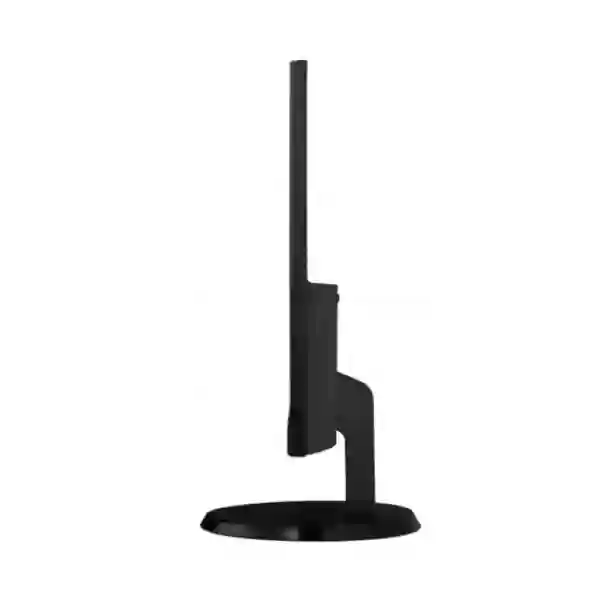
With the supplied stand, the published overall dimensions are approximately 491.9 mm wide, 186.7 mm deep, and 371.4 mm high, expressed here in width, depth, and height order for desk planning. Hanwha’s listed dimensions in width, height, depth order are 491.9 × 371.4 × 186.7 mm. The panel without the stand is listed as 491.9 × 289.4 × 36.1 mm in width, height, depth order. Dimensions do not replace an on-site fit check, particularly when an HDMI plug, mounting arm, or power lead needs clearance behind the display.
The monitor weight is listed as approximately 2.59 kg. The chosen arm or bracket must safely accommodate the equipment and any accessories, with the wall or furniture able to carry the assembly according to mounting-hardware instructions. Avoid positioning the display where people can hit it while passing, where it obstructs a door, or where cleaning staff may pull on cables. If an adjustable arm is part of the plan, examine how the arm moves and whether movement strains the HDMI, VGA, or power connection. A sound installation allows routine access without putting the monitor or its cables under mechanical stress.
Power adapter and electrical planning in Tanzania
Hanwha specifies DC 12 V, 5 A input and states that an adapter is included with the monitor. The listed power consumption is 30 W. Those two numbers describe different things: the adapter rating is its power-delivery specification, while the product’s stated consumption is the manufacturer’s operating figure. Do not substitute an arbitrary adapter because its connector appears to fit; voltage, polarity, connector dimensions, and current capacity must all be suitable. The original adapter and its label should be checked during receiving and installation.
For a Tanzania deployment, confirm the exact supplied adapter’s AC input range, mains plug, and any required compliant connection arrangement before commissioning. Do not assume a particular regional plug is included, and do not infer that a generic travel adapter solves electrical safety or grounding requirements. Where the monitoring station is important, review power quality, cable protection, and backup design with the responsible installer. A suitable UPS may support the monitor and recorder during brief supply interruptions, but its size should be calculated from the full equipment load rather than this monitor’s wattage alone.
The 30 W specification can help with a preliminary power budget, although actual consumption depends on operating conditions. If a device drew 30 W continuously, it would use about 0.72 kWh over 24 hours and about 21.6 kWh over 30 days. These are illustrative arithmetic figures, not measured site consumption, a Tanzanian electricity tariff, or a forecast of monthly costs. The important practical point is to include all essential devices—recorders, switches, cameras where applicable, networking equipment, and monitor—in a realistic continuity plan. A display powered by backup electricity is of little use if the source feeding it has shut down.
Temperature, humidity, ventilation and placement
The manufacturer’s published operating temperature is 0°C to +40°C, with a specified operating relative humidity range of 10% to 80% non-condensing. These are equipment-environment limits, not a statement that every indoor or outdoor location in Tanzania will fall within them. Some rooms can become significantly warmer than the surrounding area because of sunlight, poor airflow, nearby power equipment, or locked cabinets. Measure or assess the actual installation location rather than assuming that an indoor room is automatically suitable for continuous electronic equipment operation.
The non-condensing humidity requirement means the manufacturer has not rated the monitor for conditions in which moisture condenses on the equipment. Avoid directly exposed, wet, or poorly protected locations. A guard post with rain blowing through an opening, a humid unventilated cabinet, or a display mounted near persistent water intrusion needs a different environmental solution. No outdoor weatherproof or ingress-protection rating should be inferred for this monitor. If the system design requires external operation, select an appropriately rated enclosure or display as part of the broader project specification.
Allow ventilation and service clearance around the monitor and its adapter, and keep it away from concentrated heat sources. Leave the operator enough space to use the recorder’s controls and route cables without placing strain on the connectors. If the room is air-conditioned, consider what happens when cooling is switched off outside business hours while the monitor remains powered. An early environmental check can prevent problems that a specification sheet alone cannot reveal. For critical installations, periodic temperature checks near the screen and recorder are a reasonable maintenance practice.
Using the SMT-2212 with an NVR or DVR
A common configuration sends the HDMI output from a compatible NVR or DVR to the SMT-2212. The recorder processes incoming camera streams and produces the image displayed on the monitor. Connect the matching output, set a supported video resolution, and confirm that the display shows the recorder’s live view and configuration menus correctly. The fact that an NVR records 4K cameras does not by itself prove that every output mode will match a Full HD monitor; check the recorder’s available display output settings. Where practical, test the exact recorder-monitor combination before final deployment.
Some older DVRs may offer VGA output, which is why the second input can be useful for replacement projects. However, the presence of a VGA connector does not confirm the available source signal is correct, stable, or appropriately scaled. Use a suitable cable and select the correct input on the monitor. If a site wants both HDMI and VGA sources available, establish how the operator will change between them; do not infer picture-in-picture, simultaneous dual-source display, or automatic multiview functionality unless confirmed for the product. Input selection and video composition are separate features.
If a camera is an IP camera with only a network connection, it generally needs an NVR, PC running suitable software, or compatible video decoder to present a conventional HDMI or VGA image to this monitor. Plugging a network cable into an unrelated adapter is not a substitute for decoding an IP video stream. For sites upgrading from analog equipment, identify each camera, recorder, and output interface individually. That makes it easier to decide whether the monitor can remain in service while the recording system is replaced, or whether the entire viewing arrangement should be updated together.
Cable routes, signal stability and neat installation
A surveillance display should remain readable during routine operations and after equipment restarts. The cable path matters as much as the connector label. Record the distance from recorder to monitor, whether the route crosses doorways or electrical cabinets, and how cables will be secured. Select video cabling and any active extensions according to the source and accessory manufacturers’ recommendations; do not rely on an untested cable simply because it uses an HDMI or VGA connector. If the installation involves a long run, the specification and powered components of an extension system need separate verification.
At the workstation, provide enough slack for normal monitor positioning without leaving cables loose where staff can snag them. Avoid placing connector weight on unsupported sockets, particularly with a wall mount or moving arm. Label the monitor end and source end so a technician can identify the video path quickly. Keep power connections accessible for safe maintenance and avoid running temporary extension leads through normal walking paths. These details are inexpensive to plan and can save a great deal of diagnostic time when a blank screen is reported.
During commissioning, check image stability for a useful observation period and repeat the test after powering the recorder and monitor off and on in the intended sequence. Look for intermittent blackouts, changes in output resolution, shifted VGA images, or unexpected input changes. If the picture fails, isolate the problem logically: source output, signal cable or converter, input selection, power, and finally the display. Do not repeatedly replace monitors without first identifying the failed part of the signal chain. A documented basic test procedure can be handed to site staff along with the installation.
Viewing distance, camera grids and operator comfort
The best viewing distance depends on what the operator needs to read. Large live pictures may be clear from farther away, while recorder settings, timestamps, and small grid tiles can demand closer viewing. Arrange the desk so the user can maintain a comfortable line of sight without twisting their neck to monitor the screen. Try the actual software interface at its intended resolution rather than relying only on sample marketing images. An installation that looks neat in a quotation may still be tiring if the operator repeatedly leans forward to read critical information.
Consider the duration and frequency of viewing. A screen used for brief checks has different ergonomic requirements from one watched for long shifts. The monitor’s frameless-style design and wide viewing angles may help with placement, but they do not solve glare, poorly adjusted seating, or an overcrowded screen layout. Place frequently needed camera views where the operator can find them quickly, and use an alerting workflow appropriate to the recorder or video-management software. It is better to have a clear operating procedure than to depend on a grid of tiny pictures being watched constantly.
When several people need the same overview, stand at their actual positions and evaluate image legibility. A 178-degree viewing-angle specification is not a guarantee that everyone can see a face or number plate on a small tile. If the screen must serve a group briefing, a gate command desk, or a large control room, consider whether another display size or placement would provide better usability. Use the SMT-2212 where its compact format is an advantage, not as a default for every viewing requirement regardless of distance.
Common application scenarios
For a small reception desk, the monitor can show a recorder-generated view of an entrance, waiting area, or loading access point. The value lies in keeping relevant live pictures visible without requiring a large display footprint. The underlying recorder, not the monitor, controls which cameras appear and whether the user can play back an event. Check that the operator can comfortably read names, timestamps, and menu options from the chosen seating position. If a desk also handles intercoms or access control, plan an uncluttered workspace and convenient input access.
In a security office, the SMT-2212 may serve as a primary compact overview screen or a secondary focused view. Multiple-monitor arrangements should be designed around the actual recorder or PC output capability. Two display connectors on this particular monitor do not mean it can create or independently manage two different CCTV views at once. If supervisors want a dedicated entrance feed while officers navigate playback on another screen, the video sources and software must support that workflow. Define this before cable installation and test it with the real equipment.
At a gatehouse or operational counter, environmental limits deserve attention. A monitor used near an open window may face glare, heat, dust, or moisture that a protected office does not. The 0°C to +40°C operating range and non-condensing humidity condition are important checks, especially when equipment runs during unstaffed hours. Where those conditions cannot be maintained, a different protected setup may be necessary. The goal is not to declare one monitor suitable for every type of site, but to match the display to the location and the people using it.
What to verify when replacing an older screen
A replacement project begins with the existing equipment. Note the old monitor’s diagonal size, mounting pattern, physical width, and video connector, then compare these details with the SMT-2212. A screen described as the same nominal size may have different external measurements, stand depth, bezel design, or mount position. If the old unit is fitted inside furniture or a custom panel, the dimensions without the stand may be more important than the marketed diagonal. Verify the 100 × 100 mm VESA pattern and physical clearance rather than assuming a bracket from another model will fit.
Check the recorder’s real output resolution and whether it remembers the setting after reboot. If the previous screen worked through VGA and the replacement will use HDMI, the shift may involve configuration changes rather than merely exchanging a cable. Also inspect the mains adapter and connector so the installer does not mistakenly reuse an incompatible supply. If a site keeps spare screens for emergency replacement, standardise the practical details: supported input, mounting method, replacement cable, and safe power arrangement. A replacement that is difficult to fit during an outage is not an effective spare.
An older system may also expose a broader decision: whether replacing the monitor alone is enough. If staff routinely complain that a camera grid is too small or recorded detail is difficult to inspect, replacing one Full HD screen with another of similar size may not fix the workflow. Review camera quality, recorder outputs, operating desk layout, and the need for investigation playback. Conversely, a simple display fault on an otherwise suitable system may justify a targeted monitor change. Distinguishing those situations prevents unnecessary purchases and avoids leaving the original usability problem unresolved.
Limits to recognise before buying
The SMT-2212 is a Full HD monitor, not a 4K monitor. It provides a stated 1920 × 1080 maximum resolution rather than native display of a 3840 × 2160 image. It has the listed HDMI and VGA inputs, not a confirmed digital IP video interface. It is not documented as a touchscreen, an audio speaker system, a video recorder, a camera, or a computer. These distinctions make the product easier to specify accurately. If a purchasing brief requires any of those functions, request a different, verified solution instead of assuming they can be enabled through configuration.
High brightness for direct outdoor sunlight and resistance to rain or condensation are also not established by this model’s published specifications. It has a 250 cd/m² typical brightness rating and an indoor-style operating environment specification, not a claim of daylight-readable weatherproof performance. Likewise, the 6.5 ms typical response time should not be translated into a promise about event detection or security outcomes. The image displayed is limited by the source stream, camera conditions, software, and human interpretation. Match claims to actual functions rather than adding broad marketing labels.
Finally, availability and service coverage require confirmation. Hanwha’s Canadian product page currently labels the model discontinued and notes that availability may vary by region. That is important procurement context, but it does not establish the stock situation or commercial status in Tanzania. Ask the supplier to verify whether this exact model can be supplied, the condition and completeness of the product, the applicable service terms, and what current alternative would meet the same requirements if necessary. A carefully specified substitute is better than an unverified promise of immediate supply.
Technical specifications at a glance
The following specification values reflect the current Hanwha Vision product and support listings for SMT-2212. They are useful for technical comparison and preliminary system design, but installers should still check the documentation accompanying the supplied unit. Manufacturers can revise details, and accessories or installation requirements may differ by region. Dimensions are shown in the manufacturer’s width × height × depth order. Values such as brightness, contrast, and response time are product ratings and do not guarantee identical performance under every operating condition.
Display: LED monitor, marketed as 22 inches, 16:9 aspect ratio, maximum 1920 × 1080 resolution at 60 Hz. Typical brightness: 250 cd/m². Typical contrast: 3000:1, with 2000:1 minimum stated in the key features. Viewing angles: 178° horizontal and 178° vertical. Typical response time: 6.5 ms. Published display colour specification: 16.7 million colours. Panel life: 30,000 hours. Video connections: one HDMI and one VGA; each is listed for 1920 × 1080 at 60 Hz. Hanwha also states the monitor was designed and tested for around-the-clock use.
General: DC 12 V, 5 A input with adapter included; stated power consumption 30 W; operating temperature 0°C to +40°C; operating humidity 10–80% non-condensing. Dimensions with stand: 491.9 × 371.4 × 186.7 mm; without stand: 491.9 × 289.4 × 36.1 mm. Weight: approximately 2.59 kg. Cabinet colour: black. VESA mounting pattern: 100 × 100 mm. These characteristics are particularly relevant for checking a recorder’s output, planning desk space, choosing the correct wall bracket, allocating power, and assessing the room’s environmental conditions.
Installation and commissioning checklist
Confirm the exact model name and any supplier-provided documentation before treating a proposed display as SMT-2212. Inspect the screen, stand, adapter, and necessary accessories on receipt, with the purchase order used to define what the supplier is actually expected to provide. The manufacturer says an adapter and stand are included, but an installer should not assume every optional mounting bracket or video cable is part of the purchase. Record the monitor’s identifying details for site asset management and keep documentation available to the person responsible for maintenance.
Connect the selected recorder or workstation to HDMI or VGA and confirm that the intended source output mode is accepted. Check the monitor input selection and test the live camera display, recorder menu, and recorded playback workflow. Verify that picture proportions are correct and that the operator can read interface labels and timestamps. If more than one screen is used in the system, test the final display layout rather than an isolated monitor. Check behaviour when the source and display are restarted. A successful one-minute demonstration is helpful, but a functional handover should test the tasks operators perform every day.
Review the physical environment and safety of the finished installation. Confirm the mounting hardware is secure, the adapter suits the site, cords are protected from accidental pulling, and ventilation is unobstructed. If a UPS or surge-protection arrangement is specified, test it according to the relevant device instructions and site policy. Record the final configuration, cable destination, and any unresolved limitations. The person accepting the system should know how to recognise a disconnected signal, how to select the correct input, and whom to contact for technical assistance. These basic checks make future troubleshooting more efficient.
Troubleshooting a blank or unclear image
If the monitor appears blank, begin with the simplest observable facts. Confirm that the correct power adapter is connected and that the monitor shows signs of receiving power. Check the selected video input and inspect the HDMI or VGA connection at both ends. Verify that the recorder or computer is actually running and generating video; a screen may be functioning correctly while its source is off or has changed output mode. Avoid opening the monitor or carrying out electrical repairs without appropriate expertise. A basic check of external connections is safer and more informative than guessing at an internal failure.
If a source menu is accessible, review its display resolution and refresh rate. The SMT-2212 is specified for up to 1920 × 1080 at 60 Hz through its listed inputs. A mismatched output mode, unstable cable, or faulty converter may prevent a correct image. For VGA, analog signal quality and source settings can affect clarity. Where possible, substitute a known-working suitable cable or test the video source with another compatible monitor to isolate the problem. Record the results rather than repeatedly changing several settings at once. Systematic steps keep the troubleshooting process understandable.
If the screen displays a picture but camera detail is poor, first distinguish monitor quality from camera, compression, or recorder settings. Try a clear source menu or computer desktop to assess the display independently of camera footage. Examine whether the recorder is showing a low-resolution substream, an overly small tile, or an image enlarged beyond its useful detail. Nighttime camera noise and motion blur cannot be corrected simply by changing monitor models. For recurring issues, document a sample scene and compare the source recording with the monitor output before selecting a replacement or making system changes.
Maintenance and long-term operating practices
Routine care should focus on preserving visibility and avoiding preventable interruptions. Keep the viewing surface free of dust and fingerprints using methods permitted in the product’s current manual. Do not spray liquids directly into vents or connectors, and do not use unapproved cleaning chemicals. Inspect accessible cabling for strain, damage, and accidental disconnection. Where displays run for long periods, check the image during normal operating conditions rather than only at installation. A monitor that powers on but routinely shows the wrong recorder view may be operational electrically yet ineffective for the staff who need it.
Review the wider monitoring arrangement periodically. Are the most important cameras still presented in the right locations? Can staff see necessary detail from their usual chairs? Are time and labels legible? Has a new cabinet, window covering, or nearby device changed the light or heat around the screen? These practical questions are often more useful than spec-sheet comparisons alone. The SMT-2212 is a fixed Full HD display; changes to a site’s number of cameras or monitoring objectives may justify revisiting display size, number, or placement even if the existing panel remains functional.
Record faults, maintenance actions, and any display replacements so that recurring problems can be separated from isolated incidents. If the manufacturer or supplier no longer offers this exact model in the relevant region, ask about an appropriately verified replacement with the needed video inputs, resolution, physical dimensions, and mount pattern. The continuity plan should address access to a working viewing device and not depend on an assumption that a particular legacy unit will always remain available. Local commercial and warranty terms should be established with the supplier, not inferred from international listings.
Procurement questions worth asking before a quotation
A useful quotation request identifies the intended role of the screen, such as a compact security desk display or replacement for an existing CCTV monitor, and names the exact device being requested: Hanwha Vision SMT-2212. Provide the recorder or PC model, the planned HDMI or VGA connection, and the output resolution if known. Also state whether the monitor will be used on its stand or on a 100 × 100 mm VESA bracket. This information allows the supplier to assess the practical fit rather than offering a generic display based only on diagonal size.
Ask whether the exact product is currently procurable for the intended Tanzania project, and request confirmation of the model revision, package contents, accessory needs, and relevant service terms. Do not assume that a product described as available by an overseas reseller is in local stock, or that an overseas warranty applies in Tanzania. If the SMT-2212 cannot be supplied, request an alternative recommendation tied to your requirements: Full HD support, video connectors, continuous-operation suitability, dimensions, mount compatibility, and environmental limits. A replacement should be selected against those needs, not only against a product name.
Finally, specify anything outside the monitor itself: recorder configuration, installation, wall bracket, cable route, surge protection, UPS integration, and on-site commissioning if such services are needed. Ask the supplier to separate confirmed product specifications from optional accessories and project services. This avoids misunderstandings about what a display purchase includes. FourTeck Tanzania can be contacted through its available enquiry process to discuss model verification and product suitability, but pricing, delivery, installation coverage, and service commitments should be treated as subject to a verified quotation rather than assumed from the existence of this product description.
Frequently asked questions
Is the Hanwha SMT-2212 a CCTV recorder?
No. It is an LED monitor that displays video supplied by an external recorder, computer, or compatible video decoder. It does not independently store camera footage, manage recording schedules, or provide IP camera connectivity. To assemble a working CCTV station, identify the cameras, recorder or software, network and storage as relevant, power infrastructure, and suitable output cabling. The monitor is the viewing component. If you need recording and remote access as well as a screen, those requirements must be covered by the rest of the system.
What screen size and resolution does it have?
Hanwha markets the SMT-2212 as a 22-inch LED monitor with a maximum 1920 × 1080 Full HD resolution and 16:9 aspect ratio. It supports a 60 Hz video signal through its listed HDMI and VGA inputs. Display dimensions should be distinguished from desk footprint: with its stand the specified width is 491.9 mm. Assess whether operators will view one large picture, a small number of cameras, or a densely divided grid. Native resolution does not mean that each camera tile retains a complete Full HD image.
Can I connect the monitor to an NVR?
Yes, it can be a viewing endpoint for an NVR that offers a compatible HDMI or VGA video output at a supported format. Inspect the actual NVR model rather than assuming every recorder has the required connector. Configure a suitable output mode, connect the source, choose the monitor input, and test live view and menus. If the recorder only has a different output, a properly specified converter or an alternative monitor may be required. The monitor does not connect directly to an NVR over Ethernet.
Will it display a 4K CCTV camera?
It can show a recorder-produced or computer-produced Full HD view originating from a higher-resolution camera, provided the source offers a compatible display signal. However, the panel itself is not a native 4K screen: its maximum published display resolution is 1920 × 1080. The recorder or software determines how a higher-resolution source is scaled or viewed. For detailed examination, staff may need recorded playback, digital zoom, or a higher-resolution workstation display. Do not treat the monitor as a substitute for the original camera recording.
Can I use HDMI and VGA at the same time?
The manufacturer lists one HDMI input and one VGA input, but the presence of two inputs is not evidence of simultaneous picture-in-picture or split-screen capability. Treat them as alternative input connections unless the exact product documentation confirms another feature. A multi-camera grid or parallel independent views must be generated by suitable external equipment or software. If your workflow needs two separate displays or automatic switching between sources, specify that requirement explicitly so that the wider installation can be checked before purchase.
Is it suitable for continuous 24/7 monitoring?
Hanwha says the SMT-2212 was designed and tested for 24/7 operation, which is directly relevant to CCTV viewing stations. That does not guarantee failure-free operation or confirm a particular warranty duration. The product also has stated temperature, humidity, power, and panel-life characteristics that need to be considered. Keep ventilation available, use the correct adapter, and maintain a reliable video source. Where monitoring is operationally critical, include contingency viewing and power arrangements for the wider CCTV system.
Does the product include a wall bracket?
The verified manufacturer information identifies a supplied monitor stand and a 100 × 100 mm VESA mounting interface. It does not establish that a wall-mount bracket is included with the purchase. Confirm the exact package contents and any required screws or mounting hardware with the supplier. Choose a bracket rated for the display and the mounting surface, and plan sufficient clearance for video and power cables. Installation safety depends on the whole mounting arrangement, not just matching the four-hole VESA pattern.
What power supply does it require?
Hanwha lists DC 12 V, 5 A input and says an adapter is included. The specified monitor consumption is 30 W. Before use, check the adapter’s rating, connector, input range, plug arrangement, and electrical condition. A substitute adapter must be correctly matched and should not be selected merely because its plug fits. For a Tanzania installation, verify the supplied unit’s suitability for the actual mains connection and include any required backup or power-protection arrangements within the site’s electrical design.
Can it be used outdoors or in a hot gatehouse?
Do not assume outdoor suitability. The published operating temperature is 0°C to +40°C and relative humidity is 10–80% non-condensing. The model is not identified in the reviewed manufacturer specifications as weatherproof or designed for rain exposure. A hot, dusty, wet, or sun-exposed gatehouse may exceed suitable conditions even when it is roofed. Assess the exact placement, temperature, ventilation, moisture, and glare. If the required environment cannot be maintained, select an appropriately protected viewing solution instead.
How long will the monitor last?
The manufacturer states a panel-life figure of 30,000 hours. That is a specification for the display panel, not an exact service-life forecast, replacement date, or warranty commitment. Operating environment, usage, power conditions, and maintenance can affect practical service experience. For purchasing decisions, ask about the support and replacement options relevant to the exact product and region. Do not calculate a guaranteed number of years by dividing the published panel-life hours by an assumed daily operating schedule.
Is the SMT-2212 still available in Tanzania?
Current Tanzania stock, sale status, pricing, and delivery arrangements have not been verified for this listing. Hanwha’s Canadian product page labels SMT-2212 discontinued and warns that regional availability can vary. That regional listing should not be used to declare the exact status in Tanzania. Ask for confirmation of local procurement before placing an order or planning an installation around this model. If unavailable, compare a current alternative against the required inputs, 1080p support, 24/7-use suitability, mounting dimensions, and environmental conditions.
What details should I include when requesting a quote?
State the exact model SMT-2212, quantity, desired use, recorder or computer model, intended HDMI or VGA connection, and whether a stand or VESA wall installation is needed. Mention any space, temperature, continuous-use, backup-power, or display-layout constraints. Request clarification about package contents, commercial availability, any optional cables or mounting accessories, and applicable support terms. For a replacement project, include the old monitor’s model and dimensions. These details help a supplier propose either the requested monitor or a technically suitable substitute without assuming site conditions.
Discuss the SMT-2212 for your Tanzania installation
Request confirmation of exact-model supply and suitability before ordering. Share your recorder model, planned video output, monitor quantity, mounting method, and viewing environment. If the SMT-2212 is not available or does not meet your requirements, request an alternative checked against your actual CCTV display needs. Product price, availability, delivery, installation service, and applicable warranty should be confirmed in a formal quotation.
Next step: Request a product compatibility check and quotation from FourTeck Tanzania.




Reviews
There are no reviews yet.