
IP Audio | System Integration | Tanzania Buying Guide
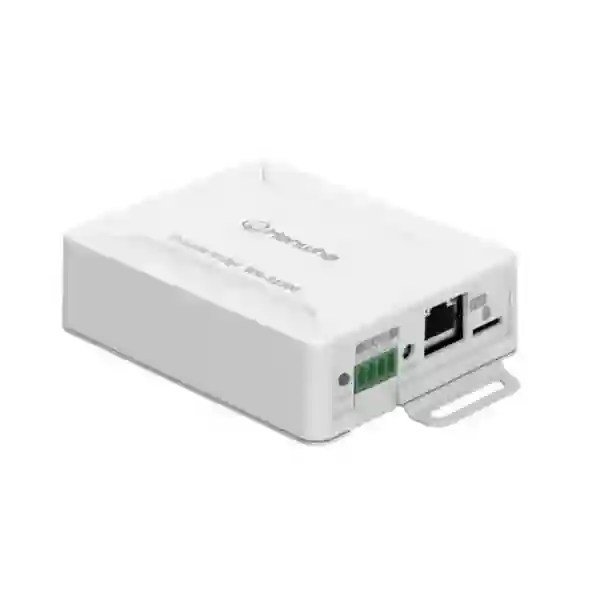
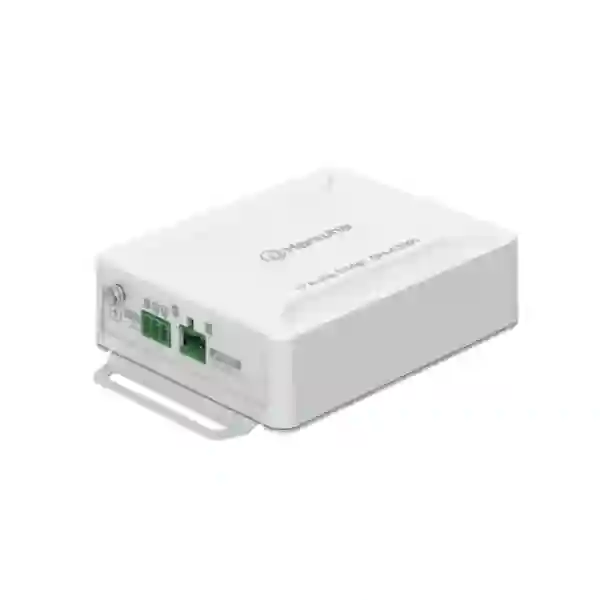
Hanwha Vision SPA-B1000 IP Audio Bridge
Connect a suitable analogue audio source to a managed network-audio design, with an integrated 10 W Class D amplifier, PoE connectivity, local audio storage and integration options. Choose the bridge for a defined audio conversion and control requirement—not as a substitute for a complete public-address system.
For Tanzania project enquiries: request a compatibility review and itemised quotation before ordering. Availability, price and warranty need direct confirmation.
At a glance: when to specify this product
- Best fit: a project with an identified analogue-to-IP audio path and compatible managed network-audio equipment.
- Useful functions: line-input audio, background music, paging and announcement workflows described by Hanwha Vision.
- Connection planning: verify speaker load, cabling, audio-server requirements, PoE budget and switch configuration.
- Procurement caution: the model number is not a 1,000 W power rating, and a bridge alone is not an entire paging system.
An IP audio bridge, not a general-purpose PA amplifier
The Hanwha SPA-B1000 IP Audio Bridge is designed to introduce network-audio functions into an environment with analogue audio equipment. Its job is to help pass audio between a physical source and a compatible IP audio system while supporting the control functions that make announcements and music manageable. A bridge is useful when replacing every existing component at once is impractical, but it must be specified as part of a complete system rather than treated as the whole system.
Hanwha Vision describes the SPA-B1000 as an IP audio bridge and lists a built-in 10 W Class D amplifier. The digits in the model designation do not mean that it provides 1,000 watts of output. The available power must not be confused with the capacity of a building-wide amplifier, and the device should not be assumed to drive an arbitrary bank of ceiling or horn speakers. Speaker impedance, connection method, expected loudness and the approved installation arrangement need confirmation.
For buyers, the key question is not simply whether the unit has an Ethernet port. It is whether the existing audio source, the intended destinations and the required control workflow can work together without introducing unnecessary complexity. Before purchasing, identify the source and speaker types, the number of locations requiring sound, and who needs to trigger an announcement. That information determines whether the bridge is the right component or only one part of the proposed solution.
Where the bridge can make sense
Consider this device when a facility has an analogue music player or other line-level audio source but wants that sound distributed through a managed IP speaker environment. The bridge can be part of a phased transition in which useful equipment is retained while network audio functions are introduced. It may also suit a site with an identified paging or messaging requirement and a supporting Hanwha Vision audio architecture already being planned.
A school might want routine announcements to reach selected areas without rebuilding all of its audio cabling. A workplace may need music and occasional spoken instructions, with clear rules about which message takes priority. A warehouse might need messages to reach specific operational zones. These are planning scenarios, not promises that a single SPA-B1000 will serve every room or that it independently handles a particular number of speakers or zones.
Where there are several buildings, remote sections or different teams responsible for IT and facilities, document those boundaries early. A successful bridge deployment depends on compatible devices and a deliberate network design. If only a conventional analogue amplifier is needed, an IP bridge may add little value. Conversely, if every destination already supports native IP audio, the design may call for a server, controller or direct network audio path instead of additional conversion.
How audio travels through the installation
At a high level, an external analogue source feeds the bridge, and an appropriately configured IP audio environment makes that sound available to compatible destinations. Hanwha Vision’s product description includes network paging, background music, scheduling and security-related announcements. The actual signal path, control component and available features depend on the installed product family and software configuration; the bridge should not be specified as a universal audio protocol converter.
Map the path before drawing a bill of materials. Record which device creates each sound, where it enters the system, how it is routed and which speakers reproduce it. If a receptionist must make a live page, identify the microphone or other input equipment involved. If management wants recorded messages, identify where the files will live, who will update them and how playback is initiated. The role of the bridge should be explicit at every stage.
It is equally important to decide how ordinary music is interrupted. A design may require an operational message to override background audio or to be heard only in a specific area. Do not assume priority, grouping or escalation rules without checking the accompanying audio server, endpoints and current firmware. A concise signal-flow diagram and a live demonstration are more reliable than choosing equipment from feature labels alone.
Built-in amplifier and analogue speaker questions
Hanwha lists an integrated 10 W Class D amplifier, but that figure alone does not establish the number, type or impedance of speakers that can be connected. There is a difference between line-level analogue input, amplified speaker output and an existing 70 V or 100 V distributed loudspeaker circuit. Connecting the wrong type of load can cause poor performance or equipment damage. The wiring diagram and current manufacturer instructions must govern the final speaker connection.
Ask the installer to photograph or identify existing speaker labels and the amplifier currently serving them. Record the rated impedance or line-transformer taps, cable lengths and expected speech coverage. If these cannot be established, do not guess from the loudspeaker’s appearance. The presence of an integrated amplifier does not automatically make the bridge a drop-in replacement for a legacy public-address rack or a high-power zone amplifier.
Sound-pressure requirements also matter. Quiet reception areas and noisy industrial spaces have different needs, and speech intelligibility can be more important than music quality. Coverage should be established through appropriate speaker selection, placement and on-site testing. Where the environment calls for higher output, wider coverage or multiple independently controlled areas, plan additional compatible equipment rather than relying on the bridge’s model name.
PoE, Ethernet and power budgeting
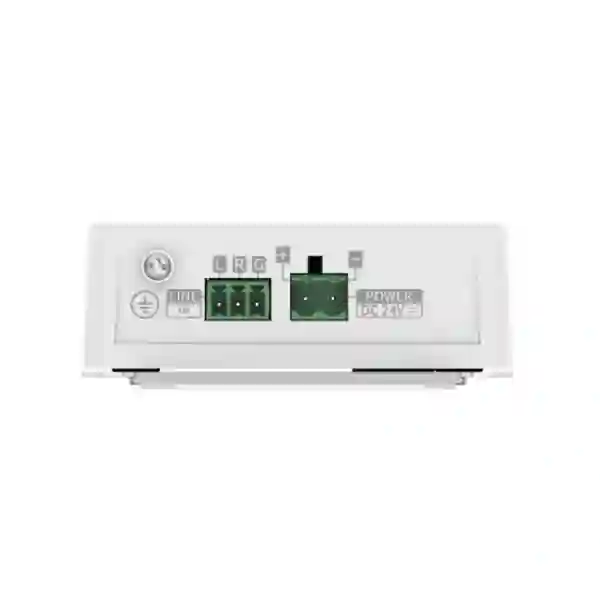
The published technical specification identifies 10/100 Base-T Ethernet and IEEE 802.3af Power over Ethernet, with 24 V DC appearing in manufacturer specifications as a power option. The product overview also references PoE/PoE+ support. For purchasing, use the exact power table and installation instructions for the hardware revision being supplied; do not treat a general marketing reference as a substitute for a precise switch-port requirement.
A PoE switch has a total available budget as well as limits on individual ports. A design that adds several speakers, an audio server, cameras and other devices should account for all equipment, cable runs and reserve capacity. Specify the required switch type, available ports and network topology. Confirm whether any external power supply is required or included, rather than assuming accessories come in the box.
For facilities where announcements support daily operations, consider what happens if mains electricity fails. A suitable uninterruptible power supply may protect the network switch, router and supporting control equipment, but the scope and duration must be calculated for the site. A powered bridge cannot deliver useful messages if its audio source, controller or destination speakers are offline. Treat the entire audio path as a system when discussing resilience.
Analogue audio input and source matching
The SPA-B1000 is described with left and right analogue line input, and Hanwha specifies a maximum line input level of +6 dBV. This is a line-level connection, not a blanket claim that every microphone, mixer, media player or amplified loudspeaker output can connect directly. The installer should verify connector wiring, signal level, output impedance and whether any mixer, attenuator or other interface is needed.
Before using an existing music source, check whether its volume changes automatically, whether it has separate fixed-level and variable-level outputs, and whether the output contains unwanted notifications. Set a predictable gain structure during commissioning. An incorrect input level can produce distortion, weak speech or inconsistent playback even when network connectivity is healthy. The system should be tested with the actual programme material to be used.
Where background music is planned, also clarify who owns the content and how it is selected. Audio hardware does not itself grant the right to broadcast copyrighted recordings. Decide whether the facility needs scheduled playlists, occasional live audio or a maintained recorded-message library. These decisions affect management procedures and supporting equipment more than they affect the bridge’s basic physical size.
Storage and supported recorded audio
Hanwha specifies 1 GB of internal memory and a single microSD slot that supports SDHC storage up to 32 GB, with the manufacturer’s specification naming supported card media. The product family documentation describes WAV and MP3 file streaming with sample rates from 16 kHz to 48 kHz and bit rates from 64 kbps to 320 kbps. Check current firmware and media requirements before preparing a permanent audio library.
Internal storage is useful for project planning, but the number of minutes available depends on the encoding and content. Do not promise a fixed announcement count without measuring actual files and reserving capacity for software and operational needs. Short, carefully edited messages usually serve listeners better than lengthy recordings. Use file names that communicate language, location, purpose and approved revision so administrators can distinguish the current version.
For a multi-user facility, create a small editorial process for recorded messages. Assign an owner to update time-sensitive content, confirm pronunciation, check volume consistency and remove obsolete files. Store a controlled copy outside the device so settings and audio can be restored after maintenance. A successful audio deployment needs both suitable equipment and reliable management of the messages people will hear.
Background music, announcements and text-to-speech
The manufacturer positions the SPA-B1000 within an IP audio workflow that can include background music, paging, scheduling, security announcements and text-to-speech. Those capabilities are valuable because the device is not limited to the job of moving an audio signal; it can participate in a managed communication environment. However, the available control interface and feature set should be demonstrated against the proposed server, endpoints and software version.
For scheduled announcements, decide whether the trigger is a clock event, an operator action or an external signal. Confirm the desired announcement language, voice quality and how exceptions will be handled on holidays or changed operating days. A test recording often reveals pronunciation or acoustic problems that do not appear in a desktop preview. Never promise particular text-to-speech languages without verifying the installed firmware and configuration.
For paging, agree on who has permission to make a broadcast and which areas they may address. If several message sources may compete, establish a priority policy and test it. Music volume should remain appropriate for the space, while important spoken instructions must be intelligible. The correct design aims for predictable, controlled behaviour rather than the maximum number of features advertised in a catalogue.
Dry contacts, relay output and external events
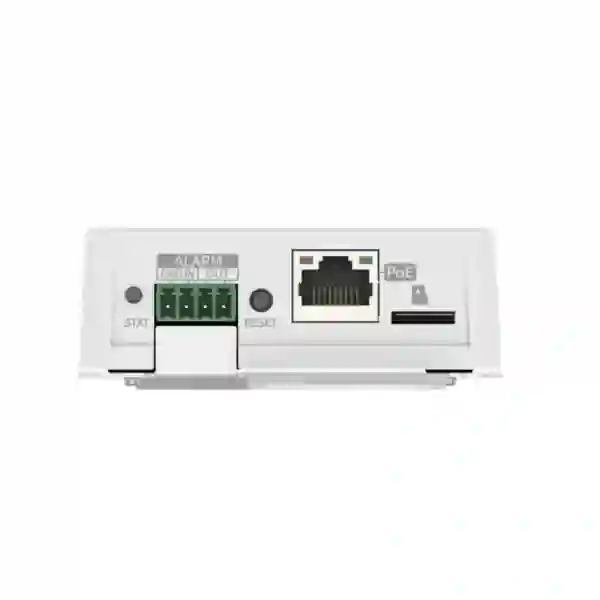
The technical listing includes one dry-contact input and one normally open dry-contact output. These are useful integration points when a wider system requires a physical trigger or a controlled output state. Hanwha also identifies virtual-contact and dry-contact events within its system integration information. The exact event mapping depends on the configuration and equipment attached to those contacts.
Do not mistake a dry-contact interface for a universal emergency signalling certification or a power switching circuit. Check contact ratings, isolation, wiring diagrams and permitted loads in the installation documentation. If another system such as access control, building management or a sensor controller is expected to trigger a sound, agree on the conditions, fail states and acknowledgements before connecting equipment.
During testing, simulate the normal event, a disconnected trigger and recovery after power loss. Record whether the device reacts once or repeatedly and whether a human can cancel the resulting announcement. If the audio system is intended to interact with fire or life-safety equipment, obtain a separate engineered design and the necessary approvals; this general-purpose product listing should not be read as proof of life-safety compliance.
Network protocols, API and software integration
Hanwha lists IPv4, HTTP, HTTPS, mDNS, DNS, NTP, TCP, UDP, DHCP, ARP and ICMP among supported network protocols, and SUNAPI as the application programming interface. Its current product description also mentions SIP-based integration. These details are starting points for a compatibility discussion, not a guarantee that an arbitrary PBX, SIP trunk, video management platform or third-party controller will connect without configuration.
Ask for a deployment drawing that names the actual communication partners. The installer should identify addressing, discovery behaviour, routing boundaries, port and firewall requirements, and relevant credentials. Where an external software application must control the device through SUNAPI, request a limited proof of concept for the specific actions needed. Document the expected results and how errors or offline devices will be reported.
Time synchronisation is worth special attention for scheduled operations and consistent logs. Establish which network time source the audio devices will use, how that source is reached and what happens during disconnection. When a project involves more than one VLAN or building network, confirm whether discovery and audio transport will work across the intended boundaries instead of assuming any reachable IP address is sufficient.
Access control and secure administration
The specification describes administrator and other user roles, password protection, SHA-2 and digest authentication references, and access logging. These features should be part of a wider hardening plan. Assign named responsibilities for system setup, routine announcements and fault investigation. Avoid sharing a privileged account merely because several staff members may need to play messages.
Where supported by the approved installation procedure, use HTTPS for configuration, change default credentials, restrict management access to authorised networks and follow the manufacturer’s firmware-update guidance. Maintain a controlled record of device addresses, firmware versions, role assignments and backup locations. A networked audio device may be less visible than a camera, but it is still an endpoint that needs IT ownership.
Before handover, test that an ordinary operator can perform only the permitted tasks. Confirm that unauthorised users cannot reach configuration pages from guest networks and that logs can be reviewed by the designated maintainer. Review access when employees move roles. Security is not achieved by a single protocol name; it is the result of sensible network segmentation, credentials, updates and monitored administrative practice.
Zones, groups and the role of other equipment
The word ‘networked’ does not automatically mean that the SPA-B1000 alone provides an unlimited number of audio zones. Grouping, scheduling across several destinations and message distribution may depend on compatible IP speakers, a supporting audio server and their respective licenses or configuration limits. The published bridge specification should not be used to infer a maximum installation size.
Start by listing the areas that need separate treatment. Reception, open offices, meeting rooms, production areas and outdoor spaces may have different operating hours and audio priorities. For each area, note the listener population, ambient noise, existing cabling and expected type of announcement. Then decide which endpoints, amplifiers and controllers are required to serve those zones.
A practical design also names the owner of each zone. Without that, technically functional paging can become disruptive because too many people can send messages to too many areas. Request a demonstration that selects an intended group, broadcasts a normal message and confirms it is not played in excluded spaces. This is a stronger acceptance criterion than relying solely on an advertised number of groups.
Planning a project in Tanzania
For a Tanzania-based procurement, begin with the actual building conditions and confirmed equipment schedule. Verify that the installer can obtain the required bridge, compatible speakers, switch hardware and any controllers before fixing the project timeline. Product availability varies by region according to Hanwha Vision, and no local stock level, delivery commitment or price is assumed here. Request a formal quote that identifies the exact model and included accessories.
Inspect the network room and intended mounting point. A technically supported device can still fail when installed near excessive heat, dust, water exposure or unstable power. Hanwha lists an operating-temperature range of -20 °C to +50 °C and 10% to 95% non-condensing relative humidity, but it does not list an IP enclosure protection rating for the bridge. Use a suitable protected installation environment and follow all current mounting instructions.
Ask the project team to consider mains interruptions, routing between buildings, cable protection and access for servicing. For a campus or multi-floor site, distinguish the operator’s location from the areas receiving sound. A requirement to page from a remote office or through a telephone platform needs an explicit interoperability test. No claims are made about local approval, installation coverage, operator partnerships or regional warranty support without project-specific verification.
A practical site survey before procurement
A useful site survey begins with listening rather than a parts list. Walk each proposed announcement area, note typical noise and decide what a listener must understand. Record how music is currently delivered and which existing components the owner wants to retain. An installer should be able to identify the path from a source to the final speaker before suggesting the SPA-B1000 as the solution.
Next, collect technical evidence: photos of equipment labels, amplifier ratings, speaker wiring, available switch ports, network cabinet locations and a basic IP addressing plan. Confirm who controls firewall rules and who can create or manage the audio system’s accounts. If the customer requests integration with a third-party control system, ask for its model, software version and the exact desired trigger or control action.
Finally, agree on the acceptance test. An appropriate test might be ‘a scheduled message reaches the agreed zone at a consistent level while non-selected areas remain silent.’ It may also include a test of a line-input source, operator permissions and recovery after restarting a network switch. Defining these outcomes before purchasing reduces disputes over what the equipment was expected to provide.
Suggested installation and commissioning sequence
The installer should first verify product identity, included accessories and the current manufacturer documentation. Prepare a protected mounting location and check the approved power connection. Verify cable termination and link activity on the planned switch port, then discover or address the device using the documented procedure. Do not connect speaker loads or external control circuits until their electrical characteristics and terminal assignments are checked.
Once the bridge is reachable, configure administrative access, time synchronisation and the intended integration. Check basic audio using a controlled source at a safe initial level. Increase levels carefully while listening for distortion and verifying coverage. Set up the actual announcement and music workflows only after a clear signal path has been proven. Save the working configuration using the supported backup method, if available.
The final commissioning session should use staff members who will operate the system. Have them trigger a normal message, observe the outcome, change an approved setting and report a fault. Record actual firmware versions, device addresses, cable labels and tested behaviour. Provide written instructions that distinguish routine operations from maintenance tasks requiring privileged access. A working installation is one that the customer can operate and maintain after the technician leaves.
Acceptance tests that reveal real-world issues
A link light and a successfully opened configuration page are not enough to prove an audio installation works. Conduct a listening test at the furthest intended points and under realistic background-noise conditions. Test a short spoken message, a music source and any recorded file that must be used regularly. Assess speech clarity, unexpected level changes and the behaviour when a programme source is stopped or disconnected.
Check each control path independently. For a scheduled event, verify the time and selected destinations. For an external trigger, verify the expected contact action and what happens if the triggering device remains active. For an operator page, verify that the caller or user can access only authorised groups. If a wider platform manages alerts, test that its documented action produces the intended response rather than simply assuming API connectivity is sufficient.
Perform a controlled recovery test with the customer present. Note what happens when the IP network is interrupted, the switch reboots or the audio source becomes unavailable. Record whether settings and queued messages return as expected. Where these behaviours depend on other products or firmware revisions, document that dependency explicitly. This evidence creates a meaningful handover benchmark for future troubleshooting.
Operating and maintaining the audio service
Assign responsibility for the SPA-B1000 in the same way as other operational network equipment. A facilities team may own message wording and acceptable volume, while IT manages addressing, credentials, switch ports and software maintenance. Decide in advance who responds to complaints about silent speakers, repeated messages or unwanted background music. A clear ownership model prevents problems from being passed between departments.
Keep a small change log. Record when firmware, network configuration, message files or group settings are modified and who approved each change. Back up working settings and maintain an inventory of connected devices. Before applying updates, check current manufacturer guidance and test important functions afterward. Avoid scheduling disruptive changes immediately before a critical event where announcements are expected.
Periodic checks can be brief but purposeful. Test one representative message at the planned listening points, check logs or management status for recurrent faults and confirm that the current staff still hold appropriate access. Replace obsolete recordings, check cable and power conditions and make sure the documentation remains accessible. Preventive attention is usually simpler than tracing an intermittent audio problem without a known baseline.
Choosing between a bridge, IP speaker and audio server
An IP audio bridge is appropriate when the design has a defined analogue-to-network audio requirement. A native IP speaker may be a simpler endpoint when a new installation does not need to retain analogue audio equipment. An audio server or controller may be needed when the customer wants central management, more elaborate scheduling or coordinated playback to many destinations. These product categories solve different problems and should not be substituted purely because each includes the phrase ‘IP audio’.
In a small location, the simplest reliable architecture can be preferable to a complex distributed system. In a large facility, a bridge might be one input among several in a managed network-audio design. Ask whether the proposed design requires a separate server, additional licenses, microphones, amplifiers, speaker endpoints or external power accessories. The quotation should identify each component and its role, not just the headline model.
Keep the scope flexible until a compatibility check is complete. A customer who already owns Hanwha Vision equipment may have a more straightforward integration path, but model generation and firmware differences still matter. Where the requirement is a conventional high-power speaker circuit, a dedicated PA amplifier and an appropriately engineered interface may be the safer design choice. The bridge should be chosen because its verified interfaces meet the task, not because it appears to replace everything.
Typical business scenarios and their design questions
Offices and reception areas: The aim may be gentle background music during opening hours with occasional staff or visitor announcements. Check where music comes from, who changes its volume and which rooms should remain silent. A common pitfall is allowing announcements to interrupt confidential meeting areas without permission. Document selected groups and test their boundaries before handover.
Schools, training centres and campuses: The desired result may be a timetable announcement, a spoken notice or a manually triggered message. Confirm the intended schedule, languages, ability to update recordings and the need for different areas to hear different content. A school may also have a separate emergency communication obligation; this product listing does not establish that the bridge meets those special requirements.
Retail, hospitality and operational facilities: A source may provide background audio while staff require occasional instructions. Consider the acoustic environment, whether audio must cross building boundaries and whether simultaneous sources compete for attention. In a workshop or warehouse, noise and speaker placement can dominate the result. Choose the full architecture after surveying the actual space and testing clarity rather than assuming one bridge will cover the premises.
Ordering checklist and what to ask for in a quote
A useful quote identifies the Hanwha Vision SPA-B1000 by model, states the intended deployment purpose and distinguishes included equipment from separately supplied items. It should confirm the compatible audio source and speaker arrangement, the proposed network and power method, any audio server or software dependencies, and the work covered by installation and commissioning. Ask the supplier to reference the hardware revision and current applicable manufacturer documentation.
Commercial details should be explicit rather than inferred from a product page. Request the current Tanzania selling price, taxes if applicable, stock or procurement status, shipping arrangements, estimated lead time and warranty terms in writing. If training, programming, speaker cabling or after-sales support is needed, ask whether those services are included. A quotation for the bridge alone is not necessarily a complete network paging project.
Before approving an order, review the acceptance test and any exclusions. If existing speakers have not been inspected, note that compatibility remains subject to confirmation. If a third-party telephone system must connect, require a demonstration or a written integration assumption. This is especially important when the purchase is part of a larger security or building-communications budget. The lowest hardware line item may not produce the lowest complete project cost.
Verified technical reference
These are published manufacturer specifications and should be checked against the current datasheet for the exact hardware and firmware revision being offered. Technical specifications may change. Listed capabilities are not a guarantee of compatibility with every third-party speaker, server or IP platform.
| Manufacturer and model | Hanwha Vision SPA-B1000 |
|---|---|
| Equipment category | IP audio bridge / IP audio module |
| Integrated amplifier | 10 W Class D (manufacturer specification) |
| Analogue line input | Left and right; +6 dBV maximum input level |
| Ethernet | 10/100 Base-T |
| Power | PoE; IEEE 802.3af listed, and DC 24 V referenced in manufacturer specifications |
| Memory | 1 GB internal; one microSD slot, SDHC up to 32 GB |
| Contacts | One dry-contact input; one normally open dry-contact output |
| Software interface | SUNAPI (HTTP API); manufacturer describes web configuration |
| Network protocols | IPv4, HTTP, HTTPS, mDNS, DNS, NTP, TCP, UDP, DHCP, ARP, ICMP (published specification) |
| Temperature | -20 °C to +50 °C (published operating range) |
| Humidity | 10–95% RH, non-condensing |
| Dimensions and weight | Approximately 123 × 80 × 30.6 mm; 0.24 kg |
| Colour / enclosure rating | White; IP code not specified |
Do not infer a Tanzania SKU, local certification, warranty, stock status or selling price from this technical table. No project-specific commercial information has been verified.
Pre-order technical checklist
- List every analogue audio source and the device that provides its line-level output.
- Identify existing loudspeaker impedance, wiring system, amplifier configuration and intended listening areas.
- Name the required paging, recorded-message, music and scheduling workflows.
- Confirm the accompanying Hanwha Vision IP speakers, audio server or controller, where applicable.
- Document switch model, IEEE 802.3af power availability, port budget and network addressing.
- Verify supported software, SUNAPI actions and any intended SIP or third-party integration.
- Plan enclosure location, humidity control, power continuity and physical cable protection.
- Agree on realistic commissioning tests, training, documented exclusions and support responsibilities.
Where an item remains unknown, treat it as an open design question rather than silently assuming compatibility. A short survey and written scope can prevent an expensive mismatch between the quoted product and the installation the customer expects.
Frequently asked questions
What is the Hanwha SPA-B1000 IP Audio Bridge?
It is a Hanwha Vision network-audio bridge for use in a managed IP audio installation. It provides analogue line input, network connectivity, an integrated amplifier and control-related features. Its suitability depends on the source, destinations and supporting system, so it should be specified as one component in a complete audio design.
Is the SPA-B1000 a 1,000 W power amplifier?
No. The model number is not an output-power rating. Hanwha Vision’s published specification describes a built-in 10 W Class D amplifier. Do not use the model designation to estimate speaker capacity. Confirm supported connection loads and output arrangements from the current installation guide before wiring any loudspeaker.
Can it work with existing analogue speakers?
Hanwha markets the bridge as a way to bring analogue speaker infrastructure into IP audio applications, but direct compatibility cannot be inferred for every legacy circuit. Determine whether the existing speakers use low-impedance wiring or a distributed-voltage system, then verify the supported connection arrangement with the installer.
Does it support PoE?
Yes. The manufacturer lists Power over Ethernet and identifies IEEE 802.3af in the technical specification. Its product overview also refers to PoE/PoE+ support. Confirm the precise supply and consumption requirements for the delivered device and ensure that the proposed network switch has adequate port and total power budgets.
Does it include an audio input for music?
Yes. The product information lists left and right analogue line input with a maximum input level of +6 dBV. Verify the source device’s output level and the required connector wiring. A microphone or amplified speaker output should not be connected merely because it carries an audio signal.
How much local storage is available?
The listed hardware includes 1 GB of internal memory and a single microSD slot supporting SDHC storage up to 32 GB. Actual useful capacity for recordings depends on encoding, file size and system configuration. Confirm approved media and file requirements before preparing a large message library.
Can it play WAV or MP3 audio?
Hanwha’s product-family documentation describes file streaming with WAV and MP3 formats, including specified sample-rate and bit-rate ranges. Confirm the current supported format table for the intended firmware, and test real recordings before handover. Format support alone does not prove that every playback or scheduling workflow is available.
Does it support scheduled announcements and text-to-speech?
Hanwha’s current overview refers to scheduling, paging and text-to-speech as part of the bridge’s network-audio use. The practical workflow may involve supporting devices or software and should be demonstrated for the proposed installation. Supported languages, available voices and message priorities should be verified rather than assumed.
Can it connect to a SIP telephone system?
The manufacturer’s overview mentions SIP-based integration, but that does not guarantee compatibility with every PBX, telephone service or SIP feature. Identify the exact calling platform and firmware, then test the required paging action and authentication method. A project-specific interoperability check is essential.
What are the dry contacts used for?
The specification identifies one dry-contact input and one normally open dry-contact output. Their possible use depends on the event configuration and external electrical characteristics. The installation instructions determine permissible wiring and loads. They should not be presented as approval for fire-alarm or other life-safety use.
Is the bridge intended for outdoor installation?
The manufacturer’s specification does not give the device an IP enclosure-protection rating. Even though an operating-temperature range is listed, that does not make the unit weatherproof. Plan a suitably protected indoor or enclosed installation location and follow the published environmental and mounting guidance.
Can I use it without an audio server?
That depends on the exact source, destination and control requirement. Some functions in a managed IP audio architecture may require compatible endpoints, a server or software components. Ask for an architecture diagram and a demonstration of the actual required workflow instead of assuming that every named feature runs independently on the bridge.
What should a buyer in Tanzania confirm before purchasing?
Confirm the exact model, compatible speakers and audio source, any additional controller, network power capacity, installation environment, delivery conditions and commissioning responsibilities. Request a local quotation for price and availability and obtain written confirmation of warranty and support terms. These commercial details are not established by the manufacturer’s general specification.
What details should I send for a compatibility review?
Provide the existing amplifier and speaker models, photos of connectors or labels, the audio source type, the number of spaces that need messages, the available network infrastructure and the intended triggering method. Include any required telephone or software integration. This allows a supplier or engineer to review the complete application before recommending the bridge.
Request an SPA-B1000 compatibility review and quotation
Share the intended audio source, speaker types, network details, required announcement zones and any software integration needs. Ask for an itemised Tanzania quotation covering the bridge, any supporting equipment, commissioning and confirmed commercial terms.
Contact FourTeck Tanzania through its verified sales or enquiry channel. No product price, in-country stock, delivery date or service entitlement is assumed in this listing.




Reviews
There are no reviews yet.