
LEGACY ANALOGUE VIDEO RECORDING
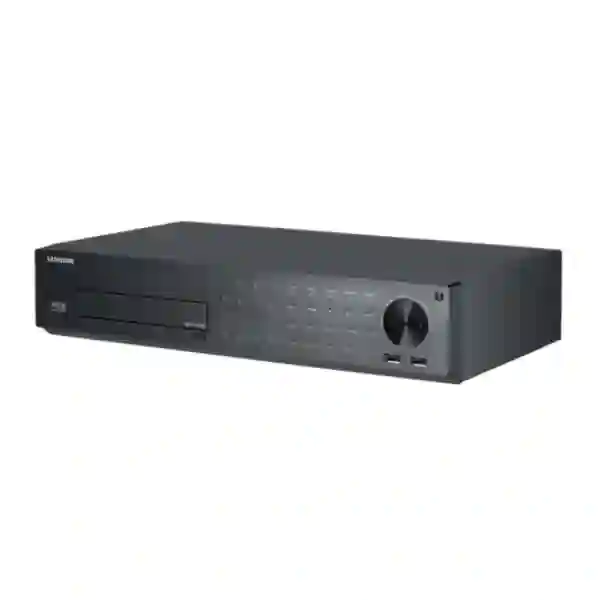
Hanwha SRD-854D 8-Channel H.264 CCTV DVR
The Hanwha SRD-854D 8-channel DVR supports eight compatible analogue camera feeds, H.264 recording, local monitoring, disk storage and footage export. It is an older Samsung Techwin-era system, so suitability depends on your existing cameras and evidence requirements.
Important: HDMI output can drive a 1080p display, but recording is not native 1080p. Treat the product as legacy hardware and ask FourTeck to review whether repair, replacement or an upgrade best fits your Tanzania installation.
At a glance: what buyers should verify
- Eight analogue composite-video channels, not eight native IP camera inputs
- H.264 recording with resolution-dependent total frame rates
- HDMI and VGA monitoring; 1080p is a display-output capability
- Four audio inputs and one output, plus alarm interfaces
- Up to four SATA hard-drive positions, subject to actual disk compatibility
- DVD and USB export functions; test current firmware and media
- Legacy lifecycle: confirm unit condition, client compatibility and support before purchase
Verified technical specifications
The values below describe the original published model, not the condition or accessories of any individual unit. Recording rates are aggregate figures. Exact firmware, drive compatibility, usable backup media and remote-client operation should be checked before installation.
| Manufacturer and historical branding | Hanwha Vision; earlier Samsung Techwin |
|---|---|
| Model | SRD-854D |
| Recorder class | 8-channel analogue composite-video CCTV DVR |
| Video compression | H.264 |
| Recording family | CIF / 2CIF / 4CIF / wide-D1-era modes; mode-dependent limits |
| Maximum aggregate CIF recording | Up to 240 fps NTSC or 200 fps PAL |
| Higher-detail aggregate recording | Up to 60 fps NTSC / 50 fps PAL at 4CIF or comparable wide-D1 mode, per technical document |
| Display outputs | HDMI and VGA; supports 1080p output display mode |
| Audio | 4 line-level inputs, 1 output; G.711 |
| Internal storage | Up to 4 compatible SATA HDDs; capacities must be verified |
| Backup | Built-in DVD writer and two USB ports |
| Network | Ethernet; original SmartViewer/Webviewer/CMS functions; software age matters |
| Events | Motion, video-loss and external alarm events |
| Alarm interfaces | 8 inputs, 4 relay outputs |
| PTZ interfaces | RS-232 / RS-485; verify camera protocol compatibility |
| Power input | 100–240 V AC, 50/60 Hz |
| Operating temperature | 0°C to 40°C, manufacturer specified |
| Product lifecycle | Legacy discontinued-generation hardware |
What this recorder is—and when it makes sense
The Hanwha SRD-854D 8-channel DVR is best understood as a recorder for an established analogue CCTV installation. Its eight composite-video inputs are intended for compatible analogue camera signals carried over conventional coaxial CCTV connections. It captures footage on internal hard disks, offers local playback and can show multiple camera views on a connected display. For an owner trying to preserve an existing system, the key question is whether the cameras, storage and required viewing arrangements still match this older recorder’s capabilities.
It can be considered for legacy maintenance or replacement where a site already uses appropriate analogue cameras and does not require modern high-definition acquisition. It should not be chosen merely because the monitor specification says 1080p, or because the site has eight cameras. Before committing, compare recording detail, retention goals, long-term support, cyber exposure and the cost of preserving old hardware against a current recorder platform.
Eight inputs: understand the camera connections
The SRD-854D accepts eight analogue composite-video channels. Each source must produce a compatible signal; a connector that happens to look like BNC is not sufficient proof. Legacy composite CCTV, higher-resolution analogue formats and network IP cameras can use very different electrical signals and encoding. Verify the actual camera model, signal standard and cable path before designing an installation around this recorder. A suitable analogue camera may fit the physical connector yet still require settings verification.
If cameras are already installed, collect photographs of model labels, note which feeds are working and identify how power reaches each camera. A recorder swap should not accidentally hide poor pictures caused by weak camera power, damaged coaxial cable, loose connectors or mismatched signal modes. Testing one known-good camera at the recorder is a practical first diagnostic step before treating all eight channels as a recorder fault.
How much detail can the SRD-854D record?
This is an H.264 standard-definition-era DVR, not a native 1080p or 4K recorder. Hanwha documentation describes recording modes around CIF, 2CIF, 4CIF and wide-D1 or 960H-era dimensions, with values that depend on the product document and signal system. The important buying point is that recorded evidence contains substantially less picture detail than footage from a modern Full HD or higher-resolution security camera. Enlarging a low-detail recording on a large screen cannot restore missing information.
For a door, till, entrance or vehicle area, decide what the operator needs to identify before judging suitability. Detecting that someone entered a room is different from reliably reading a small label or capturing a face at a distance. Check recorded sample clips from the actual proposed cameras and settings, not only a live monitor preview. If fine detail is a core requirement, investigate a current HD analogue or IP solution instead.
Frame rates: read the specification in context
Hanwha lists up to 240 frames per second for NTSC or 200 for PAL at CIF across the recorder, not 240 high-resolution frames per second on every channel. The manufacturer’s technical specification also describes up to 60 fps NTSC or 50 fps PAL at higher wide-D1 or 4CIF-class recording modes across the device. At intermediate 2CIF settings, the stated aggregate ceiling increases to 120 or 100 fps respectively. These are system recording rates subject to selected resolution and configuration.
This distinction is important for a busy reception, warehouse aisle or checkout. Eight cameras recording together share the device’s overall capacity, so a higher picture-detail setting may mean fewer recorded frames per camera. Identify where smooth movement matters and where a sharper still image matters, then test the available setting combinations. Do not interpret an advertising phrase such as real-time as a blanket claim that all channels operate at their highest resolution and frame rate simultaneously.
PAL, NTSC and legacy regional settings
The original documentation presents separate PAL and NTSC performance figures. Common values include a maximum aggregate rate of 200 fps at CIF for PAL and 240 fps for NTSC, while higher-detail recording operates at correspondingly lower rates. These figures describe distinct operating standards, not options that should be mixed casually within the same project. The camera output and recorder settings must be compatible. Check the camera’s original signal configuration before changing the DVR video standard.
For a Tanzanian premises, the practical requirement is a working end-to-end camera signal and stable recording, rather than choosing a mode because its headline number is larger. If a site has cameras bought over several years, document their formats individually and carry out a bench test. Avoid assuming that a video signal will be converted automatically. Changes to legacy signal settings should be planned carefully, especially when the existing recorder contains important footage.
Why 1080p HDMI output is not 1080p recording
The SRD-854D supports HDMI output at display modes that include 1920 by 1080, and it also offers VGA monitor output. This feature concerns the signal sent to a screen. It does not increase the resolution of the footage acquired from analogue cameras or written to the recorder’s disks. A television can show an upscaled image in a Full HD display format while the original security recording remains standard definition. The difference becomes obvious when an operator zooms into a saved clip.
When selecting CCTV equipment, read three specifications separately: the camera’s captured detail, the DVR’s recording resolution and the monitor’s video output. A glossy monitor display is useful for live operation, but the retained evidence is what matters after an incident. If the buyer expects true 1080p recordings, specify a recorder and cameras that explicitly support that acquisition and encoding capability; this model does not fulfil that requirement.
H.264 compression and practical image settings
H.264 video compression is a verified feature of the SRD-854D. Compression reduces the amount of storage and network capacity required compared with uncompressed video, but it cannot make every scene occupy the same amount of space. Movement, noise, image complexity, configured recording quality and the number of active channels all influence the resulting data. A static indoor hallway is different from a busy outdoor entrance in wind or rain.
Plan recording quality by viewing representative footage under the conditions that matter to the owner. A setting that looks acceptable during daylight may conceal motion detail at night. Adjusting a bitrate or quality option can affect both evidence usability and the number of days available on disk. Preserve a record of working settings before changing them. Because this is a legacy platform, do not assume it offers modern H.265 storage efficiencies or advanced AI-based recording features.
Continuous, scheduled and event-based recording
The manufacturer’s specification supports manual, scheduled continuous and event recording, including configurable pre-event and post-event periods. This gives an operator several ways to balance footage coverage and storage use. A site that needs a complete account of every delivery may prefer continuous recording, whereas a low-traffic back room might be monitored using an event-based schedule if that method meets the owner’s policy. Event-triggered capture can miss relevant context when detection is poorly configured.
Before deployment, write down the required recording hours for every camera. Identify areas where footage must remain continuous, where an event trigger is acceptable and who is responsible for reviewing failed recordings. Motion activity, video-loss events and alarm inputs should be tested rather than assumed. A recording schedule only has value if the device clock is correct, the hard disks are healthy and the operator can recover a clip from the relevant period.
Motion events, video loss and alarm connections
The SRD-854D lists motion detection, loss-of-video and alarm events. Its manufacturer technical specification identifies eight alarm inputs and four relay outputs. These interfaces can be useful when a legacy installation includes suitable dry-contact devices or requires a local response from an appropriately rated connected system. Correct wiring and configuration matter. An alarm input does not mean the DVR includes a fire, intrusion or access-control system by itself, and it must not be presented as a substitute for one.
Map each input to the connected device, confirm normal and alarm states, and test the recorded result. A camera obstruction or a severed cable may create different alerts from movement in front of a camera. Assign meaningful channel names to make incident review easier. When connecting relay-controlled equipment, use the proper electrical design and observe the manufacturer’s interface ratings. Electrical integration should be handled by a qualified installer, not improvised from the presence of terminal blocks.
Four-channel audio input and one output
Manufacturer information specifies four line-level audio inputs and one audio output using G.711 compression. These connections can support an installation where compatible audio sources and recording policies are appropriate. They do not mean that each of the eight video channels automatically records sound, or that the recorder supplies microphones, amplification and every cable needed for an audio installation. A technician should check the audio input type and the specific microphone or preamplifier requirements.
Audio recording can introduce significant privacy and workplace considerations. Before enabling it, define an authorized purpose, review applicable legal and organizational requirements and restrict access to recorded material. A test clip should confirm that sound is synchronized with the intended video channel and is intelligible at appropriate levels. If audio is not required, leave it disabled rather than creating a large quantity of unnecessary sensitive material.
SATA hard-drive bays and what they do not guarantee
The chassis can accommodate up to four internal SATA hard drives according to Hanwha’s product information. That number describes drive positions, not a guaranteed maximum capacity for every modern hard disk. Drive generation, capacity, firmware, recording workload and model-specific compatibility all matter. The manufacturer has published historical hard-drive compatibility material, including tables that group this recorder with legacy discontinued models. Always verify individual drive support before purchasing or replacing media.
Ask for the proposed disk make, exact model and capacity, as well as the condition of any drives already installed. A recorder sold without hard disks has a very different practical value from one supplied with verified, healthy media. A working front-panel power light is not proof that recording is occurring. The configuration should be tested with actual footage over a representative period, and old drives should be checked for errors before the device is entrusted with new evidence.
How to plan retention without guessing a capacity
Retention is the number of days of usable footage a site needs to keep. It depends on how many cameras record, their individual frame rates and quality settings, actual scene complexity, the daily recording schedule and effective disk space. A simple planning approach is to estimate the combined average recording bitrate, multiply by the hours of recording and the desired days, and then reserve room for operational variation. Real measurements from the intended camera scenes are more dependable than a generic advertised day count.
For example, a convenience shop may want frequent access to recent counter footage while a lightly used storeroom may need a different period. Do not choose disk capacity solely from the number of cameras. Decide whether continuous, event-based or mixed recording fits policy, then test how quickly the recorder fills its media. Confirm the configured overwrite behaviour and any procedures for preserving incidents. Retention promises should not be made without a tested disk and recording configuration.
Backups, evidence export and chain of custody
A built-in DVD writer and two USB ports for backup are listed for this device. Hanwha’s technical document also describes backup formats such as the recorder’s native format, executable playback packages and AVI. The actual options and export process should be checked against the installed firmware and any organization’s information-security policies. The existence of a USB port does not establish that every storage device or file system will be accepted by an older recorder.
Before relying on the system, run an evidence-export drill. Locate an event using its date and channel, export a short clip, verify that the file opens on the intended review computer and retain notes of the times and operator. Keep original media and copies protected from unauthorized changes. Be cautious with old bundled executable players: test them on a controlled machine under appropriate IT supervision. Evidence that cannot be recovered reliably is not operationally useful, regardless of how long it was stored.
Local monitoring and front-panel usability
The SRD-854D includes a touch-interface front panel and provides HDMI and VGA output for a monitor. Its design also supports a multichannel live display, search and playback functions. These are useful for a staffed reception, security desk or shop office that requires direct access to camera images without leaving the site. A local display still needs a suitable cable, supported screen mode and dependable power supply. Video on the monitor should be checked in both live and playback modes.
Plan for a restricted installation position where authorized staff can reach the recorder when needed but customers or visitors cannot disconnect it. Label each camera channel and document basic operations such as searching by time, exporting an incident and identifying a failed input. Operators should know that a smoothly updated live tile is not confirmation that the device is writing to disk. A short periodic playback check is an inexpensive way to uncover unnoticed recording problems.
Network monitoring and legacy software limitations
Hanwha’s technical specification describes an Ethernet connection, up to 32 Mbps of network bandwidth, remote viewing through legacy applications such as SmartViewer and Webviewer, and Android or iOS support in the original product generation. These statements identify historical supported functions; they do not confirm compatibility with current browsers, operating systems, smartphone releases or hosted services. A present-day buyer should not assume that an old mobile app will install or be supported today.
If remote viewing is essential, test it using the precise software version, network architecture and approved client device before purchasing. Record what works on a protected local network and which functions remain available if internet access is lost. Avoid exposing the recorder directly to the public internet for convenience. When current remote access and vendor support are mandatory, modern equipment is generally a more appropriate direction than extending the lifetime of unsupported viewing components.
Cybersecurity and support status
The SRD-854D belongs to an older product generation. Manufacturer compatibility documentation places the SRD-1654D/SRD-854D family among discontinued models, and Hanwha’s current support guidance explains the limitations of assistance for end-of-life Samsung-branded equipment. For that reason, availability of current security patches, software compatibility and technical assistance must be checked for the specific unit rather than assumed. A manual or firmware file remaining available is not evidence of ongoing active product development.
Treat an in-service legacy recorder as a security-sensitive device. Restrict administration, change default or reused credentials, separate it from general business networks where feasible and use a properly secured method for authorized off-site access. Keep a controlled inventory of firmware versions and configuration backups, and avoid installing unverified files. If the site cannot manage those risks, include replacement as part of the CCTV decision rather than presenting a legacy recorder as a modern, security-maintained platform.
Compatibility checks before a replacement DVR is ordered
A small amount of preparation can prevent an expensive mismatch. Start with the precise camera model and video format for every channel. Then check each camera’s resolution expectations, cable termination, power arrangements and any pan-tilt-zoom control hardware. Document the recorder’s current connections including audio, alarm inputs, relay outputs, network cables, monitors and storage media. An old installation may contain dependencies that are not obvious from a photograph of its front panel.
Next decide whether existing evidence needs to be kept and how it will be exported before changing the recorder. Compare desired recording detail and days of retention with the actual capability of the proposed hardware. Ask the supplier to state whether the unit is new old stock, refurbished, previously used or offered only as a replacement part, if applicable. Verify accessories and software support separately. The objective is a functioning system, not just a model number that fits on the shelf.
Surveying an existing eight-camera site
Walk the site and map cameras to real operational needs: entrance, public counter, delivery gate, stock room, service passage and other authorized observation points. For each camera, note how much area it covers, typical lighting, likely motion and the detail needed after an incident. Eight connected cameras can provide broad coverage, but the number of feeds alone does not establish whether useful evidence will be captured. A badly placed camera can leave an important face or transaction outside its view.
Also review the path from camera to recorder. Inspect junctions, coax runs, power distribution, monitor location and the network switch or router. Long or damaged cable routes and poor grounding may cause intermittent faults. In Tanzania, practical planning may include heat, dust, electrical interruptions and variable internet conditions at the actual premises, but those site conditions must be assessed rather than generalized into promises about performance.
Power supply, heat and room conditions
The manufacturer specifies a 100–240 V AC, 50/60 Hz input and an operating temperature range of approximately 0–40°C for this recorder. Its technical specification describes power consumption up to 60 W in the stated configuration with one hard disk. Consumption can differ with the installed drives and operating conditions. This is an indoor electronic recorder that needs adequate ventilation and protection from moisture, dust and tampering.
Choose an installation point that does not trap heat behind furniture or inside an unventilated cabinet. Evaluate surge protection and an appropriately sized uninterruptible power supply where interruptions could stop recording or damage disks. A UPS should be specified for the actual load, including monitors or network equipment only if they also need backup power. Restoring electricity is not the same as restoring a working system; verify that the recorder boots and resumes writing footage after a planned power-loss test.
Physical security and access control for footage
The security of recordings depends on more than password settings. The recorder, hard disks, power lead and network cables should be located where casual visitors cannot disconnect or remove them. A locked cabinet with suitable ventilation may help, provided authorized staff can still perform maintenance and emergency exports. Establish who may change camera views, recording schedules and retention settings, and who may remove backed-up footage. Shared administrator accounts make incident accountability much harder.
Keep a register of configuration changes and a secure method of retaining administrative access details. If a disk is removed for replacement, follow the organization’s policy for protecting stored footage and sanitizing or securely disposing of retired media. The DVR’s local interface should not be left unattended with administrative privileges active. These practices are especially useful in mixed-use commercial premises where security operators, IT staff, contractors and management have different reasons to interact with the system.
Daily, weekly and monthly operator checks
A useful routine should be simple enough for people to follow. Each day, confirm that expected camera views are present, the system time is correct and the recorder indicates active recording. At a suitable weekly interval, play back a random clip from each critical camera rather than relying only on green status lights. Review motion and alarm triggers for unexpected patterns, and investigate blank intervals or image degradation promptly. Keep a concise record so trends can be noticed.
At a planned maintenance interval, inspect disk health and storage consumption, test an export, check cabinet ventilation and verify that authorized staff can use their accounts. Reassess the retention period if more cameras or longer operating hours are introduced. Even the best checklist cannot remove the support limitations of older hardware; it can, however, make failures visible before a serious incident reveals them. Every procedure should identify the person responsible for escalation.
Recording quality during darkness and difficult lighting
An eight-channel recorder does not control all aspects of the image it receives. A camera facing sunlight, headlights or a dark corridor may deliver a picture with low practical value even when the DVR is operating correctly. CCTV quality is influenced by camera sensor, lens, exposure settings, scene illumination, cable signal quality and recording settings. The SRD-854D does not convert poor camera capture into detailed evidence simply by using HDMI on its monitor output.
Test footage at the time when incidents are most likely to occur, including night hours where appropriate. Look for blurred motion, washed-out entrances, reflections and subjects appearing too small in the frame. Choose recording settings after seeing exported clips, not only live images. If the site requires fine identification or modern analytics under challenging conditions, evaluate a replacement platform and cameras as a coordinated system rather than changing a single component and hoping the other limitations disappear.
What happens when one or more channels are blank?
A missing picture can be caused by a camera, power supply, connector, cable, mismatched video format or the recorder input. Begin with a documented, safe test using a known-working signal and a known-working channel. If a camera works on a different input, investigate the original route or port. If several cameras fail at once, check shared power and cabling before assuming every camera has failed. Do not swap unknown wiring into the DVR or alter electrical connections under power without appropriate precautions.
Once video is restored, inspect whether recording resumed for that channel. Review the event log and any configured video-loss notifications. A live image after repair does not recreate the missing footage. If the system is being considered for critical evidence, establish whether the fault was intermittent and whether additional monitoring or a more current recorder is justified. Keep the outcome of diagnostic tests with the maintenance record so the same problem is not repeatedly investigated.
What happens when storage stops recording?
A full or failing hard disk can interrupt recording or reduce the period of available footage. Check the device’s storage status, configured overwrite setting, event logs and the ability to play back recently captured video. A disk that spins up is not necessarily healthy. Because the SRD-854D uses a legacy storage controller and compatibility set, do not assume a new high-capacity surveillance drive will work without testing. Avoid reformatting or replacing a disk until important evidence has been preserved using an appropriate method.
If the recorder has become unreliable, first identify whether the problem lies in a particular disk, the recording configuration, power quality or the chassis. Set a clear procedure for who authorizes media replacement, what footage must be retained and how replacement media is validated. Some businesses will find that the cost and risk of repeated legacy drive troubleshooting favour a supported new recorder.
When keeping analogue CCTV is a reasonable choice
Maintaining an analogue system can be reasonable where cameras already cover the necessary areas, footage detail is adequate for the actual purpose, and the owner can operate the platform safely. A targeted recorder repair may be less disruptive than replacing cameras and cabling during a temporary operational need. It is still important to verify working hardware, supported drives, functioning evidence exports and the continuing usability of the chosen local monitoring arrangement.
That decision changes when a business needs stronger picture detail, broader retention, centralized monitoring, current software support or easier remote access. An older DVR may preserve familiar workflows but also preserve their limitations. Instead of treating the SRD-854D as a default choice for every eight-camera installation, use it as a clearly identified legacy option and compare the total lifecycle burden with a suitable contemporary recording system.
When a newer DVR or NVR is a better fit
A newer recorder should be considered if the customer requires native HD or 4K recording, modern camera protocols, current mobile viewing support, secure remote administration, better event search or long-term vendor maintenance. A newer analogue-compatible DVR may preserve some existing camera cabling while supporting additional formats, depending on its exact specification. An IP network video recorder generally works with compatible network cameras and has different connectivity, storage and infrastructure requirements.
Do not assume that an NVR accepts eight existing analogue cameras directly or that a modern multi-format DVR supports every ageing camera. Confirm standards, recorder channel licensing where applicable, camera power, switching and cable condition. Request a design based on the desired outcome—identification detail, retention, security, operational access and budget—rather than selecting a replacement solely because it has eight channels on its label.
A practical path from old DVR to modern surveillance
Start by documenting the existing installation and exporting any footage that must be retained. Then decide whether to keep cameras temporarily, replace them by area or renew the entire platform. A staged migration can focus first on high-value views such as entrance and transaction points while preserving less critical coverage where technically feasible. The right sequence depends on camera formats, cabling, available downtime and whether the old equipment can operate safely throughout the transition.
Before changes are made, establish a cutover window, confirm each recording destination, test the playback and backup process and train the people who will use the new interface. Keep a secure record of old configuration and channel mapping for troubleshooting. A successful upgrade is not merely a new box in the rack: it provides footage that is easy to find, useful when examined and protected through an agreed maintenance process.
Questions to ask about a second-hand or legacy unit
Because the SRD-854D is part of an older product family, a buyer should ask precisely what condition is being offered. Request confirmation of the hardware revision where relevant, supplied accessories, firmware version, number and health of hard disks, and whether the DVD drive, USB ports, network port and video inputs have been tested. Ask whether the unit has been reset securely and whether any previous owner’s footage or accounts remain. Do not treat a photograph of an illuminated front panel as proof of full operation.
Ask for a demonstration covering live view, recording, playback, a test export and power recovery. Clarify the seller’s actual return or service terms in writing rather than assuming an original manufacturer’s warranty still applies. If an important site cannot tolerate interruption, compare the risk of relying on aged mechanical components with the cost of obtaining current supported equipment.
How to match the recorder to real business scenarios
A small shop may prioritize a clear view of transactions, entrances and stock movement. A compact office may value simple local playback and restricted access to recorded clips. A warehouse may need broad coverage during long operating hours, while a service desk may need fast incident retrieval after a customer complaint. These are operational needs, not claims that one legacy resolution setting solves all of them. The purpose of the cameras should determine whether this particular DVR remains adequate.
For any scenario, identify the person who needs footage, how quickly it must be found, which area requires fine detail and how long recordings must remain available. Then test the recorder using those criteria. Where the answer involves high-resolution identification, sophisticated analytics, robust contemporary remote access or stronger support assurances, it is appropriate to recommend a newer solution instead of stretching an old recorder beyond its intended function.
How the technical features fit together
The eight analogue inputs, H.264 recording engine, SATA disk bays, local display outputs, audio interfaces and network functions are parts of one recording system. They are not independent guarantees of performance. Higher recording detail can reduce aggregate frame rate; more cameras can increase storage demand; remote viewing can increase network exposure; and long retention can depend on healthy media and carefully selected settings. A purchase decision should consider these interactions rather than rank products by a single headline feature.
For this model, the most meaningful verified strengths are its eight-channel analogue purpose, original local DVR controls, storage expansion positions and built-in backup options. The equally important limitations are its older recording resolution, legacy client software and discontinued-generation status. A careful product description should make both sides clear so the buyer can decide whether the unit is an exact replacement need or a candidate for modernization.
Pre-installation checklist for installers and buyers
Before an installer starts work, agree the camera list, confirmed analogue signal formats, channel naming, recording schedule, desired retention, monitor location, available network connection and power plan. Identify any use of audio, alarms, PTZ or off-site access. Confirm the quantity and compatibility of actual hard drives supplied with the equipment. Decide where the recorder will sit, who has authority to change settings and how important footage will be backed up during maintenance.
At commissioning, test all eight inputs that are in use, review sample footage in live and playback modes, verify the time stamp, perform a backup, check recovery after power interruption and confirm the alarm and audio settings if those functions are required. Document any unsupported requirement rather than quietly omitting it. This approach protects both the customer and installer by turning vague expectations into observable acceptance checks.
Choosing the correct next step in Tanzania
For a customer in Tanzania, the first decision is whether the requirement is a like-for-like repair of an existing analogue surveillance system or an investment in a current camera platform. The SRD-854D can be evaluated as a legacy eight-channel DVR, but prices, current stock, unit condition, delivery arrangements and warranty status have not been verified here. These details must be established for the specific offer before any purchase decision is made.
Prepare a short brief listing the existing camera models, number of active channels, target recording days, required picture detail, monitor and remote-access needs, and any faults in the present installation. Ask FourTeck to review the requirements and advise on model suitability or a supported replacement option. A well-scoped enquiry leads to a more useful recommendation than an unqualified request for any eight-channel recorder.
Frequently asked questions
Is the Hanwha SRD-854D an eight-channel DVR?
Yes. Hanwha identifies the SRD-854D as an eight-channel digital video recorder for compatible analogue composite-video cameras. Count the cameras you wish to connect, then verify each one’s actual signal type before assuming it will work.
Does its HDMI output mean footage is Full HD?
No. HDMI supports a Full HD monitor output mode, but native recording resolution is from the legacy standard-definition-era range. An upscaled image on a 1080p screen is not the same as a genuine 1080p recording.
Can I connect eight IP cameras directly?
No direct eight-IP-camera capability is specified. This model is designed around eight analogue composite-video inputs. If the installation uses network IP cameras, identify a compatible NVR or another correctly engineered system.
How many hard drives can it take?
The published chassis specification states up to four internal SATA hard disks. This does not guarantee support for any particular modern disk model or capacity. Check manufacturer compatibility data and the condition of the actual device before purchase.
Can it record all eight channels at 240 fps in high resolution?
No. The advertised aggregate 240 fps NTSC or 200 fps PAL figure applies to CIF recording. Aggregate recording speed is lower at higher-detail settings. Check the original performance table and configure frame rates for the intended channel mix.
Does it support mobile and remote access?
Original specifications list network and smartphone monitoring functions, but present-day compatibility with phones, browsers and client software is not guaranteed. Test the exact setup and use secure network access rather than exposing a legacy recorder directly to the internet.
Does it include audio recording?
The model has four audio inputs and one audio output. Suitable line-level audio devices, appropriate wiring and compliant operating practices are still required. Sound recording should be enabled only where it has a clear authorized purpose.
Can footage be exported to USB?
The original specification lists USB backup through two ports, along with a built-in DVD writer. Verify recognized media and available export formats on the actual firmware, then test playback of an exported clip on the intended review device.
Is the SRD-854D a current model?
It is a legacy, discontinued-generation product. Manufacturer documentation groups the SRD-854D among discontinued equipment, and support for old Samsung-branded hardware is limited. Request current condition and support details before relying on it.
Should I repair it or replace it with a newer recorder?
That depends on existing camera formats, recording detail, retention, secure remote access, parts condition and operational risk. Keeping the legacy unit may fit a narrow repair need; modern recording and long-term support requirements often justify an upgrade.
Request a suitability review from FourTeck Tanzania
Share the existing camera types, number of active feeds, required recording period, image-detail expectations and whether network access is needed. Ask about the exact unit condition and compatible hard disks if the SRD-854D is being considered as a legacy replacement, or request advice on a current supported recorder. No stock, pricing, warranty or delivery terms are assumed in this description.
Contact FourTeck through its verified business enquiry channel to discuss your CCTV recording requirements.




Reviews
There are no reviews yet.