
Professional IP video recording
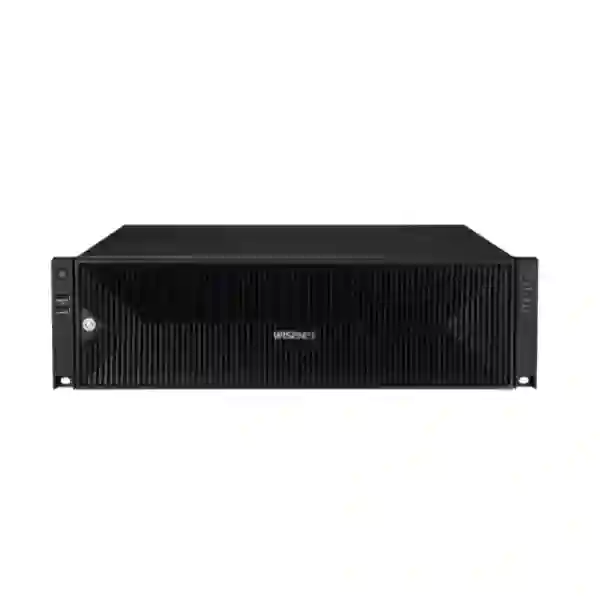
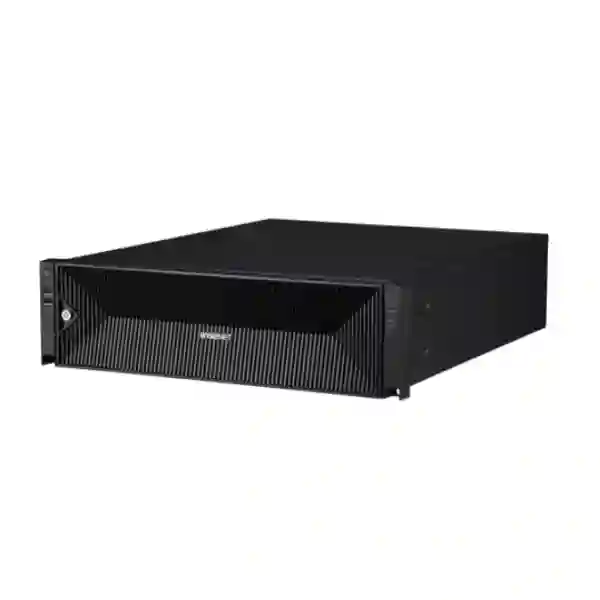
Hanwha Vision PRN-6400DB4 64-Channel AI NVR
Planning a multi-camera surveillance system in Tanzania? The Hanwha Vision PRN-6400DB4 combines up to 64 IP-camera inputs, support for 32MP video, sixteen SATA drive bays and AI-assisted search with compatible cameras. It is most useful when its storage, network and resilience features are matched to a documented operational requirement.
Confirm regional availability before ordering: Hanwha’s US catalogue marks this model discontinued and identifies the XRN-6420DB4 as its replacement. For a suitable quotation, provide camera models, expected bitrates, retention period, RAID preference and power-protection requirements.
Specifications at a glance
Maximum figures depend on supported modes, compatible equipment and configuration. Raw disk capacity is not usable RAID capacity and drives are not presumed included.
Who this recorder is for
The PRN-6400DB4 suits organisations planning a substantial IP video recording estate rather than a few standalone cameras. Its 64-channel allowance makes it relevant to commercial buildings, multi-area facilities, industrial premises, warehouses, campuses and security control rooms where operators need a central recording point. Channel capacity is only the starting point: buyers must also confirm how camera resolution, frame rate, bit rate, storage capacity and simultaneous review activity fit together. A proposal that counts cameras without modelling the complete recording workload can look adequate on paper yet leave too little performance margin in operation.
For procurement teams in Tanzania, the practical decision is whether the recorder can meet a defined surveillance objective within the constraints of the site. Ask how many cameras will record continuously, which cameras will record on events, how long footage must be retained, who will review video and how the system will behave when a disk or power source fails. These requirements help determine whether this precise model is suitable, whether multiple recorders make more sense, or whether a supported current-generation replacement is the safer purchase.
What the 64-channel capacity really means
A maximum of 64 camera channels means the recorder can be configured for as many as 64 supported IP camera streams as inputs. It does not mean that every connected camera can always run at its highest possible image quality, frame rate and codec profile while the recorder simultaneously performs all other tasks. The manufacturer specifies separate limits for recording throughput, decoding and playback. Those specifications are interconnected, so system design should consider them as a combined budget rather than as independent promises.
A sensible channel schedule starts with a camera register showing location, purpose, recording mode, chosen codec and expected average or worst-case bitrate. Separate cameras that protect critical entrances from those that provide broad situational awareness. Where expansion is anticipated, reserve channels and performance headroom deliberately. The total number of IP cameras, their compatibility and their real measured streams should be confirmed during commissioning instead of assuming that simply reaching 64 channels validates the installation.
High-resolution recording without overpromising
Hanwha lists supported camera resolution up to 32 megapixels, often described as 8K-class recording. This can be useful where a wide scene needs to preserve more visual detail, but the resulting file sizes and decoding demands can be significant. The manufacturer’s decode figures depend on resolution, codec and frame rate. A single highly detailed stream behaves differently from many lower-resolution streams, even when both configurations fall within the channel count.
Choose resolution from the actual investigative task: identification at an entrance, overview of an open yard, monitoring a loading operation or preserving context around an incident. Lens selection, camera placement and scene lighting are just as important as headline megapixels. Do not promise readable faces, number plates or other evidence solely because a recorder accepts a high-resolution feed. Those outcomes depend on the camera, scene geometry, optics, exposure settings and real deployment conditions.
Recording bandwidth and operating modes
The manufacturer’s published recording bandwidth is up to 400 Mbps in distributed recording mode, while the normal mode is listed at up to 150 Mbps. With RAID enabled, the published performance is up to 400 Mbps in normal RAID operation and up to 320 Mbps during degraded or rebuild conditions. These are mode-dependent maximums, not a guaranteed sustained rate for every real-world camera mix. A proper design allows room for burst traffic, camera events and changing scene complexity.
To assess a proposed workload, add the intended bitrate for each camera rather than multiplying a convenient single number by 64. Confirm whether each feed is constant or variable bitrate and whether additional streams are being recorded. Test representative busy scenes, not only an empty corridor or a quiet yard. If the deployment depends on high throughput, confirm the exact supported operating mode, drive configuration and firmware before acceptance, and include performance checks during a simulated failure or rebuild.
Detailed technical reference
| Video and interface | 64 IP channels; 32MP to CIF; H.265 / H.264 / MJPEG; WiseStream where compatible |
|---|---|
| Recording modes | Normal, dual-stream, continuous or event schedules, pre/post event and bookmarks |
| Recording throughput | Up to 400 Mbps distributed; up to 150 Mbps normal; RAID degraded/rebuild up to 320 Mbps |
| Storage | 16 hot-swappable SATA bays; supported drive size up to 10TB; iSCSI support |
| Storage protection | RAID 5 or 6; up to two eight-drive arrays as specified |
| Displays | HDMI 1 up to 4K at 30 Hz; HDMI 2 up to 1080p at 60 Hz |
| Connectivity | Three 1 Gbps RJ-45 ports; SUNAPI and ONVIF integration |
| Alarms and peripherals | Eight alarm inputs; four alarm outputs; four USB ports |
| Power and environment | 100–240 VAC, 50/60 Hz; max 285W with 16 HDDs; 0–40°C; 20–85% RH |
| Chassis | Approx. 440 × 132 × 571.1 mm; 14.3 kg without HDDs |
The manufacturer’s specification is the final authority for exact mode and firmware limits. Confirm all features on the specific supplied model before project sign-off.
Video codecs and storage efficiency
The recorder supports H.265, H.264 and MJPEG, alongside Hanwha WiseStream technologies where supported. Efficient compression can reduce storage use for many video scenes, but savings are not fixed. Movement, lighting, noise, camera tuning and codec implementation all affect the bitrate seen on the network. A buyer should not budget retention using an assumed universal compression percentage, particularly when the site includes high-motion or difficult night-time scenes.
It is often useful to use one carefully selected recording profile and separate streams for live viewing where the camera and system support that arrangement. Higher-quality recording can preserve more detail for later investigation while lighter live streams may ease operator display and remote access demands. Confirm which cameras provide the required codec profiles, whether analytics remain available in those profiles, and how any scene-adaptive settings behave during periods of heavy activity.
Sixteen drive bays and raw capacity
The PRN-6400DB4 provides sixteen internal SATA drive bays with hot-swap support. Hanwha publishes a maximum of 10TB per supported drive and up to 160TB total raw internal capacity without RAID. This headline figure is not a statement of preinstalled storage and must not be confused with usable footage space. The supplied drive population, supported disk models, formatting overhead and storage protection choice need to be confirmed for each quotation.
Build the drive schedule around surveillance-qualified, manufacturer-compatible HDDs rather than choosing solely by advertised terabytes. Confirm whether disks are included, whether all bays are populated, which drive firmware or model is supported and how replacements will be sourced. A 160TB raw figure may be appropriate as an upper planning boundary, but usable capacity after RAID parity and reserved space is lower. Never estimate retention from raw disk capacity alone.
Understanding RAID 5 and RAID 6
The recorder supports RAID 5 and RAID 6, with the manufacturer describing two arrays of up to eight disks each. These configurations use parity to tolerate specified disk failures while continuing to present recording storage, subject to the array’s health and supported configuration. RAID is a resilience feature, not a substitute for a backup or a guarantee that footage will survive every failure. Incorrect configuration, multiple faults and environmental events can still cause data loss.
When choosing between RAID levels, ask how much usable space the site can give up in exchange for additional fault tolerance. Consider the time required to rebuild an array after a drive replacement, the effect on recording throughput and the operational process for detecting a failed disk. Document who receives the alert, who can replace a drive and how the recorder will be checked afterwards. A tested response process adds practical value to RAID hardware.
Retention planning based on real workload
A retention target such as several weeks of continuous footage cannot be established from drive size alone. Calculate the expected data volume from the average recording bitrate, the number of cameras and recording hours, then account for event peaks, RAID overhead, formatting, reserve capacity and the difference between decimal storage marketing units and actual available space. Continuous recording, scheduled recording and event-driven recording produce different storage patterns and evidential trade-offs.
Estimate from representative sample footage at the proposed camera settings, including daytime and night-time scenes. Ask the site owner to state the required minimum retention and the procedure for preserving evidence before automatic overwrite. If the requirement is regulatory, contractual or evidentiary, verify its exact source rather than relying on a generic rule for all Tanzanian organisations. The best storage plan is traceable to a requirement and can be retested after cameras or profiles change.
Continuity: dual power supplies
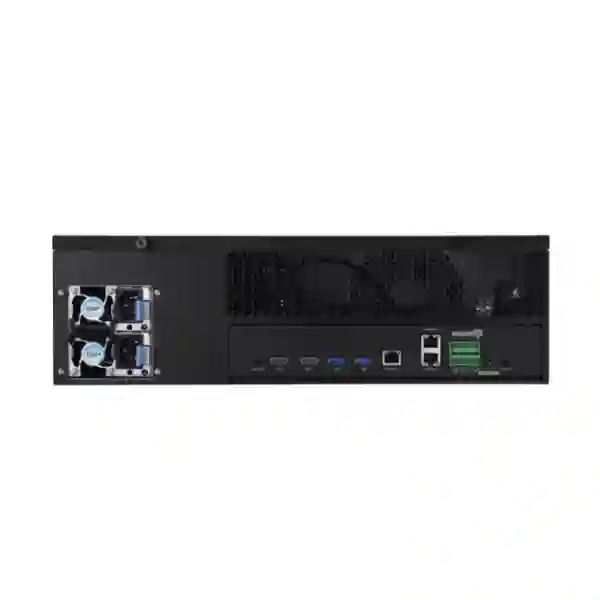
The model includes dual SMPS power supply modules and dual AC inlets. This can support a more resilient design when each inlet is fed from an appropriately protected and independently planned power path. It does not make the building’s electricity supply inherently redundant. Connecting both inlets to the same unprotected extension strip leaves a significant common failure point, and power-supply redundancy should not be confused with uninterrupted power.
For a Tanzania installation, plan suitable UPS protection, proper earthing, surge management and safe shutdown behaviour for the control room and essential network components. Check the manufacturer’s specified 100–240 VAC, 50/60 Hz input and maximum power consumption of 285W with sixteen drives when sizing the protection system. An engineer should evaluate runtime needs for the entire recording chain, including switches, cameras where relevant, monitors and any upstream connectivity equipment.
Automatic recovery backup and failover
Hanwha lists ARB, or Automatic Recovery Backup, and N+1 failover among the recorder’s supported redundancy features. Such capabilities can be valuable where camera connectivity or a primary recorder may be interrupted. Their usefulness depends on compatible cameras, supported topology, configuration and the limits described in the applicable firmware and manual. They should not be described as an automatic guarantee that no frame of video will ever be lost.
Discuss realistic failure scenarios before selecting these features: a short network outage, a hard-disk failure, a recorder shutdown or the loss of a network path. For each scenario, document what continues to record, where temporary footage is stored, how restoration occurs and what an operator must do. Test the chosen recovery procedure under controlled conditions, including reconciliation of timestamps and verification that footage is searchable after recovery.
AI search: what is actually supported
The PRN-6400DB4 is marketed as an AI-capable NVR with BestShot and attribute-based search functions. Hanwha describes searches involving people, faces, vehicles and licence-plate related metadata in supported contexts. However, the NVR is not a universal AI engine that turns any ordinary IP camera into a fully analytic camera. AI search depends on compatible Hanwha Vision cameras, suitable analytics metadata and the specific combination of camera model and supported features.
Before choosing cameras, list the exact investigative searches the control room needs: for example, locating a person with particular attributes, finding vehicle events or narrowing a time window around a known incident. Verify the required camera model, firmware and metadata support for each function. Do not equate AI-assisted search with legal identity verification, perfect recognition accuracy or guaranteed plate reading. Lighting, camera angle, image quality, analytical configuration and local operating conditions all affect results.
Using events and bookmarks effectively
In addition to continuous recording, the NVR supports scheduled recording, event-based recording, pre-event and post-event recording, bookmarks and various triggers. Event sources can include camera motion detection, analytics, video loss, alarms and other supported system inputs. These capabilities help operators focus on meaningful activity instead of watching every image constantly, provided events are tuned carefully and reviewed by trained personnel.
Set event policies by operational priority. A secure doorway, vehicle gate, storage area and public circulation area may need different sensitivity and retention rules. Excessive alerts can overwhelm an operator; too few may leave important incidents unnoticed. Commissioning should include daytime, night-time and adverse scene testing, with a documented procedure for refining analytics and assessing false activations. Bookmark conventions and event naming also make investigations easier when several people share a control room.
Local viewing and monitor outputs
The manufacturer lists two HDMI outputs with different resolutions: HDMI 1 supports up to 3840 × 2160 at 30 Hz, and HDMI 2 supports up to 1920 × 1080 at 60 Hz. Local viewing supports clone and expanded layouts, with display division limits depending on mode. This is helpful for a desk or control-room arrangement that separates overview monitoring from detailed incident review. It does not mean every high-resolution camera can be decoded at full native resolution in every multi-camera grid.
Plan operator workflows before buying large monitors. Determine which camera views must remain visible, how alarms change the layout and where an investigator can review archived footage without disrupting active monitoring. The graphical interface, mouse, keyboard and supported controller options can assist daily work. Display tests should reflect actual camera count, grid configuration and intended viewing distance, not just the recorder’s maximum HDMI output resolution.
Remote access and mobile viewing
Hanwha lists web viewing, Wisenet Viewer, Wisenet Mobile and QR-code/P2P configuration among the recorder’s available access options. Supported remote functions and user counts are limited by the product, network and software versions, and remote viewing must be planned within the available transmission bandwidth. A mobile connection that is adequate for a few low-resolution live views may be unsuitable for reviewing many detailed archived streams.
Determine who genuinely needs off-site access, which actions they may perform and how accounts will be managed. Prefer protected network designs and supported secure access methods over exposing management services directly to the public internet. Assess internet reliability, uplink capacity and cybersecurity ownership before promising remote performance. User experience will vary with the network path and viewing profile, so test with the actual devices and connections that authorised personnel will use.
Connecting Hanwha and other IP cameras
The NVR lists SUNAPI and ONVIF support, including ONVIF Profile S, for network camera integration. This provides paths for connecting compatible equipment, but protocol support alone does not prove that every camera will deliver all its functions. Basic live video and recording may work while advanced analytics, event metadata, PTZ controls, audio or configuration options remain limited by the exact model and interoperability implementation.
For mixed-camera projects, prepare a compatibility matrix before procurement. Include manufacturer, model, firmware, codec, resolution, required event features and whether the camera will use native integration or a supported standard interface. Test representative third-party cameras with the chosen recording profiles and confirm time synchronisation, reboot recovery and event handling. Where the procurement goal depends on advanced Hanwha AI search, verify compatible Hanwha cameras rather than assuming generic ONVIF cameras can supply the same metadata.
Network design for a 64-camera recorder
Hanwha specifies three 1 Gbps RJ-45 Ethernet interfaces, with LAN/WAN roles depending on configuration. The overall network should be segmented and dimensioned for camera ingestion, control, remote clients and any management services. Use appropriately managed switching, consistent IP addressing and monitored links. A recorder’s nominal interface speed is not a reason to disregard its separate application-level recording or transmission limits.
Draw the topology showing camera VLANs, switching paths, uplinks, the NVR, viewing workstations and any remote connectivity. Estimate simultaneous traffic, including secondary streams and playback. Check how the topology behaves when a switch, uplink or single path fails and whether critical devices have protected power. If cameras connect across buildings, include fibre, surge and grounding considerations as appropriate to the site. Field tests should compare actual traffic against the approved capacity budget.
Cybersecurity and user accountability
Security features listed by Hanwha include IP address filtering, user access logs, 802.1X, device certificates and signed firmware. These are useful controls when properly configured, but their presence does not automatically make a surveillance network secure. Default credentials, stale firmware, weak access policies and exposed services can undermine an otherwise capable system. Give each operator only the permissions needed for daily work and preserve an accountable process for administrative changes.
Set a commissioning baseline that covers secure credential creation, time synchronisation, device inventory, network separation, logging, firmware review and approved remote access. Restrict who can export footage or change recording schedules. Maintain a documented process for applying manufacturer updates after compatibility review and planned testing. Because footage may contain personal information, access controls and handling procedures should reflect the organisation’s legal advice and applicable requirements rather than informal assumptions.
Exporting and preserving video evidence
The manufacturer documents local and network backup or export options, with supported formats varying by interface. A usable evidence workflow needs more than a successful file export: investigators should be able to identify the camera, relevant timestamps, event context and whether the file can be reviewed with the intended software. Establish naming conventions, handling records and a secure place for authorised copies.
Before incidents occur, run a rehearsal that searches for a short time window, marks the relevant footage, exports it and opens it on an approved review workstation. Check any required player or format conversion and verify that exporting does not interfere excessively with critical monitoring. Preserve original files when evidentiary integrity matters, and consult the organisation’s legal and security advisers for retention and disclosure rules. No generic product page can guarantee admissibility in a particular proceeding.
Physical installation and service access
The black metal chassis measures approximately 440 × 132 × 571.1 mm and weighs around 14.3 kg without HDDs according to Hanwha’s specifications. Those dimensions matter when a rack has restricted depth, cable-management rails or limited rear clearance. The drive population increases the installed weight, and the chassis requires appropriate support, ventilation and access for safe service.
Allocate room for power leads, network cables, display connectors and drive removal without disturbing adjacent equipment. Confirm whether rack mounting parts and any accessories are included in the exact supply package. Label power inputs and interfaces so maintenance personnel can isolate the correct source. Avoid installing the recorder where water ingress, dust accumulation, direct sun or unauthorized physical access could compromise operation. Plan for maintenance access rather than placing the unit wherever it just fits.
Temperature, humidity and site conditions
Hanwha specifies an operating temperature range of 0°C to +40°C and relative humidity of 20% to 85%. Equipment rooms can become substantially hotter than outdoor ambient readings when recorders, switches, UPS batteries and other devices operate together. In a warm or humid environment, controlled ventilation, airflow design and periodic inspection are important parts of system reliability, not optional aesthetic details.
For Tanzanian premises, evaluate the actual equipment-room environment during expected high-load and high-temperature periods. Confirm that cooling continues through the required operating hours and that rack placement does not block airflow. Dust filtration, cleaning arrangements and humidity management may be needed depending on the building. Monitoring room temperature and power quality can reveal conditions before they become recording faults. The published environmental limits should be treated as operating boundaries, not a recommendation to run continuously at the upper edge.
How to specify a Tanzania surveillance project
Start the procurement brief with locations, risk priorities and the operational reason for each camera. Then record the required camera count now and in the future, preferred analytics, expected image quality, retention requirement, viewing positions, administrator roles and incident response process. The NVR should be selected after these requirements are consolidated, because storage and network assumptions can substantially change the right system choice.
Ask integrators or suppliers to return a camera-by-camera design with bitrate assumptions, a drive schedule, usable RAID capacity and a calculated retention estimate. Request a network diagram and a clear list of what is supplied versus separately priced, including drives, protected power, monitors, cabling and commissioning work. Since local stock and product lifecycle status are not established here, request confirmation of the exact model’s supply status and the available current alternative before approving a purchase order.
Commissioning and acceptance testing
A successful installation should demonstrate recorded evidence under the intended workload rather than merely displaying live cameras. Acceptance tests can verify channel registration, correct time settings, chosen codecs, sustained throughput, archive search, alarm handling, user permissions, export and restart behaviour. Record test dates, firmware versions and configuration backups so future changes can be compared against an established baseline.
Include a controlled storage or network failure scenario if it can be undertaken safely, then verify that monitoring, alerts and recovery behave as designed. Check RAID health, spare-drive procedure and the site’s response process for a failed disk. Confirm retention using recorded data from representative scenes, adjusting the model if actual bitrates differ from forecasts. Sign-off should identify any limitations still open, not simply declare that every headline specification has been met.
Day-to-day operation and preventive maintenance
Once the recorder is in service, assign responsibility for checking storage health, recording status, camera loss events, cooling conditions and user access. A large system can continue to look healthy on an operator screen even when some cameras are failing to record, a drive has degraded or an old account retains unnecessary permissions. Routine review helps catch such conditions before the footage is urgently required.
Create a short maintenance calendar with periodic export tests, configuration review, firmware assessment, drive compatibility checks and verification of the designated retention window. Keep an inventory of compatible replacement parts and document escalation contacts without assuming that replacements are available locally. After adding cameras or changing image settings, repeat bandwidth and retention calculations. Long-term reliability comes from operational ownership and measured performance, not capacity figures alone.
Comparing the PRN-6400DB4 with alternatives
The manufacturer’s US product listing currently identifies the PRN-6400DB4 as discontinued and names XRN-6420DB4 as a replacement. This status is region-specific evidence and should not be converted into an unverified claim about Tanzanian inventory or official local product availability. If the request is for an existing site using PRN hardware, a like-for-like unit may have different procurement implications from a new greenfield installation.
Compare any replacement on the requirements that matter: channel count, recording and rebuild throughput, storage type and usable capacity, network ports, supported analytics, integration compatibility, lifecycle, warranty conditions and maintenance support. Do not assume that a newer model is interchangeable in chassis, drive, configuration or camera feature support. Request a written comparison for the exact offered variant and verify whether the quotation is for a new unit, an available older unit or a substitute.
Questions to resolve before requesting a quote
The most useful quotation begins with a well-scoped bill of requirements. State the number of cameras, their models if known, desired frame rates, codec preferences and retention target. Identify whether storage drives are required, whether RAID is mandatory and which failure scenarios must be tolerated. Add the number of local and remote viewers, the approved network design and the needed level of installation or commissioning assistance.
Also request written clarification on the model’s regional availability, supplied accessories, firmware state, compatible HDD choices and support arrangements. Ask for any exclusions to be listed, particularly drives, UPS protection, monitoring workstations and system integration. If a supplier proposes a substitute, ask for it to be mapped against your requirements rather than accepted solely on the grounds of having 64 channels or a similar number of disk bays.
What this NVR does not guarantee
A 64-channel recorder does not guarantee flawless footage, instant AI identification, uninterrupted networking or a fixed number of recording days. The 160TB figure is a maximum raw internal capacity, not usable RAID storage, a bundled drive population or a promised retention period. The 400 Mbps figure depends on mode and operating state. Analytics need compatible cameras and appropriate configuration, while remote access relies on network quality and security policy.
No stock, Tanzanian price, installation service area, warranty term, local certification or delivery date is established by these product specifications. The US discontinuation notice makes lifecycle verification especially important. A technically responsible purchase compares the exact proposed build against a written camera schedule, throughput model, retention calculation, resilience plan and current manufacturer guidance before commercial commitments are made.
Designing access for multiple operators
A surveillance control room often has different groups of users: guards who monitor live scenes, investigators who search recorded video, supervisors who approve exports and administrators who maintain equipment. These groups do not all require the same privileges. Define each role in writing before accounts are created. A smaller set of well-governed accounts is easier to audit than shared administrator credentials used at every workstation.
The manufacturer lists limitations for simultaneous local and remote playback and user operations. If several investigators routinely work at once, test that exact workflow with the proposed viewing software. Consider how an active incident affects everyday monitoring, whether exports are supervised and which actions should be logged. This approach addresses usable system capacity from the perspective of people carrying out real tasks, not just the hardware specification.
Building an upgrade path
A new installation should leave room for camera additions without encouraging unnecessary overbuying. Record the expected growth of channels, recording bitrate, storage demand and user access over the system’s planning horizon. A reserved camera input is useful only if adequate bandwidth, drives, network connectivity and operator capacity remain. Conversely, a recorder that is vastly larger than the site’s realistic needs may be harder to justify and maintain.
When evaluating a newer Hanwha recorder, preserve a clear distinction between documented capabilities and assumptions of backward compatibility. Review camera registration methods, metadata features, playback tools, drive support and commissioning requirements separately. Obtain advice for any migration of archived footage or configuration; do not assume that disks can simply be moved between recorders without changing their contents. A documented migration plan is particularly important where old video must remain accessible.
Balancing evidence quality against cost
Video projects sometimes chase maximum resolution without defining which incidents need to be investigated. A more defensible strategy identifies the questions footage must answer: whether an event occurred, which zone was involved, what sequence took place and whether sufficient visual detail exists for authorised review. Camera position and lighting may provide greater improvement than increasing every stream to its highest setting, especially where storage and network bandwidth are constrained.
Different zones can have different recording profiles when the system and operating policy permit them. The result should be easy for operators to understand and robust under changing conditions. Record why each camera was specified, how its footage was tested and which limits remain. Where a high-stakes detail is required, validate it on site at the actual target distance and light level. Avoid contractual promises built solely around pixel counts or advertised AI capability.
Keeping time, logs and evidence aligned
A multi-camera investigation becomes difficult when video streams have different timestamps. Ensure the recorder, cameras and relevant operator systems use an agreed time source and a documented local time setting. Check timekeeping after restart and network interruption, especially if the site relies on event logs and bookmarked clips to reconstruct a timeline. Precise time management is an operational requirement even when the recorder’s core recording features work normally.
Define a method for recording the source camera, relevant time period and export operator whenever video is extracted. Keep restricted logs and archive handling procedures appropriate to the organisation’s policies. If several systems are involved, test whether their clocks remain sufficiently aligned for review. These practical controls improve the usefulness of footage without claiming that a recorder itself confers legal or forensic certification.
Planning network and recording separation
Large camera networks may benefit from clear logical separation between device traffic and everyday office traffic. The exact design depends on the organisation’s switches, security requirements and supported recorder configuration. Camera addressing, user viewing, management access and remote connections should each have an accountable owner. Network diagrams and saved configurations help maintain consistency when staff change or equipment is replaced.
Avoid relying on a single undocumented uplink as the only path for critical cameras. Where resilience matters, design and test alternatives using supported devices and protocols. Monitor interface errors and unexpected traffic growth in addition to application status. The value of this preparation becomes visible during troubleshooting: a technician can distinguish camera loss, a network fault, a storage issue and an access-permission problem without guessing.
Frequently asked buyer questions
Can it record 64 IP cameras at once?
It supports up to 64 network camera channels, subject to camera compatibility, total recording bandwidth, selected codecs and operational mode. The maximum channel count alone does not guarantee every camera can record at its maximum resolution and frame rate. Calculate the combined bitrate and verify the proposed camera mix.
Does the recorder include 160TB of hard drives?
No such drive bundle has been verified for this listing. Hanwha states sixteen SATA bays with support for drives up to 10TB each, giving a maximum 160TB raw capacity in a non-RAID configuration. Confirm the exact installed drive count and model on the quotation; RAID reduces usable capacity.
How many days of footage will it retain?
There is no universal retention number. Duration varies with camera count, resolutions, codecs, recording schedule, scene activity, average bitrate, installed disk capacity and RAID overhead. Ask for a calculation based on the intended cameras and validate it with actual recorded data before acceptance.
Does it support RAID protection?
Yes. Hanwha lists RAID 5 and RAID 6 with arrays of up to eight disks each. The right choice depends on storage overhead, resiliency needs and rebuilding practices. RAID helps tolerate certain drive failures but does not replace independent evidence backup or eliminate all risks.
Does AI search work with every ONVIF camera?
No. ONVIF support helps with compatible camera connectivity, but advanced AI search relies on supported Hanwha camera models and the metadata they produce. Confirm individual camera and firmware compatibility for desired object, attribute or event searches rather than assuming universal analytics.
What is the maximum supported video resolution?
Hanwha specifies camera input resolutions up to 32MP. Actual decoding, frame-rate and playback capability varies by codec and workload. A 32MP camera can be connected only as part of a compatible overall design; it does not mean sixty-four 32MP streams can all be shown at full resolution simultaneously.
Is the 400 Mbps figure always available?
No. The manufacturer specifies different recording bandwidth ceilings according to mode and RAID condition. Distributed mode reaches a stated maximum of 400 Mbps, whereas normal mode is listed at 150 Mbps, and degraded or rebuilding RAID operation has a different limit. Verify the chosen configuration.
Can security staff monitor cameras from a phone?
Supported Hanwha viewing software and mobile access options are listed, including a QR-code/P2P setup path. Actual access depends on software compatibility, user permissions, network configuration and connection quality. Use secure configuration and test the intended remote views under real site conditions.
Does it provide redundant power?
The NVR has two power supply modules and two AC inlets. For this feature to help with continuity, the surrounding installation also needs suitable power distribution and appropriate UPS design. Two power inlets do not by themselves protect against a building-wide power outage.
Can existing third-party cameras be retained?
Possibly. The recorder supports ONVIF and other documented integration methods, but the full feature set varies by camera. Supply a list of existing models, firmware versions and required functions so recording, events, PTZ and any special controls can be assessed and tested.
Is this exact model still available in Tanzania?
Local availability has not been verified. The Hanwha Vision US catalogue labels this model discontinued and identifies XRN-6420DB4 as its replacement, while regional listings may differ. Ask for written confirmation of the exact unit offered and compare a current replacement when appropriate.
What should be sent with a quotation request?
Share the camera list, number of planned channels, recording profiles, retention objective, RAID preference, need for preinstalled drives, remote-viewing requirements and protected-power design. Mention any existing Hanwha cameras and special analytics requirements. This gives a supplier a basis for checking suitability and exclusions.
Request a configuration-led quotation
To assess the Hanwha Vision PRN-6400DB4 for a Tanzanian site, share the camera schedule, recording profiles, retention target, RAID requirements and viewing needs. Ask for confirmation of the exact unit’s current regional availability, compatible drives, supplied accessories and any recommended replacement. The next step is an accurately specified solution, not an unsupported promise about price, stock or installation coverage.
Contact FourTeck Tanzania to discuss the required configuration and available options.




Reviews
There are no reviews yet.