
FOURTECK TANZANIA • VIDEO RECORDING
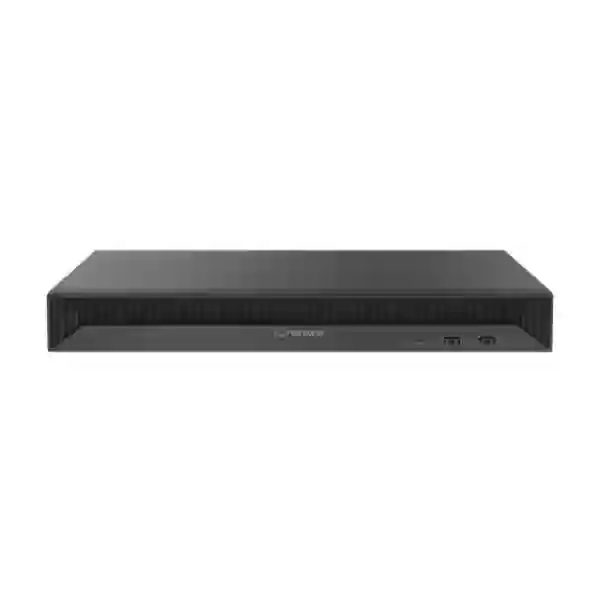
Hanwha WRN-2010S Edge WAVE Network Video Recorder
The Hanwha WRN-2010S offers eight powered PoE/PoE+ camera connections, up to 150 Mbps recording bandwidth and two SATA storage bays supporting up to 20TB. Evaluate this Wisenet WAVE recorder against your cameras, software licenses, power budget and footage-retention requirements before ordering.
Key specifications
| Recording throughput | Up to 150 Mbps |
|---|---|
| PoE camera ports | 8 × 10/100 RJ-45, PoE/PoE+ |
| Combined PoE power budget | 100W |
| Network interfaces | 2 × 1Gbps RJ-45 |
| Internal data storage | 2 × SATA bays, up to 20TB combined |
| System drive | 32GB eMMC |
| Processor / RAM | Dual core / 8GB DDR4 |
| Operating system | Ubuntu Linux 22.04 LTS |
| Local display | HDMI × 1; DisplayPort × 1 |
| USB | Front: 2 × USB 2.0; rear: 2 × USB 3.0 |
| Environment | 0–40°C; 20–85% non-condensing humidity |
| Power input | 100–240V AC; confirm current model load |
The specification does not establish included drives, recording-license quantities, accessories, regional availability or exact usable archive space. Published power-consumption figures differ by document revision, so verify mains sizing against current official information.
An IP surveillance recorder planned around real requirements
The Hanwha WRN-2010S is aimed at organizations that need to record and manage video from compatible network cameras using the Wisenet WAVE environment. It brings powered camera connections, recording software and local storage bays into a compact appliance. That makes it a practical product to evaluate for offices, shops, service facilities and distributed business premises where a conventional PC-based recording server may not be the preferred starting point. The choice still depends on the actual camera estate and operating needs. An attractive specification does not tell a buyer how long footage will remain available, which cameras can be integrated or how many license entitlements are supplied.
Begin with a camera schedule, not just a price request. Identify the number of cameras, their models and expected stream sizes, the points where cameras will be installed, how recordings will be reviewed and who needs remote access. Use these facts to test the recorder’s network, storage, licensing and power limits. A clear design brief prevents a buyer from mistaking one useful capability for a guarantee that the entire surveillance system will perform as required.
Core product capabilities at a glance
Hanwha specifies up to 150 Mbps of recording bandwidth and eight integrated 10/100 PoE/PoE+ RJ-45 camera ports with a combined 100W power budget. It also lists two 1Gbps RJ-45 interfaces, two SATA bays supporting up to 20TB of combined internal data capacity, and a separate 32GB eMMC system device. Computing resources include a dual-core processor and 8GB DDR4 RAM with Ubuntu Linux 22.04 LTS. For local connections, there is one HDMI output, one DisplayPort output, two front USB 2.0 ports, two rear USB 3.0 ports and an audio output.
These numbers describe separate parts of an integrated system. The 150 Mbps figure is not a fixed number of cameras. The eight powered ports do not define the quantity of recording licenses. The 20TB capacity is not a supplied disk bundle or guaranteed footage-retention period. Check the current manufacturer revision for the regional unit and confirm all project-specific inclusions in writing. A buyer should know which components are included before approving a procurement budget.
How Edge WAVE fits into a video management workflow
The Edge WAVE designation matters because the recorder is built for a Wisenet WAVE management workflow rather than being simply a generic disk box. A security operator may need live views and easy search, an administrator may maintain users and devices, and a manager may require occasional permission-based review. These activities can be supported through WAVE clients and suitable mobile or cloud-connected access configurations. Designing around these distinct roles gives the system a more useful structure than giving every employee broad access to all cameras.
WAVE capability is not the same as automatic entitlement to all recording features. Confirm the software version, suitable licenses and supported device functions. Also identify where people will work: a local monitor may serve setup and basic checks, while a separate computer may be better for complex monitoring and evidence handling. Ask the project team to demonstrate the specific search, playback, export and user-permission workflows needed by the organization before the system is accepted.
Understanding the eight integrated PoE connections
The integrated PoE/PoE+ interfaces can carry network video and deliver electrical power to compatible cameras using Ethernet cabling. For a deployment with camera cables returning to the recorder cabinet, these connections can reduce the need for separate camera adaptors or some external switch ports. However, the manufacturer specifies a shared 100W power budget, meaning the cameras must be assessed collectively. The presence of eight sockets alone does not prove that eight high-draw cameras can all operate simultaneously within the available power.
Check the maximum documented power requirement of every proposed camera. Consider infrared illumination, additional peripherals, heating elements and moving components where relevant; their worst-case consumption may differ from an ordinary daytime operating value. The design should respect both the total budget and applicable port-level limits, leaving appropriate margin. If the requirements are higher, discuss a suitable external PoE switch or another approved power architecture. Do not solve a power mismatch simply by hoping that camera consumption will remain low.
Camera connection count versus recording entitlement
Physical ports and recording licenses are different constraints. Eight local powered connectors establish a convenient direct-connect arrangement, but they do not independently establish a licensed camera capacity or the total number of network streams that an installation can record. Likewise, a camera connected through a separate switch must still meet the software, bandwidth and licensing rules of the proposed WAVE system. Treat the hardware connections as one component in the design rather than the whole design.
Ask the supplier to itemize the exact WAVE Professional or other appropriate recording licenses included with the selected sales package. Confirm whether any special integrations or extensions require separate entitlements. Record the quantity that will be activated during commissioning and the quantity needed for future growth. If an organization plans more cameras later, make that expansion explicit now. A clear licensing plan avoids a situation in which the recorder arrives and displays cameras but the intended recording service cannot be commissioned as quoted.
What the 150 Mbps throughput limit really means
The maximum stated recording bandwidth is 150 Mbps. This specification should be checked against the aggregate recording workload, rather than divided by a guessed bitrate to produce an unconditional camera count. Camera stream demand depends on resolution, frames per second, codec, compression choices, scene movement and lighting. Two cameras with the same stated resolution can send different average data rates when one watches a quiet corridor and the other observes a busy entrance.
Ask for a bitrate schedule based on the actual selected camera profiles. Estimate typical and peak demand, include any streams that will be recorded and leave operational headroom. Confirm how video reaches the server through local or upstream network interfaces. A configuration that nearly saturates the maximum during ideal conditions is vulnerable to extra load if settings or site activity change. Project capacity should be justified by practical measurements or a documented manufacturer planning method, not a simplistic claim that an advertised recorder supports any particular mix of high-resolution cameras.
Plan storage as carefully as the camera selection
Two SATA drive bays support a maximum combined internal capacity of 20TB with suitable drives. That figure is an installed-capacity ceiling and does not establish what hard disks are included in a particular commercial bundle. It also does not equal guaranteed usable recording storage. Formatting, system reservations, configured retention and the recording pattern affect how much capacity remains available for footage. Verify current compatible-drive information and confirm the actual drive models and sizes on the quotation.
Start by asking how long recordings need to remain retrievable. The answer may vary among entrances, customer service areas, loading gates and sensitive rooms. Next, establish the expected bitrate and recording schedule of every camera. Continuous recording tends to consume more storage than some event-based schedules, but changing the recording policy can also change what evidence is available. Choose a capacity and schedule that meet the organization’s requirements rather than fitting the available disks by reducing quality without reviewing the consequences.
How to calculate a realistic recording-retention estimate
For a first approximation, one megabit per second of sustained video uses about 10.8 gigabytes each day before overhead. For example, five streams averaging four megabits per second would collectively produce around 216 gigabytes in one day of continuous recording. This is a mathematical planning example, not a promise that this model is appropriate for a particular five-camera installation. Actual consumption varies with the cameras’ chosen compression, frame rates, lighting, motion and recording rules.
To turn the calculation into a decision, use realistic average bitrate estimates, add an allowance for uncertainty and establish usable disk space after system requirements. Consider whether recordings are continuous or scheduled. Verify the expected archive duration after deployment using WAVE’s storage information and real observed activity. A security procedure requiring footage from a given incident date should not depend on an estimate that was never validated. Record the expected retention period and the circumstances under which it could become shorter, then review the setting periodically.
Hard drive suitability and serviceability
Video recording can involve sustained disk writing over long periods, so drive selection is part of system engineering. Obtain the current Hanwha-compatible storage guidance for the exact hardware and firmware. Confirm drive capacity, interfaces and suitability for the intended operating workload rather than assuming that a disk works because its SATA connector physically fits. Follow approved installation and handling procedures, and inspect recognized storage capacity during commissioning.
A two-bay chassis does not automatically establish a particular RAID configuration, mirrored data or a complete backup facility. These functions should be separately verified if they are mandatory. Organizations handling important evidence should also document what happens when a drive fails and who is authorized to export essential footage. Keep drive details in the equipment inventory so a technician can support the system later. If the project demands larger archives or more sophisticated storage resilience, consider a different recording architecture instead of presenting the two-bay limit as something it is not.
Retention schedules and evidence priorities
Different camera views can justify different recording policies. A delivery entrance may require continuous observation, while another area might have a different business purpose and a carefully configured schedule. A policy can include camera quality, recording times, event handling, expected archive length and who may export footage. Make these decisions before installation so storage calculations and operational instructions reflect the same assumptions.
A lower recording rate can reduce disk usage, but it may also remove detail required to investigate an event. Motion-based recording can conserve capacity in some settings, yet poor detection settings may omit important context. The final design should balance useful evidence, privacy obligations and practical limits rather than optimize a single number. Involve operational and compliance staff where footage captures identifiable people. Record who approves retention changes, how incidents are preserved and what procedure applies when requested footage is close to being overwritten. This makes the archive valuable as evidence, rather than simply a large quantity of files.
Supported WAVE clients and remote operations
Hanwha lists WAVE client, mobile and Cloud Sync support for this Edge WAVE recorder. This provides options for how properly authorized users interact with the system, subject to network connectivity, application versions, access policy and account configuration. For a small business, the person reviewing a security incident may not be the same person responsible for network maintenance. Identify those roles separately and make sure each can reach the functions needed to do their job.
Remote viewing is not a guarantee that the recorder stores footage in a third-party cloud or that every mobile network connection will offer responsive playback. A cloud-assisted connection and an offsite evidence archive are different services. If a company needs recordings accessible during a site outage, ask for a separate business-continuity plan. If it only needs occasional remote viewing, protect accounts and agree on an appropriate secure access method. Test remote connections under realistic conditions and avoid making assumptions about data usage, latency or connection stability.
Software licensing must be specified in the quotation
Wisenet WAVE recording workflows depend on software entitlements. The exact count of licenses supplied with a specific commercial bundle should be taken from the supplier’s confirmed package description, not inferred from the eight powered interfaces. Ask for the recording licenses, their types and their quantities to appear as clear lines in the proposal. Confirm any requirements for third-party cameras, embedded recorder integrations, analytics plugins and advanced functions.
If the buyer owns an earlier WAVE system, record whether existing licenses are expected to be reused and request the appropriate verification before promising that transfer is possible. License activation details should be kept in a secure commissioning record rather than posted publicly. A temporary evaluation setup is not proof of permanent entitlement. When comparing quotations, include the licenses that make each option fully operational; an appliance-only figure may be misleading if the proposed camera workload needs additional software purchase. Make future expansion entitlement part of the same discussion.
What AI metadata support does and does not establish
The manufacturer’s feature list includes AI metadata support. This can help a WAVE system work with information generated by compatible cameras or other supported components, potentially making some investigation tasks more efficient. It does not establish that the recorder itself supplies every object detector, automatically upgrades a basic camera into an AI camera or includes all analytics licenses. The exact metadata fields and search functions depend on connected devices and the WAVE deployment.
If a customer wants to locate people, vehicles or defined events in recorded video, specify those outcomes rather than ordering equipment merely described as AI-ready. Check the model and firmware of the cameras and demonstrate the requested workflow using realistic footage. Discuss the chance of missed or misclassified events, the responsibility of human review and how footage is exported when an event matters. Treat analytics as an additional capability whose usefulness must be proven, not as a replacement for good camera placement, suitable image quality and an established evidence-handling procedure.
Third-party cameras and ONVIF considerations
Wisenet WAVE supports many IP video devices, including suitable ONVIF-based and other network streams. This creates useful choices for customers with existing camera fleets, but it is not proof that any device bearing an ONVIF label will supply every feature required by the project. Basic live video, recorded streams, motion events, audio, analytics metadata, pan-tilt-zoom control and advanced settings may have different support characteristics.
For every camera, record the exact manufacturer, model, firmware, stream profile and functionality to be tested. Check current WAVE compatible-device guidance and evaluate important integration behavior before large-scale installation. A generic stream may allow a picture to be recorded while losing richer camera events. Time synchronization and networking must also be correct for reliable operation. If a supplier proposes a camera substitution, ask how the replacement affects bitrate, PoE load and software functionality. Compatibility is a documented technical outcome, not a broad promise based on a shared network connector.
Design the local camera and business-network paths
Draw a network map that identifies cameras on integrated PoE ports, cameras connected through other switches, recorder uplinks, viewing workstations and any managed connection to the wider business network. The published eight 10/100 PoE interfaces and two 1Gbps RJ-45 interfaces should be assigned roles according to the approved installation instructions. Do not assume every interface belongs on the same unrestricted network or that a device is secure merely because it is inside a private building.
Use sound cabling practices, label port assignments and keep an IP addressing schedule. Verify that switches and uplinks support the expected traffic and that camera discovery and management operate as intended. A network that plays live video briefly may still be unstable during continuous recording. Include the site IT administrator when firewall rules or shared switches must change. If cameras span buildings or network segments, account for link reliability and fault isolation. A clear diagram will save support time when a camera disappears and helps the team distinguish software issues from cabling or network faults.
Security controls for access and administration
Remote viewing and centralized management should be accompanied by a clear access policy. Hanwha documents WAVE security features that include password protections, secure communications and options for controlled sessions and cloud-connected access. Determine which features apply to the selected WAVE version and configuration. Use named accounts for individuals where possible and limit rights to the minimum needed. Establish processes for issuing credentials, reviewing permissions and removing former employees’ access promptly.
Do not expose the recorder broadly to the public internet because a viewer wants quick remote access. Let the organization’s responsible IT team approve network paths and security configuration. Protect the physical cabinet and store administrator credentials securely. Where supported, use stronger authentication for remote accounts, review audit information and apply approved updates. Treat footage exports as sensitive data. An unauthorized user with legitimate-looking credentials may pose a greater operational risk than a camera with inadequate image quality. Secure operations must be planned from the beginning rather than added after deployment.
HDMI and DisplayPort: basic on-site viewing
One HDMI and one DisplayPort output are documented for configuration and basic monitoring. They can be useful when setting up the device or checking the recorder on site. The manufacturer description should not be interpreted as a guarantee that the local outputs replace a fully featured WAVE desktop control-room workstation. Monitor resolution, software layout, decoding workload and the tasks operators expect must all be checked for the intended configuration.
A security officer who regularly searches archives, reviews several cameras and exports footage may work more effectively from an approved client workstation. A technician who visits only to check configuration may be well served by basic local display. Discuss both cases before selecting screens and input equipment. Test how a real user moves from a live camera to recorded footage and an evidence export. Provide short operator instructions and distinguish monitoring access from administrator privileges. A display is valuable only when the workflow around it is reliable and understandable.
Power input, PoE loading and backup electricity
The product information specifies a 100–240V AC power input and a separate 100W shared PoE output budget. Those are distinct values and should not be conflated when planning backup power. Published revisions for this model present differing power-consumption figures, so electrical loading should be confirmed against the current applicable manufacturer documentation and the label on the supplied device. Do not order backup power on an unsupported assumption about total draw.
For a Tanzania installation, evaluate whether interruptions to utility power or local electrical disturbances could affect camera coverage. Where needed, have a qualified specialist size a suitable UPS and protection system for the recorder, attached camera load, required switches and necessary monitoring components. A battery’s useful runtime depends on load, condition and maintenance. Document what must continue to operate during an outage and whether a controlled shutdown is required. After power restoration, verify that connected cameras resume recording correctly. Backup electricity is an engineering choice, not an automatic feature of the recorder.
Temperature, humidity and indoor installation
Hanwha specifies an operating temperature range of 0°C to 40°C and relative humidity of 20% to 85% without condensation. A warm equipment cabinet can reach higher temperatures than the surrounding room, particularly when other PoE or networking devices are installed nearby. Choose an indoor location consistent with the manufacturer’s ventilation and mounting instructions, and evaluate the actual cabinet temperature during normal use.
Avoid direct weather exposure, uncontrolled dust, moisture and crowded installations that obstruct airflow. Account for cable bends and access to ports when measuring an equipment rack. Plan who will inspect ventilation and respond to environmental problems. If the recorder must be near a workshop, warehouse or external equipment area, do not assume the basic indoor rating is sufficient; consider an appropriately engineered protected location. The best recorder specification cannot overcome installation conditions beyond its supported environmental range. Mechanical access is equally important because a technician may need to inspect drives or cables without taking apart unrelated equipment.
Physical size, rack space and accessory checks
The recorder’s published dimensions are approximately 370 mm wide, 50.7 mm high and 320 mm deep, with a unit weight around 2.78 kg. Check the cabinet against all three dimensions and allow extra space for cables, ventilation and service access. The manufacturer describes rack brackets and a USB mouse in feature material, but regional package information and itemized accessory tables are not fully consistent. Confirm what actually ships with the quoted product instead of assuming that every accessory shown in a generic illustration is present.
Document the equipment position, cabinet identification, network cable labels and power source. Keep the security cabinet appropriately restricted, particularly where removing the recorder could affect evidence availability. A clear photograph of the final installed assembly and an accurate equipment list make future maintenance easier. If rails, brackets or cable accessories are essential for the site, specify their included status and installation method in the quote. A compact recorder can still cause unexpected work when rack compatibility is not checked.
Scenario: small offices and branch locations
A smaller office may want coverage of reception, entry points and document or stock areas without dedicating a large room to a recording server. This appliance may be worth evaluating when its port power, recording bandwidth and storage capacity cover the proposed cameras. Select camera positions based on the evidence needed, not simply on the number of available ports. For a reception camera, lighting and face visibility can matter more than adding another high-resolution stream.
Define which staff members can view which areas and how an incident is reported. Decide whether an occasional local monitor meets the daily workflow or a WAVE client computer is more appropriate. Check whether management really needs remote viewing and how access will be protected. Work through the storage requirement with the selected recording profiles. A good office installation includes a short operating guide and a maintenance contact, because footage that staff cannot find or export promptly provides less operational value.
Scenario: retail entrances and store operations
Retail sites often combine quiet aisles, changing lighting, active entrances and cashier areas. These camera views have different recording demands and may require different image profiles. A camera observing a frequently moving entrance may produce a higher bitrate than one watching a static area. An infrared-equipped camera can also draw more power under low-light conditions. Evaluate the cumulative impact rather than assuming every camera behaves like a simple fixed load.
Determine whether individual store staff, regional managers or a separate security operator will review incidents. A multi-site organization should decide how viewing rights are managed across locations and what happens when its internet connection is unavailable. The WRN-2010S can be considered as part of a site-level architecture, but it is not by itself a managed multi-branch service. Specify the cameras, appropriate licenses, archive policy and network design for each premises. Check the proposed workflow under real store conditions before formal handover.
Scenario: warehouse and workshop coverage
A warehouse or workshop may need cameras that cover loading movements, stock areas, perimeter doors and vehicle activity. These scenes can be more demanding than a simple reception view. Camera positioning, lens selection, lighting, mounting height and network reliability are important to obtaining useful images. Confirm whether power requirements increase at night or with camera accessories, and include those figures in the PoE schedule.
A site manager may need footage after a loading discrepancy, while security staff may check a live gate camera. These functions require an archive that records continuously as intended and permissions appropriate to each role. Consider equipment-room temperature and the route of long camera cable runs. If planned storage, bandwidth or powered connections exceed the published limits, evaluate a larger recording solution. The most useful outcome is reliable coverage of the operational risks, not the maximum number of cameras that can be physically attached to the recorder.
Scenario: growing sites and future camera additions
When a site initially installs several cameras, it can be tempting to use all available camera ports and storage capacity immediately. Before accepting that design, ask what happens if another entrance or loading bay must be monitored. Will another camera connect through supported external networking? Is its required software license budgeted? Is there recording bandwidth available during peak activity? What happens to the archive retention period after adding another stream?
Document a reasonable expansion allowance in the original design. That allowance can be achieved through reserved network, power, software and storage capacity or through a planned migration to a different architecture. The right solution depends on the organization’s growth expectations. Do not promise unlimited expansion simply because WAVE is flexible software. Conversely, do not assume the integrated port count tells the whole expansion story. A camera-count increase must be evaluated against each relevant limit, and the operating team should understand when a redesign becomes necessary.
When another recorder or architecture is preferable
This model is not automatically the right choice for every surveillance project. A design needing more than eight integrated powered camera connections, more than the 100W shared PoE budget, more than 20TB supported internal capacity or a recording workload beyond 150 Mbps should be assessed for a different solution. Projects requiring specific storage redundancy, demanding control-room displays or specialized administration capabilities also need functionality verified explicitly rather than inferred from the product category.
Possible options include suitable external PoE switching, a different WAVE appliance, a dedicated recording server or an architecture with more storage capacity. Each option has its own costs, licenses, network requirements and maintenance demands. A proper comparison measures whether the design can produce the required footage for the required period and be supported through foreseeable changes. The lowest appliance price does not necessarily mean the lowest total cost of a usable security system. Ask the supplier to explain technical tradeoffs before recommending a larger or smaller model.
A site survey before procurement
Prepare a practical site survey that records camera locations, expected fields of view, cable routes, lighting challenges and the proposed recorder location. Include conditions during and outside normal working hours. Check the available electrical supply and whether protected backup power is needed. Identify network switches, upstream connections, space in the cabinet and responsibility for administration. For existing cameras, obtain exact models and firmware information rather than a casual description such as ‘standard IP camera.’
Use the survey to prepare a camera power schedule and recording bitrate plan, then determine the desired archive duration. Define which users need live view, playback, export, configuration or remote access. Ask the project stakeholders to agree on acceptance tests before equipment is purchased. This combination turns a single product request into a verifiable system proposal. It also helps the supplier identify cases where the recorder cannot meet the requirement without external components or a different architecture.
Commissioning and acceptance testing
Begin commissioning by confirming the exact recorder model, included drives, software licenses and accessories. Install the appliance according to current official instructions, confirm the electrical arrangement and check network configuration. Set accurate time, date and time-zone information because recorded evidence must be interpretable. Add cameras through supported WAVE methods and check every intended stream at its planned resolution, frame rate and codec settings.
Next, confirm actual recording rather than looking only at live video. Test playback at several times, inspect storage status and check the expected retention information. Verify authorized user accounts, exports, remote connections if required, and notifications available in the licensed setup. Conduct a controlled restart and make sure the intended cameras return to service. Record any unmet requirement before the installation is accepted. A signed handover should document the equipment, licenses, configuration, user responsibilities and maintenance arrangements without placing passwords or activation keys into publicly accessible material.
Daily health checks and routine maintenance
An operator seeing a live image does not prove that yesterday’s recording was preserved. Establish regular checks for camera availability, disk warnings, recording status and the oldest footage expected to be retained. Where available, configure suitable alarms and verify that somebody receives and acts on them. Periodically open archived recordings and play them back. Check the camera scene after construction work or layout changes, because a camera can still be online while pointing at an obstructed view.
Maintain an inventory of installed devices, firmware versions, network settings and license records. Document configuration changes and assign responsibility for approved updates. Agree how faults are escalated and who can arrange drive service. If evidence is regularly exported, train staff to preserve the time, camera details and handling record needed for an investigation. These operational controls are inexpensive compared with discovering after an incident that an apparently functioning recorder had not retained the required footage.
Updates, backup information and recovery
Hanwha’s support documentation notes that the Linux-based WRN range has operating-system re-imaging procedures separate from ordinary WAVE software updates. Treat these as different maintenance activities and follow current model-specific instructions. Before significant changes, preserve the configuration, available license details and other necessary records, then arrange a controlled maintenance window. After changes, verify camera connections, disk recognition, playback and intended user access.
Create a response plan for disk faults, network disconnections and interrupted power. Know which drive models are supported and what a service technician is permitted to replace or reset. A configuration backup does not by itself preserve every video recording; decide separately whether essential incident evidence needs an independent copy. Test recovery in an approved window rather than improvising when an incident has already occurred. A system that can be operated and repaired predictably is more valuable than one with impressive initial specifications but no maintenance procedure.
Permissions, footage privacy and export records
A recording system can contain images of staff, visitors and customers, so access must be governed deliberately. Assign roles for live viewing, historical playback, footage export and administration. Apply least-privilege permissions and remove access when responsibilities change. Use a written process for requesting and disclosing recordings and store exported files in an appropriately protected location. A routine user should not need administrator credentials simply to review an incident.
Camera placement, retention periods, notices and handling of identifiable footage should be evaluated against the organization’s applicable legal and privacy responsibilities in Tanzania. Purchasing this appliance does not automatically establish regulatory compliance. Seek appropriate legal or compliance advice for sensitive deployments. Keep an evidence log identifying who produced an export, why it was needed and where it was securely transferred. These policies complement software security and reduce avoidable disputes about how recordings were handled.
What a complete quotation should contain
The quotation should identify the exact WRN-2010S package, whether compatible hard drives are included, their capacities, the number and types of WAVE recording licenses, and any external network switches or power accessories. It should distinguish appliance supply from installation, configuration, cabinet work, training and support. Confirm the regional shipping contents where a mouse, bracket or rail is needed. Pricing, stock, warranty and delivery arrangements must be confirmed by the seller for the actual order, not assumed from a manufacturer’s generic product page.
The quote should also refer to the camera schedule, required image profiles, retention period, network plan, power backup and accepted software functions. Ask about compatibility testing for existing cameras. When comparing offers, make sure they all deliver the same level of recording and support, rather than comparing an incomplete appliance-only price with a fully configured system. A clear scope of supply protects both the buyer and the team responsible for commissioning the installation.
Tanzania buyer checklist and next step
For a Tanzania project, provide the number of camera locations, any cameras already installed, the intended video quality and the number of days recordings must remain available. Describe whether the site is an office, retail store, warehouse or another environment, and note any conditions that affect cabling, lighting, ventilation or electrical continuity. Identify who will operate the system and whether they need local or secure remote access.
Ask FourTeck Tanzania to confirm the exact hardware package, current product availability, compatible drives, appropriate software licensing and the full commercial scope. Request a design review that checks aggregate video throughput, shared PoE loading, archive capacity and operational growth. Where a requirement falls outside the verified product capability, ask for a suitable alternative instead of weakening the security outcome silently. A well-specified quotation is the next sensible step toward reliable recording and evidence retrieval.
FAQ: Is this suitable for ordinary analogue CCTV cameras?
It is an Edge WAVE IP network video recorder, not a direct coaxial analogue input DVR. An existing analogue estate may need conversion or a different recording arrangement. Prepare a list of the current camera models and interfaces before assuming they can be connected. Compatibility, encoding, network access and the relevant WAVE license configuration should all be checked. If a project mixes old and new equipment, confirm the exact path each video stream will take and test the footage in the chosen client.
FAQ: Are eight PoE ports the same as eight included licenses?
No. The eight published PoE/PoE+ ports are physical powered network connections. WAVE recording rights are a separate software licensing matter. The buyer should request an itemized list of licenses supplied with the specific commercial package and any additional licenses needed. A powered camera that displays video during a test is not proof that the required permanent recording entitlement has been included. Verify the system’s licensed camera plan as part of acceptance testing.
FAQ: Does the appliance include 20TB of hard drives?
No such inclusion should be assumed from the headline specification. The two SATA bays support up to 20TB combined internal capacity when equipped with suitable drives, but the supplied disk configuration depends on the exact commercial package. Ask for drive quantities, manufacturers and capacity on the quotation. Storage available for video will be affected by formatting and the system configuration. Confirm the installed configuration and realistic retention estimate before the project is accepted.
FAQ: Can it work with cameras from other manufacturers?
WAVE supports a wide variety of IP video devices, including appropriate ONVIF and network-stream integrations. Full compatibility is specific to camera model, firmware and the requested features. Live streaming may work even when analytics events, audio or special controls do not. Check the current supported-device guidance and arrange a practical demonstration for business-critical functions. A proposed third-party camera should also be evaluated for its recording bitrate and PoE consumption.
FAQ: Does AI metadata mean automatic AI detection?
The manufacturer specifies AI metadata support, but that does not mean the recorder independently performs every AI analysis or includes every additional feature. The available capability depends on compatible cameras, software versions, plugins and possible license requirements. Specify the actual search or analytics outcome needed and verify it with sample footage. Do not substitute a broad AI marketing phrase for a tested event-detection requirement.
FAQ: Can users view cameras on a phone?
WAVE mobile and Cloud Sync support are part of the product’s described environment. A working mobile view still depends on supported software, network access, authorized accounts and security configuration. A cloud-assisted connection is not an automatic cloud video backup service. Establish whether the user needs live viewing, recorded playback, event notification or remote administration, and test the required functions using the intended connection method.
FAQ: Can HDMI or DisplayPort replace a control-room computer?
The integrated outputs are described for setup and basic monitoring. They should not be treated as a guarantee of every advanced workstation feature or multi-monitor control-room layout. For demanding live surveillance and evidence review, consider an approved WAVE client workstation. Test the chosen display resolution, layout, search and export workflow with the actual WAVE software version. The correct interface depends on the operator’s daily tasks.
FAQ: How much footage can be retained?
Retention depends on installed usable disk space, number of cameras, recording schedules and actual stream bitrates. The published maximum of 20TB internal capacity does not translate into one universal number of recording days. Estimate demand using realistic camera profiles, then verify archive behavior after commissioning. If a specific retention period is mandatory, document the assumption and configure a suitable storage plan before purchase. Remember that heavy motion or quality changes can affect data rate.
FAQ: What power and temperature conditions are supported?
Hanwha lists a 100–240V AC supply, a shared 100W PoE budget, an operating temperature range of 0°C to 40°C and 20% to 85% non-condensing humidity. Different published document revisions give different total consumption values, so confirm electrical design using the applicable current specification and product label. Provide suitable ventilation and evaluate backup power for the complete connected system where necessary.
FAQ: What should I send for a useful Tanzania quotation?
Send FourTeck Tanzania the requested model, camera quantity and types, expected image quality, desired retention duration, operating conditions and whether secure remote viewing is needed. State whether disks, cameras or WAVE licenses already exist and may need to be reused. Request a configuration-specific quote showing drives, licenses, accessories, installation scope and commercial conditions. That allows the supplier to assess the requirements and identify missing components or a more suitable design.
Request a configuration-specific quotation
Contact FourTeck Tanzania with your intended camera list, maximum PoE requirements, recording quality, archive retention target and any current WAVE licenses. Ask for a complete project quotation confirming disks, software entitlements, accessory inclusions, compatibility and commercial terms. If the verified requirements exceed this recorder’s limits, request an alternative system proposal rather than relying on unsupported assumptions.




Reviews
There are no reviews yet.