
Professional IP video recording | Tanzania project enquiries
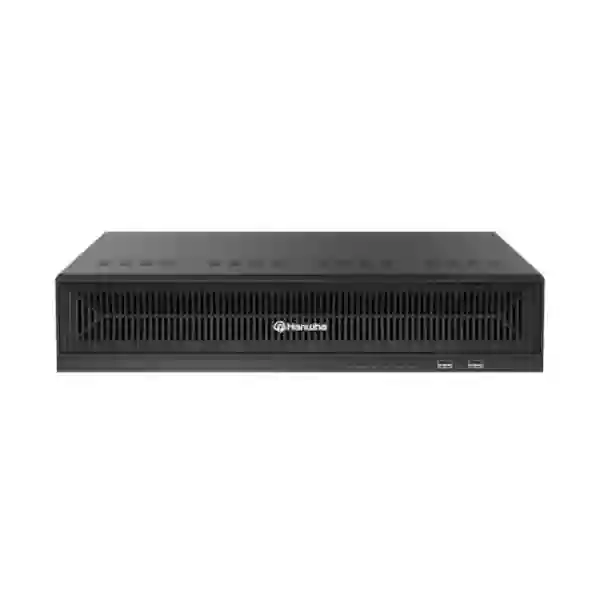
Hanwha WRN-2110SB1 NVR — Edge WAVE with 16 PoE/PoE+ ports
Plan a managed IP surveillance system around verified recording throughput, powered camera connectivity and a realistic storage requirement. This Hanwha Vision appliance provides 16 built-in PoE/PoE+ ports, a shared 200W camera-power budget, up to 250 Mbps recording bandwidth and four internal SATA drive positions. Request a configuration-matched quote before deciding on a recording licence or hard-drive package.
Best next step: share your camera list, desired retention period and intended deployment layout.
Key points before specifying this NVR
- Sixteen built-in PoE/PoE+ RJ-45 camera connections
- 200W shared PoE budget for compatible powered devices
- Up to 250 Mbps recording throughput
- Four SATA drive positions; up to 40TB supported raw storage
- Wisenet WAVE environment with compatible AI metadata support
- Separate checks required for recording licences and included disks
Verified hardware specifications
These are model-level specifications drawn from Hanwha Vision’s WRN-2110SB1 datasheet. The supplied bundle and the installed software release still require confirmation.
| Manufacturer / model | Hanwha Vision / WRN-2110SB1 |
|---|---|
| Type | Edge WAVE network video recorder |
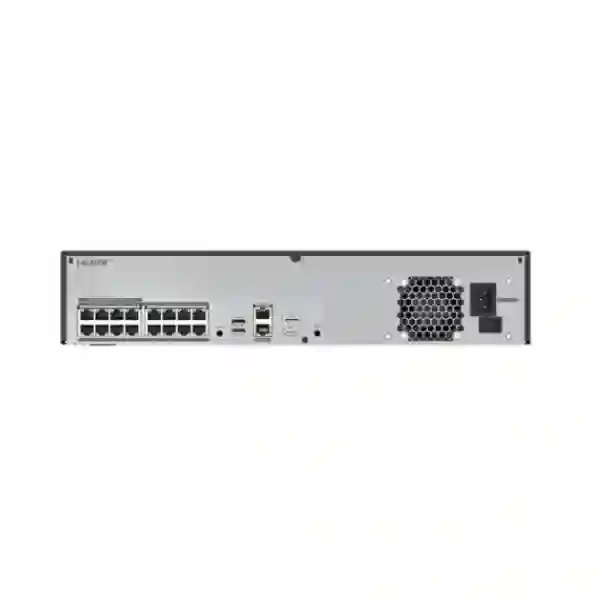
| Built-in powered camera ports | 16 × PoE/PoE+ RJ-45; 200W total PoE budget |
| Recording bandwidth | Up to 250 Mbps |
| Internal data-drive positions | 4 × SATA; up to 10TB each, 40TB maximum supported raw capacity |
| Network uplinks | 2 × RJ-45 Gigabit Ethernet |
| Video outputs | 1 × HDMI; 1 × DisplayPort for configuration/basic monitoring |
| USB and audio | 2 × front USB 2.0; 2 × rear USB 3.0; audio output |
| Processor and memory | Quad-core CPU; 8GB DDR4; 32GB eMMC operating-system storage |
| Published operating system | Ubuntu Linux 22.04 LTS (verify actual installed software build) |
| Electrical figures | 100–240V AC, 50/60Hz; datasheet power-consumption figure 340W |
| Environmental limits | 0–40°C; 20–85% relative humidity |
| Physical chassis | Approximately 440 × 89.8 × 428.4 mm; 5.56 kg |
| Recording licences / installed drives | Package-dependent; confirm in the exact written quotation |
What this recorder is designed to solve
A growing surveillance system needs more than a place to plug in cameras. It needs dependable recording capacity, an understandable interface for operators, a retention plan and a network arrangement that does not disrupt normal business traffic. The Hanwha WRN-2110SB1 NVR combines an Edge WAVE recording platform with a built-in PoE switch, making it worth considering when a project has multiple wired IP cameras and a requirement to retrieve footage without managing a separate general-purpose computer for the recording role. The appliance still needs a properly designed wider system, including supported cameras, suitable storage and appropriate software licences.
The primary buying decision is whether its integrated camera-power capability, storage envelope and recording throughput match the proposed site. Those requirements are related but not interchangeable. Sixteen physical PoE interfaces do not establish the number of recording licences included, while a 40TB maximum supported capacity does not mean 40TB is installed. This page separates the published hardware specifications from package-dependent items so that installers, IT teams and facilities managers can ask for a useful, itemised quotation rather than relying on an ambiguous channel label.
At-a-glance fit for an IP surveillance project
The recorder is most relevant when wired network cameras can connect directly to nearby rack equipment or through a deliberately designed external switching network. Its integrated 16-port PoE/PoE+ interface can remove the need for a separate powered camera switch in some layouts. A 200W shared PoE budget supports the design only when the total power requirement of connected devices stays inside that limit, with allowance for peaks and changes in camera operating modes. The four available SATA positions give a route to expand recording storage within the published compatibility limits.
Think of the appliance as one component of an operational system, not a complete surveillance installation supplied automatically in every box. Camera positioning, lenses, nighttime lighting, approved disk models, recording licences, network cabling and monitoring procedures are separate decisions. Sites whose cameras are far apart may be better served by external PoE switches near those camera groups; sites with strict evidence requirements should evaluate export, access permissions and recovery procedures. The best fit depends on a complete camera schedule and a realistic recording design, not on any single advertised figure.
The difference between PoE ports and recording channels
The WRN-2110SB1 has sixteen built-in PoE/PoE+ network ports. Those are physical Ethernet interfaces that can deliver network data and electrical power to connected compatible cameras. A recording channel is a separate software entitlement and system-design concept: it determines whether a camera stream can be recorded through the licensed WAVE environment. A camera connected through an external switch can consume a recording licence even though it uses none of the sixteen built-in PoE ports. Conversely, an unused built-in port does not represent an extra recording licence.
Manufacturer product-family documents describe channel-capacity configurations, and market listings show multiple bundles with different preinstalled licence and disk quantities. Therefore, do not interpret the base model code alone as proof of how many licences or hard drives are included in an individual offer. Ask the supplier to identify the exact variant, licensed recording-channel count, included disk count and any upgrade entitlements. If more cameras are anticipated later, confirm the supported expansion path and whether the chosen licence arrangement will remain suitable after the camera schedule changes.
How to evaluate the 200W PoE power budget
Power over Ethernet is useful because one cable may carry both data and electrical power to an eligible camera, but the recorder has a shared limit across its powered ports. Hanwha lists 200W as the total PoE budget. For design purposes, prepare a camera-by-camera schedule showing the manufacturer’s maximum power requirement, whether each device needs PoE or PoE+, and whether features such as heaters, infrared illumination, motors or accessories increase demand. Add the individual maximum requirements before selecting the final topology. A count of sixteen cameras by itself is not enough information.
A simple average of 200W divided by sixteen ports is only 12.5W per port; it is not an individual port guarantee or a recommendation to fill every connection equally. Actual device allocations and port-level limits should be checked against the latest switch and camera documentation. If an outdoor camera’s worst-case requirement is high, move that camera to a suitable independent power source or a correctly sized external switch rather than assuming the recorder will supply it. Ask the commissioning engineer to check PoE usage after all high-load camera functions have been enabled.
Storage capacity, drive selection and what is included
The published hardware specification provides four SATA data-drive positions, each supporting a drive of up to 10TB, for up to 40TB of total internal raw capacity when populated with compatible drives. This is a hardware ceiling rather than a promise about usable recording space, redundancy or included disks. Drive formatting, filesystem overhead, reserves, recording policies and any applicable storage arrangement can all affect usable space. The manufacturer directs buyers to compatible-drive information, and compatibility should be checked against the current hardware and software combination before disks are sourced.
For continuous video recording, the drives should be selected for the expected duty cycle, workload and environmental conditions, not just their capacity. The quote should state each installed drive’s manufacturer, model, capacity and quantity. Ask whether installation, initialization and storage health checks are included, and decide who replaces a failed drive. The appliance’s operating-system eMMC storage is separate from the four video data-drive positions; its presence is not a substitute for recording disks. An empty-chassis configuration and a fully populated storage bundle may look similar in a catalogue but have substantially different project costs.
How much retention can the system provide?
Retention is the period for which recorded video remains retrievable, and it depends primarily on the aggregate recorded data rate, usable storage and recording pattern. A 40TB maximum capacity is not equivalent to a guaranteed number of days. Sixteen cameras producing light event-triggered recordings can have very different storage needs from sixteen high-resolution cameras recording continuous motion-rich scenes at higher frame rates. Codec efficiency, actual scene complexity, audio, event rules and substream choices all influence the result. The responsible design method is to estimate the average and peak bitrates for the exact camera models and recording profiles.
Request a storage worksheet that shows cameras, streams, assumed bitrates, expected recording hours, target retention, safety margin and available disk capacity. Include a decision for what happens when storage is full: routine overwrite may be appropriate for ordinary operations but unacceptable for material under investigation or subject to retention rules. Sensitive or important incidents may require a protected export process separate from the rolling recorder archive. Check the proposed storage capacity against real sample video when practical, then revisit the calculation after changing resolution, frame rate, analytics or recording schedules.
What 250 Mbps recording bandwidth means
Hanwha specifies a maximum recording bandwidth of 250 Mbps. That is a recording-throughput figure, not an internet subscription speed, a guarantee of simultaneous playback performance or a per-camera allocation. The relevant workload is the combined video ingest expected from all recording streams, with enough engineering headroom for ordinary fluctuations and the demands of the software. A project can reach a throughput ceiling before it reaches the physical camera-port count, and the opposite can also happen. This is why a camera schedule needs both channel quantities and stream parameters.
For each camera, obtain realistic bitrates at the intended resolution, frame rate, compression method and scene complexity, including challenging conditions such as heavy movement or nighttime infrared operation. Sum the estimated recording streams and compare the result with the maximum published recorder bandwidth. Do not use an average bitrate as an absolute peak. Also assess uplink traffic, operator viewing and video exports separately: those may share parts of the broader network even when the recorder can ingest the selected streams. A realistic test during commissioning is more useful than merely quoting the 250 Mbps specification.
Network ports and clean surveillance-network design
The recorder provides two Gigabit Ethernet network interfaces in addition to its integrated camera PoE ports. These interfaces make it possible to design network separation between camera traffic and wider corporate access, subject to proper configuration. Hanwha’s WRN setup guidance distinguishes a camera-network interface and a corporate-network interface and provides separate instructions for internal or external DHCP scenarios. An installer should decide at the design stage which network is responsible for camera discovery, addressing and security, rather than allowing several overlapping DHCP services to compete.
Keep the surveillance network understandable to support teams. Document subnets, switch locations, allowed routes, recorder addresses and which devices need internet access, if any. Use a controlled configuration for DNS, time synchronization and remote access. Camera networks should not become an unmanaged bridge into office devices. If existing network policy already dictates VLANs or routing, verify how those policies map to the recorder’s supported interfaces. Secure segmentation usually improves maintainability, but it needs to be planned with camera discovery, external switches, client access and future expansion in mind.
When to use an external PoE switch
A built-in sixteen-port switch is convenient when cable runs terminate near the recorder, but many buildings have camera clusters in different wings, floors or outdoor zones. External PoE switches may reduce long cable runs, provide additional camera power and make local maintenance easier. Hanwha’s WRN setup instructions explicitly consider both onboard and external PoE switching and identify the camera-network port for connections from an external camera switch. The exact wiring arrangement, network-address plan and interoperability requirements should be confirmed by the installer before cables are terminated.
An external switch does not automatically increase recording licences, recorder throughput or internal storage. Its advantages are chiefly physical distribution, power flexibility and network architecture. Select switch power budgets from connected camera loads, including high-consumption devices and equipment that may be added later. Specify appropriate uplink speed, fibre or copper media, surge protection and management features as required by the site. Label switch ports and keep camera addressing records accurate. A well-specified expansion switch can be a practical complement to the recorder; an unplanned one can introduce confusing discovery and network-security problems.
Working with Wisenet WAVE video management
The Edge WAVE platform is intended to make footage accessible through a unified video-management environment. The manufacturer’s feature summary names WAVE client, mobile and Cloud Sync support, together with compatibility for AI-camera metadata. These capabilities matter to organisations that need an operator to locate an incident, compare camera views or retrieve footage without relying entirely on a person standing beside the recorder. However, specific viewing, sharing and integration features can vary with software release, permissions, network conditions, camera capabilities and licensing.
Plan the operator experience rather than assuming default settings will match site procedures. Identify who needs live viewing, who may inspect recorded video, who can export evidence and who may change retention or camera configuration. Decide whether security staff will use a dedicated workstation, a supervised local screen or authorised remote clients. Test the interface with actual tasks such as finding a delivery, tracing movement through several cameras or exporting a short incident clip. Software usability is most valuable when the camera names, timestamps, permissions and recording schedules were configured correctly during commissioning.
Check recording licences before committing
Wisenet WAVE recording entitlements are a distinct procurement item. Some marketed WRN-2110SB1 packages have named channel and storage configurations, while the base model designation on its own does not prove that any specific licence bundle comes with the unit being quoted. A supplier should state the WAVE licence quantity, licence type, activation arrangement, applicability to the proposed cameras and any restrictions on software updates or future expansion. Do not substitute the number of physical PoE sockets for a verified licence count.
This distinction also affects budgeting. A low hardware price may exclude the number of recording licences required by the project; another offer may include licences but have a smaller or different drive configuration. Compare like with like by asking for an itemised package that lists recorder chassis, licence entitlements, disks, cameras, switches and installation work. Confirm the support process for recovering licence records and managing hardware changes before deployment. The recording design should be checked against current Hanwha WAVE licensing instructions rather than a broad statement that the unit supports a particular number of cameras.
AI metadata: useful, but camera-dependent
Hanwha identifies AI metadata support among this recorder’s headline features. In practice, metadata-driven search and alerts depend on what the selected cameras actually detect, which information they expose and how the relevant WAVE software version handles that information. The recorder’s support for metadata does not mean it turns an ordinary camera into an AI camera. Nor does it confirm that every analytics feature, licence or plugin is included with a basic hardware quotation. Ask for a demonstration using the proposed camera models and the intended workflow.
For a site manager, the real question is whether AI-supported information shortens the time needed to find a meaningful event while keeping false alerts manageable. A person, vehicle or other event label may be useful when the associated camera and software provide the required capability. Evaluate recording conditions such as camera angle, lighting, occlusion and movement speed, and distinguish a detection result from conclusive evidence. Any operational alert still needs a suitable human response process. Build analytics requirements into the camera schedule instead of adding an unspecific promise of intelligent monitoring to the purchase order.
Local monitor, USB and operator access
The WRN-2110SB1 datasheet lists one HDMI output and one DisplayPort output for configuration and basic monitoring, together with two front USB 2.0 connections and two rear USB 3.0 connections. It also lists an audio output. These interfaces are useful during installation and maintenance, and they can support an operator workflow appropriate to the installed software. They should not be mistaken for a guarantee that the recorder is a complete multi-screen control-room workstation or that every local display arrangement is supported without qualification.
Decide whether monitoring will normally take place at the rack or from separate client devices. A rack in a locked communications room may be secure for equipment but inconvenient for security staff; a controlled viewing workstation may be more practical. Verify supported monitor resolutions, input devices and any site-specific export procedure against the current application documentation. Maintain physical access controls around the recorder and removable media. When an incident is exported, the operator should record the camera, date, time and export destination so that useful footage is not lost among unnamed files.
Remote viewing and Cloud Sync planning
Remote access can be valuable for organisations with authorised managers or several operating locations, but connectivity must be treated as a system-design issue. The WAVE family supports mobile and cloud-connected workflows according to the manufacturer; the experience in a particular installation depends on activation, connectivity, firewall rules, identity controls and product configuration. Cloud Sync should not be interpreted as an automatic cloud backup of every recorded video file. Before deployment, establish exactly which data or remote functions the intended service provides and which data remain on the local drives.
Ask the IT team to define a remote-access policy, not simply open broad inbound access to the surveillance network. Use supported secure methods, strong credentials and controlled accounts. Test remote viewing at realistic uplink speeds, particularly where internet connectivity fluctuates. Decide what authorised users should see if the internet is unavailable: local recording should be evaluated separately from remote convenience. If the organisation has internal privacy or data-handling requirements, review them before giving external users access. A remote-access feature is useful only when it is secured and supportable over the life of the installation.
Access security and recorder hardening
The initial configuration should include unique strong credentials, appropriate account privileges and an inventory of who is allowed to manage the recorder. Hanwha’s WRN initialization guidance specifically instructs users to set the Ubuntu password for the preconfigured WAVE account and verify system date and time. Treat these as beginning steps, not the whole security programme. Separate administrator duties from ordinary viewing rights, remove access when staff change roles and document how credentials are securely stored and recovered by authorised personnel.
Consider the cameras, switches, operator workstations and network gateway as part of the same security boundary. Keep supported software and device firmware under a controlled maintenance plan, with testing and recovery arrangements before changes. Limit unnecessary network exposure and monitor authentication or service issues where operationally feasible. Never use a public website form to collect recorder passwords, live licence keys or private camera addresses. Security procedures should reflect the organisation’s own requirements and the supported manufacturer documentation. A professionally installed surveillance appliance can still become risky if default credentials or broadly accessible network services are left unmanaged.
Time accuracy, searching and evidence handling
Useful surveillance video needs trustworthy timestamps. If the recorder clock and camera clocks disagree, a search for an incident can miss the relevant footage or produce confusing exports. Hanwha’s WRN setup guidance calls for verifying the system date and time before recording begins. For a Tanzania deployment, document the intended local timezone and the approved time source, then check how displayed timestamps relate to exported evidence and the clocks shown in client applications. Where automatic time synchronization depends on the network, verify that the service is available under the site’s security policy.
Define a repeatable incident-handling process before the first event occurs. Record who can search footage, who approves export, where exported files are stored and when material must be deleted or retained. If a recording is likely to be used in a formal inquiry, preserve the relevant original context and track who handled each copy. A video recorder is not by itself a complete legal chain-of-custody system. The operational process surrounding the files is just as important as image quality. These decisions also help determine user permissions and how much dedicated export storage may be needed.
Power supply, UPS and shutdown planning
Hanwha lists an AC input range of 100–240V at 50/60Hz for the WRN-2110SB1, along with a 340W power-consumption figure in its product datasheet and a separate 200W PoE power budget. Electrical design should use the manufacturer’s current installation instructions and the final configuration, rather than treating the PoE budget as the entire recorder’s power requirement. The chosen power circuit must also account for the attached network equipment, displays and any separate PoE switches. Have a qualified technician confirm the correct protection and distribution arrangement.
An appropriately sized uninterruptible power supply may reduce the chance of abrupt recording interruption during brief outages. UPS capacity and battery runtime need to be calculated for the actual connected loads; no particular runtime is guaranteed by the recorder. Define which devices need continuous power, whether controlled shutdown is supported in the intended setup and how operators will know when the UPS battery is low. If cameras are powered from independent switches, include their power supply and network uplinks in the continuity plan. Recording reliability is an end-to-end consideration: a powered recorder cannot capture a camera that has lost power.
Temperature, ventilation and site environment
The manufacturer specifies an operating temperature range of 0°C to 40°C and an operating relative-humidity range of 20% to 85% for this model. These are equipment limits, not assurances that any unventilated room, outdoor enclosure or equipment cupboard will be suitable. In a warm or dusty operating environment, equipment placement, airflow, filtration and routine inspection become important design decisions. The installation should keep the recorder within its stated conditions when the disks and network connections are under expected operating load.
Do not assume that the outdoor temperature is the same as the temperature inside a locked rack or cabinet. Multiple powered devices can raise cabinet temperature, especially when airflow is obstructed. Provide appropriate clearance around ventilation openings and use a suitable indoor equipment location unless a specialist enclosure is designed to maintain the required conditions. Plan how staff will detect cooling problems and arrange maintenance. Environmental planning is particularly important for a recording service expected to operate continuously: protecting the storage devices and electronics is more economical than relying on repairs after repeated thermal stress.
Rack dimensions, placement and physical security
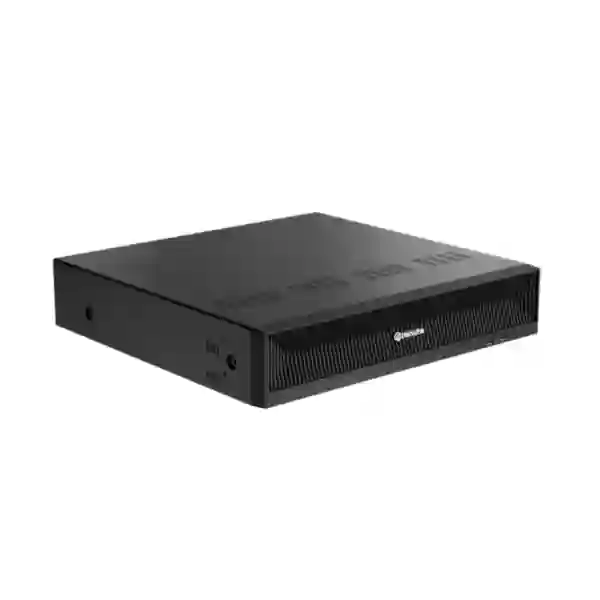
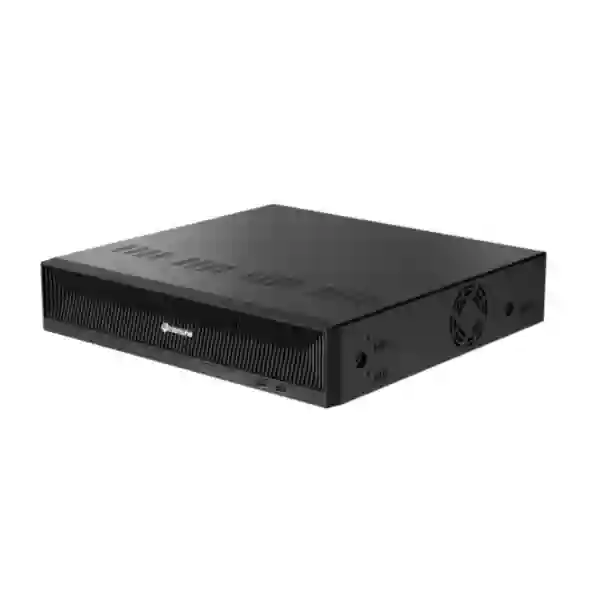
The Hanwha datasheet describes a black metal chassis measuring approximately 440 by 89.8 by 428.4 millimetres, with a listed weight of about 5.56 kilograms. It includes a USB mouse and rack-mount brackets according to the published feature sheet. These figures help estimate space, but the actual rack arrangement should also allow for cables, airflow, service access and any rails or shelves required by the installation plan. Confirm included hardware in the quoted configuration instead of assuming every mounting accessory is identical across regions or packages.
Choose a placement that prevents casual access to recording drives and front-panel connections while allowing authorised maintenance. A lockable equipment space, labelled network cables and a documented power path simplify support. Consider how a technician will replace a disk, connect a setup screen or access rear ports without pulling on active camera cables. If the installation is shared with other IT equipment, coordinate rack capacity and ventilation with the team responsible for that room. The physical installation should make the service easier to maintain, not harder to inspect when footage is needed urgently.
Camera compatibility before installation
The physical presence of an Ethernet port does not prove every network camera will function exactly as intended. Camera discovery, video streaming, PTZ control, audio, events and analytics can rely on different protocols and software capabilities. Wisenet WAVE supports a broad range of integrated devices, but the appropriate choice is to verify the proposed brand and exact camera model against current supported-device guidance. This is especially important for third-party cameras or specialised devices whose metadata and event functions may differ from standard live video.
Create a camera matrix listing location, manufacturer, model, firmware, desired stream, power requirement and essential functions. Mark functions such as two-way audio, PTZ presets, alarm input handling and AI metadata as requirements rather than generic assumptions. Test at least one representative device of each camera family before a full rollout where practical. Check whether the selected camera needs an additional software integration or feature entitlement. A camera that produces a picture is not necessarily meeting the operational requirement if its events, quality settings, or evidence retrieval workflow have not been verified.
Recording profiles and image-quality decisions
Surveillance requirements are better expressed as usable outcomes than as a single resolution number. For an entrance, identifying a person may be the priority; for a warehouse aisle, broad activity coverage may matter more. Camera position, lens selection and lighting have major effects on recorded evidence. After those decisions, select resolution, frame rate and encoding settings that satisfy the task without consuming unnecessary bandwidth and storage. High recording quality everywhere is not automatically better when it causes an avoidable retention shortfall.
Decide whether cameras will record continuously, on selected events or according to schedules supported by the installed software. Event-based recording may save space but requires careful testing to ensure important actions are not missed. A hybrid policy may preserve baseline activity while capturing greater detail around significant events where the application supports it. Evaluate daytime, nighttime and adverse scenes before approving the configuration. Document each recording profile and who may change it, because a later adjustment to bitrate or frame rate can silently change the number of days of video retained.
Planning for multiple departments and user roles
A shared business site may have security, facilities, operations and management users, each with different reasons to consult surveillance footage. The right video-management configuration should minimise unnecessary access while making legitimate investigations practical. Define which camera groups each role may view, who can review history and who can export clips. Administrative functions, system settings and storage deletion should be controlled separately from routine viewing whenever the supported software permits that separation.
Before commissioning, agree a simple camera-naming convention based on meaningful locations rather than manufacturer defaults. An operator searching for a loading-bay event should not need to identify an unexplained device number. Create a documented procedure for reporting missing footage or camera outages and designate the person who will evaluate alerts. If several departments share responsibility, establish a clear escalation route. These practical choices can reduce troubleshooting and review time even without purchasing additional hardware. Camera count is a technical planning input; clear responsibility is an operational requirement for the system to produce value.
What happens if a component fails?
Recording continuity depends on more than the NVR chassis. A camera can lose power, an Ethernet link can fail, storage can become unavailable or the network can block access to an otherwise functioning recorder. Map likely failure points and decide which of them the organisation needs to tolerate. The base model’s four drive positions should not be interpreted as a confirmed RAID, hot-swap or automatic failover feature; any such capability must be established for the exact software and disk configuration before it is promised.
A maintenance plan should include checking camera availability, disk health, free-space behaviour, system alerts, network uplinks and the status of the UPS where fitted. Test incident retrieval after a controlled restart and record how to recover access if a workstation is replaced. A separate backup or export strategy may be necessary for recordings that cannot be overwritten. If a site requires exceptionally high availability, evaluate redundancy at the cameras, network, storage and recording-service levels rather than assuming a single appliance covers every possible failure. Ask for documented recovery responsibilities in the support scope.
Expansion beyond an initial camera layout
A surveillance installation can grow when new entrances, stock areas or operational processes are added. The WRN-2110SB1’s integrated sixteen PoE ports set a convenient local connection point, but not the sole potential path for networked cameras. Additional compatible devices may be connected through correctly configured external infrastructure, subject to supported system capacity, recording licences, aggregate bandwidth, power arrangements and remaining storage. Expansion should be planned against all five of these constraints, not described simply as adding another switch.
Reserve a sensible design margin and keep a versioned camera schedule. For every proposed additional camera, consider the incremental recording bitrate, daily storage demand, licence entitlement, PoE load and network path. A project close to its ingest or storage limit may need a different architecture even when free physical ports remain. A project with ample recording capacity may still be short of powered switch connections. If significant future growth is expected, compare the cost of extending this appliance with choosing a larger recording architecture from the beginning. The preferred option depends on total project cost and operational risk.
Tanzania deployment questions to resolve
For a surveillance project located in Tanzania, the immediate practical questions are site-specific: will the equipment room remain within the recorder’s environmental limits, is power continuity important, what internet connectivity is actually available, and who will support the installation after handover? A remote branch can have different network and support constraints from a single building with an on-site IT team. These issues should be discussed during the design stage without assuming that any particular carrier, installer, stock location or local support arrangement is automatically included.
Ask the project owner to supply the number of locations, a floor plan or camera-position schedule, target retention in days, working hours, critical incident scenarios and the policy for remote viewing. If data protection, employee monitoring or other legal obligations are relevant, obtain appropriate local professional guidance and establish a privacy-conscious operating policy. Avoid tying the hardware choice to a guessed regulatory approval or service promise. The recorder can be assessed against clear operational and technical requirements; local availability, pricing, commercial terms and suitability for a specific site need confirmation through the quotation process.
A structured procurement comparison
When comparing quotations, request the same itemised scope from every supplier. Begin with the exact Hanwha model and any suffix describing a licence or storage bundle. Then ask for the number and type of recording licences, installed drive quantities and capacities, proposed cameras, any required external switches and accessory items. Show installation, network integration, training and ongoing support as separate cost lines. This allows decision-makers to compare the complete system instead of assuming the lowest quoted appliance price covers the full deployment.
A strong quotation also includes a statement of performance assumptions. It should identify the estimated total recording bitrate, calculated retention, power budget and environmental requirements. Ask for the supported software version, currently available hardware documentation and a plan for keeping the system maintainable. Record exclusions, such as new cabling, UPS equipment, network changes or data exports, before approving a budget. The availability or lifecycle status of the exact model should be reconfirmed with an authorised supply channel; a third-party catalogue entry is not reliable proof of present inventory or manufacturer support in Tanzania.
Commissioning steps that prevent avoidable problems
Before the system goes live, verify the recorder model, physical condition, disks, licences and power supply against the purchase order. Install the hardware where ventilation and physical security are suitable, then commission the network according to Hanwha’s current WRN guidance. Establish the administrator password, verify the local time and approved time source, and carefully configure the camera network and any permitted DHCP service. Add cameras in a controlled order so addressing problems and incompatible settings can be identified early.
Next, apply the agreed recording profiles and check actual ingest rates, storage operation and supported video-management functions. Confirm that each camera records the expected scene in both bright and low-light conditions. Test ordinary user accounts, remote viewing if enabled, incident search, playback, export and recovery from a short planned interruption. The final handover should contain a camera schedule, software and licence inventory, network diagram, retention assumptions, administrator custody procedure and maintenance contacts. A signed test record is more meaningful than a statement that every camera showed a live picture on the first day.
Questions to ask before accepting the system
A final acceptance conversation should focus on outcomes. Can the operators find a specific incident quickly? Does the date and time display match the agreed site setting? Is the actual recording bitrate consistent with the capacity estimate? Can authorised users export footage in an agreed form, and can unauthorised users be prevented from changing system settings? Will the cameras, switches and recorder remain powered for the required interval during an expected outage? These questions reveal gaps that a hardware-only checklist can miss.
Ask the installer to demonstrate the complete workflow with the purchaser present. Use at least one test involving playback from the oldest available portion of the initial recording window, one remote-access test if applicable and one deliberate camera-disconnect alert where supported. Record any exceptions and an agreed corrective action. Validate that the reported licensed channel quantity and installed storage match the written offer. If the project has plans to expand, ensure those assumptions are documented rather than promised verbally. Acceptance should establish a workable baseline from which the organisation can manage the system responsibly.
Limitations and alternative design choices
The WRN-2110SB1 may not be the most appropriate choice for every system. If the planned camera aggregate exceeds the available recording throughput, the recording architecture needs adjustment. If total PoE demand exceeds the built-in 200W budget, use appropriately designed additional power infrastructure. If the desired retention cannot fit within supported internal storage, consider a different storage and recording approach. If an application needs advanced video-wall operation, specialist analytics or a particular integration, confirm software support rather than presuming the basic local monitor outputs cover it.
There are also project situations in which distributed recording servers, a larger central video-management platform or a newer model may make more sense. Assess those alternatives using the same criteria: camera compatibility, licensed capacity, power, throughput, retention, security, operating conditions, maintenance and total cost. An effective design does not need to use every available port or drive bay. It needs to deliver the required evidence quality and reliability within a supportable operational budget. Request a technical configuration review if the site is close to a published limit or has unusual conditions.
What to provide when requesting a quotation
A useful enquiry starts with the exact model, Hanwha WRN-2110SB1 NVR, and the number of cameras planned now and in the future. Include a list of camera makes and models if already selected, whether each will use the recorder’s PoE ports or an external switch, and the desired continuous or event-based recording schedule. State the number of days of video the organisation wishes to retain and whether local viewing, mobile access or multi-site operations are required. If camera specifications are unknown, provide intended locations and the main purpose of each view.
The supplier can then confirm a suitable recorder variant, WAVE licence count, compatible hard drives, storage estimate and supporting network equipment. Ask for a written explanation of any assumptions and exclusions, including UPS, ventilation, cabling and configuration work. Stock, local price, delivery, warranty and support eligibility must be confirmed for the actual offer and should not be inferred from this description. The right next step is an itemised technical quote that demonstrates the fit of the complete system, not merely a model-number price.
Frequently asked questions
Does the WRN-2110SB1 have 16 PoE ports?
Yes. Hanwha’s model-specific datasheet lists sixteen integrated PoE RJ-45 connections, and the manufacturer’s feature summary describes support for PoE and PoE+ devices with a 200W total power budget. Before connecting all ports, verify the individual cameras’ maximum demands and any port-specific restrictions. The presence of sixteen power-capable Ethernet ports does not establish how many recording licences are included. A quotation must identify the supplied WAVE licence package separately.
Does it include 40TB of hard-drive storage?
Not necessarily. The manufacturer’s specification describes four SATA drive bays and a maximum supported capacity of 40TB using drives of up to 10TB each. Some commercial packages may contain preinstalled disks, and some may be empty or have a different capacity. Ask the supplier for the exact drive quantity, model and usable storage arrangement in the proposed configuration. Storage capacity also does not translate directly into a fixed number of recording days.
How many cameras can it record?
That depends on the supported recorder configuration, installed recording licences, streaming workload and other design limits. Sixteen built-in PoE connections are physical network ports, not a statement of bundled WAVE channel entitlements. Product-family information describes different channel configurations, so the exact package should be confirmed in writing. Supply the proposed camera list and recording settings to allow a technical assessment of licensed camera capacity, aggregate throughput and storage needs before purchase.
Can it use cameras connected to an external switch?
Hanwha’s WRN configuration guidance describes connecting cameras through the built-in PoE switch, an external PoE switch, or both. External switches must be properly connected and configured on the camera network, and camera discovery and addressing need to be tested. An added switch does not create extra recording licences, additional internal disk capacity or higher recorder ingest bandwidth. Confirm camera compatibility, power provision and network design with the installer for the chosen deployment.
Is the video available on a phone or remotely?
The manufacturer lists WAVE client, mobile and Cloud Sync support, but a working remote workflow depends on the current software, correct configuration, user permissions and the site’s internet connection. Remote viewing and storing all video in the cloud are not the same thing. Ask what features the proposed setup includes, how access is secured and what remains possible during an internet interruption. Demonstrate the actual remote-user process before accepting the installation.
Does this recorder perform AI analytics by itself?
Its published feature set includes support for AI metadata. The available analytics and search experience depend on compatible cameras, the metadata they generate, WAVE software capabilities and any required licences or plugins. The recorder should not be described as independently adding AI object detection to every ordinary camera. If analytics matter to the project, identify the events required and ask for a demonstration using the exact camera models and software versions proposed for the site.
Will it record through a power outage?
The recorder requires electrical power and cannot be assumed to record during an outage without an appropriately designed power-continuity system. A UPS can be considered for the recorder, relevant switches and cameras, but its runtime depends on the actual equipment load and battery capacity. Confirm the manufacturer’s electrical requirements, plan controlled shutdown behaviour where supported and test the required outage scenario. A powered NVR still cannot capture video from an unpowered camera or disconnected network path.
Can the HDMI or DisplayPort outputs replace a control-room workstation?
The Hanwha datasheet describes HDMI and DisplayPort outputs for configuration and basic monitoring. That is not a promise that every advanced multi-display or operator-control function is available directly on the recorder. Determine what the actual users need, then confirm the supported WAVE client and local display arrangement. A separate viewing workstation may offer a more suitable operational layout for a control room, depending on the intended workflow and software support.
Is the WRN-2110SB1 suitable for a warm equipment room?
Only when the operating environment remains within the manufacturer’s published conditions. The datasheet lists a temperature range from 0°C to 40°C and relative humidity from 20% to 85%. Temperature inside a closed cabinet may exceed room temperature because of the heat produced by disks and network equipment. Specify adequate ventilation and monitoring, avoid obstructed airflow and confirm environmental suitability at the proposed location. Do not assume the unit is designed for direct outdoor exposure.
How can a Tanzania buyer obtain an accurate quote?
Provide the camera count and models, estimated future expansion, intended camera locations, desired retention period and required viewing or remote-access workflows. Ask the supplier to quote the exact WRN-2110SB1 bundle with itemised WAVE licences, compatible drives, switching, power backup, cabling and commissioning. The final local price, availability, support and commercial terms must be verified for that actual quotation. A technical review can identify whether this unit or a different recorder architecture better matches the project.
Request a WRN-2110SB1 configuration review
To assess this recorder for a project in Tanzania, share the camera quantity and models, approximate location layout, required video-retention period, recording schedules and any remote-access needs. Ask for an itemised quote identifying WAVE recording licences, installed compatible disks, camera-power assumptions and supporting installation equipment. Local price, stock, delivery, warranty and support are subject to written confirmation for the exact offer.
Next step: request an itemised technical quotation from FourTeck Tanzania.




Reviews
There are no reviews yet.