

Hanwha Vision | Wisenet WAVE recording server
Hanwha WRT-P-3105MW1: compact video recording with a clear deployment plan
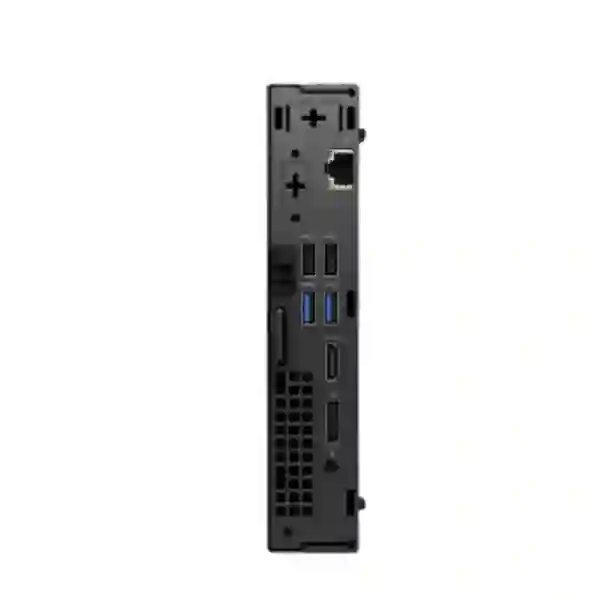
The Hanwha WRT-P-3105MW1 is a micro form factor Wisenet WAVE recording server for carefully sized IP surveillance installations. With WAVE preinstalled, four Professional recording licences, support for up to 16 channels, recording bandwidth up to 45 Mbps and 1 TB or 2 TB video-storage options, it brings server and local viewing functions into a small Windows-based unit. Before ordering for a Tanzania project, confirm the exact storage variant, the additional camera licences required, expected recording bitrates and the number of days you must retain footage. The right configuration depends on the complete camera, network and power design.
Up to 16 channels | 45 Mbps recording | 1 TB or 2 TB | 4 Professional licences included
Key specifications at a glance
| Product family | WRT-P-3105MW1; micro form factor WAVE recorder/workstation |
|---|---|
| Recording bandwidth | Up to 45 Mbps |
| Camera channel positioning | Up to 16 channels; licence and workload limits apply |
| Bundled WAVE licences | 4 Professional licences |
| Video storage | 1 × 1 TB or 2 TB M.2 SSD, depending on variant |
| Operating-system storage | 1 × 256 GB M.2 drive |
| CPU and memory | 14th-generation Intel Core i3; 8 GB DDR5 |
| Operating system | Windows 11 IoT Enterprise LTSC |
| Network | 1 × 1 GbE RJ45 |
| Video connections | HDMI, DisplayPort and VGA; DP-to-HDMI adapter listed |
| Power | 100–240 V AC; maximum 90 W |
| Operating environment | 10°C to 35°C; 20–80% RH non-condensing |
| Dimensions and weight | 182 × 36 × 178 mm (H × W × D); approximately 1.40 kg |
Specifications refer to the Hanwha Vision product family; final supplied variant, software build, installation fit and local commercial terms must be confirmed in the quotation.
A compact recorder for a planned surveillance system
The Hanwha WRT-P-3105MW1 is a micro form factor Wisenet WAVE recording server that also works as a local client workstation. It is intended for organisations that want a managed IP video system without allocating the floor or cabinet space of a larger tower recorder. Hanwha Vision specifies support for up to 16 channels, recording input bandwidth up to 45 Mbps, and factory storage configurations of 1 TB or 2 TB. WAVE is preinstalled, and four Wisenet WAVE Professional recording licences are included. These figures describe different aspects of the solution; they should be considered together rather than interpreted as a promise that every 16-camera project will fit.
For an office, retail site, small warehouse, reception area or another modest indoor deployment, the value is straightforward: place a compact recorder where its operating environment and network can be controlled, connect suitable IP cameras through the site network, and give authorised staff a clear way to review footage. The right purchasing decision starts with the actual number of camera streams to be recorded, their combined bitrates, and the number of days that evidence must remain available. Request a configuration-based quotation rather than choosing storage by the camera count alone.
What the manufacturer confirms
Hanwha Vision identifies this model as a combined WAVE server and client workstation with a 14th-generation Intel Core i3 processor, 8 GB DDR5 memory, a separate 256 GB M.2 operating-system drive and one 1 TB or 2 TB M.2 SSD for recorded video. It runs Windows 11 IoT Enterprise LTSC and connects to the network through one Gigabit Ethernet RJ45 port. The manufacturer lists an HDMI output, DisplayPort output, VGA output and a DisplayPort-to-HDMI adapter, along with a supplied keyboard and mouse. These are useful installation details, but the precise screen arrangement, display resolution and live-view workload still need to be tested for the intended operator layout.
The recorder's footprint is approximately 182 mm high, 36 mm wide and 178 mm deep, with a manufacturer-listed weight of about 1.40 kg. Its maximum rated power consumption is 90 W from a 100–240 V AC supply. The operating range is 10°C to 35°C, with 20–80% non-condensing relative humidity. It is a small indoor computing device, not an outdoor weatherproof recording enclosure. The supplied four Professional licences, the physical platform's up-to-16-channel positioning and the 45 Mbps recording performance are separate constraints. No price, stock level, Tanzania warranty or local service promise is implied by these specifications.
Who should shortlist it—and who should compare larger alternatives
Shortlist this recorder when the installation is genuinely compact, the site has a stable LAN, camera count is modest, and the recording plan can fit inside the available bandwidth and SSD storage. It may suit a small business that needs local evidence for incident review, a reception or branch office where a bulky rack is impractical, or a phased installation starting with a few licensed camera streams. Its server-and-workstation design may also appeal when an operator needs a screen at the same location as the recorder, subject to display and workload testing.
Do not make it the default choice for long archival periods, high-bitrate camera fleets, extensive multi-camera operator walls or rapid expansion without first sizing the requirements. A 16-channel platform ceiling does not override the 45 Mbps recording limit. Adding licences can enable more recording streams, but licences do not increase processor capacity, network capacity or storage. Where camera workloads, retention obligations or resilience expectations are higher, compare an appropriately sized Hanwha Vision tower or server solution rather than assuming this micro unit can be expanded indefinitely.
A buyer should also distinguish a dedicated recording server from a complete surveillance package. Cameras, network switching, PoE power, structured cabling, monitor placement, installation work, UPS provision, backup procedures and any licences beyond the four included may be separate project items. Ask which items are part of the quotation. That small question prevents an apparently inexpensive recorder-only price from being mistaken for a functioning end-to-end system.
Understand the four included licences before counting cameras
The WRT-P-3105MW1 ships with four Wisenet WAVE Professional licences. Under Hanwha Vision's WAVE recording licensing guidance, recording a typical IP camera stream uses a recording licence. Consequently, the four included licences should not be described as 16 included recording licences. Recording additional eligible camera streams ordinarily requires the correct additional licences, and the applicable WAVE software version and licensing terms should be confirmed at procurement. Special device types or embedded recorder workflows may use different licensing products.
If a plan shows six cameras today and ten later, document the licence requirement for each stage. Separate the count of physical camera housings from the number of streams requiring recording licences, especially for unusual devices, encoders or multi-sensor solutions. Confirm the stream and recording rules with a qualified integrator. The manufacturer's advertised maximum of up to 16 channels is a platform suitability statement; it is not a guarantee that any arbitrary 16 cameras, any resolution, or any recording schedule can be supported.
Licences also require sensible administration. Record who owns the WAVE system, where legitimate keys and purchase records are stored, and who may add or deactivate a licence. Hanwha's WAVE guidance explains that activated licences relate to a server hardware identity. Changes to underlying hardware can affect activation, so avoid unmanaged hardware swaps. Plan software upgrades and server replacements with the licence owner and manufacturer-approved process, not by assuming keys can simply be copied between machines.
Recording bandwidth: the number that changes camera sizing
The manufacturer's recording bandwidth ceiling is up to 45 Mbps. This figure refers to the incoming recording workload, not the general speed printed on the Ethernet connector. A single Gigabit network port is listed, but a Gigabit port does not turn a 45 Mbps-class recording appliance into a recorder rated for hundreds of megabits of video. For sizing, estimate the bitrate of every stream that will actually be archived and sum those values. Include changes driven by scene complexity, motion, illumination, codec, frame rate and quality settings.
For example, eight cameras planned at an average recording bitrate of 3 Mbps create a simple combined average of 24 Mbps. Sixteen cameras at the same average would reach 48 Mbps, already above the stated 45 Mbps figure before considering spikes or other workload. These are planning examples, not promised device performance or recommended settings. Another system might use fewer cameras but much larger streams and exceed the budget sooner. Evaluate peak as well as average rates, and leave margin for variation rather than designing exactly to the rating.
Have the camera schedule show model, stream resolution, codec, image quality, frames per second, expected average bitrate, credible busy-scene bitrate and recording method. Ask the installer to check the aggregate rate during day and night conditions after commissioning. Night noise, foliage, vehicle movements and crowded scenes can change compression efficiency. If the actual rate exceeds the plan, adjust camera settings for the intended evidence requirement or select a higher-capacity recording platform; do not reduce image usefulness merely to make a poor equipment selection appear successful.
Choosing 1 TB or 2 TB storage with a real retention target
The family is offered with one 1 TB or 2 TB M.2 SSD intended for video storage. These are raw configuration sizes; actual usable recording capacity is lower once formatting, reserved space and software behaviour are considered. The operating-system drive is a separate 256 GB M.2 device and should not be added to the quoted video archive capacity. Because the published configuration describes a single video-storage SSD, buyers should not assume a redundant RAID recording array or a built-in long-term evidence vault.
A practical first-pass estimate uses total average recorded bitrate. At a constant 1 Mbps, a video stream generates approximately 10.8 GB in 24 hours using decimal units. A combined 8 Mbps average would therefore create about 86.4 GB per day, before overhead. Dividing a nominal 1,000 GB by that figure suggests roughly 11.6 days; a nominal 2,000 GB suggests around 23.1 days. Neither number is a guaranteed retention period. Effective capacity, recording settings, storage reservation and fluctuating bitrates can materially reduce or change those estimates.
For a busier example, a combined 32 Mbps average would create about 345.6 GB in a day. A nominal 1 TB archive holds only around 2.9 days of that stream volume, while nominal 2 TB corresponds to around 5.8 days, again before real-world deductions. This demonstrates why the storage decision cannot be answered by a statement such as “up to 16 cameras.” The same device may be appropriate for brief incident review but unsuitable for a policy requiring weeks of continuous high-quality footage.
Build a retention worksheet that includes each camera's purpose and typical bitrate, continuous versus event-based schedules, acceptable evidence quality and a minimum number of days. Include the worst relevant operating period, not merely the quietest night. Where a customer must preserve video following an incident, provide an approved export and preservation process that is separate from routine automatic recycling. Hanwha's support guidance notes that WAVE manages reserved space and may recycle older footage; changing advanced reserved-space settings without qualified advice can undermine stability.
A decision guide for the 1 TB and 2 TB variants
The 1 TB configuration is sensible to evaluate when camera count and bitrates are genuinely light and the retention target is short. It may keep the initial hardware configuration smaller, but the right question is whether the recording plan produces an adequate buffer after usable capacity is calculated. A slightly cheaper storage choice is poor value if the oldest recording disappears before an incident is noticed. For busy storefronts or entrances, calculate a realistic daytime traffic profile and verify that it fits, rather than relying only on a low-motion demonstration.
The 2 TB variant doubles the stated raw video-storage configuration, not the recording bandwidth or the number of included licences. It may provide additional retention at the same aggregate bitrate, yet it does not solve the problem of too many licensed streams or a video feed above the 45 Mbps design limit. If even the 2 TB estimate cannot meet the retention policy, consider another recorder class or a separately designed archiving arrangement. Confirm exactly which suffix and capacity appear on the supplier quote; the family name alone does not specify which SSD option is being supplied.
Match recording modes to the evidence the business needs
Not all cameras require the same recording schedule. Entrances, cash-handling points and sensitive corridors may justify continuous capture, while certain low-traffic spaces could use an approved event-based policy if it meets the customer's operational and legal needs. Event recording can reduce storage use, but it depends on correct event configuration and detection quality. An important movement may be missed when a rule is poorly tuned, or recording may be triggered too frequently in a busy environment. Never promise an exact storage-saving percentage without testing the intended scene.
Before choosing the schedule, ask what an investigation must reconstruct. Does the team need the moments before and after an alarm, the continuous approach to a doorway, a complete shift, or only occasional exception clips? That answer determines camera angles, recording hours, frame rate, resolution and review process. A higher resolution is not automatically a better result if storage is exhausted too soon or the camera is poorly aimed. Good evidence design balances readable detail, coverage, lighting and retention.
Make the recording policy visible to authorised administrators, test it after changes and record who approved deviations. For event-based rules, simulate representative events and confirm that the clip begins early enough and continues long enough to be useful. For continuous schedules, check the archive timeline across a normal working day and a busy period. The selected WAVE software release and camera capabilities determine the available scheduling and event options, so verify the live system rather than assuming every camera offers the same analytics.
Local viewing and the workstation role
Hanwha positions this model as both a WAVE recording server and a client workstation. The listed HDMI, DisplayPort and VGA outputs give installers physical display connection options, while the keyboard and mouse are included. This may reduce the number of separate devices needed for a simple local control position. However, “video outputs present” does not by itself establish an approved number of simultaneous high-resolution streams, a specific video-wall layout or compatibility with every screen arrangement.
The recorder's first responsibility is to write the required footage reliably. If an operator wants to watch several live streams while another user searches archives, test the combined workload in real conditions. Decode load, display resolution, number of views and camera codec all matter. For an intensive monitoring desk, a separate appropriately specified WAVE client workstation may give a clearer operational division between recording and viewing. That architecture also makes it easier to place the recording unit in a protected room while staff operate from a suitable workstation.
Decide who needs live view, who may search recordings, and who may export evidence. A reception user might need only a few cameras; a security supervisor may need broader access and audit responsibilities. Configure roles around those duties rather than distributing a shared administrator account. The practical benefit of the combined form factor is flexibility, not a substitute for thoughtful workstation and account design.
Network design for reliable video
A stable wired network matters more than the novelty of the recorder. This unit has one manufacturer-listed 1 GbE RJ45 network interface, so document how cameras and authorised viewers reach it. IP cameras normally need suitable network ports, PoE power arrangements where applicable, addressing and switching capacity. The recorder specification alone does not state that it supplies PoE power to cameras. Include PoE switches or injectors as appropriate to the chosen camera models and their actual power requirements.
Plan addressing, VLANs and routing with the customer's IT administrator. A small deployment might share managed infrastructure with business systems, while another may use a more tightly segmented camera network. Either approach needs sufficient throughput, sensible firewall policy and clear maintenance ownership. Account for simultaneous recording, local clients, remote access and any backups or exports. A 45 Mbps recording figure should not be taken as a total-network engineering specification; client viewing traffic can add separate demand.
During acceptance tests, check for packet loss, intermittent links, duplicate IP addresses and unstable camera power. Monitor camera reconnection after a switch reboot or utility interruption. Label switch ports and cable runs so a future technician can identify a failed connection without disrupting the whole installation. Where the site uses wireless camera bridges or links between buildings, assess signal stability and capacity independently; the recorder cannot correct an unreliable transport path.
Physical installation and operating conditions
The compact 182 × 36 × 178 mm form factor can fit in spaces that a tower cannot, but small is not the same as unrestricted placement. Keep the unit on a stable surface or in a suitable, ventilated indoor enclosure. Protect it against accidental unplugging, dust, unauthorised handling and liquids. The manufacturer lists 10°C to 35°C as its operating range and non-condensing humidity conditions. A sealed, sun-exposed cabinet or unventilated cupboard can exceed safe temperature limits even when the room initially feels comfortable.
Plan the installation around airflow, service access and cable strain relief. A compact recorder hidden behind furniture may be difficult to inspect or restart safely during a fault. Ensure the screen cables, network lead and power cable do not pull against small connectors. Record its installed location, serial details and responsible administrator in a secure equipment register. If the proposed position is in a workshop, warehouse or humid environment, verify the actual enclosure temperature and humidity rather than assuming indoor placement is automatically compliant.
The published electrical input is 100–240 V AC and maximum consumption is 90 W. This helps an electrical professional select supporting equipment but does not prescribe a particular UPS model. Evaluate the recorder, network switches, cameras, display and any broadband router as a single continuity requirement. An uninterrupted recorder is of limited use if the cameras lose PoE power at the same time. Any local electrical design should be carried out according to applicable site requirements by a qualified installer.
Tanzania deployment considerations without assumptions
For an organisation planning surveillance in Tanzania, begin with site conditions rather than an imported product description. Ask whether the recorder will operate in a reliably cooled room, whether the electrical supply is stable, and whether the camera network spans a single floor or multiple buildings. If remote viewing is needed, test the site's actual uplink speed and availability. These are practical checks for the deployment environment, not claims about any particular Tanzanian network operator, city coverage, or local service commitment.
Confirm the exact orderable configuration, import and procurement arrangements, approved currency, warranty terms and installation scope in a formal quote. No Tanzania stock level, local price, delivery window, certification or warranty period has been verified for this listing. Do not infer such terms from an overseas catalogue. If the buyer has a retention or privacy obligation, have the responsible organisation define it before storage sizing; a recording server does not itself determine the legal duration for which footage must be retained.
The unit is rated for an indoor operating temperature no higher than 35°C. Rooms that become hot during power interruptions may need a temperature-management plan. If the camera system protects an essential business function, consider what happens during loss of power, switch failure, disk trouble or prolonged internet outages. Local recording may depend on local power and connectivity remaining available even when cloud access is not required. Resilience must be engineered into the whole system, not assumed from a recorder's brand.
Cybersecurity and responsible access
Video recordings may contain sensitive information about staff, visitors and customers. Assign an accountable owner and establish who can watch live feeds, retrieve footage, export clips and administer the server. Hanwha Vision documents user-rights management, secure communications and auditing capabilities in Wisenet WAVE, but the strength of a deployment depends on configuration and operational discipline. Use individual accounts where feasible, strong authentication, appropriate role permissions and a documented process for removing access when responsibilities change.
Treat network exposure as a deliberate design choice. Work with IT to assess approved remote-access methods, firewall policy, updates and monitoring. Avoid exposing management interfaces or sharing credentials simply to make installation quicker. Maintain a schedule for software, operating-system and device updates consistent with manufacturer guidance and the organisation's maintenance windows. Do not treat the existence of security features as proof that a default installation is automatically hardened against every attack.
For evidence handling, document how staff request recordings, who authorises an export and where that export is stored. Preserve incident clips in an approved location outside routine circular recording when necessary. Use audit logs and access review where supported, and test restoration or recovery procedures rather than assuming a video file is safe because it appears in a timeline. Camera placement and retention decisions should reflect the organisation's applicable privacy and employment obligations, with qualified local advice where needed.
A practical commissioning sequence
Start with a camera schedule and a written acceptance target. Inventory each device, its purpose, expected bitrate, requested recording hours and the business requirement for archive retention. Choose the WRT-P-3105MW1 storage option only after the sums have been reviewed. Then confirm that the number of required WAVE recording licences is covered, including any additional purchases beyond the four supplied. For a phased project, write down the point at which future cameras would trigger a new licensing, bandwidth or storage review.
Next, prepare the room and network. Install appropriate camera power infrastructure, confirm addressing and connectivity, and check the recorder's ventilation and protected power. Verify the installed WAVE software and operating-system configuration under a controlled administrator process. Add cameras according to the documented plan and check live and recorded video at the required quality. Confirm time synchronisation, because inaccurate timestamps make incident correlation across cameras and other systems difficult.
Test several real activities rather than looking only at a static screen. Walk through an entrance, simulate an after-hours event where permitted, confirm recording schedules, search for the result and export a sample clip under authorised supervision. Monitor combined recording bandwidth during busy periods and review how storage is being consumed. Verify camera recovery after a controlled network restart and check alerting or fault indications that the operation will actually monitor.
Finally, deliver the system record: camera list, location map, installed capacity, licence register, access-role matrix, basic fault procedures, maintenance owner and signed acceptance notes. Document any gaps or agreed compromises. A recorder is commissioned when the organisation can obtain reliable footage and knows what to do when something goes wrong—not simply when the installation screen shows connected cameras.
Maintenance, monitoring and lifecycle planning
Once the system is operational, schedule simple recurring checks. Confirm that every critical camera is recording, that timestamps are correct, that the oldest available footage still meets the retention objective and that the disk has no reported health or storage problems. Review event and system logs when faults appear. A camera can look healthy in live view yet fail to produce the archive expected by an incident investigator, so archived playback deserves an explicit check.
Monitor usage after operational changes. A camera repositioned towards traffic, an increased frame rate, or a new lighting condition can alter bitrates and retention. Expansion by even two cameras can affect the licence count and the storage budget. Agree on a change-control process: document who requested the change, why it was necessary, what licensing or infrastructure it requires, and which acceptance tests must be repeated. This is particularly important where cameras form part of compliance or internal safety procedures.
Keep a supported backup or export plan for recordings that cannot be lost. The published single video-storage SSD should not be described as a redundant evidence system. Separately consider the time and skills needed for hardware failure, device replacement or migration to a larger server. Keep purchase and activation records secure and identify the party responsible for manufacturer support arrangements. Maintenance procedures are far more useful when they are agreed before the first failure occurs.
How it compares with a larger Hanwha WAVE tower
Hanwha Vision also lists a WRT-P-3105W1 tower-class WAVE recorder with up to 32 channels, recording bandwidth up to 170 Mbps and raw storage options up to 16 TB. Those manufacturer figures show the kind of scaling distinction a buyer should examine. The micro WRT-P-3105MW1 is physically smaller and has a much lower stated storage and recording-bandwidth envelope. The tower is not automatically necessary for every business, and a larger headline capacity is not a substitute for a design, but it becomes relevant when the micro unit cannot meet expected retention or stream volume.
Compare total project requirements, not the two model codes in isolation. Include camera licences, storage target, recording rates, operator workload, space, maintenance procedure, power, available network and future expansion. Both families require careful confirmation of the exact quoted suffix and configuration. A small site might receive better value from the compact model when needs are limited and clearly measured; a site with frequent busy scenes or multi-week retention may need a different tier even if today's camera count is below 16.
If the project is uncertain, develop a camera schedule first and let the evidence requirements choose the server. Do not buy a recorder as the starting point and then force the camera system to fit it. Changing models during planning is inexpensive compared with discovering after installation that retention is too short, licences are missing or the required streams exceed the recorder's stated bandwidth.
Questions to put on the purchase order
Ask the supplier to state whether the proposed unit is the 1 TB or 2 TB version and to identify the exact manufacturer variant. Confirm the Wisenet WAVE version and licensing position, the four Professional licences included with the appliance, and the extra licences required for the agreed camera schedule. Request written confirmation that the intended camera devices and streams have been assessed for the selected WAVE deployment. Where third-party camera features or analytics are central, obtain a practical compatibility test rather than relying on a broad statement that IP video is supported.
Require a separate line for the camera and network infrastructure, any UPS design, monitor and operator workstation needs, installation, configuration, user training, technical documentation and post-installation support. State the target number of retention days and which camera settings were assumed to calculate it. Clarify whether the quote is equipment only or includes testing and handover. The commercial response should explicitly identify any exclusions, since a recorder by itself does not provide cameras, cabling or a guaranteed operating environment.
For Tanzania procurement, request current price and payment terms directly rather than assuming overseas prices can be converted. Ask for confirmed availability, delivery details, the actual supplier warranty, service scope and any applicable regulatory or import considerations specific to the purchase. Keep these terms in the signed quotation; they are not part of the manufacturer's generic technical description. A good final quote allows the buyer to compare two complete, properly sized solutions on the same requirements.
Common purchasing and design mistakes to avoid
The first mistake is equating up to 16 channels with 16 paid recording licences. This model includes four Professional licences, so the additional recording licence requirement must be assessed. The second mistake is sizing purely from channel count while ignoring the combined video bitrate. Sixteen low-bitrate streams and sixteen complex high-quality streams are not equivalent workloads. The third is assuming 1 TB or 2 TB provides a particular number of weeks without doing the arithmetic and testing the real installation.
Another common mistake is treating the tiny chassis as permission to install it in a poorly ventilated cabinet or an unprotected place. The listed operating temperature is a real engineering limit. A related mistake is protecting only the recorder with a UPS while network switches and cameras still lose power. Also avoid assuming that one video SSD provides storage redundancy, that WAVE remote access removes all network security duties, or that a local keyboard and display eliminate the need for an operator access policy.
Finally, do not conflate the WRT-P-3105MW1 family with the similarly named tower WRT-P-3105W1. They have different hardware, recording envelopes and storage arrangements. The fastest route to a workable project is a single requirement sheet showing cameras, licence count, aggregate bitrate, target retention, physical site conditions and the exact quoted model. That sheet gives procurement, IT and security teams a shared basis for accepting or rejecting the design.
Frequently asked questions
What is the Hanwha WRT-P-3105MW1?
It is a compact Windows-based Hanwha Vision Wisenet WAVE recording server that also supports client workstation use. It is preloaded with WAVE and comes with four Professional licences. Hanwha positions it for up to 16 channels with up to 45 Mbps recording bandwidth. Those specifications must be interpreted together with the selected 1 TB or 2 TB video storage option.
Does it include licences for 16 cameras?
No. The manufacturer states that four Wisenet WAVE Professional licences are included. Recording more eligible camera streams generally requires additional licences. The stated up-to-16-channel platform capacity is not the number of bundled licences. Have the provider verify requirements for the particular software release and any unusual devices.
Is 45 Mbps the same as the Ethernet port speed?
No. Hanwha lists up to 45 Mbps as the recording bandwidth capability, whereas the physical network interface is a 1 GbE RJ45 port. Ethernet link speed does not replace the appliance's recording performance specification. Total camera bitrate, variable scene complexity and viewing activity must be assessed separately.
How many days will 1 TB of recordings last?
There is no reliable universal number. Retention depends on total recorded bitrate, recording hours, motion conditions, codec and actual usable disk capacity. For a purely illustrative constant 8 Mbps aggregate recording load, 86.4 GB is generated per day; a nominal 1 TB divided by that figure is about 11.6 days before overhead or reserves. Verify retention on site.
Is the 2 TB model twice as fast?
No. The 2 TB configuration has more raw video storage, not a doubled recording bandwidth. Both belong to the same micro recording-server family, with the manufacturer's 45 Mbps recording figure. More disk capacity can help retention, but it cannot resolve inadequate recording performance or missing licences.
Can the unit act as a local viewing workstation?
Yes, Hanwha describes this product as a combined server and client workstation and lists HDMI, DisplayPort and VGA video outputs. The specific monitor and stream layout should be validated against the workload. Heavy simultaneous live viewing and recording may justify a separate dedicated client computer.
Does it supply power to IP cameras?
The published specification lists a Gigabit Ethernet RJ45 network interface but does not describe integrated PoE camera ports. Plan for suitable external PoE switching, injectors or other approved camera power arrangements as dictated by the actual camera models. Include those components in the project quote.
Is it suitable for an outdoor cabinet?
The appliance is an indoor micro form factor recorder with a manufacturer operating range of 10°C to 35°C and non-condensing humidity requirements. Do not assume it is weatherproof. A proposed cabinet or remote equipment position needs appropriate environmental protection, ventilation, physical security and temperature assessment.
Can the video storage be treated as a redundant archive?
The manufacturer describes one 1 TB or 2 TB M.2 SSD for video storage and does not identify a redundant storage array for this model. Design separate preservation or backup processes when specific recordings must survive a device or storage failure. Do not rely on ordinary cyclic recording as an evidence retention or disaster recovery plan.
Can it connect to cameras from other brands?
Compatibility depends on the exact camera, stream protocol, firmware, feature requirements and WAVE version. A standards-based stream may be available while analytics, events or specialised functions differ. Request a compatibility assessment and a working test for critical third-party camera features before signing off.
What should a Tanzania buyer confirm before ordering?
Confirm the exact 1 TB or 2 TB suffix, licensed camera count, expected aggregate recording rate, retention target, power and cooling provisions, installation scope, price, delivery and supplier warranty in writing. None of those local commercial terms has been verified for this listing. Use the actual site requirements rather than an overseas sample quotation.
When should I move to a larger recorder?
Consider a higher-capacity platform when calculated camera bandwidth approaches or exceeds 45 Mbps, the target retention will not fit on the available SSD, operator workloads grow, or future expansion would create recurring compromises. Hanwha lists larger WAVE tower options with substantially greater recording and storage capacity, but the correct choice still requires a full design.
Request a configuration-based quote
Ask for a Hanwha WRT-P-3105MW1 configuration and quote based on your camera schedule, required recording licences, projected Mbps, chosen 1 TB or 2 TB variant, retention target and Tanzania site conditions. Share the installation scope and any power, network or monitoring constraints so the proposed system can be assessed as a complete solution. Pricing, stock, warranty, delivery and professional services are subject to written supplier confirmation. This is a quotation request, not a claim of current local availability.




Reviews
There are no reviews yet.