
Video recording solutions • Tanzania
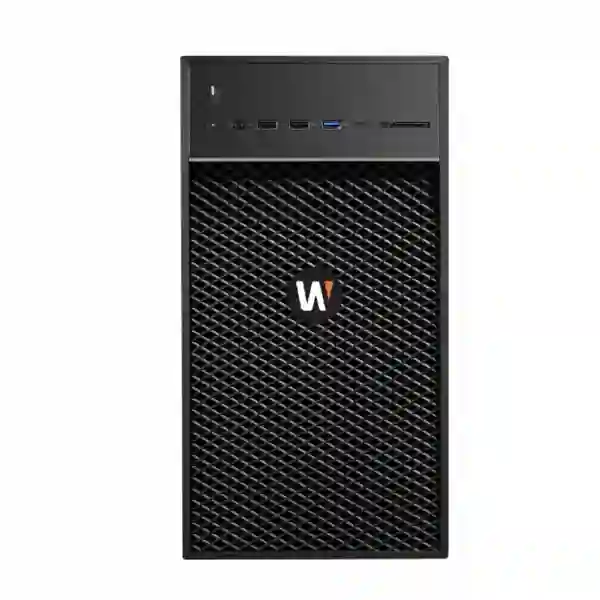
Hanwha WRT-P-5201L Wisenet WAVE Linux Network Video Recorder
Need a structured IP surveillance recording platform? The Hanwha WRT-P-5201L combines Wisenet WAVE video management with a compact Linux recording server. Review the verified capabilities, capacity limits, compatibility checks, and procurement questions before selecting an exact configuration for your Tanzania project.
Quick buying answer
Choose this model only after confirming the exact installed storage size, recording-license entitlement, camera compatibility, and maintenance status. Published maximums refer to the product series, not necessarily to the unit offered. For a new surveillance design, request a capacity calculation and a current model comparison. For a replacement or WAVE expansion, review software compatibility and the support position first. Ask FourTeck Tanzania for a configuration-specific quotation rather than relying on unverified stock or price figures.
Verified WRT-P-5201L technical overview
The following values summarize the historical Hanwha Vision WRT-P-5201 series datasheet. They are useful starting points for design review, not confirmation that a particular seller’s unit has every maximum configuration.
| Product family | Hanwha WRT-P-5201L, Linux Wisenet WAVE NVR |
|---|---|
| Platform | Dual-purpose WAVE recording server and client |
| Published recording throughput | Up to 470 Mbps; subject to system design |
| Maximum series raw storage | Up to 36 TB; exact offered configuration varies |
| Included software | Wisenet WAVE VMS, preconfigured in original series |
| Included licenses | 4 Wisenet WAVE Professional licenses per series specification |
| Processor and RAM | 10th-generation Intel Core i5; 16 GB DDR4 |
| Operating-system drive | 256 GB internally mounted SSD |
| Historical Linux operating system | Ubuntu Linux 18.04 LTS; verify installed version |
| Network | 2 × RJ-45 Gigabit Ethernet |
| Video outputs | 2 × DisplayPort; adapter listed |
| Power | 100–240 V AC; maximum 550 W in series datasheet |
| Operating conditions | 0–35°C; 10–80% RH non-condensing |
| Physical form | Mini-tower; approximately 335 × 177 × 345 mm |
| Camera support | Wisenet and ONVIF-conformant IP cameras, subject to testing |
| Commercial configuration | Confirm drives, capacity suffix, support, and pricing before order |
What is the Hanwha WRT-P-5201L?
The Hanwha WRT-P-5201L is a compact, Linux-based network video recording server built for IP camera systems using Wisenet WAVE video management software. Unlike a basic recorder that is primarily operated through one local monitor, it is designed to function as both a recording server and a client workstation within the WAVE environment. It is suitable for an organization that needs centrally managed video, structured user access, and an appliance that can become part of a larger WAVE system. Its mini-tower form is intended for a controlled equipment area rather than exposed outdoor installation.
The WRT-P-5201L comes from the WRT-P-5201 series. The manufacturer’s series datasheet lists up to 470 Mbps recording bandwidth, up to 36 TB of raw data storage, an Intel Core i5 processor, 16 GB of DDR4 memory, dual Gigabit Ethernet ports, and four Wisenet WAVE Professional licenses. Those are family-level capabilities, not confirmation of the drive capacity fitted to a particular unit offered for sale. Before purchasing, confirm the exact storage suffix, included hard drives, license entitlement, software version, unit condition, and support eligibility.
Which surveillance projects does it suit?
Consider this recorder when a business has a defined IP-camera estate and wants WAVE software to manage recordings rather than using several unrelated camera apps. Examples include offices with monitored entrances, warehouses with multiple zones, schools with corridors and perimeter views, and retail premises that require investigation of incidents across several cameras. The right choice depends on a camera schedule, network layout, recording policy, and usable retention capacity. The recorder alone does not guarantee detection quality, uninterrupted recording, or any specific number of days of video history.
It can also be relevant to an upgrade from older recording hardware where the customer intends to retain compatible IP cameras and centralize operator workflows. Existing cameras must be evaluated individually for WAVE discovery, supported video streams, firmware, and the functions the operator expects to use. The presence of the Wisenet name or an ONVIF claim does not by itself prove that every analytic event, microphone, PTZ command, or metadata field is available. A pilot with the actual camera models is the prudent way to confirm functional fit before committing to a full deployment.
Why choose a dedicated WAVE recording server?
A purpose-built recording appliance brings the computing platform, operating environment, storage position, network interfaces, and licensed VMS into one planned system. This can simplify an installation compared with constructing a recorder from unrelated components, because a known platform makes it easier to document the configuration and establish a repeatable commissioning checklist. It does not eliminate design work. Camera bandwidth, storage endurance, user permissions, backup procedures, power quality, and safe network exposure still need to be engineered according to the site.
The WRT-P-5201L is also a dual-purpose system: footage can be captured by the server and reviewed from an appropriate WAVE client. In a small control room, a local operator may use the available video outputs; in a distributed environment, authorized users can work from compatible clients according to the supported WAVE deployment design. The decision should therefore consider the intended number of operators and the practical workload on the machine, not just the headline recording throughput figure. Monitoring and recording compete for real system resources during busy periods.
Understanding the 470 Mbps recording specification
The published figure of up to 470 Mbps describes the recording throughput capability tested for the WRT-P-5201 series under Hanwha’s stated conditions. It should not be translated into a fixed channel count or a promise that all camera combinations will work at that rate. Each camera can contribute a different bitrate according to resolution, frame rate, compression profile, scene movement, video quality, and supplementary streams. The achievable result also depends on system load and storage performance. A useful project starts with the real camera schedule rather than dividing 470 by a guessed bitrate.
For sizing, list the expected recording bitrate for every camera and sum the simultaneous streams, allowing an engineering margin for bursts, configuration changes, and associated overhead. Confirm whether any second stream, audio, or analytics workload changes the plan. Then check recording bandwidth together with disk capacity, client viewing requirements, and network conditions. An office with many low-bitrate cameras and a warehouse with fewer high-detail cameras could require very different designs. A meaningful quotation should identify the design assumptions instead of claiming a universal number of supported cameras.
Planning storage: raw TB versus recorded history
Up to 36 TB is the published maximum raw storage figure for the series, not the guaranteed accessible capacity of every WRT-P-5201L order. Some units are identified with a capacity suffix, and the installed configuration must be confirmed from the exact offer. Raw drive capacity is not the same as usable recording space after formatting, file-system overhead, or any selected disk arrangement. It is also not the same as a promised retention period. Never choose a recorder using the largest family-level storage figure unless the quoted unit actually includes the matching drives.
Recording retention depends primarily on the data written each day. Higher resolution, more frames per second, continuous recording, and busy scenes tend to increase use of storage; event-based rules can reduce it but may fail to capture desired activity if configured poorly. Before specifying the unit, establish how many cameras record continuously, which use events, what audio is enabled, the preferred quality, and the retention objective. Document whether recordings must remain available during an incident review or export. This avoids selecting a recorder that looks large on a specification sheet but is insufficient for the site’s actual evidence policy.
A practical method for calculating recording needs
Use expected camera bitrates and active recording hours to build a storage estimate. A planning worksheet should have a row for each camera or group, including the stream profile, typical and high-activity bitrate, schedule, and desired retention. Convert the aggregate stream volume to daily storage, then multiply by the retention target and apply an appropriate contingency. The resulting capacity should be compared with the usable space of the specific drive configuration rather than with the theoretical series maximum. Estimates should be tested against real sample video wherever possible.
Two sites with the same camera count may have radically different retention needs. A reception camera with sparse motion may consume less storage than a loading bay with constant vehicles, even if the settings appear similar. A customer who needs short operational playback may optimize differently from one that must retain video for formal investigation. The right answer is a documented capacity calculation and an agreed retention policy, followed by checks after commissioning. If the required storage exceeds a confirmed WRT-P-5201L configuration, consider a revised recording architecture instead of silently lowering recording quality.
Professional licenses and camera expansion
The manufacturer’s datasheet specifies four Wisenet WAVE Professional licenses preloaded with the series. Treat these as an initial entitlement, not an assertion that the system automatically licenses every camera the customer owns. WAVE licensing is linked to recording capability and has different license types for different integration scenarios. Additional recording channels may require additional appropriate WAVE licenses. The final licensing schedule should account for live cameras, intended recording channels, future expansion, and any separate functionality that has its own license requirement.
Before ordering extra licenses, ask the engineer to verify the installed WAVE version, existing license inventory, system topology, and how cameras or devices are counted in that environment. Buying a larger storage drive does not add recording licenses, and purchasing licenses does not expand physical disk capacity. Conversely, having spare licenses does not make an unsupported camera or overloaded network viable. The hardware, license entitlement, software compatibility, and operating policy must be checked together. For a used or previously deployed unit, independently validate whether a claimed license entitlement can be assigned to the intended system.
Camera compatibility: Hanwha and ONVIF devices
The series documentation states support for Wisenet and ONVIF-conformant IP cameras. That makes the recorder a potential candidate for mixed-brand surveillance systems, but ONVIF is not a blanket guarantee of feature parity. Basic video access may work while advanced analytics, edge events, two-way audio, PTZ controls, or proprietary metadata are limited. A meaningful compatibility review should name the exact camera model, firmware level, authentication method, streaming profile, and features needed for daily operation. Document every integration that is important to operators before procurement.
At commissioning, confirm discovery and credentials, use a supported stream configuration, and test the essential actions instead of relying on a device appearing in a camera list. Test live images, recording and search, timestamp consistency, export, disconnect and reconnect behavior, and alert handling if required. If the site has existing PoE switches or third-party cameras, also verify the network and power design independently. The WRT-P-5201L provides recording-server connectivity; its specification does not describe a built-in multiport PoE camera switch. Camera power must therefore be planned as a separate project component.
Processing platform and physical connections
Hanwha lists a tenth-generation Intel Core i5 processor, 16 GB DDR4 RAM, and an internally mounted 256 GB solid-state operating-system drive for the WRT-P-5201 series. These provide a defined platform for Wisenet WAVE but should not be confused with unlimited headroom for transcoding, analytics, or third-party workloads. Recording applications are sensitive to background processes, drive performance, thermal conditions, and misconfigured services. A system integrator should maintain the recorder as a controlled video-security appliance rather than using it as a general office computer.
The listed connections include two RJ-45 Gigabit Ethernet interfaces, two DisplayPort monitor outputs, a DisplayPort-to-HDMI adapter, USB connections, audio output, and the conventional keyboard and mouse supplied with the platform. Video outputs are useful for local access where appropriate, but monitor quantity is not equivalent to the number of simultaneous cameras that can be decoded smoothly on screen. Check display resolution, live-layout complexity, workstation role, and operator expectations. For larger monitoring walls, a separate client workstation or carefully designed video-wall solution may make more sense than relying entirely on the recording server’s displays.
Designing a reliable network around the recorder
A stable IP network is central to any video recording project. Each camera must be able to deliver its configured video stream to the WAVE server without persistent congestion or unplanned packet loss. Start with a map showing camera VLANs or segments, switch uplinks, addressing, the recorder interfaces, administrative access, and any remote client connections. Dual Gigabit Ethernet ports offer options for network design but do not automatically double every camera’s practical throughput or provide redundancy without the correct configuration. Document how each port is actually intended to be used.
Security cameras are often installed at the edge of a building or across separate areas, so cable quality, switch power budgets, uplink capacity, and link stability are as important as the recorder itself. A recording-rate estimate should be paired with expected switch traffic and any concurrent playback or export demand. Avoid opening direct inbound access from the public internet simply for convenience. If remote monitoring is needed, design authorized access and protective controls using the capabilities supported by the deployed software and the organization’s IT policy. Test network recovery after switches or links restart.
Environmental suitability for Tanzania installations
The published operating temperature range for this series is 0 to 35 degrees Celsius, with 10 to 80 percent relative humidity under non-condensing conditions. Those specifications matter for a recorder installed in an equipment room, warehouse office, gatehouse, or retail back office. In warm environments, poor ventilation and dust accumulation can undermine reliable operation even where the room occasionally feels comfortable. Place the mini-tower on a stable, protected surface with suitable airflow. Do not present it as an outdoor-rated recorder or assume it can tolerate a sealed cabinet in direct heat.
Before selecting a room, verify ambient temperatures through the hottest part of the operating day, available ventilation, physical security, and the ability to keep equipment dry. Position the recorder to make service access practical without exposing cables and storage drives to unauthorized handling. The environment should allow routine cleaning and inspection while minimizing accidental power disconnection. For deployments in Tanzania, these are engineering considerations rather than claims about local stock or certified installation coverage. Environmental risk should be assessed on the actual premises instead of inferred from the city or region.
Power continuity and electrical planning
The series datasheet lists a 100 to 240 V AC input and maximum power consumption of 550 W, along with a 460 W 80 Plus Gold power-supply description. These are equipment specifications, not an estimate of typical daily consumption. A UPS should be selected from the confirmed recorder draw plus necessary switches, network equipment, and any other loads that must remain active. Runtime depends on the UPS model, battery condition, actual load, temperature, and shutdown procedure. No fixed backup duration should be promised without a calculated and tested electrical plan.
A practical installation includes appropriate electrical protection, grounding, cable management, and recovery behavior after a power interruption. The recorder cannot keep surveillance footage current if its cameras, PoE switches, or upstream links lose power first. Define which elements need backup, which should shut down gracefully, and how operators will know that recording has stopped. Where outages are operationally significant, test the complete chain rather than testing the UPS alone. Electrical design and maintenance should be handled by qualified personnel in accordance with the site’s requirements.
Secure deployment and access control
Security-recording infrastructure contains sensitive operational material and should be treated as an important IT asset. Establish named user accounts where supported, assign permissions based on duties, document who can export evidence, and remove access when staff change roles. Record administrator credentials in an approved secure system rather than on a note attached to the recorder. Restrict physical access to the tower, storage drives, and console. Align retention and incident handling with the customer’s organizational policies and applicable obligations; the recorder’s features do not substitute for those policies.
Also review time synchronization, auditability, system updates, backup of configuration information, and remote-access rules. A reliable timestamp matters when comparing video with door events or other records. Review the supported security settings for the deployed version of WAVE, update compatible components according to an approved maintenance schedule, and test recovery using a documented procedure. Avoid unsupported assertions that every update is compatible with a legacy appliance. For an internet-connected environment, have the IT team validate firewall restrictions and remote-access architecture before exposing a new service.
Operating-system and product-lifecycle checks
The L suffix identifies the Linux edition in this product family, and the historical manufacturer specification lists Ubuntu Linux 18.04 LTS. This is an important procurement detail because operating-system maintenance, installed WAVE version, and hardware lifecycle can affect cybersecurity and support options. The historical software specification is not proof that a specific unit has received later upgrades or remains eligible for every current update. Request the exact installed OS release, WAVE build, serial or service information through the seller’s appropriate verification process, and any supported upgrade path before accepting the configuration.
For a new project, compare the long-term maintenance plan with current Hanwha recording-server alternatives. An older recorder may be suitable for some existing-system or replacement needs, but a buyer should not mistake a previously documented configuration for the latest platform. Check software support status, spare-part and drive availability, security-update planning, and warranty coverage for the country and unit involved. Manufacturer literature describing a warranty in another market should not be treated as a guaranteed Tanzania warranty. Obtain applicable support terms in writing before committing.
Adding the recorder to an existing WAVE environment
An organization already using Wisenet WAVE may consider the WRT-P-5201L as another recording node, subject to the supported product and software versions. First document the existing system topology, network paths, active licenses, camera workloads, and intended division of recording responsibilities. Confirm how users will find cameras, search footage, and handle recording if one server becomes unavailable. Avoid assuming that adding a second server automatically delivers failover, synchronized storage, or uninterrupted access; these outcomes require specific supported configurations and commissioning tests.
Where cameras are being moved from an old recorder, plan the changeover to avoid unintentional footage gaps. Record the existing camera configuration, confirm credentials and supported streams, determine whether recording schedules can be transferred, and establish what happens to historical footage on the previous machine. Securely preserve necessary evidence before repurposing hardware. At the cutover, check cameras one at a time, then verify recordings across a realistic period. A migration is successful only when the customer can reliably retrieve the intended footage after the change.
Commissioning sequence for a professional installation
Start by checking the product identity, ordered drive capacity, physical condition, accessories, power requirements, network interface status, and evidence of the four listed WAVE Professional licenses. Record the installed software versions and agree whether updates are appropriate for the supported hardware. Next, configure addressing and trusted access, establish clock synchronization, add a limited sample of representative cameras, and confirm that video is recorded and searchable. Only after those tests should the engineer increase the camera population and verify how the system performs under the intended load.
Continue by checking the actual storage allocation, retention settings, alarm or event behavior, export process, and permissions for each operator role. Simulate routine interruptions: an unplugged camera, a switch restart, and an approved recorder reboot during a maintenance window. Confirm that recording resumes and that operators understand the warnings. Finish with a handover pack identifying the camera inventory, configuration baseline, license records, retention policy, administrator process, and support contact arrangements. These commissioning steps are project recommendations, not a claim that every site receives an installation service from FourTeck.
How this WAVE recorder compares with a conventional NVR
A conventional standalone NVR may be attractive when a small, fixed camera system needs straightforward local recording without a broader VMS architecture. The WRT-P-5201L addresses a different design preference: a software-based WAVE recording and viewing environment that can potentially fit into a managed multi-server installation. The choice is not simply which product has the higher headline camera count. Compare software workflow, licensing, camera interoperability, operator requirements, storage calculations, system administration, and the availability of the exact hardware configuration.
Neither approach is automatically better. A simple site may gain little by introducing more complex server administration. A growing organization may value consistent WAVE workflows, properly governed access, and an architectural path for adding compatible resources. The WRT-P-5201L’s strengths are its documented hardware platform and WAVE preconfiguration; its limitations include its historical OS platform, the need to verify the available storage variant, and the dependence on correct network and license planning. Ask for a design comparison based on intended operations rather than a generic feature-count contest.
Questions to resolve before requesting a quotation
Prepare the camera model list, number of required recording streams, expected bitrates, recording schedules, and required video retention. Note whether the site must support existing Wisenet WAVE users, needs on-site monitor outputs, or intends remote viewing by authorized staff. Specify if the deployment is new, a replacement for an existing recorder, or an expansion of an operating VMS. These answers directly affect storage, license count, network design, and whether a mini-tower is the best format. They also make vendor quotations easier to compare on equal terms.
Ask the seller to confirm the exact WRT-P-5201L capacity suffix, hard-drive population, raw and usable storage assumptions, included licenses, version details, accessories, and any regional service terms. Where the original model is no longer an appropriate option, request a clearly identified alternative and document the differences. Do not assume price, stock, lead time, import terms, warranty, or on-site support from a historical manufacturer’s brochure. FourTeck Tanzania can be asked for a current quotation and suitability review, but no local commercial promise is made in this product description.
Maintaining reliable surveillance over time
Once deployed, a recording server benefits from regular operational checks, even when operators rarely need to review footage. Confirm that each expected camera is online, that recording schedules remain correct, that available storage matches the retention target, and that the time shown in video is accurate. Keep a process for investigating recurring disconnects, failed disks, unusually low bitrates, and unexpected gaps. Regularly test whether an authorized user can retrieve an incident clip in the required format; a large amount of stored video is of little use if it cannot be located when needed.
Maintenance planning should include physical cleaning, suitable ventilation, safe handling of storage drives, review of supported WAVE releases, and careful management of administrative changes. If the machine is inherited from a previous installation, audit its condition and credentials before placing it into production. When the organization’s recording policy changes, update the storage calculation instead of assuming the original design remains sufficient. The goal is to preserve trustworthy access to intended footage through documented operation, not merely to keep a power indicator illuminated.
Common deployment risks and how to address them
An undersized recorder plan may appear acceptable during a quiet demonstration but fail under normal activity. Typical risks include recording at an unexpected bitrate, insufficient disk space, unlicensed channels, crowded switch uplinks, weak power continuity, high ambient temperature, and inadequate account management. Each has a distinct mitigation: measure streams, confirm usable drives, reconcile licenses, inspect network traffic, test UPS behavior, assess the room, and establish controlled credentials. These checks should happen before the recorder is relied on for an important security operation.
Another risk is relying on feature descriptions from the WRT-P-5201 series without confirming the exact Linux variant and the state of a particular unit. A historical maximum is not a promise about current supply, and a reference to ONVIF does not mean every camera feature is supported. A quoted offer should be traceable to a specific hardware and software configuration. If a critical requirement cannot be verified, make that uncertainty visible in the purchasing decision and plan a test or an alternative architecture rather than hiding it.
Frequently asked questions about WRT-P-5201L
These answers address common selection and deployment questions. Final design decisions should be based on the offered hardware configuration, current software support guidance, and a site assessment.
Is the WRT-P-5201L a camera or a recorder?
It is a network video recorder and Wisenet WAVE server/client appliance, not an IP camera. Cameras capture video, network infrastructure carries it, and the server records and provides access through the supported WAVE environment. A complete project generally needs cameras, power delivery, networking, configured recording rules, appropriate licenses, and protected equipment space. The recorder should be specified as one component of that system, not as a complete surveillance installation in a box.
Does every WRT-P-5201L include 36 TB of storage?
No. The manufacturer’s maximum for the series is up to 36 TB raw. Individual configurations can use different drive capacities, and the usable recording space can be lower than the raw label after formatting or other storage choices. Check the exact capacity suffix and written drive configuration of the unit being offered. Do not rely on the maximum number in a family datasheet when estimating the number of days of footage the purchased machine will keep.
What does 470 Mbps mean for my camera count?
It is a published maximum recording-throughput figure, not a fixed camera-count guarantee. Camera bitrates depend on image settings and site activity. Calculate the expected simultaneous recording bitrate from each camera, allow margin, and evaluate the network and disk system as a whole. Also consider whether the same appliance must handle intensive client viewing or other tasks. A camera count can only be responsibly estimated from a defined camera schedule and recording configuration.
How many Wisenet WAVE licenses are included?
The WRT-P-5201 series documentation lists four preloaded Wisenet WAVE Professional licenses. Confirm the entitlement on the exact offered unit, especially if it is pre-owned or has already been deployed. Additional recording channels may require additional suitable licenses. Licensing should be planned independently of storage capacity. Before ordering, the engineer should verify the deployed software version, licensing requirements for each device type, and the active licenses in any existing WAVE environment.
Does the Linux model run Ubuntu?
The historical WRT-P-5201L specification identifies Ubuntu Linux 18.04 LTS. That does not prove the software image presently installed on a particular unit, nor does it establish that every possible upgrade is supported. Confirm the current installed operating system and Wisenet WAVE version from the actual hardware. For a new installation, verify vendor support and the maintenance plan, because software and security considerations can be as important as raw recording performance.
Can it use IP cameras from another brand?
Hanwha documents support for ONVIF-conformant cameras as well as Wisenet cameras. Basic connection and video capture may be possible with supported third-party models, but feature-level compatibility must be tested. Verify the specific model, firmware, credentials, streaming method, and any required functions such as motion events, PTZ, audio, or analytics. Do not assume a feature works merely because the camera is advertised as ONVIF compatible.
Does the recorder provide PoE ports for cameras?
The published series specification lists two Gigabit Ethernet connections and does not describe integrated multiport PoE switching for camera power. In a typical IP surveillance design, cameras receive power through appropriately sized PoE switches, injectors, or their supported power supplies. Confirm camera power requirements and switch budgets separately. Backup power planning should include the camera switches, because a recorder cannot continue capturing new footage when upstream cameras have lost power.
Can I connect monitors directly to the recorder?
The series specification lists two DisplayPort outputs and a DisplayPort-to-HDMI adapter. This supports planning for local monitor connections, but practical live-view performance depends on the installed software, number and resolution of streams, and overall hardware load. Check the intended display layout before promising a particular multi-camera view. Larger control rooms may benefit from dedicated viewing workstations so that operator activity does not place unnecessary demand on recording duties.
Is this suitable for a hot equipment room?
Only if the actual conditions stay within the manufacturer’s published operating range, including 0 to 35 degrees Celsius and 10 to 80 percent non-condensing relative humidity. A hot, sealed cabinet can exceed the limits even when the surrounding building is occupied and otherwise comfortable. Provide appropriate ventilation, protect against dust and moisture, and verify operating temperature during demanding periods. This is a protected indoor mini-tower, not a substitute for outdoor-rated equipment.
Will I need a UPS?
A UPS is a recommended design consideration where continuity is important, but the required capacity and runtime must be calculated for the whole system. Include the recorder, PoE switches, necessary networking, and any critical accessories in the load assessment. The datasheet’s maximum 550 W is not a measured typical operating draw. Determine shutdown behavior and test recovery after an outage. Avoid relying on a UPS label alone as proof of uninterrupted surveillance.
Can this recorder be added to an existing WAVE system?
The series is described as usable at a standalone site or as an addition to an existing Wisenet WAVE environment. Real integration depends on compatible software versions, network topology, camera assignment, license state, and current vendor guidance. Plan the change carefully to protect existing recordings and avoid gaps during migration. Test camera acquisition, playback, user access, and recovery in the actual environment rather than assuming a second server provides automatic resilience.
How long can it store my camera recordings?
Retention cannot be answered from the model name alone. It depends on installed usable storage, camera bitrates, number of streams, operating schedules, video settings, and any recorded audio. Provide a camera list and target retention period for a proper estimate. Then monitor real storage consumption after installation, because observed activity may differ from the original assumptions. An exact number of days should not be promised without a capacity calculation for the specific configuration.
Does the listed warranty automatically apply in Tanzania?
No regional warranty should be assumed solely from an older international or North American product brochure. Warranty terms can depend on the market, sales channel, unit identity, age, and eligibility. Ask for current written terms specific to the product offered and the intended country before purchasing. The same caution applies to service response, replacement drives, support availability, and shipping arrangements. These terms are commercial details that must be confirmed separately.
Can the recorder be accessed securely from another location?
Remote access may be possible through an appropriately configured and supported WAVE environment, but secure access must be designed around the organization’s network policy and deployed software. Verify permissions, client compatibility, bandwidth, authentication, and any approved remote-connectivity method. Avoid exposing recorder services directly to the public internet without a security review. Remote viewing quality also depends on upstream connectivity and the streams that clients request.
How do I obtain a suitable quotation from FourTeck Tanzania?
Share the exact model reference WRT-P-5201L, intended storage size, camera models and quantities, expected recording bitrates, target retention, and whether WAVE licenses are already owned. Explain if the need is an upgrade, a new deployment, or an addition to an existing WAVE system. Request confirmation of the offered unit’s software build, accessories, availability, and applicable support terms. A clear requirements brief allows the proposed configuration or alternative model to be evaluated accurately.
Request a WRT-P-5201L configuration review
Tell FourTeck Tanzania what you need to record, how long footage must be retained, which camera models are involved, and whether this is part of an existing Wisenet WAVE installation. Request confirmation of exact model and capacity suffix, installed operating system, licensing, availability, commercial terms, and any suitable current alternatives. A confirmed specification is more useful than assuming that every WRT-P-5201L has identical drives or regional support terms.
Next step: Request a tailored product quotation and technical suitability check.




Reviews
There are no reviews yet.