
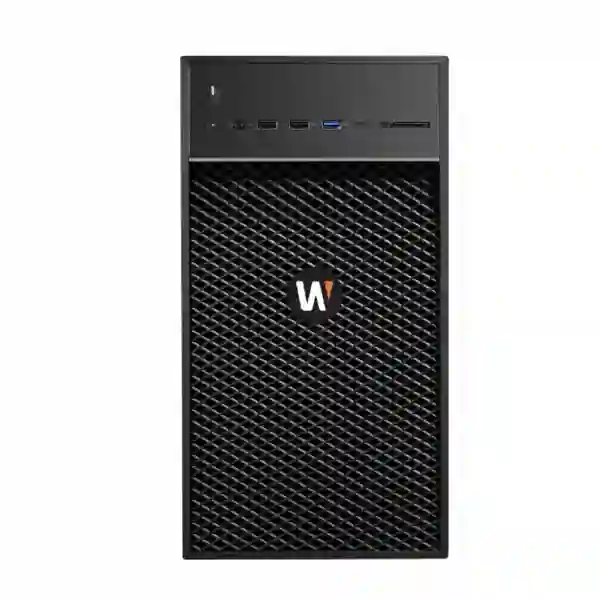
Hanwha WRT-P-5201W dual-purpose network video recorder
A preconfigured IP video recording platform for buyers who need to assess camera recording, retention, software licensing and reliable evidence review. Evaluate the exact storage configuration and current support terms before ordering for a Tanzania project.
Technical summary for evaluation
The following values distinguish verified manufacturer platform specifications from commercial details that must be confirmed for the exact unit supplied.
| Product family | WRT-P-5201W dual-purpose Wisenet WAVE NVR |
|---|---|
| Video management | Wisenet WAVE preconfigured |
| Recording throughput | Up to 470 Mbps (manufacturer test condition) |
| Included software licenses | Four Wisenet WAVE Professional licenses |
| Maximum internal raw storage | Up to 36 TB (not confirmed installed) |
| Published platform CPU / memory | 10th-generation Intel Core i5 / 16 GB DDR4 |
| Operating-system disk | 256 GB SSD in series specification |
| Data drive provision | Three 3.5-inch SATA drive positions in series specification |
| Camera interoperability | Wisenet and ONVIF-conformant IP cameras; features vary by device |
| Network / video connections | Two Gigabit Ethernet interfaces / two DisplayPort outputs |
| Exact-model OS listed by Hanwha | Windows 10 IoT Enterprise LTSC |
| Local SKU, price, stock and warranty | Not established for the intended Tanzania listing |
Specifications describe the family and published platform. Installed capacity, local supply, software servicing and any guarantee require verification against the actual quotation.
Three decisions to make before purchase
1. Licensed cameras
Count the recording devices and establish whether the four included Professional licenses cover the planned deployment. Price additional entitlements separately.
2. Actual video storage
Identify installed drives and calculate retention using bitrates, recording schedules and realistic margin. A raw-capacity ceiling is not a retention commitment.
3. Maintainable operation
Confirm OS and VMS support, network security, site cooling, backup power and written Tanzania supply and warranty conditions.
Who this Wisenet WAVE recorder is designed for
The Hanwha WRT-P-5201W is best understood as an IP video management appliance rather than a simple box that automatically records any number of cameras. It combines a Wisenet WAVE recording server with local client functionality in a mini-tower enclosure. That combination can be attractive to a business that wants a designated machine for receiving, organising, searching and retaining footage without building a server from unrelated components. It is also relevant to an integrator who wants to extend an existing Wisenet WAVE deployment with another recording resource. The value lies in a defined hardware platform, an installed VMS environment and a clear starting point for planning. Actual suitability still depends on project design and the specific unit offered.
Typical decision-makers include security managers, facilities teams, IT administrators, operations managers and the installers who must maintain the equipment after handover. Their first question should not be simply how many terabytes are printed in a brochure. It should be whether cameras at the intended site can be recorded at the required quality for the required number of days while legitimate users can retrieve evidence reliably. Ask how many cameras will record continuously, which will record on events, whether several operators need to view live feeds, and how footage must be exported. A recording platform is a good fit only when these requirements have been translated into a tested design.
For buyers in Tanzania, the planning process also benefits from considering site-level realities: equipment room ventilation, electricity interruptions, the quality of the local area network and the operational responsibility for software maintenance. These are deployment considerations, not claims that a particular local service or product variant is available. If the project covers multiple premises, define whether each premises needs a separate recording node and how authorised staff will access footage across locations. This early definition avoids paying for a server whose storage and licensing do not match the security objective.
Verified capabilities at a glance
Hanwha identifies the WRT-P-5201W as a dual-purpose Wisenet WAVE network video recorder. The manufacturer’s published highlights identify a maximum recording throughput of 470 Mbps, a maximum internal raw-storage capacity of 36 TB, four included Wisenet WAVE Professional licenses, Wisenet and ONVIF-conformant camera support, two Gigabit Ethernet network interfaces and two DisplayPort monitor outputs. A keyboard and mouse are identified among the supplied accessories. The product is presented as running Windows 10 IoT Enterprise LTSC. These are hardware and platform descriptions, not a guarantee that an individual quoted unit has every possible storage drive fitted.
The series technical information additionally identifies a 10th-generation Intel Core i5 processor, 16 GB of DDR4 memory, a dedicated 256 GB SSD for the operating system and three 3.5-inch SATA data-drive positions. These details help an IT team understand what is inside the mini-tower, but they are not permission to change the factory build without confirming support conditions. The 470 Mbps figure is an upper-end recording throughput specification measured under manufacturer test conditions. It is not a promised internet upload speed, a fixed camera count, a guaranteed export rate or an instruction to run the server permanently at its theoretical maximum.
Think about three distinct purchase variables: the appliance family, the exact storage variant and the applicable software licenses. Each should appear separately on a quotation. The model family can have a 36 TB raw ceiling while the offered configuration contains materially less installed capacity. Four included Professional licenses provide a starting point; they do not mean that every additional recording channel is automatically licensed. The buyer should verify both items before committing to a camera schedule or calculating retention.
What the dual-purpose architecture changes
A dual-purpose WAVE device can host recording services and provide a local interface for monitoring or review. For a modest security office, that may reduce the need for a separate dedicated viewing computer at the outset. It can also help an installer commission an appliance while looking directly at connected cameras. Yet displaying many simultaneous high-resolution streams and recording them are separate processing tasks. A design that looks comfortable with a few live views should not be assumed to support an unrestricted video wall merely because two monitor outputs are available.
The better question is what each operator needs to do. Reception personnel may monitor a small selection of entrances, a security supervisor may review incident timelines, and an investigator may export a longer sequence after an event. These workflows have different display, storage, account and network requirements. If a control room expects dozens of constantly changing panes, verify WAVE client performance and graphics requirements independently of the recorder’s ingestion rating. A separate client workstation can be more appropriate where intensive live viewing must coexist with high-volume recording.
Two DisplayPort connections are useful physical interfaces, but monitor compatibility, resolution, adapters and the display workload need confirmation. Likewise, the included keyboard and mouse support initial interaction but do not define the entire operational solution. The chosen monitors, power protection and operator furniture are separate items unless explicitly included in the project scope. Treat the WRT-P-5201W as one central component in a complete surveillance system rather than a self-sufficient site-security package.
Understanding the four included WAVE Professional licenses
The four Wisenet WAVE Professional licenses included with this model are an important starting benefit. WAVE licensing is distinct from the physical number of network ports or drive bays. It is associated with software-managed recording devices and their licensing requirements. Therefore, the four included licenses should be verified and allocated against the intended camera configuration during setup. If the planned system exceeds the included licensed recording connections, additional appropriate licenses may be required. A precise license bill of materials is more useful than a vague promise of expandable capacity.
For example, a business that plans more than four recorded camera streams should not assume that simply attaching cameras to a network switch will create the necessary recording entitlements. First list each camera and any special video, encoder or other device type, then check the current WAVE licensing rules for the version being deployed. Different device categories or deployment scenarios can have different licensing considerations. An existing WAVE estate may also have licenses already assigned to particular servers, making allocation and migration important procurement questions.
A system integrator should document the license quantities purchased, the units already supplied with the appliance, where the keys are activated, who administers them and what process applies when hardware changes. License information should be kept securely, not pasted into publicly accessible purchase notes. When comparing quotations, distinguish the cost of the recorder, any storage configuration, additional licenses and labour for installation. This makes offers comparable and reduces the risk of discovering a licensing shortfall only after cameras have been installed.
Raw storage is not the same as recording retention
The stated 36 TB figure refers to maximum raw internal storage for the product family. Raw capacity is the total nominal capacity of installed disks before considering the way files, metadata, reserved space and any chosen storage arrangement affect usable recording space. It also should not be read as the installed storage of a specific appliance unless the seller confirms the drives in the quoted build. Two units in the same series may be sold with different drive capacities. Request the actual number, model and capacity of installed video drives, along with any supported expansion path.
The number of days of evidence that can be kept depends on aggregate recorded bitrate. Resolution matters, but it is only one variable alongside frame rate, encoding format, scene activity, recording schedule and camera settings. A quiet indoor corridor may use a different average bitrate from an outdoor entrance facing moving vehicles and fluctuating light. A system recording twenty-four hours a day will also consume capacity differently from one relying on scheduled or event-triggered recording. There is no reliable universal conversion from terabytes to camera count or retention days.
For a practical sizing discussion, write down every camera’s expected average recording bitrate, expected peak traffic and recording hours. Multiply the resulting average data volume by the intended retention period, then leave appropriate margin for metadata, bursts, future expansion and the storage configuration supported by the system. Confirm how WAVE handles archive allocation and disk failure in the proposed build. If the project has a policy requiring footage to be retained for a defined period, document that requirement before selecting drive sizes. The storage estimate should be revisited after the cameras are commissioned using measured rather than purely assumed bitrates.
Sizing recording bandwidth responsibly
Hanwha publishes up to 470 Mbps of recording throughput for the WRT-P-5201W. This is a valuable upper bound when evaluating a recording workload, but it does not establish how many cameras can be attached in a real design. A camera configured to send several megabits per second and a camera sending a much higher stream impose different demands. An apparently small site can generate substantial traffic if it uses high resolution, high frame rates or complex scenes. Conversely, a larger count of moderately configured cameras can have a different bandwidth profile. Capacity planning begins with measured or estimated streams, not a camera-count shortcut.
The recording server also uses the network for camera discovery, management, live retrieval and client access. Traffic may travel over several network segments, and simultaneous video exports or multiple viewing clients can alter the operational experience. The two Gigabit Ethernet interfaces give network-design options, but they do not automatically create a 2 Gbps recording capability or remove upstream switch bottlenecks. An IT team should map which devices communicate across each interface, which routes are permitted and whether the switching fabric can carry the expected streams with sufficient headroom.
Request a camera-by-camera bitrate worksheet and identify peak periods such as busy opening hours, traffic movement and adverse lighting. Leave operational margin below any maximum published performance number, since firmware, analytics, disk configuration and viewing load can affect realised performance. Pilot the configuration with representative cameras before the full rollout. If calculated ingest traffic approaches the appliance’s limit, consider distributing recording across additional appropriately sized servers rather than betting the project on perfect laboratory conditions.
IP camera interoperability and ONVIF checks
Hanwha describes support for Wisenet cameras and ONVIF-conformant IP cameras. This makes the platform relevant to a business that wants to combine compatible cameras from more than one source, but conformity alone is not a blanket guarantee that every camera feature will work in every software version. Before purchase, check the exact camera model, firmware, WAVE version and required functions. Core live streaming may work while specialised analytics, audio, alarms, metadata, motion events or remote configuration need further investigation.
An effective compatibility assessment starts with the intended camera inventory. For each unit, capture its manufacturer, model, firmware level, codec, maximum resolution, planned recording stream and essential features. If the system must search particular analytic events, confirm that those events are exposed and supported by the combination of camera and VMS, rather than assuming that a camera’s marketing description is sufficient. Where older cameras are being retained, examine their security posture and supported network protocols. Compatibility should include dependable operation and safe maintenance, not just the ability to display one image during setup.
Testing a representative camera is especially valuable when an installation uses mixed brands or different generations of devices. During acceptance, confirm continuous recording, event behaviour where required, correct time stamps, playback, multi-user access and export of evidence. Record the final settings so a replacement camera can be configured consistently. When a feature depends on an extra plugin or a particular camera edition, list it separately on the solution proposal. That approach protects the buyer from receiving a system that technically connects cameras but fails to support the workflows that justified the investment.
Network architecture for predictable operation
A dependable recording system needs an intentional network design. Cameras should be assigned documented addresses or dependable address reservations, connected through adequately sized switching equipment and placed on segments consistent with the organisation’s security policy. Where practical, separate camera traffic from everyday office devices and restrict management access to authorised hosts. The aim is to make recording predictable while reducing unnecessary exposure. A network video recorder is not itself a substitute for PoE switches, structured cabling or a firewall; those elements must be included in the site plan if they are needed.
The WRT-P-5201W has two Gigabit Ethernet interfaces according to the manufacturer. A project may use them for approved network separation or other supported deployment purposes, but the interface roles must be designed and tested. Avoid casually connecting both ports to different networks without checking routing, addressing, firewall rules and the security consequences. Operations staff should know which interface carries camera traffic and which permitted clients can access the VMS. Document switch locations, uplinks and any path shared with other heavy applications.
Remote viewing introduces another layer of planning. Identify who needs access, from where, with what account permissions and through which supported secure method. Calculate the effect of outbound streams on the site’s internet link, especially where upload bandwidth is constrained or usage is metered. Do not expose administration interfaces simply to make remote access quick. The preferred design should use supported secure access methods, credential controls and network policy, with firewall changes approved by the responsible IT team. Recording must continue locally according to design even when internet access is interrupted, subject to the cameras and local infrastructure remaining operational.
Operator workflows: viewing, playback and evidence export
An NVR purchase succeeds when the people responsible for incidents can reliably use it. Before deployment, identify the live views operators need, how cameras will be named, which layouts are helpful and what access levels different roles should receive. A front-desk operator should not automatically have the same rights as the system administrator. Clear camera names such as an entrance, loading area or corridor help staff locate footage quickly during a time-sensitive event, while a consistent naming convention remains useful as the installation expands.
Test incident review as a complete workflow. Start with a known event, select the right camera, navigate to the timestamp, check whether audio or analytic markers are available when relevant, and produce an export in the required format. Confirm that an authorised recipient can play the exported file on the intended review computer. Check that timestamps, time zone settings and any available audit information are handled consistently. The recorder’s operating system, display outputs and client software matter only insofar as they allow these everyday tasks to be completed reliably.
For multi-site operations, separate the need for central visibility from the need for local recording resilience. A security coordinator may want one way to reach authorised views from several sites, but each site’s storage, permissions and availability must still be designed. Establish procedures for responding to camera offline warnings, a full disk, unexpected restarts and export requests. Staff training should include who to contact when video is missing, not merely how to change a viewing layout. Good operational procedures protect the value of the installed equipment.
Cybersecurity and controlled remote access
Video systems can contain sensitive images and operational information, so procurement should include a security review. The WRT-P-5201W is a Windows-based appliance according to the exact-model manufacturer page. Any Windows-based recorder needs attention to the operating-system build, service configuration, patch eligibility, account management and access to vendor-supported updates. The VMS has its own security settings and version lifecycle. Do not treat a preconfigured appliance as permanently secure without ongoing maintenance or assume that a current VMS version automatically makes an older operating system suitable for every network.
Assign unique administrative credentials, remove unused accounts, apply least privilege and use the secure access controls supported by the installed software. Change default credentials on cameras and switches, document who holds emergency access and maintain a planned password and account-review process. Where supported and appropriate, enable additional account protection. Network administrators should limit inbound paths and avoid unnecessary exposure of the recorder to the public internet. An organisation may also need to define who can export footage, how exports are stored and when old evidence is deleted under its policies.
The maintenance plan should distinguish firmware for cameras, WAVE software updates and operating-system security servicing. Evaluate changes in a controlled window, back up configuration before major updates, and confirm that the intended cameras remain compatible. Hanwha’s current support resources describe WAVE backup and version support procedures, which are useful reference points for the integrator. These general precautions do not constitute a claim that a specific older hardware unit remains within warranty or receives a particular OS support arrangement. Obtain lifecycle confirmation for the exact unit on offer.
Operating-system and lifecycle questions to resolve
The exact WRT-P-5201W manufacturer listing identifies Windows 10 IoT Enterprise LTSC. This matters because a recording appliance may remain physically operational even as software support conditions evolve. Buyers should ask for the precise installed Windows edition and servicing release, current WAVE version, any supported update path and the security update status applicable to that configuration. The broader WRT-P-5201 series documentation also describes a Linux variant, but buyers should not infer that a W-designated unit ships with Linux. The ordered part and manufacturer build are the authority.
A specification written for an earlier hardware generation is not proof of a current stock position. Before buying new, refurbished or replacement equipment, confirm whether the exact storage variant is obtainable, what parts or drives are supported and which party is responsible for service. Clarify warranty commencement, territory, any conditions for on-site support and data-handling terms. Warranty language published for one market should not be presented as a guaranteed Tanzania entitlement. Ask for written terms on the actual quote and understand what happens if a failure requires replacing the operating-system drive or the complete chassis.
Hanwha also publishes newer WAVE recording platforms in its product range, so a comparison with a currently offered alternative is sensible. A newer alternative may be relevant if the project prioritises long-term operating-system maintenance, future expansion or ongoing hardware procurement. The right choice is not automatically the newest or the cheapest model: it is the appliance whose supported lifecycle, capacity, licenses and maintenance terms match the expected years of use. Record the selected version baseline and end-of-support assumptions as part of the handover documentation.
Power, heat and installation environment
Physical placement affects reliability. The WRT-P-5201W uses a mini-tower enclosure and is intended for an indoor equipment environment rather than direct outdoor exposure. Manufacturer series information gives an operating temperature range of 0°C to 35°C and a non-condensing humidity range, making ventilation a practical design concern. In a hot plant room or a locked cabinet with little airflow, the room temperature can be very different from the temperature near the recorder’s air intake. Verify a suitable location and assess airflow around the enclosure before commissioning.
An office may have a convenient shelf, but the location should also provide controlled access, sufficient clearance for cables, safe power distribution and a way to service or replace hard drives. Keep the device away from water, excessive dust, direct sunlight and accidental disconnection. A compact chassis does not eliminate the need to manage heat from data drives, a processor and surrounding network equipment. For installation in a security cabinet, check the cabinet’s ventilation and maximum operating temperature under realistic loads instead of relying on room air conditioning alone.
Power planning is equally important. Assess the electricity supply, grounding, surge protection and whether an appropriately specified UPS is required to bridge short interruptions or permit orderly shutdown. The cameras and switches must be considered together with the recorder: a functioning NVR cannot record a camera that has lost its power or network connection. Define desired backup runtime based on site risk and actual measured consumption, not an invented standard number. After installation, test restart behaviour and confirm the system resumes recording correctly when power returns.
Video retention policy and responsible footage handling
Recording capacity should be chosen against a written retention requirement. Ask whether the organisation needs a routine rolling archive, longer retention for selected cameras, or case-by-case preservation after an incident. These decisions affect storage needs and how operators search, export and protect footage. The maximum internal raw-storage specification cannot answer a retention question in isolation. A business that saves high-bitrate streams continuously will have a different archive life from one that captures scheduled views or records only approved event windows. Make the policy understandable to both security personnel and IT administrators.
Decide who can access recordings and under what circumstances. Different staff may need to see live video, review footage, export an incident clip or administer the system. Keep those rights appropriately separated. If footage is shared with an external investigator or another authority, use an approved transfer and retention process, with access restricted to the relevant people. Time synchronisation, camera naming and a consistent incident reference are simple controls that help reduce confusion when several clips are reviewed together.
Do not assume that the recorder’s primary hard drives are a complete disaster-recovery strategy. A site may need a separate plan for preserving critical clips, backing up VMS configuration and recovering after drive or server failure. Decide how quickly recording must be restored, what loss is tolerable and which spare components or vendor resources are available. Validate the process through a controlled test. The right system is the one whose real-world retention and recovery performance can be explained and documented, not just the one with the largest headline storage figure.
Storage health, data integrity and maintenance
Video recording places sustained demand on storage, making drive selection and monitoring important. Confirm that the drives in the offered configuration are suitable for the intended recording workload and supported by the appliance’s build. The series documentation identifies three SATA data-drive positions, but that does not imply every position is occupied. Ask how failed drives are detected, how capacity is allocated and what actions are required after a replacement. A storage design should account for service access, spare part availability and the effect of maintenance on the archive.
Monitoring should focus on conditions operators can act upon. These may include camera disconnections, storage warnings, recording interruptions, system time errors or unusually low available capacity. Create an escalation path with named roles rather than assuming that a notification will always reach the right person. The maintenance checklist should include reviewing server health, checking the archive of sample cameras, testing playback and confirming that alarms have not been ignored. For a multi-site estate, standardising the checks helps compare one location with another.
Maintain a secure copy of the WAVE system database and relevant configuration in accordance with the installed version’s supported procedures. Hanwha’s support guidance indicates that database backups form an important part of maintenance, particularly around software changes. Database backup and recorded-video backup are not the same thing; one can preserve settings and structure while the other relates to footage. Document both if the security policy requires both. Never assume that replacing the recorder will automatically recover historical footage without a planned storage and restoration procedure.
A practical plan for a new installation
Begin with a site survey and an agreed camera schedule. Map entrances, internal public areas, vehicle approaches, vulnerable storage zones and other approved surveillance positions based on the organisation’s security assessment. The purpose is to define footage requirements rather than recommend indiscriminate camera coverage. Record the intended field of view, image detail, lighting, recording schedule and event response for each location. If some cameras already exist, confirm their specific models, firmware and integration requirements before designing around them.
The second stage is a network and storage design. Show where the recorder will sit, how cameras connect to switching equipment, how the two network interfaces will be used and which operator devices require access. Estimate bitrate and archive volume using realistic camera profiles. Select an actual installed storage variant and any necessary extra WAVE Professional licenses. Specify power protection, environmental conditions and the responsibilities for operating-system and VMS updates. Procurement should not start until the core performance assumptions are written down and accepted.
Finally, commission with documented acceptance tests. Confirm every expected camera records and plays back, check alerts and user roles, validate correct local time, and test an incident export. Simulate a controlled restart and an internet interruption where appropriate to verify behaviour. Verify the actual configured disks and licensed channels against the purchase order. Record the software versions, serial references, administrator handover and maintenance contact details securely. A concise signed acceptance record makes future support much easier than an undocumented handover based on a live-view demonstration.
Adding the appliance to an existing WAVE estate
An organisation already using Wisenet WAVE may evaluate the WRT-P-5201W as another server node. The key question is whether the new unit can operate with the deployed software versions, licensing arrangements and network topology. Confirm the intended relationship between the existing servers and the new recorder before purchasing. Some projects need a separate recording resource at another site; others need more storage or a different performance profile at the same site. Those are not interchangeable problems, and each leads to a different design.
Before migration, create an inventory of existing cameras, streams, licenses and archives. Identify which recordings must remain accessible on the original server, which cameras will move and whether any downtime is acceptable. A license migration or hardware replacement may require administrative actions that should be verified against the current supported WAVE procedures. Keep secure backups of relevant configuration and document original license assignments. Never assume that plugging in a second server automatically transfers camera entitlements, archived video or security permissions.
Run a pilot move with a representative device and validate recording, search, user rights and remote access before changing the whole site. If the project involves older cameras or software, make compatibility and cybersecurity part of the migration acceptance criteria. Schedule high-impact changes outside critical security periods when possible. Maintain a rollback plan stating how the original recording arrangement will be restored if the new setup fails testing. This disciplined approach is especially useful when legacy footage remains important to an ongoing investigation or internal retention requirement.
Application scenarios and when the fit changes
For a business building a single-site IP camera system, this mini-tower can be considered as a central video recording appliance when the verified workload fits its recording and storage capacity. A typical planning case might include entrance cameras, selected operational areas and a small security office. The design still needs an appropriate camera inventory, cabling, switching, installed disks, licenses and operator permissions. Do not interpret a scenario as a promise that a specific camera count or retention period is supported without an actual design calculation.
For a warehouse or logistics operation, scene motion, working hours and the need to review deliveries can drive higher or more variable bitrates. The recording server may be suitable if the camera profiles, archive needs and network capacity have been calculated with margin. Staff should be able to find an event using accurate timestamps and export a relevant clip, but advanced analytic outcomes depend on the cameras and software integrations actually selected. A monitored storage alarm is often more valuable than an impressive theoretical storage limit that nobody checks.
For a multi-location business, the same model can be evaluated as a node in a wider WAVE design, subject to version compatibility, licensing and secure inter-site access. If a control room needs many simultaneous high-resolution views, a separate viewing workstation may be prudent. If a site needs far more local storage, higher recording bandwidth or a longer support horizon than this platform can offer, compare other suitable Hanwha recording architectures rather than forcing the WRT-P-5201W into a poor fit. The decision should follow operational need, not the convenience of a familiar model number.
Comparing this model with other recorder approaches
A conventional standalone NVR, a Wisenet WAVE server appliance and a custom-built VMS server can all record IP video, but they answer different buying questions. A standalone NVR may provide a more appliance-like configuration with channel limits defined by its firmware. A WAVE-based server uses the VMS licensing and management model, which can be attractive for organisations planning multiple servers or tailored operator workflows. A custom server can provide design flexibility but transfers more integration and support responsibility to the buyer or installer.
The WRT-P-5201W offers the convenience of preconfigured WAVE software and four included Professional licenses, together with published hardware characteristics. That can simplify initial specification, but there is no shortcut around checking camera compatibility, licensing, storage, environmental limits and current software support. When comparing proposals, request a like-for-like schedule showing installed raw capacity, intended usable archive, expected retention, supported recording load, software version, license quantities, service terms and the price of additional elements.
Consider the anticipated life of the system. An inexpensive older server may be a reasonable fit for a defined replacement or expansion project where the software and service implications are understood. For a brand-new long-term rollout, a currently supported alternative may deserve attention even when its purchase cost differs. Compare expected ownership effort, replacement availability and maintenance responsibilities rather than only processor model or maximum throughput. The strongest proposal explains its assumptions and limitations in terms the security manager and IT administrator can both approve.
Procurement checks for organisations in Tanzania
Tanzania buyers should obtain an exact written quotation for the intended Hanwha WRT-P-5201W configuration. Request the full manufacturer part reference and actual installed storage, rather than relying on the family designation alone. Ask whether the quoted unit is new, refurbished or otherwise classified, and verify the software build, licensing included, supported upgrades and accessories. Clarify any additional camera licenses, networking equipment, UPS, monitors, installation or training as separate line items. These questions make different offers easier to compare without treating a model-specific headline as a complete bill of materials.
Commercial conditions need the same care as technical specifications. Confirm the seller’s applicable supply terms, local service arrangements, warranty coverage, lead time and payment terms in writing before placing an order. Manufacturer warranty language displayed for another territory should not be automatically applied to Tanzania. Do not assume that availability elsewhere confirms local stock. If a quoted storage variant is unavailable, require an updated capacity and retention calculation for the substitute; a change in drive configuration is not merely a cosmetic change.
For the deploying organisation, identify who will own the equipment, configure the cameras, administer WAVE accounts, secure the network and maintain the system after handover. Request a configuration record and basic operator training. A quote should state the outcome being supplied: functioning licensed recording of the agreed cameras, a retention target subject to documented bitrates, and tested playback and export procedures. A purchase decision is strongest when the commercial scope, technical acceptance tests and service responsibilities are clear to everyone involved.
Commissioning and acceptance checklist
Before the recorder goes live, record the model and exact part reference, drive configuration, operating-system release, WAVE version and license inventory. Check the physical site for stable power, proper cooling, secure access and clear network labelling. Confirm that the clock and time zone are correct and that the appliance can reach the required local devices without unnecessary exposure. Validate that all approved cameras are discovered with the intended credentials, firmware and stream profiles. These simple steps prevent later confusion about what was actually installed.
Next, confirm the system does its job over time. Observe sustained recording during a representative busy period, review actual bitrate and disk consumption, and compare observed archive growth with the sizing assumptions. Test search, playback and export from more than one camera. Verify that permissions prevent unauthorised access and that staff can follow the incident-handling process. Check alert routes for offline cameras and storage warnings. If the solution is designed to operate without constant internet connectivity, validate the expected local behaviour in a controlled test.
At handover, deliver an agreed configuration summary, asset information, operating instructions, administrator recovery procedure and a maintenance schedule. Store sensitive credentials and license details through a secure channel rather than in a public project file. Document outstanding limitations, including any untested third-party camera features or future storage-expansion steps. Set a date to review retention after real operating data is available. Acceptance should be based on evidence that the proposed system works under agreed site conditions, not merely on the fact that the software opens successfully.
How to request a useful product quotation
A productive enquiry for this recorder should state the site type, the number of existing and proposed IP cameras, their models when available, the intended recording schedule and the target footage-retention period. It should also explain whether the site needs local viewing, remote viewing or integration with an existing Wisenet WAVE system. If known, include expected stream bitrates, resolution and any requirement for audio or camera-generated events. The more complete this brief, the easier it is to check whether the appliance’s storage and throughput suit the job.
Ask for an itemised response covering exact storage installed, the four included Professional licenses, any additional recording entitlements, OS and VMS versions, appropriate supported camera integration, and accessories outside the main chassis. Request applicable local commercial and warranty terms as written quote conditions, not assumptions based on international listings. If a different recorder is proposed, ask for an explanation of how it meets the same camera schedule, retention policy and maintenance expectations. Alternatives are useful when they solve a documented limitation rather than simply changing the model.
The next step is a configuration-led enquiry to FourTeck Tanzania for product suitability and quotation information. Availability, final pricing, installation arrangements and warranty coverage must be confirmed separately for the exact offer. A complete request can save time for both the purchasing team and the systems engineer because it connects the required security outcome with the physical and software resources needed to deliver it. Use the model name, expected camera count and storage objective as the starting point for that conversation.
Buyer questions about the WRT-P-5201W
Is the Hanwha WRT-P-5201W an NVR or a VMS server?
It is presented by Hanwha as a dual-purpose Wisenet WAVE network video recorder. The appliance runs video recording services and can also support local WAVE client interaction. That does not remove the need to assess separate cameras, switching, storage configuration and user access. If the deployment expects extensive live viewing, verify the workstation workload independently of the recorder’s published ingest capacity.
Does this recorder arrive with 36 TB of hard drives?
Not necessarily. Hanwha lists up to 36 TB of internal raw storage as the platform maximum. The capacity installed in an actual purchase depends on the exact product variant or configuration quoted. Ask the seller to specify the number and capacity of installed drives. Do not calculate retention as if the maximum were already fitted unless that particular configuration is confirmed.
How many recording licenses are included?
The product information identifies four Wisenet WAVE Professional licenses included. That is a starting license quantity, not a claim of unlimited camera recording. A project involving more recording devices should include a license schedule based on current WAVE requirements. The installer should verify existing entitlements as well if this appliance is being added to a running WAVE system.
What does the 470 Mbps rating mean?
It is Hanwha’s published maximum recording throughput for the appliance under the manufacturer’s test conditions. It does not specify a guaranteed camera count, internet speed or export performance. The real project should sum camera bitrates, plan network paths and allow headroom for changes in scene activity, client use and storage workload. Measure actual traffic during commissioning to confirm the design assumptions.
Can the recorder use third-party ONVIF cameras?
Hanwha lists support for Wisenet and ONVIF-conformant IP cameras. Specific functions can still differ by camera model, firmware and WAVE version. Test required capabilities such as recording, motion events, audio, analytics metadata and export with the intended devices. A successful live view is useful evidence of connectivity, but it is not proof that every camera feature is integrated.
Does the WRT-P-5201W provide Power over Ethernet ports for cameras?
The manufacturer lists two Gigabit Ethernet network interfaces, not an integrated bank of dedicated PoE camera ports for this model. Plan for suitable external PoE switching or other camera power arrangements where required. The choice of switch should reflect total camera power demand, uplink bandwidth, environmental conditions and fault-management needs. Verify the full networking bill of materials rather than assuming camera power is included with the recorder.
Which operating system does the W model use?
The exact-model manufacturer listing specifies Windows 10 IoT Enterprise LTSC. Broader series documentation also describes a Linux variant, but that must not be confused with the W-designated unit. Ask the seller for the exact installed edition and release as well as confirmation of current security servicing and WAVE software compatibility. These are important lifecycle questions for a long-running surveillance system.
Is it suitable for a very hot equipment room?
The published series operating temperature range is 0°C to 35°C. If a room or cabinet can exceed that range, the environment needs attention before installation. Provide ventilation, avoid direct heat and verify conditions near the appliance intake during realistic operation. An indoor mini-tower should not be assumed suitable for exposed outdoor mounting or an uncooled enclosure.
Can it record when the internet connection is down?
A properly designed local IP recording system can continue to use its local cameras and storage without depending on everyday external internet access, provided all required local components remain powered and connected. The actual configuration must be tested. Internet loss can affect off-site access or external services even while local recording remains operational. Confirm the intended behaviour in the acceptance plan rather than relying on a generic promise.
What determines the number of days of saved footage?
Retention is driven by usable installed storage, the number of recorded streams, their average bitrates, the recording schedule and the software storage configuration. High activity, higher frame rates and higher-quality settings can increase consumption. A useful quotation includes a camera-by-camera bitrate estimate and a target retention window, with operational margin. The maximum raw-storage number by itself cannot answer how many days a site will retain.
What should an installer test before handover?
Test the expected cameras, actual recording and playback, timestamps, user permissions, alerts, export quality, storage use, power recovery and any approved remote-access functions. Check the installed licenses and storage against the quotation. Document software releases and hardware identifiers securely. A meaningful handover demonstrates the complete incident workflow, not only a dashboard with live pictures.
Can the recorder be added to an existing Wisenet WAVE system?
Hanwha describes the model as suitable for a single site or as an addition to an existing WAVE system. A specific expansion still requires checking versions, networking, licenses, security settings and archive requirements. Plan any migration with backed-up configuration, a pilot test and a rollback procedure. Do not assume additional storage or license rights become automatically available across servers without verification.
Is a five-year warranty guaranteed in Tanzania?
No such local guarantee should be inferred from a manufacturer page for another market. The product information includes warranty wording, but actual eligibility, location of service and conditions depend on the commercial arrangement and territory. Obtain written warranty and after-sales terms for the exact unit and supply channel in Tanzania. Do not rely on an international product listing to establish local on-site support.
Can the recorder be expanded in the future?
The platform describes a maximum raw-storage capacity and supports WAVE licensing arrangements, but practical expansion depends on the existing configuration, approved drives, remaining performance headroom and software support. Decide whether future growth means more cameras, longer retention or a new site; each creates a different requirement. An additional server or a newer platform may be more appropriate if expansion would exceed the selected unit’s design limits.
How does a buyer obtain the correct quotation?
Provide the exact model, camera quantity and camera models if known, recording hours, desired footage retention, whether there is an existing WAVE estate, and any special monitoring or export requirements. Request the actual installed drive configuration, included and additional licenses, software version and applicable Tanzania supply and service terms. This information enables a configuration-based quote rather than a price for an ambiguous product family.
Request a configuration-led Tanzania quote
Ask FourTeck Tanzania to confirm the exact WRT-P-5201W storage variant, available software licensing, product lifecycle and written commercial terms for the intended supply. Share your camera inventory, desired retention, network considerations and monitoring needs so that suitability can be assessed against a real project rather than an assumed capacity.
No price, inventory, local warranty or delivery commitment is implied by this product guide.




Reviews
There are no reviews yet.