
Wisenet WAVE • Linux recording appliance
Hanwha WRT-P-5204L WAVE Recording Server
A practical buying and deployment guide for the WRT-P-5204L in Tanzania: verified hardware, four bundled recording licenses, system-sizing questions, lifecycle status, and replacement decisions.
Verified product snapshot
Family specifications are not a promise about the exact storage variant or what is included in a specific offer.
| Platform | Wisenet WAVE recording server; Ubuntu Linux 22.04 LTS |
|---|---|
| Included recording licences | Four WAVE Professional licences |
| Recording throughput | Up to 470 Mbps, subject to system and deployment design |
| CPU and memory | 14th-generation Intel Core i5; 16 GB RAM |
| System drive | 256 GB M.2 SSD for operating system |
| Archive storage | Up to 36 TB raw across three 3.5-inch SATA data-drive bays; variant dependent |
| Network and display | Two gigabit RJ45 ports; two DisplayPort outputs; DP-to-HDMI adapter |
| Lifecycle | Discontinued; confirm current successor and regional procurement terms |
A recording server for a planned IP video system
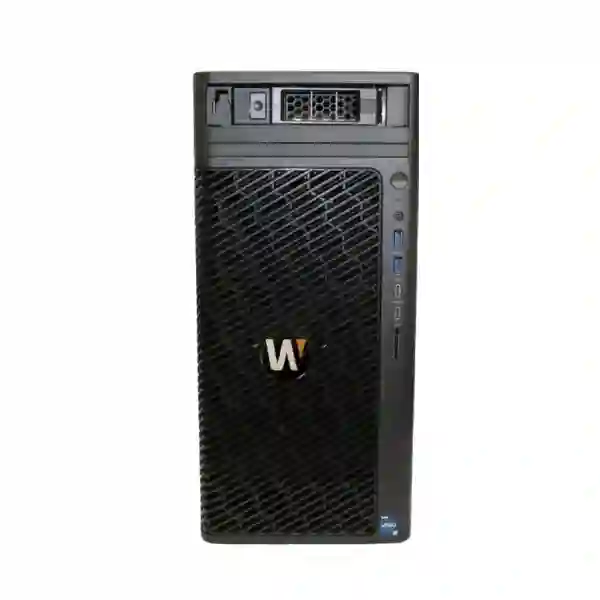
The Hanwha WRT-P-5204L is a compact, Linux-based recording server intended for a Wisenet WAVE video management deployment. It is not a camera and it does not replace the need for an appropriately designed camera network. Its job is to receive supported IP video streams, manage recording through WAVE, and provide a workstation-style platform for operators and administrators. The manufacturer describes a mini-tower system with Wisenet WAVE installed, four Professional recording licenses, an Intel Core i5 processor, and a separate system SSD. That combination makes the appliance most relevant to buyers who want a defined recording platform rather than assembling a general-purpose computer from unrelated components.
An important buying point comes first: Hanwha Vision currently marks this exact model as discontinued. The product information is still useful for identifying an existing unit, evaluating legacy inventory, and planning an upgrade, but a new purchase should not be based on an assumption of factory availability. Ask for the complete model suffix, drive configuration, software version, condition, and replacement recommendation before requesting a quotation. The reference to Tanzania describes the market for this buying guide; it is not a claim about local stock or service coverage.
What the standard hardware description actually establishes
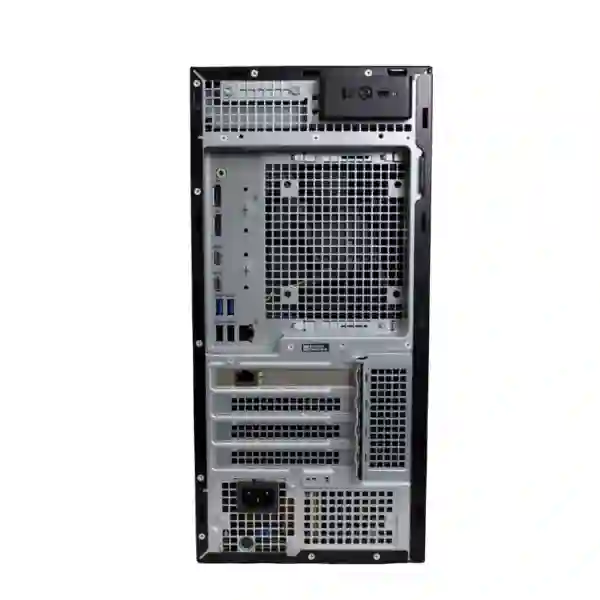
For the WRT-P-5204L family, Hanwha identifies a 14th-generation Intel Core i5, 16 GB of RAM, a 256 GB internal M.2 SSD for the operating system, and Ubuntu Linux 22.04 LTS. The original series specifications describe three 3.5-inch SATA data-drive bays and a maximum of 36 TB of raw internal data storage. There are two gigabit Ethernet interfaces, two DisplayPort outputs, and an included DisplayPort-to-HDMI adapter. A keyboard and mouse are included in the manufacturer’s listed package. The compact tower form factor is intended for an equipment room or another appropriately controlled location.
These statements describe the product family, not a promise that an unspecified unit ships with 36 TB. Hanwha offered capacity variants, so the suffix and installed disks determine the actual supplied raw capacity. Storage already used by operating system files, recording indexes, formatting, or other configuration elements must not be treated as available archived footage. The installation environment, selected camera streams, and licensing are separate from chassis specifications. Request a written bill of materials when comparing a refurbished unit, remaining distribution inventory, or a successor model. That one document can prevent confusion between the base WRT-P-5204L name and a particular capacity variant.
Who should consider this model
A WAVE recording server is a practical category for a site that needs centralised viewing, recording, and management of IP cameras. Typical examples include a commercial office, a warehouse, a controlled-access storage area, a retail property, or an operations facility. The useful common feature is not the building type; it is a requirement to manage footage across several cameras with clear retention, access, and incident-review procedures. The WRT-P-5204L can be assessed in that context when an existing deployment already relies on its hardware and software.
For a new system, the lifecycle status changes the comparison. A newer recording appliance may be a better procurement target, provided its cost, WAVE compatibility, power requirements, interfaces, and support terms are verified for the actual order. If the requirement is only occasional live viewing, a complete recording server may be unnecessary. If the project demands many cameras, high bitrates, long archive retention, or resilient storage, it may require a different architecture or several servers. An integrator should first size the job from streams, days of retention, operational workflows, and failure tolerance, and only then choose a box. Never choose solely from a headline storage number or the four bundled licenses.
Understanding the four Wisenet WAVE Professional licenses
Hanwha lists four Wisenet WAVE Professional licenses with the WRT-P-5204L. The distinction between a license and physical camera connectivity matters: these are software recording entitlements, not four integrated PoE camera sockets. Wisenet WAVE documentation explains that a recording license generally permits recording one video stream from an IP camera or supported source. The recording license count therefore needs to correspond to the channels that will actually be archived. Live viewing and licensed recording are different operations under the VMS.
Consider a project with eight cameras where all eight need continuous archive. Four included Professional licenses do not by themselves cover eight recording streams; the project must account for the additional eligible licenses. Conversely, someone examining a live feed should not infer that every live-viewing operation consumes another recording entitlement. Confirm the current licensing rules for the deployed WAVE version, especially for embedded recorders, specialised video-wall functions, and any third-party streams. Record license ownership, activation status, and the server hardware identifier in the project handover. A camera count alone is not a sufficient licensing plan when the solution combines IP cameras, third-party devices, and unusual recording sources.
Adding cameras without misreading the license count
An expansion plan must check three independent limits: available recording entitlements, actual recording bandwidth, and storage retention. Adding a camera may require a new Professional license even when the server has enough compute and disk capacity. Licensing alone, however, does not guarantee that another stream can be recorded at the chosen bitrate. Similarly, a quiet low-bitrate camera and a high-resolution camera with a demanding frame-rate profile can consume very different amounts of capacity and network bandwidth. Any upgrade assessment should document the proposed camera model and its main and substream profiles.
A sensible process is to establish how many channels are already enabled for recording, how many licensed channels remain, which channels are planned, and what headroom is required. WAVE licensing can be tied to the server hardware identifier, so moving an existing system to another chassis needs an authorised migration and activation procedure, not an assumption that keys can simply be copied. Preserve proof of entitlement and follow the applicable software instructions. For a legacy WRT-P-5204L, also determine whether the current software version and supported upgrade path suit the proposed cameras. A successful demonstration with one camera should not be treated as proof that a much larger deployment has been sized correctly.
What the 470 Mbps figure means
The headline recording throughput is up to 470 Mbps according to Hanwha’s WRT-P-5204L information. This is a recording-bandwidth figure, not an internet speed, a per-camera bitrate, or a guarantee that any arbitrary number of cameras will operate successfully at maximum quality. Recording load is affected by the combined camera streams, codecs, resolutions, frame rates, scene complexity, recording schedules, and system activity. Live viewing, exported evidence, operating-system tasks, and network conditions may affect the overall engineering decision even when recording is the primary workload.
As a basic sizing exercise, an engineer can sum the expected average recording bitrate for every camera, then evaluate peak behaviour and leave practical operating margin. For example, ten cameras averaging 4 Mbps represent about 40 Mbps of video input before allowing for additional effects and variation. That illustration is a planning calculation, not a guaranteed capacity commitment. Performance should be validated with the intended WAVE version, camera mix, and recording policy. Avoid designing a system to run permanently at the advertised maximum because a real site needs room for changes in scene activity, additional cameras, maintenance, and unexpected peaks.
Raw storage is not the same as archive duration
The series maximum of 36 TB is described as raw storage across data drives. Raw capacity is a hardware quantity; it does not answer how many days of evidence will be retained. Available footage duration depends on the purchased drive variant, formatting, filesystem overhead, selected recording streams, motion or event rules, and how much data each camera actually creates. A system recording every camera continuously at high quality may fill the same storage faster than one using a verified event-driven policy. Retention should be calculated from site requirements before storage is selected.
It is especially important to ask whether a quotation includes installed surveillance-rated drives, whether disk configuration is mirrored or unprotected, and how failed disks will be replaced. Do not assume RAID protection merely because a server supports several HDD bays. Confirm the actual disk layout and usable capacity in the offered unit. The dedicated 256 GB SSD described by Hanwha is for the operating system; it should not be counted as part of the stated video archive capacity. Archive integrity also depends on correct time settings, healthy storage, suitable operating temperatures, and consistent maintenance. The best comparison uses usable capacity and a clear recording profile, not just the largest raw-terabyte figure.
Calculating retention before ordering
Start with the minimum period the organisation needs to preserve recorded evidence and identify whether every camera requires the same schedule. A loading-bay view might have a different recording priority from an internal corridor, while a high-value area may need continuous capture rather than motion-only recording. Document the required resolution, frames per second, codec, camera-side bitrate settings, and the amount of time each profile is active. The resulting estimate can be converted to daily storage use and tested against the actual data-drive configuration.
Retention estimates should include a reserve for unusually busy scenes and the difference between average and peak bitrate. Lighting changes, rain, traffic, and background movement can alter encoded video size. An engineer should also distinguish archive retention from footage manually exported for an investigation. Exports may need their own controlled storage location, access procedure, and preservation policy. For an existing WRT-P-5204L, inspect real disk utilisation over several representative days rather than relying exclusively on nominal camera bitrates. For a new purchase, obtain a written storage calculation that cites the intended camera count and recording configuration. This provides a more defensible basis for deciding whether the legacy appliance or a current replacement can meet the organisation’s needs.
Camera and ONVIF compatibility
Hanwha promotes the Wisenet WAVE platform for Wisenet cameras and supported ONVIF-conformant IP devices. ONVIF support is useful for heterogeneous systems, but it is not a promise that every capability of every camera will be available. Before procurement, check the camera model and firmware against WAVE’s current compatible-device guidance. Confirm the specific functions that matter, such as recording, time synchronisation, events, audio, supported codecs, PTZ control, or any required analytics metadata. Different functions may need different support paths.
A practical acceptance test should cover automatic or manual discovery, authenticated streaming, continuous recording, scheduled recording, playback, and evidence export. Include the real camera firmware in the test; two units of the same model can behave differently if their software differs materially. Make sure the system clock, timezone, and daylight-saving rules are consistent across servers, cameras, and client computers. If a third-party camera is only partially compatible, document the limitations before promising an operational feature to end users. The most valuable question is not simply whether video appears on screen, but whether the deployed configuration can capture, retrieve, and preserve the footage required by the organisation.
Networking requirements and dual Ethernet interfaces
The WRT-P-5204L manufacturer description includes two gigabit Ethernet interfaces. They provide useful network connectivity, but they should not be interpreted as PoE outputs or an automatic redundant network design. IP cameras normally need appropriate network switches, cabling, and independent electrical power or PoE infrastructure. An installer must plan addressing, switching capacity, broadcast domains, time services, access controls, and available bandwidth between cameras, server, and viewing workstations. How the two NICs are configured matters more than their mere presence.
For many installations, separating camera traffic from office-user traffic can improve manageability, provided routing and access rules are carefully designed. A dedicated camera VLAN or network segment may reduce unnecessary exposure and simplify troubleshooting. Dual interfaces should be configured according to the site’s security policy rather than bridged indiscriminately. If remote viewing is required, evaluate secure network access, upstream bandwidth, user authentication, and the implications of any cloud-connectivity options supported by the deployed WAVE version. Do not equate gigabit link speed with the 470 Mbps recorder throughput rating. They describe different constraints. A successful network design accounts for camera ingress, operator viewing, exports, management traffic, and future expansion.
Processing hardware and operating system
The listed processor and 16 GB memory place the WRT-P-5204L in the category of a purpose-configured recording computer rather than a small embedded recorder. Hanwha specifies Ubuntu Linux 22.04 LTS for the L version, with an internal 256 GB M.2 SSD for the operating system and software. This distinction also helps identify the unit: the related WRT-P-5204W is a Windows variant and should not be used as evidence for Linux operating-system support or a quote describing the L model.
The fact that Ubuntu is installed does not authorise arbitrary software changes. A recording appliance should be maintained according to the vendor’s supported patching, WAVE version, driver, and recovery procedures. Additional applications can increase resource consumption or complicate support. A purchaser of existing stock should request confirmation of the installed OS image and VMS build, the administrative handover method, and the availability of recovery media or documented restoration steps. If an organisation requires a different Linux release, virtualisation, unusual storage controllers, or unsupported third-party services, it should obtain a vendor-backed compatibility determination rather than assuming a general PC capability transfers directly to a validated WAVE appliance configuration.
Local display and operator workspace
The WRT-P-5204L product information lists two DisplayPort video outputs and an included DisplayPort-to-HDMI adapter, together with a keyboard and mouse. That can be convenient when a technician needs local access for setup or when the design uses an attached display. It does not mean the purchase automatically includes monitors, mounting hardware, a control-room workstation, or video-wall licensing. Those are separate design and purchasing decisions. The Wisenet WAVE client experience should also be checked against the number and resolution of streams that an operator intends to display simultaneously.
For day-to-day security work, a simple layout can be more effective than an overfilled screen. Identify which cameras need continuous attention, which are consulted only after an alarm, and who is permitted to view sensitive areas. The recording server’s main responsibility remains reliable capture and archive management. If many operator screens or graphics-heavy layouts are expected, consider whether separate client workstations are appropriate. Test the complete workflow, including selecting a camera, finding a past event, exporting footage, and returning to live view. This avoids confusing the presence of display connectors with a guarantee of an unrestricted monitoring workstation.
Central management for a single site
A recording server is easiest to evaluate when the operational workflow is described before installation. At a single site, the plan might include cameras at entry points, corridors, loading zones, and selected internal areas, with different authorised users responsible for security review and system maintenance. The server receives the specified streams and keeps an archive according to the recording rules configured in WAVE. Operators then need predictable ways to locate footage by time and camera, verify that the server is recording, and export clips when an incident requires review.
Write down who owns the camera naming convention, how user permissions are approved, how clocks are synchronised, and which person responds when a disk or camera goes offline. Use clear camera names linked to real locations rather than serial numbers alone. Separate administrative tasks from ordinary evidence-review tasks. A small site benefits from these controls just as a large site does; many recording failures stem from overlooked procedures rather than insufficient hardware. In an existing WRT-P-5204L installation, an organised operations review may improve results before new equipment is purchased. In a new project, these same requirements belong in the acceptance criteria for a replacement server.
Planning for multiple locations
Wisenet WAVE may form part of a multi-site video management strategy, but the WRT-P-5204L is one physical recording appliance. A distributed project needs a plan for where footage is recorded, how remote users authenticate, what happens when a WAN circuit fails, and how bandwidth is used between sites. It is rarely wise to assume that every remote camera should continuously send full-quality video over an unreliable external link. Local recording, centrally managed systems, and selective remote viewing are architectural choices that must be assessed against the actual network.
A multi-site design should account for independent failure domains, retention requirements at each site, evidence exports across links, and administrative ownership. Test the behaviour during loss of internet access as well as normal operation. If a server is being replaced, confirm how licenses, camera configurations, and user access will migrate under the software vendor’s supported process. Also identify whether the newer hardware will change rack space, electrical demand, or network-port requirements. Do not promise uninterrupted migration without a tested plan. A carefully staged trial at one site gives a more reliable view of compatibility and bandwidth than assumptions based on the family product name.
Commissioning checklist and baseline tests
Before admitting a recording server into normal operation, verify the model suffix and drive inventory against the purchase order. Confirm that the installed operating system and WAVE build match the approved configuration, and that the administrator can access the system through a documented secure method. Check camera discovery, license activation, network addressing, time synchronisation, recording schedules, storage allocation, alerting, and playback from representative cameras. A newly installed system can appear healthy on the live screen even when the recording policy is incorrect.
An acceptance record should include at least one recording and retrieval test for every critical camera group, observed bitrate and disk behaviour, expected archive duration, and a failed-camera or failed-network test where safe and practical. Confirm the identity and rights of users who can export evidence. Inspect cooling and equipment-room cleanliness, and document any power backup. Keep configuration exports and recovery instructions in a controlled location. These steps apply whether commissioning a remaining-stock WRT-P-5204L or a newer WAVE recorder. The difference is that a discontinued unit needs even more attention to software support, spare parts, and the consequences of a hardware failure that may force a replacement earlier than expected.
Resolution, compression and real-world image quality
Camera recording settings can influence both the value of footage and the cost of storing it. A higher pixel count may help identify detail in a suitable field of view, but it does not guarantee useful evidence in poor lighting, excessive glare, fast movement, or an unsuitable camera position. Bitrate and frame rate should be chosen from the actual visual task. The WRT-P-5204L processes the streams it receives; it cannot compensate for an image that never captured the needed details. The WAVE design should therefore begin with camera placement and image quality checks.
Confirm each camera’s supported codec and test the chosen streams with the intended WAVE version. Where supported, adaptive streams or alternate profiles may make live viewing more practical, but archived quality and client-viewing quality should not be confused. An operator may see a reduced-bandwidth live stream while the system records a different profile. Record which profile is archived and prove it by exporting a sample clip. Test daytime and night-time scenes as well as periods of motion. This process reduces the risk of discovering after an incident that the video is too blurred, too compressed, or too intermittent to answer the relevant question.
Video security and access control
Video recordings can contain sensitive information about employees, visitors, customers, and the movement of goods. A sound design protects both the camera network and the archive, regardless of the recorder brand. Use named user accounts where practical, give administrators only the access they require, and revoke credentials when responsibilities change. Keep secure records of password ownership, remote-access methods, installed software versions, and authorised support contacts. Exposing camera or server management ports directly to the public internet should not be treated as the default way to enable remote viewing.
Security should include a patch and change-management procedure approved for the exact appliance configuration, a backup plan for essential settings, and documented recovery steps. Limit physical access to the tower and storage media. Review audit information and export permissions supported by the installed VMS version, and avoid sharing captured evidence through informal channels. A failed or stolen drive may create confidentiality issues as well as an operational interruption. For any replacement project, plan how the old appliance, disks, cached credentials, and retained recordings will be handled. A secure system depends on these lifecycle procedures as much as on camera encryption and administrator passwords.
Electrical power, cooling and installation space
The recording appliance is a powered computer with internal storage drives. It requires an appropriate protected power source, ventilation, a stable placement surface, and a suitably controlled environment. Hanwha’s technical information for this series describes a tower chassis, not a rackmount device supplied with slide rails. The installer must therefore check physical dimensions, clearance around air intakes, cable access, and whether the equipment cabinet is designed to accommodate a tower. Do not assume the unit can be placed in a sealed or poorly ventilated enclosure without affecting reliability.
A UPS may be appropriate to allow controlled shutdown during brief power interruptions, but the required runtime depends on the full load of recorder, switches, and network equipment. Backup power for the recorder alone is not enough if all PoE switches immediately turn off. Evaluate surge protection and electrical safety in the context of the actual building. Heat and dust are operational concerns, particularly in equipment spaces without conditioned air. Confirm the vendor’s environmental limits for the specific ordered unit. A legacy appliance with ageing drives deserves preventive inspection and a documented plan for safe shutdown and restart after outages.
Maintenance signals that matter
A recorded-video system should be checked regularly for more than a green power indicator. Useful operational checks include camera connection state, successful recording, licence status, disk health, archive age, system time, network errors, unexpected restarts, and whether an operator can retrieve a clip. The strongest monitoring process defines a person responsible for responding to each type of fault. An alert that nobody owns is not an effective protection against missing evidence.
Store maintenance notes with the model, installed drive capacities, software build, camera inventory, and support history. Observe actual throughput and storage use after adding cameras or changing their image settings. Confirm that scheduled updates or restarts do not silently change the expected recording policy. Periodically exercise the evidence-export process because software changes, permission edits, and client updates can affect an operator’s ability to deliver footage. For a discontinued WRT-P-5204L, add checks for drive age, fan condition, available replacement parts, and the organisation’s threshold for moving to a supported successor. Routine observations make it easier to decide whether repair or replacement is justified before an incident exposes a weakness.
How to evaluate a used or remaining-stock unit
A model marked discontinued may still appear in distributor catalogues, resale channels, or an organisation’s existing equipment inventory. The correct question is not simply whether the chassis powers on. Ask for the exact capacity suffix and manufacturer part number, a complete drive list, condition of each disk, VMS version, license transfer or ownership evidence, available software recovery path, and any documented repairs. Confirm whether the advertised capacity means installed raw disk space or a theoretical maximum that would require additional purchases.
Do not assume that a warranty described in an overseas sales brochure applies to an unspecified Tanzania transaction. Support commitments, return logistics, entitlement validity, and regional service arrangements must be confirmed in writing for the actual offer. Require evidence that the included licenses can be legally and technically used by the buyer, especially when the appliance is second-hand. Check whether original accessories and power components are included. Compare the full cost of testing, refreshing drives, supporting older software, and preparing an upgrade against a new recorder. What initially appears to be a lower hardware cost may carry greater operational risk if the device is difficult to service or cannot meet the latest compatibility requirements.
Lifecycle: discontinued WRT-P-5204L and successors
Hanwha Vision’s own product page identifies the WRT-P-5204L as discontinued and names the WRT-P-5205L as its replacement. The manufacturer also currently identifies the WRT-P-5205L as discontinued, with the WRT-P-5206L listed as its successor. This sequence is important when preparing a current purchase specification. A distributor’s old product description may still display historical replacement advice without reflecting the newest catalogue position. Ask the supplier to confirm the active model and exact version proposed for the project.
A successor is not necessarily a plug-and-play exchange. Changes in processor generation, memory type, connectors, power requirements, software image, and mechanical dimensions can matter in a real installation. Hanwha’s WRT-P-5206L page identifies a Linux WAVE recording server with four Professional licenses, but buyers should compare the complete current datasheet, selected storage variant, licensing, and deployment constraints rather than selecting it solely because the model number is newer. Existing users should plan supported migration, identify the ownership of recorded archives, and confirm the impact on licence activation. Preserve the original WRT-P-5204L specification in asset records even if a new product is purchased.
Comparison with a generic PC-based VMS server
An off-the-shelf computer may look flexible because its components can be selected independently. Yet an IP video deployment also needs validated storage, supported operating-system and VMS combinations, suitable network interfaces, enough recording capacity, recovery procedures, and clearly assigned support responsibilities. A purpose-configured appliance such as the WRT-P-5204L offers a manufacturer-defined hardware baseline and preinstalled Wisenet WAVE. This may simplify initial system definition, although it does not remove the need for camera licensing, network design, or storage engineering.
A generic PC solution may still be appropriate when an integrator can take responsibility for the full configuration and lifecycle. The comparison should include replacement-parts access, supported software versions, power consumption, installation effort, cybersecurity maintenance, and how quickly the system can be restored after a disk or motherboard failure. For a new procurement in Tanzania, an up-to-date validated appliance may be more sensible than obtaining a discontinued model solely because a past specification names it. The choice should follow site requirements, procurement constraints, and verified support channels rather than general assumptions that all recorder computers perform alike.
Comparison with an embedded network video recorder
An embedded NVR and a WAVE recording server can both store IP camera footage, but they commonly serve different operating models. Embedded recorders may combine simplified setup with a defined set of camera ports or channels, while a VMS server allows a software-led approach to camera organisation and operator workflows. The WRT-P-5204L should not be presented as a recorder with four built-in camera PoE ports simply because it includes four Professional licenses. It relies on properly networked IP camera sources and an appropriate licensing arrangement.
Choose the architecture from what operators and administrators need to do. Consider the number of sites, user roles, integration demands, storage retention, long-term support, and whether cameras are all from one ecosystem. Test retrieval and export workflows, not only the live picture. A small premises with limited operational demands may not need a full tower VMS platform. A business requiring managed access, varied cameras, and structured evidence handling may value that architecture, but should still assess current models. The discontinued status of the WRT-P-5204L is relevant to a purchasing decision even if the general WAVE approach remains technically suitable.
Questions to settle before issuing a quotation
A useful request for quotation should state the number of cameras to record today, planned growth, resolution and typical bitrate for each camera class, recording schedule, retention days, and whether audio or event metadata is required. It should identify existing camera models and firmware, the number of operator workstations, remote access expectations, and the power and networking environment. If the request specifically concerns WRT-P-5204L equipment already owned, include serial and capacity details privately through the authorised quotation channel rather than publishing them in open correspondence.
The supplier should respond with the exact model and storage suffix, included versus additional WAVE licences, installed drive inventory, usable storage assumptions, expected recording bandwidth, compatibility plan, delivery conditions, and written support arrangement. Ask the supplier to distinguish documented manufacturer specifications from any site-specific performance estimates. Where a discontinued device is proposed, require an explicit explanation of software support, replacement parts, and why it remains suitable. For a current successor, request a comparison identifying any electrical, cabling, or migration changes. A quote that contains only the recorder name and a price is not sufficient to validate a business-critical surveillance solution.
Tanzania deployment considerations
For a buyer planning an IP video system in Tanzania, the engineering questions are familiar but should be answered against the actual premises. Confirm reliable mains power, a suitable UPS strategy where required, camera and switch power budgets, equipment-room temperature, ventilation, physical access, and the stability of any internet connection used for administration or remote access. Evaluate whether the site requires all cameras to keep recording when internet service is interrupted. A local recording design may serve that objective better than an arrangement dependent on uninterrupted wide-area connectivity.
Commercial details must be kept separate from technical descriptions. The WRT-P-5204L model name does not establish local stock, Tanzania warranty eligibility, import terms, delivery lead times, or a TZS selling price. Obtain those details from an authorised, current quotation for the exact product or its successor. There is no basis here to assume a particular city has a warehouse, a certified installer, or a guaranteed response time. When video includes workers or visitors, involve the organisation’s responsible team in setting lawful retention and access rules. This guidance assists local evaluation without asserting a regional compliance certification or legal conclusion for the recorder.
Operating cost beyond the purchase price
The total cost of a video recording system includes the hardware, appropriate hard disks, WAVE recording entitlements, switches and cabling, backup power, installation, commissioning, training, maintenance, and eventual storage replacement. The WRT-P-5204L’s four bundled Professional licences are relevant to this calculation, but they do not eliminate the need to license additional recording streams where required. Nor does the series’ maximum raw capacity establish the number of disks delivered or the retention days achieved. A useful cost model separates initial expenditure from the expected costs of keeping the system reliable.
Also account for work required after incidents. Staff may need time to find footage, export it, document chain of custody, or restore access when a disk fails. A system that simplifies those tasks may have operational value even if its headline specifications look similar to another recorder. On a discontinued platform, the prospect of unexpected parts replacement or earlier migration should be reflected in the decision. Ask suppliers to show what is included and excluded rather than assuming prices seen in another country translate directly to a Tanzania offer. A clear comparison makes the practical tradeoffs visible before deployment.
Example: office or commercial premises
Consider an office that needs to review entrances, circulation routes, reception, and selected perimeter areas. The recording requirement should be expressed in cameras that actually require an archive, not simply every camera that can be viewed live. The project team can group cameras by purpose, decide whether continuous or scheduled recording is required, and establish a retention policy. If more than four streams require recording, additional eligible WAVE licences need to be included beyond the WRT-P-5204L’s bundled set.
The network should keep camera traffic manageable and restrict administrative access. A secure location for the tower, suitable power backup, and a documented export process help make the system workable after installation. The total recording bitrate should be estimated from the actual camera profiles rather than guessed from camera count. An acceptance test can verify that a receptionist or security operator can retrieve the correct footage without gaining unnecessary administrative permissions. If the office is buying a new recorder, the manufacturer’s discontinued status means the current successor deserves assessment. If it already owns a functioning WRT-P-5204L, a focused lifecycle and retention review may inform the upgrade timetable.
Example: warehouse, loading bay or logistics site
A warehouse may need to observe vehicle movement, loading doors, goods transfer points, and areas with high activity at different times of day. Such conditions can produce variable video bitrates because a scene full of moving people, vehicles, and changing lighting can be harder to compress than a quiet corridor. A practical design begins with representative video samples, a clear definition of evidence needs, and a tested retention calculation. The advertised maximum recording bandwidth should not replace measurement with the intended cameras and their chosen profiles.
Network placement also matters. Long camera runs, outdoor connections, power to PoE switches, and interference from other facility systems may affect reliability. Operators may require rapid access to a defined time window after a stock discrepancy or safety event; this makes camera naming, clock synchronisation, playback, and export procedures central requirements. The WRT-P-5204L may be part of an existing system, but the proposed drive capacity and license count must be checked independently. A new warehouse project should compare an active recorder model, support arrangements, and realistic maintenance access before relying on a discontinued tower.
Example: retail premises with several viewing roles
Retail operations may involve different authorised users, such as a security operator monitoring events and a manager permitted to request selected footage. The recording design should separate those permissions so that routine viewing does not require unrestricted system administration. Choose camera locations and resolutions for the particular risks being addressed, and set recording schedules that suit opening and closing periods. Capture requirements for a checkout area can differ from those for a general corridor or stockroom.
The deployment should include an agreed method for reviewing an incident without exposing unrelated footage. Test searches by time and camera, clip exports, and retention expiry. Do not infer that a client viewing many feeds requires an equal number of extra recording licenses; WAVE’s recording entitlement rules should be applied to recorded sources. Also avoid assuming that an internet connection is necessary for every local recording action merely because remote access is offered elsewhere in the ecosystem. Evaluate each workflow separately. For a retail business comparing new hardware, the latest supported Linux WAVE server may provide a more straightforward procurement path than a discontinued WRT-P-5204L, subject to a current quote and deployment review.
Expansion and migration planning
A migration project should begin by inventorying the present system rather than replacing hardware blindly. Record camera models and firmware, assigned IP addresses, recording schedules, user groups, existing WAVE licences, disk utilisation, and critical retention dates. Check which recorded footage needs to remain accessible after cutover and whether a separate evidence preservation process is necessary. A replacement may change network interfaces, display connections, physical footprint, or power provisioning, and those differences should be identified before the maintenance window.
Software activation requires particular care because WAVE documentation associates licences with a server hardware identifier. Follow the supported transfer or reactivation process rather than assuming a simple disk clone preserves entitlement. Verify the replacement appliance against actual camera compatibility and required capacity, then conduct a small test with representative streams. Plan a rollback or controlled contingency for unexpected behaviour and document responsibility for the old drives. After migration, test live view, historical playback where required, camera recording, alerts, user permissions, and exports. A well-run upgrade is measured by continuity of the required evidence workflow, not merely by the successful boot of a newer computer.
What an evidence-ready handover should contain
The final project handover should give the customer more than the appliance’s serial number. Include a camera list with descriptive labels, network and power diagrams, installed drive configuration, software version, expected archive-retention estimate, licensing record, user-role matrix, alert contacts, and tested recovery procedures. Preserve the product’s exact model suffix in the asset register because storage capacity variants can otherwise be confused. The WRT-P-5204L family name identifies the platform, not every detail of an installed unit.
A useful handover also contains instructions for retrieving a time-based incident, exporting a clip through an authorised account, checking that recording is active, and escalating a disk or network fault. Define who is authorised to change recording policy and who approves deletion or extended preservation of evidence. Make the document accessible to approved operations staff but protect credentials and sensitive topology information. For a discontinued device, add a lifecycle note explaining its current status, known software constraints, and the planned replacement evaluation. These practices give a business a realistic way to operate the system, whether it is extending an existing installation or procuring a supported successor.
A practical buyer decision
Choose the Hanwha WRT-P-5204L as a reference for an existing Linux-based Wisenet WAVE installation or a carefully verified offer, not as an assumed current production model. Its defining strengths are a known WAVE appliance configuration, four included Professional licences, and manufacturer-stated recording throughput up to 470 Mbps. Its critical limitations are that installed storage varies by suffix, recording licence counts require a separate camera plan, and the manufacturer now lists the model as discontinued. Those facts should be clear in any product conversation.
For an existing deployment, request a health check and establish whether its actual workload, available archive, and software support still satisfy the site. For a replacement or new deployment, confirm the current Linux WAVE recorder model and compare the exact specifications, operating costs, and migration implications. In every case, a useful next step is a quote or technical review based on camera quantity, recording profile, retention period, operating environment, and current equipment list. A well-specified project is easier to support and less likely to disappoint when footage is needed most.
Frequently asked questions
Is the Hanwha WRT-P-5204L still a current model?
No. Hanwha Vision labels the WRT-P-5204L discontinued. Its page names WRT-P-5205L as the original replacement, while the manufacturer’s current listing for that successor also shows discontinued status and names WRT-P-5206L. Confirm the active model and regional availability for any new quotation.
Does it come with four cameras?
No. The four included Wisenet WAVE Professional licences are recording entitlements, not bundled cameras or integrated PoE ports. Cameras, network switching, cabling, and any additional licensing must be specified separately. Check exact camera compatibility and license requirements before installation.
Can it record more than four cameras?
A project may support more recorded sources with suitable additional recording licences, bandwidth, and storage, but the included four licences do not entitle unlimited recording. Work out the camera count, licensed streams, expected bitrates, recording schedules, and server limits together rather than treating any one figure as capacity.
Is the maximum 36 TB installed in every unit?
No. Up to 36 TB is a raw family storage ceiling, not a standard shipment guarantee. Actual drive capacity depends on the specific suffix and supplied configuration. Ask for installed drive sizes, usable capacity after configuration, and the calculation supporting the required footage-retention period.
What operating system does the L model use?
Hanwha identifies the WRT-P-5204L as the Ubuntu Linux 22.04 LTS version. Do not confuse it with the related W model associated with Windows. Verify the installed image and supported Wisenet WAVE software build when inspecting any actual appliance.
Does 470 Mbps refer to internet speed?
No. The up-to-470-Mbps value describes recording throughput for the server. Camera traffic, network-link speeds, viewing activity, recording profiles, and storage demands are different design considerations. A project needs a measured or defensible stream-by-stream load estimate with headroom.
Will all ONVIF cameras work identically?
Not necessarily. Wisenet WAVE supports compatible IP devices, including relevant ONVIF cameras, but supported functions depend on the specific model, firmware, and software version. Test essential live view, recording, playback, events, and any specialised functions before committing to an integration.
Does the server provide power to IP cameras?
The manufacturer describes dual gigabit Ethernet network interfaces, not integrated PoE camera outputs. Plan appropriate PoE switches or camera power supplies separately. Ensure camera-side networking remains available during power interruptions if recording continuity is a requirement.
Can I view footage remotely?
Remote viewing may be part of a correctly configured Wisenet WAVE deployment, subject to the installed software, connectivity, accounts, and security policy. It should not be promised from the hardware model alone. Test the approved access method and required bandwidth without exposing management interfaces unnecessarily.
How many days of recording will be stored?
There is no reliable universal answer from the model name. Retention depends on actual usable disk capacity, number of licensed and configured streams, camera bitrates, recording schedules, and scene conditions. Obtain a site-specific retention estimate and verify it using real archived footage.
Should I repair an existing WRT-P-5204L or replace it?
Compare current hardware health, software support, spares, repair cost, licence status, reliability requirements, and the cost of migrating to a current model. A functioning system may remain useful, but discontinued status makes a documented replacement plan important. Confirm migration entitlements and archive handling before any change.
Can I get an exact Tanzania price or delivery date here?
No verified Tanzania price, inventory position, delivery commitment, or regional warranty has been established for the unspecified capacity variant. Request a quotation that identifies the exact model, storage suffix, included licences, support terms, and any proposed newer alternative before making a purchase decision.
Is a video management server the right choice for a small site?
It depends on the work needed rather than just the camera count. Consider archive retention, number of recording streams, permission roles, supported camera mix, and evidence-export procedures. Some small sites are better served by a simpler recorder, while others need VMS management. Compare on operational requirements.
What information should I send for a technical quotation?
Provide the site type, camera list and firmware if known, planned recorded channels, target retention days, expected video quality, viewing users, network arrangement, and backup-power needs. If upgrading an existing unit, add the precise model suffix, software version, installed disk configuration, and licence inventory through a secure sales channel.
Request a WAVE recorder technical review
Share your recorded camera count, target retention period, camera models, and whether you are maintaining an existing WRT-P-5204L or specifying a new solution. Request confirmation of the current Hanwha Linux WAVE successor, exact storage configuration, available licences, commercial terms, and a suitable deployment plan for your Tanzania site.
Ask FourTeck Tanzania for a project-specific quotation and compatibility assessment.




Reviews
There are no reviews yet.