
Business desk communication • Tanzania buying guide
HP Poly CCX 600 Business Media Phone
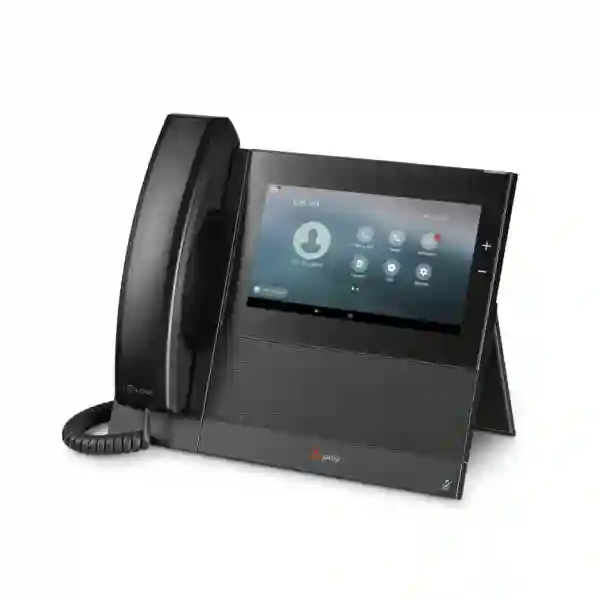
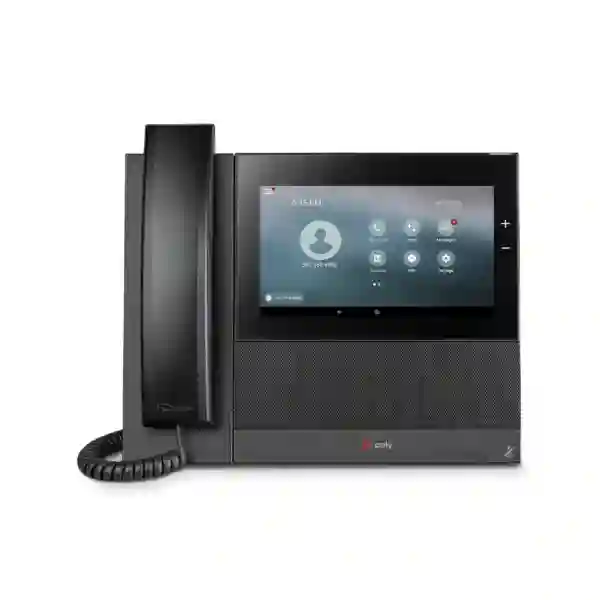
The HP Poly CCX 600 Business Media Phone is a premium touchscreen IP desk phone for people who spend a meaningful part of their working day making, receiving, transferring, and managing calls. Its large 7-inch colour display, Poly audio technologies, built-in Wi-Fi and Bluetooth, and multiple headset options make it a practical candidate for executive offices, managers, senior administrators, and shared business communication environments in Tanzania. Before choosing one, confirm the calling platform: HP offers Microsoft Teams and Open SIP editions, and the correct edition matters more than the phone’s appearance. Also check network power, headset accessories, and the organisation’s provisioning requirements. Request a configuration-specific quotation rather than assuming that every CCX 600 package includes the same software, power adapter, or peripherals.
Need a quote? Specify your Teams or Open SIP platform, quantity, headset needs and PoE+ availability.
Technical overview at a glance
| Device class | Business media IP desk phone |
|---|---|
| Display | 7-inch colour touchscreen, 1024 × 600 pixels |
| Audio | Poly HD Voice, Acoustic Clarity, Acoustic Fence and NoiseBlockAI |
| Wired networking | Two 10/100/1000 Ethernet connections |
| Wireless networking | Integrated 2.4 GHz and 5 GHz Wi-Fi; Bluetooth 4.2 |
| USB | One USB 2.0 Type-A and one USB 2.0 Type-C |
| Headset connections | RJ-9, electronic hook switch (EHS), compatible USB and Bluetooth options |
| Power | IEEE 802.3at PoE+, Class 4; up to 25 W |
| Available editions | Microsoft Teams and Open SIP; exact supplied edition must be confirmed |
| Management | Poly management and provisioning capabilities, subject to edition and service configuration |
| Typical package | Phone console, desk stand, handset and cord, network cable, setup sheet; confirm exact kit |
These are model-family and manufacturer-documented capabilities. Exact software, package accessories, platform support and service features must be confirmed for the quoted configuration.
Common business scenarios
Executive desk
Large touch interface, clear speech and options for handset, headset or hands-free calls.
Manager or administrator
Contact visibility and practical call handling on a supported business calling platform.
Reception pilot
Evaluate transfers, multiple-call workflows and compatible headset controls before scale-up.
Multi-site IT estate
Standardise edition, firmware, power, network settings and managed provisioning.
Why organisations choose a dedicated desk phone
A dedicated desk phone gives a user a predictable place to answer business calls even when their computer is busy with spreadsheets, remote meetings, or other applications. For a manager who regularly handles client conversations, the physical handset, familiar call controls, speakerphone and large touch interface can be easier to operate than switching between software windows. The CCX 600 is particularly relevant when ease of navigation and an accessible contact list matter more than minimising the initial device cost. It does not replace the need for a configured voice service. Think of the phone as an endpoint in an existing or planned communications system: its value depends on the selected edition, service support, local network quality and everyday user workflow.
The touchscreen and everyday usability
The seven-inch, 1024 × 600 colour LCD offers more viewing space than compact desk phones. Users can work with on-screen contacts, call information and available applications without learning numerous small physical keys. The touch interface supports an on-screen keyboard and display options such as adjustable font sizing, helping employees who prefer larger visible information. Actual menus, available meeting functions and sign-in screens depend on whether the phone is configured for Microsoft Teams, Open SIP or another supported software profile. Ask for a demonstration of the intended deployment interface, not just an unconfigured product image. For buyers comparing desk phones, assess how quickly an employee can answer, place on hold, transfer and retrieve an active call during a normal workday.
Poly audio technologies explained
Clear speech is usually a stronger purchase reason than an unusually large screen. Poly HD Voice supports natural-sounding voice communication when the service and other endpoint support suitable audio quality. Poly Acoustic Clarity provides full-duplex operation, echo cancellation and background-noise reduction, which is useful during hands-free calls. Poly Acoustic Fence targets surrounding sounds while using a handset or supported wired headset; NoiseBlockAI addresses distracting noise during speakerphone use. These technologies improve the conditions for understandable conversations, but they cannot repair poor internet connectivity, severe packet loss or an incompatible calling service. Evaluate call quality with the actual provider, headset and office acoustics before committing to a large deployment.
Choosing Microsoft Teams or Open SIP
The HP Poly CCX 600 Business Media Phone name covers more than one commercial configuration. A Microsoft Teams edition is intended for a Teams calling environment, while an Open SIP edition is designed for supported standards-based SIP services and IP PBX deployments. HP identifies the Teams and Open SIP editions separately in its product materials. Do not infer the supplied edition from the screen size, brand or a generic photograph. Ask the supplier to confirm the exact manufacturer product number and software profile on the quotation. If the organisation expects to change providers later, include that requirement in the evaluation. Switching platforms is not something to promise without checking the specific unit, firmware, licensing and administrator-supported transition path.
What the Teams edition is intended for
A business standardising calling on Microsoft Teams may want a familiar, desk-based endpoint for users who prefer a handset or do not always wear a computer headset. The Teams variant is the configuration to investigate in that case. Its actual calling experience depends on the organisation’s Microsoft tenant, eligible Teams Phone arrangement, supported policies, network connectivity and current device software. A Teams edition should not be assumed to be a universal SIP desk phone simply because other CCX 600 variants support SIP. Before purchasing, ask the Microsoft 365 administrator which accounts will sign in, what calling plans or operator arrangements apply, and whether the organisation’s device-management and security requirements have been checked for the intended model and firmware.
What the Open SIP edition is intended for
The Open SIP version is relevant for organisations using a compatible hosted PBX, on-premise IP PBX or provider-managed SIP calling platform. It can suit businesses that want the phone interface at the desk while retaining an existing SIP-based telephony arrangement. However, support for particular call features cannot be inferred from the SIP label alone. Shared-line appearance, directory integration, transfer behavior, presence, recording controls and advanced functions may depend on the provider or PBX configuration. Obtain the precise PBX brand, version, provisioning method and firmware recommendations from the voice administrator. Where possible, test one phone on a representative extension before ordering devices for every office or branch.
Compatibility is a project check, not a slogan
A product that supports a standard communications protocol is not automatically guaranteed to deliver every service feature on every platform. Confirm registration, inbound and outbound calling, caller identification, transfer, hold, voicemail indication, dial plans, emergency calling procedures, directory behavior and software upgrades with the intended provider. If the service uses a managed cloud platform, check its published supported-device list and onboarding process. If the service is an internal PBX, confirm current firmware compatibility and provisioning templates. These checks matter especially when replacing older Poly or mixed-brand phones, because a familiar user interface may hide differences in configuration. Record successful tests and required changes so that the final installation does not rely on assumptions.
Wi-Fi flexibility and its limits
Integrated Wi-Fi can be useful where running a separate Ethernet cable to a desk is inconvenient. The CCX 600 supports 2.4 GHz and 5 GHz Wi-Fi connectivity, allowing a network designer to select a suitable wireless environment. A wireless connection should not be confused with wireless power: if the phone is not receiving supported power over Ethernet, an appropriate external power adapter is required. For important voice calls, evaluate signal strength, channel congestion, roaming behavior, access point load and voice prioritisation before using Wi-Fi as the primary connection. A well-designed wired connection is often simpler for a fixed executive desk. If wireless is necessary, test calls at the exact installation location under normal office network load.
PoE+ power requirements
The CCX 600 is specified for IEEE 802.3at Power over Ethernet, Class 4, with a maximum power figure of 25 W. This is an important purchasing detail: a switch that offers only lower-power 802.3af ports should not be assumed sufficient. For a multi-phone deployment, calculate both the available power per switch port and the switch’s total power budget, including other PoE devices such as wireless access points and cameras. A compatible external power adapter can be considered when PoE+ is unavailable, but the quotation must clearly state whether it is included or sold separately. Check power availability again when using a Wi-Fi connection without an Ethernet power feed. Protect upstream network equipment through suitable power-continuity planning.
Two Ethernet ports and a tidy desk
The phone provides two Gigabit Ethernet interfaces, which can help with desk layouts where one network point must accommodate both a phone and a connected computer. Whether this arrangement is appropriate depends on the organisation’s VLAN design, network policy, bandwidth requirements and security controls. IT administrators should confirm that the downstream connection is permitted and configured properly instead of treating the second port as an automatic substitute for independent structured cabling. Where a desk already has dedicated voice and data points, the phone can use the preferred network architecture. In either case, label connections clearly for support staff and document which switch port and network segment serves the device.
Bluetooth and USB connectivity
Bluetooth 4.2 and both USB Type-A and Type-C ports expand the options for connecting compatible peripherals. This is valuable when users alternate between a handset, a wired desk headset and a wireless headset. However, a physical port or wireless protocol does not guarantee that every headset, adapter or accessory will function with every device software release. Select a tested accessory combination and confirm call-answer, volume and mute behavior before purchase. The USB ports are also described in HP specifications for media and storage-related use, but actual functions depend on software. An accessory plan should specify the intended connection method for each user instead of leaving employees to solve compatibility questions after installation.
Headset options for different working styles
The CCX 600 includes a dedicated RJ-9 headset port and an electronic hook switch connection, alongside compatible Bluetooth and USB headset options. An employee who works at a stationary desk may prefer a wired headset for a simple connection, while someone who frequently moves around the office may value a compatible wireless model. EHS operation can require a suitable adapter and a supported headset; it should not be presumed from the presence of the port alone. Headsets are not automatically part of every CCX 600 package. Ask whether the selected headset needs additional cables, a charging station or firmware updates. A brief pilot with real users will reveal comfort, microphone pickup and call-control issues that a specification table cannot.
Hands-free calling and office acoustics
The full-duplex speakerphone is useful when a manager needs to consult a colleague during a call or refer to documents without holding the handset. NoiseBlockAI and Poly Acoustic Clarity are designed to support more usable conversations under typical business conditions. Still, a desk speakerphone is not a replacement for a dedicated meeting-room system when several participants are spread around a large room. Position the phone away from noisy ventilation, avoid placing it against a reflective wall, and test microphone pickup at the normal working distance. In shared offices, employees should use a headset for private client matters. Audio features should be assessed alongside workplace privacy and noise policies, not viewed as a cure for every acoustic problem.
Incoming calls, contacts and call handling
A suitable business desk phone should make routine work more efficient: answering calls, seeing caller information, placing calls on hold, forwarding to the right person and retrieving messages. The CCX 600’s large touchscreen and visible message indication can make these actions approachable for users who handle many conversations. The availability and exact presentation of directories, voicemail, meeting actions and advanced controls are governed by the configured service. Before rollout, build a short list of the five or six actions each user performs most often and confirm how those actions work on the supplied software profile. Train users with their actual screen, account and extension, rather than a generic training guide for a different edition.
Executives and senior managers
Executives often need easy access to contacts, the ability to switch between handset and speakerphone, and clear audio during calls where details matter. The CCX 600 can be an appropriate premium endpoint because it combines a larger visual interface with multiple audio accessories. The main question is whether the organisation needs this level of screen space and connectivity at each desk. For leaders who rarely make desk calls, a simpler phone or softphone may be sufficient. For staff who manage complex call activity throughout the day, the larger display can justify a closer evaluation. Consider executive-assistant workflows, delegation policies and the underlying service’s supported functions before presenting the phone as a complete executive communications solution.
Reception and administrator desks
A receptionist or senior administrator may handle frequent transfers, caller lookups and different call destinations. The touchscreen offers room to work with call information, but the total number of accessible lines, speed-dial arrangements and attendant functions depend on the software edition and calling platform. If high-volume call handling is central to the job, confirm whether the service provides an appropriate console, expansion accessory or supported attendant workflow. The CCX 600 alone should not be sold as a full contact-centre platform. During a trial, ask reception staff to route calls between departments, handle multiple simultaneous events and locate a contact. Their experience provides better evidence of suitability than a generic feature claim.
Hybrid work and desk-based calling
Some employees alternate between a laptop-based collaboration experience and a more traditional desk phone. The CCX 600 can give them a stable communications endpoint when working from an equipped office desk. The right configuration depends on where the calling account lives and whether the organisation permits the same account or number on multiple endpoints. Do not assume automatic synchronization of call state across unrelated platforms. For hybrid policies, document how the phone is assigned, how users sign in or sign out where applicable, and who supports it when a desk changes occupant. If employees rarely use a physical handset, compare the cost and simplicity of the desk phone with an approved headset and software calling arrangement.
Growing organisations and multiple locations
Businesses operating from several offices need endpoints that can be configured and maintained consistently. The CCX 600’s support for central management and provisioning can help the IT team build repeatable deployment procedures where the chosen software and management services support them. Standardise approved firmware, connection preferences, account setup, names and user instructions. Plan how replacement units are introduced and how retired devices are reset. Before rolling out across branches, assess the network at each location rather than assuming identical performance. A deployment list should include device location, user role, edition, accessory type, power method and support ownership. This makes future troubleshooting and procurement more predictable.
Relevance for organisations in Tanzania
For a buyer in Tanzania, the essential questions are the same as elsewhere but local deployment conditions should be confirmed rather than assumed. Determine whether the planned voice service is available at the installation site and whether the provider supports the intended device and call features. Check reliable internet connectivity, power backup, networking equipment, service administration and access to appropriately configured accessories. For businesses with more than one office, compare site-level connectivity and the practical support model before choosing a single deployment approach. No claim about local stock, delivery time, service coverage, regulatory approval or installation availability is implied by this product description. Those commercial and compliance details should be verified during the quotation process.
Planning a reliable voice network
Voice traffic is sensitive to interruption, jitter, latency and packet loss. A phone with advanced audio processing cannot make an unstable network dependable. Before installation, test the expected call path during normal working hours, including busy periods when cloud applications and downloads consume capacity. Review switch port configuration, voice VLANs where used, quality-of-service markings, firewall rules and DNS behavior with the organisation’s networking and telephony administrators. Wired Ethernet is generally easier to monitor at a fixed desk; Wi-Fi can work well when the wireless network is designed for voice. Document who is responsible for the internet connection, the PBX or calling service, and the local network so that faults can be isolated quickly.
Power continuity and business resilience
An office may have excellent communications software but still lose calling capability when its switches, router, access points or upstream network service lose power. The CCX 600’s PoE+ design creates an opportunity to centralise phone power at the switch, provided that the switch and relevant network equipment have appropriate backup. Where an external adapter is used, protect that power path according to the workplace’s resilience requirements. Design business continuity around the entire call route rather than the desk phone alone. Confirm alternative contact procedures for critical roles and how emergency calls are handled on the selected service. Device specifications do not establish continuity guarantees, recovery times or local emergency-service integration.
Security and the administrator’s role
The Open SIP product documentation lists controls including 802.1X, secure provisioning over HTTPS, SRTP media encryption and authentication features. Their practical value depends on how the calling platform, certificates, credentials and network are configured. A secure endpoint is not created simply by purchasing a device with security capabilities. Assign responsibility for strong administrative passwords, supported firmware, removal of unused accounts, access to configuration interfaces and logging. Confirm the applicable security feature set for the exact edition and software version. For shared desks, establish sign-out or reset procedures as appropriate. For confidential organisations, check headset privacy, physical placement and account permissions alongside network security.
Central management with Poly Lens
HP describes Poly Lens as a way for IT teams to gain visibility and management capability across supported Poly devices. That can simplify administration when organisations maintain several phones and need a consistent approach to software and configuration. However, available functions, supported versions, service prerequisites and management permissions can vary. Before specifying a cloud management workflow, ask which CCX 600 edition and firmware are being deployed and whether the relevant capabilities are available for that environment. Decide who will own device inventory, application of security updates and fault escalation. A well-documented deployment can be managed more efficiently, but no management platform can replace the need for accurate service configuration and local troubleshooting.
Provisioning and first setup
A practical deployment starts by identifying the edition, connecting approved power, attaching the network, and applying the calling platform’s prescribed configuration. On an Open SIP deployment, the administrator may need SIP registration details, a provisioning server or a provider-specific configuration. On a Teams deployment, onboarding follows the organisation’s Microsoft calling and device-management process. Avoid entering unknown configuration values simply to make a test call, because temporary shortcuts can become long-term support problems. Record firmware, network mode, assigned account and configuration source for each unit. Complete an inbound call, outbound call, transfer and voicemail check before handing over the phone, and leave the user with a short guide that reflects the actual screen.
Migrating from an older telephone system
Replacing desk phones is a chance to review dial plans, account assignments and user habits. Before swapping hardware, identify the existing PBX or voice provider, its supported endpoint types, current extension list, network infrastructure and call workflows. Clarify whether the project is simply a hardware refresh or a move from a legacy phone system to a different calling service. Number retention, feature equivalence and service cutover need provider confirmation, not a promise made by the handset specification. Pilot the CCX 600 with users from different roles, including one person who makes simple calls and one who handles complicated transfers. Use the findings to refine provisioning, training and contingency plans for the remaining offices.
Meeting and application features
HP’s CCX 600 materials describe quick access to contacts and meetings as part of the supported user experience. The exact functions visible on a deployed phone depend on the edition, application, account rights and software version. A dedicated application or Teams button may behave differently on distinct profiles. Buyers should distinguish a meeting shortcut from a promise that every conferencing feature will work on the endpoint. If meetings are essential, ask for a live demonstration with the chosen service and typical user account. For users who require a wide range of screen-sharing or collaboration tools, a computer may remain the primary meeting device. The desk phone can complement that experience without replacing all desktop collaboration capabilities.
Optional camera and video considerations
Some Open SIP CCX 600 materials refer to support for an optional compatible USB camera, subject to the appropriate software and calling platform. The device should not be advertised as including a camera, nor should video support be assumed on every edition. Confirm the exact accessory, current support documentation, software level and provider requirements before quoting video-related functionality. If video calling is a major project requirement, compare the real user experience with a purpose-built video endpoint or a laptop collaboration setup. Consider privacy permissions and desk placement if a camera is added. For buyers whose main requirement is dependable voice calling, prioritise the speech experience, power design and platform compatibility before optional video accessories.
What is normally included in the package
HP’s Open SIP PoE-enabled product documentation lists a console, desk stand, handset and handset cord, a CAT-5E network cable and a setup sheet. This is a helpful basis for procurement, but the exact supplied kit must be confirmed against the supplier’s manufacturer number. Some versions are offered with an external power supply, while PoE-only packages may not include one. Headsets, EHS adapters and optional camera accessories should not be assumed to come in the box. A detailed quote should separate the phone itself from power accessories, headsets, installation, configuration and any calling service charges. This avoids an apparently attractive handset price becoming an incomplete desk deployment.
Space, placement and physical design
The CCX 600 is designed for a business desk with an adjustable stand and visible touchscreen. Put it where the user can view the screen without constant stretching, reach the handset comfortably and avoid tipping the device while using touch controls. Leave sufficient room for the coiled handset cable, headset cables and rear connections. If the telephone will be positioned in a narrow reception station or on a crowded management desk, check the physical dimensions of the exact version before ordering. Consider reflected light on the display, speakerphone acoustics, cable routing and easy access for IT support. Good placement is part of usability, especially when staff handle calls frequently.
Environmental and operating conditions
HP’s technical specifications give an operating temperature range of 0 to 40 degrees Celsius and operating humidity of 5 to 95 percent for a listed CCX 600 configuration. These are device operating limits, not a statement that the phone is suitable for outdoor use or for exposure to rain, dust and direct heat. Place the unit in a normal protected office environment and assess local conditions where ventilation or air conditioning is limited. Do not install it in a location that regularly exceeds published operating limits. Electrical protection, reliable ventilation and a clean workspace support long-term operation. For unusual industrial or outdoor sites, request a product assessment rather than assuming that a standard executive desk phone is appropriate.
Accessibility and user comfort
The larger screen, adjustable font options, audio path volume controls and familiar physical handset can help users with different working preferences. HP also describes hearing-aid-compatible handset features in its technical documentation. Accessibility requirements are personal and should be assessed with the employee rather than inferred from a list of standards. Ask whether the user needs a particular headset, screen presentation, audible ring level or hands-free arrangement, and check those requirements with the intended software profile. Where important, arrange a short practical trial. A phone that works well technically may still require the correct accessory or interface settings to be comfortable during a full workday.
How to compare the CCX 600 with smaller desk phones
A less expensive desk phone may make more sense when staff only answer occasional calls and need little on-screen information. The CCX 600 is more compelling for users who value the seven-inch touchscreen, advanced audio processing and varied accessory connections. Compare the roles first: an executive’s workstation may benefit from the larger interface, while a low-traffic utility extension may not. Check the selected calling platform, required PoE class, accessory ecosystem and support responsibilities for every model under consideration. Avoid comparing devices on screen size alone. A smaller phone that is approved for the chosen service may be the better operational choice than a premium device that requires additional integration work.
Budgeting beyond the handset price
The overall cost of a business phone installation includes more than the endpoint. Account for the selected phone edition, required calling subscription or PBX arrangement, possible headset and EHS purchases, external power adapters where needed, PoE+ switch capacity, cabling, provisioning time and future support. Large deployments may also need staff training and tested replacement procedures. Ask for a written quote that identifies what is included, what is optional and which third-party service charges remain separate. Prices and local stock for Tanzania have not been verified here and should not be inferred from international retail listings. A complete bill of materials reduces the risk of unexpected installation expenses.
Deployment checklist for IT teams
Before approving the purchase, document the current voice platform, required edition, firmware support, user accounts, registration method, security policy, network topology and power plan. Confirm the switch’s 802.3at capacity and total PoE budget. Decide whether wired Ethernet or Wi-Fi is appropriate and test the intended network route. Select the headset and any EHS adapter from a compatible configuration list. Plan device inventory, management tools, software updates and reset procedures. Test typical incoming, outgoing and transferred calls and voicemail alerts. Include one representative user in the acceptance test, because technical registration alone is not enough. Finally, retain the approved configuration and service contacts for future replacements and troubleshooting.
Common reasons an installation disappoints
Many deployment problems are not defects in the display or handset. A Teams phone may have been ordered for an Open SIP service, or the phone may have been connected to a switch that lacks sufficient PoE+ power. A headset may connect physically but lack the expected remote call-control behavior. An office Wi-Fi network may be strong for email yet unreliable for continuous voice traffic. A PBX may register the device but fail to deliver all desired call features. These issues can often be prevented with pre-order verification and a small pilot. Request evidence for essential workflows and obtain supplier confirmation on ambiguous features rather than relying on broad claims about universal compatibility.
Practical troubleshooting questions
If the phone does not start, check the network power source and whether it supplies the specified PoE+ class, or confirm that the correct external adapter is present. If it powers on but cannot place calls, verify network access, service status, account registration and relevant provisioning details with the administrator. If callers hear interruptions, examine the network path, local congestion, headset connection and actual voice-service conditions. If one meeting or transfer option is missing, determine whether that feature is supported by the selected edition and platform. Do not reset or change security settings on a managed enterprise phone without the support team’s approval. Keep diagnostic steps aligned with the organisation’s administration policy.
Keeping software and settings maintainable
Business endpoints need a maintenance plan even after the first successful call. Establish which administrator reviews HP’s supported firmware information, tests updates, backs up approved configuration where appropriate and handles device replacements. A staged update process is safer than introducing an untested change across every executive desk. Record the installed edition and current software baseline so that support staff can distinguish service problems from device-specific issues. Protect administrative access and remove configuration data when a phone changes users or is retired. Check the organisation’s software support and security requirements at the time of deployment. The product description is not a guarantee of indefinite update availability or compatibility with future platform releases.
A sensible pilot before large-scale purchase
For a multi-user rollout, start with a small trial covering at least two contrasting workflows. Have one executive or manager test everyday calls and contact navigation, and let a receptionist or administrator assess transfers, directories and any multiple-call workflow. Test the chosen headsets, speakerphone, power source and network connection over ordinary working days. Ask the support team to perform a firmware check and basic fault recovery. Record user feedback in terms of time saved, clarity, comfort and unresolved functions instead of collecting general impressions alone. If a critical task depends on a special calling-platform feature, resolve it during the pilot. A good pilot helps determine whether the CCX 600 is the right endpoint for each role.
What buyers should ask on a quotation
A useful quotation should identify the HP Poly CCX 600 Business Media Phone edition, manufacturer part number, supplied accessories, power method and expected configuration work. Ask the vendor to state whether the offer is for Microsoft Teams or Open SIP and whether a compatible external adapter is included. Provide the name and version of the calling platform and ask for a written compatibility assessment for essential functions. Specify quantities, intended user roles, headset preferences, installation environment, billing requirements and who will administer the phones. Request current Tanzania-specific pricing, availability and any applicable commercial terms directly from the seller. Do not rely on a model-family name alone to identify the exact item to be delivered.
When another communications solution may be preferable
The CCX 600 is not the automatic choice for every extension. An employee who works entirely in a laptop calling application may gain little from a second endpoint. A contact-centre team may require a dedicated agent application or supervised queue system beyond a desk phone. A boardroom may need a conference speaker system instead of a handset on one participant’s desk. A remote site without stable connectivity could require a different communications plan. Evaluate the actual task, supported service and total deployment cost before choosing the form factor. The strongest reason to purchase the CCX 600 is a verified need for a premium desk-based voice experience that fits the organisation’s platform.
Summary: match the device to the workflow
The CCX 600 combines a spacious touchscreen, professionally focused audio features, flexible wired and wireless networking and several headset connection choices. Those capabilities can support a comfortable executive or business calling workstation when paired with the right telephony service and network design. The decisive pre-order checks are the Microsoft Teams versus Open SIP edition, the availability of 802.3at PoE+ or an appropriate adapter, compatibility with the intended PBX or calling account, and the accessories each user requires. For organisations in Tanzania, request a configuration-specific quote that confirms the exact product, technical fit and local commercial details. Choose based on demonstrated call workflows rather than on a generic device title.
Frequently asked questions
Does the Poly CCX 600 work with Microsoft Teams?
HP offers a version of the CCX 600 intended for Microsoft Teams. Confirm that the quoted product is the Teams edition and ask the organisation’s Microsoft administrator to check the current supported device configuration, account and Teams Phone requirements. The Open SIP edition should not be treated as interchangeable with the Teams variant without verified guidance for the precise unit and software. A supplier should specify the intended platform clearly on the quotation.
Can the CCX 600 connect to a SIP-based IP PBX?
The Open SIP version is intended for compatible SIP calling environments, including some hosted and on-premise PBX systems. Exact interoperability, provisioning steps and advanced call features depend on the PBX, provider and firmware. Before ordering, share the PBX name, software version and essential features with the administrator or supplier. Ideally, register a test handset and demonstrate the needed workflows. Do not presume that all SIP-enabled systems offer identical functionality.
Does it need a PoE switch?
The PoE-enabled CCX 600 is specified for IEEE 802.3at PoE+, Class 4, and a maximum power figure of 25 W. Check that the switch supports the class per port and has sufficient total budget. An appropriately specified external power adapter is an alternative where the intended package and installation support it. Verify whether the adapter is included; it is not safe to assume that every PoE package contains one.
Can I use the phone over Wi-Fi?
The CCX 600 has integrated Wi-Fi for compatible 2.4 GHz and 5 GHz networks. Wireless networking does not provide electrical power. A suitable power source is still required, and a separate adapter may be necessary when no PoE+ cable is connected. Check wireless coverage, congestion and voice quality at the actual desk. Fixed office installations should compare the reliability of wired Ethernet with wireless deployment before choosing a standard.
Does the phone include Bluetooth?
Yes. HP lists Bluetooth 4.2 for the CCX 600 and describes compatibility with Bluetooth headsets. Headset behavior and supported call controls can depend on the selected accessory and device software. If the user expects remote answer, end-call or mute functions, confirm that the complete phone-and-headset combination supports them. Headsets should be treated as separate accessories unless the vendor’s quotation expressly includes one.
What is the display size and resolution?
The CCX 600 has a 7-inch colour LCD touchscreen with 1024 × 600 native resolution. The larger interface is useful for contacts, call information and supported applications, although the exact screen layout depends on the configured phone edition. For purchase decisions, consider how frequently the employee interacts with the screen. A larger display is most beneficial when the user manages contacts, calls and application options regularly.
Does it support both a handset and a headset?
The standard handset-style package documented by HP includes a handset, and the phone supports multiple headset connection approaches, including RJ-9, EHS and compatible USB or Bluetooth headsets. Confirm the precise package because model-family variants and accessory kits differ. If a wireless headset is required, ask whether the installation needs an EHS adapter or other additional part. Test call controls and audio quality with the chosen accessory before scaling the order.
Is an external power adapter supplied in the box?
Not necessarily. HP lists PoE-enabled versions and versions packaged with an external power supply. For the documented Open SIP PoE-enabled configuration, the listed package contents do not include a separate power adapter. The supplier should confirm the actual manufacturer number and list every included accessory. When using Wi-Fi without Ethernet-delivered PoE, plan an approved external power source. Do not infer package contents from a generic CCX 600 photograph.
Is the CCX 600 suitable for a reception desk?
It may suit reception and administrative staff who benefit from the large touchscreen, call handling and supported headset options. However, high-volume attendant features, shared lines, queues and advanced directories depend on the calling platform and configuration. Test the precise receptionist workflow, including call transfer and handling multiple incoming requests. If a full attendant or contact-centre console is required, evaluate that application separately rather than assuming the phone alone provides it.
Can it be managed by an IT department?
HP describes provisioning and Poly management capabilities for supported CCX devices. The available controls depend on the software, edition, management service and organisation’s configuration. IT teams should confirm the appropriate provisioning workflow, security policy, firmware maintenance process and access rights. For several devices, a consistent configuration record and pilot update procedure are especially valuable. The phone’s management capabilities do not mean that setup is automatic or that every platform requires no administration.
Does the CCX 600 guarantee good calls on a slow internet connection?
No. Audio processing can reduce some distracting sound and echo, but it cannot overcome serious loss, latency, jitter, outages or misconfigured networks. Call quality depends on the entire route between endpoints and the voice service. For important deployments, test voice performance under expected network loads and assess the availability of suitable quality-of-service and power-continuity measures. A stable connection and correctly configured calling platform remain essential.
What details should I provide to request a quote in Tanzania?
Provide the required number of phones, desired Microsoft Teams or Open SIP edition, the intended calling platform, preferred headset type, available PoE+ equipment and whether Wi-Fi will be used. Mention any installation, configuration or user-training expectations. Ask the supplier to identify the exact manufacturer number, optional accessories and Tanzania-specific commercial terms in writing. Price, stock, delivery, warranty handling and service eligibility should be verified for the exact offer rather than presumed from manufacturer descriptions.
Request a configuration-specific CCX 600 quotation
Tell the FourTeck Tanzania team whether you need a Microsoft Teams or Open SIP edition, how many desk phones are required, which calling system you use and whether your desks have PoE+ power. Include headset, optional accessory and installation requirements. Request confirmation of the exact model, current local terms and the complete package before purchase.
Ask for product availability and a tailored quote. No local price, stock level, delivery promise or authorised-service claim has been assumed.




Reviews
There are no reviews yet.