
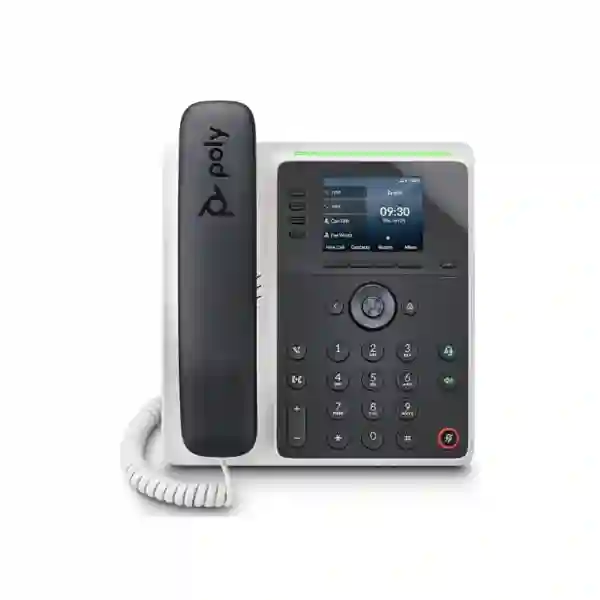
HP Poly Edge E220 IP Desk Phone
A wired office VoIP phone with four flexible line keys, a 2.8-inch colour display, Bluetooth 5.0 and Power over Ethernet. Compare its everyday benefits and deployment requirements before requesting a quote.
Quick buyer answer
Choose the E220 for routine office or small reception calling when you already have, or plan to use, a compatible SIP service and a wired network. It combines a modest footprint with line-key pagination, several headset options and Gigabit PoE connectivity. It is not a Wi-Fi phone, not a stand-alone telephone system and not a guarantee that every hosted voice provider or headset will support every feature.
Who should choose this business IP phone?
The HP Poly Edge E220 IP Desk Phone fits workplaces that need a physical calling endpoint with reliable, familiar controls without demanding a large operator console. An administrative employee, branch-office worker or receptionist who makes regular calls may appreciate a permanent handset, a readable screen and clearly identified actions. It is designed to work with a compatible SIP telephone platform, not to replace that platform. Its value is best judged against the daily workflow: how many calls are handled, which shortcuts are needed, whether a headset is preferred and who maintains the underlying voice system.
A compact handset can suit a variety of organisations, yet the best choice is specific to each position. Someone making occasional internal calls may not use the full set of keys. A front-desk operator who constantly watches many extension states may need more immediately visible keys than this model offers. The E220 is a useful middle ground: flexible enough for routine line and contact management while retaining a straightforward desk-phone footprint. Plan the duties of the user before comparing hardware, and separate must-have calling functions from features that are merely convenient.
For a Tanzania purchasing project, the first questions should be about technical fit and the offer actually being quoted. Confirm that the intended service provider supports the model, that a network connection is present where the phone will sit and that suitable power can reach it. Ask whether a headset, power accessory or onsite configuration is part of the quote. No particular local stock, coverage, price or response time can be inferred from the device’s global specification.
Colour display, buttons and everyday usability
The E220 uses a 2.8-inch colour IPS LCD with a native resolution of 320 by 240 pixels. This screen provides the space to show line information, caller details, menus and the current meaning of soft keys. The phone also has a navigation cluster and dedicated controls for functions such as hold, transfer, headset, speakerphone and mute. A multicolour status light provides another visible indication of phone activity. Together, these controls can make common interactions easier to locate than they might be in a computer application with frequently changing windows.
There are four physical line keys, with pagination supporting up to sixteen configured line, contact or feature assignments. That distinction is important. Sixteen assignments are not a promise of sixteen simultaneous live conversations, and the telephone platform decides which features can be presented. A good configuration places the user’s most frequently needed actions on the first page, with less common contacts or functions on later pages. Otherwise the added capacity can create unnecessary searching. Ask the person who will use the handset to review the key layout before a large rollout.
Accessibility should be evaluated as part of normal product selection. HP describes options including text-to-speech, larger font settings and colour-display adjustments for the Edge family, along with a hearing-aid-compatible handset. Their usefulness depends on the individual user and the actual configuration. Test readability, volume, key spacing and navigation in a representative environment where possible. An organisation should not assume a feature list alone establishes complete accessibility for every employee.
Voice quality and practical noise management
Poly HD Voice is part of the E220 audio design, together with Poly Acoustic Clarity for full-duplex conversations and echo management. In practical terms, full duplex helps both sides speak naturally during a speakerphone call, subject to the surrounding environment and network. The phone also offers noise-reduction technologies intended to make speech easier to understand. Their effect is not the same as soundproofing an office; microphone position, reflective surfaces and other nearby conversations can still influence the experience.
HP identifies Poly Acoustic Fence with handset or wired-headset operation and NoiseBlockAI with speakerphone operation. Buyers should understand that these technologies address different use cases rather than assuming one universal processing setting. In a crowded reception area, a headset may provide a more consistent microphone position. In a quiet private office, speakerphone calling may be convenient. A short pilot with the actual user’s voice, headset and surrounding noise is more reliable than relying on a promise that background sounds will always disappear.
Supported audio codecs listed by HP include G.711, G.722, G.722.1, G.729AB, iLBC and Opus. Which codec is selected can depend on the PBX, provider, call route and negotiated settings. If speech becomes choppy or delayed, examine network conditions and configuration before assuming the handset is defective. Packet loss, jitter, insufficient capacity, a problematic upstream route or a distant endpoint can all affect what a caller hears. Good phone hardware and a well-managed network must work together.
Bluetooth 5.0 for headsets and mobile pairing
Integrated Bluetooth 5.0 is one of the E220’s most useful distinctions from simpler desk phones. HP describes support for compatible Poly Bluetooth headsets, together with mobile phone pairing and the ability to use certain mobile contacts or calling functions from the handset. This can help staff who prefer to take calls while moving between a desk and nearby workspace. Actual wireless range, connection stability and available call-control functions depend on the paired device, physical environment and software.
Before purchasing a headset for every employee, test the exact make and model. Wireless audio pairing does not automatically guarantee that answer, end-call, mute indication or call switching will work in the same way across all devices. A compatible headset may offer an excellent user experience, but buyers should confirm the functionality they need rather than relying only on the presence of Bluetooth. Shared phones also need a policy for removing previous users’ paired devices and contacts.
Bluetooth on the E220 should not be confused with Wi-Fi. Bluetooth links local accessories or a supported mobile phone; it does not connect the handset to the office IP network for SIP registration. A location without wired Ethernet therefore cannot treat the E220 as a wireless network phone. This distinction is particularly important when desks are moved frequently or when a home-working setup relies only on a wireless router connection.
RJ-9, USB Type-C and electronic hook switch accessories
Headset selection is broader than Bluetooth alone. The E220 supports an RJ-9 headset connection, USB Type-C headset use and an electronic hook switch interface, with HP noting an optional adapter for certain EHS arrangements. These alternatives let teams match audio accessories to individual work habits. For example, a user making many consecutive calls might prefer a stable wired headset, while a worker who often stands to reach nearby files might prefer a compatible wireless model.
The connector is only one part of compatibility. Some accessories provide audio but not remote answer and hang-up controls, while others need extra hardware or particular firmware settings. Obtain the precise headset model and discuss expected functions with the supplier or platform administrator. Where people share a desk telephone, consider whether each person should use a personal headset. Hygiene, comfort, pairing management and the risk of the wrong user receiving audio are practical issues worth addressing early.
The standard manufacturer box list contains the phone and basic mounting and network components, not a promised bundle of premium headsets. Separately list the accessories needed for each role and ask the supplier to confirm what will be delivered. Include adapters and any headset charging equipment in the purchasing plan. A clear accessory schedule avoids the common situation where phones arrive but employees cannot use their preferred calling arrangement.
Four line keys and sixteen configured assignments
A physical line key is valuable because it gives a staff member a repeatable place to look and act. On the Edge E220, four line keys are available immediately, and pagination lets users access additional configured lines, contacts or functions up to a stated capacity of sixteen assignments. The number shown on the datasheet should not be confused with SIP account licensing, queue capacity or the number of conversations a receptionist can manage concurrently. Those depend on the chosen telephony service.
The most effective layout starts with an understanding of call handling. A small business might assign the user’s extension, an internal department contact and common call functions. A receptionist might need quick transfer destinations, while an operations desk may benefit from a dedicated contact for urgent issues. Each arrangement should be reviewed against the SIP platform’s supported key types. Features such as presence monitoring or a busy-lamp field cannot be assumed unless the system supports them.
Because more assignments can be hidden on subsequent pages, constant monitoring of a large team may be cumbersome. If the employee must see many live extension statuses at once, compare devices with more permanently visible keys or a specialist attendant interface. The E220 is better positioned as an everyday office endpoint than an unrestricted high-volume switchboard. Choosing according to actual visual line-management needs improves usability and avoids paying for the wrong interface.
Dual Gigabit Ethernet and PC passthrough
The E220 has two RJ-45 ports with 10/100/1000 Mbps support. In a typical installation one connects to the organisation’s network and the other can provide a data passthrough connection to a nearby computer. This is useful where a desk has limited network outlets and the office uses an approved phone-and-PC cabling arrangement. It does not remove the need for normal switch capacity, IP addressing, security policies or good-quality cabling.
IT administrators should check voice VLAN discovery, LLDP-MED operation, network access rules and the intended separation of voice and computer traffic. HP lists network quality-of-service and VLAN capabilities, but correct operation depends on the rest of the infrastructure. A phone inserted between a switch and a workstation also becomes part of that workstation’s physical network path. Staff should understand the effect of unplugging or restarting it, and IT should document how the computer is connected.
The phone has no built-in Wi-Fi, making structured Ethernet an essential site requirement. Before finalising desk positions, confirm that an appropriate outlet exists and that the cable can be routed safely. A tidy installation is easier to support and may reduce accidental disconnections. If the project involves temporary rooms or frequently reconfigured furniture, determine whether additional cabling or a different device class is more suitable before committing to the E220.
PoE requirements and power continuity
Power over Ethernet can make multi-phone installations neater. The E220 supports IEEE 802.3af Class 3 PoE, with HP specifying a maximum device power figure of 13 watts. When a suitable powered switch and cable are in place, the handset can receive data and electrical power through Ethernet. This removes the need for a separate wall adapter at that desk, although the switch still needs mains power and enough overall PoE budget for all connected equipment.
Check the full switch power budget rather than looking only at the number of PoE ports. Other equipment such as access points and cameras may share that budget, and the deployment must account for the actual device loads. HP describes an optional external AC/DC adapter for cases where compatible PoE is unavailable. The adapter is not part of the published standard PoE-enabled package listing, so its inclusion and regional suitability should be verified separately. Avoid using an unspecified substitute power supply.
A phone powered by a PoE switch may stop working during a power interruption unless the network components and voice platform have suitable resilience. Consider the switch, router, broadband equipment and any onsite PBX as one chain. A correctly selected UPS may support part of that chain for a limited time, but no universal backup duration can be promised. Organisations should also decide how essential calls will be handled during connectivity outages, particularly at sites where staff cannot rely on one communications channel.
SIP platforms, registration and feature compatibility
The Poly Edge E220 is a SIP endpoint. It needs an appropriate IP telephone service, account configuration and network access for everyday voice calling. This is distinct from a complete PBX or a telephone line: purchasing the handset alone does not create an extension or calling subscription. HP’s technical documentation identifies SIP support and multiple network provisioning features, yet support for a standard does not establish that every hosted PBX or telephone provider supports every function on this particular model.
Ask the prospective voice platform owner to verify the exact E220 software variant, supported firmware and provisioning process. The administrator should confirm registration, inbound and outbound calling, transfer modes, voicemail indications, group calling and any required directory or presence features. Optional functions frequently depend on service-side implementation. If the provider maintains an approved hardware list, check it rather than assuming an Edge-series family name is sufficient proof of compatibility.
A sensible purchasing brief includes the name and version of the business phone system where known, the number of endpoints, the preferred headset models and the planned network environment. For a branch or home-office installation, include the provider’s supported remote registration method and security requirements. Testing a representative phone can expose compatibility limitations before several devices are deployed. A confirmed interoperable configuration is more useful than an unsupported assurance that any SIP handset will work everywhere.
Provisioning and management of multiple phones
HP describes Poly Zero Touch Provisioning, Poly Lens and conventional provisioning approaches for the Edge product family. These tools can help administrators with configuration or fleet management when available and supported in the chosen environment. They should not be treated as a guarantee that every service provider or handset variant uses the same central-management arrangement. Access, entitlements, provisioning profiles and firmware influence what can actually be done.
For a small pilot, the administrator can connect one phone to the correct wired network, check power and address assignment, register the approved extension and test the core call flow. Confirm time settings, software version, audio, transfer behaviour, headset operation and any computer passthrough. Document the working configuration so subsequent devices can be prepared consistently. When deploying many phones, apply the standard in controlled groups and record any location-specific exceptions.
Clarify responsibilities in writing. The hardware supplier may not be the organisation that operates the hosted PBX, maintains SIP credentials or controls the switch. Staff should know whom to contact for login problems, lost calls and defective accessories. Administrators should hold the authoritative device configuration and a reliable asset register. This separation of duties prevents a straightforward phone change from becoming a lengthy argument about who is responsible for the underlying voice service.
Security of a network-connected telephone
A business IP phone should be managed as a networked endpoint, not as an isolated appliance. HP lists features such as TLS, SRTP, 802.1X, digest authentication, encrypted configuration files, signed software and HTTPS provisioning. These indicate supported security mechanisms, not a statement that all are automatically enabled or usable with every provider. The installed configuration, certificate handling, software version and wider infrastructure determine whether the intended controls protect live calls and management traffic.
A deployment policy should protect administrator access, limit exposed management interfaces and use authorised provisioning channels. Change or secure credentials according to the platform guidance, and do not publish SIP account information in documentation intended for ordinary users. Voice network segmentation and carefully designed remote access can reduce unnecessary exposure. Directly exposing administration or registration services to the internet without an approved design is not a safe shortcut.
Review security notices and firmware support over the lifecycle of the device. Updates should be tested against the live voice platform before they reach all users, with a plan for rollback where supported. When a staff member leaves or a phone is reassigned, remove or replace credentials, local contacts and stored pairings as appropriate. The most effective security practice combines configured endpoint capabilities with day-to-day operational discipline.
Front desks and customer reception
For a modest front desk, the Edge E220 can put common voice tasks on a dedicated device rather than forcing every call through a computer. The display, four accessible keys and soft-key actions can support answering, holding and transferring calls where the SIP platform exposes those functions. A compatible headset may be especially useful if employees answer visitors while speaking with callers. These benefits follow from a suitable configuration; they are not automatic guarantees of a specific receptionist workflow.
Map out common calls before programming shortcuts. A receptionist might answer the main number, identify a department, consult a contact and transfer the caller. That sequence should be rehearsed on the actual PBX, including what happens if the destination does not answer. A larger operation with constant queue monitoring or many simultaneous extension states may require a more elaborate operator device. The E220’s paginated keys are not a substitute for an unlimited live-status console.
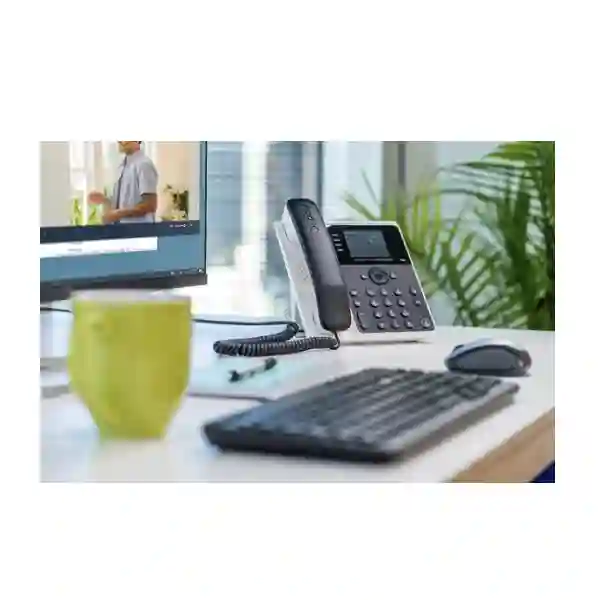
Placement should reflect the environment. Locate the telephone where the screen is legible, the network cable is protected and the handset can be reached without interrupting visitor service. Where several people share the device, agree on contact visibility, headset practices and sign-in responsibility. A clear set of operational rules makes a physical reception phone more useful than adding features that staff do not understand.
Individual office desks and shared workspaces
Employees who work with records or business applications may value a permanent calling device because answering a phone does not require switching away from a computer screen. The E220’s physical controls, voice processing and headset connectivity address this situation. Its Gigabit passthrough port can also be convenient in approved wired workstation designs. Still, the phone should be configured for the tasks of the user rather than receiving a generic collection of unused line keys.
Shared desks require extra attention. HP describes NFC capabilities in the Edge family, including support that third-party applications may use for hot-desking or pairing workflows. The presence of NFC does not mean a particular PBX’s guest login system is supported out of the box. Test the actual application, firmware and account-switching procedure. Consider whether staff can safely sign out and whether call history, contacts and paired devices are removed when users change.
For home-based staff, wired network access and power arrangements are essential. An employee whose home network offers only Wi-Fi connectivity should not assume the E220 will connect directly to it. Remote SIP registration must also follow the chosen platform’s documented security approach. An organisation planning hybrid use should settle network, support and accessory responsibilities before distributing devices to employees outside a central office.
Practical deployment planning for Tanzania
A Tanzania office procurement should begin with an assessment of the actual building or site. Determine how many desk locations need handsets, whether Ethernet cabling reaches them, which switches support PoE and how the organisation connects to its voice platform. These facts cannot be assumed from the product name. A quick site survey can prevent orders that omit network outlets, require unexpected power accessories or place phones where cables cannot be safely routed.
If voice calls use a cloud PBX, test the site’s real connection to that service at busy times. Good web browsing performance does not guarantee consistent voice quality: latency, packet loss, jitter and competing downloads affect real-time conversations. A local administrator should review the network alongside the SIP provider’s requirements. Do not assume that a handset purchase includes connectivity, SIP trunks, telephone numbers or technical support for unrelated equipment.
For a multi-branch deployment, standardised extension profiles and asset records can ease support, but locations may differ in their power and networking arrangements. Share the project scope when requesting a quote: number of phones, branch requirements, model variant, headsets and any commissioning needs. Ask the vendor to confirm what can actually be supplied and which services are included. Do not infer delivery coverage, installation availability, local certification, stock or price from manufacturer information prepared for another market.
Call quality checks and troubleshooting
Voice traffic can be disrupted by conditions that are almost invisible in email or general website use. Excessive jitter, delayed packets and intermittent loss may produce clipped words, silence or calls that seem to overlap. Quality-of-service options on the E220 can assist only if switches, routers and the provider path handle traffic appropriately. Administrators should consider call concurrency, available uplink capacity, background downloads and the behaviour of the chosen SIP service.
Troubleshooting works best when it proceeds in stages. First check whether the phone has power, an IP address and successful registration. Then determine whether calls fail in both directions, whether audio disappears in only one direction and whether the problem affects every handset at the site. Compare speakerphone, handset and headset modes. A failure that occurs only with one accessory suggests a different line of investigation from a failure that affects an entire branch.
Keep diagnostic records proportionate and secure. Administrators may need timestamps, software versions, switch-port information or device logs, but credentials and personal conversation content should not be exposed casually. If problems occur primarily during peak traffic, investigate the network rather than immediately replacing a working phone. Reliable service is the product of a correctly selected endpoint, supported PBX, adequate network design and a clear support process.
Comparing the Edge E100, E220 and other models
Buyers should compare the E220 with nearby Poly Edge models based on required tasks. HP’s guidance describes the Edge E100 as a more basic phone with two line keys and no built-in Bluetooth. The E220 offers four line keys, up to sixteen paginated assignments and Bluetooth 5.0. Both are compact wired desk phones with a colour display. That difference can justify the E220 where a user needs more accessible contacts or a compatible wireless headset.
A desk with no Ethernet connection presents a separate requirement. The E220 does not support Wi-Fi, while other members of the Edge range, including the E350, are identified by HP as offering wireless network capability. The alternative still needs its own compatibility, power and accessory review. A larger screen or more visible keys may be valuable for an operator, but can be unnecessary expense for an employee who uses one extension and makes only occasional calls.
Build comparisons around use cases, not model numbers alone. Review voice-platform compatibility, visible line requirements, headset interfaces, PoE capacity, Wi-Fi need, security management and the number of users sharing a device. Then compare quotes that include all required accessories and configuration work. A well-fitted entry or midrange desk phone can provide a better experience than a feature-heavy device whose capabilities are unused or unsupported.
Technical specifications interpreted for buyers
HP specifies a 2.8-inch 320 by 240 colour IPS display, four line keys supporting up to sixteen SIP line assignments with pagination, dual 10/100/1000 Mbps Ethernet, Bluetooth 5.0, a USB 2.0 Type-C connector, RJ-9 headset support and an electronic hook switch interface. The E220 has NFC capability, support for IEEE 802.3af Class 3 PoE and a stated maximum device power of 13 watts. The published operating temperature range is 0 to 40 degrees Celsius.
These numbers serve different decisions. The screen and line assignments concern user interaction. Ethernet and PoE concern infrastructure. Headset ports and audio codecs concern communication habits and platform compatibility. None proves that a particular cloud PBX has certified the exact device or that a chosen accessory’s remote controls will work. Likewise, the maximum line assignment count does not create additional service licences or unlimited call capacity.
HP identifies product number 82M87AA for a PoE-enabled E220 offering and lists manufacturer product number 2200-86990-025. These are model or manufacturer identifiers, not a verified SKU for the FourTeck Tanzania listing. Check the part number, bundle, supported configuration and included accessories on the actual quote. This is especially important when comparing products marketed under the same broad family name in several markets.
Package contents and physical placement
HP’s standard package description lists the phone console, handset, handset cord, CAT-5E network cable, desk stand, wall-mount hardware and setup sheet. The two-position stand supports more than one viewing angle, while wall mounting may suit a reception area, corridor office or shared workstation. Installation still requires an appropriate network connection, power source and supported telephone service. A box of phones cannot be expected to create a working calling system on its own.
Optional items may include a suitable headset, electronic hook switch adapter, external power supply or additional networking components. Confirm every item on the written quote. If a project has different user roles, it may be more economical to specify accessories by role rather than buying the same premium headset for everyone. Check compatibility at the model level, not only the fact that two products carry the Poly brand.
For each position, consider cable safety, the height of wall mounting, screen visibility, handset reach and the location of any headset equipment. A desk phone placed between a PC and a network outlet should have its Ethernet ports labelled in an installation plan. Record the serial number and location for later support. These simple practices reduce faults caused by disturbed cables and make replacements or moves easier.
Total cost and quotation decisions
The hardware price is only one part of the total operating cost of an IP telephone. A working configuration may require an appropriate voice-service account, PoE switch capacity, structured cabling, headsets, optional power accessories and administrator time. A purchase comparison that omits these items can favour a cheap-looking handset that is more expensive to deploy. Ask the PBX or hosted provider about extension and user licensing rather than assuming it follows the number of phones purchased.
Think beyond initial installation. A growing organisation may need spare accessories, asset records, firmware updates and support when employees move between roles. The platform operator’s responsibilities may differ from those of the device supplier. Confirm whether setup, training and fault resolution are included, sold separately or handled by an existing IT team. Get clear written descriptions instead of relying on general assurances about compatibility or after-sales service.
No Tanzania selling price, current stock amount, delivery date or local warranty term is stated here. These require confirmation from the seller for the exact offer. When comparing quotations, use the same list for each: device variant, accessories, installation requirements, platform support, power and network readiness. A complete cost comparison makes approval easier and reduces unexpected charges after the phones arrive.
Pilot installation and staff training
Before installing dozens of handsets, select a representative desk and perform a pilot with the intended SIP service. Verify PoE power, network addressing, software level and registration. Make incoming and outgoing calls, check mute, hold, transfers and voicemail where supported, and compare audio through the handset, speakerphone and selected headset. If the PC connects through the telephone, verify its network path and expected speed. Record the results and any configuration changes.
Training should focus on common tasks rather than every feature in the software menus. Show staff how to answer, identify an active line, navigate paginated keys, put a call on hold, transfer correctly and select their preferred headset. Bluetooth users should understand pairing and disconnection, especially when sharing workstations. Reception staff should practise realistic call sequences using the organisation’s own extension structure.
Give users a straightforward way to report problems. A useful report includes the observed symptom, the approximate time, the call direction and whether other nearby phones are affected. Staff should not publish account credentials or perform unapproved administrative resets. A documented pilot, clear user guidance and a defined IT support owner help convert working hardware into a stable everyday service.
Maintenance, reassignment and lifecycle planning
Networked telephones benefit from an ordinary maintenance routine. Record the precise model, software version, deployed location and headset or adapter configuration. Review manufacturer software and security information through the organisation’s normal support process. Test updates on representative devices before broad rollout, because a firmware change can alter provisioning or compatibility with a particular telephone platform. Maintain a controlled configuration reference so replacement phones can be prepared consistently.
Follow applicable manufacturer cleaning and handling guidance. Avoid liquid entering ports, pulling handset cords excessively or placing devices outside the specified environmental range. In a shared environment, the organisation may need a regular cleaning process and clear responsibility for headset equipment. During office moves, inspect cabling, PoE access and the physical condition of the stand before deciding a phone has failed.
When a phone changes owner, remove or update the previous extension configuration, access credentials, contacts and paired devices as appropriate. Coordinate with the voice administrator so old accounts do not remain active. Keep purchase and serial-number records needed for any service enquiry, while confirming actual local warranty terms separately. Good lifecycle management protects users and reduces replacement effort over time.
A final suitability checklist before ordering
Start with the voice platform: is the exact Edge E220 model supported, and which firmware and provisioning methods are approved? Then review the user: how many lines, contacts and common shortcuts must be accessible, and are the four visible keys sufficient? Check the desk: is Ethernet present, is a compatible PoE source available and does the PC need to share the network path? Confirm audio preferences with each employee, including whether a headset is required and which features must work.
Next examine operating risks. Test call quality on the site’s network during typical business activity. Decide how phones, routers and switches are supported during electricity interruptions. Establish who handles phone configuration and who deals with problems on the PBX or external voice service. For shared desks, document user sign-out and pairing privacy. For remote employees, verify the approved remote SIP arrangement rather than assuming a plug-and-play internet connection.
Finally, ask FourTeck Tanzania for an itemised quote identifying the exact device variant, any optional adapters, compatible headsets, quantities, availability and applicable commercial terms. Explain your business phone system and network environment so the supplier can address relevant requirements. The goal is a practical, supportable desk-phone choice, not a collection of unrelated features. The E220 is a strong candidate where straightforward SIP calling, paginated line assignments, Bluetooth options and wired PoE connectivity match the real working conditions.
Technical specification table
The information below summarises model facts published by HP. Confirm the particular regional package and accessory list before purchasing. Compatibility and software-supported functions depend on the deployment.
| Display | 2.8-inch colour IPS LCD, 320 × 240 |
|---|---|
| Line access | 4 line keys; pagination for up to 16 SIP line assignments |
| Audio | Poly HD Voice, Poly Acoustic Clarity, Acoustic Fence, NoiseBlockAI |
| Wireless | Bluetooth 5.0 and NFC; no Wi-Fi |
| Ethernet | 2 × RJ-45, 10/100/1000 Mbps |
| Other connections | USB 2.0 Type-C, RJ-9 and EHS interface |
| Power | IEEE 802.3af Class 3 PoE; 13 W maximum |
| Placement | Two-position stand; wall-mount hardware listed |
| Operating temperature | 0–40°C |
| Codec examples | G.711, G.722, G.722.1, G.729AB, iLBC, Opus |
| Manufacturer product identifiers | 82M87AA and 2200-86990-025; not verified Tanzania listing SKU |
Frequently asked questions
Is the Poly Edge E220 a standalone telephone system?
No. It is a SIP IP desk-phone endpoint and needs a supported PBX or hosted voice service, extension configuration and working network before it can make the intended calls.
How many line keys are there?
There are four physical keys, with pagination supporting up to sixteen configured lines, contacts or feature assignments. This is not the same as sixteen simultaneous live calls.
Does the E220 include Wi-Fi?
No. HP’s Edge family model guidance lists Bluetooth on the E220 but not Wi-Fi. A suitable wired Ethernet network connection is required for normal SIP calling.
Can I pair a Bluetooth headset?
Yes, with compatible Bluetooth devices. Verify the exact headset and the call-control functions you require because pairing alone does not guarantee every accessory feature.
Can it work with my mobile phone?
HP describes integrated Bluetooth 5.0, mobile phone pairing and mobile contacts support. Check practical feature behaviour for your mobile device and phone software.
Will I need a power supply?
The phone supports IEEE 802.3af Class 3 PoE. A suitable powered switch can supply power through Ethernet. An external adapter is optional and not listed in the standard PoE-enabled package.
Does the E220 have a PC network port?
Yes. It has two Gigabit RJ-45 ports for network connectivity and supported PC passthrough. Correct voice and data network configuration remains important.
Which headset connections are available?
HP lists Bluetooth, RJ-9, USB Type-C and electronic hook switch options. An optional adapter may be required for EHS, and compatibility should be checked by headset model.
What audio processing is available?
Poly HD Voice, Acoustic Clarity, Acoustic Fence and NoiseBlockAI are listed by HP. The technologies work differently across calling modes and cannot eliminate every source of noise.
Is it a good reception phone?
It can suit routine reception calling and transfers on a compatible SIP platform. High-volume attendant positions requiring many visible line states may need a different endpoint.
Does NFC guarantee hot desking?
No. NFC capabilities may support third-party workflows, but a specific hot-desking procedure depends on the voice platform, software and configuration.
What should be confirmed for Tanzania?
Confirm the exact product variant, PBX compatibility, wired Ethernet, PoE, headset needs, quote contents, local availability, applicable warranty and any services being offered. No local stock or pricing is assumed.
Request a Tanzania product quotation
Tell FourTeck Tanzania how many E220 devices you need, your SIP or hosted telephone platform, the PoE and wired networking available, and any preferred headset accessories. Request confirmation of the exact supplied variant, price, availability, accessories, warranty conditions and any offered configuration support before placing an order.
Next step: ask FourTeck Tanzania for a product and compatibility quote.




Reviews
There are no reviews yet.