
BUSINESS DESK PHONE ACCESSORY
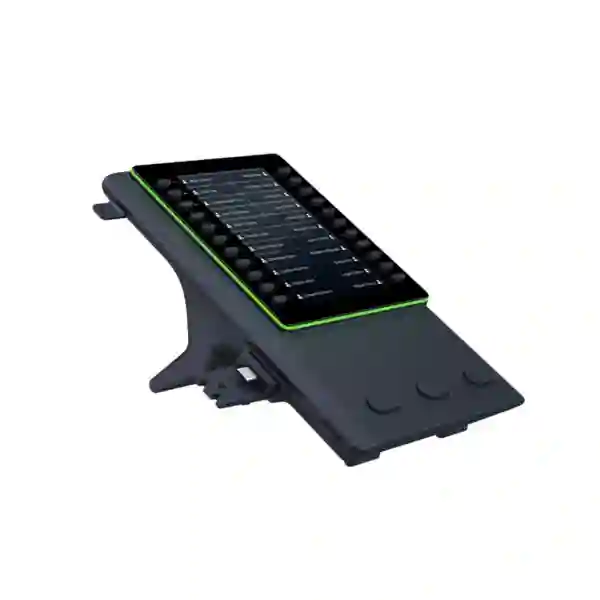
HP Poly Edge V Expansion Module
For receptionists, administrators and other desk-phone power users, the HP Poly Edge V Expansion Module adds clear, configurable access to the contacts and line functions used most often. It offers a 5-inch color display, 22 multifunction keys and three pages of positions on supported HP Poly Edge V host phones. Before you buy, check your host model, voice platform and operator workflow.
At a glance
An accessory for selected Edge V desk phones. Compatible handset and appropriate calling service are required; module quantities vary by host model.
A clearer view of the calls that matter
A receptionist who handles a handful of calls may be comfortable with the keys already built into a desk phone. The situation changes when the same person monitors colleagues, transfers callers between departments, watches shared lines and repeatedly contacts a long list of extensions. Switching among menus can interrupt that work. The HP Poly Edge V Expansion Module addresses the visibility problem by placing more programmable positions beside a compatible host phone. It extends the phone’s user interface; it does not introduce an independent phone number, an additional handset or a separate calling service.
HP describes the accessory as programmable button expansion for attendants, executives, administrative staff and other intensive phone users. Its appeal is practical: a user can keep common destinations visible and group less-used destinations on additional pages. The physical keys and screen become an organized workspace for routing conversations, rather than simply an impressive number of buttons. Good configuration remains essential. A set of poorly named or duplicated keys can be harder to use than a smaller, carefully planned setup.
For a Tanzanian organization evaluating a reception or switchboard refresh, begin with the daily call-handling task instead of the accessory alone. Count the extensions that genuinely need monitoring, identify the numbers staff dial repeatedly, and check the call-management functions your telephony platform supports. Then choose the host phone, module quantity and key allocation together. This approach prevents buying an accessory that fits physically but fails to deliver the expected operator workflow because of platform settings or unsuitable provisioning.
How 22 keys and three pages translate into capacity
The module has 22 configurable multifunction line keys beside its 5-inch color display. Three pagination keys allow the user to select among three pages. Multiplying 22 positions by three pages yields up to 66 configurable positions on one module. This is a description of addressable key positions, not 66 additional simultaneous telephone calls, 66 SIP accounts or 66 new extensions included in the box. Actual services and actions depend on what the host telephone and connected calling system are configured to support.
The distinction matters when comparing accessories. A receptionist might put 18 colleagues and four frequently called service numbers on the first page. The second page could hold department overflow destinations and less frequently contacted staff. The third might collect specialist functions or rarely used contacts. These are examples of layout strategy, not a default factory configuration. A better design puts urgent and common actions on the first page so staff do not hunt for them during the busiest period of the day.
Page indicators help operators understand which group is visible, while the configurable line keys and their status indicators support informed call handling. For workers who rely on rapid glance recognition, the display should use concise and distinguishable labels. Avoid filling every available position simply because it exists. Empty positions can improve separation between departments, and a small, predictable number of pages may reduce mistakes. Capacity is valuable when it makes a decision easier, not when it creates another directory that has to be searched.
What the specification actually confirms
HP’s Edge V module product information describes a 5-inch color screen, 22 configurable multifunction line keys, three pagination controls with LED indicators, and USB Type-C connection points. The manufacturer identifies line appearances, contacts and busy lamp fields as supported uses for the feature keys. The screen presents associated line and contact information, while the host phone supplies the core telephony experience. These are hardware and interface capabilities; feature behavior depends on current host-phone software and the connected voice service.
The module is an accessory rather than an alternative to a complete SIP telephone. It has no separate handset, microphone or loudspeaker for handling calls on its own. A buyer still needs a supported Edge V host phone, properly provisioned service and an installation plan. Do not interpret the product’s display size as a claim that it provides independent video calling or a touchscreen. Nor should a connection to the host phone be mistaken for a general-purpose USB accessory connection to a laptop or arbitrary phone.
Check any proposed quotation against the specific accessory and host-phone model. Product-family names are similar, and procurement teams may encounter older Edge E materials during research. The Edge V and Edge E modules should not be treated as interchangeable. If an equipment list contains a mixed fleet, list each desk phone by its exact model and confirm the appropriate accessories before committing to a bulk purchase. The compatible-model table below is a better starting point than a broad claim such as works with every Poly phone.
Compatibility comes before ordering
HP identifies the Edge V400 and V450 as compatible with one Edge V expansion module each. The Edge V650 also supports one. The Edge V800 and V850 support up to two modules on a compatible handset. These ceilings refer to the number of attached accessories, not the number of programmable positions on the phone itself. A single module can provide up to 66 positions across pages; a two-module arrangement provides two separate sets of module positions, subject to provisioning and any platform constraints.
Entry-level Edge V200, V250 and V250 Plus phones do not support this expansion accessory. That is an important purchase filter: a visually similar Edge V phone is not automatically a suitable host. A buyer with an unsupported handset may need a different host model rather than a different cable. For mixed deployments, identify which desks require reception-console functionality and which can remain on simpler phones. Expanding every desk is rarely necessary if only a few roles monitor multiple extensions.
The model match is only the first compatibility gate. Confirm the host’s software release, the telephony platform, the intended key functions, the required number of modules and the power configuration. If busy lamp fields, shared call appearances or special transfer actions are central to the project, ask the phone administrator or platform provider to demonstrate them on the actual environment. Hardware support does not guarantee every application behavior across every SIP service, configuration or hosted-phone provider.
Choosing the right Edge V host phone
An Edge V400 or V450 can be an effective foundation where a user needs one block of expanded keys and does not require the larger premium host-phone layout. The V450 has wireless capabilities that the V400 lacks, but the module selection remains the same: one supported expansion accessory. If a desk is already equipped with one of these phones, adding a module may be more suitable than changing the entire handset. The purchasing question is whether the user’s call workload justifies the extra visible positions.
The Edge V650 has an integrated secondary display as well as support for one additional module. This can suit a worker who benefits from the phone’s own visible favorites or monitoring positions but still needs a substantial attendant-style list beside it. A sensible configuration reserves frequently used actions for the native phone interface and moves larger departmental groups onto the module. The combined layout should be checked during setup because the clearest arrangement will depend on the organization’s extension naming and call flows.
For the busiest reception or executive-assistant environments, the Edge V800 and V850 can support up to two expansion modules. The second accessory is useful when separate teams or a wider monitored extension set would otherwise require too much page switching. It does not eliminate the need to prioritize. Two crowded modules can still confuse a new operator, and the larger desk footprint deserves attention. Select two modules after counting actual monitored users, not because the host phone accepts the maximum.
A purchasing decision should also account for the host phone’s own capabilities. Wireless connectivity, displays, integrated key counts and accessory support vary across the series. The expansion module itself is not a substitute for selecting the right base handset, desk connectivity or calling platform. Review the complete operator station as one system: host phone, accessory, headset if required, network, provisioning configuration and training. This prevents a small accessory decision from masking a larger usability problem.
Busy lamp fields: seeing whether colleagues are available
A busy lamp field, commonly shortened to BLF, lets a configured telephone show the state of a monitored line or contact. On a suitable calling platform, a receptionist can glance at a programmed key to help decide whether to transfer a caller immediately, use an alternate contact or take a message. HP’s Edge V documentation describes line-key LEDs and status indications associated with line and BLF activity. These visual signals are useful in a high-call-volume role because they reduce the need to dial purely to discover whether a colleague is occupied.
A BLF is not the same thing as a guarantee of presence across every collaboration application. Its behavior depends on the call server, registration, permissions, subscriptions and the specific feature being monitored. Some environments distinguish between phone busy status, device presence and user availability; those states may not match. During a pilot, compare the accessory’s displayed state with real calls on several monitored extensions. Make sure operators understand how incoming calls, held calls and active conversations appear before relying on those indicators for routing decisions.
Use BLF positions selectively. Reception may need live status for sales, accounts, dispatch and management but not for every individual in a large organization. Add roles whose availability changes routing decisions and assign stable labels that staff recognize. Where extensions are reorganized often, make BLF mapping part of the employee move and departure process. Old monitored entries can mislead a switchboard as effectively as an incorrect phone directory, even when the accessory hardware works perfectly.
Line appearances, shared lines and speed dial
A line appearance is a configured key representing a phone line or call-related function, while a speed dial provides fast access to a stored number. A shared line appearance can be used in certain PBX configurations to give multiple devices visibility or control over a shared calling resource. The expansion module gives the administrator more positions for supported functions, but it does not create new telephone lines, subscriptions or PBX entitlements. Those resources must already be provided and supported by the calling platform.
In practical terms, an operator might reserve a small group of keys for main reception lines, another for named staff, and a third for fast dialling of internal services. Color and status indicators can be valuable cues, but consistency matters more than the total number of indicators. A key labelled with only a person’s first name may be ambiguous in a growing office. Team names, departments or role-based labels can remain understandable when staffing changes, provided the call routing and records are maintained with them.
Speed dial is especially valuable where a call needs to be handed to a predictable destination, such as facilities, a service desk or a duty manager. It reduces repetitive number entry and reliance on memorized extensions. Nevertheless, an external-number speed dial can be costly or inappropriate if the call plan or dialling policy is not checked. Review outbound permissions and number formats before deployment. Make sure an accidentally pressed key does not dial an emergency or chargeable destination without the user’s intention.
Transferring callers with less searching
The product supports attendant-style workflows in which a worker accepts, screens and directs calls using the host phone and the extra configured keys. A well-organized key bank can shorten the search for the next contact during a transfer. It does not automatically determine where a call belongs. The receptionist still needs a call-routing guide, current extension directory and a method for handling unanswered calls. Clear operating practice makes the expanded interface useful rather than merely faster to operate.
There are important differences between blind transfer, attended transfer, parking and forwarding. The available actions, prompts and permissions vary by platform and provisioning. Before rolling out a configuration, test the exact sequence staff will use for each common call type. If a key launches a speed dial on an idle handset but behaves differently during an active call, teach that distinction explicitly. Operators should not discover it for the first time while speaking with a customer.
Treat transfer accuracy as a workflow measure. During a test period, ask staff to record destinations they struggle to find, contacts that need alternative routing and unexpected call returns. Use those observations to improve key naming and page assignment. The aim is to direct callers to the appropriate person with less friction, not to promise that no calls will ever be missed. Staffing levels, phone-service features and the organization’s processes still determine the full customer experience.
A practical three-page key-layout method
Page one should answer the operator’s most frequent question: where does this call need to go right now? Put the highest-volume departments, primary shared lines and essential monitored colleagues in clearly defined groups. Leave visual space between unrelated groups. Label each role with terminology used by actual staff, not internal project codes. Review the design with at least one receptionist before fixing it in the provisioning system. Their real call patterns often differ from assumptions made by an IT team.
Page two can hold additional named extensions, specialist teams and escalation contacts. Where the organization has more than one business unit, keep related destinations together rather than sorting the entire set alphabetically. Alphabetical order is useful for a general directory, but task-based grouping is often faster when the operator knows that the caller needs accounts or technical support. If a department spans multiple pages, include a recognizable naming convention so the user knows where to look next.
Page three is appropriate for less-frequent contacts, fallback destinations and functions that require deliberate use. Avoid placing rare but critical emergency procedures solely on a hidden page without another accessible method. A key map should be documented in plain language and available to cover staff. As departments grow, review whether the current arrangement still reflects call volume. A three-page structure is flexible, but a stable pattern is necessary for muscle memory.
When two modules are attached to a supported V800 or V850 host, think of them as two named work zones rather than one undifferentiated bank. For example, the first could serve day-to-day front office routing while the second groups regional teams or escalations. This arrangement is only an illustrative planning technique. Final behavior, page organization and assignment should be tested against the phone’s current user and administrator guides. Do not assume every provisioned key type will behave identically on both accessories.
Reception desk scenario
At a central reception desk, a caller might ask for a staff member whose direct extension is busy. The operator checks an appropriate monitored key, decides whether another colleague can assist, and transfers or takes a message under the organization’s policy. The module helps make the contact list and available states easier to see. It does not replace switchboard training, a properly designed call queue or a process for handling calls that return unanswered. Those supporting procedures should be reviewed alongside the hardware.
During a lunchtime surge, the operator may have several incoming calls and multiple internal requests in progress. Keeping primary destinations on page one can be more valuable than maximizing the number of monitored staff on screen. If overflow routing is handled by the PBX, document which part is automatic and which part the receptionist must initiate. This distinction reduces confusion between a key that displays information and a key that takes a call-handling action.
For temporary or relief reception staff, simple labels and predictable page groups are essential. Provide a printed or digital map, examples of transfer sequences and a few safe practice calls. Use the same descriptions in the training guide and the key labels. A module that is intuitive for the person who configured it may be difficult for a new operator who does not know the organization’s internal abbreviations. Testing with cover staff exposes those gaps early.
Executive assistant and administrative scenario
An executive assistant may monitor several decision-makers, coordinate meeting-room or facilities calls and reach key departments throughout the day. Extra visible favorites can reduce directory searches when every minute matters. The key layout should be built around permissions and expected actions, however. Monitoring an executive’s line state may be appropriate in one organization and disallowed in another. Confirm that any visibility or call-handling functions follow the business’s internal policy and the phone service’s access controls.
A useful layout can group executives, assistants, support teams and frequently contacted outside numbers separately. Reserve immediate-access positions for the people most often involved in live transfers. Less common contacts may remain in the ordinary directory rather than occupy dedicated module keys. The objective is not to mirror every contact from a laptop or mobile phone. It is to create a small set of reliable, quickly understood destinations for a workday dominated by phone coordination.
Customer service and distribution scenario
A small customer-service team may have a main desk that directs callers among sales, orders, service and delivery coordination. If the host platform exposes suitable shared lines and monitored extensions, the accessory can help the person on duty see who is reachable before sending a caller onward. Do not present it as a replacement for a contact-center platform with queue analytics, recording, workforce management or automatic distribution. The module is a desk-phone interface extension, not a full call-center software package.
A distribution business might arrange keys around order enquiries, dispatch, accounts, returns and urgent operational contacts. That map can be more useful than a long list of individual names because customers usually describe the reason for their call. When departments change shifts, use role-based destinations where the PBX supports them. Verify that numbers continue to reach the right team after hours. The visible controls should reflect a tested operational process, not an organizational chart that no longer matches reality.
Hospitality, healthcare and education considerations
Hotels and other hospitality workplaces often need to connect external callers with reception, reservations, maintenance or a duty manager. Additional keys may suit a central desk when there are many frequently used destinations. Sensitive guest information should not be exposed through labels or notes on a shared operator station. Configure only the functions appropriate for the environment, and test any handover between staffed shifts. A dependable call escalation procedure matters at least as much as the number of positions available.
In a clinic or health-administration setting, a front desk may need quick access to appointments, billing and approved internal departments. The device can help organize these contacts, but it must not be portrayed as a clinical alarm system or a substitute for medical emergency communications. Call-handling permissions, confidentiality and availability requirements should be assessed under the organization’s policies. Keep displayed labels role-based where personal information should not appear on a publicly visible reception desk.
Schools, colleges and training organizations may use a central number to reach admissions, finance, administration and facilities. A page grouped by functional department can help staff route routine enquiries. During admissions or examination periods, call volumes and staffing arrangements may change; review page layouts for those peaks. Shared desks also need clear user instructions and account practices. The expansion module can support a consistent interface, but a policy for answering and escalating urgent calls must still be maintained separately.
Check the voice platform before promising features
The HP Poly Edge V family is designed for Open SIP desk-phone environments. Nevertheless, Open SIP describes an approach to interoperability rather than an unconditional guarantee that every server exposes every advanced key function. Some telephony platforms implement BLF subscriptions, shared call appearances, transfer actions or attended-console behavior differently. Before purchase, identify the provider, PBX version, registration method and relevant phone provisioning profile. Have the responsible technical team confirm the exact features and any licensing or permission requirements.
Run a small pilot using the same service and network conditions intended for production. Register a compatible handset, attach the requested module quantity and provision a representative selection of keys. Observe what the display shows for idle, ringing, busy and held states where those functions are supported. Try an attended transfer, a blind transfer and a failed destination. Document what works and where phone settings or provider configuration are required. A live demonstration is more reliable than relying on model names alone.
If the business uses a hosted SIP service, ask whether the provider supports the precise BLF and shared-line workflows requested. If it uses an on-premises PBX, check firmware compatibility, server configuration, extension rights and any limits on watched contacts. The accessory does not confer the permissions required to observe another user’s status. Build those checks into the acceptance test, especially where an existing system is being upgraded rather than installed from the beginning.
Physical installation and desk planning
The module uses a USB-C connection arrangement to work with supported Edge V phones. The user guide also describes alignment and connection features for attaching it beside the host, including an arrangement for a second module on supported V800-series phones. Installation should follow HP’s applicable instructions for the exact hardware revision. Avoid improvising with generic adapters, external hubs or an unsupported phone merely because a connector fits. Physical connection and supported operation are different things.
Ask for a clear product quotation that identifies the module itself, the required host phone if not already owned, and any needed desk or mounting components. HP identifies an optional wall-mount accessory, but an optional part should not be assumed to be included in the box. For a shared workspace, check the desk’s usable width, cable route, reach to the handset and viewing angle. An expansion module that forces the operator to twist around a monitor will not feel efficient during a long shift.
Power arrangements must be considered as part of the complete phone installation. Some reseller descriptions indicate that the module is powered from its compatible host, while the host phone’s power requirements depend on model and attached peripherals. Since HP’s brief does not establish a universal power budget for every installation, confirm the approved PoE or power-adapter arrangement with the current administrator documentation or HP support. Do not assume every existing network switch port or generic USB charger is sufficient.
After physical connection, make sure the module is recognized by the host and that its pages display the expected labels. If the module is not detected, do not jump immediately to replacing the hardware. Check model compatibility, software level, the physical connection and the administrator’s peripheral settings first. Follow the relevant support guide before unplugging devices under power or changing production configurations. Record the final arrangement so replacement equipment can be commissioned consistently.
Network reliability and business continuity
A well-arranged console cannot compensate for an unstable voice network. Review the host phone’s connection to the LAN or approved wireless infrastructure, its addressing and provisioning, and the reliability of the SIP service. In Tanzania, as in other markets, network quality and power continuity depend on the site and provider; they should be measured rather than assumed. If a business relies heavily on its reception number, evaluate an appropriate continuity plan for internet or PBX outages before placing the new equipment into service.
Power continuity deserves special attention in environments where the reception desk must remain operational. A supported host-phone power setup, suitable network equipment and properly maintained backup arrangements may be necessary according to the organization’s risk assessment. The expansion module does not independently keep calls alive when its host phone or network loses service. Document who is responsible for switching to an alternate reception channel during an outage, and ensure that the procedure is usable by staff on duty.
Quality of service and VLAN practices may be relevant in a managed voice deployment, but configuration depends on the network architecture. A buyer need not become a network engineer to evaluate the accessory. It is reasonable to ask the installer whether voice traffic, switch-port power and provisioning have been tested with the intended number of phones and peripherals. The operator should also know how to recognize an out-of-service handset and when to escalate the problem rather than repeatedly using keys that cannot complete a call.
Provisioning and ongoing maintenance
Document every configured key with a page number, visible label, extension or destination, function type and responsible owner. This becomes the baseline for future updates. Without it, changes to staff locations or department structures can leave the console showing outdated contacts. A spreadsheet or an administrator-managed configuration record is often enough for a modest deployment. The important point is that the map matches the live PBX and is not kept solely in one person’s memory.
Use a controlled change process when moving extensions or altering monitored groups. Confirm whether the calling platform must be updated, whether the handset needs reprovisioning, and whether the operator should be notified. Test the changed key before treating it as active. In a busy workplace, the most frustrating errors are not dramatic failures; they are familiar labels that quietly begin routing to the wrong place. A small periodic review can prevent many such mistakes.
Phone firmware, service configuration and peripheral behavior may evolve as vendors release updates. Plan updates through the organization’s normal IT maintenance practices, considering compatibility and rollback rather than enabling changes blindly at peak reception hours. Keep a record of the host model, module count and software version after commissioning. When seeking help, those details will usually be more useful than a generic report that the additional buttons have stopped working.
Shared desks require an additional decision about user profiles. If different employees log into the same phone or if phones are reassigned, verify how favorite lists, monitored keys and user settings behave under that arrangement. Never assume that the accessory follows a user’s personal profile automatically. Test sign-in, sign-out and replacement scenarios as appropriate for the calling system. A configuration that looks correct for the first operator may need additional work before it can be used reliably on every shift.
Operator training that makes the keys useful
Training should be built around actual calls rather than a tour of every screen. Ask a new receptionist to handle a normal transfer, a busy extension, an unanswered transfer, a high-priority caller and a request for a department not visible on page one. Observe whether the staff member can find the intended destination without guessing. These exercises reveal missing labels and confusing groupings before real customers are affected. Training content can then be simplified around the tasks staff perform each day.
Explain what the status LEDs mean in the configuration being deployed. A ringing or busy indication can support a decision, but it does not necessarily establish whether a colleague is willing or permitted to take a particular call. Operators should follow company procedures for confidential or escalated matters. Offer a short reference guide showing page groups, transfer sequences and fallback numbers. Include a way to report outdated keys so the layout improves as the organization changes.
When a two-module system is used, teach the relationship between the two physical banks and their pages. Staff should understand which area contains everyday destinations and which contains escalations, branches or specialists. Avoid using inconsistent abbreviations on different pages. Ask a relief operator to complete the same scenarios after receiving only the standard handover guide; that is a useful test of whether the setup is truly self-explanatory and sustainable beyond its original administrator.
Security and privacy at a shared reception desk
Access to call-state information should be granted according to organizational policy. A monitoring key may reveal that a particular extension is active even if it does not expose the call’s content. Treat that information appropriately in workplaces where visibility into staff activity is sensitive. Do not configure every available monitoring position merely because the module makes it possible. Define which contacts a role needs to monitor and review permissions when people change jobs or leave the organization.
Physical privacy also matters. An attendant console positioned toward a public waiting area may show names, extensions or other organizational details to visitors. Arrange the desk so the screen is primarily visible to authorized staff and use neutral labels where appropriate. The module is not a substitute for screen privacy practices, secure provisioning or account management on the host phone and PBX. Follow the applicable organization’s information-handling policy for contact labels and call activity.
Procurement and support teams should keep administrative credentials out of page descriptions, labels and training examples. If remote provisioning is used, configure it according to the provider’s documented security procedures. Record who may modify key assignments and how changes are approved. The most secure arrangement is not necessarily the one with the fewest features; it is one where the enabled functions correspond to legitimate business tasks and can be managed consistently.
Buying for a Tanzania deployment
When requesting an HP Poly Edge V Expansion Module quotation for Tanzania, give the supplier the exact host-phone model, number of operator positions, required module quantity and whether the installation is new or an upgrade. Explain which functions are important, especially BLF monitoring, shared lines and transfer behavior. Ask for confirmation of accessory compatibility, included components and any optional mounting parts. A quote that describes only the accessory name may leave important integration details unresolved.
Check the offer’s currency, taxes, logistics terms, delivery arrangements and warranty information with the specific seller before approving an order. These commercial details vary and are not established by the hardware specification. Do not assume that a price displayed for another country is the landed price in Tanzania. Similarly, an international product listing does not prove local stock, delivery coverage, import treatment or service authorization. Request written confirmation for the exact transaction.
For a larger office rollout, provide a desk-by-desk equipment schedule. One employee may already have a V650 and need only one module; a central reception position may use a V850 with two; ordinary office users may not need an expansion accessory at all. This role-based approach makes budgeting and commissioning clearer. Include a trial station and acceptance criteria in the purchase plan where the business cannot afford disruption to its main incoming-number workflow.
If comparing supplier proposals, ask each to identify the product and host models explicitly and to state whether platform configuration, key mapping and operator training are included or excluded. Do not confuse a hardware-only quotation with a fully integrated reception solution. Clarifying responsibilities early avoids a situation in which the accessory arrives but nobody has been assigned to provision the BLF subscriptions, create the operator key map or test transfer behavior.
Edge V expansion module versus Edge E accessories
HP Poly has more than one generation of Edge desk phones and accessories. The Poly Edge E Expansion Module is associated with specific Edge E phones and should not be substituted for the newer Edge V module solely because both have similar screens and expansion concepts. Purchase records, product photography and short product titles can make them easy to confuse. Start with the full series letter and host-phone model, then verify the accessory against the matching manufacturer’s product information.
This distinction is especially important when a business expands an existing deployment in phases. A location with older Edge E phones may need a different accessory plan from one buying new Edge V400, V650 or V850 handsets. Do not assume mounting hardware, electrical characteristics, software handling or replacement parts can be reused between families. Prepare separate equipment lines in the procurement document and have the administrator review any intended mixed-fleet configuration before purchase.
When a module is and is not the right solution
Choose the module when staff already use a supported Edge V host phone and need quicker access to a larger set of lines, contacts or monitored extensions. It is also worth evaluating for a new reception deployment where a physical attendant-style interface matches the work pattern. A relatively small team with only a few transfers each day may gain more from simplifying its extension directory or call flow than from adding dozens of keys. The decision should reflect demand, not just feature capacity.
A business that needs sophisticated call queues, real-time wallboards, recording, detailed customer-service metrics or workforce planning may need contact-center or PBX software alongside, or instead of, the hardware. The Edge V module does not supply those enterprise systems. Similarly, a user who works entirely from a softphone may have different interface requirements. Compare the real workflow, total cost and training effort before choosing physical expansion as the primary answer.
If the existing host is an unsupported V200 or V250-family phone, the module is not a viable plug-in upgrade. Evaluate a compatible Edge V phone and any associated service changes, or consider a different way to expose call-routing controls. Upgrading a host can affect wiring, power and provisioning, so price the full operator position. A precise compatibility check is more useful than treating the module as a universal add-on for all IP handsets.
Acceptance testing: what success should look like
Before signing off a new station, establish a list of test calls that represents its actual workload. Include a known available colleague, a busy colleague, an unanswered transfer, a shared-line scenario if configured, and an overflow or backup destination. Use a second phone to observe what happens from the caller’s perspective. Check that the display, LEDs and audible call behavior agree with the administrator’s intended design. Document any platform-specific exceptions rather than hiding them from operators.
Verify all three module pages, not just the first one. Read labels for accuracy, test a representative key in each group and confirm that the page indicators behave predictably. Where two modules are attached, test each bank independently. If a function depends on a particular provisioned account or user permission, repeat the test with a realistic operator login. A screenshot of a configured screen is helpful documentation, but it is not proof that an action completes correctly.
Agree in advance on who fixes configuration faults, hardware attachment issues, network problems and service-provider behavior. These may involve different support parties. A clear acceptance checklist prevents the phone vendor and the PBX provider from assuming the other party has tested the whole solution. After deployment, ask users to report the top five slowest or most confusing call actions. That feedback can guide a small, evidence-based key-map revision.
Common problems and first checks
If the module remains blank or is not detected, verify the exact supported host-phone model and the hardware connection using the applicable HP instructions. Check whether the host telephone is fully operational and whether its software and power arrangement meet the intended setup. Do not assume that swapping to an arbitrary USB cable is a safe fix. If the accessory is not recognized after documented checks, record the host model, software version, module arrangement and observed indicators for support.
If labels appear but BLF indicators do not behave as expected, test whether the monitored extension exists and whether the call platform provides the necessary status information and permission. Compare an active call on the monitored handset with the operator’s display. Some issues are caused by PBX subscriptions, provisioning data or feature differences rather than a defective screen. Isolate one simple monitored contact first before changing a large configuration across all pages.
If transfers are reaching the wrong department, inspect the destination assignments and any dial-plan rules rather than assuming a hardware failure. A visible label can remain correct while the underlying extension or routing has changed. Review whether the user expects a speed dial or a transfer action in that call state. Where confusion is recurring, simplify the page arrangement and retrain using a small set of test calls. The objective is a predictable operation, not merely a functioning indicator light.
Total value and ongoing costs
The price of an expansion module is only one element of a complete attendant station. Consider the compatible host phone, any optional accessories, network power arrangements, PBX or hosted-service features, configuration time, testing and staff training. If the business already owns a compatible phone, the incremental cost may be different from a brand-new installation. Request a quotation that identifies what is included, rather than comparing an accessory-only price against an integrated-system proposal.
Value is best assessed through observable improvements: fewer directory searches, simpler handovers, faster access to common destinations and fewer routing mistakes during a defined test period. These outcomes depend on the organization’s call volume and operating practices, so a universal return-on-investment percentage would be misleading. Review the layout after launch and adjust it based on staff feedback. A thoughtful 22-key first page can be more valuable than a second module that no one uses.
Compatible Edge V models at a glance
Use this reference to begin the model check. Confirm the exact device software, installation instructions and telephony-service capabilities for the intended deployment before ordering.
| HP Poly Edge V host model | Supported module quantity | Buying guidance |
|---|---|---|
| Edge V400 | 1 | Confirm compatible firmware and calling-service functions |
| Edge V450 | 1 | Useful for one expanded attendant key bank |
| Edge V650 | 1 | Combine native phone controls with expanded keys |
| Edge V800 | Up to 2 | Assess high-volume desk layout and space |
| Edge V850 | Up to 2 | Plan two-bank roles only when needed |
| Edge V200 / V250 / V250 Plus | 0 | Choose another host if expansion is essential |
Frequently asked questions
Does it work with every HP Poly Edge V phone?
No. HP documents Edge V400, V450 and V650 support for one module, and V800 and V850 support for up to two. Edge V200, V250 and V250 Plus are not on the supported list. Confirm your exact model and current software before ordering.
How many keys can one module display?
There are 22 configurable multifunction line keys and three selectable pages, giving up to 66 programmable positions per module. These are positions for configured functions, not 66 separate simultaneous conversations, 66 extra SIP accounts or a guarantee of 66 independently supported lines from your provider.
Can I connect two modules to my phone?
Only selected host phones support two. HP lists the Edge V800 and V850 for up to two expansion modules. The V400, V450 and V650 support one. Plan physical space and confirm the supported connection and power arrangements before purchasing a two-module setup.
Does the accessory work without a desk phone?
No. It is an expansion interface for a compatible Edge V host phone, not a standalone SIP telephone. Calls, user registration, audio and the configured voice service remain functions of the host phone and the associated telephone platform.
What is a busy lamp field?
A busy lamp field is a configured way to show the call state of an allowed monitored line or extension. It can help an operator decide how to route a caller. Availability and exact behavior depend on the PBX or hosted SIP service, subscription settings and access permissions.
Will it automatically add new phone lines?
No. Extra key positions do not by themselves create numbers, subscriptions or provider entitlements. Your call platform must already supply the services that the keys access. Ask your phone administrator to confirm line appearances, shared-line support and licensing where applicable.
Is USB-C used for the connection?
Yes. HP describes a USB Type-C connection arrangement for the Edge V Expansion Module. Use the supported host-phone connection method and the relevant HP installation instructions. A matching connector on another device does not demonstrate compatibility.
Can it help a receptionist transfer calls?
It can provide faster access to configured destinations and monitoring information for attendant workflows. The exact transfer steps and any one-touch behaviors depend on the calling platform and phone configuration. Test both answered and unanswered destinations during setup.
Can it be used with Poly Edge E phones?
Do not assume so. Edge E and Edge V expansion accessories belong to different product families. Confirm the series and accessory pairing from manufacturer documentation. Similar appearance and a common brand are not enough to establish interchangeability.
Does it need a separate power adapter?
The intended connection is through a supported host phone, but the complete station’s power budget and permitted powering method need verification for the exact host and attached peripherals. Confirm approved PoE or external-adapter arrangements rather than relying on a generic charger assumption.
Is the expansion module itself a touchscreen or video phone?
It is specified as a 5-inch color display with configurable keys. It is not a standalone calling device, and buyers should not infer touchscreen operation or independent video calling from the display specification. Use the host phone’s documented features for such requirements.
What information should I send for a quotation?
Provide the host phone’s model, the number of operator desks, desired module quantity, calling-platform name, key functions required and whether mounting or configuration help is needed. Ask for the specific product offer, price, availability, included components and warranty terms in writing.
Request an HP Poly Edge V compatibility check and quotation
Tell FourTeck Tanzania which Edge V phone models you use, how many reception positions you want to equip, and whether BLF monitoring, shared lines or transfer controls are important. Ask for the correct accessory, supported module count and a written offer covering the products and services needed for your particular setup.
Product availability, price, delivery, installation scope and warranty details are subject to confirmation in the specific quotation.




Reviews
There are no reviews yet.