
Wired Open SIP business communications
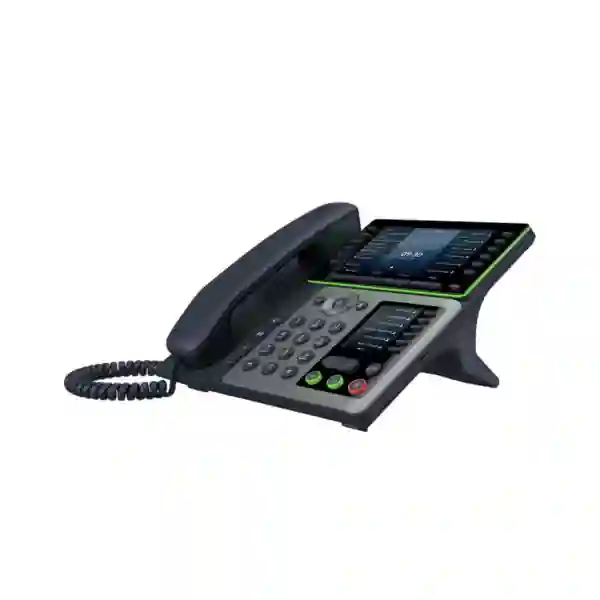
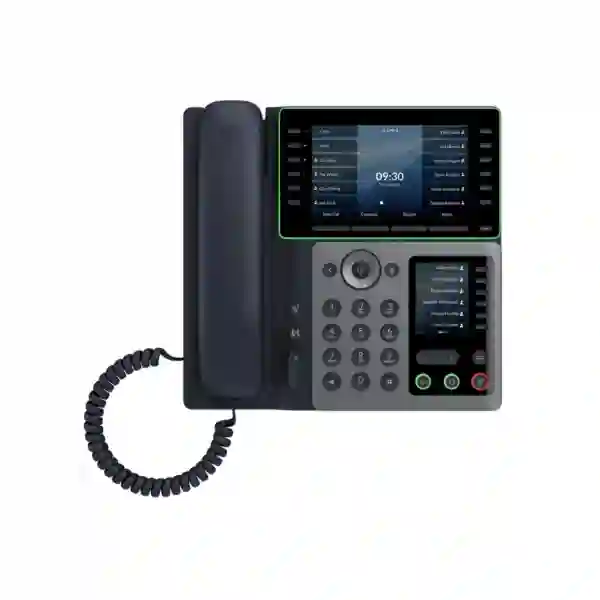
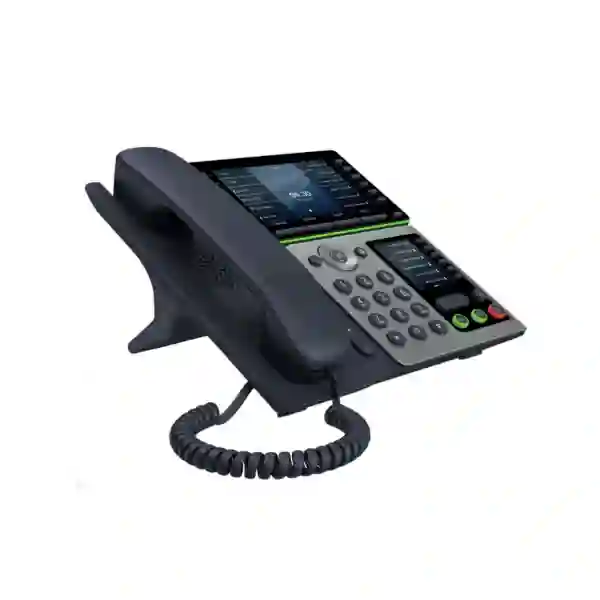
HP Poly Edge V800 IP Desk Phone
Bring clearer conversations and better call visibility to busy office desks. The HP Poly Edge V800 IP Desk Phone is built for managers, reception teams and other professionals who need a familiar handset, dedicated call controls and room to expand their line and contact views. Its dual-display layout, Poly audio processing and wired Open SIP architecture make it a practical candidate for structured business telephony.
At a glance
Five-inch colour screen; 2.4-inch secondary screen; twelve main and six secondary line keys.
Poly HD Voice, full-duplex conversation, Acoustic Fence and NoiseBlockAI processing.
Two Gigabit Ethernet ports, two USB-C ports and wired headset connection options.
Up to two compatible HP Poly Edge V expansion modules, purchased separately.
Before you choose: the V800 does not include integrated Wi-Fi or Bluetooth. Specify the V850 when those built-in wireless features are a requirement, subject to solution compatibility.
Who benefits from this phone?
A desk phone is most useful when answering, transferring, holding and locating calls are important daily activities rather than occasional tasks. The V800 is positioned for people who benefit from physical controls and visible line information: an executive who frequently switches between conversations, a reception professional handling callers for several departments, or a customer-facing employee whose computer is already occupied with other work. A separate phone can keep essential call tasks within reach without depending on a browser tab or a softphone window remaining in front.
The relevant question is not simply whether a desk can accommodate a premium phone. It is whether staff spend enough time managing calls to benefit from the two screens, programmable line keys and possible expansion modules. A low-volume desk may be adequately served by a simpler phone; a busy switchboard position may need multiple devices, a larger attendant solution or a suitable call-handling application. Define expected call activity first, then decide whether the V800 is proportionate to the work.
A buyer’s answer before the feature list
Choose the V800 when the organisation uses, or plans to deploy, a compatible Open SIP calling system, can provide a suitable wired network connection and values quick access to call functions. It is especially compelling for desks where incoming calls, monitored extensions and frequent contact transfers make a single small display inconvenient. The secondary screen can present status or favourite contacts while the main screen supports other call actions, subject to administrator configuration and the calling platform’s functionality.
Do not select it purely on the assumption that every feature printed in a product family brochure is available on every model. Edge V family models differ in wireless connectivity, display layouts and accessory support. Also distinguish the capabilities built into the handset from services supplied by your PBX, hosted calling provider or IT administrator. A desk phone cannot create additional external numbers, queues, voicemail policies or service subscriptions on its own. The V800 is a capable endpoint within a wider communications solution.
Understanding the dual-display layout
The V800 has a five-inch colour main display and an additional 2.4-inch colour display. This arrangement matters most when staff need to see call information and contact status without constantly changing contexts. The main screen handles the phone’s broader interface, while the secondary screen can help with favourite contacts and busy-lamp-field information where supported and configured. Physical keys remain important for people who prefer consistent tactile locations during repetitive call-handling tasks.
Planning should start with an actual sample of what each user needs on-screen. A front-desk operator might prioritise an office manager, a sales group and a dispatch contact. An executive assistant might need a smaller group of frequently monitored extensions. The screen capacity and configurable key pages do not automatically mean every line shown represents a separate SIP account. Ask the system administrator to map appearances, shared lines and contacts to real business scenarios before rollout, and let users review that map before it is standardised.
Line keys, appearances and call capacity are different things
HP describes the V800 as having twelve main line keys plus six additional keys associated with its secondary display. These controls can make it easier to reach telephone functions, frequent contacts or appropriately configured lines. But line-key quantity should not be confused with a guarantee that a particular service provider will support the same number of simultaneous external calls. The number of active calls available to an organisation also depends on its PBX configuration, SIP accounts, concurrent-call entitlements and upstream voice service.
This distinction is especially important during procurement. A buyer may say they need forty contacts, twelve internal extensions or several concurrent customer calls; those are three different requirements. Write down which people must be visible, which calls can be put on hold, who can pick up shared calls and which transfers must be completed quickly. A deployment diagram is often more informative than a marketing line count. The key layout then becomes a service design decision rather than a guessing exercise.
Poly HD Voice and conversation quality
The Edge V800 combines Poly HD Voice, full-duplex audio and echo management features. These capabilities are designed to make ordinary conversation sound more natural and reduce distractions during a call. A suitable wideband audio path can improve the perceived clarity of speech compared with constrained legacy connections, although the end-to-end result depends on codecs, network conditions, the far-end device and the chosen calling service. The desk phone alone cannot improve a poor or highly compressed upstream connection beyond those limits.
For an office, intelligibility is more meaningful than a large audio specification. Think of a service desk reading reference numbers, a receptionist confirming a visitor’s name or a manager discussing a contract. In each example, reducing repeated questions can improve the experience. Test real handsets, speakerphone use and representative remote call paths before committing to a full installation. This is particularly valuable when different departments use different headsets or talk from environments with contrasting background noise.
NoiseBlockAI and Acoustic Fence in context
NoiseBlockAI and Acoustic Fence are technologies designed to reduce unwanted sound during calls. NoiseBlockAI targets distracting noises, while Acoustic Fence helps focus pickup on speech nearer the intended talker. These functions are relevant to active reception counters, shared workspaces and desks near printers or other staff. They do not transform an acoustically difficult environment into a silent room, nor do they guarantee that every sound will disappear under all conditions.
The best results still depend on how the phone is used. Position a speakerphone away from persistent mechanical noise, avoid obstructing microphones and consider a headset for highly sensitive conversations. Keep the handset or microphone at a consistent distance and test the feature with actual users. Buyers should compare performance in their workspace instead of assuming that an audio-processing label resolves every room or internet problem. Strong audio processing complements good network design, sensible acoustics and appropriate call etiquette.
A wired-first connection strategy
The V800 is a wired Open SIP desk phone, not a Wi-Fi handset. Two RJ-45 Gigabit Ethernet ports support the phone’s network connection and an associated computer pass-through arrangement where appropriate. This makes the device a natural fit for structured office cabling and managed Ethernet switches. At a planned desk, a cable-based deployment can provide a predictable connection for voice traffic and place the endpoint under the same inventory, monitoring and access-control processes as other business equipment.
Treat that simplicity as a design choice, not a reason to ignore the underlying network. Verify that the switch has an available compatible port, that the cabling is in good condition and that any voice VLAN or authentication policy is understood. An office may share a physical network while still separating voice and data traffic logically. Where an endpoint is on a shared desk, confirm whether the computer pass-through port is allowed under company security policy. Wired connectivity works best when everyone knows which team owns the port and its configuration.
Power over Ethernet and desk readiness
Power over Ethernet allows suitable network equipment to provide the phone’s electrical power through the Ethernet connection. The V800 is commonly specified for an IEEE 802.3at PoE+ power arrangement; however, buyers should confirm power class, switch capacity and the exact regional package against the final manufacturer documentation and ordered configuration. A PoE-capable switch is not automatically guaranteed to have sufficient power budget for every attached phone and expansion accessory at the same time.
During planning, add up the devices drawing power from each switch, examine available port budgets and consider what happens during an electrical interruption. A UPS protecting the switch, local router and upstream communications equipment may be relevant in an office that requires telephony continuity, but its capacity and runtime must be engineered rather than assumed. Where PoE is unavailable, verify the approved adapter and whether it is included with the exact supply package. Do not assume that a photograph showing a power adapter means one ships with every market variant.
Two Gigabit ports and practical network planning
The integrated network and computer connection ports can simplify a desk that has one Ethernet wall outlet, provided the organisation permits a phone with a computer connected through it. This can reduce an immediate cabling problem, but it should not dictate the network architecture. Security controls, maximum permitted devices, endpoint authentication and traffic prioritisation still matter. IT teams should decide how a phone is identified and managed on the network before a computer is introduced behind it.
For call quality, examine latency, packet loss and jitter along the actual voice path, not only an internet speed-test result. A connection can have ample download bandwidth and still produce uneven audio if packets are delayed or dropped. Configure quality-of-service rules only in a manner compatible with the switch, PBX and provider. Confirm DNS, provisioning reachability and the chosen network time source. If a phone intermittently registers or misses calls, trace the full network route rather than immediately blaming the handset.
USB-C connections and accessory choices
HP lists two USB-C ports for the V800, with different host and device roles. Depending on the supported mode and configuration, the ports may be used for compatible USB peripherals, headsets or computer-related functions. Buyers should not assume that every USB-C headset or charger will operate identically just because its plug fits. Connection standards describe physical and electrical capabilities, while actual audio controls and feature support depend on firmware and the specific accessory.
For a workplace order, make a simple accessory matrix. Identify who uses the handset, who needs a comfortable headset for extended calls and who requires remote answer or end-call control. Validate the exact wired headset, cable, EHS interface or USB mode with the device documentation and accessory compatibility list. This step protects buyers from purchasing a phone that is technically suitable but delivered without the small adapter that makes a user’s preferred call workflow practical. Budget for the complete desk setup instead of only the central phone.
Headsets: choose by working style
A reception operator who handles calls almost continuously may prefer a lightweight headset so both hands remain available for customer records. A manager who takes occasional calls may prefer the handset, while someone who joins frequent remote discussions may value a compatible USB headset. The V800 has wired headset connection options and an electronic hookswitch interface described in HP’s hardware materials. Specific call-control support is accessory-dependent and should be verified against the exact headset or EHS adapter.
Importantly, the V800 should not be bought on the expectation of integrated Bluetooth headset pairing. That feature belongs to the V850 variant within the family. A separately connected wired or appropriately supported base-station headset may still be viable, but that is not the same as built-in Bluetooth. Include wearer comfort, spare accessories, hygiene, shared-desk use and replacement cables in the purchasing checklist. Many apparent phone problems are caused by incompatible or poorly configured headsets rather than defective telephony hardware.
Optional expansion for busy call desks
The V800 supports up to two optional HP Poly Edge V expansion modules. HP describes the compatible module as having a five-inch display and multiple pages of dedicated line keys. Its value is straightforward: a receptionist or attendant can keep more people or functions visible without navigating as frequently through pages on the base phone. This can be beneficial when a team handles many internal extension transfers, departmental contacts or observed availability states.
Expansion does not replace a PBX’s call routing logic or create additional services by itself. Before purchasing modules, identify the contacts and functions that must be represented and test whether the chosen platform supplies the needed presence or busy-lamp-field information. Review the accessory’s physical footprint, power needs, connection requirements and firmware support. An additional screen is useful only when the arrangement remains understandable to the operator. Start with a priority-based layout and add further keys when users demonstrate a real, repeatable need.
Reception workflows that deserve testing
For reception teams, the meaningful measure is how quickly a caller reaches the right person. Build test cases that reflect ordinary office activity: answer a new call, ask for a colleague, inspect whether the colleague is available, transfer with an introduction, recover a call that was not answered and take an accurate message. Repeat those steps when a second call arrives during the first interaction. A handset with sensible keys can reduce navigation, but only a properly designed call flow makes the experience reliable.
Decide in advance how unattended calls should behave. Should a missed reception call ring another extension, return to a queue or reach voicemail? Those outcomes depend on the hosted provider or on-premises PBX, not solely on the V800. Train users on the difference between attended and unattended transfer, and document what happens after hours. In Tanzania, where an office may coordinate with remote branches or customer-facing teams, consistent extension naming is often as important as the physical phone model.
Executive and assistant use cases
Executive communication frequently involves a small number of important contacts and several competing conversations. The V800’s display arrangement and programmable functions can help an executive or assistant keep frequently used call actions readily accessible. Shared lines and contact-presence functionality may support coordinated handling, but their behaviour must be configured in the communications platform. A successful executive installation needs privacy rules and delegation policies as well as attractive hardware.
Before a rollout, define who may monitor another person’s extension, who may answer a shared line and how forwarded or private calls should be distinguished. Discuss voicemail ownership, access to personal directories and the effect of absence or travel. Users should know whether call status indicators are public within the team. A premium phone is most valuable when its shortcuts express an agreed working pattern; it can become confusing when key assignments are copied from a demonstration rather than designed for the actual organisation.
Customer-facing environments
Hotel reception areas, administrative counters, clinic offices, schools and customer-support points are examples of environments where a physical desk phone may suit operational needs. These are illustrative use cases, not claims of local installations or endorsements. Staff often need to answer calls while speaking to someone in person, checking a record or directing another team member. A separate endpoint with clear status indications can help divide attention, particularly where a computer is used for unrelated tasks.
Assess the environment rather than applying one configuration everywhere. A public-facing counter may require discreet headset use and limited directory access. A private back office may be comfortable with the built-in speakerphone. A clinic or educational office may have confidentiality and safeguarding policies governing who can hear a call and what can appear on screen. The V800’s capabilities create choices, but the organisation’s procedure determines which choices are appropriate. Train staff to avoid displaying unnecessary contact information in shared areas.
Open SIP: what that means for buyers
Open SIP describes the phone’s standards-oriented VoIP calling approach rather than a promise of universal plug-and-play compatibility. A compatible SIP service or PBX provides account registration, number plans, features and policies. The phone acts as the user endpoint. Many business calling features use a combination of endpoint capability and server-side support, which is why apparently similar phones can behave differently on two provider platforms. Do not equate Open SIP with native support for every proprietary communications ecosystem.
Before buying, ask for the exact PBX or hosted voice product name, software version, provisioning method and supported endpoint list. Confirm whether the deployment uses ordinary SIP credentials, a provider-supplied configuration, certificates or a managed enrolment service. Check the supported call features that matter most: transfers, hold, shared lines, presence and voicemail indication. If the organisation is moving from an older phone system, document any analogue adapters, gateways or numbering changes that may be required. Compatibility should be demonstrated, not inferred from a familiar brand name.
Hosted voice and on-premises PBX evaluation
A business may use a cloud-hosted calling platform, a local IP PBX or a hybrid arrangement. The V800 can be assessed as a candidate endpoint in any architecture where the intended platform supports its Open SIP implementation. However, that does not mean the handset is approved for every hosted provider or compatible with every specific feature profile. Vendor certification, provisioning profiles and firmware versions are significant details. Obtain a written compatibility answer from the party responsible for the platform.
A hosted deployment needs reachability to the provider and a reliable route for voice media. A local PBX requires suitable internal network design and may depend on an external SIP trunk or gateway to reach ordinary phone numbers. A hybrid design has both sets of dependencies. Compare the failure modes: what stops working when internet access fails, a local server is unavailable or a remote service has an outage? The answer informs not only the phone selection but also resilience, training and support responsibilities.
Security features and their practical limits
HP documents a range of security-related capabilities for the V800 family, including transport encryption options, secure media mechanisms, network authentication and protected provisioning. Examples include TLS for signalling, SRTP for media when supported by the complete calling environment, and 802.1X-based network access controls. These mechanisms can be useful components of a managed security posture, but their presence in a specification is not proof that an individual installation has encryption enabled or is correctly hardened.
IT teams should maintain an inventory of phone firmware, administrator access, certificate practices and provisioning settings. Disable unnecessary access paths, use strong credentials and decide who may change configuration. Apply software updates through an approved change process and investigate unexpected registration or account behaviour. Be cautious with published claims of compliance: product security features do not establish that an organisation meets a particular local regulation, nor do they replace data-handling controls for call recordings, directories or voicemail systems.
Provisioning and fleet administration
A single desk phone can often be configured manually, but larger deployments need consistency. HP describes provisioning and management approaches for its business phones, including zero-touch provisioning options and managed configuration services. The exact workflow can depend on the firmware, enterprise environment and provider arrangement. If a Tanzania business plans ten, fifty or more endpoints, the administration model may affect rollout effort as much as hardware selection does.
Before procurement, build a baseline configuration for display language, time zone, directory sources, network settings, firmware, emergency procedures and user assignments. Decide who owns onboarding and decommissioning when an employee changes roles. Test a factory-reset device in a controlled environment to confirm it receives only the intended configuration. A documented process helps avoid the common situation where every desk phone works slightly differently because each was configured by a different person. Keep credentials outside shared documents and do not embed secrets into customer-facing inventories.
Tanzania deployment considerations
For a Tanzania office, the essential starting point is the organisation’s actual internet and telephony arrangement. Determine whether calls are handled by an internal PBX, a contracted hosted voice provider or a SIP trunk that links the office to the public telephone network. Verify national and international dialling rules, the numbers that may be presented to callers, and the provider’s supported registration or trunking method. Do not assume a specific local telecom provider offers a suitable plan or endorses this endpoint without direct confirmation.
The location of staff and supporting infrastructure may influence operational decisions, but city names do not prove network coverage or available service. Ask the actual connectivity provider about service quality at the premises, and ask the voice-service provider about supported calling features, failover and escalation channels. Confirm local procurement terms separately: stock, currency, taxes, warranty coverage and delivery are not determined by the phone’s technical specification. A quote should name the exact supply package and any installation or support charges.
Internet quality, power continuity and service resilience
Voice communication depends on more than the handset. When calls traverse an external network, inconsistent latency and packet loss can make speech break up, while power interruptions can disable switches, routers or PBX equipment. A resilient design considers all those components. Use representative call tests during busy office hours rather than assuming a quiet morning demonstrates normal operating conditions. If the organisation relies heavily on its telephone line for customers, define an acceptable recovery method before deployment.
A continuity plan might include protected network equipment, alternate connectivity or provider-controlled call forwarding, provided those services are available and correctly configured. Test the procedure with the actual team. The existence of a UPS or second internet line is not enough if staff do not know how to reach callers when a component fails. Keep emergency contact numbers and escalation procedures in a secure location accessible without the phone system. Business continuity is an operational process supported by equipment, not a feature automatically purchased with a desk phone.
Network and firewall acceptance checklist
Before registering the V800, have the IT administrator confirm that the phone can reach its approved provisioning server, DNS resolver, time service and voice-signalling destinations. Review firewall rules, NAT behaviour where relevant, certificate validity and the media ports expected by the PBX or provider. If the network uses voice VLANs, ensure the appropriate switch configuration is in place and that a computer connected through the phone remains in its intended security context.
Avoid opening broad network ranges just to make the first test call succeed. Instead, request exact requirements from the platform administrator and test against an approved change. Record the switch port, phone identity, software version and support contact in the deployment inventory. A disciplined acceptance checklist reduces troubleshooting time later because the support team knows which elements were verified at installation. The same checks are useful when moving the phone to another floor or restoring the office after network maintenance.
What to confirm in a quotation
A useful quotation should identify the precise model variant, region-specific part number and what comes in the box. Verify the handset, stand, cables and documentation against the proposed package. Check separately whether a power adapter, wall-mount kit, headset, electronic hookswitch accessory or expansion module is required. Do not treat these additions as included simply because they appear in demonstration photography. The amount charged for configuration, shipping, taxes and support should also be specified before a purchasing decision.
Ask the seller to state whether the phone is supplied for a customer-managed Open SIP deployment or as part of a configured solution. Identify any ongoing voice-service subscription and who is responsible for provisioning. Confirm support channels and any applicable warranty terms for the supplied unit in Tanzania; a warranty statement in another country’s product listing should not be assumed to apply identically. Avoid relying on a generic product title when the purchase depends on a particular power adapter, accessory bundle or regional commercial condition.
Physical placement and ergonomics
The included two-position stand gives the V800 a choice of desk angles, while an appropriate wall-mount option may be available separately. Evaluate where the phone can be reached without interfering with a keyboard, monitor or visitor counter. Leave enough clearance for the handset cord and any expansion modules. In a reception position, a screen that is comfortable for an operator may be visible to visitors, so consider privacy before making the phone face outward.
Cable management helps both appearance and reliability. Avoid stretching the Ethernet cable across a walkway or placing connectors where frequent movement can damage them. Check the headset’s resting position and whether the user can reach the transfer and mute controls quickly. Shared desks require a repeatable arrangement; staff should not have to re-route cables every shift. A short ergonomic review can prevent unnecessary accessories and improve satisfaction with the phone from the first week.
A staged installation approach
Start with one V800 attached to a representative network port. Confirm power, boot behaviour, address assignment, time synchronisation and secure provisioning. Register it to a test or appropriately authorised calling account and make incoming, outgoing and internal calls. Check caller identity, hold, transfer, voicemail indication, audio quality and relevant programmable keys. If the intended workflow uses presence monitoring or shared lines, validate those with the actual server features instead of using a demonstration profile that will not exist in production.
Next, test the chosen headset, an optional expansion module and any computer pass-through connection. Complete a power-cycle test and observe how the endpoint recovers after network interruption. Document the final configuration, user guide and escalation contact before expanding to additional desks. In a multi-location organisation, pilot users from different roles so their needs are represented. Only after those acceptance checks should the configuration become a standard build. This sequence reduces the chance that a minor firmware or service mismatch is multiplied across an entire office.
Training users without overwhelming them
Give each user a concise guide that matches the keys actually programmed on their phone. Include how to answer a second call, place someone on hold, complete an attended transfer, recover a transferred call and access voicemail. Where a user monitors colleagues, explain what the status indicators mean and when those indicators may be unavailable. A generic product manual can answer technical questions, but role-based instructions are usually more effective for daily work.
Use a small number of realistic exercises. A receptionist can practise redirecting a caller to an unavailable employee. An assistant can rehearse answering a shared line. A manager can practise muting a confidential call while reviewing a document. End training by identifying who can request changes to favourites or line keys. As staff roles change, revisit the configuration rather than allowing labels to become outdated. The phone remains useful when its interface stays aligned with the current organisation.
Managing updates and lifecycle expectations
An IP desk phone is a managed network device and should be included in IT maintenance planning. Firmware updates can address security and interoperability matters, but introducing new software into a production voice environment requires care. Read the applicable release notes, confirm platform support and test critical calling behaviours on a small set of devices before a broad update. Maintain a rollback or recovery plan where supported by the environment.
Asset records should identify the model, assigned user or location, software baseline and the organisation responsible for providing support. When a phone moves to a new owner, remove user-specific configuration and directories through the approved process. When retiring a device, follow the organisation’s secure decommissioning policy. Keep spare compatible cables or accessories if telephony continuity matters. Lifecycle planning is particularly important when a company operates multiple sites and wants a consistent support experience rather than isolated devices with different versions and undocumented settings.
Solving common deployment problems
If the phone cannot register, first confirm network connectivity, DNS resolution, time and the authorised SIP credentials or provisioning assignment. For one-way or broken audio, examine the media path, network translation and provider requirements. For intermittent calls, look for packet loss, latency variation and overloaded network links. These checks should be performed by someone authorised to manage the service, and changes should be recorded. Replacing the handset is not usually the first or most informative diagnostic step.
If programmable keys do not display expected presence information, review the PBX’s subscription and busy-lamp-field settings. If a headset behaves differently from the handset, isolate the accessory, cable and EHS configuration. If the phone powers off unexpectedly, inspect the PoE budget and switch events. When gathering evidence, record the fault time, affected extension and observed behaviour without exposing passwords or sensitive call content. A small, accurate problem report helps a support team distinguish a device issue from a network or provider fault.
V800 versus V850: the essential choice
The V800 and V850 sit in the same premium part of HP’s Edge V line-up, but they should not be treated as identical. Both are promoted for high-call-volume and executive-style use, with strong audio technologies and room for expansion. The V850 adds integrated Wi-Fi and Bluetooth connectivity, whereas the V800 is a wired-first model without those built-in radios. The V850 also has differences in supported line presentation according to HP’s portfolio information, so the precise intended configuration should be checked.
For an office with reliable Ethernet at every desk, choosing the V800 can be a sensible way to focus on the needed wired calling experience. For a location where a compatible Bluetooth headset or Wi-Fi connection is mandatory, investigate the V850 and its power and provider compatibility requirements. Do not expect a generic software update to change a V800 into a wireless model. The best choice depends on deployment constraints and user workflows, not merely on which device carries the higher number.
Compare with simpler Edge V models
Not every office desk needs the V800’s dual-display arrangement or support for two expansion modules. A basic shared desk may be adequately served by a lower-tier Edge V phone, while a heavy reception position may justify the premium model. HP’s Edge V family includes different screen sizes, line-key configurations and wireless options. The suitable comparison is between roles, not simply between model names or the largest screens.
Create a role-based comparison of at least three needs: ordinary employee calling, management calling and reception or attendant work. Record how many shortcuts are needed, whether monitored extensions are required, the preferred headset method and the available network connections. A fleet can standardise on more than one phone model if that produces a better outcome. Conversely, a company may value consistent training and inventory enough to use one model more widely. Evaluate total deployment cost, including cabling, licences, accessories, setup and support, before selecting the mix.
Accessibility and inclusive operation
The Edge V platform includes accessibility-oriented options such as enlarged fonts, display adjustments and text-to-speech features, with support depending on model and software. These are useful considerations for people who need clearer on-screen information or more accessible interaction. Physical buttons can also appeal to users who find touch-oriented interfaces less convenient, although no single arrangement suits everyone. A realistic accessibility assessment should involve the person who will use the device.
During a trial, check the visibility of labels, lighting conditions, handset comfort, audio level, screen angle and whether the controls can be located without unnecessary effort. Ask administrators which accessibility settings can be maintained through provisioning so a user’s preferences are not lost after a reset. Where accessibility is a formal requirement, confirm the exact functionality with current manufacturer guidance and user testing. Do not infer certification against a particular accessibility standard merely from the presence of helpful features.
Privacy and appropriate use
Business phones can reveal contact names, caller details and sometimes shared-line status. In a private office these details may be routine; at a reception counter they can be visible to visitors. Consider how directory content is displayed, who may monitor a colleague’s availability and where voicemail notifications appear. If users share a phone, create a process for clearing personal data, changing assignments and protecting account credentials. Privacy settings are as much a workplace policy matter as a phone configuration task.
Some organisations record customer calls for quality or compliance purposes. Call recording is normally controlled by the service platform or supporting systems and must be designed in accordance with the organisation’s applicable legal obligations. Do not assume the V800 alone includes or enables a compliant recording service. Employees should understand when calls are recorded, who may access recordings and how sensitive information is handled. Security features described by HP help create a technical foundation, but operational governance remains the responsibility of the deploying organisation.
How to evaluate total cost of ownership
The hardware unit is only one part of the investment. Other possible costs include hosted voice licences or PBX capacity, SIP trunking, switching infrastructure, PoE upgrades, cabling, headsets, expansion modules, installation, configuration and continuing support. These vary significantly between organisations. A lower initial device price can be misleading if the deployment requires extra network work or accessories, while an expensive endpoint may deliver little value at a desk with minimal call activity.
Prepare a per-role bill of materials rather than multiplying one generic phone price by the number of employees. Include a small allowance for spares where operationally justified, and plan how failed devices will be replaced. Distinguish one-time hardware costs from recurring service charges. Assess the support model: will a local IT team provision phones or will a voice-service provider own the configuration? A transparent cost breakdown is more useful than unsupported promises about savings or productivity, and it gives buyers a sound basis for comparing quotes.
Questions to ask your telephony provider
Ask whether the exact Edge V800 model and intended firmware are supported. Request instructions for account registration, provisioning, certificates, codec negotiation, emergency calling and the handling of transfer, shared lines or presence. Confirm which features are included in the subscribed plan and which require higher service tiers. If remote offices are involved, ask how extensions communicate across locations and how failover behaves when connectivity is lost. Written answers are preferable to a verbal assumption about the broad SIP standard.
Also clarify operational ownership. Who will add an employee, reset a device, troubleshoot a failed registration or maintain the dial plan? What information should staff provide when a call fails? Can the provider run a pilot with the final production configuration? For Tanzania buyers, this is more useful than a generic claim that a phone works with every operator. Service plans, regional network arrangements and software support lists can change; they should be verified at procurement time for the exact deployment.
A practical acceptance test for a completed installation
A successful installation should be proven through outcomes that matter to the user. Make a call from the V800 to an internal extension and then to an authorised external number. Receive a call from outside the organisation. Test call hold, mute, blind and attended transfers, voicemail notifications, caller identification, keypad navigation and relevant programmed line keys. Verify the preferred headset and the phone’s speakerphone quality at normal desk volume. Observe screen status during overlapping calls.
Then interrupt the Ethernet connection under controlled conditions and confirm the system’s recovery process; do the same for a planned restart. Check the administrator’s intended firmware baseline and that management interfaces are restricted appropriately. If an expansion module is supplied, verify every configured key page. Record any exceptions and the person responsible for resolving them. Obtain user sign-off only when daily tasks work reliably. That is a stronger completion measure than a phone merely displaying a registered account.
Next step: request a configuration-based quote
To evaluate the HP Poly Edge V800 for your Tanzania business, provide the planned number of phones, the calling platform or PBX name, the location’s wired network and power arrangement, and the roles that will use the devices. Note whether you require monitored extensions, shared lines, USB or EHS headsets, wall mounting or optional expansion modules. If an existing system is being upgraded, include the current endpoint models and any issues your staff encounter with them.
Request confirmation of the exact V800 package, approved accessories, compatibility checks, current commercial terms and proposed implementation responsibilities. A quotation should distinguish hardware from any voice-service subscription or installation charge. Where compatibility is uncertain, ask for a controlled pilot before committing to a wider rollout. This approach helps choose a phone and an operating model that are genuinely suited to how the organisation makes and receives calls.
Before you place an order
- Confirm the exact HP Poly Edge V800 package and accessories.
- Verify Open SIP support with the selected PBX or hosted calling provider.
- Check Gigabit Ethernet, PoE power budget and any voice network requirements.
- Define line keys, shared lines, monitored extensions and transfer procedures.
- Test wired headset and expansion accessories for the intended workflow.
- Request Tanzania-specific commercial terms and support arrangements in writing.
Frequently asked questions
Does the HP Poly Edge V800 have Wi-Fi?
No. The V800 is a wired desk phone and does not have integrated Wi-Fi. HP reserves built-in Wi-Fi for selected Edge V variants, including the V850. Plan an Ethernet connection at the desk and verify the necessary switch, cable and network configuration.
Does the Edge V800 support Bluetooth headsets?
Not through integrated Bluetooth. For the V800, consider supported wired headset connections or a compatible headset system using an appropriate base and interface. Verify the exact accessory, call-control functions and required adapters before purchase; do not assume a Bluetooth product will pair directly with this phone.
Can the V800 work with any IP PBX?
The V800 uses an Open SIP design, which makes it a candidate for many standards-based telephony environments. Compatibility still depends on the exact PBX or hosted provider, software version, provisioning profile and required features. Ask the service owner to confirm support and perform a pilot when necessary.
How many screens and keys are included?
HP describes a five-inch main colour display, a 2.4-inch secondary colour display and twelve plus six line keys. The effective arrangement of contacts, features and appearances depends on programming. The count of visible keys does not, by itself, tell you how many external concurrent calls your provider supplies.
Can I add more line keys?
Yes. HP supports up to two optional Edge V expansion modules with the V800. Those modules are separate accessories. Confirm the configuration, physical space, power needs, supported firmware and the calling platform’s presence or shared-line capabilities before ordering modules for a receptionist or attendant desk.
Does it need a separate power adapter?
The device supports a suitable wired Power over Ethernet arrangement. If your network cannot supply the required PoE power, ask the seller which manufacturer-approved power adapter is needed and whether that adapter is included in the exact regional bundle. Check the switch budget before deployment.
Does the V800 have a touchscreen?
The manufacturer describes colour displays and physical navigation and call-control buttons. Do not purchase the device assuming a touchscreen workflow unless your exact product documentation explicitly confirms it. Users who prefer touch-first operation should compare alternative product families and test the interface before selection.
Which sound technologies are built in?
HP lists Poly HD Voice, full-duplex audio, echo cancellation, NoiseBlockAI and Acoustic Fence. These features are intended to improve conversation clarity and limit distracting background sound. Actual results vary with the room, handset or headset, network and the other side of the call.
Can it be used at a reception desk?
Yes, reception and executive environments are core use cases identified by HP. The value comes from dedicated line keys, dual displays and support for optional expansion modules. Confirm that the chosen PBX supports the monitoring, shared-line, forwarding and transfer behaviour that the reception team actually needs.
Can I connect my computer through the phone?
The V800 has separate Gigabit network and computer Ethernet connections. Whether computer pass-through should be enabled depends on the network architecture and organisation’s access-control policy. IT should test the arrangement, including voice separation and network authentication, before deploying it across many desks.
Can it receive video from a SIP device?
HP’s Edge V documentation describes SIP video receiving among supported V800-series capabilities. The behaviour depends on the endpoint configuration, firmware, video format and remote system compatibility. This should not be interpreted as a built-in camera or as a guarantee of full two-way video conferencing.
Are expansion modules, headsets and wall mounts included?
Do not assume they are. HP identifies expansion modules and certain mounting accessories as optional. The items in the carton depend on the exact package ordered. Ask for an itemised quote listing the base phone, power supplies where relevant, headsets, EHS accessories and expansion units separately.
Is this phone suitable for multiple branches in Tanzania?
It may be suitable where each office has compatible wired network access and the wider telephony platform supports the intended multi-site design. Check numbering, routing, network quality, support responsibility and recovery procedures. The presence of a standards-based endpoint alone does not verify any specific operator service or branch connectivity.
What should I provide when asking for a quotation?
Share the number of users and phones, the current or proposed SIP provider or PBX, required call-handling roles, available wired connections, power arrangements and accessories. Include any need for monitored extensions or expansion modules. Request a confirmed configuration, accessory list, compatibility review and itemised commercial terms.
Request a tailored HP Poly Edge V800 quotation
Tell FourTeck Tanzania how many phones you need, which SIP or PBX platform you use and whether you require headsets, expansion modules or help planning the wired deployment. Ask for a confirmed configuration and itemised quote before placing an order.
Ask for compatibility, accessory and commercial details before purchase.




Reviews
There are no reviews yet.