
Professional Open SIP Communications
HP Poly Edge V850 Wi-Fi IP Desk Phone
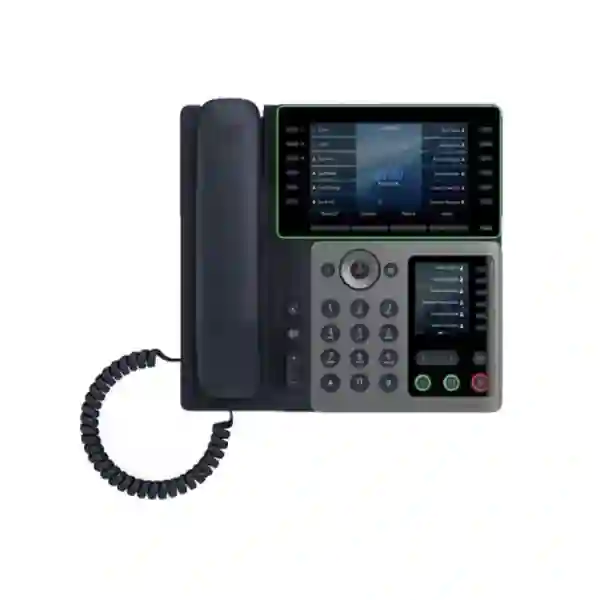
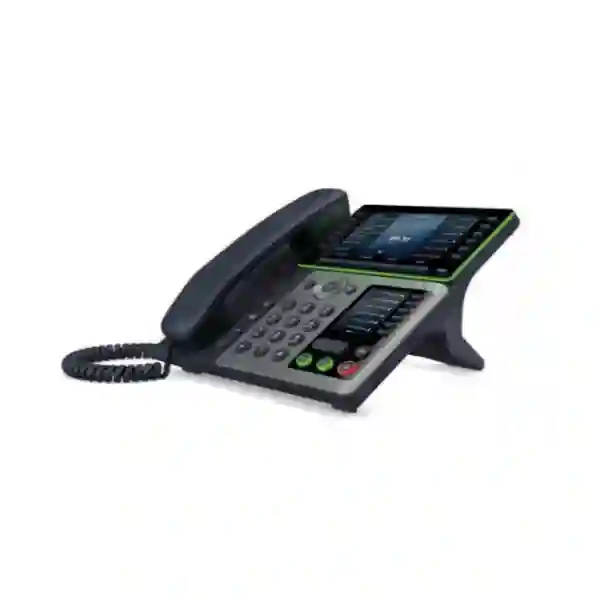
Built for reception, executive support and other call-intensive desks, the V850 combines two colour screens, visible line controls and integrated Wi-Fi and Bluetooth. Review the fit with your SIP platform, network and accessories before requesting your Tanzania quotation.
2.4-inch secondary display
12 + 6 line keys
Wi-Fi 6 & Bluetooth 5.4
Up to 2 optional expansion modules
At a glance
Choose this phone when a desk needs regular transfers, quick access to colleagues, visual line monitoring and headset flexibility. It is an IP endpoint for a compatible SIP service, not a complete PBX. Confirm platform support, network quality and power before specifying a fleet.
Verified product overview
Line assignments and supported call functions are configuration-dependent. Optional accessories and market-specific packages should be confirmed when obtaining a quote.
Why the Edge V850 fits a demanding business desk
The HP Poly Edge V850 Wi-Fi IP Desk Phone is intended for people whose work depends on answering, routing and monitoring numerous calls throughout the day. An executive assistant may need immediate access to a manager, a reception team may watch several extensions at once, and an operations coordinator may switch frequently between callers and internal colleagues. A basic single-screen phone can make those activities unnecessarily cumbersome. The V850 brings a large main colour screen, a dedicated smaller display and a set of programmable line keys into one desk-based Open SIP endpoint. Its purpose is to keep important call information visible while preserving the familiar handset, speakerphone and headset workflows that busy staff already understand.
The key buying decision is not simply whether the desk has a phone socket. It is whether the employee needs this level of screen space, call visibility and expansion, and whether the selected business phone service can provision the device correctly. The V850 is especially relevant when the person handles shared lines, favourites, monitored extensions and routine transfers. Where the business only requires occasional outgoing calls, a smaller model may be more economical and easier to justify. Where the desk operates as a communications hub, the V850 offers capabilities that can reduce the need to repeatedly open menus and search for contacts.
For a Tanzanian organisation assessing an IP telephony upgrade, the practical next step is to document the existing PBX or hosted SIP service, the number of monitored colleagues, the planned network connection and the intended power method. Those facts determine whether the hardware will fit the day-to-day workflow. FourTeck Tanzania can be contacted for a quote and an assessment of the desired configuration; exact availability, commercial terms and integration suitability must be confirmed before purchase.
Dual displays and programmable line keys
The V850 combines a 5-inch colour main display with a 2.4-inch colour secondary display. HP identifies a layout with twelve main line keys and six additional keys associated with the secondary screen. The larger screen gives the user room to navigate calls and phone functions, while the additional display provides a visible area for busy lamp fields and frequently used contacts. This division is useful when callers must be handled without losing sight of colleagues who might be available to receive a transfer. The physical keys can be assigned according to the functions supported by the deployed phone software and service platform.
HP announced support for up to sixty line assignments across the V850 interface. That figure describes the phone family’s potential assignments, not sixty simultaneous telephone calls or sixty automatically licensed extensions. The actual provisioned keys, page layout and access to line features depend on configuration and the connected service. Buyers should ask how many extensions, shared lines, speed dials and monitoring indicators will be shown on the intended screens. A reception desk may favour several pages of favourites, whereas an executive desk may reserve keys for an assistant, selected colleagues and a key service number.
Good interface planning is as important as the total key count. Group monitored lines logically, avoid giving multiple functions ambiguous labels and agree on which contacts must remain visible during high-volume periods. Include a short training session so users understand pagination, hold, transfer and the distinction between a line appearance and a contact shortcut. A clearly arranged screen can be more useful than a large number of unstructured keys.
Built-in Wi-Fi 6: flexibility with a network plan
The V850 is the wireless-capable member of the Edge V800/V850 pair. HP identifies integrated Wi-Fi 6 for the V850, making it a candidate for desks where bringing an Ethernet cable is inconvenient. This may matter in reconfigured offices, temporary administrative workstations, reception positions that change location and rooms where cable routes are difficult. Wireless capability does not eliminate the need for a compatible voice service, suitable local power or a properly engineered network. It replaces the wired data link where the environment supports that approach.
Before choosing Wi-Fi, assess coverage at the exact handset location rather than relying only on the number of signal bars shown on a laptop in a nearby room. Speech traffic is sensitive to packet loss, network congestion, roaming events and interference. Review access-point placement, channel use, authentication, voice traffic prioritisation and the policy for joining office devices to the wireless network. For desks handling critical calls for long periods, a wired link is often attractive because it removes one source of variable radio performance. The phone also supports Ethernet connectivity, enabling the installer to select the more appropriate path.
A practical purchasing question is how the phone will receive power when there is no Ethernet cable. Power over Ethernet normally comes through the wired network port; Wi-Fi does not deliver electrical power. Confirm the exact V850 hardware variant, compatible external power accessory or supported USB-C powering arrangement, and the local plug or electrical setup before ordering. Treat wireless as a deployment option rather than a promise that every desk will work without additional accessories or changes to the network.
Bluetooth for a more adaptable calling style
Integrated Bluetooth 5.4 gives the V850 a wireless peripheral option alongside its conventional headset and handset connections. A Bluetooth headset can help an administrator move around a desk or consult nearby paperwork during a call. The supported feature set also includes pairing with a compatible mobile device and synchronising mobile contacts where configured. These abilities can be useful for personnel who alternate between office desk calls and mobile communications, but they should not be confused with a guarantee that every mobile application or call service can be controlled through the desk phone.
Headset selection deserves its own check. Confirm the exact headset model, current firmware, supported pairing method, microphone behaviour and features such as answer/end control. A Bluetooth radio connection can be influenced by nearby devices, crowded spectrum and the physical layout of the office. In critical reception positions, a compatible wired USB-C or traditional headset arrangement may provide a predictable alternative. Users should be given a way to return quickly to the handset if a wireless headset is charging or unavailable.
The right headset strategy also depends on how the team works. An employee who mostly speaks at a fixed workstation may value comfort and noise isolation above wireless mobility. A receptionist switching frequently between people at the counter and callers may prefer a fast way to put on and remove a headset. Include at least one real-world headset test in a deployment pilot, with attention to incoming-call notifications, microphone clarity and operation of call controls.
Speech clarity in the conditions offices actually face
HP Poly HD Voice, Acoustic Fence and NoiseBlockAI are central parts of the V850 audio experience. They are designed to help calls remain intelligible when the user is working near keyboard activity, colleagues, visitors or other sources of background sound. Acoustic Fence focuses on reducing sound outside the intended speaking area, while NoiseBlockAI applies processing that can suppress unwanted noise. HP also lists an enhanced bass response for the V800/V850 class. These technologies support clearer communication but cannot rescue a call from serious packet loss or unsuitable network configuration.
This distinction is particularly relevant for a reception desk, where people may converse nearby while the operator is handling a customer call. Test the phone in the real environment with a caller on the other end, rather than judging only how the speaker sounds in a quiet showroom. Check whether a headset is needed for privacy or concentration, and whether local noise levels require relocating the phone. Handset, speakerphone and headset modes each serve different situations; the best default mode should reflect the employee’s responsibilities and shared-space etiquette.
Voice quality is ultimately a complete-system outcome. The codec chosen by the SIP platform, Internet connectivity, LAN prioritisation, the acoustics of the room and the far-end caller all influence what participants hear. A pilot call should include external as well as internal destinations, normal and busy network periods, and realistic background activity. This gives the organisation a meaningful assessment of the V850 as part of its broader telephony environment.
Open SIP and the importance of platform compatibility
The V850 is positioned by HP as an Open SIP desk phone. In practical terms, it is designed to register to a compatible SIP-based telephony service rather than operate as a standalone mobile telephone. Organisations considering the device may have an on-premises IP PBX, a service-provider-managed PBX or a hosted communications platform. The necessary settings can include registration details, approved firmware, transport and security options, provisioning arrangements and the specific call features the organisation wants to use.
Open SIP should not be interpreted as automatic certification for every business calling product. A service may accept SIP registration but support only a subset of the features shown in product literature. For example, busy lamp fields, shared lines, transfer methods, voicemail indication, directories, calendars and remote provisioning can vary with the server implementation. Before a bulk purchase, ask the platform administrator or service provider to verify this exact model and the required software release against its current supported-device list.
A good compatibility exercise goes beyond making one outbound call. Check inbound routing, internal extension calls, attended and blind transfers, hold and resume, caller identification, voicemail, time settings and recovery after a network interruption. If the business uses call queues or contact-centre features, confirm how the agent workflow is delivered and whether those features belong to the PBX rather than the telephone itself. The phone provides an endpoint; many advanced business processes are controlled by the connected platform and its licences.
Expansion modules: plan for the operator’s workload
HP specifies support for up to two optional Edge V expansion modules on the V850. The dedicated module design provides a larger collection of configurable keys with a separate screen, helping receptionists and switchboard operators manage additional contacts and monitored extensions. The expansion units are not part of the phone’s basic included feature count and must be specified separately where needed. HP describes an expansion module with twenty-two dedicated keys and three pages, allowing access to up to sixty-six programmed positions per module.
Before adding modules, establish whether users genuinely need those extra visible assignments. Consider how many colleagues must be monitored, how often line states change and whether a software directory search could handle less-frequent contacts. Two modules can be appropriate for a central operator who repeatedly transfers calls across a substantial organisation; they may be unnecessary for a manager who uses only a few favourites. Also confirm physical desk space, stand arrangement, module compatibility with the chosen phone software and the applicable power budget.
A well-designed expansion layout should mirror the way the organisation works. Group departments together, retain stable assignments for frequently contacted people and give operators a documented process for updating changes. When contacts are managed centrally, specify who has permission to modify the keys and how updates will reach the handset. Expansion makes the endpoint more capable, but it creates an additional configuration and training responsibility that should be included in the project plan.
Desk connections, USB-C and power planning
The physical connectivity options provide alternatives for different working styles. HP identifies a network connection and a computer pass-through network port on the back of the V850, as well as dedicated handset and headset connections, electronic hookswitch support and USB-C connectivity. The product-family page lists two USB-C ports for the V800/V850 class. These interfaces can support applicable USB headsets and other supported accessories, while USB audio mode can allow the phone to act as a microphone and speaker for a connected computer. Each feature should be confirmed with the installed software version and accessory combination.
For a wired deployment, Power over Ethernet can simplify the desk by delivering network data and suitable power over a supported Ethernet connection. That convenience depends on a correctly rated switch port or approved injector and enough power budget for the phone and any connected peripherals. Do not assume an older access switch can support every planned handset with expansion. During procurement, ask the installer to calculate the number of PoE endpoints, the switch budget and the behaviour required during a power cut.
For a Wi-Fi deployment, verify a separate power arrangement because the data link does not supply PoE. Confirm whether the chosen seller offers a package with an approved power supply; accessory bundles can differ. If a business relies on a UPS for its router, switch and PBX, include the telephone power source in that continuity plan. A resilient Internet connection alone is not sufficient when the handset or local network loses electrical power.
Security that must be configured, not merely advertised
Business telephones are network endpoints and should be included in the organisation’s cybersecurity practices. HP describes a trusted security module within the Edge V family along with security-oriented provisioning and communications capabilities. Depending on the deployment and platform, administrators can evaluate options such as authenticated network access, encrypted signalling and protected media paths. The presence of these capabilities does not automatically mean the entire voice solution is encrypted end to end; both the phone and the service infrastructure need compatible configuration.
For an enterprise rollout, decide how devices will obtain settings, how administrative credentials are controlled and how configuration files are protected. Separate voice access from unrelated guest devices where the organisation’s network design calls for it. Use supported firmware and a planned update process, and limit who can alter SIP account details. Where phones connect over Wi-Fi, the wireless authentication policy is another important part of the overall design. Avoid sharing office administrator passwords with every desk user simply to activate a handset.
It is also sensible to plan for the lifecycle of each endpoint. Record which desk and employee receive the device, how it will be reset on reassignment, who can replace it if damaged and what happens when the business changes telephony platforms. A phone that remains securely configured and consistently maintained is more useful than hardware selected only for its feature list.
Device provisioning and management at scale
When an organisation installs a number of phones, manual configuration at every desk can become error-prone. HP describes support for provisioning and managed deployment approaches across the Edge V family, including HP Poly Lens and zero-touch provisioning options. These are relevant to IT teams and service providers that need repeatable settings, software updates and operational oversight. The precise features that can be used depend on the environment, administrative access, supported software and any applicable service arrangements.
A deployment plan should define a standard configuration for time zone, language, SIP registration, key assignments, firmware, network settings and user preferences. Keep an approved record of settings rather than relying on notes from individual installers. Before deploying to every workstation, test one handset in the intended environment and confirm that it can obtain configuration, make and receive calls, display expected contact information and recover cleanly after rebooting.
Longer-term management involves more than initial setup. Organisations should know how they will diagnose failed registration, identify a disconnected device, apply security updates and replace a phone while preserving its intended extension mapping. If an external telephony provider manages the service, agree which team handles handset configuration and which handles network faults. Clear division of responsibility limits troubleshooting delays when staff need the phones to work immediately.
An approach to a dependable Tanzania office deployment
For a business deploying the V850 in Tanzania, begin with a site survey rather than assuming that every office desk has the same technical conditions. Identify the SIP platform, Internet service arrangements, existing switch and access-point infrastructure, cable runs, power availability and the number of staff who require advanced call handling. Where calls enter through a service provider, clarify how external numbers and inbound routes reach the phone system. These checks are general engineering considerations and do not imply an existing partnership or approved service with any named local operator.
Reliable data connectivity matters for both wired and wireless voice. Measure normal traffic load and peak-period congestion, review quality-of-service policies where they are supported and make sure the chosen voice service has a viable path over the available connection. A branch that relies on a single Internet link should consider how staff will handle telephone service during an outage. If a hosted PBX is used, ask about the route to the service region and the provider’s recommendations for latency, packet loss and failover.
Power continuity is equally important. If the business has backup power, map what it actually covers: the handset, Wi-Fi access point, access switches, router, and any local PBX components. A battery-backed phone is of limited value when the network path fails. For mission-critical call handling, document an alternative method to receive customer calls when the local site is unavailable. The relevant communications and electrical requirements should be confirmed for the particular deployment, without assuming unverified regulatory approvals or commercial coverage.
Choosing the V850 instead of nearby Edge V models
The most direct comparison is with the HP Poly Edge V800. HP groups the two models together for their 5-inch main display, additional 2.4-inch screen, twelve-plus-six key arrangement and support for two expansion modules. The major distinction for this buying decision is that the V850 includes built-in Wi-Fi and Bluetooth, while HP identifies the V800 as the model without those integrated wireless features. If the organisation will always use a wired Ethernet connection and a wired headset, it is worth asking whether the additional wireless capabilities are necessary.
The HP Poly Edge V650 occupies a smaller dual-screen position in the family. Its 3.5-inch main display, six-key secondary screen and support for one expansion module may meet the needs of a department administrator who wants visible favourites but does not require the larger V850 console. The Edge V450 provides a simpler 3.5-inch colour-screen arrangement with built-in wireless capability and one expansion-module option. A smaller Edge V250 class handset may be suitable for roles with modest line and contact requirements.
Comparison should not be reduced to a race for the highest line count. Map each role to the number of people monitored, the desired display size, wired or wireless connectivity, headset type, expected expansion, power supply and supported SIP-platform functions. That approach can lead to a mixed estate: V850 handsets at central points, smaller phones at ordinary desks and standardised management settings across the installation.
What to verify before requesting a quotation
A useful quote request begins with the quantity of V850 handsets and the deployment roles. State whether the phones are for reception, executive desks or administration positions, and describe how many colleagues each user must see or transfer calls to. Identify whether integrated Wi-Fi will be used or whether the phones will be connected by Ethernet. Include the current PBX or hosted calling-service name and the firmware or device-support requirements supplied by that provider. These details allow compatibility and accessory questions to be addressed before equipment is ordered.
Power and accessories deserve separate lines in the request. Clarify whether a suitable external power unit is required, whether the network will use PoE, how many expansion modules are planned and which headset models the staff prefer. Ask whether a wall-mount kit is needed; HP lists wall mounting as an optional accessory rather than the standard desk arrangement. When comparing offers, check the exact bundle and destination-market terms instead of assuming that an overseas retailer’s power supply or accessories are included in every package.
Commercial details such as Tanzania price, current stock, delivery arrangements, warranty coverage, taxes and installation services are specific to the intended transaction and have not been established for this listing. Request written confirmation rather than relying on generic product literature. It is also useful to ask who will configure the phones, test the SIP connection and provide support if call routing behaves unexpectedly after installation.
Limitations and buyer considerations
The V850 is a professional IP desk phone, not a substitute for an entire communications service. It requires a compatible SIP platform and network, and features such as call queues, voicemail services, monitoring and routing rely on the system that supplies them. Its wireless radio can be helpful for difficult cable locations, but the performance of voice over Wi-Fi depends on local signal quality and congestion. Bluetooth accessories also need compatibility checks, and a power source is still required when the device uses wireless networking.
Support for SIP video reception should not be mistaken for a guarantee of two-way camera-based meetings or universal compatibility with a video-conferencing application. Check the exact platform, firmware and intended use case if receiving SIP video is important. Similarly, the presence of an expansion connector does not mean expansion modules are included. Accessory counts, wall mounting and power supplies should be agreed explicitly for the quote. The displayed line-assignment capacity is not a promise of a particular number of concurrent calls, licensed agents or telephone numbers.
Finally, there is no verified local price, SKU for the intended FourTeck listing, stock status, warranty package or Tanzania-specific type approval in the supplied product brief. Those fields are intentionally left unclaimed. A thoughtful buying decision combines the confirmed HP product capabilities with a practical test on the organisation’s own SIP service and an exact written commercial offer.
The next step for a confident purchase
The HP Poly Edge V850 Wi-Fi IP Desk Phone deserves consideration when an organisation needs premium desk-based call control, dual displays, configurable line visibility and built-in wireless flexibility. It is a more specialised endpoint than an ordinary office handset, and its value is highest when the business makes active use of monitored extensions, well-designed line assignments and reliable call-transfer workflows. The most important purchase question is whether those features match the role and whether the calling platform will support them.
Prepare a short equipment brief covering the number of users, the planned SIP service, wired or Wi-Fi connectivity, required accessories, expansion-module quantities and any provisioning support required. Ask FourTeck Tanzania to review that brief and provide the applicable quotation and configuration guidance. Confirm model compatibility, commercial terms and local availability before placing an order. This keeps the decision focused on useful working capabilities rather than unsupported assumptions about price or deployment.
Frequently asked questions
Is the HP Poly Edge V850 an IP phone or a conventional telephone?
It is an Open SIP IP desk phone intended for use with a compatible IP-based business telephony service. It is not a traditional analogue telephone plugged directly into a basic analogue wall socket. Before buying, identify the SIP provider or PBX that will register the phone and confirm that the service supports the required call functions.
Does the V850 support Wi-Fi without an Ethernet cable?
Yes. HP identifies built-in Wi-Fi 6 on the V850. A compatible network and separate electrical power still need to be provided, and call performance depends on wireless coverage and stability. The V850 can also use a wired Ethernet network when that is the more suitable choice.
Does Wi-Fi mean the phone needs no power cable?
No. Wi-Fi carries network data rather than electrical power. For a wireless deployment, confirm the supported external or USB-C power method for the exact supplied unit. Power over Ethernet is a wired-network option and requires an appropriately rated PoE connection.
What is the difference between the V800 and the V850?
HP groups these phones together for the larger dual-screen console design and support for two optional expansion modules. The V850 adds integrated Wi-Fi and Bluetooth, whereas the V800 is identified as lacking those built-in wireless radios. Choose based on the intended connection method and headset or mobile-pairing needs.
How many line keys does the V850 have?
HP specifies twelve main programmable line keys plus six additional keys associated with the secondary display. HP’s 2026 product announcement describes up to sixty line assignments for the V850. The number of active features, pages and accounts provisioned depends on the calling platform and configuration, not solely on the number of physical keys.
Can the V850 work with an existing PBX or hosted phone service?
It may work with a compatible Open SIP deployment, but support for the exact model and its features should be confirmed with the PBX vendor or hosted service provider. Test registration, inbound and outbound calling, transfers, voicemail, monitoring and any required advanced features before ordering at scale.
Can receptionists add more keys?
Yes. HP lists support for up to two separately sold Edge V expansion modules on the V850. Each module offers additional programmable positions across its pages. Check accessory compatibility, space, software configuration and the need for extra line visibility when preparing the order.
Does the V850 support Bluetooth headsets?
Yes. The V850 includes Bluetooth 5.4, along with traditional and USB-C headset connectivity options. The specific headset and its call-control capabilities must be checked for compatibility. Test microphone performance and answer/end functions with the chosen accessory.
Is the phone suitable for call centres?
It can be suitable for call-intensive desks, reception and administrative roles where visible lines and transfers matter. However, automatic call distribution, queue management, reporting and agent licensing are typically capabilities of the connected telephony platform. Confirm the complete workflow before presenting the handset as a contact-centre solution.
Does the V850 support SIP video calls?
HP support documentation lists the ability to receive SIP video calls on the V850 series. This should not be interpreted as built-in video-conference camera functionality or guaranteed interoperability with every meeting service. Validate the exact application and platform if video is part of the requirement.
What should IT check before using the phone over office Wi-Fi?
Check the radio signal at the desk, access-point capacity, authentication policy, channel conditions, network prioritisation, connectivity to the SIP platform and uninterrupted local power. A live pilot using real calls is more informative than a signal-strength check alone.
Is a power supply, headset or expansion module included?
Included accessories may vary by the exact sales package and market. HP lists a two-position desk stand with this class of phone and separately sold optional wall mounting and expansion. Ask for the precise bill of materials, power option and accessories in the Tanzania quote rather than assuming a third-party bundle applies.
Can the V850 replace all other desk phones in an office?
It can serve several roles, but not every workstation needs the same high-end console. Consider the Edge V650 or smaller Edge V models for positions with simpler call-handling needs. Selecting by job function can help the organisation avoid buying more keys and display space than it uses.
Can FourTeck Tanzania confirm a price, SKU and delivery date?
Request a written local quotation and confirmation for the exact intended listing. No local selling price, stock position, delivery schedule or FourTeck listing SKU has been verified in the information used for this draft, so none is stated as a fact here.
What information should be sent with a quote enquiry?
Share the number of handsets, current SIP or PBX platform, intended wired or wireless network, accessory and headset requirements, number of monitored extensions, expansion-module needs and the requested setup assistance. This helps the supplier clarify compatibility and the exact equipment package.
Request an HP Poly Edge V850 quotation
Share the required number of phones, your SIP system, whether the desks will use Wi-Fi or Ethernet, and any power supplies, headsets or expansion modules needed. Ask FourTeck Tanzania to confirm the exact package, compatibility, local price, availability and any configuration support before you commit.
Contact FourTeck Tanzania for product and project quotation details.




Reviews
There are no reviews yet.