
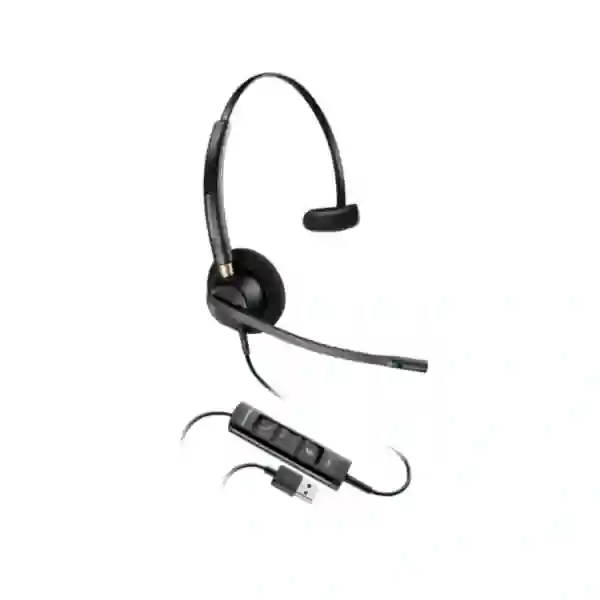
HP Poly EncorePro 515 Mono USB-C Headset for Clearer Business Calls
Equip a computer-based customer-service, help-desk or office team with a lightweight, wired single-ear headset designed for voice communication. The EncorePro 515 offers an adjustable noise-cancelling boom mic, on-cord controls and USB-A/USB-C connection flexibility. Match the exact connector and edition to your devices before ordering.
Important: HP identifies the standard EncorePro 515 as a USB-A model with USB-C connection capability via its USB-A/C arrangement. Confirm the actual supplied connector, whether the Teams-certified edition is required, and the current Tanzania quotation.
Wired USB-A / USB-C option
Noise-cancelling boom mic
Inline call controls
At a glance: who should consider it?
This headset is worth considering for fixed-seat office calling, customer support, reception, IT help desks and hybrid staff who need a wired computer connection and prefer one ear uncovered. It is not a substitute for a Bluetooth headset, a stereo listening device or a quick-disconnect desk-phone headset. For buyers in Tanzania, the next step is to confirm the exact model, connector option and intended calling application before requesting a quote.
Verified product facts and buying checks
| Product family | HP Poly EncorePro 500 Series |
|---|---|
| Model | EncorePro 515; monoaural, on-ear, wired |
| Computer connection | USB-A with an integrated USB-C option/adapter in the USB family; confirm exact supplied configuration |
| Microphone | Adjustable noise-cancelling boom microphone |
| Call controls | Inline mute, volume up/down, answer/end |
| Acoustic protection | SoundGuard Digital; configuration-dependent features may require Poly Lens |
| Manufacturer-listed weight | Approximately 52 g |
| Manufacturer-listed cable length | Approximately 2.085 m |
| Computer operating systems | Windows 10/11 and macOS listed by HP |
| Standard / Teams variants | Standard 783R0AA versus Teams-certified 783R1AA are manufacturer product numbers, not FourTeck SKUs |
| Colour | Black |
| What to verify before purchase | Exact variant, included connector/adapter, application interoperability, quote and supply terms |
Specifications are based on HP’s published information for the standard EncorePro 515 USB variant and family documentation; confirm the specific quoted unit and current manufacturer guidance.
What the EncorePro 515 is designed to do
The EncorePro 515 is a business communications headset rather than a general-purpose music accessory. It brings a microphone close to the user’s mouth, gives the user a single listening earpiece, and connects by cable to a suitable computer. That combination matters in customer-facing work where hearing the caller and being heard clearly are more important than recreational sound effects. Contact-centre representatives, reception staff, sales coordinators, support agents and remote employees can evaluate it for routine conversations. It is a sensible starting point when procurement requires repeatable wearing comfort, familiar call controls and a practical connection to modern PC hardware, rather than a premium entertainment headset.
The description “USB-C headset” needs one important qualification. HP’s product documentation describes the standard EncorePro 515 as a USB-A model with USB-A/USB-C connection flexibility through the same cable arrangement or adapter, depending on wording and packaging. A buyer who uses a USB-C-only laptop should check the supplied physical plug and adapter before ordering. The EncorePro 515 is not inherently a wireless device, a Bluetooth headset, a stereo headset or a desk-phone quick-disconnect model. These differences are not minor: they determine whether the product will plug into the intended equipment and whether its wearing style fits the job.
For Tanzania-based buyers, the most useful question is not simply whether the name includes “USB-C.” It is whether the specific headset configuration will work with the team’s PCs, calling application, work patterns and purchasing requirements. A buyer might need ten headsets for a service desk, one for a hybrid worker or a standard model for a new help-desk rollout. Each case benefits from confirming connection details, edition, expected working environment and any software prerequisites before a quotation is approved. FourTeck can be asked to verify the proposed item against that practical checklist.
USB-C and USB-A: understand the connection before you buy
USB-C describes a connector shape, not a promise that every USB-C host or every piece of call software behaves identically. The EncorePro 515 USB range is marketed for flexible computer connectivity, and HP documents USB Type-A plus a USB Type-A/C adapter or combined connector solution. In practical terms, a department using older USB-A desktop ports and newer USB-C laptops may be able to standardise on the same headset family. The exact cable end and supplied adapter must nevertheless be confirmed for the intended item, especially if the product title offered by a seller uses shortened wording such as “Mono USB-C.”
When purchasing for laptops with only USB-C, ask the seller to identify the connection shown on the actual packaged model. Check whether the computer has a free USB-C data-capable port, not merely a charging arrangement whose behaviour is unknown. If a docking station is used, test the headset directly at the laptop as well as through the dock. USB hubs, company security policies and operating-system audio-device selection can change the experience. The presence of a physical port makes a connection possible, but a successful voice call also depends on the computer recognising the device and the calling application choosing it.
The wired design removes the need to manage wireless pairing or a headset battery, but it introduces the normal discipline of cable placement. Route the cable so that the wearer can turn and reach their keyboard without pulling the headset, and keep it away from chair wheels. HP lists the standard model’s cable at approximately 2.085 metres, which helps buyers assess the desk layout before installation. It is enough to evaluate against the workstation’s port position; it should not be interpreted as a guarantee for every standing desk or distant docking arrangement.
Why a single-ear headset can work well in a shared office
The monaural format means that sound is delivered through one on-ear speaker. This is often useful when a receptionist must answer questions from people at the counter while remaining on a computer call, or when a service representative needs to hear a nearby colleague. The uncovered ear allows more awareness of the immediate environment than a headset that covers both ears. It does not make multitasking effortless, and users should still manage distractions and confidentiality. The main benefit is a deliberate balance between call listening and awareness of colleagues, supervisors, alarms or visitors in the same space.
A mono headset may be a less suitable choice in a consistently loud room. A second ear remains exposed to background sound, making concentration harder for some users. When employees work next to loud machinery, crowds or many simultaneous callers, a well-matched stereo headset or a different workstation arrangement may be preferable. Mono also does not imply automatic hearing protection from the surrounding room. That is a separate concern from the SoundGuard Digital technology applied to audio through the headset. A trial with real staff in the real work area is more informative than a specification table alone.
Fit preference is personal. Some people value leaving one ear uncovered, while others find a two-ear design more comfortable during long online meetings. Teams purchasing at scale should ask representatives from different roles to test the same call scenarios and give structured feedback on clarity, fatigue, awareness and comfort. This protects against buying the right product family for the wrong working pattern. The EncorePro 515’s strongest fit is usually speech-first work where a predictable wired connection and single-ear awareness are genuinely wanted.
Noise-cancelling microphone: what that means in practice
HP identifies a noise-cancelling microphone on the EncorePro 515, using a flexible boom that can be placed close to the mouth. This is microphone-side noise reduction, intended to help the person on the other end hear speech instead of as much surrounding activity. It is not the same as active noise cancellation for the user’s ears. That distinction matters when comparing headsets: one feature mainly concerns the outgoing voice, while the other reduces noise experienced by the wearer. Buyers should not expect the single earpiece to create a silent environment or to block a busy office simply because the product mentions noise cancellation.
Mic placement is as important as the feature name. Adjust the headband for a stable fit, then bring the boom into the recommended position near the side of the mouth without placing it directly in the breath stream. A microphone that is too far away can make speech faint, while one directly in front of the lips may capture distracting breath sounds. HP highlights positioning cues on the EncorePro 500 series, and a short voice recording is an easy way to confirm the result. Test at normal speaking volume, then listen back using the same calling software your team will use.
A headset microphone cannot repair a weak internet connection, an echoing room or a poor-quality call platform. In an office where several people speak at once, seating layout and voice etiquette still matter. Encourage agents to avoid shouting, keep keyboard and desk noise down during important calls, and use mute when speaking privately to colleagues. If the outgoing sound is still unclear after sensible positioning, check operating-system input gain and application selection before assuming a hardware fault. These simple steps make the verified microphone feature more useful in real deployments.
Inline controls for frequent call handling
The standard EncorePro 515 specification includes inline mute, volume up/down and call answer/end controls. Keeping these actions on the cord can reduce the need to navigate multiple windows during a conversation. In a customer support role, that may help an agent respond promptly when a call starts, adjust listening level or mute while consulting a colleague. The control module should be positioned where the employee can reach it without looking away from the task for long. It is best understood as a convenient input device rather than a complete call-centre console or a replacement for a software application’s controls.
Button support can depend on the communication platform and its device integrations. The presence of a call answer/end button does not establish that every browser softphone, PBX client or conferencing tool will map the button in the same way. Before deploying dozens of units, conduct a live test with your exact software: answer a call, place it on mute, restore audio, adjust volume and end the conversation. Repeat after reconnecting the device and after a workstation restart. If an action is not recognised, check the application’s audio and headset integration settings, supported devices and any managed software before deciding the product is incompatible.
For users who alternate between voice calls and meetings, teach the difference between muting the headset microphone and muting within the application. A visual indicator in a collaboration app may not always reflect hardware state exactly as expected. A short onboarding guide can tell staff where to check their mute status and how to recover from accidentally muted audio. This is a low-cost operational measure with practical customer-service value, especially when new employees are learning the desk layout and software together.
SoundGuard Digital and responsible listening levels
HP lists SoundGuard Digital acoustic protection for the EncorePro 515 USB model. Acoustic protection features address sounds delivered through the headset; they are not a substitute for safe workplace practices or for a quiet room. HP describes SoundGuard Digital as providing additional algorithm-based protection beyond basic sudden-noise protection. The detailed functions and their configuration may depend on supported software, including Poly Lens Desktop in the manufacturer’s documentation. Buyers should therefore confirm the intended deployment configuration rather than assume that every advanced protective function is automatically enabled out of the box.
A responsible headset rollout sets usable listening levels and checks them during actual calls. Volume should be high enough to understand the other speaker but no higher than necessary for comfortable speech. Supervisors should make it easy for an agent to report unusually loud or distorted audio, repeated sudden noises or discomfort. A headset feature can be one part of an audio safety programme, but it does not establish that an employer has met every applicable occupational requirement. This page makes no claim that the product has been locally approved for any particular workplace or regulatory purpose in Tanzania.
Software administrators should decide whether Poly Lens management is needed and how it fits their IT environment. Where relevant and supported, device settings and firmware management can help standardise a fleet; however, supported functionality, permissions and available versions should be reviewed using HP’s current instructions. Changes should be tested on a small group before a broad rollout. If the team does not need central management, the purchasing decision can still focus on fit, cable connection and voice clarity without assuming a particular cloud-management feature is essential to basic use.
Comfort, durability and the physical design
At approximately 52 grams in HP’s published standard-model specification, the EncorePro 515 is relatively lightweight in absolute terms. The on-ear, single-sided design and adjustable headband allow the user to tune the fit. A lighter headset can be attractive for repetitive calling work, but comfort depends on head shape, how the earpiece sits and how often the user takes a break. Before standardising the device, ask employees to wear it for meaningful work sessions instead of a brief demonstration. A headset that feels fine for two minutes may fit differently after a busy morning of phone conversations.
The EncorePro 500 series is designed for communications environments and uses a flexible microphone boom, adjustable structure and durable construction elements described by HP. Even equipment intended for repeated use benefits from basic handling discipline. Avoid pulling the headset by the cable, twisting the boom past its normal range or leaving the cord across chair paths. Store it where the microphone arm is not crushed by notebooks or heavy objects. For shared desks, allocate clear ownership and storage space so individual units are not mixed up or left in exposed locations.
HP’s published specifications describe foam ear-cushion padding for the standard model. Retailer photos and regional descriptions can differ, so the exact cushion and available replacements should be checked against the ordered part. If a team needs a specific material for cleaning, comfort or skin sensitivity reasons, request confirmation before purchase. The purchasing checklist should include replacement-part accessibility and cleaning procedures; neither material durability nor the cost of spare components should be assumed from the headset’s brand or appearance alone.
Sound quality for speech-first work
The EncorePro 515 is intended for spoken communication, so the evaluation should centre on intelligibility: how easily a user understands names, numbers, instructions and unfamiliar accents during a normal call. HP lists a speaker bandwidth of 20 Hz to 20 kHz and microphone characteristics in its specification, but frequency ranges on their own do not predict real-world speech quality. Microphone position, platform compression, background sound, bandwidth and the other caller’s equipment can all affect results. A better acceptance test uses typical conversations rather than judging the headset by the loudness of a sample video.
Set up a repeatable call-quality test with one person in a relatively quiet room and another in the intended operational area. Ask them to read product names, account-free reference phrases and numbers at ordinary speaking speed. Record whether either side must ask for frequent repetition. Check quiet and noisy periods, compare a direct laptop USB connection with the normal docking setup, and test at the volume level staff will actually use. Avoid collecting customers’ private conversations merely for testing. Short, consented test recordings provide enough evidence to compare configurations.
Because this is one-ear audio, it is not the obvious first choice for users whose primary requirement is immersive music, editing stereo media or listening for spatial detail. It can still reproduce computer audio, but product selection should match the main workflow. A customer-support headset is generally judged on microphone usability, stable connection, accessible controls and how naturally it works with the chosen phone or meeting platform. This user-centred evaluation is more reliable than treating a technical bandwidth figure as a guarantee of excellent results for every listening task.
Compatibility with Windows, macOS and business calling applications
HP lists Windows 10, Windows 11 and macOS for the standard EncorePro 515. That gives procurement a useful starting point for computer planning. However, the operating-system listing is not a certification for every application, every security policy or every hardware platform. A workstation must recognise the USB audio device, and the meeting or calling app must select it as its speaker and microphone. An organisation that relies on browser-based calling, a virtual desktop or a specific softphone should validate that workflow with the intended app version and its administrator settings.
For most evaluations, begin with the simplest path: connect the headset to the PC, select it in system audio settings, and run a microphone test. Then open the actual communication app and select the same input and output there. Make an internal call before taking a customer call. A device can work correctly in the operating system while an application continues to use a laptop’s internal microphone. Where many employees use identical profiles or centralised device images, IT teams should make the correct audio-selection procedure part of workstation onboarding.
Do not assume the EncorePro 515 connects directly to an analogue desk-phone headset socket, RJ9 handset connector or Poly Quick Disconnect base. USB and QD are distinct product approaches in the broader EncorePro series. A company running a desk-phone environment should provide the actual phone model and connection requirements when asking for a quote. Similarly, smartphone compatibility and support for individual USB-C mobile devices should be verified rather than extrapolated from a computer USB-C connector. The clearest buying request names the host device and software together.
Standard version versus Microsoft Teams-certified edition
HP identifies separate EncorePro 515 standard and Microsoft Teams-certified variants. In manufacturer references the standard mono USB model is associated with product number 783R0AA, while 783R1AA identifies the Teams-certified mono version. These are manufacturer product numbers to distinguish configurations; they are not a verified SKU for FourTeck Tanzania. The item described simply as “EncorePro 515 Mono USB-C” does not, by itself, establish which edition is in the box. Ask for the exact manufacturer’s part reference and the included connector before committing to an order.
The Teams-certified edition is relevant when a company requires the Microsoft Teams experience and associated control behaviour documented for that version. HP highlights dedicated Teams-related controls for applicable models in the EncorePro 500 family. Buyers should not present those Teams-specific behaviours as guaranteed on an unidentified standard unit. Equally, choosing the Teams-certified model should not be interpreted as a promise that every enterprise tenant setting, app build or device-management policy is automatically supported. Certification, software version and workplace policy serve different purposes in a managed environment.
If the team uses a mixture of Microsoft Teams, a browser help desk and an existing contact-centre application, compatibility tests are especially important. Decide which platform handles most calls, whether agents need answer/end controls in each platform and whether an enterprise certified edition is required by procurement. A small trial with the intended variant can prevent a situation where the headset captures audio but a particular software button does not behave as staff expect. Edition clarity also makes replacement orders and future expansion easier to manage.
Use case: customer service and contact centres
Customer service teams benefit when every representative has predictable equipment and clear instructions. The EncorePro 515’s boom microphone, wired computer connection and inline controls are useful attributes to evaluate for a desk-based service role. A representative can speak without holding a handset and keep their hands available for notes and case information. Because the design leaves one ear uncovered, it may also fit environments where agents occasionally coordinate with a supervisor beside them. The tradeoff is increased exposure to room noise, so the working environment should guide whether mono is the right standard.
The headset alone does not provide call routing, automatic call distribution, recording, analytics or customer relationship management. Those functions belong to the contact-centre platform and its configuration. When a buyer asks whether the headset will “work with our call centre,” ask for the precise platform, computer operating system and call-control expectations. A USB audio path may be straightforward, but deeper software actions must still be tested. An accurate quotation can separate the hardware item from any installation, licences, telephony integrations or training that the organisation may need.
Before a larger rollout, select a small representative group covering busy call shifts, quiet desks, shared workstations and agents who use more than one application. Test microphone intelligibility, physical comfort, volume consistency, connector wear, cable position and control mapping. Collect specific observations such as “application mute button not synchronised” instead of vague scores alone. This turns a headset purchase into a documented operational decision and reduces the chance that staff adopt their own unsupported workaround devices.
Use case: reception, help desk and front-office teams
Reception and front-office staff frequently switch between a remote caller and a person standing nearby. A monaural headset can be useful because it does not completely close off hearing from the surrounding desk. The user still needs to pause or mute a call before speaking with a visitor; the uncovered ear is an awareness feature, not permission to disclose confidential call information aloud. A wired headset also has a clearly defined place in a fixed workstation setup. It can be kept with the computer and avoids relying on an employee remembering to charge a separate wireless device.
Internal IT help desks have a different but related workload. An agent may read troubleshooting steps on screen while the caller describes a fault. The flexible boom gives the agent a consistent microphone position when they turn slightly toward the monitor, and inline volume can help adapt to callers with different voice levels. For a help desk that uses screen sharing, virtual desktops or multiple audio devices, test those transitions deliberately. A headset that works on a basic voice call may still require the application’s correct audio routing when the workflow changes.
For a small office, it may be useful to create two profiles: one for staff who need awareness of the room and another for workers who need stronger isolation from conversations around them. The EncorePro 515 can be evaluated for the first group rather than imposed universally. That approach respects staff preferences and makes procurement more defensible. The right recommendation is the headset that fits the task, not the one with the longest general feature list.
Use case: hybrid work and home offices
Employees who work partly from home and partly from an office often need a headset they can move between compatible computers without relearning pairing steps. The wired EncorePro 515 USB family provides a practical model for evaluating that pattern, subject to connector verification. Because it does not depend on a headset battery, the user is not managing charge cycles during the working day. A wired product does require an available physical port and sensible desk cable routing. Users who walk around during calls or need freedom from a computer may prefer a different, wireless style.
Home environments introduce their own noise sources, including nearby conversations, fans, pets and traffic. The noise-cancelling boom microphone can help outgoing voice, but it cannot guarantee silence. Practical habits remain important: sit away from the loudest sound source, close nearby doors when possible, and use mute while a non-work conversation is happening. A single-ear design can help someone remain aware of their immediate surroundings, though it is not always the easiest option for extended concentration. Ask each worker to report how the headset performs in their actual home setup.
A straightforward hybrid policy should state whether each person keeps one headset, whether spare units are stored at the office, and who supports configuration problems. The team should also know how to select the headset in each application after reconnecting. If a laptop uses a USB-C dock in one location and a direct port in another, test both paths. This small amount of preparation avoids blaming the microphone for a problem caused by a default-audio setting or an incompatible intermediary.
How to test the headset before deployment
A good evaluation begins with the complete working chain, not only the headset. Identify the host computer, operating-system version, connection port, docking station, communication application and normal network environment. Confirm the correct physical connector is supplied. Then connect the headset, select it as the operating-system microphone and speaker, and verify the input indicator responds to speech. Make a short internal call, test the inline controls and check that the person at the other end can understand you. Repeat through the actual application used by staff instead of assuming one successful voice recording proves full compatibility.
Next, assess the experience at the desk. Have the user adjust the headband and microphone, take ordinary calls and report whether the earpiece remains comfortable. Observe whether the cable snags, the microphone position is maintained and the user can locate mute without looking away for long. Ask a colleague to speak nearby to judge whether leaving one ear open helps or distracts. Record the findings against a defined acceptance checklist so that the final decision is based on observable results rather than the enthusiasm of an individual demonstration.
Finally, test recovery scenarios. Disconnect and reconnect the headset, restart the computer and reopen the calling application. Check whether audio routes correctly after moving between a dock and a direct port. Try a second workstation of the same approved type to see whether behaviour is consistent. For organisations that centrally manage devices, run any planned driver, firmware or application-management procedure on the pilot group first. When a question remains, record the exact model, application version and symptom so support teams can investigate efficiently.
Setup steps for a new user
Begin by confirming the connection variant before opening a large deployment batch. Insert the USB connector or the supplied approved USB-C arrangement into the appropriate computer port. Do not force a connector or use an unidentified adapter simply to make the plug fit. Wait for the operating system to recognise the audio device. In the sound settings, select the headset for microphone input and listening output. Use the built-in test feature to confirm that speech is being detected and that you can hear test audio at a comfortable level.
Put the headband on securely without overtightening it and position the boom microphone to the side of your mouth. The microphone should not rub against clothing or sit where breath hits it directly. Open the business calling or meeting application and check its separate microphone and speaker selectors, which may retain older defaults. Place a call to a colleague who can confirm voice quality and identify whether any background noise is distracting. Then test mute, answer/end and volume, remembering that application-specific controls may require integration support.
After a successful test, document the setup so the next employee can repeat it. Include a screenshot or written instruction for the relevant operating-system menus, the company calling application and the correct port on the laptop or dock. If centralised management or advanced SoundGuard configuration is in scope, IT should follow current HP guidance for the approved software environment. End-user instructions should stay simple: choose the headset, adjust the microphone, make a test call and know how to check mute.
Troubleshooting: no sound, unclear sound or missing microphone
If a user cannot hear the other party, start with the obvious checks: confirm that the headset is connected, listening volume is not turned down and the correct output device is selected in both the operating system and application. A USB headset may appear as a new audio device, but the application can continue to play through internal speakers. If the user connects through a dock or hub, test a direct connection to isolate the accessory path. A restart of the affected application may be appropriate after changing device selection, subject to the organisation’s IT support procedures.
If callers cannot hear the user, inspect the microphone position and mute state before changing software. Check whether the computer input meter moves when the user speaks and verify that the calling application has microphone access under operating-system privacy settings. A hardware mute action may not be presented identically in every application interface. If audio is faint, move the boom closer to the recommended position and check input sensitivity. If the microphone works in a local recording but not in the business application, focus next on that application’s permissions and input-device settings.
For crackling, intermittence or inconsistent call controls, note whether the issue appears only through a particular port, dock, application or workstation. Avoid repeatedly bending the cable near the connector to “fix” the sound. Check for visible damage and follow the organisation’s replacement or service policy when needed. If advanced headset settings are used, verify they are applied consistently. Keeping a simple log of the affected PC, operating system, software version and test result makes technical support faster and prevents unnecessary replacement of functioning equipment.
Managing a group of headsets over time
A team with many identical headsets needs more than a purchase invoice. Create an inventory identifying which department or workstation owns each device, including the verified manufacturer part number and your own internal asset reference. Do not confuse a manufacturer model number with the local supplier’s SKU. Document the selected application settings and any approved device-management configuration. This gives IT a consistent baseline when onboarding employees, replacing damaged units or moving staff between desks. For shared headsets, add a clear cleaning and handover routine that suits the ear-cushion material.
It also helps to agree how staff report problems. A user should be able to say “the microphone is not detected on this dock” or “the call button is not recognised in our web softphone,” rather than having to diagnose the issue. Support can then compare a known-good headset, a known-good PC and a direct USB connection. If several staff report the same symptom after a platform update, investigate the software environment before replacing multiple headsets. Device fleet management is more efficient when each failure is described in operational terms.
Replacement planning should reflect actual usage. High-volume calling teams can experience more handling wear than occasional meeting users, but a published average lifespan should not be invented without a reliable measurement. Ask the supplier about exact spare parts, service options, available support terms and replacement lead times for the quoted configuration. Where a critical contact-centre desk cannot be left without audio, define a sensible internal spare strategy based on your own staffing and service requirements. This is more valuable than relying on vague promises of durability.
How it compares with other headset approaches
The first comparison is mono versus stereo. The EncorePro 515’s one-ear format makes sense when awareness of nearby speech is part of the job; a two-ear headset may suit a consistently noisy work area or employees who prefer fewer distractions. In the EncorePro family, stereo alternatives such as the 525 should be evaluated separately rather than treated as interchangeable. The choice is about environment and staff workflow, not a blanket claim that one format sounds better. If many employees share an open office, a pilot with both wearing styles can uncover meaningful preferences.
The second comparison is USB versus a quick-disconnect or desk-phone-specific headset. A USB model is intended for suitable computer audio paths; a QD model belongs to a different connection ecosystem and may depend on an appropriate adapter. Buyers upgrading from legacy telephony equipment should inspect the old connection instead of assuming that every product labelled EncorePro will reuse the same cable. For a computer-first support desk, USB connection flexibility can simplify planning. For a desk-phone workflow, verified compatibility with the phone and any adapter is more important than the series name.
The third comparison is wired versus wireless. The EncorePro 515 avoids managing a headset battery and pairing sequence but limits movement to the cable’s reach. Wireless models can help users walk between work areas, at the cost of charging and wireless-management considerations. Similarly, a premium headset with active speaker-side noise cancellation addresses a different requirement from a mono headset with a noise-cancelling boom mic. Decide which problem you are solving before comparing prices or lists of features. Buyers looking for one simple PC call headset may not need the extra complexity of other categories.
Procurement questions worth asking in Tanzania
When requesting a quotation, describe the exact intended equipment rather than relying on a shortened product name. State that you are evaluating the HP Poly EncorePro 515 Mono USB-C Headset, and ask the seller to confirm the underlying manufacturer product number, USB-C connection arrangement and whether the unit is the standard or Teams-certified edition. Include the quantity, the computer models, and the applications employees will use. If the team relies on a particular call-control function, say so before order approval. This prevents a conversation about the wrong variant and creates a useful record for acceptance testing.
Availability, price in Tanzanian shillings, taxes, delivery terms, supplier support and applicable warranty handling depend on a current, verified offer. No local figure should be assumed from an international retailer listing, a currency conversion or a manufacturer’s general global statement. Request a written quotation identifying the specific item and terms. For a multi-unit purchase, request clarity about what is included in each box, the condition of packaging and whether the desired connector arrangement is part of the supplied unit. If your organisation needs a formal purchase order, match the quoted reference against the approved configuration.
An effective evaluation can include one or more pilot units before ordering the balance, subject to supplier and project terms. Select a representative workstation in Tanzania with the actual communication software and typical network conditions. Record audio quality, comfort, control behaviour and any configuration work required. Use that evidence to decide whether the EncorePro 515 is the right choice for the whole team or only certain roles. FourTeck Tanzania can be asked for an item-specific quotation and compatibility discussion; this page does not assert current stock, delivery coverage, certification or commercial terms.
Accessibility, training and day-to-day use
Different employees may need different levels of explanation or adjustments to use a headset comfortably. Make the setup guidance easy to read and teach people to locate the physical mute and volume controls without needing to search a software menu. Demonstrate how to distinguish the headset from the laptop’s built-in microphone in the calling app. Encourage staff to report discomfort, poor fit or trouble using controls early, so the team can investigate the cause rather than treating every complaint as an individual preference. Workplace accommodations should be assessed with the employee’s actual needs.
A headset is only one element of a usable calling station. Screen height, chair adjustment, desk layout, background sound and room privacy all influence call experience. A cable should not create a tripping or snagging hazard, and staff should have enough space to turn their heads without tugging the connector. For shared spaces, establish a clear policy about speaker volume and discussing customer information where others can overhear. Keeping one ear uncovered supports awareness, but it also increases the importance of respecting the surrounding environment and protecting sensitive conversations.
The most effective training is brief and scenario-based. Ask a new employee to answer a practice call, mute to consult a colleague, restore the microphone, adjust listening volume and finish the call. Follow with a simple test of reconnecting the headset after a lunch break or a desk move. Provide a point of contact if the control button does not behave as expected in a specific application. These steps are easy to build into induction and help employees use the headset’s verified features confidently.
Security and privacy in voice workflows
The EncorePro 515 is a wired audio accessory, not a security control for a telephony or conferencing platform. It does not independently encrypt business calls, enforce identity checks, protect customer records or manage recording permissions. Those duties belong to the organisation’s network, devices, applications and policies. The headset can improve microphone positioning and make mute accessible, but it cannot guarantee that the surrounding room is private. Procurement and IT should therefore assess it as one part of a broader communications environment, especially where staff discuss financial or personal information.
When using a headset in a shared room, agents should check who can overhear their side of a conversation and follow company policies for confidential topics. A mono earpiece may let the wearer hear nearby people, but it also means those people may still hear the employee’s spoken response. Use an appropriate private room or other approved workflow for sensitive exchanges. If calls are recorded, follow applicable legal and company requirements for notice, consent, access and retention; do not assume a headset model changes those obligations. Avoid collecting real customer conversations during equipment tests unless properly authorised.
IT teams should also review any optional device-management tools through normal software governance. A management application may have useful fleet settings, but the organisation should still assess deployment permissions, updates and its own compliance requirements. These checks are not evidence of a particular vulnerability or a reason to avoid the product. They are normal steps when introducing any managed accessory into an enterprise environment. A clear separation between hardware capabilities and software governance keeps the product page accurate and the purchase decision well informed.
A practical decision framework for buyers
Begin with the environment. Is the employee at a fixed computer most of the day, or do they move frequently while calling? Is it helpful to hear a nearby supervisor, or does room noise make single-ear listening difficult? Next consider the host: does the workstation have USB-A, USB-C or a dock, and is the correct connection arrangement supplied? Then consider the calling software: is it Microsoft Teams, another softphone, a browser service or a mixture? Finally decide what successful use looks like, such as intelligible speech, comfortable fit and reliable mute and call controls.
The EncorePro 515 moves up the shortlist when the answers point toward fixed-seat computer calls, a lightweight mono headset and an adjustable noise-cancelling microphone. It moves down the shortlist when the requirement is Bluetooth mobility, stereo listening, an analogue phone connector, proven mobile-phone compatibility or active noise cancellation at the ear. A careful product page should explain both sides. Features matter only when they solve a real task, and an apparently small connector or edition difference can outweigh an otherwise attractive specification.
Use the pilot results and the supplier’s exact quotation to make the final choice. An item with clear documentation and a repeatable installation method is easier to support than an ambiguously described unit. Keep a copy of the validated part reference, agreed connector details, successful application tests and any purchase terms. These records support subsequent orders without depending on memory or informal descriptions. If further information is needed, request it before purchase rather than filling gaps with assumptions about price, stock or local support.
Technical specification interpretation
HP’s published figures for the standard EncorePro 515 include a 135 mm boom microphone, approximately 290 degrees of microphone-boom rotation, a 30 mm speaker, an approximately 52 g headset weight and a cable of about 2.085 m. Those are useful dimensions for comparing the model with workstation needs. They do not mean the microphone should be rotated to its mechanical limit during ordinary use, nor do they imply identical fit for every employee. The specified cable length can be assessed against the computer’s location, while the weight offers a starting point for comfort evaluation.
HP also lists a microphone bandwidth of 35 Hz to 21 kHz, a speaker bandwidth of 20 Hz to 20 kHz, and a noise-cancelling microphone. These specifications should be read as manufacturer-declared properties, not as direct measures of perceived call clarity in a particular network. Application settings, compression, room acoustics and voice position can change results. Manufacturer part numbers used in product references distinguish editions, and the exact quoted package should resolve any regional naming or accessory differences. This page deliberately does not claim an unverified Tanzania SKU, stock level or price.
The published compatibility listing names Windows 10, Windows 11 and macOS. Buyers running a particular managed operating-system build, thin client or virtual desktop should confirm their deployment separately. Call answer/end integration may vary by software even when the basic USB microphone and speaker functions operate. Advanced acoustic settings may require Poly Lens configuration, so installation and support teams should check current manufacturer instructions. Together, these qualifications keep the useful specifications in context and reduce the risk of misleading a procurement decision.
Frequently overlooked details in a headset quotation
A short product description can hide important assumptions. For example, “USB-C” may describe the connection option without clearly stating whether the package uses a USB-A connector with an integrated USB-C adapter. “Teams compatible” can be used casually in conversation even though HP identifies a distinct Teams-certified EncorePro 515 edition. “Noise cancelling” may be mistaken for active cancellation at the ear when the verified feature relates to the microphone. And “headset for call centres” does not prove compatibility with a particular PBX client or browser-based call-control integration.
Another frequent omission is the intended user’s daily pattern. A headset for an eight-hour calling shift should be evaluated differently from one for occasional internal meetings. Comfortable fit, physical control reach, cable position and easy replacement can matter as much as a frequency specification. If different departments have different needs, avoid forcing a single specification on everyone simply to reduce the number of purchasing lines. Standardisation is useful only when the standard product actually works for the common workflows.
Before issuing approval, have procurement and IT both read the final quote. Procurement can verify the identified product, count, delivery conditions and commercial documentation. IT can confirm the port, device variant, calling platform, test procedure and any deployment settings. End users should contribute feedback about physical comfort and audio usability. This three-way check is especially valuable for multi-seat customer service environments, where an ambiguous product name can multiply into many avoidable support incidents.
Common questions about the EncorePro 515
Is the HP Poly EncorePro 515 a USB-C headset?
The EncorePro 515 USB family supports USB-A and USB-C computer connection options. HP describes the standard version as a USB-A headset with USB-A/USB-C adapter or integrated connection flexibility. “USB-C” in a shortened title should not be taken as proof of a particular connector in the supplied box. Confirm the exact manufacturer reference and adapter arrangement before buying for USB-C-only laptops.
Is it a mono or stereo headset?
It is a monoaural, single-ear on-ear headset. One ear receives the call audio while the other is uncovered. This can help staff remain aware of nearby colleagues, but it offers less isolation from room noise than some two-ear alternatives. If immersion, reduced distraction or stereo media playback is the priority, evaluate a different wearing style rather than expecting the EncorePro 515 to behave as a stereo model.
Does noise cancelling block office sound for the wearer?
The verified noise-cancelling feature is associated with the boom microphone and helps reduce noise in outgoing speech. It should not be confused with active noise cancellation in the earpiece. The single-ear design leaves one ear open to the room, so a loud work environment can still be distracting. Make a test call in the real workspace to judge whether the balance suits the user.
Can I use it with Microsoft Teams?
HP offers a separate Microsoft Teams-certified EncorePro 515 variant, identified in manufacturer references as 783R1AA, alongside the standard 783R0AA variant. If Teams certification or dedicated Teams control behaviour matters to your organisation, request the explicitly certified version and verify its application behaviour. A product title that omits the edition is not enough to establish certification.
Will the inline call button work with every softphone?
Not necessarily. HP specifies inline mute, volume and answer/end controls, but call-control integration depends on the calling platform and its supported-device settings. Test answer, end, mute and volume in the exact software and version used by your team. Basic microphone and speaker operation should also be checked separately because it does not prove every application-specific control is mapped.
Can the headset connect directly to an office desk phone?
Do not assume so. The EncorePro 515 USB model is primarily a wired computer-audio headset. Analogue desk-phone headset sockets, RJ9 connections and Poly Quick Disconnect accessories use different connection arrangements. If you use a hardware phone, give the supplier its manufacturer and model and ask for a specifically verified compatible headset or adapter solution before ordering.
Does the headset need charging or Bluetooth pairing?
No charging or Bluetooth pairing is part of the standard wired USB headset use described here. It receives its connection through the compatible computer USB arrangement. That is convenient for fixed desks, but the cable limits movement and must be routed safely. Buyers needing to walk away from their computer while speaking should evaluate a wireless headset rather than assuming this model provides mobility.
Which computers and operating systems are listed?
HP lists Windows 10, Windows 11 and macOS for the standard EncorePro 515. A compatible USB port and proper device selection are still required. For managed computers, virtual desktops, docks, security-controlled laptops and specialised call platforms, perform a pilot using the precise environment. A published operating-system listing does not constitute a guarantee of application interoperability.
What does SoundGuard Digital do?
SoundGuard Digital is HP Poly’s acoustic protection technology for the USB model. It is intended to help manage aspects of sound exposure through the headset, with advanced functions and configuration subject to manufacturer instructions and software requirements. HP documentation notes a role for Poly Lens Desktop in enabling certain SoundGuard Digital functions. It is not a substitute for sensible listening volume or an organisation’s broader hearing-safety practices.
Is the EncorePro 515 suitable for long customer-service shifts?
Its lightweight manufacturer-listed design, adjustable fit and communication-focused microphone make it worth evaluating for repeat calling work. Comfort cannot be guaranteed for every wearer or shift length. Pilot it with employees during realistic sessions, checking earpiece pressure, boom stability, cable placement and room-noise distraction. If the job needs greater acoustic isolation or mobility, consider another headset style.
What is the headset’s cable length and weight?
HP’s published standard EncorePro 515 specification lists approximately 2.085 metres of cable and a 52 g headset weight. These measurements help plan the position of laptops, USB ports and docks, but do not by themselves guarantee that a workstation layout is practical. Confirm the exact delivered variant and test the cord path at a representative desk.
Is it compatible with a smartphone that has USB-C?
Do not assume smartphone compatibility from the presence of a USB-C connector option. HP’s product specification primarily describes compatible computer use. A mobile phone can have different USB audio behaviour, system policies and app requirements. If smartphone calling is essential, provide the exact phone model and intended application and obtain verified compatibility for that combination before purchasing.
What price or availability applies in Tanzania?
No Tanzania price or live stock statement is included because neither has been verified for this item. Request a current, written quotation that identifies the exact standard or Teams-certified variant, physical connection arrangement, quantity, commercial terms and any locally applicable support conditions. Do not treat prices or delivery terms from overseas retailers as evidence for a Tanzania transaction.
What should I send when requesting a quotation?
Provide the product name, quantity, computer models, operating systems, USB-A or USB-C port details, business calling application and any requirement for Microsoft Teams certification. Mention whether the units will be used at fixed desks, shared stations or hybrid workplaces. Ask the supplier to verify the exact manufacturer part number, included connector and current terms. This makes it easier to match the quotation to the intended deployment.
Request an EncorePro 515 configuration and quotation
To evaluate this HP Poly EncorePro 515 Mono USB-C Headset for your Tanzania business, request confirmation of the manufacturer part number, standard or Teams-certified edition, included USB-C connection arrangement, compatibility considerations and current commercial terms. Share your computer models, calling application, quantity and preferred operating environment. A clear specification lets your team make a better purchasing decision without guessing about stock or local pricing.
Contact FourTeck Tanzania to request a product-specific quote and compatibility review.




Reviews
There are no reviews yet.