
PROFESSIONAL USB HEADSET • TANZANIA BUYER GUIDE
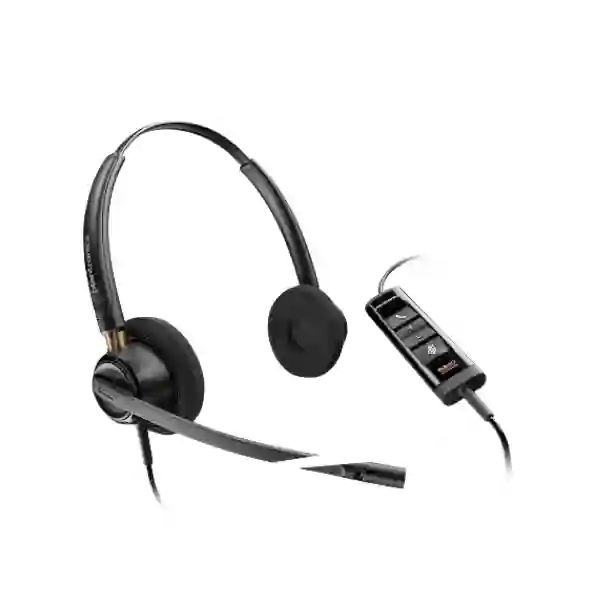
HP Poly EncorePro 525 Stereo USB-C Headset
A wired stereo office headset with a noise-cancelling boom microphone and inline controls for computer-based calling. Confirm whether your order requires the standard or Teams-certified variant, and verify the supplied USB-C/USB-A connection.
Quick reference: what HP specifies
Use this as a technical comparison aid. The supplied model, cable arrangement and all commercial terms must be confirmed for the quoted item.
| Wearing style | On-ear stereo, two earcups |
|---|---|
| Microphone | Noise-cancelling boom microphone |
| Speakers | 30 mm drivers |
| Controls | Mute, answer/end, volume up/down |
| Cable | Approximately 2,085 mm |
| Weight | Approximately 74 g |
| Speaker bandwidth | 20 Hz–20 kHz, referenced standard version |
| Microphone bandwidth | 35 Hz–21 kHz, referenced standard version |
| Connection | USB Type-A and USB-C support; confirm actual cable/adapter supplied |
| PC operating systems | Windows 10, Windows 11, macOS |
| Acoustic protection | SoundGuard Digital; software enablement qualification applies |
| Manufacturer variants | 783R3AA standard; 783R2AA Teams-certified |
| Included items | HP identifies the headset; confirm additional accessories in quotation |
A headset built around professional conversations
When employees handle customer calls throughout the day, the key requirement is dependable communication rather than an elaborate set of entertainment features. The EncorePro 525 uses a wired computer connection, stereo on-ear speakers, a boom microphone and accessible inline controls. Together, these elements make sense for desk-based voice work where the user needs to hear instructions, speak clearly and stay engaged with the calling application. A headset cannot fix every communication problem, but a suitable device can remove some of the unnecessary friction caused by poor microphone placement or difficult controls.
The HP Poly EncorePro 525 Stereo USB-C Headset should be evaluated as a complete workstation component. The caller still needs a compatible computer, approved software and a functioning network connection for internet-based calls. Buyers should assess the work environment, required calling platform, comfort expectations and physical connector before ordering. Its professional features are relevant to office personnel, reception desks and contact-centre agents, while its limitations matter just as much. This page explains those trade-offs so purchasers can make a specific, verifiable decision rather than relying on a broad claim of universal compatibility.
Understanding the USB-C and USB-A description
The manufacturer’s naming creates an important purchasing question. HP identifies the standard EncorePro 525 as a USB-A headset and describes compatibility through a USB Type-A connection or USB Type-A/C adapter. Its published features also discuss USB-A and USB-C connectors on the same cable. Retailer descriptions sometimes emphasise one connector and sometimes both. The safe approach is to request confirmation of the exact connector arrangement included with the quoted product. USB-C support is relevant for modern laptops, but a product name by itself does not prove that every unit has an identical fixed USB-C plug.
For a fleet purchase, take an inventory of the host ports before choosing a model. Some desktops offer USB-A, some recent laptops primarily use USB-C, and others rely on docking stations. Confirm whether the headset will connect directly or through a dock. USB-C describes the connector type and does not automatically promise compatibility with every phone, USB-C accessory or specialised terminal. Ask the supplier for the precise HP product identifier and the connection configuration being supplied; this is more reliable than inferring contents from a listing title.
Why the stereo design matters
The EncorePro 525 covers both ears with an on-ear stereo design. This can be helpful when employees need to concentrate on a caller while coworkers are speaking nearby. Two-ear audio is also a familiar arrangement for staff who move between voice calls and online meetings during the day. The design does not create complete acoustic isolation, and users may still hear nearby conversation or equipment noise. Its value comes from the overall balance between listening focus, comfort and the ability to perform normal work.
Think about how the employee interacts with the wider office. An agent who spends an extended period listening to customers may prefer both ears covered. A receptionist who must monitor walk-in visitors could find a single-ear headset more suitable. The decision is not merely stereo versus mono as a specification; it is about the job. Try the selected design at the actual desk and ask whether staff can comfortably hear remote speech while responding appropriately to what happens around them.
Microphone clarity for customer calls
HP specifies a noise-cancelling microphone on a movable boom. The purpose is to reduce unwanted sound that reaches the remote listener, making speech easier to understand during routine workplace conversations. This is particularly relevant where several agents speak in the same room or an employee works near keyboards and office equipment. It does not mean every possible background sound disappears. Room acoustics, microphone positioning, speaking volume and calling-software processing all influence the result heard by the person at the other end.
Evaluate the microphone by making calls in the real environment rather than relying only on product wording. Ask a permitted test listener to assess clarity, consonants, interruptions and nearby voices. Repeat the test when the office is active, then compare the result with your current headset at a similar speaking level. Avoid interpreting a short sample from a quiet room as proof of performance in a busy contact centre. Correct positioning and sensible workplace noise management remain important even with a noise-cancelling microphone.
Positioning the adjustable boom
Proper microphone placement is a small step with a large practical effect. HP describes positioning guidance for the flexible microphone, and the manufacturer lists a 135 mm boom with 290-degree rotation for the referenced standard version. Adjust the headband first, bring the microphone near the speaking position indicated in the user guidance and make a short test call. A microphone that points toward clothing, sits too far from the mouth or picks up fan airflow may produce avoidable problems despite the headset’s intended design.
Where workstations are shared, each user should adjust the device rather than assuming the previous wearer’s configuration will fit. Introduce a short routine at shift start: adjust the earcups, position the boom, check that the intended microphone is selected and verify mute status. Staff should not repeatedly bend or pull the boom beyond its intended movement. If audio quality changes suddenly, check physical positioning before changing the entire software setup or concluding that the headset has failed.
Comfort, weight and personal fit
HP publishes a weight of about 74 g for the standard EncorePro 525 USB headset. A light construction is useful for employees who take frequent calls, but no published weight can guarantee comfort for every person. Head shape, glasses, ear sensitivity, temperature and the duration of wearing all matter. The adjustable headband and on-ear cushions need to fit the individual rather than be set to a single position for the whole team. Include different users in an evaluation, especially employees who wear glasses.
Ask trial users about pressure after ordinary working periods, not just the first few minutes. Check whether the earcups move when a person turns their head and whether the cable interferes with their desk. Encourage reasonable breaks in accordance with workplace policies. If some staff find the fit uncomfortable, consider alternatives rather than treating a standardised model as mandatory for everyone. Good headset selection recognises comfort as a real operational requirement alongside audio quality and compatibility.
SoundGuard Digital and listening safety
The EncorePro 525 specification includes SoundGuard Digital, HP Poly’s acoustic protection technology for managing certain risks from unwanted or excessive listening levels. HP describes digital processing intended to provide protection while preserving natural speech. Importantly, HP also states that the Poly Lens Desktop App is required to enable the listed SoundGuard Digital functions. A business relying on these features should verify the exact software and configuration instead of assuming that every protection setting is fully active without any deployment work.
The feature is not a replacement for comfortable listening volume, appropriate workplace practices or professional assessment of an unusually noisy environment. Encourage staff to reduce volume when possible rather than simply raising it to overwhelm surrounding conversations. IT and workplace safety personnel should agree on settings and review any relevant policies. Do not treat the presence of SoundGuard Digital as proof of compliance with a particular Tanzanian occupational requirement. Formal compliance needs evidence and assessment specific to the workplace.
Inline buttons for everyday calling
The wired control unit offers microphone mute, call answer or end and volume adjustment, according to HP. These buttons can be useful when the employee is viewing a customer record, working in a support ticket or using a full-screen application. Instead of looking for the volume control in several menus, the user has a physical control near the cable. That can make routine actions easier, particularly for people handling repeated calls at a desk.
However, physical audio controls and integration with call software are not always the same thing. A platform may support listening and speaking while handling the answer button differently. During a pilot, test each action using the organisation’s actual softphone. Check the mute indicator in both the device and software where available. Teach users how to recover if they accidentally mute a call or if software control behaviour changes after an update. The headline feature is useful, but the workflow must be confirmed rather than assumed.
Why choose a wired headset
A wired headset avoids some common wireless administrative tasks. There is no headset battery to recharge or Bluetooth pairing routine to complete before starting a call. Employees who remain at a workstation may appreciate this predictable approach. HP lists an approximately 2.085 m cable on the referenced model, providing some flexibility for desk routing while keeping the user physically connected. The cable length is a practical specification, not a promise that the employee can move freely across the office.
Wired connectivity is less suitable for users who routinely walk to a whiteboard, cross the room or leave the desk while speaking. Assess whether movement is essential to the job. Also consider chairs, desk edges and adjustable work surfaces, since a cable can catch or be strained. A suitable deployment routes the wire out of the way and keeps the USB plug accessible. Choose corded equipment for its actual benefits, not as a claim that it is the best possible arrangement for every role.
A first-time setup sequence
Connect the headset to a compatible USB port using the supported connector arrangement for the supplied variant. Allow the operating system to identify the audio device, then open the computer sound settings and choose the headset for both output and microphone input. Next, open the calling application and check whether it has separate device selections. Many calling platforms can use an operating-system default, but others retain their own preferred devices. Confirm settings in the actual software employees use.
Place a short internal test call. Listen through both earcups, speak at a normal volume, adjust the boom, test mute and verify any necessary inline call controls. If sound remains on the laptop speaker, check device selection before treating it as a headset defect. On corporate computers, installation permissions and endpoint policies may limit software changes. A brief, organisation-specific setup guide is valuable for new staff and for anyone moving between laptops, docks and other computers.
Windows, macOS and application compatibility
HP lists Windows 10, Windows 11 and macOS for the standard EncorePro 525 specification. That supports evaluation with common business computers, but compatibility is a layered issue. Operating-system audio recognition, USB connection, call-control integration and virtual desktop behaviour are separate considerations. A headset may work as a speaker and microphone without offering every supported function inside a particular business application. Test the activities staff truly need rather than assuming full integration from the existence of a USB port.
For organisations with mixed endpoints, prepare a basic compatibility matrix. Include the operating-system version, main calling application, docking arrangement, headset variant and required button functions. Check what happens after a computer restart or when the USB cable is reconnected. If staff use remote desktops or thin clients, test audio redirection explicitly. Document successful combinations so IT can reproduce them and avoid support tickets based on untested assumptions.
Standard EncorePro 525 versus Teams 525-M
The standard EncorePro 525 and EncorePro 525-M are distinct product variants. HP publishes a standard version under manufacturer product number 783R3AA and a Microsoft Teams-certified version under 783R2AA. The Teams-certified model is intended to provide Teams-specific features, including app-oriented functionality documented by HP. A buyer who requires formal certification should state that requirement in the quotation. The words EncorePro 525 alone do not establish that every version is the Teams-certified edition.
If employees make calls primarily through a standard UC softphone, the usual version may be worth comparing. If their workflow depends on the native Microsoft Teams experience, request the exact Teams-certified item and verify the expected controls. Manufacturer product numbers are included here to help identify variants; they are not a verified SKU for the FourTeck Tanzania listing. The target listing SKU remains unassigned until supplied as such. For procurement, written variant confirmation matters more than an ambiguous title.
Meeting software and softphone questions
The headset is aimed at computer communication, including environments where staff use UC applications or browser-based calling. Basic audio operation can be straightforward on a compatible computer, but integration differs between software products, versions and managed IT configurations. Some systems handle headset answer and end functions, while others use only standard speaker and microphone input. Advanced features should be verified for the intended application rather than implied for every possible platform.
Create a real-world test list covering incoming calls, outgoing calls, mute, volume, reconnecting after sleep and handling a second call if applicable. Check whether the headset remains selected after a browser update or a docking change. If the company uses virtual desktop infrastructure, include a dedicated test for device redirection and peripheral policy. Where integration is incomplete, IT may still decide that basic audio is sufficient, but that needs to be an informed purchasing choice.
Customer service and contact-centre use
A contact-centre agent often works inside a customer relationship tool while speaking to a caller. Stereo listening may help the agent focus on customer speech, while the boom microphone and inline controls support routine call handling. These are practical reasons to consider the EncorePro 525 for a team that spends much of its time at connected computers. The device itself does not provide the softphone, queue management system, telephone service or network capacity required for the wider contact-centre operation.
When purchasing for several seats, consistency is as important as individual features. Confirm the model, connection, user comfort and application compatibility before making it a standard issue. Keep a small number of replacement units if operationally appropriate and assign responsibility for device support. Avoid claiming that a headset alone guarantees faster resolution times or customer satisfaction. Training, staffing, the business process and communications infrastructure play major roles in those results.
Reception, sales and support desk workflows
Reception staff, inside-sales teams, help desks and administrators may all benefit from a dedicated business headset, but they do not use communication equipment identically. A receptionist might need to hear walk-in visitors while a support agent may prefer both ears on a technical conversation. A sales representative may alternate between frequent short calls and longer meetings. The EncorePro 525 should therefore be assessed by the employee’s actual duties and not just by department name.
Ask users to demonstrate a normal day during a trial. Can they find the mute button without losing attention? Is it easy to hear a caller while working in the business system? Does the headset fit comfortably with eyewear? Is the wired cable acceptable when moving a chair or standing briefly? The answers reveal whether the product is a good fit. A single company can reasonably deploy more than one headset design if work patterns or accessibility needs differ.
Hybrid work and home office considerations
The EncorePro 525 may suit employees moving between supported office and home computers because it is a wired USB device rather than a headset that requires wireless pairing. Its connection options can be useful when hardware generations differ, provided that the supplied connector is verified. Users still need the required calling application, microphone permissions and a suitable internet connection for online calls. The headset cannot repair poor bandwidth, unstable Wi-Fi or a failing softphone service.
Home workspaces can contain family conversation, traffic, fans or reflective room surfaces. A noise-cancelling microphone may reduce some unwanted sound reaching the caller, but not every disturbance. Encourage staff to select a quiet location, place the boom correctly and test the device at realistic times. Confidential conversations also require privacy practices independent of headset choice. For any home-office supply, confirm the user’s laptop ports and permissions before treating the equipment as compatible.
Poly Lens and software management
HP describes Poly Lens as part of the management and support ecosystem for eligible Poly devices. It can be relevant when IT wants to configure supported settings or maintain software updates across a deployment. The manufacturer’s SoundGuard Digital footnote makes software configuration particularly important for organisations that intend to use those protection functions. The presence of a product feature on a web page does not guarantee that every setting is available under every organisation’s deployment policy.
Ask IT to confirm the supported application version, permissions, device recognition and update process for the exact EncorePro 525 variant. On shared PCs, check what happens when a new user signs in. For virtual or heavily restricted environments, make sure the software can operate under the applicable policy. An appropriate pilot should cover settings as well as sound quality. Do not promise access to cloud administration, firmware functions or a specific management service without verifying the customer’s technical environment.
Rollout planning for IT administrators
A successful bulk rollout starts with a controlled sample instead of shipping the same headset to every desk without evaluation. Select representative computers and teams, including any docked laptops, remote desktops and browser-based softphones. Identify the critical functions and record whether they work. Keep the exact manufacturer identifier and configuration in asset documentation. This provides a reference when new units are ordered or a software update changes endpoint behaviour.
The rollout guide should cover connecting the headset, selecting audio devices, positioning the microphone and checking mute. Include the organisation’s support path for cable damage, microphone issues and software configuration. Avoid combining several unrelated changes during a troubleshooting session because that makes results hard to interpret. A well-documented deployment can make support more predictable, but the equipment itself does not guarantee fault-free operation. The purpose of testing is to identify constraints before they affect customer calls.
Cable routing and physical care
A corded headset is handled frequently, so small habits matter. Route the approximately 2.085 m cable where it is less likely to meet chair wheels or moving desk parts. Leave enough slack for normal head and chair movement without creating a floor hazard. Unplug the device by holding the connector rather than tugging the cable. Do not exceed the intended movement of the microphone boom. If an employee uses a height-adjustable desk, check cable clearance at both working positions.
Provide a safe place to store the headset when not in use. Inspect damaged insulation, bent connectors and inconsistent audio before returning a unit to active calling duty. Replacement parts and repair processes should be confirmed for the exact supplied variant rather than assumed. A simple care procedure is especially useful for contact centres where staff work in shifts. Such procedures reduce avoidable handling problems but should never be described as a guarantee against wear or breakage.
Hygiene at shared workstations
Because the earcups and boom sit close to the user’s face, shared headsets need clear hygiene practices. Follow current manufacturer care recommendations for cleaning and avoid soaking the device or spraying liquids into electrical openings. Do not assume that every household cleaning chemical is safe for ear cushions or plastics. Allow appropriate drying before reconnecting equipment. Managers should establish a handover procedure when a device is used by multiple employees in one day.
Where possible, assigning a headset to one employee may simplify hygiene and fit. Where equipment is shared, supply suitable cleaning materials and record any defects. Check cushions for wear and ask about authorised replacements for the exact model. Never represent the box as including spare pads or cleaning supplies unless confirmed in the quotation. Product care should support normal operations without introducing damage from excessive moisture, inappropriate solvents or rough handling.
Useful published technical characteristics
HP’s referenced standard EncorePro 525 specifications list a stereo on-ear design, noise-cancelling microphone, 30 mm speakers, approximately 74 g weight, 2.085 m cable and inline controls. The same manufacturer specification gives a speaker bandwidth of 20 Hz to 20 kHz, microphone bandwidth of 35 Hz to 21 kHz and a rotatable boom. These figures describe hardware characteristics of the documented variant; they do not guarantee the full audio range will be transmitted through a particular calling platform or network.
Manufacturer listings use slightly different USB descriptions, so it is important to confirm the actual model and connector arrangement. HP lists the headset as the principal box content. Do not assume a carry case, spare pads or special dock is part of the offer unless specified. Likewise, published warranty language must be distinguished from the precise warranty or service arrangement in a Tanzania quotation. Technical facts, commercial terms and application performance are different categories of information and should be checked separately.
Stereo or single-ear: making the choice
A stereo headset is often attractive for focused listening, but a monaural design may be better for staff who must remain aware of conversation around them. Compare the two approaches through the work being done. For example, a dedicated remote service agent may benefit from two-ear listening, while a front-desk colleague may need to hear visitors. Assess comfort, audibility, call quality and environmental awareness without assuming that one configuration is categorically more professional.
The EncorePro family also includes differently connected models, so naming alone cannot identify a compatible replacement for an old analog or quick-disconnect system. Confirm whether the workstation requires USB digital audio and whether the phone or computer supports the selected device. If staff need mobility, compare wireless alternatives instead of forcing a corded cable into an unsuitable workflow. A good selection weighs comfort and compatibility alongside microphone performance and purchasing cost.
Noise-cancelling microphone versus noise-cancelling earcups
Marketing language around noise cancellation can be confusing. On the EncorePro 525, HP identifies a noise-cancelling microphone, which is intended to help the person receiving the call hear the speaker with less interference. That is different from an active noise-cancelling listening system that electronically suppresses environmental sound in the earcups. This product should not be presented as a guaranteed active-noise-cancelling listening headset without verified manufacturer evidence for that claim.
If the office is unusually noisy, begin by evaluating the acoustic environment and real headset performance. Separate what the user hears from what the remote caller hears. A microphone can perform well for the caller while the wearer still finds surrounding conversations distracting. Reduce avoidable workplace noise, consider appropriate seating and set a comfortable audio level. If listening isolation is the top requirement, compare products explicitly built for that purpose and test them in the intended environment.
Common setup problems and their causes
When no sound is heard, check the physical USB connection, computer sound-output selection, application device setting and headset volume in that order. If the headset works when connected directly but not through a dock, investigate the dock configuration. If the microphone is silent, verify permission, input selection, boom placement and mute state. Avoid replacing equipment before checking whether the application is still using the laptop’s internal microphone or speakers.
A headset may deliver ordinary audio while call answer or end behaves inconsistently in a specific softphone. That can indicate an integration difference rather than a failure of the speakers. Record the application, operating-system version and steps that reproduce the issue. Where a virtual desktop is involved, include USB audio redirection in the diagnosis. If tests fail on multiple known-compatible computers, use the approved support procedure. Troubleshooting should be systematic, documented and respectful of call recording and privacy policies.
A purchasing checklist before requesting a quote
Start with the number of headsets required, the exact role of the users and the computers they will connect to. Note whether endpoints have USB-A, USB-C or a mixture of ports, and whether docking stations are involved. Specify Windows or macOS where relevant, the calling application and the importance of hardware answer/end functions. If the organisation requires Microsoft Teams certification, request the EncorePro 525-M rather than leaving the variant unspecified.
Next, request the exact manufacturer identifier and written confirmation of the supplied connector arrangement, accessories and commercial conditions. Ask for the applicable price, tax treatment, delivery details and warranty process for the particular Tanzania transaction. If a large quantity is planned, consider a small pilot before full procurement. Do not use an overseas retail listing as evidence of FourTeck Tanzania stock, price or service coverage. These details must come from an actual local quotation.
A practical pilot for larger teams
Choose pilot users who represent the working environment rather than selecting only the most technically confident employee. Include a regular call-centre agent, someone who wears glasses, a person using a docking station and a staff member on a remote or browser-based calling platform where applicable. Let them complete normal tasks, not only a short demonstration. Check stereo listening, microphone clarity, call-control functions, comfort and how easy the headset is to reconnect.
Record the exact variant, workstation and software versions. Gather feedback on fit, cable management and any application quirks. Separate failures that IT can configure from issues that make the product unsuitable for an individual. The pilot can support a more consistent purchasing decision, but it should not be converted into a fabricated productivity statistic or a claim of universal performance. When comparing models, use the same tasks and conditions so the feedback is meaningful.
Buying for Tanzania-based operations
Tanzania-based organisations need clear product identification and a quote that reflects their actual requirements. Before making an inquiry, state the quantity, USB connection requirements and whether the team needs the standard or Teams-certified version. If the intended deployment uses a specific call platform, describe it. This is more useful than providing a model name alone, because some models are advertised with different connector wording and multiple closely related variants.
A local quote should confirm price, availability, delivery arrangements, included items and warranty handling for the actual transaction. No such Tanzania-specific commercial facts are assumed in this description. Do not infer an office location, nationwide delivery promise, local certification or stock status from a product specification. Buyers should request these details directly and in writing. For a fleet purchase, add onboarding, device records and support ownership to the discussion so the selected headset fits the broader operating plan.
Important limits to remember
USB-C wording does not prove every unit has an identical connector. A standard EncorePro 525 is not automatically the Microsoft Teams-certified 525-M. A noise-cancelling boom is not the same as active noise cancellation for the wearer. A computer headset does not supply a phone system, subscription, internet connection or a traditional analog telephone adapter. SoundGuard Digital deployment may require the Poly Lens Desktop App. These distinctions should remain visible during purchasing decisions because each can affect whether an otherwise suitable product meets a specific need.
Manufacturer specifications are a reference point, not a substitute for testing the whole workstation. Software versions, security policies, docking stations and user preferences matter. Global product pages also cannot confirm a particular seller’s stock, Tanzania price or commercial warranty handling. The best next step is to specify the intended user environment and obtain a clearly identified product quote. This approach keeps expectations realistic and helps buyers compare genuine capability rather than relying on incomplete listing headlines.
How to prepare a clear FourTeck Tanzania inquiry
A useful inquiry explains who will wear the headset, how many are needed and what computers and calling applications are in use. Include the expected USB port format, the need for any Teams-specific certification and whether the organisation expects compatibility with a dock, browser softphone or virtual desktop. Where headsets will be shared, explain the working pattern. With this information the offered device can be identified precisely and any unknown compatibility question can be resolved before purchase.
Ask that the quote identify the product variant, actual connector arrangement, included items and relevant terms. If a bulk rollout is planned, discuss whether an evaluation unit or small initial batch is appropriate, subject to availability. Avoid assuming access to extras, configuration support, special delivery arrangements or discounts until they are expressly confirmed. The objective is a dependable computer-calling setup with clear expectations for both buyer and supplier.
Buyer questions and answers
Does the EncorePro 525 connect to USB-C laptops?
The manufacturer describes USB-A connection and USB-A/C support for the family, including a connector arrangement that can serve compatible USB-C computers. Ask the supplier to verify the supplied plug or adapter arrangement for the exact quoted product. A laptop’s USB-C port alone does not establish compatibility with every USB-C accessory.
Is the regular EncorePro 525 Teams certified?
Do not assume so. HP distinguishes the standard EncorePro 525 from the 525-M Microsoft Teams-certified edition. Teams-specific functionality should be verified against the quoted model. If Teams certification is essential, request the specifically identified Teams edition and confirm its expected behaviour with the organisation’s current software.
What does the noise-cancelling microphone do?
It is designed to reduce unwanted environmental sound transmitted to the other person on a call. It does not guarantee complete removal of all noise, and it should not be confused with active noise cancellation in the earcups. Correct boom placement and a practical test call remain important.
Can I use it on Windows 11 or a Mac?
HP lists Windows 11, Windows 10 and macOS in the published model specifications. Test the exact calling application and any docking or virtual desktop setup before a large purchase. Ordinary audio functionality and advanced inline call-control integration may have different compatibility requirements.
What controls are provided?
HP lists mute, call answer/end and volume adjustment on the inline control unit. These are useful for managing conversations without leaving a work screen. Some calling applications integrate with the hardware controls differently, so test the required operations before standardising the headset across employees.
Can it connect directly to an analog desk phone?
Do not assume direct analog compatibility. The referenced EncorePro 525 is a wired USB computer headset. Some business phones support USB headsets, but that depends on the specific telephone model and firmware. Tell the supplier the exact endpoint model if a traditional desk-phone connection is required.
How much does the headset weigh and how long is the cable?
HP specifies approximately 74 g and a 2.085 m cable for the referenced standard USB version. These are useful planning details for personal comfort and desk setup, but comfort still varies by individual. Check cable clearance and fit during an evaluation.
Does SoundGuard Digital work automatically?
HP identifies SoundGuard Digital on the product specification and notes that enabling its digital features requires Poly Lens Desktop App. Ask IT to confirm the supported configuration and settings. The feature does not replace reasonable listening levels or workplace safety procedures.
Is a Teams-certified version better for everyone?
Not necessarily. A business using Microsoft Teams as its main communications platform may benefit from the 525-M features. A team using another computer softphone may prioritise basic audio compatibility and comfortable fit. Decide according to the actual calling workflow and confirmed variant rather than choosing a certification label alone.
How do I obtain pricing in Tanzania?
Ask FourTeck Tanzania for a quote identifying the exact version, quantity, USB connection, included items and required operating environment. Local price, stock, delivery terms and warranty handling must be confirmed for that transaction. No Tanzania-specific commercial offer is claimed in this description.
Request an HP Poly EncorePro 525 quotation
Contact FourTeck Tanzania with your quantity, computer ports, calling application and requirement for the standard or Teams-certified edition. Request confirmation of the exact variant, included connector or adapter arrangement and relevant quotation terms.
For larger teams, consider a tested sample before procurement. Price, stock, local warranty handling, delivery and service conditions must be confirmed separately.




Reviews
There are no reviews yet.