
Professional communication • Tanzania buying guide
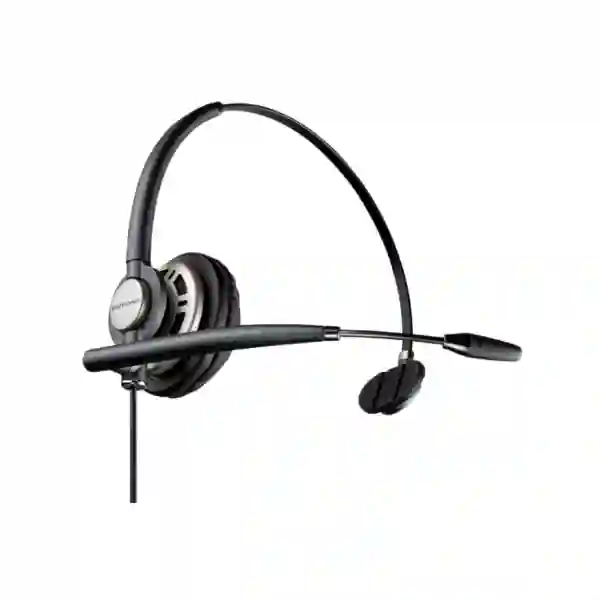
HP Poly EncorePro 710 Mono QD Headset
A speech-focused, single-ear wired headset for busy business telephone users. The EncorePro 710 combines a noise-cancelling microphone, adjustable boom and Poly Quick Disconnect connection. Choose it when a lightweight monaural headset and a verified QD phone or computer audio connection fit your workflow.
Before you buy: check the connection
The headset ends in Poly QD. It needs a compatible QD bottom cable, USB adapter or processor for the intended desk phone or computer. The connection accessory and any call-control functions must be confirmed for the actual device. No local price, stock or delivery claim is made here.
What matters most
Hear the caller
Speech-focused listening through a single on-ear speaker, with one ear free for nearby colleagues.
Be understood
A noise-cancelling boom microphone supports clearer agent speech when fitted correctly.
Match the phone
Poly QD is the headset interface; your telephone or computer may require a separate suitable lead.
Manufacturer-referenced specifications
The values are drawn from HP’s published HW710 QD reference for 8R708AA. Confirm the actual offered part number and packaging for the order.
| Attribute | Detail |
|---|---|
| Brand and family | HP Poly, EncorePro 700 Series |
| Headset model | EncorePro 710 / HW710, mono QD |
| Manufacturer reference used for specifications | 8R708AA (confirm actual offered variant) |
| Wearing style | Single-ear, on-ear, over-the-head |
| Connection | Wired Poly Quick Disconnect (QD) |
| Microphone | Noise-cancelling, adjustable boom |
| Microphone bandwidth | 100 Hz to 6.8 kHz |
| Speaker bandwidth | 150 Hz to 6.8 kHz |
| Speaker driver | 28 mm |
| Boom length and rotation | Approx. 120–145 mm; 290° |
| Ear-cushion surface | Artificial leather |
| Headset weight | Approx. 53 g |
| Headset cable | Approx. 890 mm |
| Hearing protection | Poly SoundGuard |
| Computer connection | Requires suitable compatible QD adapter |
| Desk-phone connection | Requires suitable phone-specific QD cable |
| Colour | Black |
Designed for real customer conversations
The HP Poly EncorePro 710 Mono QD Headset is built around a practical requirement: help an agent hear a caller while keeping the agent’s own speech intelligible. It combines a single on-ear speaker, a noise-cancelling boom microphone and a wired Quick Disconnect connection. That combination is particularly relevant when employees spend much of their day taking telephone calls rather than listening to music. The priority is consistent spoken communication, an adjustable fit and a headset that can work with a suitable business telephone or computer audio adapter.
This is not an all-purpose wireless lifestyle headset. It is a dedicated communication tool in Poly’s EncorePro 700 family. Buyers should evaluate it against the telephone or softphone already in use, the acoustic conditions of the workspace and the staff member’s preference for one-ear listening. Before requesting a quotation, identify the phone model and the existing QD lead, if any. Getting the connection right is at least as important as choosing a familiar headset name.
At-a-glance fit: who should consider it
A monaural headset leaves one ear uncovered, making the EncorePro 710 a sensible candidate for reception desks, customer-service agents, help desks, appointment teams and contact-centre positions where nearby speech sometimes matters. An operator may need to hear a colleague’s question, a supervisor’s instruction or a visitor while maintaining a call. A lightweight over-the-head form can also suit users who prefer not to hold a telephone handset through repeated conversations.
Not every worker benefits from this arrangement. Agents who must concentrate in a particularly loud room may prefer a binaural headset that covers both ears. Someone moving between rooms or away from their station frequently may place greater value on a wireless model. A user who has only a laptop USB port and no compatible adapter may find a native USB headset simpler. The appropriate choice is the one that matches the actual desk, calling workflow and acoustic environment rather than the highest specification on a product comparison page.
One-ear design without sacrificing situational awareness
The headset’s monaural on-ear construction covers a single ear, leaving the other ear open. This can make conversations with colleagues less disruptive than repeatedly removing a two-ear headset. It also helps some users feel connected to activity around the desk. For front-desk and operations roles, that balance between caller audio and room awareness is an everyday consideration, not merely an aesthetic preference.
The open ear is a tradeoff. Ambient sound still enters naturally, and it can compete with what the caller is saying. A noise-cancelling microphone addresses sound captured for transmission; it does not isolate the listener from everything happening in the room. Before ordering for an entire team, ask several agents to try the wearing style in their actual workspace. Check whether they can understand soft-spoken callers, hear important local cues and stay comfortable over a representative shift. A short trial can prevent expensive mismatches across multiple desks.
Comfort for repeated calls
HP lists the HW710 headset at approximately 53 grams for its specified QD reference configuration. The headband uses lightweight composite materials, and the on-ear cushion has an artificial-leather surface. Together these features support a relatively discreet wearing experience. The over-the-head design distributes support across the head, while the adjustable parts allow the microphone and earcup to be positioned around the individual user’s face and ear.
Weight alone does not guarantee comfort. Head shape, spectacles, hair, skin sensitivity, cushion condition and how firmly the headband rests all matter. For a team buying headsets in quantity, include comfort feedback from employees with different needs and glasses styles. During a fitting session, ask users to wear the headset while speaking and typing, not only while sitting still for a photograph. Adjust the band rather than forcing the earcup against the ear, and consider replacing worn cushions according to the available replacement-part guidance and workplace hygiene policy.
Noise-cancelling microphone: what it does
The EncorePro 710 uses a noise-cancelling microphone to help make the user’s voice stand out against surrounding workplace sound. In a contact centre, conversations occur alongside keyboard activity, neighbouring agents and normal office movement. A well-positioned noise-cancelling boom can reduce the prominence of some unwanted sound at the far end, supporting clearer customer interactions. HP also describes wideband speech capabilities in the EncorePro 700 family.
Noise cancellation is not a promise that a caller will hear absolutely no background activity. Performance depends on microphone placement, speaking volume, other acoustic conditions, the phone or adapter and the communication platform. Avoid treating a microphone feature as a substitute for sensible seating plans or acoustic treatment. If your office has a particularly noisy corridor, fan or shared-service counter, make a test call from that position and listen to the recording or ask a colleague at the receiving end. A real call test is more useful than relying only on marketing terms.
Positioning the adjustable microphone boom
HP’s specification for the 8R708AA HW710 reference lists an extendable boom of approximately 120 to 145 millimetres and a rotation range of 290 degrees. The boom is designed to sit relatively low and out of the user’s main line of sight. These adjustments help bring the microphone toward a consistent speaking position without requiring the wearer to tilt the head toward the microphone during every call.
Proper placement makes a measurable difference to how users experience the product, even without making an unsupported performance claim. If the boom is too far away, the person on the other end may hear a quiet or distant voice; if it rubs against skin or clothing, movement may become audible. Follow the manufacturer’s fitting instructions, speak at a natural level and confirm the sound using an actual test call. When different people share the same desk, allow each person to reposition the boom rather than assuming the previous user’s setting will work for everyone.
Wideband speech and what the figures mean
HP publishes a microphone bandwidth of 100 Hz to 6.8 kHz and a speaker bandwidth of 150 Hz to 6.8 kHz for the referenced HW710 QD configuration. It also specifies a 28 mm speaker. These figures describe parts of the headset’s audio path and reinforce its focus on speech communication. They should not be interpreted as a claim of high-fidelity music reproduction or that the telephone connection always carries the full published frequency range.
Actual call sound depends on the entire path: headset, QD lead, desk-phone electronics or USB adapter, network, codec, softphone configuration and the distant caller’s equipment. A narrowband telephone service can limit audio quality even when the headset supports wider speech frequencies. Buyers evaluating call clarity should ask how their phone system handles wideband calls and test internal as well as external calls. Clear incoming sound is the combined result of compatible equipment and a functioning voice service, not a number printed on a headset box.
SoundGuard acoustic protection
HP identifies SoundGuard as the acoustic protection technology used with the EncorePro HW710 QD headset. Its published description states that the technology limits sounds to below 118 dBA to help protect against acoustic shock. This is an important distinction for communications workers who may encounter sudden loud noises in a telephone environment. It is a headset feature, not a substitute for an employer’s broader occupational hearing-conservation arrangements.
Some Poly USB products are described with SoundGuard Digital features. Do not automatically apply every USB-only setting or management capability to this QD model. The correct protection description for the referenced headset is SoundGuard, and overall exposure also depends on the attached device, system configuration, listening level and working conditions. Teams should set reasonable playback volumes, avoid routinely increasing gain to overcome room noise and follow their own workplace safety guidance. If an organisation needs formal acoustic-exposure controls, verify the complete solution with qualified workplace-safety personnel.
Understanding the QD connector
QD means Quick Disconnect. It is the headset-side connection used to couple the EncorePro 710 to an appropriate Poly QD adapter or bottom cable. It gives a worker a convenient point at which to disconnect the headset from the attached communication equipment. That can be helpful when a staff member needs to step away briefly without removing the headset from their head or pulling a cable across the workstation.
A QD end is not the same thing as a USB-A plug, USB-C plug, RJ9 telephone plug or 3.5 mm audio jack. The correct interface to the computer or telephone is provided by the separate compatible lead or adapter. QD also does not automatically mean that disconnecting places a call on hold or mutes the line; those behaviours must be checked on the actual equipment. If you already own a Poly QD cable, note its exact identification and confirm that it is suitable for the target phone or adapter rather than assuming every cord fits every phone.
Checking desk-phone compatibility before purchase
A desk-phone installation normally requires a compatible phone-specific QD bottom cable or audio processor. Start with the exact make and model of the telephone, not a broad description such as office phone or IP phone. Manufacturers can use different headset wiring, connection sockets and accessory arrangements, even between handsets in the same family. Identify whether the desk phone has a dedicated headset socket, whether its headset mode is enabled and whether an additional interface is necessary.
Do not assume an RJ-style plug or visually similar connector proves electrical compatibility. Incorrect cabling may result in silence, poor microphone levels or unreliable call handling. For a managed office deployment, ask the person responsible for the phone system to confirm the headset connection method and whether any phone firmware or audio settings matter. It is worth recording the cable and handset combination used in a successful pilot. That record becomes a simple reference when the business adds desks, replaces a handset or orders spare accessories.
Using the headset with a computer or softphone
A computer can be part of an EncorePro 710 setup when the organisation uses an appropriate QD-to-USB audio adapter or processor. That adapter presents the audio connection to the computer, while the headset remains a QD device. A USB adapter may also provide call controls or other functions, but those capabilities depend on the exact adapter and supported application. They must be evaluated separately rather than attributed to the headset alone.
Before connecting a fleet of headsets to computers, verify the adapter, operating system, calling application and management requirements. Select the correct input and output device in the softphone, place a test call and confirm the microphone is active. Check whether the worker needs to answer and end calls using the application, a hardware button or the phone itself. A product description that lists Windows or macOS compatibility should not be read as a guarantee that bare QD will plug directly into those machines. The connecting device is an essential part of the system.
What the headset is not
The EncorePro 710 Mono QD is wired and does not provide built-in Bluetooth pairing or a rechargeable wireless battery. It is not a USB-native headset simply because an external USB adapter may be used with it. It also is not a two-ear design, an active-noise-cancelling headphone or a complete telephone system. Stating these limits plainly helps a buyer avoid ordering the wrong item for a laptop, mobile device or flexible hot-desk programme.
Do not select this product merely because a software platform recognises the Poly brand. Physical connection, audio routing and call control remain separate questions. A video-meeting app might work through a supported computer audio interface, yet the headset itself does not establish the feature set of that interface. If simultaneous mobile-phone calls, media playback, wireless roaming or direct USB-C connectivity are must-have requirements, compare an appropriate purpose-built model rather than trying to make the QD headset perform functions it does not advertise.
Call answering, hold and mute controls
Call-control behaviour is frequently misunderstood when buyers compare wired headsets. The EncorePro 710 primarily provides the headset’s audio and QD connection. Depending on the complete setup, calls may be answered using a desk phone’s headset key, a softphone window, an audio processor or a supported inline controller. The presence of QD alone does not establish one-touch answer, remote call control, mute or hold functions.
During a trial, create a short checklist for the actual job: answer an incoming call, adjust listening volume, mute the microphone, transfer the call, end the conversation and disconnect or reconnect the headset. Record which device performs each action. If an employee expects hardware call buttons, check the proposed adapter’s instructions and application support before purchase. This small practical exercise makes training more accurate and prevents a handset replacement from unexpectedly changing how users handle calls.
Choosing the correct configuration and identifier
HP and Poly documentation use names such as EncorePro 710, HW710, EncorePro 700 Series and Poly EncorePro HW710 Single Ear Headset + Quick Disconnect. One current HP reference identifies product number 8R708AA, while other markets and historical records can use different regional or legacy identifiers. The model description in a product title should therefore be matched to the actual quoted manufacturer’s part number before procurement.
An MPN is not automatically the seller’s SKU, and a regional product variant should not be silently substituted for another one. The provided request did not contain a FourTeck Tanzania listing SKU, so no seller-specific SKU is asserted here. Packaging and accessories also need checking against the exact offered part number. HP’s 8R708AA reference lists a carrying case with the headset, but the contents of a particular offer should be confirmed on the quotation. Avoid assuming that a direct-connect phone cable is part of every headset package.
A useful technical specification summary
The published figures below describe the HP HW710 QD reference documented under HP product number 8R708AA. They are useful for identifying the intended family and comparing procurement options, but they do not replace a part-number match on the supplier quotation. In particular, the QD connection remains the defining requirement even if another listing mentions a computer operating system.
Product descriptions sometimes combine information from distinct USB, digital, TAA or regional versions of an EncorePro headset. The safest approach is to confirm the exact reference before purchasing, particularly when physical connection, bundled accessories or acoustic processing are material to the order. The table captures the key QD-specific details; ask for confirmation of any variation in a proposed shipment rather than using assumptions from a similarly named headset.
A practical installation sequence
Begin by identifying the telephone or computer, its available socket and the correct Poly QD connection accessory. Connect the bottom cable or adapter according to the equipment instructions, then attach the headset’s QD end. Seat the earcup comfortably, adjust the headband and position the microphone boom. Choose the appropriate headset or audio-device setting on the telephone or computer before testing an incoming and an outgoing call.
During the test, confirm that each side hears the other at an ordinary speaking level. If a computer is involved, check input and output selection independently because an operating system may choose its built-in microphone by default. Verify that the expected answer, mute and end-call controls work. Finally, make a short written note of the phone model, cable or adapter identification, settings and any approved configuration steps. This gives technicians a reproducible deployment process rather than a vague instruction to plug in the headset.
Shared desks and rotating shifts
In a shared-seat environment, the QD design can support a workflow in which an agent disconnects from the desk’s compatible cable. This is potentially helpful where people use their own issued headsets on a common workstation. However, employers should not assume every station has the same cable or that disconnecting always changes call status. A shared-desk rollout works best when the telephone model and connecting accessories have been standardised.
Consider hygiene and asset assignment alongside compatibility. Separate personal headsets from common phone equipment when the team’s policy requires it, document where spares are kept and establish how damaged ear cushions are replaced. Ask a shift supervisor to test a handover between two workers, including reconnecting the headset and verifying the call path. If the business has several generations of desk phones, a compatibility map is more valuable than a generic assumption that any QD lead can be plugged into any desk.
Reception and public-facing service counters
A reception worker may need to answer a caller, greet a visitor and respond to a colleague, sometimes within the same minute. The single-ear form factor can suit that divided attention because it leaves an ear available to the room. The adjustable microphone also allows staff to keep their hands free for appointment records, visitor logs or normal computer work while speaking to a caller.
That benefit needs to be balanced against privacy and room noise. A reception desk near a queue or an entrance can be noisy, and conversations about personal information require appropriate procedures regardless of the headset used. Staff should avoid using speakerphone where conversations can be overheard and ensure their own voice is not unnecessarily loud. When the acoustic surroundings are especially demanding, compare a dual-ear headset and consider practical acoustic measures. The mono QD design is useful when local awareness matters, not when every worker must be isolated from surrounding sound.
Contact-centre agent stations
At an agent desk, a headset can be worn for long blocks of inbound or outbound conversations. The EncorePro 710 focuses on the essentials of that activity: an adjustable voice microphone, a lightweight headband, a monaural listening position and a QD connection suited to supported desk-phone or computer-audio arrangements. These characteristics make it a candidate for teams handling account enquiries, bookings, service tickets and telephone follow-up.
Contact-centre purchasers should test the product in a live-like environment, not only at an empty desk. Have agents speak while adjacent colleagues are talking, inspect far-end voice clarity and confirm they can hear different caller voices without raising volume excessively. Record any discomfort after repeated calls. Include the required QD bottom cable in the trial and quotation. If the organisation intends to migrate from desk phones to software calling, test the proposed computer adapter now instead of assuming the headset alone guarantees a painless future migration.
Help desks and internal support
Technical support teams often need to consult an on-screen knowledge base, type notes and speak to users at the same time. The wired headset keeps the hands free while its monaural design allows the worker to hear nearby teammates when collaboration is part of the service process. It may be suitable for internal IT desks, service coordination teams and other roles where telephone calls are frequent but the working environment is not completely isolated.
A help-desk team should also consider how calls arrive. Some organisations use desk phones, some use software clients and others alternate between several communication tools. The physical headset does not automatically switch between independent devices. Determine which platform handles the calls, which compatible QD interface is needed and how users will change audio devices when switching applications. Test transfers, escalations and conference participation if those tasks form part of normal operations. This turns a product choice into a well-defined service-desk standard.
Making sense of microphone quality in practice
Voice clarity is best evaluated from the listener’s perspective. During a pilot, have an agent speak naturally, pause, turn slightly and continue typing while a colleague listens through the actual phone service. The listener can note whether words remain understandable, whether keyboard noise dominates and whether the speaker’s voice changes substantially with ordinary head movement. Repeat the exercise from several seats, including a noisier position if the work area varies.
Keep expectations realistic: a noise-cancelling headset cannot correct a poor internet connection, packet loss, an incorrectly configured softphone or a defective phone port. Inconsistent loudness can also come from an adapter’s microphone-gain setting. Compare results using the same device and call path before blaming the headset. A structured test saves time and gives purchasing staff evidence that relates to their environment. It also creates a useful baseline for troubleshooting later, should sound quality change after a system upgrade.
Listening quality and volume discipline
A single on-ear speaker keeps the incoming call close to one ear, which can help users focus on speech without holding a handset. Yet comfort and intelligibility are not achieved by setting the volume to maximum. Start with a moderate level, improve microphone and earpiece fit and address competing room noise where possible. If an agent repeatedly needs unusually high volume, investigate the audio chain and their listening conditions rather than treating that setting as a normal requirement.
Remember that an open-ear design admits sound from the surrounding office on the uncovered side. That is useful for situational awareness but may make quiet callers harder to follow in a very busy room. A short assessment with representative call volumes should inform whether mono or duo is the better solution. Employers should apply relevant workplace hearing policies, especially for personnel taking calls for substantial portions of the day, while avoiding unsupported claims that a particular headset eliminates all hearing risks.
Cable management and movement at the desk
HP lists an approximately 890 mm headset cable on its HW710 reference specification, before any additional length provided by a suitable connecting lead. Cable routing matters because an incorrectly arranged cable can catch on a drawer, keyboard tray or chair arm. Plan a clear path that lets the worker turn their head and stand normally without tugging at the headset connection.
A QD connection makes detachment convenient, but it does not turn a corded headset into a roaming solution. Train users to disconnect at the designated point rather than pulling on cables or carrying a telephone by the headset cord. On shared desks, position the connector where it is easy to reach and less likely to be damaged by repeated movement. Cable clips or organisers may be appropriate if they do not place tension on the wire. Good workstation planning helps preserve consistent audio connections and prevents avoidable disruption in high-use environments.
Mono versus stereo: make the right tradeoff
The EncorePro 710 is a one-ear headset. A two-ear model, including other options in the EncorePro family, may provide greater separation from surrounding speech simply because both ears are covered. One-ear listening, meanwhile, can support collaboration across a desk and reduce the feeling of being cut off from the room. Neither style is automatically superior for every contact-centre seat.
Choose based on the noise level, call complexity and workflow. For an operator who regularly needs to hear a visitor or coworker, a mono design may be preferable. For a claims-processing agent handling intricate calls in a busy room, dual-ear listening may deserve consideration. Individual preference also matters. Rather than buying one headset style for everyone because it is familiar, identify the roles that benefit from the open ear and allow a short practical comparison with the alternatives approved by your organisation.
QD versus direct USB: two different buying paths
The QD arrangement is attractive when a business uses supported traditional telephone connections or wants a headset that can be paired with suitable separate audio accessories. It lets procurement consider the wearable headset and connection hardware as related but distinct components. With the right adapter, computer-based calling may also be possible. This can be useful for an organisation with known phone models and a consistent headset standard.
A direct USB headset removes the need to choose a separate QD-to-USB connection cable for a typical computer setup. That simplicity may suit laptop-only users, although application compatibility and features still require verification. For the EncorePro 710 QD, include the adapter price and supported functions when comparing costs. Do not compare just the headset unit against the full delivered cost of a USB alternative. Also avoid assuming that an adapter supporting audio necessarily offers every call-control or device-management feature advertised for a different USB headset.
Corded versus wireless for the workplace
A corded headset does not require the wearer to charge an internal wireless battery or manage Bluetooth pairing. For a fixed desk with a predictable phone connection, that can simplify day-to-day use. The physical cable also makes it straightforward to identify which station the headset is connected to. These are practical considerations for some service desks and call-handling teams.
Wireless models serve another need: movement away from the phone or computer while keeping the call connected, subject to their range and platform limitations. A person who regularly visits printers, shelves or colleagues during calls may value that flexibility more than a wired QD arrangement. The EncorePro 710’s quick disconnect lets a person leave the desk, but the telephone audio does not travel with them after disconnection. Choose the category by observing what workers actually do during calls, not by assuming that one form is always more professional.
Common connection problems and sensible checks
If the wearer hears no caller audio, first confirm that the correct phone headset mode or computer output device has been selected. Check that the QD ends are properly joined and that the bottom cable is appropriate for the phone. Try a known-working call path before replacing the headset. If the caller cannot hear the agent, verify microphone selection, mute status, boom positioning and the adapter’s input configuration.
If audio is distorted or excessively quiet, compare with another supported headset or cable on the same device. Note whether the problem appears on all calls, only external numbers or only one software application. That helps separate headset faults from network or platform issues. If a cable or connector is visibly damaged, remove it from service according to local equipment procedures rather than repeatedly tugging or bending it. Escalate uncertain compatibility cases with the phone model, adapter identification, symptoms and test results.
Cleaning, handling and replacement planning
Contact headsets are personal work equipment and benefit from a clear maintenance routine. Keep the ear cushion and headband clean using the manufacturer’s applicable care guidance and the organisation’s hygiene procedures. Avoid saturating the microphone or connector with liquid, using harsh chemicals without approval or pulling the cable to disconnect it. Inspect cushions and exposed cable areas periodically for wear that could affect comfort or reliability.
For shared environments, decide in advance whether each agent keeps a personal headset or whether equipment is cleaned between shifts. Track replacement consumables by the exact compatible part, and do not assume that cushions from every Poly model fit the HW710. A simple maintenance record can help identify recurrent damage at a particular station. Purchasing spare accessories may be sensible for continuity, but quantities should reflect the size of the team, expected wear and approved budget rather than an invented universal replacement interval.
Procurement checklist for a multi-seat rollout
Before ordering several units, document the exact phone model or softphone used at each seat, the required QD bottom cable or USB adapter, headset wearing preference, expected call-control behaviour and any applicable workplace audio policy. Ask whether the organisation already has an approved Poly cable inventory. If some desks use different handsets, test each distinct combination rather than extrapolating from one successful station.
Run a small pilot that includes agents with different head shapes, noise conditions and call patterns. Check intelligibility, comfort, microphone placement, connection reliability and actual workflow. Capture the chosen manufacturer reference, accessory part numbers and training notes in the purchase request. For ongoing operations, plan how new staff receive headsets, how faulty units are diagnosed and how the IT team will support a phone migration. This process turns a collection of individual accessories into a repeatable deployment standard.
Understanding the total cost of ownership
A purchasing decision should consider more than the headset price alone. For the QD model, there may be a separate compatible cable or processor to obtain, plus any approved replacement ear cushions and spare connection accessories. Internal time spent selecting interfaces, installing headsets and training employees can also matter. If the business already uses the correct compatible QD infrastructure, the cost picture may differ from one starting entirely with computers and no adapters.
Comparisons should be based on a complete, verified configuration and a quotation for the intended market. This page does not state a Tanzania selling price, tax treatment or stock status because those details have not been verified. Similarly, the lowest unit price is not always the lowest operational cost if the item requires a different connection accessory or does not match staff needs. Ask for a written breakdown of the headset model, compatible interface, quantity and any relevant support terms so the purchase decision can be reviewed fairly.
Tanzania business deployment considerations
For a Tanzania-based organisation planning contact-centre or office communications, start with the equipment already installed at the site. The EncorePro 710 is a headset, not a SIP service, network subscription or telephone system. Its fit depends on the connected desk phone or computer audio interface; a functioning voice platform is still required. There is no basis here to claim compatibility with a particular local telecom provider, nor to promise product stock or delivery to a specific town.
Where staff take internet-based calls, network stability, phone configuration and reliable power can influence their experience independently of the headset. Ask the IT team to test the full call path under normal working conditions. If desks use several brands of IP phone, produce a connection matrix before ordering. If the business is moving to softphones, include adapter support and software behaviour in the trial. These are actionable checks without making unsupported promises about local services, approvals or service coverage.
Packaging, warranty and support questions
HP’s product information for the 8R708AA HW710 reference lists the headset and a carrying case in the box and describes a Poly standard two-year limited manufacturer warranty. These details should be checked against the precise market variant and the actual proposed offer. They do not establish the selling terms, regional eligibility, local service arrangements or separately supplied phone cable for any particular Tanzania purchase.
Before confirming an order, ask the supplier to identify the exact HP part number, packaged accessories and applicable warranty documentation. Confirm who handles a defective unit and what evidence of purchase is required. For managed fleets, keep those details with the equipment register so agents do not have to investigate manufacturer variants while handling a support incident. This is also a reason to preserve the manufacturer part number separately from any internal asset tag or retail SKU.
Final suitability decision before requesting a quote
The EncorePro 710 is best assessed as a professional, single-ear, noise-cancelling communication headset with a QD connection. Its main strengths are the purpose-built voice microphone, adjustable boom, lightweight on-ear fit, speech-focused audio and convenient detach point when connected through suitable hardware. The key constraint is equally clear: a compatible Poly QD cable or adapter is essential, and the product is not a standalone wireless or direct-USB solution.
For a practical next step, provide the number of headsets required, the exact phone or computer-calling arrangement and whether a QD cable is already available. Add any preference for single-ear versus dual-ear listening and note if employees need remote call controls. Ask for a quotation that identifies the precise model and interface components, then validate the combination on an actual call before expanding it across the team. That provides a sounder basis for purchasing than relying on a generic headset description.
Frequently asked questions
These answers address practical pre-purchase questions about the EncorePro 710 QD headset and the equipment needed to deploy it.
Does this headset connect directly to USB?
No. The EncorePro 710 variant described here terminates in Poly Quick Disconnect, not a native USB plug. To use it with a computer, the business needs an appropriate QD-to-USB adapter or supported audio processor. The suitable accessory depends on the device and application, and it may determine which call controls are available. Confirm the adapter model and test both incoming and outgoing audio before deploying it.
Will it work with my IP desk phone?
Possibly, but the phone model and connecting cable must be checked. A headset socket that looks similar to another phone’s connector does not prove compatible wiring or call-control behaviour. Give the supplier the manufacturer and full model of the desk phone, then confirm the required Poly QD bottom cable or audio interface. Test the setup on that handset rather than assuming universal compatibility.
Is EncorePro 710 a mono or stereo headset?
The EncorePro 710 HW710 QD model is monaural: it has one on-ear listening speaker. The uncovered ear can help a worker remain aware of colleagues and visitors. It does not provide two-ear isolation from a loud room. If both ears need to be covered, compare the appropriate dual-ear model and ensure that its connection accessories suit the same workstations.
Does the headset have active noise cancellation?
The headset has a noise-cancelling boom microphone intended to improve how the agent’s voice is transmitted. That is different from active noise cancellation for the wearer’s ears. The mono design deliberately leaves one ear uncovered. In a noisy environment, evaluate the sound from both ends of a real call and consider workspace acoustics or a dual-ear alternative if necessary.
Does QD automatically mute the call?
Do not assume so. Quick Disconnect provides a physical connection that can be separated, but mute, hold, remote answer and end-call behaviour depend on the phone, adapter and software. An agent should follow the organisation’s call-handling procedure before leaving a live conversation. Check the actual controls during the installation test and document what happens when the QD ends are disconnected.
Can it be used with Microsoft Teams or another softphone?
The headset can be used through a suitable computer audio connection, but support for any application and its call-control functions depends on the chosen adapter, operating system and software configuration. A compatible audio path should be confirmed separately from claims about certified controls. If a particular calling platform is mandatory, test that precise combination rather than assuming any Poly-branded headset will deliver every platform feature.
What kind of microphone does it use?
HP specifies a noise-cancelling microphone on an adjustable boom for the HW710 QD configuration. The referenced microphone bandwidth is 100 Hz to 6.8 kHz. Its practical performance depends on how the boom is positioned, the surrounding room and the connected telephone or adapter. A short test recording in the intended workspace helps determine whether the result meets the organisation’s voice-clarity expectations.
What is SoundGuard?
SoundGuard is HP Poly’s acoustic-limiting technology included in the referenced QD headset. HP describes protection against acoustic shock by limiting sounds to below 118 dBA. Do not confuse this with every feature offered under SoundGuard Digital on certain USB products. Suitable call volume settings and broader workplace hearing-safety practices remain important alongside the headset’s built-in protection.
How heavy is the EncorePro HW710?
HP lists approximately 53 grams for its specified HW710 QD reference. The headset has an over-the-head design and an artificial-leather-surfaced ear cushion. Because comfort varies by person, a real-world fit test is worthwhile for long shifts, especially for people who wear spectacles. Check the actual offered part number if a supplier lists a different weight or variant.
Does a telephone connecting cable come in the box?
Do not assume a phone-specific QD bottom cable is included. HP’s 8R708AA product information lists the headset and carrying case, while the correct desk-phone or PC connection may require an additional accessory. Since packaging can vary by market reference or bundle, request written confirmation of the exact box contents and any required separate cable before placing an order.
Can different staff share a desk with this headset?
A QD setup may suit shared workstations when every user has a compatible headset and the desk has the correct connection lead. Before adopting that arrangement, confirm the phone’s behaviour when a headset is disconnected, establish personal-equipment and hygiene rules and make sure users can reconnect without changing audio settings unexpectedly. Test handover between shifts rather than relying on a conceptual compatibility claim.
How should we decide between mono and dual-ear?
Consider background noise, the need to hear coworkers, the complexity of calls and individual comfort. Mono can be useful where situational awareness matters; dual-ear may help some agents concentrate in busy surroundings. A headset’s microphone noise cancellation is separate from listener isolation. A small trial across representative positions often gives better evidence than a general recommendation for an entire organisation.
Can I connect it to a mobile phone over Bluetooth?
No built-in Bluetooth capability is specified for this wired QD model. The headset itself does not pair with a mobile phone or operate on an internal wireless battery. If mobile calling, wireless roaming or direct phone pairing is essential, select equipment designed for that requirement instead of assuming a QD connection provides it. Any intermediary hardware would require its own separate compatibility assessment.
Is there a confirmed Tanzania price or delivery time?
No local selling price, stock position or delivery commitment is established in this description. These are commercial details that need confirmation for the exact model and intended order. Request a current quotation stating the headset quantity, manufacturer reference, required QD connection accessories and relevant terms. This avoids using overseas prices, currency conversions or unsupported local availability claims.
What details should I provide when requesting a quotation?
Provide the desired quantity, exact desk-phone make and model or computer-calling application, and whether a compatible QD cable or adapter is already installed. Mention if the team needs inline mute, call answering, shared-desk support or special comfort considerations. Request the precise manufacturer reference, full list of accessories, stated warranty terms and a practical compatibility confirmation before committing to a larger deployment.
Request a configuration-checked quote
Tell FourTeck Tanzania the headset quantity, full phone model or softphone setup, whether an existing Poly QD cable is available, and the call controls staff require. Request confirmation of the exact headset part number and matching connection accessories before ordering.
Ask for current Tanzania pricing, availability, included items and applicable warranty terms as part of the quotation. No unverified external or internal link is used on this page.




Reviews
There are no reviews yet.