
PROFESSIONAL WIRELESS COMMUNICATION
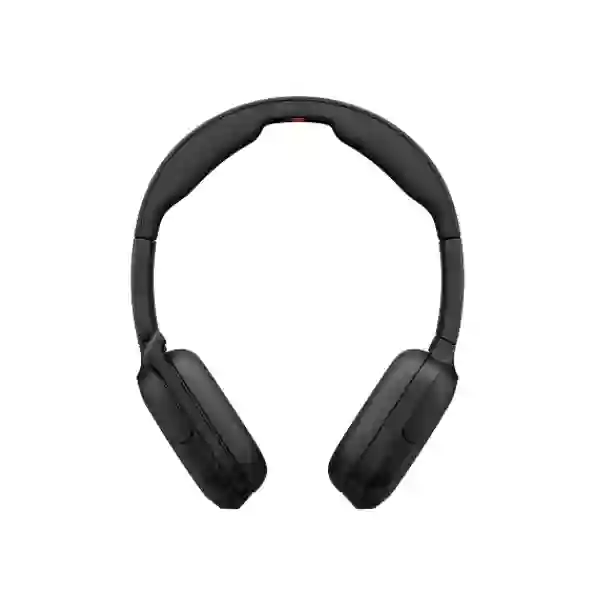
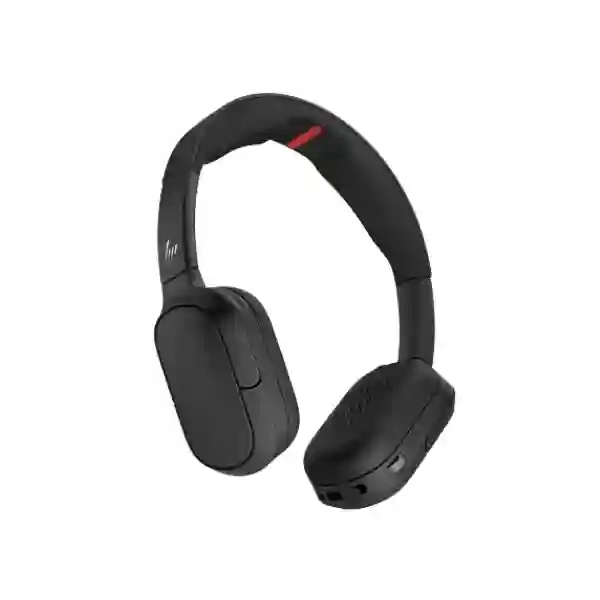
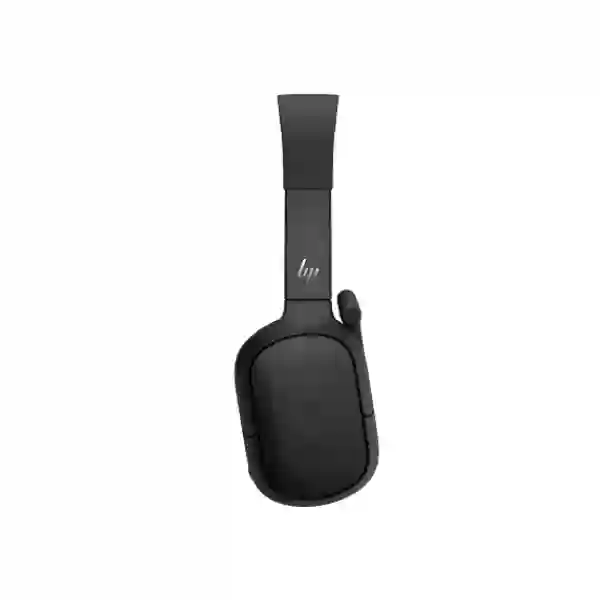
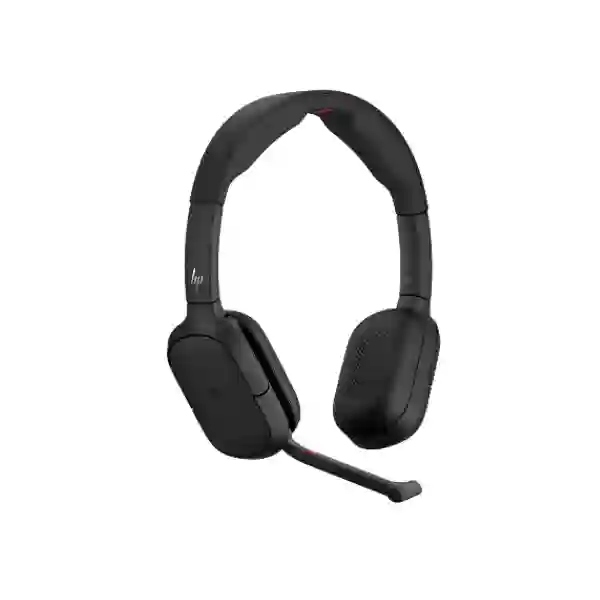
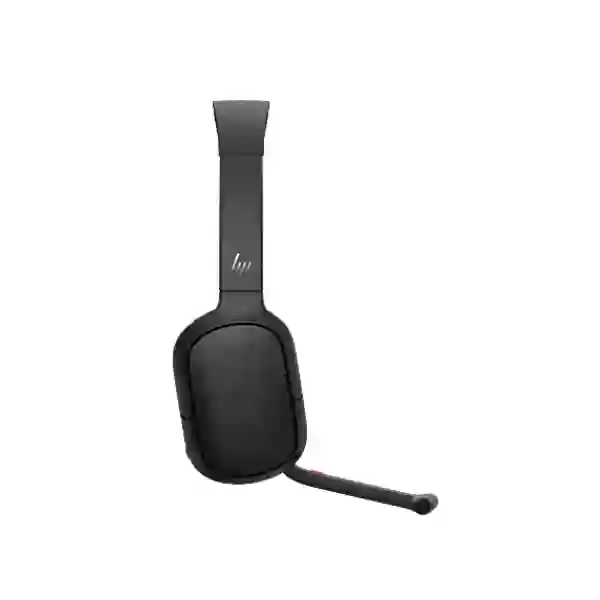
HP Poly Focus 625 Stereo Bluetooth Headset
A professional, non-foldable stereo headset with hybrid ANC, Acoustic Fence 2.0 voice noise reduction, multipoint Bluetooth and an included BT700 USB-C adapter. Built for meetings, customer conversations and focused listening at work.
On-ear stereo | Up to 25 hours talk time with ANC and indicator on | Microsoft Teams certified | HP part C56XPAA
At a glance: why choose it?
• For people taking multiple calls each day: physical mute and meeting controls, smart alerts, and noise-reducing voice pickup.
• For shared offices and hybrid teams: hybrid ANC, transparency mode and on-ear stereo listening.
• For laptop and mobile workflows: multipoint support for two concurrent connections, up to ten paired devices and included BT700 adapter.
• For practical purchasing: a clearly identified non-foldable model; optional wireless charging accessories require separate verification.
Verified technical specification summary
| Model | HP Poly Focus 625 Stereo Bluetooth Headset, non-foldable |
|---|---|
| Manufacturer part | C56XPAA — manufacturer identifier, not a verified FourTeck SKU |
| Wearing style | On-ear, stereo; black; approximately 208 g |
| Microphone and audio | Six MEMS microphones total; four for noise-reducing voice capture; hybrid ANC, transparency mode, Acoustic Fence 2.0 |
| Speaker | 32 mm drivers; 20 Hz–20 kHz stated speaker bandwidth |
| Connection | Bluetooth, multipoint for two simultaneous connections; up to ten paired devices; included BT700 USB-C adapter and USB-C to USB-A adapter |
| Wireless range | Up to 50 m in suitable conditions |
| Talk time | Up to 25 h with ANC + online indicator on; up to 30 h with both off |
| Listening time | Up to 42 h with ANC on and online indicator off; up to 52 h with both off |
| Charging | USB-C cable charging approx. 1 h; compatible wireless charging approx. 3 h; wireless stand not standard box content |
| Platforms | Windows 10/11, macOS, ChromeOS, iPadOS, Android, iOS |
| Collaboration | Microsoft Teams certified; HP also lists Zoom Workplace and Google Meet certifications |
| Included | Headset, travel pouch, BT700 USB-C adapter, USB-C to USB-A adapter, USB-C charging cable, quick-start guide, warranty card |
Published figures are manufacturer specifications. Battery life, range and application behaviour depend on conditions; local availability, accessory bundles and quotation terms require separate confirmation.
A headset for meetings, focus and mobile work
The HP Poly Focus 625 Stereo Bluetooth Headset is designed for people who move between concentrated desk work and frequent online conversations. Its on-ear stereo design, adjustable headband, hybrid active noise cancellation and noise-reducing boom microphones address two different challenges: keeping everyday distractions less noticeable to the wearer and presenting a clearer voice to colleagues. The non-foldable construction suits a regular desk setup, a shared office routine or a travel bag where a fold-flat mechanism is not essential. It is a communications headset first, but it also supports music, training videos and everyday audio between meetings.
For a Tanzanian organisation evaluating headsets for employees, the practical buying question is not simply whether Bluetooth is supported. It is whether staff can move between computers and phones, find physical mute controls quickly, remain comfortable during repeated meetings and receive a consistent kit for deployment. The Focus 625 addresses those needs with multipoint Bluetooth, an included BT700 USB-C adapter, smart controls and software-based configuration. Confirm the precise computer ports, required collaboration platform and quantity before requesting a quotation; local price, stock and delivery terms have not been verified for this listing.
Why voice pickup and listening noise control are different
The Focus 625 uses two complementary approaches to noise. Hybrid active noise cancellation, or ANC, is primarily about the listening experience. It reduces some unwanted sound reaching the person wearing the headset, which can help when working around fans, conversation or other recurring office background noise. Acoustic Fence 2.0 with enhanced noise reduction focuses on microphone pickup, helping keep nearby voices and ambient activity less prominent to the person at the other end of a call. These are related technologies, but they address different sides of a conversation and should not be treated as interchangeable.
HP lists six microphones in total: two transmission microphones, two combined transmission/ANC microphones and two dedicated ANC microphones. Four of these contribute to noise-reducing voice capture. The design is useful in an open-plan office, but it does not create absolute silence, and call quality still depends on fit, microphone position, room conditions, software processing and network quality. When evaluating headsets for a team, conduct a short test call in the actual workplace rather than judging microphone quality only from a product label or an ideal quiet-room demonstration.
Stereo on-ear design and day-long fit
The headset provides stereo sound through two 32 mm speakers and rests on the ears rather than enclosing them in large circumaural cups. That makes it a different fit from a full-size over-ear headset. HP specifies artificial-leather ear-cushion surfaces with foam padding, an ergonomic headband and a pressure-relief design. At approximately 208 g, it is intended to remain manageable for regular daily wear. Individual comfort, however, depends on head shape, eyewear, temperature and personal preferences; an employee who dislikes on-ear pressure may prefer another cushion style or headset category.
A stereo layout gives staff audio from both sides during meetings and improves the sense of separation when using media or training material. It can also make ambient conversations less intrusive when ANC is active, although it should never replace awareness of safety instructions or activity nearby. If the work environment requires frequent face-to-face interaction, the transparency control is important. If the priority is maximum physical isolation in a noisy production environment, an ordinary office Bluetooth headset should not be mistaken for certified hearing-protection equipment.
The non-foldable model, explained clearly
This page covers the standard Focus 625 Stereo Bluetooth Headset, not the Focus 625 Fold. The manufacturer identifies the standard design as non-foldable, and HP associates manufacturer part number C56XPAA with that model. A foldable version is sold under a different manufacturer number and may have different packing arrangements. Buyers should not assume that every Focus 625 photograph, video or accessory bundle shows the exact configuration being quoted. Use the full product name and manufacturer part number when comparing offers or preparing a purchase order.
The standard version is a sensible choice where a headset spends much of its day at an assigned workstation or in a protective pouch. Buyers who frequently pack a headset into a compact bag should compare the physical dimensions and travel requirements before deciding. Do not infer foldability from the soft-looking headband or the presence of a travel pouch. The user benefits of the standard unit remain its microphone system, wireless operation, ANC, integrated controls and compatibility rather than a compact folding mechanism.
Bluetooth connection to a computer and phone
Bluetooth connectivity is central to the Focus 625. The headset can remember up to ten paired devices and supports multipoint connection to two devices simultaneously. In a typical workday, an employee can keep a laptop and smartphone connected, reducing the need to repeatedly remove and re-pair the headset. Multipoint does not mean two independent conversations can be mixed together, nor does it guarantee that every calling application will switch exactly the same way. The active audio source, operating-system settings and application behaviour still affect what the user hears and which microphone an app selects.
The package includes an HP Poly BT700 Bluetooth USB-C adapter and a USB-C to USB-A adapter, making it easier to plan compatibility with different workplace computers. The supported operating-system list includes Windows 10 and 11, macOS, ChromeOS, iPadOS, Android and iOS. Check the precise computer connection method and any organisational IT policies before purchasing in volume. If a machine has restricted Bluetooth access or a managed USB policy, IT should confirm whether the included adapter can be enabled and recognised. Computer audio can require selecting the correct input and output device inside the meeting application.
Microsoft Teams and collaboration platforms
HP identifies the Focus 625 as Microsoft Teams certified and lists a dedicated Teams control among its headset buttons. HP also reports Microsoft Teams Open Office certification for the audio implementation. For organisations standardising on Teams, these are useful indicators that the headset has been designed around professional calling workflows. HP additionally lists compatibility certifications for Zoom Workplace and Google Meet on regional product pages. Actual controls and integrations can vary with software versions, operating systems, connection method and organisational settings, so testing the intended configuration remains a sensible part of deployment.
An employee joining scheduled video meetings needs dependable mute status, understandable speech and easy call handling more than a long list of marketing features. The Focus 625 provides controls for answer, ignore, end, mute, volume and call hold/resume, alongside media actions. IT teams should verify which actions are available through the chosen desktop application and how the Teams button behaves with the BT700 adapter. Certification should not be interpreted as a promise of compatibility with every third-party softphone, legacy PBX integration or custom communication system.
Battery life: four figures that matter
The Focus 625 battery ratings vary significantly depending on ANC and the online indicator. HP specifies up to 25 hours of talk time with ANC and the online indicator on, and up to 30 hours when both are off. For listening, the published figures are up to 42 hours with ANC on and the online indicator off, and up to 52 hours with both off. These are different operating modes rather than competing claims. A staff member who keeps ANC enabled throughout calls should budget around the relevant talk-time rating, not the maximum music-listening figure.
Battery performance changes with volume, usage mix, battery condition, charging history, ambient conditions and software settings. The best way to compare headsets for a contact-heavy team is to estimate actual daily calling hours and breaks, then apply some margin instead of assuming the maximum laboratory figure will always be achieved. The rechargeable lithium-ion battery is a convenience, not a substitute for charging discipline. Plan charging access for employees who handle long shifts, travel or back-to-back online sessions.
Fast wired charging and optional wireless charging
HP states that a full wired charge takes approximately one hour, while a full wireless charge takes approximately three hours with a compatible wireless charging setup. A ten-minute wired top-up is specified to provide up to four hours of talk time, or six hours of listening, with ANC and the online indicator off. These quick-charge numbers depend on the stated operating conditions and should not be used to promise the same result during ANC-heavy calls. The box includes a USB-C charging cable, so a separate wireless charging stand is not necessary to begin charging by cable.
Wireless charging is supported, but appropriate HP Poly charging stands are optional accessories and should not be assumed to be part of the standard package. Before ordering a stand, verify the exact accessory, desk space, power needs and whether it is included in the specific quotation. A managed office can benefit from clearly assigned charging positions and simple charging rules at the end of a shift. For field staff, a compact cable-based arrangement may be more convenient than a desk stand, especially if available workspace changes frequently.
Controls that reduce meeting friction
Physical controls can be more important than specifications during a busy call. The Focus 625 includes mute, volume adjustment, call answer and end controls, media playback actions, power and pairing, and ANC/transparency selection. It also provides voice alerts about events such as mute state, connection state and battery level. HP lists a rotating microphone boom and supports rotate-to-mute functionality. These controls can help an employee respond quickly when a colleague walks up or when a private conversation begins near the workstation.
The best deployment practice is to teach a short, repeatable control routine: verify connection before joining, confirm the microphone indicator, test mute, know how to adjust listening volume and check battery status before a long meeting. Smart sensors can automate selected interactions, but organisations should not rely solely on automatic behaviour for confidential calls. Teams may benefit from documenting preferred controls for each computer platform, especially where users alternate between laptops, phones and shared conference applications.
Software personalisation and IT visibility
HP lists the HP Poly Studio App as management software for the Focus 625. Depending on the supported platform and current app version, the software is intended to help with device configuration and user settings. For a small business, this can simplify a first-time setup and reduce support calls caused by accidental changes. For a larger organisation, it provides a recognisable software path for maintaining a consistent headset experience. Confirm the exact deployment and administrative capabilities that your IT environment requires, rather than assuming a consumer app includes every enterprise fleet-management function.
A sensible IT checklist starts with operating-system compatibility and the permitted installation method. Then verify headset firmware, USB adapter behaviour, microphone permissions, softphone input selection and meeting-app controls. Ask users to report the model name and connection method when requesting assistance; a problem observed over direct Bluetooth may behave differently when using the BT700 adapter. It is also worth recording the chosen ANC, device and call-handling settings during pilot testing, particularly where employees change computers or access work through virtual desktop systems.
What arrives in the standard package
HP's standard product specification lists the wireless headset, travel pouch, BT700 Bluetooth USB-C adapter, USB-C charging cable, USB-C to USB-A adapter, quick-start guide and warranty card. This is a practical set for initial desktop or mobile configuration. The included USB-A adapter can be particularly relevant when an organisation has a mixed fleet of newer and older laptops. Inspect a supplier quotation carefully because accessory bundles and regional packages can differ; the manufacturer list is a reference for the specified standard model, not evidence of what any unverified local seller has on hand.
Notably, the regular package should not be assumed to contain a wireless charging stand, specialist replacement ear cushions or a USB-C to 3.5 mm audio cable. Some listings for the Fold variant have different box contents. If wired analogue audio is a non-negotiable requirement, do not infer support from the presence of a USB-C charging cable. Ask for the exact connection arrangement to be demonstrated. Confirm the headset, USB dongle and any requested accessories as separate line items before approval of a bulk order, and retain the package list in procurement records.
Choosing this headset for an open-plan office
Open-plan offices create two simultaneous frustrations: the worker hears nearby conversation, and remote participants hear colleagues in the background. The Focus 625 is relevant because its hybrid ANC addresses the first challenge while Acoustic Fence 2.0 and the boom microphone address the second. An online status indicator can also give colleagues a useful cue that someone is busy, although whether people respect that cue is an office practice rather than a hardware feature. A headset improves the communication toolset; it does not replace sensible room layouts, meeting etiquette or quieter spaces for confidential discussions.
Before placing a larger order, ask two employees with different voices and workstation positions to join calls at the same time. Listen from the receiving side, record whether background speech remains distracting and test how easy it is to mute rapidly. Observe comfort after a real working session instead of a five-minute demonstration. Compare direct Bluetooth and BT700 use where relevant. This pilot often reveals practical needs such as desk charging, adapter permissions or a preference for alternative cushions that cannot be settled by specifications alone.
Use in home offices and hybrid work
At home, the challenges may include traffic outside, family activity, household appliances or a changing work location. Hybrid ANC can make a busy environment easier to listen in, and the noise-reducing microphone system can help remote listeners concentrate on the speaker's words. Multipoint operation is appealing when one device handles office meetings and another handles mobile calls. The travel pouch and lightweight on-ear construction make it feasible to move between work areas, even though the headset itself does not fold.
A home-office user should also consider network stability, webcam positioning and background privacy. No headset can repair a poor internet connection or make a noisy room equivalent to a sound-treated meeting space. The practical goal is understandable two-way communication with less friction. Place the computer or adapter where the Bluetooth signal is not blocked, keep firmware and meeting apps current, and make sure the chosen microphone is active after connecting a second device. If the employee regularly shares the room with others, transparency mode may be more suitable during some periods than full ANC.
A practical evaluation for IT procurement
The manufacturer specifications provide a strong starting point, but an organisation buying ten or one hundred headsets needs a deployment decision rather than a brochure summary. First confirm the intended user group: heavy call handlers, occasional meeting participants, supervisors or travelling professionals. Next list the devices, operating systems and meeting applications they actually use. Then test headset pairing, adapter recognition, call control mapping, mic permissions, ANC preferences and long-session comfort. Use results from real workflows, not an isolated music playback test, to decide whether the product fits the task.
Procurement should also ask how replacement ear cushions and batteries are sourced, what support procedures are available locally, and how a defective unit would be handled. HP lists replaceable components for the series, but local supply and service arrangements should be confirmed before any commitment. If sustainability or equipment lifespan is an organisational priority, record those considerations separately from price. A slightly more expensive headset that matches the managed environment may be preferable to one that looks similar on paper but creates recurring help-desk issues.
Tanzania purchasing considerations
For a business purchasing collaboration equipment in Tanzania, practical considerations often include the exact manufacturer variant, operating-system mix, payment process, supporting documents and the delivery destination. The product specification on this page describes the headset itself; it does not prove local stock, authorisation, import status, tax treatment or delivery service. Those commercial details must be established from a current quotation. Buyers should request a clear description of the model, included adapter, any optional charging stand and applicable support terms before approving a purchase.
Where employees work across locations or travel between offices, verify the charging arrangements and computer connectivity used at each site. USB-C on one laptop and USB-A on another need not be a barrier when the included adapter is available, but organisational security controls may be. Also confirm whether particular users need compatible mobile devices or a desktop softphone that accepts headset controls. A carefully specified order reduces the risk of receiving a different Focus series model or accessory bundle. No Tanzanian market price, stock quantity or delivery promise is asserted here.
Compatibility checkpoints before ordering
A headset can be compatible with an operating system and still need configuration in an application. Check the computer's USB policy, Bluetooth settings, microphone privacy permissions and preferred default communication device. For managed Windows endpoints, test the BT700 adapter under the same policies employees use every day. On macOS or ChromeOS, verify the intended meeting program and call-control expectations. On a phone or tablet, test incoming calls while the headset also remains linked to a computer. These small steps matter for predictable deployment more than simply reading a broad platform list.
Some users depend on specialised communication software, remote desktop sessions, accessibility configurations or security restrictions. These may introduce conditions beyond the headset's published operating-system support. Ask the software provider or internal IT team to confirm unusual requirements, then conduct a practical pilot. If the headset will be used through a conferencing room system rather than a personal computer, do not assume that personal Bluetooth pairing and meeting controls automatically translate to that system. Confirm pairing and audio routing with the exact endpoint.
First-day setup: a sensible sequence
Start by inspecting the package and identifying the headset, BT700 USB-C adapter, USB-A adapter if needed and charging cable. Charge the headset before the first full meeting day. Follow the supplied quick-start instructions to power on and pair the unit with the computer through the chosen connection method. Within Windows, macOS or the chosen application, select the Focus 625 as the relevant speaker and microphone device. Make a test call and verify that another person can hear the voice clearly. Check that mute and volume controls behave as expected before moving to production use.
Next pair a smartphone if multipoint use is part of the employee workflow. Test what happens when a mobile call arrives during computer audio and decide whether the behaviour suits the role. Explore ANC and transparency modes in an ordinary work area, then adjust settings through the supported HP Poly software where needed. Finally, explain charging routines, storage and the location of the USB adapter. This sequence turns several advanced features into an understandable everyday habit and makes it easier for support staff to isolate a problem if something changes later.
When another headset may be a better choice
The Focus 625 is not automatically the right answer for every employee. Users who need a headset that folds into a particularly compact travel case should compare the Fold variant. People who prefer full ear enclosure or who are sensitive to on-ear pressure should try an over-ear option. A professional who needs one-ear monitoring while remaining fully attentive to the room may prefer a mono headset. A fixed workstation where Bluetooth is prohibited may justify a wired USB model instead. Each tradeoff relates to the work pattern, not necessarily to shortcomings in audio quality.
Likewise, a very noisy industrial setting needs an assessment of safety and acoustic protection requirements; an office collaboration headset is not a substitute for the correct protective equipment. A team using an older desk phone, proprietary telephony connector or complex contact-centre application should confirm its particular integration rather than assume every softphone capability is included. Selecting hardware by use case prevents both overspending on features people will not use and underestimating limitations that become expensive after roll-out.
Care, cleaning and replaceable parts
Routine care affects both appearance and useful life. Store the headset in its pouch or a suitable clear space, avoid pulling on the microphone boom and keep liquids away from ports and electronics. Clean the cushions according to the manufacturer's guidance and any organisational hygiene policy, using products appropriate to the cushion materials. Do not soak foam padding or use harsh solvents without confirmation of material compatibility. If the headset is passed among staff, develop a cleaning schedule and consider the cost and practicality of replacement cushions.
HP describes replaceable ear cushions and a replaceable battery in regional product materials, which can be helpful in long-term asset planning. However, replacements should be sourced by verified part compatibility, not by appearance. A battery replacement may involve safety and support requirements; do not improvise with generic cells or dismantle the headset without proper service instructions. Maintain an equipment register with model, assigned user and service history. This reduces the chance that a suitable headset will be discarded because a minor wearable component has degraded.
Frequently asked questions
Is the Focus 625 a stereo headset or a mono model?
The model described here is stereo, with an on-ear speaker on each side. That makes it useful for both conversation and two-channel media playback. If a user must keep one ear uncovered continuously, compare the role with a mono headset rather than assuming that stereo is always preferable. The right choice depends on concentration needs, workplace awareness and the amount of time spent in calls.
Does the HP Poly Focus 625 have active noise cancellation?
Yes. HP specifies hybrid active noise cancellation for the listening experience and a separate microphone noise-reduction approach using Acoustic Fence 2.0. ANC helps manage sounds heard by the wearer; microphone processing helps remote participants hear the speaker. Neither feature guarantees complete silence in every office. Users can also select transparency mode when they need greater awareness of nearby activity.
Can it connect to a laptop and a smartphone together?
Yes. HP specifies multipoint support for two simultaneous device connections and memory for up to ten paired devices. This is useful for professionals who alternate between computer meetings and mobile calls. Actual switching behaviour depends on the connected devices and apps. Test the combination used at work, especially when a mobile call arrives while computer audio is already active.
Is the Bluetooth adapter included?
HP lists a BT700 Bluetooth USB-C adapter in the standard box and a USB-C to USB-A adapter for computers with a different available port. Confirm the package contents on the specific supplier quotation because accessory bundles can vary. The adapter can simplify computer connection, but IT policies and supported applications still determine whether the intended setup will operate correctly.
How long does the Focus 625 battery last?
HP publishes up to 25 hours of talk time with ANC and the online indicator enabled, or up to 30 hours when both are disabled. Listening claims are up to 42 hours with ANC on and the indicator off, or up to 52 hours with both disabled. Real-world endurance depends on settings, volume, use patterns and battery condition. Choose the figure matching your work pattern.
Does it support Microsoft Teams?
HP identifies this headset as Microsoft Teams certified and lists Microsoft Teams Open Office certification. It includes a Teams control in the published button list. Teams functions may depend on the software version, device connection method and organisational configuration. For business deployment, test the exact Teams client and computer build, particularly if centrally managed endpoints or virtual desktops are used.
Can the headset be folded for travel?
No. The standard Focus 625 described here is the non-foldable version. HP also offers a Focus 625 Fold, which is a separate configuration. If compact storage is essential, compare those two versions by their complete product names and manufacturer part numbers. A travel pouch with the non-foldable model should not be treated as evidence that it folds.
Does it offer a quick charging option?
HP specifies that approximately ten minutes of wired charging can deliver up to four hours of talk time or six hours of listening when ANC and the online indicator are off. These values describe particular conditions, not guaranteed runtime with all features enabled. The full wired charge is approximately one hour, while a compatible wireless charging setup takes approximately three hours.
Is a wireless charging stand included?
The standard box contents do not list a wireless charging stand. The Focus 625 supports compatible wireless charging options, but relevant stands are accessories that may be sold separately or bundled in a special offer. Confirm the exact stand and whether it appears on the quotation. USB-C charging is available through the supplied charging cable, so the optional stand is not required for the basic setup.
What operating systems are listed as compatible?
HP includes Windows 10, Windows 11, macOS, ChromeOS, iOS, iPadOS and Android in its compatibility information. This describes platform support rather than a guarantee that every application-specific control works identically on every platform. Verify Bluetooth or USB policies, audio device selection and the preferred collaboration application on the actual devices intended for use.
Can it be used in a noisy open-plan office?
The headset is designed for professional conversations and HP lists Microsoft Teams Open Office certification. Hybrid ANC helps the wearer, while the noise-reducing microphone system works on outgoing voice pickup. Performance still depends on actual conditions and is not a substitute for a quiet room when confidentiality matters. Test real calls at the intended desks before buying a large number of units.
What is the difference between Focus 625 and Focus 625 Fold?
The key purchase distinction is the physical design: the standard Focus 625 is non-foldable, while the Fold is a separate folding configuration. HP gives different manufacturer part numbers to distinguish them. Some bundle details can also differ, so do not copy a Fold accessory list into a standard-model purchase request. Confirm the full model label, included items and quotation configuration.
Can IT configure the headset centrally?
HP lists the HP Poly Studio App as management software and describes configuration and device-management capabilities. The availability of particular administrative functions depends on platform, software version and organisational deployment. IT should test the intended settings, firmware process and adapter configuration in a pilot. Do not assume a consumer pairing workflow automatically provides every enterprise management function.
What should a Tanzania buyer confirm before ordering?
Confirm the exact non-foldable model, manufacturer part number, required quantity, operating-system and meeting-software environment, and any optional accessories. Request local availability, price, delivery terms and support details in a current written quotation. The manufacturer figures in this description do not establish stock, tax treatment or delivery performance in Tanzania. A structured purchase request reduces errors and makes different supplier offers easier to compare.
Request the right Focus 625 configuration
Need this Bluetooth headset for a team in Tanzania? Ask FourTeck Tanzania to confirm the non-foldable HP Poly Focus 625 (C56XPAA), quantity, included BT700 adapter, optional charging accessories, current availability and a written price quotation. Share your computer operating systems and preferred conferencing platform so the configuration can be checked before purchase.
Request a product quotation and compatibility review from FourTeck Tanzania.




Reviews
There are no reviews yet.