
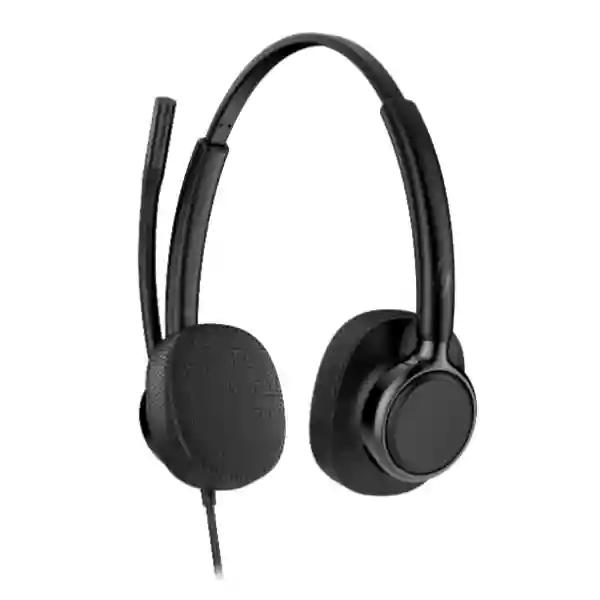
Professional wired communication • Stereo USB audio
HP Poly Mission 425 Stereo USB Wired Headset
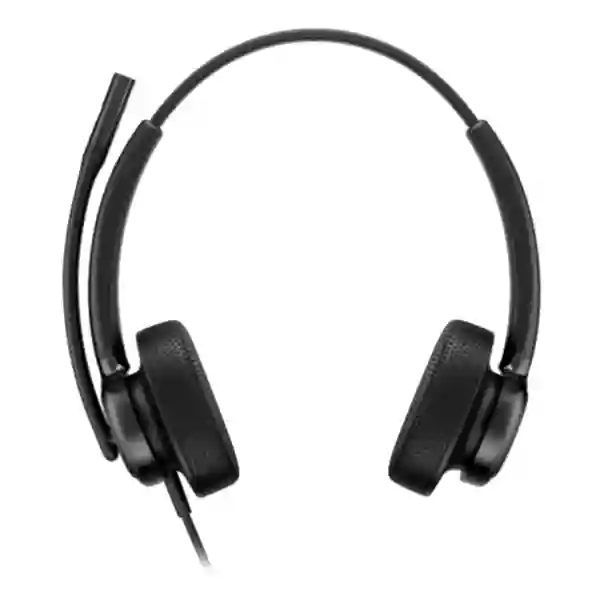
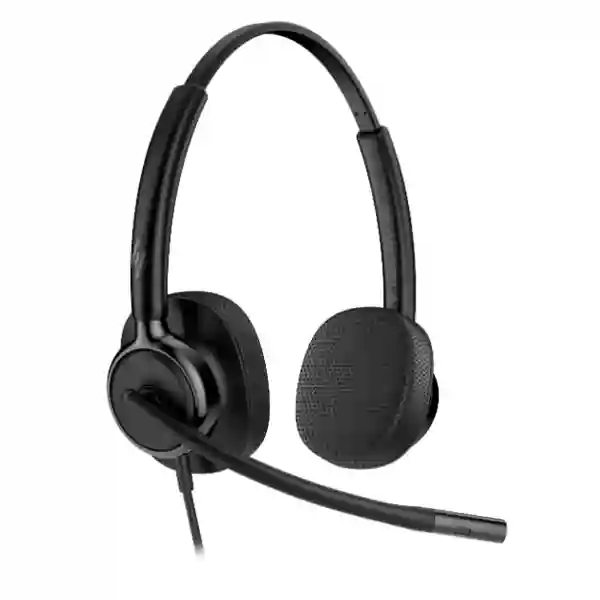
Make professional calls from a compatible computer with two-ear listening, an AI noise-cancelling boom microphone, a USB-C connection with USB-A adapter, and practical inline controls. The standard C01B6AA configuration has memory-foam ear cushions with a PU-leather surface. It is designed for people who need a dependable desk-based communication headset, not wireless roaming.
Confirm the exact HP product number C01B6AA, the devices and communications applications in use, required quantities, and the seller’s written commercial terms. This is the standard leatherette-cushion configuration, not the Classic foam version. Ask for a quotation to verify Tanzania pricing, availability, delivery, and warranty handling.
A practical headset for business conversations
The HP Poly Mission 425 Stereo USB Wired Headset is intended for people who spend substantial parts of their workday speaking and listening through a computer. It combines two on-ear speakers, a boom microphone with AI-enhanced transmit noise reduction, straightforward USB connectivity, and accessible inline call controls. For a buyer selecting headsets for a work team in Tanzania, the most useful question is whether the daily workflow depends on reliable desk-based calls rather than wireless movement. If the answer is yes, the Mission 425 is a credible model to evaluate against the team’s software, devices, comfort preferences, and headset policy.
This is the standard Mission 425 variant identified by HP as product number C01B6AA, not the Classic foam-cushion variant or a bulk-pack model. HP specifies PU-leather surface cushions with memory-foam padding and an on-ear stereo design for this version. Those details matter during procurement because similar model names can conceal different materials, packaging, or ordering identifiers. Before accepting a quotation, ask the supplier to identify the manufacturer part number, the exact cushion style, included connector adapter, quantities, and terms. Treat local availability, seller support, and final price as quotation-specific information rather than assumptions derived from an international product page.
At a glance: the fit and the trade-offs
The central benefit is a simple wired audio path. A compatible computer supplies the USB connection and the headset becomes the chosen microphone and output device in the calling application. There is no Bluetooth pairing sequence or headset battery to charge. The USB-C plug and included USB-A adapter make the unit useful across mixed desktop and laptop fleets. The inline controller puts common tasks such as muting and changing volume close to the user, reducing the need to switch windows during a busy sequence of calls.
That simplicity brings an important limitation: the wearer remains connected by a physical cable. The Mission 425 is not a Bluetooth headset, is not described as a 3.5 mm analogue headset, and should not be selected for people who routinely walk away from their computers while talking. Its AI noise reduction is a microphone feature that aims to reduce sound sent to remote participants; it is not the same thing as active noise cancellation for the listener. Buyers should decide whether microphone clarity, stereo comfort, and easy USB deployment are more important than wireless freedom or speaker-side ANC.
Why stereo on-ear listening can be useful
A stereo headset places an earpiece over each ear, helping the listener hear call audio in both channels while working in an office or home workspace. For employees who need to follow detailed discussions, training sessions, or frequent customer conversations, two-ear listening can feel more focused than a single-ear design. The 32 mm speaker drivers and HP’s stated multimedia-mode speaker bandwidth of 20 Hz to 20 kHz support both speech and general computer audio. Those are manufacturer specifications, not a promise that any particular online meeting will reproduce the entire range.
Stereo is not universally the right choice. Reception employees, supervisors, and staff who regularly converse with colleagues across a desk may prefer a mono headset that leaves one ear unobstructed. In some settings the better solution is to offer both styles according to job role rather than standardizing on a single wearing format. In a shared office, assess the ambient sound, time spent on calls, comfort feedback, and whether staff need to remain aware of people nearby. Product selection works best when those practical factors receive as much attention as the headline audio figures.
How the AI noise-cancelling microphone helps
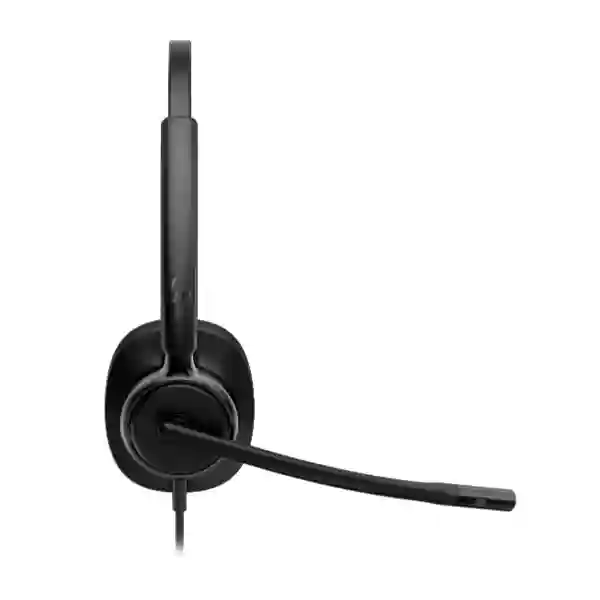
HP describes the microphone as AI noise cancelling and lists AI-enhanced transmit noise reduction as an audio feature. In practical terms, the technology is designed to reduce typical background sounds that would otherwise be sent through the call. This is especially relevant when colleagues type nearby, conversations occur in the same room, or a home worker cannot control every ambient interruption. The microphone is positioned on a boom, so the wearer can aim it consistently instead of relying on a laptop microphone far from the mouth.
Noise reduction cannot guarantee perfect silence for the person at the other end. Speech from people close to the wearer, an echoing room, very loud machinery, or wind and handling noise may still affect a call. Actual results depend on speaking distance, microphone placement, audio software, device settings, and the environment. A sensible purchasing evaluation includes a short recorded speech test in the workplace where the headset will be used. Compare voice intelligibility with nearby conversations and ordinary office noise present, then listen to the recording on another device instead of relying only on how the wearer perceives the sound.
Super wideband speech and what it means
HP lists super wideband audio and a microphone bandwidth of 50 Hz to 16 kHz for the Mission 425. The purpose of a wider supported speech range is to preserve more voice detail than a very narrow telephony signal when the connected application and service support suitable audio quality. That can make consonants and tone easier to distinguish in a collaborative conversation. The specific experience still depends on software encoding, internet conditions, and the other participant’s microphone and speaker system; the headset does not independently control the full call chain.
When comparing headsets, distinguish manufacturer microphone bandwidth from the bandwidth a particular voice service actually delivers. A call routed through an older telephone connection may sound narrower than a high-quality computer-to-computer meeting, even with the same headset. For procurement teams, a useful demonstration is a routine meeting in the exact application being deployed. Ask participants to assess clarity, fatigue, and how often they request repetition. The goal is understandable communication in ordinary working conditions, not simply choosing the specification with the largest number.
SoundGuard Digital and listening practices
The headset includes HP Poly SoundGuard Digital acoustic protection technology. HP describes this feature as controlling sudden audio spikes and continuous sound levels to help maintain a more comfortable listening experience. It is particularly relevant for employees who receive unpredictable call audio from multiple sources during the workday. Protection technology is one consideration in workplace audio planning, but it does not remove the need to manage volume sensibly, offer breaks, and address unusually loud or distorted source signals.
A headset should not be described as guaranteeing hearing safety in every environment. Listening exposure is affected by volume, duration, source content, and working practices beyond the headset itself. Employers can establish sensible starting volumes, ask users to report uncomfortable sounds, and verify application-level controls during setup. If a team has formal occupational health requirements, those requirements need their own assessment. HP’s SoundGuard Digital feature supports the buying case, but it should be explained in its proper context rather than presented as a substitute for an organization’s health and safety procedures.
Comfort for repeated calls and meetings
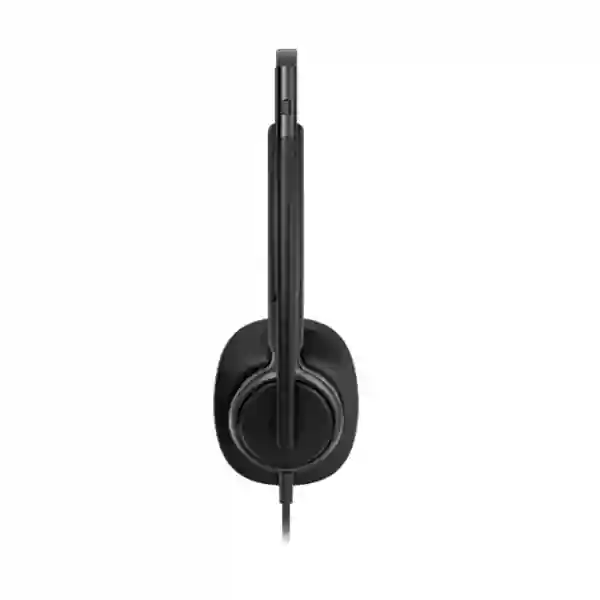
HP specifies a weight of 132 grams for the standard Mission 425 and describes lightweight construction with memory-foam ear cushions and a PU-leather surface. Those design choices are intended to make repeated calls easier to manage without the bulk of a more elaborate headset. On-ear fit differs from over-ear fit: the cushions rest against the ears rather than enclosing them completely. Some users value that compact feel, while others may prefer a different shape or pressure distribution when wearing a headset for many continuous hours.
Comfort is personal, so do not infer universal all-day suitability from weight alone. Head size, spectacles, hairstyle, room temperature, and the number of uninterrupted calling hours can all change the experience. Before a larger office purchase, a short user trial can reveal whether the ear cushions create pressure and whether the headband feels stable when staff turn toward a monitor or take notes. The leatherette surface is also worth confirming when comparing the model with the separate Classic foam version. Select on actual wearability and intended users, not only on a catalogue photograph.
Adjustable microphone boom and consistent placement
The manufacturer’s specifications show a 130 mm boom microphone with 285-degree rotation. This gives users flexibility to position the microphone near the mouth and adjust its orientation to their working preference. A consistent boom position can be more valuable than an obscure audio setting because speech capture becomes more predictable between calls. The headset should be adjusted according to the supplied quick start information, without bending or forcing mechanical parts beyond their intended travel.
During onboarding, encourage users to test their normal speaking volume while the microphone is in a comfortable position. If voice audio is too weak, the first step is to confirm the chosen microphone, correct positioning, and software input level rather than assuming a defective headset. If sound is boomy, distorted, or full of breath noise, an overly close or poorly directed microphone may be contributing. Staff using shared equipment should return the boom and headband to a neutral position after use. These small habits improve consistency and help a support team distinguish setup errors from genuine hardware faults.
USB-C connection with USB-A flexibility
The Mission 425 uses a wired USB Type-C connection and HP lists a USB Type-C to USB Type-A adapter among the supplied accessories. This is useful for businesses operating a mixture of newer USB-C laptops and desktops that primarily have USB-A ports. The manufacturer lists a cable length of approximately two metres, giving typical seated users some freedom to place the computer or dock without stretching a very short lead. USB connectivity also simplifies the distinction between the headset and analogue audio sockets found on some older devices.
Compatibility should still be checked at the device level. Not every USB-C port, adapter, hub, mobile device, or locked-down workstation behaves identically, and certain accessories may limit the way USB audio devices are detected. For important deployments, connect a sample headset directly to a representative machine, confirm audio input and output, and then test again through the docking hardware that employees actually use. Avoid stacking unnecessary adapters. A cable that fits physically is not by itself evidence that every calling feature or software control will operate as expected.
Inline controller for common tasks
HP lists inline user controls for mute and unmute, volume adjustment, Microsoft Teams, and call answer, ignore, or end. Keeping those functions on the cable lets a user react during a call without looking for a menu in the meeting window. The recessed control layout is intended to reduce accidental presses. HP also documents indicator states and tone alerts, including cues related to mute and volume limits. These details are helpful for users who switch frequently between a conversation, notes, and other applications.
The behavior of call-control buttons may depend on the computer operating system, installed software, and the particular application. For example, the presence of a Microsoft Teams button should not be interpreted as a guarantee that every third-party softphone will respond identically. In a purchasing trial, test the exact workflow: answer a call, mute, unmute, adjust volume, place a call on hold if the application supports it, and end the call. Document any functions that are managed inside the software rather than directly on the headset. That approach prevents disappointment after a larger deployment.
Use with Microsoft Teams
The headset is designed for business communication and has a dedicated Microsoft Teams control among its listed buttons. HP also identifies collaboration-platform certification in its product documentation. For a Microsoft Teams organization, this makes the Mission 425 worth evaluating where staff need a familiar wired headset with physical call controls. A team can establish a standard audio device in Teams and explain how to select it for speaker and microphone input before joining a meeting.
Certification and product compatibility should not be confused with universal behavior across every Teams deployment or future software release. Features may vary with app version, operating system, permissions, meeting policy, and active call state. A brief acceptance test should cover a scheduled meeting, a direct call, mute indication, and the headset’s button response. IT teams can then provide one simple user guide showing the expected behavior for their supported environment. The objective is an easy daily experience rather than a blanket claim that no configuration will ever be required.
Use with Zoom, Google Meet, and other meeting tools
HP positions the Mission 425 for leading online collaboration platforms, and its product documentation identifies certifications covering Microsoft Teams, Google Meet, and Zoom services. This makes the model relevant to workplaces that use more than one meeting provider. At a basic level, USB audio can be selected as the input and output device by compatible applications. However, a vendor certification, a device’s ability to pass audio, and support for specialized hardware buttons are different questions and should be evaluated separately.
A mixed-platform business should prepare a practical compatibility matrix. Record the supported computer operating systems, the meeting applications actually installed, and the required actions such as mute synchronization, call answer or end, and device selection after reconnecting. If a browser-based meeting tool is important, test it in the browser and permission configuration used by staff. For contact-centre software, verify the exact agent client and its USB headset-control support. Completing those checks before purchase is more reliable than assuming all conferencing applications implement every optional feature the same way.
Operating systems and mobile-device questions
HP lists compatibility with Windows 11, macOS, Chrome OS, Android, and iOS for the standard headset. This is a useful starting point for organizations that manage several computer platforms. It does not mean that every device running one of those operating systems is equipped with the needed connection or that every application-level button feature will be available. Compatibility should be understood as a manufacturer-listed platform relationship, not a substitute for checking the actual hardware and communications software.
Phones and tablets deserve extra attention. A USB-C connector does not automatically establish complete support for a particular mobile device, especially where an adapter, case, operating-system limitation, or application permission is involved. Teams planning to deploy headsets with mobile devices should verify USB audio recognition, microphone input, power behavior, and the ability to sustain a real call. The wired cable also changes how convenient a mobile workflow feels. For staff whose work involves frequent walking, a suitable wireless product may be a better match even if the Mission 425 can connect to the device.
HP Poly Studio App and IT expectations
HP references HP Poly Studio App for convenient headset management. For IT teams, that provides a manufacturer-supported software context when planning supported device settings and maintaining a consistent workstation experience. Buyers should not assume that every advertised management function is available on every platform, in every version, or under every enterprise policy. Check the currently supported HP application, installation requirements, permissions, and the features needed for the actual fleet before including software management in an internal specification.
The simplest deployment may involve little more than connecting the headset and selecting it in the voice application. A more controlled environment may require device naming conventions, a known application version, a help-desk procedure, and documented audio-device settings. IT buyers can pilot both approaches and choose the least complicated process that satisfies their support requirements. If software deployment is restricted by administrative policy, verify whether the core USB audio tasks work without optional software and whether any desired special controls depend on it. This keeps rollout planning practical.
Everyday office calling in Tanzania
A business team in Tanzania may use computer-based meetings for coordination, customer conversations, remote administration, training, or supplier discussions. The Mission 425 addresses the headset side of those tasks: comfortable wired listening, a dedicated microphone, and accessible controls. It does not provide internet connectivity, a calling account, a telephone number, or the meeting application itself. Those remain separate parts of the communication environment, and buyers should budget and plan accordingly.
When assessing fit, ask where employees sit, what computers they use, and which conversations matter most. A fixed workstation with consistent USB access is a natural use case. A field employee travelling between sites, a person who must take calls while moving around an office, or someone who needs independent mobile connectivity may have different requirements. Local stock, quotations, delivery arrangements, and service support should be confirmed through the intended purchase process. This content does not imply a specific local price, current availability, office location, or guaranteed delivery time.
Customer service and contact-centre workstations
A customer-service employee often needs to hear callers clearly while documenting information in another application. The Mission 425’s stereo listening, boom microphone, inline controls, and wired design are relevant to that pattern of work. A consistent physical connection can reduce the daily need for Bluetooth pairing and charging management. The noise-reducing microphone is intended to help the remote party hear the agent, an important distinction when comparing a headset for an open-plan team rather than personal entertainment.
Before buying a larger quantity, test the actual agent application and workstation. Inbound calling software can have its own audio-device rules, shortcuts, mute functions, and permissions. The interface may recognize sound while ignoring some headset call-control buttons, so a sample test is essential. Consider how agents share equipment across shifts, whether cushions are individually assigned, and how replacement or cleaning will be handled. A headset rollout succeeds when everyday workflows are predictable, not simply when an item connects successfully on the first attempt.
Hybrid work and home-office calling
Home workers often move between short video meetings, longer voice calls, and occasional recorded presentations. A wired USB headset can provide a stable personal audio device without making the user keep track of a separate wireless battery. The two-metre cable may be convenient at a desk with a laptop, monitor, and docking station. HP’s light construction and memory-foam cushioning are relevant for that use, although comfort should still be evaluated by the individual wearing the headset.
Remote-work conditions vary substantially. A headset microphone can help reduce some everyday background noise, but it cannot fix poor room acoustics, weak connectivity, or distracting activity visible during video calls. A useful setup routine includes placing the microphone correctly, choosing the headset in the conferencing application, checking speaker volume, and joining a brief test call. Staff should also know how to switch audio devices when moving between a home computer and an office workstation. Written setup guidance often delivers more value than complicated troubleshooting after a meeting starts.
Training rooms, classes, and online learning
Two-ear listening and a dedicated boom microphone can be relevant for instructors, learners, and staff taking part in online training at a workstation. A headset lets the wearer focus on the session and reduces dependence on a distant built-in laptop microphone. The stereo design is also appropriate when training content includes a mixture of spoken explanation and ordinary computer audio. For managed rooms, wired accessories can be straightforward to inventory because each headset has an identifiable connection and no charging dock to track.
A training deployment introduces practical requirements beyond the hardware specification. Different users may need different headband adjustment, the learning software may select the wrong default microphone, and shared equipment raises hygiene questions. Verify application compatibility, store cables so they do not become tangled, and decide whether headsets belong to individuals or remain with desks. For younger learners or specialized accessibility needs, establish suitability through user trials instead of assuming one fit for every person. Instructors should have a simple microphone test procedure they can communicate before the class begins.
Desk setup, cable management, and workstation design
HP lists a two-metre cable for the standard headset, which is long enough for many conventional desk arrangements but should still be checked against actual device placement. In a tidy workspace, the lead can run toward the laptop or docking station without crossing a keyboard, chair arm, or walkway. The inline controller should remain reachable when the wearer is seated normally. If the cable has to stretch tightly across the desk, the workstation layout probably needs adjustment before deployment.
Cable management is not only cosmetic. Leads caught by chair wheels, repeatedly bent at connectors, or pulled sharply when someone stands up are more likely to cause problems over time. Encourage users to unplug by holding the connector instead of tugging on the cable and to store the headset without twisting the lead around the ear cups. If a desk uses a hub or dock, confirm that its USB audio behavior is stable across sleep, restart, and reconnection. A small setup checklist can prevent many intermittent support tickets.
What the published specifications do and do not establish
Specifications help narrow down products but should be read carefully. HP reports a single AI noise-cancelling microphone, 32 mm speakers, an on-ear stereo configuration, and a defined microphone and speaker frequency range. Those values establish the published technical profile. They do not establish a measured improvement over every competing headset, a guaranteed call-quality score, or complete background-noise removal. Real-world sound depends on the user, room, connected device, application, and network conditions.
Manufacturer dimensions and weight describe a specific product configuration, not the total carrying weight of every package or an exact fit for every head. Similarly, the existence of a manufacturer limited warranty does not establish the service procedure or local entitlement for a purchase from every market. The right buying process distinguishes hard specifications from benefits that need testing and commercial terms that need written confirmation. An organization can then make a defensible selection without relying on marketing language as a substitute for evidence.
The standard model versus Mission 425 Classic
There are several similarly named Mission 425 configurations. The standard HP Poly Mission 425 Stereo USB Wired Headset, manufacturer product number C01B6AA, uses PU-leather surface cushions with memory-foam padding and has a listed weight of 132 grams. The separate Mission 425 Classic, product number C01B3AA, uses foam-surface ear cushions and has a listed weight of 126 grams. HP also has bulk-pack identifiers. These names describe distinct ordering configurations, so they should not be silently interchanged during quotation or fulfilment.
A buyer choosing between standard and Classic should primarily consider cushion feel, shared-use cleaning practices, expected wearing time, and exact order configuration. The model name alone is not enough for purchasing accuracy, especially if different employees or departments have specified materials. Ask for the manufacturer part number on the quotation and check the delivered product against that number when it arrives. The seller’s internal SKU is separate from the HP product number. This page does not claim a verified FourTeck listing SKU because none was supplied for the target listing.
Wired versus wireless: choosing the right approach
A wired headset is appealing when employees remain at a fixed desk, require predictable connection steps, and prefer not to manage batteries or Bluetooth pairing. The Mission 425 suits that pattern. It can also be practical in rooms where many headsets operate close together, because the audio connection does not depend on an individual Bluetooth pairing to the computer. The trade-off is mobility: the wearer must remain within the practical reach of the cable and connected device.
A wireless headset may be preferable for employees who need to stand, consult shelves, or move around while remaining on a call. A different headset may also be required if the job calls for active noise cancellation at the ears, a 3.5 mm connection, or a direct connection to a particular desk telephone. Compare requirements before comparing prices. A budget-friendly wired device is not a good value if it forces workers into awkward movement, while an expensive wireless model may add little to a role that never leaves the workstation.
How to plan a small deployment
Start with a representative user group rather than immediately ordering a full fleet. Include one or two employees who attend meetings throughout the day, someone who handles incoming customer calls, and an IT person who supports the relevant computer configurations. Test the headset on the operating systems, docking stations, and conferencing tools actually in use. Ask participants to rate microphone intelligibility, comfort, cable placement, ease of muting, and whether the audio controls behave as expected in their daily applications.
Record the results in a short checklist. If several people report the same weakness, determine whether it comes from the headset, the application, or the workstation environment before making a purchasing decision. Include a scenario with surrounding office conversation and another with a quiet room. A short pilot is especially helpful when a business employs people with different head sizes and working styles. The objective is not an elaborate laboratory study; it is enough evidence to know that the product supports a normal day of work.
Standardizing across multiple desks
Organizations with many workstations benefit from a documented, repeatable setup. Establish the intended USB connection, supported operating-system versions, chosen microphone and speaker defaults, and the steps for joining the main meeting platform. Provide simple instructions for identifying mute status and returning audio to the headset if an application switches to built-in speakers. These processes make it easier for a help desk to diagnose problems without taking staff away from their work for long periods.
A standard headset also simplifies basic inventory and training, provided the selected configuration suits the staff. Record the HP manufacturer part number, delivery batch, assigned user or workstation, and any applicable supplier documentation. Avoid treating manufacturer product number and seller stock-keeping unit as interchangeable data fields. If some roles require mono listening or wireless mobility, allow those to be documented exceptions rather than forcing every employee into the same device. Practical standardization balances support simplicity with genuine work requirements.
Procurement and quotation checklist
When requesting a quotation in Tanzania, specify the exact full product name and confirm that the intended configuration is the C01B6AA standard stereo model with leatherette-surface memory-foam cushions. Confirm the USB Type-C connection, included USB Type-A adapter, the number of units, and whether the quotation concerns individually packed units or a different bulk configuration. Ask the seller to state pricing, taxes, availability, payment terms, dispatch or delivery arrangements, and the relevant returns process in writing rather than assuming they match an overseas listing.
Warranty should be checked just as carefully. HP publishes a standard two-year limited manufacturer warranty for the model, but the precise entitlement, documentation, service channel, and country-specific handling should be verified for the purchase. If the order is for many seats, request a sample or pilot where practical and clarify how discrepancies in part number or accessories will be resolved. A complete quotation reduces uncertainty and prevents a technically suitable headset from becoming an avoidable procurement problem.
What comes in the manufacturer’s box
For the standard Mission 425, HP lists the headset, a USB Type-C to USB Type-A adapter, a quick start guide, a warranty card, and a product notice. This is a useful expectation for checking an individual package. The headset is wired and does not require a wireless charging base for its normal audio connection. Do not assume that a carrying case, replacement cushions, docking station, or separate desk-phone adapter is included unless the specific quotation expressly identifies it.
When receiving an order, check the actual package contents against the relevant part number and paperwork. Inspect the headset, connector, inline controller, and ear cushions for visible damage before handing units to staff. Keep the documentation needed for support and explain to users where their headset should be stored. For bulk purchases, packaging quantities and accessories may differ, so confirm the manufacturer configuration before building a receiving checklist. A careful handover makes it easier to identify a missing adapter or incorrect version early.
Cleaning, care, and shared equipment
In a shared-workspace setting, cleaning policy is an important part of headset selection. The standard Mission 425 uses PU-leather surface cushions over memory foam; HP also describes the cushions as replaceable, with replacements sold separately. That can make it easier to plan ongoing care, but cleaning products and procedures must be compatible with the materials and the manufacturer’s guidance. Do not soak the headset, spray liquid into electrical openings, or assume that harsh disinfectants are suitable for every surface.
Businesses should decide whether each worker has a personal headset or whether devices remain at shared stations. Personally assigned equipment can reduce turnover between users, while shared models require clear cleaning and inspection rules. Check cushions periodically for wear and replace them with compatible parts when appropriate. Teach users to handle the microphone boom gently and store the cable without sharp bends. Basic care helps protect the original purchase and gives support staff a clear process when employees report discomfort, wear, or intermittent audio.
Troubleshooting before a support ticket
If there is no sound, begin by checking that the USB connector or adapter is fully seated and that the operating system recognizes the headset. Then confirm that the calling application is using it as the output device. If other people cannot hear the wearer, verify that the microphone is selected, not muted, and placed close enough to capture speech naturally. Try a short local audio test and, where permitted, a different USB port to distinguish an application setting from a physical connection problem.
If mute or call-control buttons behave unexpectedly, test a known supported application and review its permissions and device settings. Some third-party platforms may accept the audio signal without implementing every hardware control. For intermittent sound, examine whether a dock, hub, loose connector, or cable strain is involved. Avoid risky repairs or opening the headset. Follow the supplier or manufacturer support process if basic checks do not resolve the problem. Keeping a short record of the computer type, application version, and symptom helps support teams work efficiently.
Internet quality remains a separate responsibility
Clear headset audio cannot compensate for unstable internet access. Remote meetings depend on the connection, software service, and network devices as well as the microphone and speakers. Packet loss, jitter, overloaded Wi-Fi, and temporary service problems can make speech break up even when the Mission 425 is connected correctly. When colleagues report that a call sounds robotic or delayed, test the network and conferencing application before concluding that the headset itself is responsible.
For an office procurement evaluation, distinguish local microphone recordings from audio captured across a live call. A clear local recording but poor remote audio points toward other parts of the communication chain. Encourage users to close unnecessary bandwidth-heavy activities during critical meetings, use a reliable workstation connection when possible, and follow the organization’s approved IT procedures. The headset supplies the local audio interface; the wider calling experience remains a shared responsibility among the device, network, application, and participants.
Sustainability details without overstating them
HP’s specifications identify paper-based packaging and at least 25 percent post-consumer recycled plastic for the standard Mission 425 model. HP also lists TCO Certified, generation 10, in its product features. These attributes may matter to organizations comparing equipment against internal purchasing guidelines. They are specific manufacturer statements and should not be expanded into an unsupported claim that the product is carbon neutral, completely recyclable, or automatically compliant with every buyer’s procurement policy.
An organization with a sustainability policy can record the published attributes alongside durability, replaceable cushion availability, expected replacement processes, and responsible disposal arrangements. Keep in mind that a single recycled-content percentage does not describe every component of the finished headset. Buyers who need formal evidence for a tender should request the current applicable manufacturer documentation for the exact configuration. The most useful procurement communication is precise about what has been documented and transparent about what still needs verification.
When the Mission 425 may not be the right model
The Mission 425 is not the best match for every communication task. It is a wired USB headset, so jobs requiring untethered movement, Bluetooth pairing, a 3.5 mm analogue connection, or a specialist desk-phone interface may call for another device. It is also an on-ear stereo model; some users prefer a single-ear design for room awareness or a different cushion style for longer sessions. HP does not list active noise cancellation for the wearer as a feature of this particular model.
Another possible mismatch is an application that relies on proprietary headset integration rather than ordinary USB audio. Before ordering, determine whether the requirement is simply sound input and output or a specific combination of call control, device management, certification, and support policies. If the requirement is uncertain, conduct a short compatibility test rather than relying on a generic label such as ‘office headset.’ Choosing the right product includes recognizing what this one is not intended to do.
A final decision framework for buyers
Use five questions to arrive at a practical decision. Will the wearer remain at a computer during calls? Does the workstation have a suitable USB Type-C or USB-A connection? Are stereo on-ear cushions appropriate for the employee’s comfort and awareness needs? Does the microphone and inline controller work properly with the organization’s actual calling applications? Can the supplier confirm the exact HP configuration and clear local commercial terms? If those answers are positive, the Mission 425 merits serious consideration.
If the answer to any question is uncertain, resolve it through a specification check, a representative trial, or a written quotation. That approach is more useful than comparing headline features in isolation. For individual buyers, a simple test of comfort and audio may be sufficient. For IT teams, the same decisions should be documented in a deployment checklist, including operating-system support, headset assignment, user training, and escalation procedures. An informed purchase is one that fits the work performed every day.
Manufacturer technical specifications
The following figures describe the standard manufacturer configuration and are not a local stock, price, or compatibility guarantee. Where platform-specific behavior matters, test the actual environment before purchase.
| Product name | HP Poly Mission 425 Stereo USB Wired Headset |
|---|---|
| Manufacturer product number | C01B6AA (not a verified FourTeck SKU) |
| Brand and series | HP Poly, Mission 400 series |
| Wearing style | On-ear stereo, two earpieces |
| Connection | Wired USB Type-C; USB Type-C to USB Type-A adapter included |
| Cable | 2 m approximately |
| Microphone | One AI noise-cancelling boom microphone |
| Boom microphone | 130 mm length; rotates 285 degrees |
| Microphone bandwidth | 50 Hz to 16 kHz |
| Microphone sensitivity | -35 ±3 dB |
| Speaker drivers | 32 mm |
| Speaker bandwidth | 20 Hz to 20 kHz in multimedia mode |
| Speaker sensitivity | 116 dB |
| Audio protection | HP Poly SoundGuard Digital |
| Ear cushions | PU-leather surface and memory-foam padding |
| Colour | Black |
| Headset weight | 132 g |
| Dimensions | 170 × 180 × 40 mm |
| Controls | Mute/unmute, volume up/down, Microsoft Teams, call answer/ignore/end |
| Manufacturer-listed operating systems | Windows 11, macOS, Chrome OS, Android and iOS |
| Management software | HP Poly Studio App |
| Manufacturer limited warranty | Poly standard two-year limited warranty; verify local entitlement |
| Sustainability attributes | Paper-based packaging; at least 25% post-consumer recycled plastic |
| Certification attribute | TCO Certified, generation 10; refer to current manufacturer documentation |
Frequently asked questions
Is the HP Poly Mission 425 a wired or wireless headset?
It is a wired USB headset. HP specifies a USB Type-C connection and includes a USB Type-C to USB Type-A adapter. It does not provide the mobility of a Bluetooth headset. Choose it for desk-based work where consistent connection and straightforward setup matter more than walking around during a call. If wireless movement is essential, compare a different device category rather than assuming a cable-free mode is hidden in the settings.
What is the difference between Mission 425 and Mission 425 Classic?
HP lists the standard Mission 425 as C01B6AA with PU-leather surface cushions and memory-foam padding. The distinct Classic model, C01B3AA, uses foam-surface ear cushions. Published weights are 132 grams and 126 grams respectively. Buyers should confirm the manufacturer product number on the quotation and delivered package. Do not substitute a reseller-specific SKU or an unverified local listing code when identifying either manufacturer configuration.
Does the Mission 425 offer active noise cancellation?
HP documents AI-enhanced transmit noise reduction on the microphone, which aims to reduce noise heard by people on the other end of a call. That is different from active noise cancellation in the ear speakers. HP does not list wearer-side ANC as a feature of this Mission 425 configuration. If your priority is reducing surrounding noise you personally hear, consider an explicitly ANC-equipped headset and test it in your working environment.
Can I use it with both USB-A and USB-C computers?
The standard connection is USB Type-C, and HP includes a USB Type-C to USB Type-A adapter in the box. That supports practical trials with both connector styles on compatible computers. For managed fleets, test the actual laptop, desktop, dock, and conferencing application before ordering quantities. A physical adapter does not guarantee that every specialized call-control button will behave identically across all software.
Is it suitable for Microsoft Teams calls?
HP lists a Microsoft Teams control among its inline buttons and positions the model for modern collaboration tools. It is therefore relevant to Teams users who want a wired stereo headset. For full confidence, verify audio selection, mute synchronization, and call-control response in the installed version of Teams and the operating system your organization supports. Meeting and calling behavior can depend on software configuration as well as the headset.
Will it work with Zoom or Google Meet?
HP identifies certification and collaboration compatibility for major conferencing platforms, including Zoom and Google Meet, in its product materials. Core USB audio may be selected in supported applications. However, browser permissions, operating-system behavior, and application integration can influence specific hardware controls. Test a real meeting using the same software and settings that employees use. Do not assume a general compatibility statement guarantees every optional button feature.
Can I connect it to a smartphone or tablet?
HP lists Android and iOS among supported operating systems. Actual use depends on the specific device, connector, USB audio support, and application. Some mobile devices may require additional arrangements not supplied with the headset. Before purchasing primarily for a phone or tablet, verify that the device recognizes the microphone and speakers and can sustain a call. Remember that the cable makes it better suited to relatively stationary use.
What is the cable length?
HP lists a cable length of approximately two metres, also expressed as 6.5 feet in some product materials. This may suit a desk with a nearby computer or docking station. Measure the distance between the port and the user’s seated position rather than assuming it will fit every layout. Keep the inline controller easy to reach and route the lead away from chair wheels and walkways to reduce accidental strain.
Can it be used for customer-service agents?
Yes, it is a reasonable headset to evaluate for desk-based customer-service work, thanks to stereo listening, a dedicated boom microphone, wired USB connectivity, and inline controls. Suitability still depends on the software used by the agents and their workstation setup. Pilot the actual softphone or contact-centre client to confirm microphone operation, call controls, comfort, and the cleaning or assignment policy before a broad rollout.
What items are supplied in the package?
HP lists the headset, a USB Type-C to USB Type-A adapter, a quick start guide, a warranty card, and a product notice for the standard model. Verify the exact packaging arrangement on the order, especially for bulk purchases. A Bluetooth dongle, charging base, carrying case, and extra ear cushions should not be assumed to be included. Check the delivered part number and contents before deploying the unit to an employee.
What warranty applies in Tanzania?
HP publishes a standard two-year limited manufacturer warranty for this model, but that alone does not establish the local procedure, eligibility, service channel, or remedies applicable to a particular purchase in Tanzania. Ask the seller to confirm warranty terms in writing and retain the invoice and product documentation. Do not treat the manufacturer’s general specification as a promise of a specific FourTeck service arrangement or response time.
How can I request an accurate quotation?
Specify the complete product name, manufacturer number C01B6AA, required quantity, intended operating systems, and whether the headsets will be used with Teams, Zoom, another meeting service, or a contact-centre application. Ask for confirmation of cushion style, included adapter, unit configuration, stock status, pricing, taxes, delivery, and support terms. If the intended order is substantial, request a compatible sample or pilot before finalizing the fleet purchase.
Request a quotation for your workstations
For the HP Poly Mission 425 Stereo USB Wired Headset, ask for the standard C01B6AA configuration and identify your expected quantity, devices, and meeting or calling software. Confirm connector requirements, included accessories, local price, availability, delivery arrangements, and written support terms before placing an order. If you are purchasing for a group, consider a short user trial first to verify comfort and call-control behavior.
Contact FourTeck Tanzania to request a product quotation and configuration confirmation.




Reviews
There are no reviews yet.