
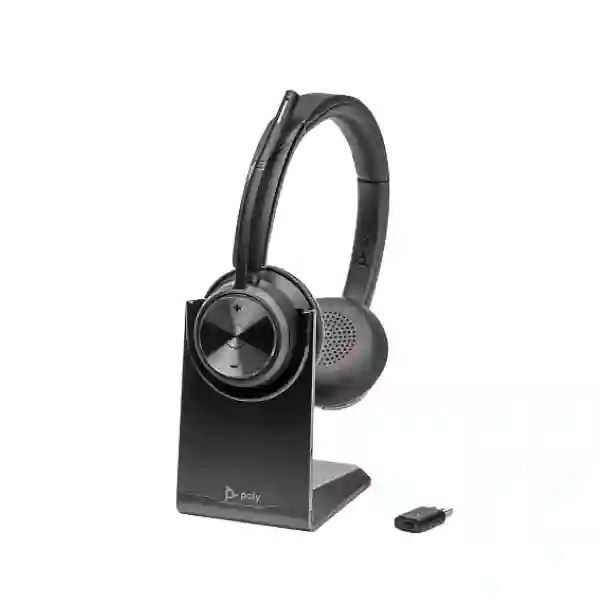
HP Poly Savi 7320 UC Stereo DECT Headset
The HP Poly Savi 7320 UC Stereo DECT Headset is a dual-ear wireless headset for computer-based business calls. Its DECT connection, USB adapter and noise-cancelling microphone make it a practical option for teams that value call clarity, freedom to move near the desk and documented wireless security features.
Before ordering, check whether you need the UC computer version or a desk-phone-capable Office configuration, and confirm the exact radio variant for deployment in Tanzania.
Key specifications at a glance
The following are published HP/Poly reference specifications for the Savi 7320 UC configuration. They should be matched to the full product identifier on a quotation because regional and software-specific variants can differ.
| Product family | HP Poly Savi 7300 UC |
|---|---|
| Wearing style | On-ear, stereo (dual ear) |
| Primary use | Computer-connected professional calls |
| Wireless connection | DECT through D400 USB adapter |
| Computer connection | USB Type-A; supplied Type-A to Type-C adapter |
| Microphone | Noise cancelling with Poly Acoustic Fence |
| DECT security | AES 256-bit encryption; AES 128-bit authentication; DECT security certified |
| Acoustic protection | SoundGuard Digital |
| Range | Up to 40 m in typical office; up to 137 m in open area |
| Talk time | Up to 13 hours |
| Standby time | Up to 52 hours |
| Charge time | Under 2 hours |
| Weight | 160 g |
| Controls | Answer/end, mute, volume, power |
| Operating systems listed | Windows 10, Windows 11, macOS |
| Headset colour | Black |
| Charging method | Charging stand |
| Speaker size | 14.2 mm |
| Headset speaker bandwidth | 20 Hz–20 kHz multimedia; 100 Hz–6.8 kHz wideband voice |
| Microphone bandwidth | 100 Hz–10 kHz |
Understand the product before you order
The correct buyer profile
This headset is particularly useful for a customer service agent, account manager, analyst, support specialist, or other professional whose principal telephone is a computer application. The Savi 7320 UC brings a stereo listening experience and DECT wireless mobility to that desk. It is not a replacement for every type of telephone headset. Buyers should first identify the actual calling endpoint: a Windows laptop, a Mac, a USB-enabled desktop, or a traditional desk phone. If calls are normally answered inside a PC softphone or meeting application, the UC approach is relevant. If calls are taken directly from an analogue or proprietary desk-phone handset, compare an Office-series configuration before choosing this product.
What the UC designation means
UC stands for unified communications. In this product family the UC headset package is oriented toward computer-connected calling through a dedicated D400 USB DECT adapter. The included charging stand is not the same as a multiport office telephone base, and the published UC box contents do not include a conventional telephone line cable. This distinction affects purchasing more than a minor difference in appearance. Confirm the software your team uses and how calls are answered, then match the headset version to that workflow. The presence of a USB adapter does not by itself establish advanced call-control compatibility with every softphone or a formal certification for every collaboration platform.
Why the stereo format matters
The Savi 7320 uses two on-ear earpieces, so call audio is delivered to both ears. This can make it easier for an agent to focus on the customer when colleagues are speaking nearby. It can also reduce the need to listen with one ear while the other remains exposed to room noise. However, the earpieces are not a claim of active noise cancellation, and their fit and comfort vary from person to person. A reception counter, control-room operator, or employee who must hear surrounding announcements may prefer a single-ear alternative. Include a wearing trial in a large headset procurement instead of choosing only from technical specifications.
Wireless design, mobility and office coverage
DECT and the dedicated computer adapter
The headset communicates wirelessly using DECT technology. The D400 USB adapter provides the computer-side connection, while the headset itself can be worn without a cable running to the workstation. For an organization with a Bluetooth-restricted policy, this is an important architectural difference. It does not mean the headset automatically satisfies the organization’s policy: the approved radio variant, permitted devices, IT security controls, and local communications requirements still need review. Think of DECT as the wireless connection method, not as a guarantee that every desk arrangement or operating system will work without configuration. The actual package and regional variant should be checked on the supplier quotation.
Interpreting the published range
HP specifies up to 137 metres in open space and up to 40 metres in a typical office environment for the referenced UC model. These are upper-bound test or reference figures, not an assured distance through every building. Reinforced walls, metal shelves, glass partitions, lifts, corridors, neighboring wireless systems, and the adapter’s position can reduce coverage. A 40-metre office figure should not be translated into a promise of seamless coverage across several floors. For teams that routinely walk away from their desks while speaking, verify performance in the actual workplace before deploying a full fleet. Give particular attention to routes around meeting rooms, storage areas, and enclosed offices.
Plan movement without overpromising
Wireless freedom is useful when a worker must stand, retrieve a document, consult a colleague, or move a short distance during a customer conversation. It is not a guarantee that a call remains connected anywhere on the premises. Map the user’s typical movements against the adapter location and the published office range. A person who mainly sits at a desk may prioritize voice quality and comfort instead of maximum distance. A person moving between separated departments may need a different communications architecture or a dedicated call-transfer workflow. A practical pilot should include walking tests, headset alert checks, and a confirmation that the call remains intelligible at every essential location.
Security and speech confidentiality
DECT security features explained
HP lists 256-bit AES encryption, 128-bit authentication, and DECT security certification for the Savi 7320 UC reference configuration. Encryption helps protect wireless voice traffic; authentication helps control how the communicating equipment establishes a trusted link. Those product capabilities are useful when specifying headsets for environments that handle sensitive conversations. They do not replace application encryption, identity management, endpoint hardening, permissions, employee training, or private meeting spaces. A regulated organization should review the complete communications path from headset to calling platform rather than treating headset-level encryption as sufficient proof of overall compliance. Security teams should also verify that the exact radio and hardware variant being procured matches their approved equipment register.
What Acoustic Fence actually helps
The noise-cancelling boom microphone uses Poly Acoustic Fence technology to reduce unwanted sounds picked up around the speaker. This is an outgoing-audio benefit: it is intended to help the person at the other end hear the employee’s voice more clearly when an office is busy. It does not soundproof the physical room or prevent a nearby person from overhearing the employee’s spoken words. The stereo earcups likewise should not be described as soundproofing. To improve confidentiality, combine an appropriate microphone position with reasonable spacing between desks, confidential-call procedures, and a suitable location for highly sensitive conversations. Test the headset with the kinds of voices and room noise present in your own workplace.
SoundGuard Digital and listening practices
HP identifies SoundGuard Digital as an acoustic protection technology in this headset. This is relevant to users who spend much of a shift listening to calls, but it should not be marketed as an absolute guarantee against hearing damage or as a substitute for sensible listening levels. Employers can supplement built-in audio protection with volume policies, regular breaks, coaching about headset fit, and processes for reporting unexpectedly loud calls. During a rollout, test common ringtones and softphone alerts so employees do not turn volume up unnecessarily. For hearing-sensitive staff, determine individual suitability through the organization’s occupational health process rather than inferring medical benefits from a feature name.
Audio quality and everyday controls
Clear speech is a combined system
The Savi 7320 UC combines a noise-cancelling microphone, stereo speakers, and a computer audio connection. HP publishes a microphone frequency range of 100 Hz to 10 kHz and speaker performance specifications for multimedia and wideband voice modes. These values describe device capabilities, not the quality of every call. The softphone codec, network condition, the caller’s device, and microphone placement also influence what users hear. A useful evaluation includes recorded test phrases, live internal calls, and noisy-floor calls during a normal working period. Listen for intelligibility, clipping, distortion, room-noise pickup, and how natural the wearer’s voice sounds to the other party.
Control calls without returning to the mouse
Physical headset controls include call answer/end, mute, volume adjustment, and power on/off. Voice alerts cover conditions such as mute status, connection status, low battery, and volume limits. This can reduce distractions when a user is reading a customer record, taking notes, or stepping briefly away from the keyboard. Actual software call-control behavior can depend on the installed application, permissions, configuration, and supported integration. In a pilot, check whether answering, ending, and muting a call behave as expected in the exact calling applications your teams use. Treat on-headset controls as practical aids, not as proof of universal software compatibility.
Fit, weight and wearing preferences
HP lists the headset weight as 160 grams and identifies an on-ear stereo wearing style with artificial-leather-surface ear cushions. Those measurements help IT managers compare device options, but an individual user’s comfort is subjective. Some employees value two earpieces for sustained concentration; others need one ear free to communicate with colleagues. Ask pilot users to assess pressure, heat, microphone reach, headband adjustment, interference with glasses, and whether the controls are easy to locate. Comfort can affect consistent headset use, call quality, and adoption. A procurement specification should allow a documented exception for employees whose work requires a different wearing style.
Battery, charging and shift readiness
Talk time and standby are different
HP quotes up to 13 hours of talk time and up to 52 hours of standby time. Talk time refers to active use, while standby reflects a different operating condition. Neither figure promises a fixed duration under every mix of calls, alerts, battery age, and workplace conditions. For a long customer-support shift, make sure the user has an established charging routine and understands battery-low notifications. Consider the proportion of time actually spent on calls rather than assuming a full shift will always leave the same battery reserve. Procurement teams can review typical usage patterns during a pilot and use that evidence to plan spares or end-of-day charging habits.
Using the charging stand
The product’s published package includes a charging stand and charging cable. HP lists a charge time of under two hours for the referenced model. A stand can give a headset a consistent home on the workstation and reduce the risk of equipment being misplaced between calls. Its placement should allow charging without stretching cables across walkways or hiding the stand behind monitors. Users should follow the supplied charging instructions and keep connectors free from dirt or damage. The stated charge time is a specification, not a guarantee under damaged cables, unsupported chargers, power faults, or an aging battery. Confirm what power source is provided with the quoted regional package.
Create a realistic battery operating policy
For larger deployments, plan charging ownership as carefully as the hardware purchase. Decide whether each headset stays assigned to one person or is shared across shifts, who checks charging status, and how staff report poor battery life. If a headset is shared, implement a cleaning and asset-management process that suits the workplace. Give supervisors a documented route for arranging a spare when someone cannot take calls. Avoid assuming that the battery is field-swappable or that a replacement battery or charging accessory is included unless that is confirmed for the exact model and service terms. Consistent routine is more reliable than a theoretical maximum runtime.
Connection, compatibility and software
USB Type-A and USB Type-C planning
HP lists a D400 USB Type-A DECT adapter and a USB Type-A to USB Type-C adapter in the UC package. That makes computer port selection an important pre-purchase check. Confirm whether the workstation has a free Type-A port or whether the supplied conversion accessory will be needed. Some docking stations, tightly packed ports, and security restrictions can complicate USB audio device connections. Before a bulk order, test the actual laptop model, dock, operating-system build, and endpoint security policy. Users should be shown how to identify the correct adapter and avoid confusing the USB charging connection with the active wireless audio connection.
Operating systems and softphone checks
HP lists Windows 10, Windows 11, and macOS as compatible operating systems for this product family reference. That statement does not verify support for every release, browser, thin-client environment, virtual desktop, telephone system, or third-party calling application. If the team uses Microsoft Teams, Zoom, a contact-centre platform, or another softphone, check the specific application’s current device guidance and available button functions. A headset may transmit audio correctly while some enhanced control features need additional supported software or configuration. Write the calling application and operating-system versions into the purchase brief so a supplier can confirm the proposed setup rather than making an assumption from the term UC.
A helpful first-use sequence
Begin with a supported computer and identify its available USB port. Connect the appropriate D400 adapter, prepare the headset according to its quick-start instructions, and allow the computer to recognize the intended audio endpoint. In the calling application, choose the headset for speaker and microphone functions if automatic selection does not occur. Make a short test call, verify two-way audio, set a comfortable volume, test the mute function, and confirm that call-control buttons operate as expected. Check that the microphone is positioned for clear speech. This is a general commissioning sequence, not a replacement for the model’s official setup guide or employer security procedures.
Collaboration, training and management
Conferencing on the D400
HP describes a conferencing capability for up to four headsets using the D400 dongle. For a training team, that may support supervised listening or collaborative call review where the platform, privacy rules, and equipment configuration allow it. It should not be confused with a promise of four independent telephone lines or simultaneous multi-customer calls. Before designing a training workflow around it, confirm the applicable connection procedure, supported firmware, call application, and employee consent requirements. In particular, organizations handling confidential calls should consider who can hear the conversation and how training sessions are authorized and recorded. Try the actual setup before making it a fleet-wide standard.
Central device management considerations
HP describes remote device management for settings, firmware, and security updates in the Savi 7300 UC feature information. This is potentially useful for an organization deploying headsets to several teams, where individually maintained configurations can drift over time. The exact management platform, licensing requirements, available policy controls, and supported operating environments should be verified before procurement. IT administrators can plan a controlled test group, maintain a device inventory, and document approved settings before wider distribution. Remote-management capability is not proof that every feature can be changed remotely on every endpoint. Do not promise automated updates or reporting until the organization has tested its intended management workflow.
Training agents to use the controls
A short orientation can prevent many avoidable support calls. Show users where the mute and volume controls are, how battery and connection announcements sound, how to place the headset on the stand, and how to choose the device inside the softphone. Explain the difference between headset mute and application mute so employees verify privacy before speaking to colleagues. Demonstrate a simple test-call procedure and explain what to do if the USB adapter is moved to another computer. Provide a one-page local instruction sheet in the language used by your team. Good adoption depends on clear everyday habits, not only on the purchase of technically capable equipment.
Use cases across professional workplaces
Contact centres and customer support desks
In a support centre, the value of the Savi 7320 UC lies in reliable access to computer-based calls, a microphone designed to reduce surrounding voices, and an on-ear stereo listening experience. Agents may use the wireless connection to stand or consult nearby information while remaining on a call, provided coverage permits. Teams should confirm comfort across full shifts, check softphone answer and mute controls, and review device hygiene for shared positions. Supervisors should evaluate speech quality in a busy live environment rather than relying solely on demonstrations in a quiet room. It is also worth testing how the headset behaves when agents switch between the calling application and training audio.
Finance, legal and professional services
A business discussing customer financial details, legal instructions, or commercially confidential projects may value the documented DECT security features and reduced microphone pickup of surrounding conversations. Nevertheless, users still need access controls, confidential-call guidance, and appropriate physical spaces. The headset cannot stop a person across the desk from hearing a conversation spoken aloud. Consider whether the firm’s information-security policy permits the exact radio equipment, whether its calls are managed through a compatible computer application, and whether the procurement record identifies the precise regional variant. The right choice is a headset that fits both daily workflow and the organization’s wider information-handling policies.
Healthcare administration and public-facing teams
Administrative staff handling appointment queries, scheduling, help-desk requests, or service enquiries can benefit from clear outgoing speech in an active office. However, healthcare suitability must be assessed against the actual task, infection-control requirements, and workplace policies. Do not infer a clinical-device certification or a hygiene claim simply because a product is used in a healthcare office. Where headsets are shared, consider approved cleaning methods and whether replacement cushions can be sourced for the exact model. If a role involves direct conversations with patients or colleagues in the room, a stereo headset may not be the most appropriate wearing style. Review confidentiality and accessibility needs before ordering.
Choosing between Savi variants
Savi 7320 UC versus Savi 7320 Office
The Savi 7320 UC is the computer-oriented package identified by its USB DECT adapter and charging stand. HP’s Savi 7320 Office documentation describes a different configuration with an office base and telephone connection options. They should not be treated as identical packages despite sharing a family name and a similar stereo headset shape. If your staff need to answer calls arriving directly on a desk telephone, confirm the Office model and the exact telephone’s support requirements. If almost every call runs through a PC softphone, the UC package may be the simpler fit. Include the full version name and variant in the supplier quotation.
Savi 7320 UC versus a Teams-specific edition
Some Savi 7320 UC listings are explicitly labeled as Microsoft Teams-certified variants, while the general UC version has a distinct product description. Do not assume a Teams-specific hardware button, certification status, regional model code, or accessory bundle applies to every version. Organizations standardizing on Teams should confirm the exact approved Teams configuration and any button-function needs before ordering. Organizations using several calling tools should verify the general UC version against all priority applications. The naming difference may have procurement and deployment consequences even when two headsets look almost identical. Ask for documentary confirmation instead of relying on product photography.
Stereo versus mono and Bluetooth alternatives
Stereo is appropriate when users prefer listening through both ears and want to concentrate on digital calls. A mono version can be more appropriate when awareness of colleagues, doorbells, or in-person requests is essential. A Bluetooth headset may be more convenient for some people who must switch between mobile devices and laptops, but it can be unsuitable when organizational policy restricts Bluetooth equipment. The Savi 7320 UC takes a DECT-and-PC route instead. The best option is determined by device connectivity, security rules, wearing preference, room noise, mobility, and the applications used, not by the claim that one wireless technology is universally superior.
A practical procurement checklist
Identify the exact hardware and region
Start with the complete product name, UC or Teams-specific variant, radio-frequency variant, requested quantities, and the end-user location. The general product name alone does not establish the exact region-specific part number or whether a particular import is approved for use in Tanzania. Confirm that the quoted model includes the D400 USB adapter and the necessary port accessory. Request a current manufacturer specification for the exact unit offered. Ask the seller to describe the charger and all included accessories rather than assuming bundles are identical internationally. This avoids confusion with Office-series bases and similarly named headsets sourced for other radio markets.
Document compatibility before purchase
List the workstation operating systems, USB port types, docking stations, security restrictions, and calling applications deployed in the organization. For a contact centre, include agent desktop software and any virtual-desktop architecture. Ask for a pre-purchase test with one representative headset if the environment is complex. Record how answering and ending calls, microphone mute, audio playback, headset discovery, and firmware management behave. If software integration is business-critical, request confirmation of that integration rather than accepting broad statements such as works with all softphones. This is particularly important when users switch between the main phone application, meetings, and web-based learning tools during the day.
Ask the questions that affect total cost
A useful quotation should describe the exact headset variant, quantities, included accessories, applicable commercial terms, service process, support arrangements, and any separately ordered items. Clarify whether replacement cushions, charging stands, or adapters are available for the proposed configuration and what their prices and ordering rules would be. Confirm who handles device setup and troubleshooting after delivery. Do not infer local stock, delivery days, warranty coverage, tax treatment, or pricing from a specification page. For large projects, establish what will be delivered, how it will be accepted, and which party is responsible for technical compatibility checks before a purchase order is issued.
Rollout planning for an IT department
Run a representative pilot
A pilot should include at least one user from each distinct calling environment rather than only a single office administrator. Select Windows and Mac endpoints if both are deployed, include the relevant docking stations, and test in the noisiest normal work area. Record fit and comfort comments as well as objective results such as successful connection, intelligible call audio, reliable mute behavior, and actual walking routes. Review whether the headset interferes with other work tasks. If the organization restricts radio equipment, obtain the appropriate internal approval before the pilot. Pilot evidence can prevent avoidable returns and help standardize a meaningful support procedure.
Stage devices consistently
Prepare an inventory entry for each delivered headset and adapter, noting its assigned user or desk and the approved configuration. Follow current HP/Poly setup instructions for pairing, software, and updates. Document the selected microphone and speaker devices within the corporate softphone. A consistent deployment method can reduce the number of tickets involving wrong audio endpoints or missing USB adapters. Treat the headset and its D400 dongle as a working kit rather than separating their storage without an asset process. If a workstation is replaced, verify the headset again on the new computer. Do not assume that an unattended firmware update is safe without a planned test and recovery procedure.
Measure adoption after go-live
After deployment, ask users about microphone clarity, comfort, charge habits, software control behavior, and whether roaming coverage meets their actual tasks. Compare feedback across departments because a quiet private office differs from a crowded customer-service floor. Track recurring issues such as adapters being removed, microphones selected incorrectly, mute confusion, and headsets left uncharged. Offer targeted coaching where a process issue is more likely than a hardware fault. A follow-up review can establish whether the specified stereo design serves employees well or whether selected roles need an alternative. The objective is productive daily calling, not simply distributing all units ordered.
Troubleshooting and operational upkeep
When the computer cannot see the headset
Start by checking that the D400 adapter is physically connected to an appropriate USB port and that the headset has power. If a Type-C conversion adapter or dock is used, inspect those connections too. Follow official pairing and device-discovery instructions before changing settings. Check the operating system’s available playback and recording devices and determine whether corporate endpoint policies block new USB peripherals. Test a direct connection where permitted, as some docking setups can introduce complications. If the same symptom occurs across several devices, escalate with the operating-system version, adapter information, software version, and a clear description of the failure. Avoid unsupported factory resets without a recovery procedure.
When colleagues cannot hear your voice
Confirm that the headset microphone is selected in the calling application, that the microphone is correctly positioned, and that neither a headset mute control nor an application mute setting is active. Make a short recording or internal test call to distinguish device input problems from network or softphone problems. Check the application permissions, especially after an operating-system update or a change in computer. If background voices are being transmitted, verify boom placement and compare results in a typical office environment. Acoustic Fence can reduce unwanted pickup, but poor microphone positioning and extremely close background talkers may still affect the call. Document repeatable symptoms before requesting repair.
When calls cut out or audio is poor
Differentiate wireless coverage problems from internet or application problems. A call that becomes unclear only when the employee moves away from the workstation suggests a range or obstruction issue worth testing. A problem at the desk may point instead to computer audio configuration, software, network congestion, endpoint performance, or a physical USB connection. Check for interference or obstacles and compare a call in another nearby position. Note whether only microphone audio, only received audio, or both directions are affected. Collect evidence from the same application under similar conditions and consult official support procedures. Do not promise that relocating the adapter resolves every dropout.
Tanzania purchase and compliance considerations
Confirm the local radio variant
DECT headsets are radio equipment, and variants can be built for different operating frequencies or markets. The title Savi 7320 UC does not, by itself, establish which specific radio-frequency version is supplied. An imported unit intended for Tanzania should be checked against the applicable local requirements before sale or deployment. Ask for the exact manufacturer’s part number, the region configuration, and the relevant supporting documentation. Do not assume that a frequency band or equipment authorization applicable in another country automatically applies in Tanzania. This is a purchasing due-diligence step, not a statement that the offered product already holds an individual Tanzania authorization.
Review TCRA requirements where relevant
The Tanzania Communications Regulatory Authority publishes requirements and guidelines concerning type approval of electronic communications equipment. Organizations importing, distributing, or deploying radio-enabled communications products should establish what approvals and documentation apply to the specific equipment and transaction. The manufacturer’s international product specification is not equivalent to evidence that a particular imported headset is approved for the local market. Before finalizing a procurement, request confirmation of the regulatory position for the exact proposed model and radio variant. Compliance and import questions should be answered by the responsible supplier or authorized regulatory adviser, with official documentation where needed. Do not rely on a generic marketing label as proof.
Keep commercial promises separate from specifications
A manufacturer specification can verify headset features but cannot tell a Tanzanian buyer whether a particular seller has stock, what its current price is, whether a local warranty applies, or when a shipment will arrive. Treat these as quotation-specific questions. Request confirmation of the item being offered, the currency and commercial terms, delivery arrangements, any local support commitments, and the process for handling faults. If the workplace requires a particular roll-out date, ask the supplier for written confirmation before making staffing plans. This product description intentionally avoids unsupported local stock, price, shipping, certification, and after-sales promises. Accurate procurement starts with knowing which facts are published features and which require an actual offer.
Decision guide: is it the right fit?
Choose this model when
The Savi 7320 UC deserves consideration when users handle long periods of computer-based voice communication, prefer stereo audio, need a noise-cancelling boom microphone, and value a DECT wireless link with documented encryption and authentication features. It is especially relevant when employees must remain near their work area but benefit from standing or taking a few steps during calls. An organization prepared to standardize a USB-based connection, test its softphones, and manage a charging routine can make practical use of the package. The headset is most compelling where the required call workflow has been described clearly and the exact proposed version matches the workstation environment.
Choose another configuration when
Look beyond this UC package if the main requirement is answering a conventional desk phone, seamlessly switching between a mobile handset and several other devices, or keeping one ear free to monitor the room. Also reconsider if the workstation cannot accommodate an approved USB adapter, the software requires a specific certification not established for this variant, or a planned mobility route exceeds a realistic DECT coverage area. None of those limitations makes the headset poor; they mean a different architecture may be more appropriate. A mono headset, an Office-series model, or another technology should be compared against the actual task before a purchase is approved.
The next step for a reliable quote
For a more accurate quotation, provide the required number of users, the country of deployment, the relevant calling applications, workstation operating systems, and whether employees need direct desk-phone connectivity. Mention any enterprise policy restricting Bluetooth or other radio devices, along with requirements for security review and device management. Ask the supplier to identify the exact regional Savi 7320 UC configuration, the listed accessories, applicable product documentation, and commercial terms. For a fleet purchase, request a representative test before final acceptance. This makes the procurement conversation about suitability and deployment rather than relying on a broad product name.
In the manufacturer’s UC package
HP describes a wireless headset, D400 USB Type-A DECT adapter, USB Type-A to USB Type-C adapter, charging stand, USB Type-A charging cable, travel case, and quick-start guide for its referenced Savi 7320 UC configuration. Package contents must still be confirmed for the exact offered regional part number. A charging stand should not be confused with the Office version’s telephone base, and no direct desk-phone connectivity should be inferred from these UC accessories.
Before accepting delivery, compare the purchase order with the carton label and supplied accessories. Keep documentation and the adapter together with the assigned unit, and store procurement identifiers in the asset register. When ordering at scale, confirm how a missing, defective, or incompatible accessory is reported under the supplier’s actual commercial terms.
Frequently asked questions
Is the HP Poly Savi 7320 UC a Bluetooth headset?
The UC version discussed here is built around a DECT wireless connection to a computer using a D400 USB adapter. Do not assume conventional Bluetooth pairing to a mobile phone. If smartphone connectivity is essential, specify that requirement before choosing a headset. The radio variant and device restrictions should also be reviewed for the country of use.
Does the Savi 7320 UC work with a desk phone?
This UC package is described by HP as a PC-connected model with a D400 adapter and charging stand. Its listed box contents do not include the Office-series telephone base and telephone cable. For direct desk-phone connections, compare the Savi 7320 Office variant and validate the particular telephone model.
Can it work with a USB-C laptop?
HP lists a USB Type-A to USB Type-C adapter in the referenced UC package. Verify the actual package, available ports, and any corporate docking or USB restrictions before ordering. The headset uses the DECT link for wireless voice even though the computer connection is through USB.
How long will the headset operate between charges?
HP specifies up to 13 hours of talk time and up to 52 hours of standby time. Those are published maximum figures under differing usage conditions. Real-world battery performance varies with call patterns, charging behavior, device condition, and other operating factors. Give users a dependable routine for placing the headset back on its stand.
How long does charging take?
HP lists a charge time of under two hours for the referenced configuration. Proper charging depends on the correct stand, cable, power supply, and condition of the battery. For daily use, keep the stand accessible and train users to recognize low-battery alerts rather than relying on a fixed charging schedule alone.
What range should we expect in a busy office?
The manufacturer specifies up to 40 metres in a typical office and up to 137 metres in open space. Walls, materials, radio conditions, and adapter placement can reduce practical coverage. Test the precise locations where employees expect to walk while on calls before treating the published range as suitable for a particular floor plan.
Is the headset suitable where conversations are confidential?
It has HP-published AES 256-bit encryption, AES 128-bit authentication, and DECT security certification, plus a noise-cancelling microphone. These are relevant technical features, but they do not establish compliance with an organization’s full privacy policy or prevent colleagues from physically overhearing spoken conversation. Combine the device with appropriate application and workplace safeguards.
Does Acoustic Fence block all background noise?
No. Poly Acoustic Fence is intended to reduce unwanted background sound transmitted through the microphone. It cannot eliminate every voice or sound and does not create a soundproof room. Performance depends on the environment and microphone placement, so test audio with typical nearby conversations and office activity.
Does the stereo model provide active noise cancellation?
The product is a stereo on-ear headset with a noise-cancelling microphone, but that does not mean it includes active noise cancellation for the listener. The microphone’s noise-reduction technology mainly concerns what the other party hears. Consider the distinction when comparing this headset with consumer ANC headphones.
What operating systems does HP list?
HP identifies Windows 10, Windows 11, and macOS for the referenced UC specifications. Before buying for an organization, validate the actual OS build, USB policy, softphone, device-management tooling, and any virtual desktop environment. Published OS support alone does not confirm every conferencing feature or button integration.
Will it work with Microsoft Teams?
The general UC and explicitly Teams-certified variants must be distinguished. PC audio operation and formal platform certification are different questions. If Teams certification or a specific Teams control is mandatory for your users, ask for the exact certified part number and the relevant documentation rather than assuming all Savi 7320 packages are identical.
Can multiple people listen for training?
HP identifies conferencing capability for up to four headsets on the D400 connection. The exact workflow, supported hardware, and calling-platform behavior should be checked before using it for training. Confirm internal authorization and the confidentiality of customer calls whenever more than one listener is involved.
What comes in the box?
HP lists the wireless headset, D400 USB Type-A DECT adapter, USB Type-A to USB Type-C adapter, USB Type-A charging cable, charging stand, travel case, and quick-start documentation for the referenced UC package. Ask the supplier to confirm the contents of the exact regional item quoted before payment.
Is it appropriate for a shared contact-centre desk?
It can be evaluated for shared desks, but success depends on comfort, pairing and storage procedures, user hygiene, charging practices, and how the softphone selects audio devices. A shared-use policy should cover cleaning and asset tracking. Test the complete operational process before making a large fleet purchase.
Is the headset approved for deployment in Tanzania?
The product name and international HP specifications do not establish an individual Tanzania type approval for a particular imported radio variant. The applicable TCRA requirements, equipment identification, and supporting documents should be confirmed for the exact offered item. Avoid assuming local approval from a foreign-market listing.
Can we obtain a Tanzania price or delivery estimate from the specifications?
No. Manufacturer technical data does not establish local price, currency, inventory, shipping times, local service terms, or import arrangements. Ask for a quotation that identifies the exact model and its commercial and support conditions. This listing intentionally does not state unverified stock or pricing.
Which version should a mixed desk-phone and softphone office choose?
Compare the UC and Office configurations against the actual connection requirements. The UC model is designed around computer communications through the USB DECT adapter. A traditional desk phone may require the Office system and a compatibility check. A mixed environment should be tested before selecting one configuration for everyone.
What information helps a supplier validate the right model?
Provide your user count, calling software, laptop and desktop models, USB connection types, requirement for telephone base connectivity, security policies, country of use, and preferred wearing style. Also describe any softphone button features that are mandatory. This information helps distinguish similar-looking variants and reduces procurement errors.
How do we evaluate comfort before ordering many units?
Have representative users wear the headset during genuine work sessions. Ask about pressure, heat, glasses fit, microphone position, control accessibility, and awareness of surrounding announcements. A brief demonstration may not reveal issues that appear during sustained calls, so collect structured feedback across different roles.
What if users experience muting or microphone problems?
First verify the microphone selected in the calling app and operating system, then check headset and software mute states. Confirm headset charge and D400 connection, position the microphone correctly, and run a controlled test call. If the problem persists, consult official HP/Poly troubleshooting guidance and record the software and workstation configuration.
Request a configuration-specific quotation
Tell FourTeck Tanzania how many HP Poly Savi 7320 UC Stereo DECT Headsets you need, which calling platforms your team uses, and whether the devices will connect to computers or desk phones. Request written confirmation of the exact regional model, USB adapter package, relevant approvals, compatibility and commercial terms before placing an order.
Ask for a Savi 7320 UC headset quotation and compatibility review. No price, stock, delivery time, regulatory approval or local warranty is implied by this description.




Reviews
There are no reviews yet.