
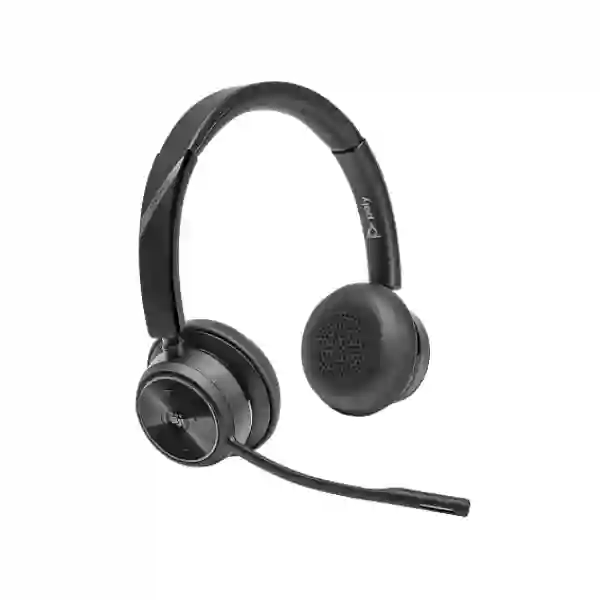
HP Poly Savi 7420 Office Microsoft Teams DECT Headset
The HP Poly Savi 7420 Office Microsoft Teams DECT Headset serves people who need a single practical calling position for computer meetings, desk phone conversations and mobile calls. Rather than expecting a headset to pair independently with every device, the system uses an office base as its central connection point. The headset communicates wirelessly with that base using DECT, while the base connects to the relevant calling equipment. It is especially useful where an employee frequently moves between different lines but wants a consistent microphone, familiar call controls and a place to charge the headset between conversations.
This is the stereo, on-ear member of the Savi 7400 Office family in a Microsoft Teams-oriented configuration. Its noise-cancelling boom microphone uses Poly Acoustic Fence technology, and its dedicated Teams controls are designed for the supported desktop Teams experience. Buyers should confirm the exact regional variant, phone model and accessories before ordering. FourTeck can use those details to prepare a configuration-specific quotation for a Tanzania deployment; no stock, local regulatory approval or price is assumed on this page.
Key specifications at a glance
These manufacturer-based figures describe the Savi 7420 Office family and relevant Teams stereo configuration. Confirm the regional part code and configuration delivered for the intended Tanzania installation.
| Form factor | Stereo, on-ear wireless headset with office base |
|---|---|
| Calling sources | Computer, compatible desk phone and mobile phone via base |
| Wireless connections | DECT headset-to-base; Bluetooth mobile-to-base |
| Computer / phone interfaces | USB Type-A or USB Type-C computer cable; telephone interface cable for compatible desk phones |
| Microphone | Noise cancelling with Poly Acoustic Fence |
| Battery | Up to 13 hours talk time; up to 52 hours standby |
| Charging | Under 2 hours according to HP specifications |
| Range | Up to 55 m in a typical office; up to 180 m in open area |
| Weight | 160 g headset |
| Listening safety | SoundGuard Digital |
| Team calling | Microsoft Teams-certified series; desktop app required for Teams button functions |
| Purchase check | Confirm regional DECT variant, part code and desk phone accessories |
A headset for mixed calling environments
In a modern office, a single role may involve Teams meetings, telephone extension calls and client calls arriving on a mobile handset. Switching between separate audio devices can interrupt work and make conversations less predictable. The Savi 7420 Office is designed around that mixed environment. Its base provides separate source selections for a connected computer, an appropriate desk phone and a Bluetooth-paired mobile device. A user can identify which source is active, answer using the applicable controls and continue with the same on-ear headset rather than replacing equipment between conversations. The actual call-control behaviour depends on the connected telephone or softphone and its supported integration.
The strongest fit is a fixed workplace, shared service desk, reception counter, supervisor’s office or similarly established calling position. This is not simply a Bluetooth travel headset: the office base, charger, cables and DECT connection are central to how the system operates. That distinction matters for procurement because the base needs power and physical connections. If staff work exclusively on a laptop and rarely use a desk phone, a simpler USB or mobile-oriented headset may be easier to deploy. Where calls genuinely arrive through several channels, the multi-source base offers a clearer reason to choose this model.
What the three-way office base actually does
The base acts as the control point between the headset and the three supported communication sources. The computer connects over the appropriate USB cable, the desk phone uses the suitable telephone interface and the mobile phone pairs by Bluetooth with the base. The headset itself uses DECT for its radio connection to the base; Bluetooth is not the headset-to-base radio path. This arrangement allows the headset to remain associated with its base while the user selects another source. The base also provides charging and an interface for configuration, so installation is more involved than pairing ordinary earbuds to a phone.
Three-way connectivity should not be confused with a guarantee that every source or application behaves identically. A traditional desk phone may need a physical button press or a separately purchased electronic hookswitch accessory for remote answering. A softphone’s answer and end commands may depend on compatible Poly software and application support. A mobile call is subject to the paired phone’s Bluetooth settings. Before committing to a multi-seat order, test one installation with the actual PC, collaboration application, telephone and mobile device used in your office. That small test can reveal accessory needs long before desks are fitted out.
Microsoft Teams certification and workflow
The Teams-oriented Savi 7420 Office is intended to simplify desktop collaboration. Microsoft lists the Poly Savi 7410/7420 Office series in its certified headset directory, and the manufacturer’s Teams configuration supports dedicated interactions with the desktop application. With the supported Teams model and desktop software, the Teams button can bring the application into view, help the user interact with a scheduled meeting and signal notifications on the base. These behaviours can reduce time spent locating the application window while a call is approaching, but they still require the relevant application, account and configured system.
There are important boundaries. Certification does not supply a Teams license, telephone calling plan, internet service or an organisation’s account settings. The manufacturer’s user guide says that these dedicated Teams interactions require the Teams desktop app and that the Teams mobile application is not supported for that particular Teams-button workflow. Operating-system support and calling features should be checked against the current workstation build and organisational policy. Teams certification is a product compatibility characteristic, not proof that every function in every other conferencing or softphone application will operate without configuration.
Why stereo audio matters for a desk-based role
The 7420 uses two on-ear speakers rather than the single-sided wearing style of the Savi 7410. Stereo can help an agent follow a detailed call and reduce the need to rely on a separate office speaker. It may also suit employees who listen to supported computer audio between conversations. HP lists separate speaker bandwidth specifications for media and wideband calling modes, illustrating that playback characteristics are not identical across every source. The actual voice quality depends on the calling service, codec, connection conditions and the audio settings selected by the software or telephone.
Stereo is nevertheless a personal fit decision. Some receptionists and colleagues in walk-up support roles prefer to hear the surrounding room clearly and may choose a monaural alternative instead. On-ear cushions create a different feel from in-ear earbuds or over-ear noise-isolating headphones. Ask intended users whether they need to monitor visitors, hear alerts from coworkers or concentrate on successive remote conversations. A short wear-and-call evaluation is more useful than assuming that stereo automatically suits everyone. The Savi 7420 should be selected because its acoustic arrangement matches the daily work pattern, not simply because it has two earcups.
Microphone clarity in busy workspaces
The boom microphone uses noise-cancelling technology with Poly Acoustic Fence to help attenuate unwanted environmental sound captured alongside the speaker’s voice. That is useful in offices where other people are talking, phones are ringing or employees share nearby workstations. It can make a caller’s voice easier to distinguish from background activity, particularly when the boom is positioned correctly. The benefit is primarily about the outgoing voice signal; it should not be described as active noise cancellation for the wearer’s ears. The Savi 7420 is an on-ear business headset, not a promise to silence every environmental distraction.
For dependable results, start with a sensible workstation layout. Position the microphone according to the manufacturer’s wearing instructions, keep unnecessary audio sources away from the desk and test the captured speech from the far end of a normal call. Compare performance with typical office sounds rather than an artificially quiet showroom. If staff handle confidential conversations, complement the headset with appropriate room privacy and workplace practices. A noise-reducing microphone helps communication, but it does not substitute for private meeting space, controlled access to customer information or respectful speaking volume in a shared room.
DECT wireless range without unrealistic promises
HP specifies wireless reach of up to 180 metres in open areas and up to 55 metres in a typical office environment. The distinction is material. Open-area figures assume a comparatively unobstructed radio path, while office performance is affected by walls, metal structures, floor layouts, building materials and nearby equipment. A department may find that staff can walk between adjacent desks but not through every corridor or onto another floor. Range figures describe maximum reference conditions, not a site-wide coverage guarantee. The connection is still anchored to the user’s office base and its appropriate regional DECT radio system.
Buyers should map realistic movements before selecting wireless equipment. Does an employee only need to reach a filing cabinet, printer and nearby colleague? Or must the headset operate across several separated rooms? Test at the actual working locations, including at busy times with other radio devices in use. Discuss base positioning and possible interference with your technical team. A DECT system can be well suited to a busy fixed office, but it is not an alternative to planning a building-wide roaming voice network. Where continuous communication across an entire site is essential, consider whether another communications architecture better meets that requirement.
Battery capacity and charging rhythm
Manufacturer specifications indicate up to 13 hours of talk time and up to 52 hours of standby time with the rechargeable lithium-ion polymer battery. HP also lists charging time as under two hours. These figures help a buyer estimate whether the headset can accommodate a normal calling shift, although call intensity, age of the battery, usage conditions and configuration affect the result. A headset can be capable of a long shift while still benefiting from planned charging breaks. The base and cradle are intended to provide an easy return point, reducing the need for separate charging arrangements.
When evaluating a service team, calculate approximate active calling hours rather than merely the length of the working day. An eight-hour shift with frequent short calls creates a different pattern from extended continuous conversations or overnight operations. Where staff rotate between shifts, verify the charging interval available between users and whether each person has a dedicated headset. Keep power adapters and charging positions accessible and protect cables from accidental pulling. For continuity-sensitive work, establish a response plan for a depleted battery; advertised talk time should not become an assumption that no interruptions are possible.
Computer setup and everyday PC audio
A compatible computer is connected to the base using the supplied USB Type-A or USB Type-C cable, selected according to the workstation’s available port and hardware requirements. The operating system and meeting application must then use the correct Poly audio device for speaker and microphone input. HP’s support information identifies Windows 10, Windows 11 and macOS among compatible operating systems, although compatibility with a particular managed computer image, docking station or softphone remains a practical deployment question. The setup should be confirmed on the actual company equipment rather than a personal laptop with different permissions.
For the best user experience, check operating-system audio devices, Teams device settings and application call controls before handing the workstation to a user. Make a test call, confirm the headset microphone is the active input, and ensure the remote participant hears the voice clearly. Test mute, call answer and end, and switching away from PC audio to another line. Some software call-control features rely on Poly management software and supported softphone integration. If the workstation is locked down by IT policy, obtain approval for any required software or firmware management in advance.
Desk phone connections and compatibility
A desk phone can connect to the office base through the telephone interface cable, but the physical method depends on the specific phone. Some phones provide a dedicated headset port; others may require the connection through the handset port. The manufacturer’s guide describes different base configuration positions and instructions for different telephone designs. Thus a telephone fitted with a familiar modular connector is not, by itself, proof that every remote-call feature will work. The exact phone make, model, interface and firmware are useful inputs to provide before equipment is ordered.
A basic connection may require the user to press the telephone’s own headset button or lift its handset when starting a call. Compatible electronic hookswitch arrangements or a handset lifter can change that experience, but they are separate accessories and must be matched to the telephone. Buyers replacing old headsets should check whether existing adapters are genuinely compatible instead of assuming they will transfer. For a larger office rollout, prepare a small compatibility matrix covering phone models, required cables, configuration settings and successful call tests. This can prevent a very small accessory mismatch from creating a department-wide support problem.
Bluetooth mobile calling through the base
Mobile compatibility is supplied through Bluetooth on the office base. The mobile phone pairs to that base, which in turn routes audio to the DECT headset. HP identifies Bluetooth Core 5.2 and relevant audio profiles for the supported model. This is helpful for employees who receive a mobile client call while remaining at a desk, particularly if their work includes a combination of company telephone extensions and mobile contacts. However, moving the headset away from the office does not turn it into an independent Bluetooth phone headset; the Savi 7420 system is designed around the base connection.
Pairing should be completed with the intended business handset and its permitted Bluetooth settings. Check the phone’s behaviour when it is locked, in a bag, or receiving a second call. Confirm audio routing between mobile and headset, and agree on how employees should return audio to the phone when leaving the workstation. For organisations managing sensitive information, ensure pairing practices align with mobile-device and information-security policies. This is a convenience feature for a controlled desk environment rather than a reason to bypass company policies about the use of personal devices for business calls.
A base that makes switching sources clearer
The office base has separate source buttons for desk phone, computer and mobile audio, as well as a screen and a navigation wheel for supported setup functions. These controls are useful for staff who need to tell which line they are using without searching through multiple applications. The user’s headset also provides familiar call, mute, volume and power controls. The Teams-certified configuration differs from some standard versions in the function assigned to the additional base button. It is worth identifying the supplied version before writing desk-side training instructions, because photos of related models may show different labels.
Introduce users to a simple pattern: identify the source, select it, place or answer the call, confirm the microphone state and end the call using the controls supported by that source. A headset button is not guaranteed to control every desk phone automatically, and a call originating from a phone application may still require an action in that application. In training, include a demonstration of switching back to the preferred default line. Consistent workstation habits can save more time than memorising every configuration menu; reserve advanced adjustments for help-desk staff and documented support procedures.
Security characteristics and responsible use
HP describes enhanced DECT security and lists encryption and authentication capabilities for the appropriate Savi 7420 configuration. This provides a technical basis for discussing protected headset-to-base wireless communication. The manufacturer’s product information identifies AES 256-bit encryption and DECT security certification, while its guide emphasises using the product only within its designated radio region. These statements should be understood as product features, not as certification of an organisation’s entire voice infrastructure or a substitute for security reviews of connected computers, desk phones, calling platforms and mobile handsets.
Businesses should apply ordinary communications governance as well. Keep account permissions appropriately managed, maintain endpoint software, restrict unauthorized device pairing where policy requires it and use approved calling applications. Do not describe the headset as making conversations inherently confidential in an open room; sound can still be overheard by people nearby. The specific radio variant and any applicable local approval must also be confirmed for the proposed deployment location. When evaluating equipment in Tanzania, request documentation for the precise part number and have the relevant procurement or technical authority check whether its use is permitted before ordering.
Regional DECT variants: a critical Tanzania check
DECT products are not necessarily interchangeable between countries because radio frequencies and permitted configurations differ. HP publishes regional variants within the Savi 7420 Office family, including a Microsoft Teams-certified stereo configuration for the 1880–1900 MHz band identified in the manufacturer’s catalogue. That information does not establish that this exact configuration has been selected for the FourTeck Tanzania listing, or that any given unit is approved for use in Tanzania. Neither a familiar model name nor a retailer’s foreign product code resolves the issue. The manufacturer’s guide explicitly warns against using DECT products outside their intended regions.
A sensible quotation therefore begins with the exact manufacturer part number, supported radio band and evidence relevant to the intended country of use. Ask the supplier to identify the configuration proposed for delivery, not just the Savi 7420 family name. Have your organisation confirm applicable Tanzanian radio requirements before deployment. This page intentionally does not claim local regulatory approval, local inventory or a specific operating band for the undetermined listing variant. That caution makes comparison more useful: two listings with nearly identical names can differ in the radio configuration, packaging or region-specific components that matter during installation.
Remote call control may need extra accessories
When a desk phone is integrated, users often expect to answer a ringing call without returning to the desk. That capability depends on the telephone, its headset port and any supported electronic hookswitch or handset-lifter accessory. HP’s Savi 7410/7420 Office guide describes EHS and the HL10 lifter as optional accessories, sold separately. A compatible EHS cable can allow electronically controlled answering and ending, while a handset lifter mechanically manages a traditional handset. Neither should be included in a quote as though it automatically comes in the standard box unless the supplier has explicitly specified it.
The practical buying question is not simply whether a headset can be plugged into a phone; it is whether the intended user can complete the calling workflow they need. For reception, uninterrupted movement during calls may be a key requirement. For an office worker who sits close to the desk phone, manual answering may be acceptable. Ask for a tested compatibility recommendation for the exact telephone model, including whether a cable, lifter or base setting is needed. Record both the preferred workflow and the tested outcome so the business can compare the price and complexity of different solutions fairly.
Comfort, fit and daily wearing habits
The Savi 7420 headset is listed at 160 grams and uses a stereo on-ear wearing style with artificial-leather-surface ear cushions. Those specifications are useful starting points, but comfort is personal. Head shape, spectacles, preferred headband position and the number of hours spent on calls all influence how a headset feels. A soft cushion and familiar wearing style may work well for one member of staff and less well for another. Where the headset will be used repeatedly throughout a shift, give a representative group time to wear it in realistic conditions before making a fleet-wide choice.
Make sure the microphone boom can be positioned consistently and that the earcups do not interfere with necessary protective or specialist equipment. Consider hygiene arrangements if devices will be shared, and consult the applicable maintenance guidance before cleaning. Avoid storing the headset loosely with cables or heavy objects that could damage it; return it to its cradle when available. On-ear stereo audio can support focus, but users should keep volume at a reasonable level and follow company guidance on hearing protection. Practical fit and sensible listening habits remain essential even with advanced electronic audio features.
SoundGuard Digital and listening protection
HP identifies SoundGuard Digital as the acoustic protection technology associated with the product. Its purpose is to help manage exposure to certain potentially uncomfortable sound events and listening levels. It should not be described as complete protection against all hearing hazards or as a replacement for workplace risk assessments. The exact enabled features and settings may depend on the supported software configuration, so buyers should review current HP documentation before relying on a particular protection profile. Telephone and collaboration audio levels can also vary between applications and source devices.
Organisations that operate busy contact desks should establish sensible headset volume settings, user education and procedures for reporting unexpectedly loud audio. Test the loudness of both incoming desk-phone and computer calls during initial setup; a mismatch can lead staff to raise one device to compensate for another. Encourage regular pauses where job design permits, and address noisy surroundings as an environmental issue rather than asking users to increase the headset volume. Sound management is most effective when the headset’s capabilities are combined with well-configured calling software and appropriate workplace practices.
Multi-headset conferencing for coaching
HP describes an ability to conference up to four headsets onto one compatible Savi 7400 Office base. The user guide explains conferencing with three additional headsets, making the total four. This can be useful for supported desk-based coaching situations where a supervisor or trainee needs to listen to or participate in a call through an additional headset. The feature is distinct from adding four independent desk-phone lines or issuing four separate conferencing licenses. It is a headset-and-base function whose exact use should be checked against the intended calling environment and permitted organisational workflow.
For training, plan the roles and permissions before enabling additional listeners. Customer conversations may include sensitive information, and coaching should be conducted only under the organisation’s appropriate policies and notices. Test audio behaviour with the selected phone or application, including what happens when a guest headset is added or removed. Do not assume that any unrelated Poly headset can participate; compatibility should be checked for the particular device and configuration. If regular call monitoring, recording or supervisory dashboards are business requirements, evaluate those separately within the telephone or contact-centre platform.
Managing a group of office headsets
The Savi 7400 Office family is positioned for business administration, and HP describes remote device management for settings, firmware and security updates. This can help IT teams apply consistent configuration practices when multiple users share a workplace, although the available management functions depend on the supported Poly software, organisational permissions and devices. Before a rollout, define who is responsible for initial setup, firmware policy, user support and replacement decisions. Centralised administration is useful only when it aligns with how the organisation actually manages its endpoints and change processes.
A pilot should answer practical questions that a product specification cannot: Are base settings stable after workstation restarts? Does the approved softphone recognise the controls? Can staff select the correct line consistently? Are updates managed in the same manner as other endpoint software? Create a short installation checklist and record the working versions and connection settings. When a user reports an audio problem, the help desk can then compare the affected workstation against a known working configuration. Avoid making unsupported claims about automatic updates, cloud security, guaranteed interoperability or licensing; those depend on the actual deployment.
Planning desk layouts for reliable operation
Position the base where it can reach the desk phone, computer and power outlet without strain on cables. The manufacturer’s guide advises separating the base from certain nearby devices to reduce possible noise or interference; it gives a minimum recommendation of approximately 15 centimetres from a desk phone and 30 centimetres from a computer. Those are starting points, not a substitute for site testing. Plan cable routing to avoid damage, clutter or accidental disconnection when a user adjusts their chair or moves a keyboard. The headset cradle should be easy to reach so it is natural to return the device for charging.
In a high-density office, look beyond one successful desk. Nearby DECT systems, furniture changes and room partitions can influence performance. Coordinate deployments so that base positions and device records remain consistent. Walk through the typical routes people use during calls and check the headset’s audio while moving, not only while sitting down. Keep the distinction between computer connectivity and wireless headset range clear: a successful USB connection does not mean that wireless coverage will extend across the whole building. A well-planned workstation gives the technology the best opportunity to perform as intended.
Typical use cases in Tanzania offices
A customer-support employee may spend the morning answering desk-phone enquiries and the afternoon joining Teams discussions. A finance coordinator may need the office line for suppliers while receiving authorised mobile calls from colleagues. A team supervisor may need consistent audio across a computer-based meeting and a routine telephone call. In these scenarios the value of the Savi 7420 lies in consolidating an established desk’s audio sources into a single headset system. It does not depend on an invented local price, delivery offer or a promise that every workplace already has compatible telephony.
Local deployment planning should reflect the organisation’s real power arrangements, workstation equipment, internet connectivity and calling services. The headset does not provide internet access or cellular service by itself. If a Teams call relies on an unstable data connection, headset features will not correct network congestion or outage conditions. Likewise, a desk phone connected to a particular PBX or hosted calling platform requires its own configured service. Buyers can make better decisions by separating headset compatibility from telephone-system compatibility and obtaining the required information from both the IT team and the communication-service provider.
How to compare this model with alternatives
The most useful comparison begins with the sources the user actually needs. Against a simple wired USB headset, the Savi 7420 Office offers greater freedom to move near the workstation and the potential to handle several supported calling sources from one base. The tradeoff is a more complex installation with a charger, separate connections and possible desk-phone accessories. Compared with a mobile-oriented Bluetooth headset, this Savi model uses a DECT connection for the headset-to-base link and is shaped around a fixed office environment. That may be preferable for a desk phone workflow but less convenient for frequent travel away from the base.
Within the Savi family, the 7410 is a monaural option to consider when situational awareness matters more than stereo listening. Other models may offer different wearing styles, radio arrangements, supported bases or cost structures. Do not compare products solely on maximum claimed range or battery duration; test call quality, comfort, actual app controls and desk phone integration. Ask users which parts of their workflow consume the most effort today, then rank solutions against those requirements. An inexpensive headset that lacks a required phone interface may be a poorer purchase than a correctly specified system with the needed accessories.
What is included in the manufacturer’s box
HP’s listed standard box contents for the model include the wireless headset, office base, AC power adapter, charging cradle, telephone interface cable and USB Type-A and USB Type-C cables. This supports a useful baseline for quotation review, but the exact regional package and retailer offer should be confirmed before purchase. A box list is not a substitute for verifying the specific part number proposed by the supplier. In particular, an electronic hookswitch cable or HL10 lifter is described by the manufacturer as a separately sold accessory; buyers should not assume it is part of the standard package.
When checking a quote, compare the listed accessories against the actual installation plan. A workstation may have only certain USB ports or may use a managed dock. The desk phone may require an adapter to support the desired answering method. The power connection should match the correct officially supplied regional equipment. Request an itemised description of the proposed system and any additional parts so the installer knows what belongs at each desk. If multiple seats are ordered, make the same checks for every phone model rather than relying on the setup of a single representative user.
Installation sequence for one pilot workstation
Start with an inventory of the computer, telephone and mobile device, including their operating systems and relevant application versions. Confirm the precise DECT part code and radio configuration before radio equipment is deployed. Place the base securely, connect power and the required computer cable, and connect a compatible desk phone according to HP’s instructions. Pair the mobile handset through the base when that source is required. Ensure the headset is seated correctly in its charging cradle, then select the intended default calling source and verify that speaker and microphone settings in the computer application identify the correct device.
Next, test the real operations: receiving and ending a Teams desktop call, using mute, changing volume, switching to a desk-phone call and taking a paired-mobile call. If remote desk-phone control is expected, test it with the required accessory rather than assuming the headset button will operate the phone. Walk the required office route while someone listens to the audio at the other end. Record any adjustments, including base settings or telephone configuration, so that later workstations can be deployed consistently. Complete user training only after the pilot demonstrates the required call patterns reliably.
Troubleshooting checks before escalating
If a call has no audio, first identify which source is active on the base and whether the relevant application or telephone has selected its headset audio path. On a computer, check both the operating-system device choice and the collaboration app’s device settings. On a desk phone, confirm the proper headset or handset connection and whether the telephone requires a button press, electronic hookswitch or lifter. On a mobile phone, confirm Bluetooth pairing and audio routing to the base. A problem that appears to be a defective wireless headset can sometimes be a wrong source selection or an incomplete source-side configuration.
For an intermittent or noisy call, check headset battery status, base positioning, nearby electrical equipment, cable seating and the conditions along the user’s normal walking route. Compare a local test call with a working workstation, and isolate whether the issue occurs on one source or every source. If Teams controls behave differently after a software change, consult the supported Poly and Microsoft compatibility documentation. Avoid changing multiple settings at once without recording them. A repeatable troubleshooting checklist supports faster service and helps determine whether the problem lies with the headset system, the calling software, the telephone or the office environment.
Information to provide when requesting a quote
For a useful Tanzania quotation, provide the product name and say that you require the stereo Microsoft Teams Office configuration. State how many users are involved, whether they use a computer, desk phone, mobile phone or all three, and identify the desk phone brand and exact model for every seat. Include workstation connection types, operating systems and the intended collaboration application. Describe whether people must answer desk-phone calls from a distance, because that may determine whether a separately priced electronic hookswitch or lifter is required. Ask the supplier to specify the actual regional part number and supported DECT frequency variant.
It is also helpful to describe the office layout, approximate movement required during a call, shared-headset policies and any endpoint management restrictions. Ask for clear treatment of accessories, compatibility testing, applicable product documentation and warranty terms in the proposed offer rather than relying on generic international listings. This product page does not quote a Tanzanian selling price, claim local stock or promise a delivery schedule. Those details need confirmation for the actual transaction. A configuration-specific request keeps the comparison focused on suitability, makes hidden accessory requirements visible and reduces the possibility of ordering an incompatible regional or phone-interface combination.
Purchase decision: who should choose the Savi 7420
Choose the Savi 7420 Office Teams configuration when users spend much of their time at a fixed desk, regularly handle more than one supported calling source and benefit from stereo listening and dedicated Microsoft Teams desktop controls. Its DECT headset link, noise-cancelling boom and central office base address that combination of needs. It is also worth evaluating where staff coaching or centralised device configuration is part of the operating model. The strongest reason to buy is the complete fit between the user’s workflow, the connected systems and the verified package, not any isolated headline specification.
Consider another form factor where mobility beyond the base is the main requirement, where only a simple USB meeting connection is needed, or where staff need a free ear to hear visitors constantly. Do not proceed merely because the product title resembles a previous headset. Confirm the actual part code, local radio suitability, desk phone control requirements and installation conditions first. For teams evaluating multiple devices, a short pilot with real employees and phones is more informative than making a broad compatibility assumption. Request a FourTeck configuration review for the proposed Tanzania use case before committing to a larger deployment.
Frequently asked questions
Can the Savi 7420 Office connect to a PC, desk phone and mobile phone?
Yes. Its office base supports connections to a computer, a compatible desk phone and a mobile phone. The headset communicates with the base using DECT, while the mobile device pairs to the base through Bluetooth. The desk phone may need additional setup or accessories, and source switching should be tested for the organisation’s particular phones and software.
Is the Savi 7420 Teams version certified for Microsoft Teams?
Microsoft lists the Poly Savi 7410/7420 Office series among certified headsets. HP also offers a Teams-specific Savi 7420 configuration with dedicated interactions for the Teams desktop application. Confirm the exact Teams variant in the quote and ensure the supported desktop application is installed. Teams certification does not provide an organisation’s Teams license or calling service.
Does the Microsoft Teams button work with the Teams mobile app?
The manufacturer’s user guide identifies Teams button interactions for the supported desktop application and specifically notes that the Teams mobile application is not supported for that feature. A paired phone can still be used as a mobile calling source through the base. These are different capabilities, so avoid treating mobile Bluetooth connectivity as identical to the desktop Teams control experience.
What is the realistic wireless range in an office?
HP quotes up to 55 metres in a typical office and up to 180 metres in an open area. Walls, office partitions, building materials, interference and base placement influence the distance achieved. Treat the figures as reference limits, not guaranteed coverage at every desk or through multiple floors. Test the routes employees actually need to walk during calls.
How long does the battery last?
HP specifies up to 13 hours of talk time and up to 52 hours of standby time, with charging in under two hours. Actual endurance varies with use, operating conditions and battery age. Organisations with long or overlapping shifts should review call patterns and charging opportunities, and make sure the cradle is conveniently positioned.
Does a noise-cancelling microphone remove all office noise?
No. Poly Acoustic Fence technology is intended to reduce distracting sound captured by the microphone, helping listeners hear the speaker more clearly. It does not make a noisy room silent for the wearer and should not replace appropriate acoustic planning. Microphone positioning and testing in a real working area remain important.
Can I answer desk-phone calls from a distance?
Possibly, depending on the phone model and any suitable remote-call-control accessories. HP documents electronic hookswitch cables and the HL10 handset lifter as separately available options. Without a supported accessory, the user may still have to press a phone button or lift the handset. Check the exact phone model and desired action before selecting accessories.
Can several people conference on one base?
HP indicates that a compatible Savi 7400 Office base can conference a total of four headsets, including the primary unit. This is useful for certain coaching or collaboration situations, subject to supported headset combinations and workplace policy. It should not be confused with four separate telephone lines, independent extension licenses or a hosted conference service.
Which DECT frequency is suitable in Tanzania?
The regional part code and allowable radio configuration must be verified before purchase. HP offers different regional frequency variants and warns against use outside the intended region. This page does not confirm a Tanzania-approved frequency or claim a local approval for the unspecified unit. Ask the supplier for exact model documentation and complete any applicable local compliance checks.
What should I send for an accurate quote?
Give the full requested product name, number of headsets, preferred stereo Teams version, phone models, computer ports, operating systems and collaboration applications. State whether mobile calling and remote desk-phone answering are required. Include a brief description of the intended office and ask the supplier to specify the regional part code, accessories and commercial terms.
Is the Savi 7420 a good travel headset?
It is primarily an office headset system built around a powered base and DECT headset connection. It is suitable for movement near an installed workstation within the actual radio coverage, not a direct substitute for a standalone Bluetooth travel headset. If most calls take place away from a fixed desk, evaluate an alternative designed for that mobility pattern.
Is a local price or stock level available on this page?
No verified Tanzania selling price, inventory level or delivery time has been supplied for this listing. An international manufacturer or reseller listing should not be treated as evidence of a local offer. Request a configuration-specific quotation from FourTeck that identifies the proposed regional version, included accessories and the commercial details applicable to your order.
Request a configuration-specific quotation
To discuss the HP Poly Savi 7420 Office Microsoft Teams DECT Headset for your organisation in Tanzania, request a configuration-specific quotation from FourTeck. Please include your telephone models, preferred Teams stereo version, number of users and the required calling sources. Ask for the proposed radio-region part number and any accessories needed for remote phone answering. Confirmation of price, stock, delivery, warranty terms and local regulatory suitability belongs in the actual quotation and compliance review.




Reviews
There are no reviews yet.