
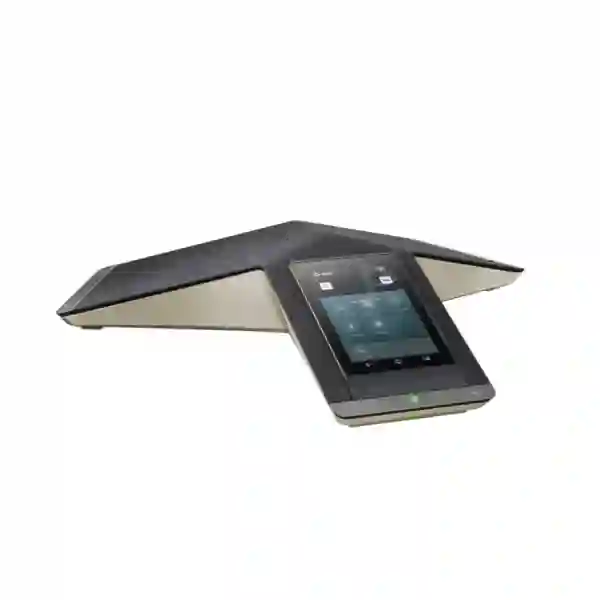
HP Poly Trio C60 Expansion Microphone
Make more seats around your meeting table practical for conversation. The Poly Trio C60 Expansion Microphones provide wired tabletop pickup extension for a compatible Poly Trio C60 conference phone, helping teams assess and improve how clearly distant participants are heard during calls.
Is this the right accessory?
Choose this microphone kit when you already use a Poly Trio C60, have participants seated farther from the central phone, and can accommodate wired tabletop microphone positions. Confirm the exact package contents and your supported conference configuration before ordering. For a Tanzania quotation, ask for the manufacturer part number 85X02AA and describe your actual room layout.
What the Poly Trio C60 Expansion Microphone does
The HP Poly Trio C60 Expansion Microphone is a wired tabletop accessory for organisations that already use a compatible Poly Trio C60 conference phone and need more practical voice pickup around a meeting table. Rather than replacing the conference phone, the microphones extend the position of the pickup points toward participants who are seated farther away. The intended outcome is more balanced participation during group calls, particularly when people at the end of a table find themselves speaking toward a phone placed in the centre.
The standard Poly Trio C60 Expansion Microphones accessory is identified by HP with manufacturer part number 85X02AA. HP’s Trio C60 setup material also identifies the earlier Poly accessory code 2200-86430-001 and illustrates a pair of round, wired tabletop microphones. These are manufacturer identifiers, not a FourTeck stock keeping unit. When requesting a quotation, quote the product name and manufacturer number so the intended accessory can be matched with the installed conference phone.
This is an add-on, not a standalone conferencing endpoint. It does not provide its own dial pad, service registration, meeting account, loudspeaker, or independent network connection. Its value comes from working with the Trio C60 conference phone as the main audio device. If you have not yet purchased that phone, plan the complete room solution first rather than assuming the microphones can replace a conference system.
For a meeting room in Tanzania, the first buying question is not simply how large the room is. Consider where participants sit, how frequently seats at the far end are used, what the room sounds like during a real call, and where the cable can be placed safely. Those practical factors decide whether adding two close-to-participant pickup points is a sensible improvement.
At a glance: verified identity and buying facts
The product family is Poly Trio C60 Expansion Microphones, marketed under the HP Poly name. HP’s current Africa accessory listing identifies 85X02AA. The Poly Trio C60 quick-start illustration identifies accessory code 2200-86430-001 alongside two 2.1 metre, or 7 foot, cable arrangements. The item should be described as a wired expansion-microphone accessory intended for the Trio C60, not as a generic USB microphone for a laptop.
The supported buying decision is whether the organisation needs to extend pickup away from the main phone. It is not a means to increase speaker loudness, add a second conference service, improve internet bandwidth, or change the acoustic characteristics of the room. Those issues may also affect meeting quality, but they require separate diagnosis. Avoid confusing the specifications of the Trio C60 conference phone itself with specifications belonging to the optional microphones.
HP publishes the Trio C60 phone as a system that can be expanded using optional microphones or additional Trio systems. This supports a clear distinction between expanding an existing phone and redesigning a larger meeting space. If one table arrangement requires substantially more distributed audio than two wired accessory positions can provide, compare a broader room-audio design rather than attempting to stretch the accessory beyond its intended layout.
Exact pack contents, supplied cables, commercial terms, local stock, and warranty conditions should be confirmed on the quotation for the Tanzanian purchase. The usual kit is described as two microphones with connecting cables, but a written bill of materials is the safest way to avoid confusion between an individual replacement item, a complete accessory kit, and a main Trio C60 conference phone.
Who should consider this microphone kit
A boardroom with a long rectangular table is an obvious scenario. A centrally positioned Trio C60 may be comfortable for participants nearby, while people at the ends of the table may turn their heads, lean forward, or speak more loudly. Positioning wired microphones nearer those seats can make the seating plan more usable without placing the main phone at one end. Test the proposed positions with normal conversation before committing to a permanent cable route.
Management and project review rooms also benefit when attendance changes. A room can work well for a short call with four people and become less convenient when additional colleagues occupy every seat. Optional expansion microphones let a facilities or IT team plan for the actual occupied footprint rather than only the nominal capacity printed on a room booking sign. The objective is intelligibility from the seats people really use.
Training rooms and consultation spaces may need a different approach. If participants are spread among several separated tables, one set of wired expansion microphones may not be the most convenient answer. Check cable routes, distance, instructor movement, and whether the room is arranged differently every day. A device designed for a table is not automatically suitable for an open-floor training session or a presenter who walks around.
This accessory is most appropriate when an operational Poly Trio C60 already meets the organisation’s conferencing requirements and only the placement of voice pickup needs attention. If the room also lacks acceptable remote-audio playback, has severe reverberation, or requires microphone positions far from any sensible cable path, first assess the entire sound and conferencing system.
Why microphone position matters more than a headline distance
People rarely remain perfectly still during a meeting. They turn to a presentation screen, read documents, consult someone beside them, and move back from the table. A microphone positioned closer to a group of seats can give those participants an easier speaking position. The practical improvement depends on acoustics, talker direction, room noise, microphone placement, system settings, and the remote participant’s receiving setup.
Published figures for the Poly Trio C60 base phone should not be treated as guaranteed coverage figures for every expanded layout. A manufacturer’s base-device pickup range describes a product capability under particular conditions; it does not replace an on-site test of far-end intelligibility. Avoid promises that a microphone kit will add a fixed percentage of coverage or enable a stated number of extra participants unless the exact configuration is formally documented.
Look for the seats from which remote attendees most often ask for repetition. A room may have a single problem area near a glass wall or air-conditioning unit rather than a problem with overall microphone quantity. Repositioning a table microphone can be helpful, but so can reducing competing noise, changing chair orientation, relocating a loud device, or adjusting the meeting layout. A good design considers all of these options.
During assessment, ask someone at the remote end to listen while each occupied seat speaks in a normal voice. Record which seats sound quiet, distant, or masked by noise. Do not judge solely by what people in the room hear from the conference phone speaker, because local playback quality and outgoing microphone pickup are different parts of the conversation.
Compatibility: check the exact Poly system
The supported parent system for this accessory is the Poly Trio C60 conference phone. HP identifies the matching accessory as 85X02AA. That model relationship is the essential compatibility check. The C60 designation matters: not every accessory bearing the word Trio is interchangeable, and similarly shaped expansion microphones can belong to different generations of conference phones.
HP’s accessory documentation distinguishes the Poly Trio C60 Expansion Microphones, part 85X02AA, from expansion microphones for earlier Poly Trio models, such as the 8300 or 8800 accessory family. Do not assume that a microphone left over from an older boardroom phone will connect to a Trio C60. If replacing legacy equipment, list the current phone’s full model and the part labels visible on the existing accessories.
Platform integration also needs a careful distinction. A Trio C60 may be configured for supported calling or meeting workflows, while the extension microphones simply contribute pickup to the parent device. Buying this accessory does not independently certify a Microsoft Teams, Zoom, SIP, or video-bar deployment. Confirm the supported Trio C60 configuration and software version for the room’s actual service.
When the Trio C60 works as part of a Poly video solution, consult HP’s current compatibility notes for the specific video bar, platform mode, and software release. Some video-device combinations support a Trio C60 as an audio peripheral under particular conditions, but that fact does not mean every accessory arrangement or controller mode is supported. Record the full room topology before accepting a proposed bill of materials.
Connection and supplied cabling
The HP Poly quick-start illustration shows two round accessory microphones connected to the underside of a Trio C60. The same illustration labels the optional microphone arrangement with the Poly code 2200-86430-001 and a cable length of 2.1 metres, approximately 7 feet. This is a useful planning reference for laying out a table before installation. It should not be interpreted as permission to use arbitrary replacement leads or unsupported cable extensions.
The microphones rely on the compatible conference phone; they are not standalone Ethernet, Wi-Fi, or Bluetooth endpoints. The parent Trio C60 requires its normal network and power setup independently of the accessories. In a new deployment, arrange the main phone, approved power method, network connection, and meeting service before testing the microphones. If the main phone is offline or misconfigured, the accessories cannot correct that issue.
Measure the actual route a lead must follow rather than measuring only the straight-line distance between devices. A cable may need to travel beneath the phone, around a table insert, through a desk grommet, and along an underside channel before reaching the microphone. Leave enough slack for positioning and maintenance, but avoid loose loops that can catch on a chair or be pulled by a participant.
Do not describe the expansion kit as wireless or advertise universal connector compatibility. If the current phone has an unfamiliar connector, a missing cable, or signs of physical damage, compare the manufacturer’s instructions and the actual equipment before making changes. For reliability, use the approved connection arrangement and confirm that microphones are recognised in a real test call.
A practical layout for a long table
Start by placing the Trio C60 where its display, mute control, and loudspeaker are convenient for the participants who need to operate it. A central table position can be sensible, but not if a large monitor, pile of documents, or decorative object blocks conversations. Before attaching any extension microphone, walk through the actual meeting experience and note the seats that require extra attention.
Position each accessory toward a group of seats that would otherwise be relatively far from the main phone, subject to the manufacturer’s cable and placement guidance. Think of the microphones as additional listening positions rather than guaranteed circles drawn on a floor plan. They are most useful when the extension points are close enough to the people whose speech is difficult to capture from the central phone.
Avoid positioning microphone heads immediately beside projector fans, ventilation outlets, rustling papers, desk speakers, or laptops with loud cooling fans. Even sophisticated conference processing has less useful speech to work with when nearby mechanical sound dominates a microphone. Keep the table surface tidy and leave enough space for notebooks and drinks without asking participants to handle the audio hardware during every meeting.
Once the microphones are connected, ask users to speak from each end of the table while a remote colleague checks intelligibility. Repeat the test when the room is fully occupied if that is the usual meeting scenario. Small changes in seating, cable path, and microphone position can be more valuable than placing the accessories symmetrically for visual appearance alone.
Installation workflow for IT and facilities teams
Begin with inventory. Identify the Poly Trio C60 model, confirm the accessory packaging and manufacturer part number, inspect the supplied microphone units and leads, and record the room where they will be deployed. If the main phone is not yet installed, arrange its approved network and power connection first. This avoids interpreting a phone registration or connectivity issue as an expansion-microphone fault.
Next, sketch the table with the main phone, seating positions, cable exits, and two intended microphone locations. Verify that the approved leads reach without stretching and that the route does not cross a walkway. Facilities teams should approve any table drilling or permanent cable management before changes are made. Temporary positioning during a pilot can help prevent an expensive but inconvenient permanent layout.
Connect the microphones according to the official Poly Trio C60 setup guidance, taking care not to force connectors or pinch cables. Restore the normal phone setup and make a test call. Evaluate outgoing audio from seats near the phone and near each added microphone. If a microphone seems ineffective, check seating position, physical connection, and the phone’s documented operating status before changing unrelated network settings.
Finish with a brief handover: where microphones are meant to sit, how to keep cables clear, who supports the conference phone, and how users should report an audio problem. Photograph the final table layout for internal facilities records if your organisation permits it. The aim is a room that remains usable after furniture cleaning, changes to seating, or a routine equipment move.
What the kit can improve and what it cannot
The clearest potential advantage is extending voice pickup opportunities along a longer table. This can reduce the need for distant participants to direct their speech toward the centre of the room. It may also allow a familiar Trio C60 call interface to remain in place while the surrounding table becomes more practical for larger meetings. The actual result should always be assessed through a two-way conference call.
The kit does not create additional loudspeakers beside every participant. If someone at the end of the room cannot hear the remote caller, the problem may involve speaker placement, volume, noise, room geometry, or the broader audio design. An expansion microphone solves a pickup-location problem, not every audio problem. A room with weak playback may need a different equipment choice or acoustic adjustment.
Likewise, an accessory cannot repair unstable broadband, packet loss, poor conferencing service registration, incorrect meeting-room licensing, or an unsupported software combination. Speech transmission depends on the conference phone and its network or meeting service. Before blaming microphones, isolate whether the difficulty affects only people speaking from particular seats, everyone on the call, or all incoming and outgoing audio.
The microphone kit is not soundproofing or acoustic treatment. Hard walls, bare floors, glass partitions, and long reflective tables can make speech less clear even when microphones are nearby. Soft furnishings and sensible room design may be important complementary improvements. Make purchase decisions from the specific source of the user’s complaint rather than from a generic promise of better sound.
Meeting-room scenarios in Tanzania
In a company boardroom, the main phone may be used for regular management calls while the two end seats are occupied only during quarterly reviews. Adding expansion microphones may be worthwhile if the distant participants are consistently harder for remote colleagues to understand. The case is strongest when the same table configuration is used regularly and the wired locations remain clear of routine workspace activity.
For a professional services office, the room may host client consultations, internal planning, and hybrid meetings. The priority is reliable conversation without interrupting the discussion to reposition the central conference phone. An appropriate microphone arrangement can make seating more flexible, provided the installed Trio C60 and room acoustics already support the meeting service satisfactorily.
Universities, training providers, and institutional offices may have meeting spaces that change use during the week. Before buying a wired tabletop accessory for such a space, identify whether the tables move frequently and whether leads will be protected. A portable arrangement might be acceptable for a fixed discussion table but inconvenient for a workshop layout that is dismantled after every session.
These examples describe typical buyer needs in Tanzania, not claims about a particular customer’s installation or local service arrangement. Price in Tanzanian shillings, local inventory, lead time, delivery scope, warranty handling, and any professional installation service must be established by a current quotation rather than inferred from product listings in other countries.
How to decide between expansion microphones and another solution
Choose the expansion microphones when you have a working Trio C60, the main complaint is outgoing speech from seats farther away, and two wired tabletop pickup points suit the furniture. This is a focused extension of an existing investment. It lets a business target a known problem without automatically replacing a conference phone that already performs its other tasks well.
Consider a different approach if the room is irregular, participants move continuously, several independent tables require coverage, or the cable route would be unsafe. A larger space may need a distributed microphone design, additional compatible conference equipment, or changes in acoustic treatment. Do not assume that any number of extra microphones can be connected to a single Trio C60 without manufacturer support.
If you are comparing a new complete Trio C60 installation with a different room-audio system, evaluate the total solution. Include the conference phone, optional microphones, compatible software configuration, network and power requirements, cable management, and support burden. An accessory price alone is not a fair comparison with a system that includes different speakers, microphone locations, control interfaces, or meeting integration.
For an existing older Poly Trio model, verify whether the proposed item is the C60 kit or an expansion microphone for the older model. Physical similarity is not enough. A quotation that includes the correct parent device model, manufacturer accessory number, quantity, and necessary cables gives the buyer far more confidence than a generic line reading only ‘Poly extension microphone’.
Checklist before requesting a quotation
Record the exact conference-phone model as shown on the device or its management records. Specify whether it is a Poly Trio C60 and note the current conferencing workflow in ordinary terms, such as audio-only meetings or a room paired with a video system. Provide the desired accessory as Poly Trio C60 Expansion Microphones, manufacturer part 85X02AA, while clearly distinguishing that number from your organisation’s internal procurement code.
Describe the room in practical terms: approximate table length, maximum normal attendance, position of the existing Trio C60, and which seats are difficult to hear remotely. A simple sketch can be more useful than a detailed architectural plan. Include obstructions, table cable openings, and whether furniture is moved between meetings. This helps establish whether the standard wired placement is realistic.
Ask the seller to confirm the quantity of microphone units, the included connecting leads and their length, the applicable replacement part identifiers, and whether the supplied kit is intended for your installed C60. Confirm the scope of the quotation instead of assuming that the base conference phone is included. Request written local pricing, taxes, shipment terms, availability, and warranty details for the actual offer.
If an installer or integrator will be involved, clarify responsibility for the conference phone’s software configuration, onsite testing, and user handover. These are commercial and project questions, not features supplied automatically by a microphone. A clear scope makes it easier to compare quotations fairly and reduces surprises when the accessories arrive.
Testing the microphones after deployment
Use a genuine call with a remote participant or test endpoint. Begin with a person sitting close to the main Trio C60, then move through the seats near each accessory microphone, including any end positions that motivated the purchase. Ask each person to speak naturally for several sentences. The remote listener should report whether words are complete, whether loudness is roughly consistent, and whether competing noises obscure speech.
Test people speaking in different directions, as often happens when referring to a screen. Listen for distortion, interruptions, unusually weak speech, and large changes in perceived loudness between adjacent seats. Avoid treating one short ‘hello’ as proof that every position works. A normal discussion with several participants gives a better representation of how the room will behave in daily use.
Also test incoming audio separately. If remote voices are hard to hear on the room side, that is not proof that the microphones have failed. Adjust the appropriate parent-device settings or investigate the room’s playback and acoustics. Check that mute behaviour and call controls remain understandable to the meeting host after the table layout has changed.
Document the final test with simple pass, needs adjustment, or unresolved notes for each seating area. When a problem persists, capture the device model, software level, call service, symptom, and affected seat. These details make troubleshooting easier for the support provider and prevent repeated guesswork by subsequent users.
Troubleshooting common concerns
If people at one end still sound distant, first verify that the intended accessory microphone is correctly connected and that it is placed near the affected group. Then test again from the same seat with a remote listener. Do not immediately increase overall call volume: the room’s loudspeaker setting and the outgoing microphone signal address different problems. If the cable or microphone appears faulty, follow the manufacturer’s supported diagnostic procedure.
If the remote participant hears intermittent audio, check whether the issue follows a particular microphone location or affects the entire call. A cable that is pinched by a table hinge or moved during cleaning merits a physical inspection. If every talker is affected, investigate the phone, network, meeting service, and audio configuration. Separating local pickup from wider call performance prevents unnecessary accessory replacement.
If background noise seems prominent, check what is nearest the pickup position. Air conditioning, rattling projectors, keyboard typing, and paper movement can all compete with speech. Move the microphone away from the source where practical, or alter the room setup. Avoid promising that a microphone accessory has noise processing independent of the conference phone unless that capability is expressly documented.
If the room uses a video bar or a cloud meeting platform, consult the supported version-specific HP deployment guidance. A configuration that functions in one software mode may have different limits in another. Troubleshooting should begin from the documented room topology rather than from generic instructions for a standalone USB microphone or an unrelated Poly accessory.
Care, cabling and long-term room usability
A wired accessory is part of the shared meeting-room environment. Keep its cable supported and away from chair wheels, moving furniture, and heavy objects. Do not route cables under carpet without an appropriate professional solution, and do not use improvised adapters merely to gain extra length. A clean installation should let someone wipe the table, sit down, and join a meeting without first untangling microphone leads.
Train room users to leave the microphones in their intended positions. Moving one microphone to make space for a laptop may seem harmless, but it can change the pickup experienced by colleagues on the next call. If the room is repeatedly reconfigured, mark a suitable storage and setup procedure rather than relying on informal knowledge held by one administrator.
Follow the manufacturer’s care and safety documentation for the equipment. Do not pour cleaning liquid on microphone openings or connectors. Where shared equipment is regularly cleaned, agree on a method that protects electronic components and allows them to dry before reconnection. IT support should also keep a record of the conference phone’s supported software and configuration.
At periodic room checks, confirm that both microphone positions remain suitable for current seating, cables are undamaged, and remote participants can hear the end seats. A microphone kit is a modest hardware addition, but the lasting result depends on consistent placement, reliable connections, and ordinary meeting-room maintenance.
Procurement notes: avoid a wrong-part order
Purchase descriptions vary: some catalogues use Poly, Polycom, HP Poly, expansion microphone, or expansion microphones. The singular product wording in a request should not be taken as proof that a particular seller supplies one unit or a pair. Ask for the written contents of the exact offered package and match the manufacturer’s numbers. HP’s current accessory code 85X02AA and the earlier Poly code 2200-86430-001 are useful for identification.
Do not use a retailer-specific SKU from an international store as the product code on a Tanzania quotation. Retailers can have their own internal identifiers and bundle conventions, and stock status abroad does not prove stock locally. FourTeck’s listing SKU has not been supplied here, so it should remain blank pending the target-listing data. The manufacturer’s part reference is a separate field from that commercial SKU.
Confirm whether the quote covers new accessories, replacement parts, installation labour, configuration assistance, or just a boxed kit. Ask about return or exchange terms for incorrectly specified accessories, especially if the original conference phone was procured elsewhere. These questions are better handled before ordering than after discovering a mismatch at the meeting table.
For procurement approval, state the business problem in measurable language: remote attendees cannot consistently hear participants at the far end of a particular conference table. Record the planned acceptance test and the exact included items. This produces a more defensible purchase decision than a broad request for ‘higher quality audio’ without stating what problem the accessory is expected to solve.
Frequently asked buyer questions
Does the Poly Trio C60 Expansion Microphone work on its own? No. It is an optional wired microphone accessory for a compatible Poly Trio C60 conference phone. The Trio C60 remains the main conferencing device. The accessory does not provide an independent call account, speaker, control screen, or network service. Buyers starting a new room should confirm that the conference phone and all necessary infrastructure are included separately.
Is the accessory compatible with earlier Poly Trio 8500 or 8800 phones? Do not assume so. HP distinguishes the Poly Trio C60 microphones, part 85X02AA, from the accessory family used by earlier Trio 8300 or 8800 products. Check the exact phone model before purchase, particularly where an organisation is reusing accessories from older rooms. Matching a brand name or microphone appearance is not a reliable compatibility test.
How many microphones are supplied? The standard Trio C60 expansion-microphone arrangement is illustrated as a pair in HP’s quick-start material, and kit descriptions commonly identify two tabletop microphone units. However, the precise items supplied by a particular local seller should be stated on the final quotation. If you require a replacement unit rather than a complete kit, say so explicitly so the offer can be checked.
What cable length should I plan for? HP’s Trio C60 quick-start illustration shows 2.1 metre, or 7 foot, cabling for the optional expansion microphones associated with Poly code 2200-86430-001. Measure the actual route beneath and around the table rather than simply the distance across its top. Confirm the cables shipped with the quoted item and avoid unsupported extensions or substitute leads.
Will the microphones improve the sound for remote participants? They are intended to provide additional pickup positions for people seated farther from the main conference phone. Whether remote listeners hear a useful improvement depends on placement, acoustic conditions, noise, and the full conference setup. A trial call covering the affected seats is the best way to assess the result for a specific room.
Do the expansion microphones increase loudspeaker volume? No. Their purpose is voice pickup, not adding speakers around the table. If people in the room cannot hear the remote side, diagnose the main phone’s playback, sound settings, background noise, and room arrangement. More microphones do not automatically make the distant voice louder inside the conference room.
Can these microphones be used directly with a laptop? Do not purchase the kit as if it were a general-purpose USB laptop microphone. The identified product is an expansion accessory for the Trio C60. Laptop conferencing through the parent phone or a broader room system is a separate compatibility question that depends on the supported configuration. Verify the complete workflow before procurement.
Are they wireless? No. The documented arrangement uses wired microphone leads attached to the compatible Trio C60. That is important for procurement and furniture planning. If the room cannot accommodate protected cable routes or the tables move frequently, evaluate a different supported microphone or room-audio approach instead of assuming that this kit can operate through Bluetooth or Wi-Fi.
Is the product certified for Microsoft Teams or Zoom? This accessory should not be described as independently certified for a meeting platform. Platform support depends on the Trio C60 conference phone and the overall version-specific configuration. Organisations using Teams Rooms, Zoom, SIP services, or a Poly video system should validate the whole deployment against current HP documentation.
Can I order this in Tanzania at a fixed price? A Tanzania price, local inventory status, delivery time, warranty, or installation arrangement has not been verified for the intended listing. Request a current written quotation that specifies part number 85X02AA, package contents, currency, taxes, and applicable terms. Do not use overseas retail prices as evidence of a local commercial offer.
What information should I provide when requesting a quote? Give the installed phone’s exact model, the desired part number, the table layout, approximate length, number of occupied seats, current audio problem, and whether accessories are for a new or existing installation. Also explain if the room integrates with a video bar or particular meeting service. These details help distinguish a suitable expansion kit from a full conference-room redesign.
What should we check immediately after installation? Have a remote participant listen to people speaking from every normal seating area, especially the far ends of the table. Confirm that speech remains understandable, microphones stay connected, cables are protected, and the Trio C60’s usual call controls still operate. Record any weak seats and correct placement or configuration before declaring the room ready.
Request a Poly Trio C60 microphone quotation
Ask FourTeck Tanzania for a current quotation for the HP Poly Trio C60 Expansion Microphones, manufacturer part 85X02AA. Include your conference phone model, approximate table layout, and the seats needing improved pickup. Request written confirmation of the supplied units and leads, compatibility, local pricing, warranty terms, and any installation scope before committing to an order.
Next step: share your room requirements and request a verified quotation.




Reviews
There are no reviews yet.