
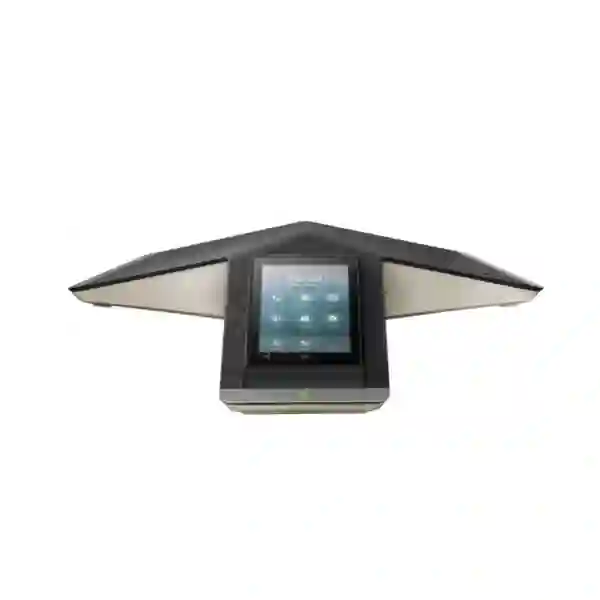
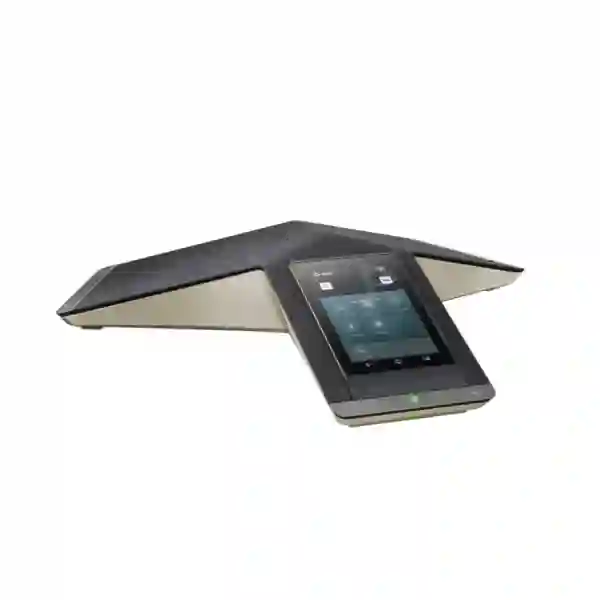
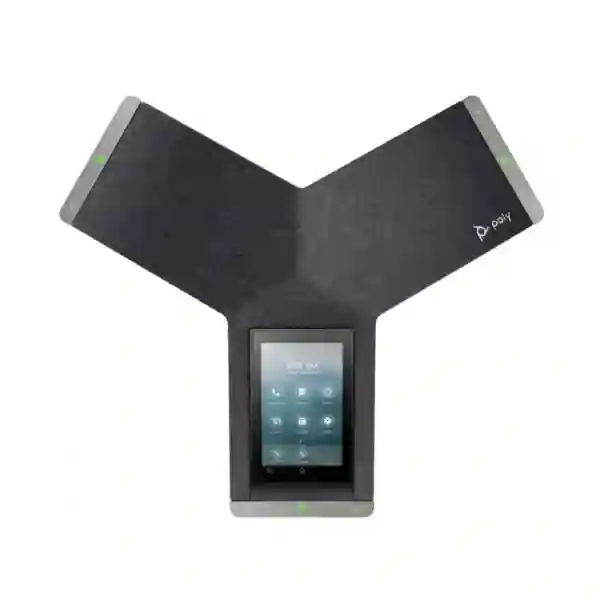
HP Poly Trio C60 IP Conference Phone
Bring people together around one easy-to-use meeting room audio device. The Poly Trio C60 offers a 5-inch colour touchscreen, dedicated conference controls and Poly audio processing for professional group calls. Select the right hardware and software variant for your calling platform before placing an order.
Request a configuration-based quotation from FourTeck Tanzania. Exact model, availability, pricing and service terms must be confirmed for your project.
At a glance: key buying facts
Important: wireless connectivity, platform certification, accessories and supplied contents can differ by specific HP part number.
Technical specification snapshot
The figures below summarize HP’s published Trio C60 family information. They are for selection guidance, not confirmation of the exact configuration to be supplied. Always match a quotation to the precise manufacturer’s identifier and its current product datasheet.
| Product family | HP Poly Trio C60 smart IP conference phone |
|---|---|
| Display | 5-inch colour touchscreen |
| Microphones | Three cardioid microphones |
| Published pickup reference | Up to approximately 6.1 m / 20 ft; room dependent |
| Audio processing | Full-duplex conversation, acoustic echo cancellation and background-noise handling |
| Wired network | Two RJ-45 Gigabit Ethernet ports on documented variants |
| Power input | IEEE 802.3at PoE Class 4 on documented variants |
| USB | USB 2.0 Type-A for charging; Micro-B for supported audio-device use |
| Wireless | Wi-Fi and Bluetooth 4.2 on applicable full-radio variants only |
| Calling options | Model- and profile-dependent Open SIP, Teams and Zoom-related deployments |
Who the Poly Trio C60 is for
The HP Poly Trio C60 IP Conference Phone suits businesses that routinely gather several colleagues around a shared table and need a purpose-built audio endpoint instead of relying on a laptop’s small microphone. Participants can join, speak and listen from one central device, with controls visible to everyone in the room. It is particularly relevant to management meetings, project reviews, client calls and hybrid collaboration where callers outside the office should hear the conversation clearly. The main purchasing decision is not simply whether the phone looks suitable; it is whether the exact variant will work with the organisation’s telephony service and meeting workflows.
Consider a Trio C60 when a room has recurring meetings, a stable network, defined IT support and users who prefer an appliance-style interface. It is less compelling for an individual who needs a pocket-sized speakerphone, or for a room that requires a complete video camera and display system rather than primarily audio conferencing. A successful deployment starts by understanding who will operate the device, which application they use to join meetings, how many people attend and whether the table layout allows everyone to speak towards the microphones without obstruction.
What makes the meeting experience different
The C60 brings a colour touch display and dedicated mute and volume controls to a familiar conference-phone format. Instead of passing a laptop around the table, a host can manage supported calls from a shared endpoint. The 5-inch touchscreen provides a visible place for meeting controls and calling information, while the industrial design is intended for central placement on a table. This matters when an organisation wants a consistent room experience across teams, including users who may only visit the room once a week and do not want to learn a complicated setup each time.
The phone’s value comes from combining an accessible interface with network calling and audio processing in a single room device. It should not be presented as a universal one-button solution for every service: the on-screen experience and available meeting-join features depend on the licensed service, software profile and administration. A demonstration using the intended platform is the best way to establish how quickly ordinary users can place a call, retrieve a meeting and mute the room. Evaluate the actual workflow, not just the claim that a device supports a platform.
Clear speech around a shared table
HP specifies three cardioid microphones and a published pickup reach of up to 20 feet, or approximately 6.1 metres, for applicable Trio C60 configurations. That is a useful planning reference, but it does not mean every speaker at that distance will sound equally clear. Voice levels, reflective surfaces, ceiling height, seating direction and background noise can change what remote participants hear. The cardioid microphones and Poly acoustic processing are intended to support more intelligible room conversations. The result should be judged in the actual space or in a room with similar acoustics before making a large deployment decision.
Full-duplex audio lets both ends of a conversation speak naturally instead of taking strict turns while the system cuts off one side. Poly Acoustic Clarity includes acoustic echo cancellation and background-noise handling; HP also promotes NoiseBlock AI in the product family. These functions help address common conferencing problems, but they cannot compensate for a poorly positioned device, loud air-conditioning directly over the table or several side conversations happening at once. Good room behaviour still matters: place the phone centrally, keep papers away from the microphone areas and avoid putting the speaker beside a hard wall.
Listening comfort and room audio
Clear reception is as important as clear transmission. The Trio C60 is designed to reproduce speech through a conference-room speaker rather than a laptop’s near-field speaker. HP describes its audio system as supporting reproduction extending up to 22 kHz, but practical call quality will also depend on the conference service, bandwidth, negotiated codec and remote endpoint. A call can sound noticeably different when placed through an ordinary telephony route versus a compatible wideband collaboration session. Buyers should therefore test the actual calling route and not treat the speaker’s published audio range as a guarantee of end-to-end quality.
Think about the quietest and loudest participants in the room. During a pilot, ask a remote listener whether soft-spoken attendees remain intelligible at the far side of the table and whether the device can reach a comfortable volume without echo. Repeat the test when a projector fan or ventilation system is operating. This check reveals more than a specification sheet can: whether participants feel comfortable speaking normally, whether the meeting leader must repeatedly adjust volume and whether an accessory or change to room layout would improve the outcome.
Touchscreen controls and day-to-day usability
The five-inch colour display is one of the defining differences between the C60 and basic audio speakerphones. It offers a touch-first surface for supported calling activities, supplemented by prominent physical mute and volume controls. A communal endpoint should remain understandable when the person who configured it is not present. For that reason, the interface should be configured for the primary room use rather than exposed to unnecessary accounts or confusing call options. Consistent labels, a sensible time zone and a correctly configured directory can reduce avoidable interruptions during meetings.
An organisation using more than one room should document a small set of expected actions: start a meeting, answer an incoming call, adjust speaker level, mute the microphones and end the session. Train reception staff and meeting hosts on these tasks with the configured system. Where one-touch meeting join is supported, check how scheduled meetings are presented and what account permissions are involved. Do not assume that calendar integration appears automatically once the device has network access. The result depends on the chosen platform, its administrator settings and the room account arrangement.
Choose the correct calling platform
The most important compatibility question is whether the room will primarily use a SIP phone system, a Microsoft Teams workflow, a Zoom-related room experience or an integration with existing Poly video equipment. HP markets the Trio C60 family with platform options rather than a single identical software experience in every box. An Open SIP-oriented unit is a sensible candidate when the organisation needs a business telephony endpoint registered to a compatible PBX or hosted voice service. A Teams-specific configuration may be the correct choice for native Teams room calling. Each possibility must be validated against the exact part number.
A list of supported brands is not the same as a promise that an arbitrary service configuration works without additional licences, provisioning or profile changes. Ask the communications administrator to identify the current calling platform, deployment version, registration method and meeting invitation workflow. If the office is moving between services, note the planned future platform as well. This protects the investment from a mismatch in which the hardware is physically suitable but the purchased software build does not support the intended room experience.
Open SIP and business telephone systems
SIP-based calling is relevant to organisations using an on-premises IP PBX, a hosted business phone system or another supported SIP environment. HP’s specifications list IETF SIP support for applicable configurations, but SIP compliance alone is not sufficient to prove interoperability with every service provider. Authentication, security policies, registration settings, codecs, call features and provisioning requirements all influence compatibility. Before buying, collect the PBX product and version, any hosted-provider restrictions, the expected number of simultaneous call paths and details of the network that will carry voice traffic.
A useful pre-deployment test includes registering the device, making internal and external calls, placing the call on hold, transferring where supported and joining the intended conference workflow. Also verify whether outbound telephone calls depend on a separate SIP trunk, hosted calling package or gateway. The conference phone itself does not grant public telephone numbers or calling credits. Organisations with a dedicated corporate voice VLAN should plan how the phone receives the correct addressing, domain information and security configuration. Record the successful settings so additional rooms can be deployed consistently.
Microsoft Teams meeting rooms
For a workplace standardised on Microsoft Teams, start by confirming that the quoted C60 is the Teams-specific configuration and that the software and account arrangement meet the current room requirements. HP identifies distinct Teams-oriented Trio C60 product variants. A familiar display is valuable for ordinary users, but the installed base profile and Microsoft’s current supported-device and licensing requirements determine the actual calling and sign-in experience. A buyer should not assume that an Open SIP unit becomes an equivalent Teams-certified device merely because the product family has a Teams option.
During planning, decide whether the phone is being deployed as a stand-alone Teams audio endpoint or as one component in a larger Teams Rooms setup. Those are different design questions. The meeting calendar, sign-in method, conferencing controls and controller role may vary by deployment. Check supported software versions and device support status with the platform administrator before a rollout. If the room already contains a video bar, clarify which screen or controller will drive the meeting and whether the C60 is intended to provide audio, control, or both.
Zoom and mixed collaboration environments
Zoom compatibility is often an important reason to consider the Trio family, particularly in offices that hold hybrid meetings with external partners. HP lists Zoom and Open SIP support for relevant variants, and the C60 can be part of a Zoom-oriented room design when correctly configured. The correct usage pattern must be identified: a dedicated audio phone, a Zoom Rooms controller or an audio device associated with a room computer may require different software profiles and accessories. Avoid treating these roles as interchangeable without checking current documentation.
Mixed-platform offices should create a simple inventory of meeting types before selecting hardware. For example, one room may host frequent Microsoft Teams meetings and only occasional Zoom guest calls, whereas another may rely on SIP calling to customers. The priority platform should influence which edition is purchased and how meeting hosts are trained. Test the less-frequent guest workflow too, because cross-platform invitations can expose limitations in guest access, dial-in numbers or device control. A conference phone is most effective when the team’s actual meeting behaviour shapes its configuration.
Connecting laptops and mobile devices
Some Trio C60 models provide Bluetooth 4.2 and Wi-Fi radio functions, and HP documents a USB Micro-B connection for use as a USB audio device. These options can be useful when a meeting organiser wants to route sound through the room system rather than through a laptop speaker. The USB Type-A port is described by HP as intended for charging compatible devices; it should not be mistaken for a universal laptop audio input. For a specific use case, confirm the required cable, supported host operating system, available profile and any device-driver or application restrictions.
Wireless capability is version-dependent. HP also sells no-radio configurations, so a generic catalogue entry should never promise that every Trio C60 supports Bluetooth or Wi-Fi. Before an order is accepted, confirm whether the offered part is full-radio or no-radio. In an office with restrictions on personal-device pairing, a wired USB workflow may be preferable even when a radio is present. IT teams should define whether pairing is allowed, how previous devices are removed and who is responsible for preventing a private conversation from unexpectedly being routed through the room speaker.
Network connections and Power over Ethernet
Published HP specifications describe two RJ-45 Gigabit Ethernet ports and an IEEE 802.3at Class 4 powered-device input on applicable C60 variants. A properly designed PoE+ connection can carry network data and device power through one cable, reducing the need for a separate power socket at the meeting table. The second Ethernet port can be useful for an approved pass-through arrangement, but network security policy should decide whether a second device is allowed on that connection. The availability of power sourcing on the output port is conditional and must not be assumed in every powering scenario.
Before installation, confirm that the switch port is provisioned for the expected PoE class and that the switch has adequate remaining power budget for all connected devices. A common deployment error is to connect a capable phone to a switch that offers insufficient PoE power or an inappropriate adapter. The result may be limited functions rather than a straightforward complete failure. Use the power method and accessories specified for the exact variant and seek the current HP guidance when power sourcing or chained-device operation is required.
Wi-Fi versus wired Ethernet
A wired Ethernet connection is often the simplest starting point for a permanently installed meeting-room phone because the team can control cabling, PoE provision, network segmentation and troubleshooting. Wireless networking may offer flexibility in a room where an additional network drop is difficult, but only a radio-equipped variant supports Wi-Fi. HP lists dual-band 2.4 GHz and 5 GHz wireless capabilities on full-radio versions. Real-world performance will depend on the local wireless environment, access-point design and security controls, not solely on the advertised bands.
If a wireless deployment is proposed, test the signal in the room when nearby spaces are occupied. Check how the network handles roaming, authentication and service quality during longer meetings. Remember that Wi-Fi data connectivity does not remove the need to power the device. The IT team must still choose an approved power arrangement. For an organisation seeking reliable daily operation, a short network survey and a documented fallback plan are worth more than assuming a portable Wi-Fi profile will behave exactly like a desk-connected phone.
Room size, seating and acoustic planning
A published microphone pickup radius is a useful starting point, not a room-sizing guarantee. A smaller room with hard glass walls can produce more echo than a somewhat larger room with absorbent furnishings. Long boardroom tables create different challenges from circular seating because people far from the centre may speak across a broad surface or away from the microphones. Begin with a room sketch showing seating locations, the phone position, any screens, the ventilation outlets and the usual meeting size. Then use a real call to assess the position.
For longer tables or difficult acoustics, ask whether supported expansion microphones or a larger room audio design would make more sense. Expansion accessories should be checked for precise compatibility with the selected Trio C60 version, the intended software profile and the room furniture. More hardware is not always the answer: moving the device away from an air-conditioning grille, adding soft furnishings or reducing competing background noise may improve speech clarity. Decide on accessories based on the room’s actual listening test rather than buying them automatically.
A practical rollout for Tanzania offices
Businesses in Tanzania can plan a Trio C60 deployment using the same core IT design principles as any other professional conferencing environment, while checking the conditions of their own site. Start with the office’s actual data network, internal voice infrastructure and collaboration accounts. Determine whether the device is for a boardroom, a shared meeting space or a conference facility. Record the expected location, cabling path, available PoE equipment and room usage. Do not assume that a specific internet or SIP service is available at a given address without direct confirmation from the provider.
Internet reliability, local network stability and power continuity deserve attention wherever important meetings rely on cloud collaboration. A robust design may include an appropriately sized UPS for relevant switches and network equipment, a plan for internet interruptions and documented procedures for contacting the IT support team. These are deployment recommendations, not claims that a particular supplier or service is bundled with the phone. Discuss the proposed configuration before purchasing so the right accessories and software requirements are understood and a site-specific quotation can be prepared.
Pre-installation information to collect
A short technical questionnaire makes the quote and installation process more accurate. Record the number and approximate dimensions of meeting rooms, average participants, current telephone or collaboration service, software release, and any planned migration. Add the network switch model, whether PoE+ power is available, available Ethernet drops and wireless access requirements. Note whether staff need laptop USB audio, mobile pairing, expansion microphones or integration with an existing video appliance. This information distinguishes a straightforward table-phone installation from a more involved unified communications project.
Where security rules are strict, include authentication requirements, VLAN policies, approved firmware management processes, administrator ownership and whether remote provisioning is permitted. If users need a calendar-based join flow, document how the room identity and account will be maintained. A buyer who provides these details before requesting a quote is more likely to receive a compatible configuration and fewer unexpected accessory changes. It also gives the receiving IT team a checklist to confirm that the delivered hardware is the same variant that was approved.
Installation and first-use checklist
At installation, inspect the device and verify the product identification against the quotation. Position the phone with adequate clearance for microphones, speaker and cables. Connect the approved power and network arrangement, then confirm the network address and the software profile intended for the room. An administrator should set strong credentials, apply the organisation’s security policies and provision the supported calling platform. Avoid using undocumented default settings as a permanent deployment method. Keep configuration records in the organisation’s controlled IT documentation rather than leaving passwords in the meeting room.
Next, perform a complete end-to-end call with someone outside the room. Check speaker volume, remote microphone pickup from each seating position, mute feedback, call ending, incoming alerts and any expected meeting-join flow. If a connected laptop is in scope, test the correct USB audio mode and application device selection. If Wi-Fi or Bluetooth is required, test its allowed pairing and reconnection workflow. Finally, explain the everyday controls to users and agree on who receives support requests when the device is offline or cannot join a meeting.
Managing security and administration
A conference phone is a managed network endpoint, not merely a passive table accessory. It can hold account details, communicate with collaboration services and receive software updates. Place it on an appropriate network segment, restrict management access and maintain unique administrator credentials. HP documents enterprise features such as secure provisioning and supported encryption protocols for relevant configurations, but an organisation must actively configure and verify them in its own environment. Security controls should match the calling platform, firmware branch and internal policies rather than rely on a generic product description.
Assign ownership for updates, support and decommissioning. A routine review should consider available software fixes, account validity, room calendars, network access and any configuration drift. When an employee changes roles, update the room account or administrator permissions where necessary. If the phone is moved or sold, remove organisational credentials through an approved reset and disposal process. Central management tools may be appropriate for larger deployments, but capabilities and enrolment should be checked with current HP guidance before they are included in procurement or service commitments.
Troubleshooting common meeting-room problems
If the phone powers on but does not register to a calling service, confirm that the selected base profile matches the intended platform before assuming the device is defective. Then check network connectivity, DNS, time settings, authentication and the service account. On a SIP system, registration failures can arise from incorrect credentials or PBX configuration even when the LAN link is healthy. When a cloud meeting cannot be joined, distinguish account or permission problems from the room’s local audio hardware. Clear symptom notes help IT teams work towards the actual cause.
Poor audio should be investigated methodically. Start with microphone obstruction, seating position, room noise and speaker volume. Then inspect packet loss, jitter, network congestion and the call service where appropriate. An echo reported by remote participants may originate at either end of the call, so compare results with a known-good endpoint. For a phone that behaves unexpectedly after a software change, check the supported firmware and profile rather than performing an unplanned reset during a scheduled meeting. Maintain a short, accessible troubleshooting guide for meeting hosts.
How to compare the Trio C60 with alternatives
Not every meeting space needs a dedicated IP conference phone. A USB speakerphone may suit a small room that always joins meetings from a laptop. A complete video bar may be preferable where camera framing, shared screens and video-first meetings are the main requirements. An existing PBX handset with external audio equipment may also meet certain needs, although the operational experience differs. The Trio C60 becomes more attractive when users value a persistent room endpoint, a touch interface, shared audio and integration with a supported business calling environment.
Compare options across the complete workflow, not only hardware cost. Ask whether the proposed solution needs a laptop, room account, separate camera, power adapter, mounting accessories, service subscriptions or dedicated IT management. Consider how visitors join calls and whether meetings can begin without a technically confident host. Evaluate the room’s acoustic needs, endpoint management and replacement plan. A product that is inexpensive up front but difficult to administer may be a poorer fit than a more structured solution, particularly across multiple shared rooms.
What the published specifications mean in practice
The published 5-inch colour display describes the user-interface hardware, not the number of collaboration applications that can run simultaneously. Three cardioid microphones describe the integrated microphone array, not three separate microphone units to place around a table. Up to 20 feet of advertised pickup is a planning benchmark, not a guaranteed intelligibility limit in a noisy office. Gigabit Ethernet describes link capability, not the speed or reliability of an internet subscription. IEEE 802.3at support describes an expected PoE input class, not a promise that every switch will provide sufficient power.
The difference between an advertised capability and a delivered workflow is why model and deployment verification matter. Wi-Fi and Bluetooth appear on specific full-radio configurations, while no-radio versions have different connectivity characteristics. Meeting controls may require a particular base profile and compatible service. Optional microphone expansion must be confirmed against current accessories and software. A strong product selection process treats each important specification as a question to validate against the intended purchase, rather than assuming the most capable version of the product family is the one being quoted.
Commercial decisions before ordering
A quote for a conferencing solution should identify the exact manufacturer part number and the intended calling configuration. Ask what is included in the package and what must be purchased separately, including any approved power adapter, microphone expansion, cables or other room equipment. Verify whether the project requires collaboration licences, SIP service access or room-account subscriptions that are not part of the hardware. Check delivery, availability, warranty terms and implementation scope directly against the current offer. No price, stock commitment or local service level should be inferred from a general product description.
For an organisation outfitting several rooms, consider buying a pilot unit first. A short evaluation can confirm room acoustics, network power and user acceptance before committing to a wider installation. Agree who will prepare the accounts and policies, perform physical installation, configure the device, train hosts and accept the completed room. These tasks may be handled internally or under a separately agreed service arrangement. Clear project boundaries help avoid the common assumption that purchasing the console alone provides a complete, operational conference service.
A sample acceptance test for IT and facilities teams
An acceptance test should be simple enough for room owners to repeat. Check that the device boots correctly from the specified power source and maintains network connectivity. Place a test call using the real organisation’s platform and have a remote colleague rate audio from every usual seat. While two people talk at once, confirm that full-duplex conversation remains usable. Test mute visibility, speaker volume and the on-screen call controls. If relevant, verify the calendar join flow, directory lookup, Bluetooth policy or USB audio behaviour with the exact laptop and software the team uses.
Finish the test by recording the firmware version, part number, network connection method, room identity and named support owner. Confirm that no unnecessary accounts or paired personal devices remain on the unit. If a problem appears during testing, describe it precisely rather than marking the room as unusable without diagnosis: for example, far-seat speech is quiet or the room account cannot retrieve meetings. This record makes it easier to request a targeted fix and creates a useful baseline when the device is updated or relocated later.
Planning for long-term use
The total value of a room endpoint depends on how reliably people use it over time. Establish a process for reviewing user feedback, applying approved software updates and checking that the conference platform still supports the installed version. Periodically confirm that room accounts remain active and correctly permissioned. Keep a spare compatible network cable available and preserve important configuration information securely. If meeting habits change, revisit whether the room needs expansion microphones, a different platform profile or a broader video system rather than assuming the original configuration should remain unchanged indefinitely.
Organisations preparing a larger refresh should consider user training alongside hardware upgrades. A room can have capable equipment and still deliver disappointing calls if employees do not know how to join meetings, manage mute or select the correct audio device. Conversely, small improvements to placement and instructions can noticeably improve the everyday experience. Keep the evaluation practical: can a normal meeting host start a call quickly, can remote participants follow the discussion, and can IT support the endpoint without unnecessary disruption? Those are the outcomes this product should be assessed against.
Frequently asked questions about the Poly Trio C60
Does the Poly Trio C60 work with Microsoft Teams?
HP offers Teams-oriented Trio C60 versions, but the family name alone does not establish which unit is being purchased. Verify the exact part number, current Microsoft support requirements, base profile and room account before buying. An Open SIP version and a Teams-specific version should not automatically be treated as identical deployments.
Can I use it with an existing IP PBX?
An appropriate Open SIP configuration can be evaluated for compatible SIP telephony systems. Check the PBX or hosted-provider support matrix, registration settings, codecs, calling features and security requirements. A device supporting SIP does not automatically guarantee full functionality with every PBX release, trunk or cloud voice service.
How far can the microphones pick up speech?
HP publishes a pickup range of up to about 20 feet or 6.1 metres for the C60. This is a manufacturer planning figure, not a guarantee for every layout. Actual clarity depends on room reflections, noise, seating positions and participant voices. Conduct an end-to-end call test before accepting a large-room design.
Does every Trio C60 include Wi-Fi and Bluetooth?
No. HP offers full-radio and no-radio variants. Full-radio specifications describe 2.4 GHz and 5 GHz Wi-Fi and Bluetooth 4.2, but those features must be confirmed on the exact quoted model. A product title that omits the radio designation is not enough evidence to promise wireless capability.
What network power does the phone need?
HP specifies IEEE 802.3at Class 4 PoE input for applicable Trio C60 configurations. Plan a suitable PoE+ switch port and verify the switch’s available power budget. Do not assume lower-power PoE will enable every feature. Ask about an approved optional power arrangement when PoE+ infrastructure is unavailable.
Can I connect a laptop for meeting audio?
HP documents a USB Micro-B port for use as a USB audio device on compatible configurations. Whether a particular laptop meeting application works as intended depends on the selected profile, cable, host settings and software support. Test the actual meeting application and confirm that the laptop uses the Trio as the active microphone and speaker.
Can it replace a complete video conferencing system?
The C60 is primarily a smart conference phone and shared audio endpoint. It can complement selected compatible Poly video systems, but it does not by itself supply a room camera, television or complete video meeting setup. Determine whether the objective is better audio, room control or full video collaboration before ordering.
Will the Trio C60 improve calls in a noisy room?
Poly audio processing is designed to reduce distractions and manage echo, but no conference phone can guarantee excellent audio in every acoustic setting. Check ventilation noise, hard surfaces, microphone positioning and overlapping speech. A pilot call in the actual room is the most useful way to evaluate the improvement.
Can expansion microphones be added?
Expansion options are discussed for the Trio family, but exact accessory support depends on the C60 model, software profile and currently supported hardware. Describe the table length and seating pattern when asking for a quote. Verify the proposed expansion microphone’s exact compatibility instead of assuming any Poly microphone will connect.
Does the device include telephone service?
No general-purpose conference-phone specification establishes that a business telephone number, SIP trunk, calling credit or collaboration subscription is included. The calling service and any required accounts must be arranged separately unless the seller explicitly includes them in an individual quotation. Confirm the complete service design before installation.
What should a Tanzania buyer confirm before requesting a quote?
Specify the location and number of rooms, intended Teams, Zoom or SIP platform, room seating, available PoE+ network ports, radio requirements and whether USB or video-system integration is needed. Ask for the exact manufacturer part number, package contents, current availability, local commercial terms and warranty conditions in writing.
Is the C60 suitable for both small and large rooms?
It can serve varied meeting environments, but physical dimensions alone do not establish audio suitability. In a small room, a compact alternative might be sufficient; in a long boardroom, additional microphones or a different acoustic design may be needed. Match the choice to actual attendance, room acoustics, platform and expected user experience.
Plan your Trio C60 deployment with FourTeck Tanzania
Tell us about your meeting room, collaboration platform, network power and connectivity requirements. Ask for the exact HP Poly Trio C60 variant, compatible accessories, current commercial terms and an itemised quotation. Choosing the correct configuration now helps your team avoid compatibility surprises later.
Request an HP Poly Trio C60 quotation from FourTeck Tanzania.




Reviews
There are no reviews yet.