
Business audio • Bluetooth • Stereo UC
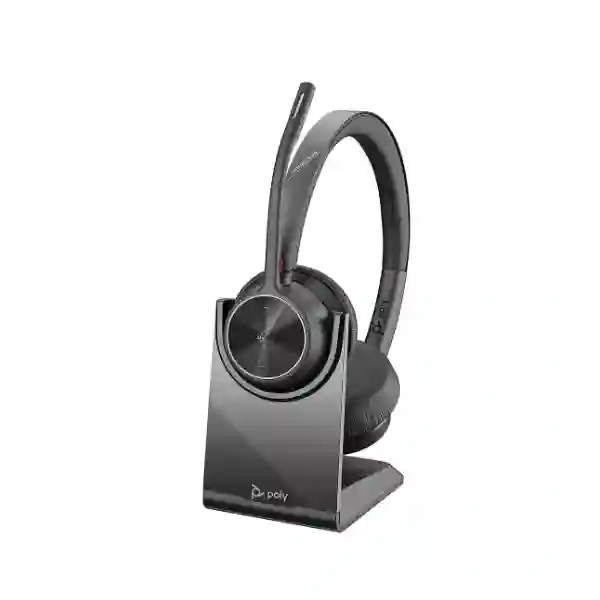
HP Poly Voyager 4320 UC Stereo Bluetooth Headset
Clearer business conversations start with the right headset. The Voyager 4320 UC combines a stereo on-ear design, a dual-microphone boom and flexible connectivity for computer meetings and mobile calling. Choose the exact USB adapter and charging bundle that match your workplace before ordering.
At a glance
- Type: wireless on-ear stereo business headset with adjustable boom microphone.
- Voice: dual-microphone noise reduction with HP Poly Acoustic Fence.
- Connections: compatible computer and smartphone workflows; BT700 adapter varies by bundle.
- Talk-time rating: up to 24 hours under the manufacturer’s stated settings.
- Wireless range: up to 50 m with supported BT700 adapter in suitable conditions.
- Important: the USB type, charging stand and platform-specific variant must be confirmed for the offered kit.
A professional headset built around conversation
The HP Poly Voyager 4320 UC Stereo Bluetooth Headset is designed for people whose working day contains calls, virtual meetings, and frequent movement between tasks. It combines an on-ear stereo wearing style with a boom microphone, wireless connectivity and straightforward call controls. That combination matters when a laptop speaker or basic consumer headphones make it difficult to follow a conversation while also contributing clearly. It is primarily a communications headset: the practical goal is to make voices intelligible, keep controls close at hand and allow the wearer to move within the supported wireless range rather than remain beside the computer.
For a business purchase, the relevant question is not simply whether a headset has Bluetooth. Buyers should ask whether colleagues hear speech clearly, whether the chosen USB adapter fits their computers, whether the preferred meeting software works with the exact variant and how the device behaves over a long working day. This guide explains those decisions without assuming that every Voyager 4320 UC package contains the same accessories. A quotation should identify the complete variant and bundle before any purchase is approved.
Stereo listening and why two earcups matter
The Voyager 4320 is the stereo member of the Voyager 4300 headset family. Its two on-ear speakers deliver conversation audio to both ears, which can help a user focus on meetings or follow voices without leaning toward a single earpiece. Stereo is especially useful for employees who regularly review recorded presentations, participate in extended web conferences or work near ordinary office conversation. The design is not intended to seal the ears in the way a dedicated over-ear isolation headset might, and the user can still hear some surroundings.
Choose the two-ear configuration when consistent listening is more important than keeping one ear completely uncovered. People who must hear reception announcements, nearby instructions or colleagues throughout the day may prefer a mono alternative instead. Personal comfort is individual: glasses, ear sensitivity, temperature and the amount of time spent wearing a headset all influence the experience. When selecting equipment for a team, a brief wear test with representative users is more informative than relying on a photograph of the earcups.
Dual-microphone voice pickup with Acoustic Fence
An adjustable microphone boom positions the voice pickup close to the speaker. HP Poly specifies dual-microphone noise reduction using Acoustic Fence technology for the Voyager 4320 UC family. The processing is designed to distinguish the wearer’s speech from nearby environmental sounds so that the people on the other end of a meeting hear less of the surrounding distraction. This is particularly relevant for a home office with activity nearby, a shared department or a desk where conversations occur within earshot.
The noise-reduction feature acts on outgoing microphone audio; it does not guarantee that every unwanted sound disappears. Extremely loud background speech, wind, poor microphone positioning and challenging network conditions can still affect a call. For best results, position the flexible boom near the mouth without touching the face, confirm that the correct headset microphone is selected in the meeting application and make a short test recording. Buyers comparing headsets should assess transmitted voice quality, not judge microphone performance by the speaker specification alone.
Microphone noise cancellation is not active noise cancellation
Product descriptions sometimes use the phrase noise cancelling without identifying which side of the conversation benefits. On this headset, the notable feature is microphone noise reduction: the intent is to improve the signal sent to other participants. The on-ear design can provide a degree of passive separation from the environment, but buyers should not assume that it supplies the same active noise cancellation experience as headphones built primarily to suppress incoming aircraft, traffic or machinery noise.
This distinction can change a purchasing decision. A customer support representative wants callers to hear a stable voice, while an employee working beside loud equipment may want additional protection from what reaches their own ears. Those are different requirements. If both are critical, evaluate an alternative with explicitly documented listening-side active noise cancellation and suitable occupational safety characteristics. The Voyager 4320 UC is best assessed as a business calling tool with a capable microphone, not as a universal solution for every noisy workplace.
Wireless working without treating range as a promise
HP Poly describes a wireless operating range of up to 50 metres when using the supported BT700 USB adapter under suitable conditions. That headline can help explain the value of a headset in an office where someone occasionally walks to a printer, checks a document or moves between nearby work areas during a call. The phrase up to is important. Walls, room layout, radio interference, other Bluetooth devices and the position of the connected computer can substantially reduce usable distance.
For dependable calls, treat wireless range as something to test in the actual workspace. Walk to the furthest intended point, keep speaking, and ask a colleague to listen for breaks or distortion. If the office has multiple enclosed rooms or dense structural partitions, do not plan a deployment around the maximum stated range. The optional Voyager Office base is associated with a different stated range and must not be treated as part of the standard Bluetooth package. Procurement should specify the exact intended connection arrangement.
Connecting a computer with the correct BT700 adapter
Many Voyager 4320 UC configurations use a Poly BT700 USB Bluetooth adapter to provide a managed connection between a Windows or Mac computer and the headset. This can simplify a worker’s daily routine by giving the headset a dedicated connection path instead of relying entirely on the computer’s built-in Bluetooth stack. The adapter is offered in USB-A and USB-C configurations, and some newer kits use an adapter or combination suited to both connector types. What is included depends on the full product reference.
Before ordering, check the ports present on the laptops or docking stations that employees actually use. A USB-A package should not be assumed to fit a USB-C-only computer without an appropriate solution. Likewise, a USB-C package is not automatically interchangeable with a USB-A package. Ask for the precise dongle specification, cable, and any charging accessory shown in the quote. After connecting, select the headset as both the speaker and microphone in the operating system and conferencing application, then test the device with an ordinary call.
Mobile-phone connectivity for people who work across devices
The headset family supports Bluetooth connectivity with compatible smartphones, making the Voyager 4320 UC attractive to staff who split their day between computer meetings and mobile conversations. This can reduce the need to swap to a separate set of earphones whenever a call arrives on a phone. The usefulness depends on the handset, its Bluetooth settings, the connected applications and the features supported by the exact headset variant.
Phone calls and computer calls are not identical workflows. Answer and end controls, application permissions and notification behaviour can differ between iOS, Android and computer software. During initial setup, pair the phone, make a regular mobile call, verify both-way audio and then test a meeting on the computer. Employees should also understand which device has priority when two calls or media streams compete. Testing that sequence before a busy working day helps prevent a missed call or a meeting starting on the wrong microphone.
Working with two connected devices
Selected Voyager 4320 UC configurations support multipoint use with two connected devices. In practice, this means a worker may keep a computer connection ready for online meetings while also maintaining a Bluetooth link with a phone. It is useful for a person who follows appointments on a laptop but sometimes needs to accept a cellular call. However, multipoint is not the same as mixing two full conversations together, and behaviour can depend on firmware, operating systems and the particular applications involved.
For a team deployment, define a simple routine: confirm the active call, end or hold it appropriately, and only then switch attention to the other device. Test meeting notifications, ordinary phone calls and media playback separately. Some users will prefer a single primary connection because it reduces surprises. The configuration should follow the real daily workflow rather than enabling every feature by default. IT teams can document a preferred pairing method so colleagues have a consistent experience when moving between office and home.
Corded USB audio as a practical fallback
One useful feature documented for the Voyager 4300 UC series is audio over USB cable. When supported by the cable and computer connection for the chosen kit, the headset can continue functioning in a corded USB mode. This gives users another way to complete a conversation when they prefer to work at their desk or when battery level is a concern. It is not a claim that every ordinary charging cable or arbitrary USB adapter will provide full audio and call controls.
A good equipment handover should include a short corded-mode test. Connect the supplied or manufacturer-supported cable, confirm that the computer detects the intended audio device and try both directions of a call. This is particularly helpful for employees delivering lengthy training sessions or attending important meetings. Wireless freedom remains the primary benefit, but having a tested fallback can make the device easier to support. Ensure that the chosen cable length and available port arrangement suit the actual desk layout.
Call controls that reduce interruptions
The headset provides physical controls for common tasks such as answering and ending calls, adjusting volume, pairing and muting the microphone. The dedicated mute control is valuable because a user does not have to search for a small software icon while sharing a screen or taking notes. HP Poly also documents spoken alerts for conditions such as microphone status, connection and low battery. These are practical features when attention needs to stay on the people in the meeting.
Call-control integration can vary across applications and versions, so staff should not assume that pressing a headset button will perform every possible in-app action. During onboarding, demonstrate how to mute, unmute, answer and end a test call in the organisation’s preferred software. Make clear that a headset mute state and an application’s mute state may need separate checking. Physical controls make day-to-day operation more convenient, but a short familiarisation session is still worthwhile for colleagues moving from wired or built-in laptop audio.
Dynamic mute reminders and meeting etiquette
Few meeting problems are as common as continuing to speak after muting a microphone. The Voyager 4300 UC platform includes dynamic mute alert functionality designed to help users notice certain situations in which they speak while muted. Voice prompts and accessible controls can reduce distraction, especially during presentations when a person alternates between listening and contributing. The feature is a convenience rather than a substitute for checking the mute indicator before sharing confidential information or addressing participants.
For a team, agree on straightforward habits: mute when not speaking in a large meeting, check the device and application status before beginning a presentation, and pause briefly after changing audio sources. A call indicator can signal to people nearby that a conversation is underway, but it does not guarantee privacy or prevent interruptions. Employees handling sensitive matters should use an appropriate private space. Product features support professional etiquette; they cannot replace a clear workplace policy about where and how confidential calls are taken.
Battery performance in a realistic schedule
HP Poly lists up to 24 hours of talk time with the online indicator switched off, with a lower figure of up to 18 hours when that indicator is active, for the documented Voyager 4320 configurations. The same manufacturer material gives up to 47 hours of music listening and up to 50 days in standby under stated conditions. These figures describe best-case rated performance rather than a commitment for every user, battery age, temperature, pairing arrangement or call pattern.
Translate specifications into work habits rather than relying solely on the largest number. A person on back-to-back calls should check battery status before the morning’s meetings, charge during a break if needed and keep a supported USB cable nearby. A user who makes only occasional calls may charge less frequently. Fleet administrators should allow for battery deterioration over time and avoid guaranteeing an entire shift without testing the intended settings. The headset should be evaluated on whether it comfortably covers the actual calling schedule.
Charging options and the difference between bundles
The Voyager 4320 UC is sold through several product configurations. HP Poly lists both cable-charging packages and specific packages that contain a desktop charging stand. A stand can be convenient on a fixed desk because it gives the headset a visible place to return between calls, whereas a cable-only kit can suit someone moving between workplaces. The buyer must confirm the exact included items from the product reference rather than relying on the family name or a photograph of an accessory.
Some manufacturer specifications describe a recharge time of less than 1.6 hours for the relevant configuration under stated conditions. Actual behaviour can differ with power source and use. Confirm the charging cable connector, stand inclusion, appropriate power supply and whether any accessory is purchased separately. For a shared office purchase, make sure each assigned user has an agreed charging location and a practical way to keep the small Bluetooth adapter safe. Those details often matter more in daily use than an attractive accessory image.
Comfort, fit and sustained use
A headset can sound good yet become inconvenient if the pressure and wearing style do not suit the individual. The Voyager 4320 UC uses a padded adjustable headband and on-ear ear cushions, with a boom that can be positioned for speech pickup. This design offers a compromise between portability, a stable listening position and a professional appearance during video meetings. It is worth remembering that stereo on-ear earcups rest against the ears instead of enclosing them completely.
Encourage users to adjust the band before their first full meeting. Ear cushions should sit evenly, the boom should remain close enough for clear speech, and glasses should not be pressed uncomfortably. Take short breaks in long sessions where possible. In a large deployment, arrange a small pilot across people with different preferences; comfort cannot be inferred reliably from product weight alone. Teams working in hot rooms or wearing protective headgear may need a different format. A headset is successful when people continue choosing to use it.
Supported computers, phones and software environments
Manufacturer documentation for the relevant Voyager 4320 family lists Windows 10, Windows 11, macOS, Android and iOS among supported operating-system environments. This broad coverage is helpful for organisations using a mixture of laptops and phones, but it is not a blanket promise that every function will behave identically on every device. Audio, on-device controls, firmware updates and application integrations have different dependencies. Verify current IT policy and support documentation for the exact device combination.
A practical compatibility test should cover a normal meeting, an incoming call, mute status, speaker and microphone selection, and reconnecting after sleep or docking. Where employees use virtual desktops, restricted USB policies or tightly managed computers, test with the production security configuration rather than a personal test laptop. If the business relies on a specific softphone or contact-centre client, ask its administrator to confirm headset support. An audio device working in one web browser is not sufficient evidence that a complete enterprise workflow is supported.
UC versions and collaboration-platform labels
The letters UC generally identify a headset intended for unified communications, but buyers may also see packages described for Microsoft Teams or other collaboration ecosystems. HP Poly offers variants with different certifications, buttons, adapters and included items. A device being able to play meeting audio does not by itself prove that the exact product reference carries a particular certification or implements every vendor-specific shortcut. For purchasing purposes, the model family name is not enough.
Start by listing the meeting platforms employees actually use. If Microsoft Teams certification, a dedicated Teams button or a particular call-control integration is mandatory, ask for written confirmation tied to the precise supplied SKU or manufacturer product number. The same principle applies to Zoom or other meeting applications. The HP Poly Voyager 4320 UC Stereo Bluetooth Headset should be selected for its documented fit to the organisation’s collaboration environment, not on the assumption that all Voyager 4320 labels represent an identical bundle.
Poly Lens and fleet-management considerations
HP Poly identifies Poly Lens as a management tool for supported headsets and collaboration devices. Depending on the version and organisation configuration, it can help users or administrators check device details and handle aspects of configuration and updates. The benefit for IT is a more deliberate approach to deploying multiple units, rather than leaving every worker to experiment with Bluetooth settings independently. Capabilities, service requirements and administrator permissions should be verified against the organisation’s deployment plan.
Plan ownership before distributing the headsets. Decide who approves firmware updates, who assists with pairing issues and where employees should report a missing adapter or charging accessory. Keep a record of the actual product references supplied. If management software requires a download, account or cloud service, review those requirements under the company’s security and privacy procedures. Do not assume that every administration feature is included without charge or works in every network environment. The right management model depends on fleet size and policy.
Desk-phone use requires a separate compatibility check
People sometimes assume that any Bluetooth headset will pair directly with a traditional office desk telephone. The Voyager 4300 UC family can support certain desk-phone workflows using a compatible optional Voyager Office base and the appropriate telephone connection arrangement. That is materially different from the ordinary computer-and-mobile Bluetooth setup. Neither a desk-phone base nor universal telephone compatibility should be assumed to come with this product name.
Before replacing existing desk-phone headsets, record the phone manufacturer’s model, available headset interface, call-answer requirements and any electronic hook switch needs. Consult a supported compatibility list for that combination and make a complete live call test. If the phone system is primarily software based, test with the desktop client instead of buying a base automatically. Separating computer calling from hardware desk-phone calling avoids unnecessary accessories and reduces the risk of a product arriving without the interfaces needed by reception, administration or contact-centre teams.
A simple first-day setup process
Begin by unpacking the exact purchased bundle and checking it against the quotation. Identify the headset, the supplied USB adapter if included, the charge cable, documentation and any specified stand. Charge the headset according to the manufacturer instructions. For a computer, insert the designated adapter or follow the supported connection method, then select the headset as both the input and output device. For a mobile phone, use the headset pairing mode and the phone’s Bluetooth settings to establish its connection.
Next, place a short test call. Confirm that the other party hears the voice clearly, check both earcups, raise and lower the volume, and try the mute control. Move a few steps away from the desk to evaluate connection stability in the intended environment. If a second device is needed, add it deliberately and test call switching. Finally, show the user how to charge, reconnect and request support. A structured five-minute walkthrough is usually more valuable than handing over a closed box and assuming the controls are obvious.
Daily workflow for remote and hybrid staff
Hybrid staff may use one desk at home and another in the office, or alternate between a laptop, a docking station and a smartphone. The Voyager 4320 UC fits that working pattern when the headset and its selected accessories are transported carefully and the employee knows which computer connection is active. A travel pouch is included with certain documented packages, but the exact bundle contents should still be confirmed. The priority is keeping the microphone and audio available wherever meetings take place.
A dependable routine starts before the first call: check power, connect the intended adapter, verify the application speaker and microphone, and confirm that no previous device has retained the connection unexpectedly. After meetings, store the headset away from moisture and excessive heat. If there is an important client presentation, test the audio in the actual meeting application rather than just checking that a system sound plays. That small preparation step prevents a surprisingly common mismatch between default system audio and application-specific settings.
Working in a shared office or open-plan department
Shared offices create a mixture of requirements. Employees need to hear their meetings, colleagues need to know when a call is underway, and customers or partners need to hear speech without being overwhelmed by surrounding conversation. The stereo wearing style, adjustable microphone boom, on-call indicator and microphone noise reduction all contribute to this use case. Their value is practical, but no headset can fully overcome a room in which several people speak loudly close together.
When planning a shared-office rollout, combine headset selection with sensible seating and acoustic practices. Where possible, separate employees who spend most of the day on calls, reduce nearby speakerphone use and provide quiet rooms for sensitive discussions. Test an individual headset at a real desk before ordering a large quantity. Check that users can still hear necessary safety instructions or workplace alerts. A stereo headset can improve concentration, but it should be integrated with the organisation’s wider approach to communication and workplace safety.
Customer-facing teams and high call volumes
Support teams, sales coordinators, account managers and administrative staff often spend significant portions of their day speaking to customers. For these users, microphone pickup, convenient mute access and predictable connectivity matter more than dramatic bass response or entertainment features. The Voyager 4320 UC provides a business-focused option for such work, particularly when calls happen through a supported computer application or mobile phone. Its corded USB option can also be useful for staff who regularly sit through long sessions.
Before adopting it for a contact centre, check the actual softphone integration, call-answer behaviour, required recording tools and whether a wireless headset is allowed under company policy. Some specialised telephone systems or high-density radio environments have requirements that a general UC headset may not satisfy. Run a pilot during busy hours and gather feedback from both wearers and people receiving calls. Do not infer guaranteed call quality from microphone marketing alone; caller experience depends on networking, application settings, room conditions and the endpoint.
Training, virtual workshops and online education
A trainer or instructor may need to hear questions from several participants, speak while viewing slides and occasionally move to reference material away from the laptop. Stereo audio can make group discussions easier to follow, while the boom microphone lets a presenter maintain a repeatable speaking position. The wireless design helps when a desk-bound cable would interrupt movement. For a teacher, mentor or facilitator, the most relevant measure is whether participants can consistently understand the speaker.
Before delivering a full session, rehearse with the actual presentation and video platform. Check microphone gain, recording permissions, mute controls, audio playback from shared videos and whether leaving the desk affects signal strength. Keep a USB audio fallback available if supported by the kit. If the event includes professional recording, live music or specialist broadcast audio, a dedicated production microphone may be more appropriate. A business UC headset is suited to speech-led collaboration, not every possible sound-capture task.
Where this headset may be the wrong choice
The Voyager 4320 UC is not automatically the right product for every listener. People seeking strong active suppression of environmental noise in their own ears should investigate headphones with documented active noise cancellation. Users needing a completely open ear may prefer a mono headset. Workers relying on a particular desk-phone model must confirm base compatibility. Audio specialists working with music production may need different microphones, monitoring characteristics and interfaces.
Other constraints can be operational rather than acoustic. An organisation that prohibits wireless devices, a workstation without a usable USB connection, or an application with unverified hardware call controls may require a different approach. A person who works near hazardous moving equipment must follow workplace safety rules governing headsets and situational awareness. Presenting these limits is part of responsible product selection. It saves the buyer from ordering a technically capable headset that does not match the way employees are expected to work.
Choosing between cable-only and stand-equipped packages
The family can be sold in packages with different USB adapters, charge accessories and platform designations. A desktop worker who returns to the same desk every day may value a charging stand because it gives the headset a regular parking and charging location. A worker who carries the headset between multiple workspaces may prefer a simpler travel-oriented bundle. Neither approach is inherently better: it depends on the charging routine, available desk space and what the quoted box actually includes.
Request the complete manufacturer description rather than only a shortened name. Confirm whether the adapter is USB-A, USB-C or a documented combination; whether a desktop charge stand is included; whether a travel pouch or USB cable is supplied; and which platform label applies. Never substitute an unrelated manufacturer’s product number for an internal inventory SKU. If a listing only says Voyager 4320 UC Stereo, treat the accessory details as pending confirmation until the supplier provides a definite product reference or packaging specification.
How to compare with a basic consumer headset
A general-purpose Bluetooth headphone can be attractive for music and occasional calls, but enterprise communication adds different requirements. A dedicated boom microphone helps put the pickup closer to the user’s voice. Call controls and status prompts can make meetings easier to manage. Supported computer adapters and fleet-management options can matter when an IT team must configure multiple units. Those are worthwhile considerations even when two products appear similar in a simple Bluetooth specification table.
Compare the devices using a real workplace test: recorded outgoing speech in a busy room, stable computer calling, reconnecting after sleep, comfort over a long meeting, available service options and the exact supplied accessories. Do not compare only advertised wireless range or music-listening time. An excellent personal music headset may lack the call workflow needed by a department. Conversely, a person who seldom takes calls may not need the additional business-focused controls of the Voyager 4320 UC.
Procurement questions for Tanzanian organisations
For a buyer sourcing the Voyager 4320 UC for a workplace in Tanzania, practical procurement questions are the same ones that prevent costly mismatches anywhere: which exact variant is being quoted, what is included, which devices will be used, and who will support the equipment after delivery? Request an itemised quote that identifies the adapter type, any charging stand, quantity, relevant manufacturer reference and the intended application environment. This gives purchasing and IT colleagues a shared basis for evaluating the offer.
Confirm quoted price, currency, applicable taxes, shipping arrangements, local availability, product condition and service terms directly through the current sales channel. This page does not assert any particular Tanzania price, stock position, delivery time, office location or local authorisation. For a larger deployment, consider ordering a small evaluation quantity before standardising. Ask how the business will replace a lost adapter, obtain a compatible accessory and handle a defective unit. Those support details can determine the real lifetime usefulness of a headset.
Pre-purchase checklist for a team order
Build a short requirements checklist before requesting final approval. Record the number of users, their main applications, operating systems, laptop connector types, mobile pairing needs, typical call length, desired charging arrangement and any desk-phone equipment. Mark platform certification as mandatory only if it truly matters to the workflow. Add expectations for microphone testing in the actual acoustic environment and for employee training. A clearly specified order is easier to compare between quotations.
Next, separate verified features from assumptions. HP Poly’s published family capabilities can establish the headset’s broad design, but they cannot tell you what a particular seller has packed in a box or how an individual employer has configured its computers. Insist that all accessory promises, service obligations and commercial details appear on the quotation. For multi-user purchases, nominate a person to confirm that the delivered packages match the agreed references. This small administrative step avoids confusion over adapters and optional charging stands.
Troubleshooting sound or connection problems
If colleagues cannot hear the speaker, first check the device selected as the microphone in the relevant application. A computer may still be using its built-in microphone even when conversation audio reaches the headset speakers. Confirm that the boom is positioned correctly, that the headset and application are unmuted and that the microphone has permission to operate. Make a local test recording, if permitted, to separate microphone setup from an unstable meeting connection.
If audio drops out, move closer to the computer, reduce interference and test with the supported BT700 adapter where available. Check whether the headset is connected to a second device that has captured the audio route. When a computer wakes from sleep, verify its selected audio devices again. If basic troubleshooting fails, consult the current HP Poly support instructions and the organisation’s IT administrator before resetting or updating firmware. Device settings, operating-system drivers, security policy and application updates can all affect the result.
Cleaning, storage and care
Routine care helps a shared communications device remain pleasant to use. Keep the headset dry, avoid leaving it in excessive heat and store it where the headband and boom are not compressed by heavier items. Clean the ear cushions and accessible surfaces according to the manufacturer’s current care guidance, rather than applying strong solvents or soaking electronic parts. In an office where headsets are issued to individuals, labelling the carry pouch or storage location can reduce accidental mixing of personal equipment.
Store small USB adapters carefully, especially when laptops are regularly moved between meeting rooms. Before a long period of non-use, check the manufacturer’s charging and storage guidance for the rechargeable battery. If the device develops a damaged cable, cracked housing or an unreliable charging connection, stop using the affected accessory and follow the approved support process. Cleaning and storage practices are simple, but they protect the microphone position, headset fit and connection arrangements on which daily call quality depends.
A buyer-focused conclusion
The strongest reason to consider the Voyager 4320 UC is its alignment with everyday speech communication: stereo listening, a dedicated boom microphone with noise reduction, convenient call controls and flexible computer and phone connectivity. Its value is greatest when employees use it for frequent meetings and calls, and when the organisation has checked the precise adapter, software and accessory requirements before purchase. It should not be presented as a universal active-noise-cancelling headphone or a desk-phone solution without the appropriate optional hardware.
Before placing an order, request confirmation of the complete HP Poly Voyager 4320 UC Stereo Bluetooth Headset configuration, including the USB connection type, charge-stand inclusion, platform variant, accessories and commercial terms. For an organisational rollout, test the chosen bundle with the same laptops, applications and workplace conditions employees will use. A short compatibility check can make the difference between a headset that simply connects and one that becomes a dependable part of the working day.
Frequently asked questions
Is the Voyager 4320 UC a stereo headset?
Yes. The Voyager 4320 is the two-ear, on-ear stereo model in the Voyager 4300 series. Stereo can help with meeting focus and listening to colleagues on calls. Users who need one ear completely free should consider whether a mono configuration better suits their work.
Does it have noise cancellation?
It uses microphone noise-reduction technology, including HP Poly Acoustic Fence, to reduce the background sound transmitted to people on a call. Do not confuse this with active noise cancellation for the listener. The level of reduction depends on environment and microphone position.
Can it work with Microsoft Teams?
The Voyager 4300 UC family includes versions intended for modern collaboration applications and certain Microsoft Teams certified configurations. Confirm the exact product reference, certification and any dedicated Teams controls on the offered bundle rather than relying only on the family name.
Can I use it with Zoom?
HP Poly documentation identifies Zoom support or certification for documented Voyager 4320 UC variants. Application behaviour and available headset controls can depend on firmware, software version and the precise product kit. Test the intended Zoom workflow before deploying many units.
Does the headset connect to a mobile phone?
Yes, supported Voyager 4320 UC configurations connect by Bluetooth to compatible smartphones. Check the operating system and handset in use, complete pairing, and place a regular test call. Computer and phone behaviour may differ when both are connected.
Does the box include a BT700 USB adapter?
Many UC packages include a BT700 adapter, but the connector type and bundled contents vary. Some are USB-A, some USB-C, and other newer configurations may differ. Ask the supplier to confirm exactly which adapter is included in the quoted product reference.
Is a charging stand included?
Only certain Voyager 4320 UC bundles include a desktop charge stand. Other packages use cable charging or offer the stand separately. A generic product title does not establish the box contents, so confirm the stand in writing before purchasing.
How long does the battery last?
HP Poly rates relevant Voyager 4320 variants at up to 24 hours of talk time with the online indicator off, or up to 18 hours with it on. Actual battery life depends on settings, battery condition and use. Treat these as rated maxima rather than guaranteed results.
Can I use the headset while connected by USB cable?
The manufacturer documents an audio-over-USB option for the Voyager 4300 UC series. Confirm that the exact supplied cable and computer connection support the intended mode, then test audio, microphone and application controls before relying on it for an important call.
Can it connect directly to an office desk phone?
Do not assume direct compatibility with a traditional desk phone. Certain desk-phone connections require the optional Voyager Office base and a supported telephone interface. Check the exact telephone model and accessories before planning a deployment.
What is the stated wireless range?
HP Poly describes up to 50 metres with a supported BT700 adapter under suitable conditions. Buildings, radio interference and device positioning can reduce real-world performance. Test the intended walking route in the workspace rather than assuming the maximum range will be available.
What should I confirm before ordering in Tanzania?
Confirm the exact manufacturer configuration, USB adapter, optional charging stand, intended meeting application, quoted price, stock, taxes, delivery arrangements and relevant support terms with the seller. No particular local stock level, price or delivery promise is represented by this product description.
Request the right Voyager 4320 UC configuration
Ask FourTeck Tanzania for a quotation that identifies the exact headset configuration, USB adapter type, charging accessories, platform variant and applicable commercial terms. Share the computer models and meeting applications your users depend on so the proposed bundle can be checked against your requirements before purchasing.
Request product and compatibility details from FourTeck Tanzania.




Reviews
There are no reviews yet.