
Office calling • Computer and desk phone • Tanzania
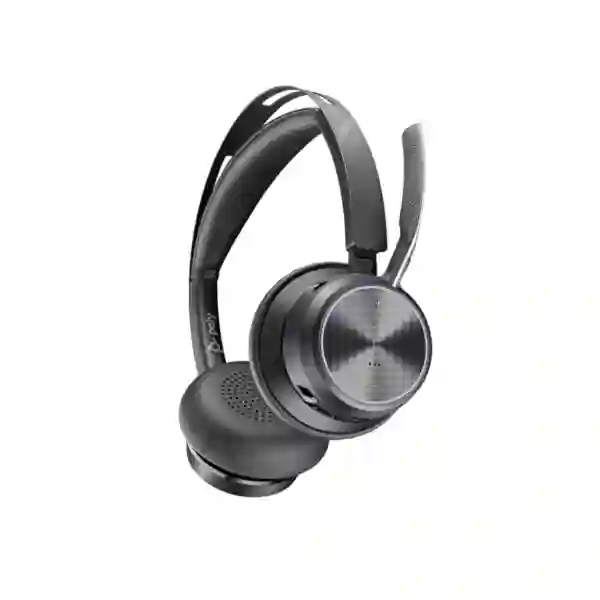
HP Poly Voyager Focus 2 Office Bluetooth Headset
A stereo wireless headset for the professional who needs clearer conversations, practical noise control and a dedicated office connectivity base.
The HP Poly Voyager Focus 2 Office Bluetooth Headset brings a compatible desk phone and computer into one office-headset workflow while supporting mobile Bluetooth use. Verify your phone model and bundle before requesting a quotation.
Best match
Employees who make frequent calls from a fixed office desk and still use a compatible desk telephone.
Check first
Telephone model, base and cable bundle, remote-answer accessories, and softphone integration.
Do not assume
Local stock, price, universal phone compatibility, maximum range or Teams certification without the exact configuration.
Key specifications and what to verify
Use this quick reference for early evaluation. The precise bundle, application compatibility and commercial terms should be checked against the quoted configuration.
| Attribute | Buyer-oriented detail |
|---|---|
| Configuration | Office version with a dedicated connectivity base; verify the quoted variant |
| Intended devices | Computer, compatible desk phone and Bluetooth mobile device |
| Listening | On-ear stereo; hybrid ANC settings: off, low and high |
| Microphone | Boom microphone using Poly Acoustic Fence technology |
| Bluetooth | Version 5.1 in the original Poly product-family datasheet |
| Range | Up to 91 m with the Office base in suitable conditions; actual results vary |
| Charging | Office base cradle; approximately two hours to full charge in HP guidance |
| Call controls | Answer/end, mute, volume and base source selection, subject to integration |
Start with the communication problem
A headset purchase is not just about how a microphone sounds during one test call. In a working office, people move between their computer, telephone and mobile phone while colleagues speak nearby. A suitable headset must make those transitions manageable without turning every call into a new setup exercise. This is where the Office configuration of the Voyager Focus 2 deserves attention: it combines an on-ear stereo headset with a base designed for computer and desk-phone connections, while the headset also supports a mobile Bluetooth connection.
For a Tanzanian organisation evaluating equipment for reception, management, customer service or hybrid administration, the first question is whether staff still use a physical desk phone. If they do, check that handset model and call-control requirements before selecting a headset. If they use only computer meeting applications, a UC variant without the desk-phone connectivity base may be more appropriate. The decision should follow the way employees actually communicate, not the similarity of product photographs.
A quick suitability check
Choose the Office configuration when a user works primarily at one workstation, makes frequent voice calls, benefits from listening with both ears, and needs a direct route to a compatible desk phone as well as a computer. The base can act as a consistent place to return the headset between calls. Its visual call-source controls help a user identify whether they are working with the computer or desk-phone side of the system. Bluetooth adds mobility around the workstation, subject to actual radio conditions.
Consider a different design when the employee frequently travels with a laptop, rarely touches a desk phone, needs a single-ear wearing style for constant face-to-face interaction, or requires a rugged headset for an industrial or outdoor setting. This is a communications accessory rather than hearing protection for machinery. The benefit is better management of typical office conversations; it does not eliminate all surrounding noise or guarantee that every phone and application will support every call-control feature.
Understand what the Office name means
The word Office identifies an important configuration difference. HP Poly describes the Voyager Focus 2 Office as a headset paired with a connectivity base. The manufacturer’s original datasheet identifies a PC connection through the base using USB-A, a desk-phone connection through a telephone interface cable, and a smartphone connection through Bluetooth. A direct USB audio mode for the headset is also described. The base is intended to support calls, not merely hold the headset while it charges.
Do not confuse an Office base with the simpler charging stand supplied with some Voyager Focus 2 UC packages. A charging stand gives the user a convenient place to charge, but it is not by itself the desk-phone integration system. Product photos, retail names and bundle lists can look similar, especially where Standard, UC and Microsoft Teams variants appear together. Verify the exact supplied base, cable type and intended endpoints with the quotation rather than assuming that every Focus 2 box contains identical accessories.
Office model versus a standard UC bundle
The standard Voyager Focus 2 UC version is primarily presented for computer and mobile use. It typically uses a BT700 USB Bluetooth adapter for computer wireless connectivity, with a charging stand included only in selected bundles. By contrast, the Office package is centred on the office connectivity base, with a wired base-to-computer connection and a separate route to a compatible desk phone. Both families share many headset characteristics, including stereo listening, a boom microphone, Bluetooth and noise-control features.
This distinction affects procurement, desk space and support. For an all-softphone team, the simpler UC route can reduce unnecessary desk-phone connections. For a workplace transitioning gradually from desk telephones to software-based calling, the Office configuration may make operational sense. Neither option should be labelled universally superior. Ask which physical devices employees use today, what will change during the equipment life, and whether the intended call-answer workflow needs extra remote hookswitch hardware.
Active noise cancellation: what the wearer hears
The Voyager Focus 2 provides three selectable hybrid active-noise-cancellation settings: off, low and high. ANC acts on the listening experience, helping reduce some distracting background sounds reaching the wearer. It can be useful in open-plan offices, where air-conditioning noise, a nearby conversation or general activity competes with a remote participant. The setting can be adapted to the environment; some users prefer lower cancellation so they remain aware of colleagues approaching their desk.
ANC should not be described as a soundproof barrier. It does not erase every voice, keyboard click or sudden noise, and effectiveness varies with the frequency and character of the sound. It also serves a different purpose from microphone noise reduction. A quiet listening experience does not necessarily mean the remote caller hears a clean signal, and a clear microphone does not mean the wearer hears nothing around them. Buyers should evaluate both directions of the conversation using a realistic office test.
Acoustic Fence: what the caller hears
For outgoing speech, the microphone system uses Poly Acoustic Fence technology. Its purpose is to favour the wearer’s voice and reduce competing sounds picked up during a conversation. This is particularly relevant for customer-facing teams who cannot control whether another employee starts speaking nearby. The discreet boom places the microphone close to the mouth instead of relying entirely on a laptop’s built-in microphone positioned farther away on the desk.
Microphone technology still benefits from good practice. Position the boom at a suitable distance from the mouth, speak naturally and avoid sitting directly beside the loudest noise source. If a call platform applies additional noise suppression, the combined behaviour may depend on its settings. Teams should test not only whether words remain understandable, but also whether there are unusual changes in volume when another person speaks. Acoustic Fence is a useful aid to intelligibility, not a promise of silence or confidential sound isolation.
A practical desk-phone connectivity review
The Office base connects to a compatible desk phone through the supplied telephone interface cable. The correct physical arrangement depends on the telephone design. Some sets provide a dedicated headset port, while others require a connection through the handset path. HP’s Office user guide explains different wiring arrangements and a configuration switch on the base. The guide notes that its common default configuration is A for many telephones, with D used in particular Cisco arrangements; this is a setup reference, not blanket compatibility certification.
Before issuing a purchase order, identify the phone brand, exact model, firmware if relevant, whether a headset socket is present, and how calls are answered today. Determine whether users can tolerate pressing a button on the desk phone in addition to the headset control. If they expect to answer remotely from across the room, check the model-specific requirements for an electronic hookswitch cable or a compatible handset lifter. These accessories are not interchangeable or automatically included in every bundle.
Using the headset with a computer
For computer calling, the Office base can be connected to a computer through the appropriate USB connection. The computer and communications application must then use the correct headset audio device for playback and microphone capture. On a shared computer, or one with an existing webcam microphone and desk speakers, it is easy for the meeting application to select the wrong audio source. A test call should verify both directions before the employee begins customer work.
Software behaviour varies by platform and version. Audio transmission may work even when buttons such as answer, end and mute do not integrate fully with a particular calling application. HP’s current user documentation notes that some softphones require additional Poly software to enable device call control. IT teams should include that detail in their application validation rather than assume universal plug-and-play control across every browser, desktop app, operating system and hosted telephony service.
Mobile-phone use alongside the workstation
Bluetooth connectivity allows the headset to pair to a compatible smartphone. This can help a manager or customer-service representative use one familiar headset for mobile and office communications. The manufacturer identifies Bluetooth 5.1 for the original Voyager Focus 2 family and supports pairing with several remembered devices. To add a phone, put the headset into pairing mode, open the phone’s Bluetooth settings and select the headset when it appears.
Remembered devices and simultaneous active connections are not the same thing. HP’s Office guide states that the headset can remember up to eight paired devices but maintain two connections at a time, including the base. An employee who frequently changes phones or laptops should be clear about which two are currently connected. Also test how a mobile call interrupts a computer meeting or desk-phone call. Audio priority and call switching can be affected by the software, device state and user actions.
Multipoint connectivity without confusion
Multipoint is valuable when the workday involves more than one endpoint, but it should be planned rather than treated as a substitute for a call-routing policy. The Office base can handle computer and desk-phone sources, while the headset also has Bluetooth pairing options. That does not mean every possible combination can be simultaneously active through independent radio links, nor that three live conversations can be mixed together. The user should know which source is selected and what happens when another device rings.
During commissioning, conduct three separate tests: a desk-phone call, a computer softphone or meeting call, and a mobile call. Then repeat while another device has an active connection. Write down the expected user action to accept, decline, hold or return to each call. This small exercise prevents training problems later. It is especially useful where a support team alternates between telephone numbers and collaboration meetings and cannot afford to discover unexpected call switching in front of a customer.
Call control and desk workflow
The headset includes accessible functions for answering or ending supported calls, adjusting volume, muting and managing the ANC setting. The Office base provides controls associated with call sources, including the computer and desk phone. Employees can learn a repeatable routine: identify the ringing source, select the appropriate line if required, answer the call, check the microphone state and return the headset to its base at the end.
The exact sequence is partly determined by telephone integration. In a basic desk-phone installation, a person may still need to use the physical handset or the phone’s headset key. Remote answering from a distance generally depends on a supported electronic hookswitch connection or handset lifter arrangement. That is why a procurement discussion should cover the employee’s movement around the room, not merely whether the headset can carry telephone audio. A system that works perfectly at the desk can feel inconvenient if the user expected fully remote telephone control.
Mute behaviour that people can trust
The Voyager Focus 2 offers a dedicated mute control and a microphone boom that can be rotated upward to mute and returned to speaking position to unmute. The product family also provides Dynamic Mute Alert, intended to draw attention when a wearer begins speaking while muted. These features can reduce one of the most common interruptions in online meetings: a participant speaking at length without being heard.
However, mute is still a state that should be checked before important conversations. An application’s on-screen mute control, a physical headset mute and an external phone system can behave differently depending on integration. Users should look for or listen to the available status feedback and perform a short test if unsure. Smart wearing sensors may also influence microphone behaviour when configured. For sensitive meetings, a clear manual mute routine is preferable to assuming that every automated action will happen in precisely the same way across applications.
Wearing sensors and daily convenience
Built-in smart sensors recognise when the headset is worn and can support functions such as answering compatible calls or pausing and resuming media. They make a headset feel more responsive during everyday work, for example when a user removes it for a short discussion at their desk and puts it back on afterward. The precise behaviour depends on the application and whether the feature has been enabled or configured.
Do not rely on an automated sensor action as the only protection against accidental transmission. HP’s user documentation indicates that sensor functions can be customised and that some media or calling functions vary by application, particularly web-based services. If sensors behave unexpectedly, the administrator can review their settings and use the manufacturer’s reset guidance. When training new staff, explain which controls are physical, which are application-based and which are automatic. That distinction makes the system easier to support and reduces uncertainty.
Comfort and stereo listening
The over-the-head, on-ear stereo design uses cushioned ear pads and an adjustable headband. Poly describes the microphone boom as reversible, with the headset preserving appropriate left and right stereo orientation when the wearer changes sides. This makes the design more flexible for people who prefer the microphone on a particular side of their face. The original product datasheet lists a headset weight of approximately 175 grams.
Comfort is personal, particularly when calls stretch across much of the day. An on-ear headset can feel different from a single-ear design or full over-ear headphones. A stereo style helps the wearer concentrate on remote audio but can reduce awareness of nearby people, especially with ANC enabled. Allow users to try the fit during a realistic call session, adjust the headband gently and place the microphone correctly. Ergonomic suitability should be evaluated alongside sound quality rather than assumed from weight or promotional photographs alone.
Battery life: interpret the numbers carefully
The original Poly Voyager Focus 2 datasheet reports up to 19 hours of talk time with ANC off and up to 16 hours with ANC on, alongside up to 40 hours of listening with ANC off. Later HP family materials describe higher maximum talk-time figures in certain settings, including when the online indicator is disabled. These figures should not be mixed into a single unconditional claim for an unspecified retail package. Battery performance depends on ANC, indicator settings, call behaviour, age and temperature.
For procurement, ask for the battery specification associated with the quoted Office variant and explain the settings used to obtain the published figure. A typical business user may care more about getting through a working day than the maximum achievable laboratory rating. The option to use audio over USB provides another route when charging is inconvenient, but users should verify the cable and connection method provided with their specific system. Plan a sensible charging routine rather than pushing battery life to the last possible minute.
Charging and accessories
The Office base provides a charging cradle so the headset can be placed in a predictable location between calls. HP’s current Office user guide describes charging through the base or a micro-USB cable, with a full charge taking approximately two hours under the stated conditions. The cable arrangement can differ across package revisions, making it important to follow the documentation for the actual unit rather than assume that a USB-C connector shown in another headset advertisement applies here.
Manufacturer materials for the Office configuration identify a headset, office base, telephone interface cable, USB cable and carrying case among the typical contents; the current Office guide also illustrates a power supply and quick-start guide. Ask the supplier to confirm the complete packing list before deployment. In particular, do not assume that a separate EHS cable, HL10 handset lifter or spare ear cushions will be included. These items should appear explicitly in the quotation if required by the installation or maintenance plan.
Wireless range in a real office
The original Poly datasheet quotes a maximum wireless range of up to 91 metres for the Voyager Focus 2 Office system, compared with up to 50 metres for the standard UC configuration. These are manufacturer maximums under suitable conditions, not a promise that a user can cross several walls, floors or dense work areas without interruption. Radio range can be shortened by building materials, interference, workstation placement and the behaviour of the paired equipment.
An administrator should test the actual path staff expect to take: from desk to printer, meeting area or nearby filing room, for example. Call clarity and connection stability matter more than whether a product reaches its largest advertised distance in open space. Where offices have metal shelving, thick walls or equipment that may create interference, practical tests become especially important. Do not position critical customer calls around an unverified range assumption, and train users to return toward the base if they hear connection warnings.
Place the base correctly
The location of the connectivity base is a small detail with a large impact on daily reliability. HP’s Office guide recommends keeping a minimum separation between the base and neighbouring equipment: approximately 15 centimetres from the desk phone and 30 centimetres from the computer. Incorrect placement can contribute to noise or interference. Set the base on a stable, accessible surface where users can reach its controls and return the headset easily.
Avoid routing cables where they will be caught by moving office chairs or repeatedly pulled from their connectors. Label the computer and desk-phone connections during a multi-user deployment so service staff can identify problems quickly. Keep access to power and connections practical without placing the base next to heat sources or in an area where it will be knocked over. If users report static, echoes or background buzzing, check the recommended physical separation before moving on to more complicated fault-finding.
Microsoft Teams and UC versions
Some Voyager Focus 2 configurations are designated for Microsoft Teams, while others are standard UC versions. The Teams-designated version can provide a dedicated Teams-related control and carries the relevant manufacturer-described certification for that specific variant. The existence of a Teams model does not mean every headset sold under the Voyager Focus 2 name is itself a Teams-certified configuration. Buyers should confirm the quoted model rather than infer certification from the family name.
A company running Microsoft Teams, Zoom, Google Meet or another softphone should check the intended application, operating system and call-control features in its own environment. Basic audio may work even when the Teams button or other integration functions are not relevant to the installed version. Browser-based meetings, managed desktops and application permissions can create different experiences. A short pilot with representative users, devices and software versions will give the purchasing team more useful evidence than a broad statement that a headset works with every collaboration service.
What to expect from stereo call audio
Stereo listening makes the headset suitable for both spoken communication and ordinary computer media, including training videos between calls. Its design places priority on intelligible business conversation rather than replacing dedicated high-fidelity music headphones or professional monitoring equipment. Audio preferences vary, and office acoustics can influence how comfortable a person feels speaking while both ears are covered. The three ANC settings offer a degree of choice depending on the task.
Test actual communications material: a normal customer call, a video conference with multiple speakers and a recorded staff-training clip. Confirm that speech is clear at a moderate listening level and that participants are not compelled to raise the volume excessively. For people who need to hear visitors, a single-ear alternative may be better. For focused desk work and frequent remote meetings, stereo can be an advantage. Neither choice is universally right; the surrounding work and the wearer’s habits should determine it.
Software configuration and device support
HP’s current Voyager Focus 2 Office guide describes HP Poly Studio desktop software for configuring supported features, checking device status and managing firmware. Earlier Poly documentation references Poly Lens. Because software names and administration workflows evolve, IT teams should follow the currently applicable HP documentation for the device and operating system rather than install an outdated utility from a third-party source. The software may also help configure certain softphone call-control functions.
A sensible support policy starts with a record of the headset configuration, base type, computer platform and telephone model. Keep firmware updates under change control, especially where the headset is used at a service counter or call-handling desk. HP advises against using the device or placing calls during a firmware update. The point is not to make a simple headset complex; it is to avoid a patchwork of undocumented settings that become difficult to troubleshoot after employees move desks or computers are replaced.
A simple commissioning sequence
Begin with one representative workstation rather than immediately distributing a large batch. Confirm the contents against the purchase description, connect the Office base to power, attach it to the computer and connect the desk phone using the correct manufacturer-guided arrangement. Position the base with suitable clearance and verify the headset is paired. Charge the headset, then test each call source separately. Record the telephone configuration switch setting and the audio devices selected in the computer.
Next, exercise call answer, call end, volume, mute and any remote hookswitch function expected by users. Pair a mobile phone if that is part of the workflow, then test switching while another source is present. Finally, check headset comfort, microphone positioning, firmware state and wireless stability at the user’s normal walking distance. Document any application-specific limitations, such as a browser meeting whose mute controls do not synchronise fully. A repeatable checklist is especially valuable when several offices or departments use different phone models.
Troubleshooting: start with the connection path
If an employee can hear the caller but is not heard, inspect the application microphone selection, headset mute state and boom position. For no audio at all, check the active source on the base, computer output setting, base power and the correct telephone cable. When a desk phone produces an echo or distortion, HP’s guide recommends reviewing speaking and listening volume settings on the base and phone. Increasing every volume control at once can make the problem worse.
If the headset disconnects or produces static, move closer to the base and check its separation from the computer and telephone. If the headset no longer responds as expected to wearing changes, review smart-sensor configuration and the manufacturer’s reset procedure. For an EHS cable or lifter that does not answer remotely, confirm exact accessory compatibility, power and wiring. Troubleshooting should follow the signal path logically rather than immediately treating a single symptom as a defective headset.
Workplace scenarios worth testing
At a reception desk, a staff member may receive a traditional desk-phone call while using a computer for reservations or records. The Office base helps keep these two communication sources in one workstation setup, although the phone’s remote-answer requirements must be verified. In a busy accounts office, the wearer may value Acoustic Fence when discussing figures while colleagues speak nearby. In an executive office, mobile pairing can be useful when the day alternates between calls on a fixed workstation and a smartphone.
For a support team transitioning to a software phone, the important question is whether the existing desk-phone requirement will continue. If it will disappear, a simpler UC configuration may ultimately fit better. For staff training, stereo audio and a reversible boom can be useful, but a group should trial fit and software integration before standardising. These are examples of workflows to validate, not claims that a particular site, provider or telephone installation has already been tested by FourTeck.
Procurement questions for Tanzania
A useful quotation should identify the exact Voyager Focus 2 Office configuration, whether it is a standard or Teams version, and which base and cables are supplied. Provide the supplier with the desk-phone make and model, computer connector availability and preferred meeting application. State whether users need to answer desk-phone calls without touching the telephone, whether smartphone pairing is required and how many devices will be deployed. This makes compatibility discussion concrete instead of generic.
For Tanzania-market procurement, request the actual price and applicable local commercial terms through the approved sales process. Do not assume stock, delivery lead time, warranty handling or installation support merely because the product is described on a website. Ask for those terms in writing for the quoted unit and location. Check the supplied power adapter against the site’s facilities and have an authorised person review the manufacturer’s safety guidance. A clear configuration record also makes future replacement and technical support easier.
Safety, maintenance and sensible use
Good headset operation includes care for the user as well as the device. Keep listening volume moderate and reduce it rather than trying to overpower surrounding noise. Poly’s product family includes SoundGuard hearing-protection technology, but the actual available settings and software requirements should be checked for the quoted unit. Employees should take ordinary breaks from continuous headset use and adjust the fit if it causes discomfort. The headset is not designed to replace protective equipment in hazardous noise environments.
For cleaning and storage, follow the current manufacturer guidance, keep liquids away from connectors and protect the microphone boom from being forced beyond its intended movement. Place the headset on its base when not in use. Avoid unattended charging arrangements that conflict with the safety instructions and keep the equipment away from excessive heat. If the casing, cable or charger is damaged, stop using it and refer the unit for appropriate inspection. These small routines matter when headsets are shared, moved between desks or used for long shifts.
What this headset does not solve
No Bluetooth office headset can compensate for an unstable internet connection, a misconfigured phone system or poor meeting-room etiquette. A user on a software-based voice call still depends on the computer, application, network and service provider. A desk-phone call still depends on the telephone and the correct interface arrangement. Noise suppression improves the immediate audio experience but cannot guarantee privacy from people physically nearby or fix a caller whose microphone is faulty.
It is also important not to equate a manufacturer’s maximum wireless range with whole-building coverage. Nor should buyers assume that multipoint means multiple calls can be mixed or that all smart controls work identically across operating systems. The Office configuration is a strong candidate for a specific combination of desk-phone and computer use; it is not a substitute for proper user training and compatibility checking. Clear expectations are more valuable than an overstated feature list.
When another headset configuration may fit better
If the user never uses a desk phone, compare the Voyager Focus 2 UC configuration with or without a simple charging stand. Removing an unneeded office base can simplify the setup. If the user must keep one ear free for face-to-face interaction, consider an appropriate mono communications headset. If the workplace needs a different wireless technology, a specialised call-centre design or a rugged industrial solution, evaluate those requirements separately rather than stretching the Office model beyond its intended role.
If the office uses an unusual telephone, the first comparison should be compatibility and remote call control, not ANC. A headset with the right audio features but the wrong telephone accessory may fail the practical requirement. Conversely, if a caller spends hours in shared meeting applications, microphone behaviour, comfort and mute feedback may outweigh desk-phone features. A short needs assessment can prevent buying a technically impressive product that does not match the role.
Pre-purchase checklist
- Identify the exact standard or Microsoft Teams variant in the quotation.
- Check the desk-phone make, model, connector and remote-answer requirements.
- Confirm the Office connectivity base rather than an ordinary UC charging stand.
- Validate the computer softphone, operating system and required call controls.
- Request a complete list of included cables, power parts and extra accessories.
- Test microphone clarity, ANC comfort, wireless range and source switching.
- Get current local pricing, supply and support terms in writing.
Frequently asked buyer questions
These answers explain the Office configuration and the practical checks that matter before ordering.
What is the main advantage of the Voyager Focus 2 Office version?
The Office version uses a connectivity base designed to connect a compatible desk phone and a computer while the headset also supports mobile Bluetooth pairing. This makes it different from a standard UC package that may include only a charging stand. The base matters most when physical telephone use remains part of a person’s working day. Confirm the actual bundled components before ordering, because similarly named variants can include different adapters, stands and call-control accessories. The useful buying question is not simply whether the headset is Bluetooth, but which calls need to reach it.
Can it connect to a desk phone and a computer?
Yes, the manufacturer describes the Office base as supporting a computer connection and a desk-phone telephone-interface connection. The desk phone must be compatible with the chosen cabling and configuration. The user may need to operate a key or handset on the telephone unless suitable remote-answer hardware is installed. Always check the exact phone model, physical port and intended call-control behaviour before purchase. A test installation is recommended for fleets that use several different telephone manufacturers or legacy phone models.
Does it cancel the noise around me and my caller?
The product uses two separate approaches. Hybrid active noise cancellation reduces certain sounds reaching the person wearing the headset and has off, low and high settings. Poly Acoustic Fence microphone technology aims to reduce distracting sounds transmitted to the other party. These features can improve real office communication, but neither provides complete soundproofing or a confidentiality guarantee. Results depend on the noise, microphone placement and the calling application. Test both the listening and outgoing speech experience in the environment where the headset will be used.
Is the HP Poly Voyager Focus 2 Office Bluetooth Headset a Microsoft Teams model?
The Voyager Focus 2 family includes standard and Microsoft Teams-designated configurations. The user-provided product name does not identify the exact variant or its manufacturer part number. A Teams-specific control and certification should therefore be confirmed on the quoted configuration rather than assumed. For an organisation standardised on Teams, ask the supplier to identify the version and test the software integration on the intended computers. For another collaboration platform, verify relevant functions such as answer, end and mute separately from basic speaker and microphone audio.
Can I use it with a mobile phone?
The headset supports Bluetooth pairing to a compatible smartphone. According to HP’s Office documentation, it can remember up to eight paired devices while maintaining two connections simultaneously, with the base counted as one of those connections. This is different from having all previously paired devices active at once. Test how mobile calls interact with the office base and the user’s chosen computer application. In workplaces where staff handle confidential customer records, follow the organisation’s normal policy on personal-phone pairing and managed equipment.
How long does the battery last?
Published figures vary with operating settings and documentation revision. The original Poly datasheet gives up to 19 hours of talk time with ANC off and up to 16 hours with ANC on; some later HP family materials show higher values in specified indicator and ANC configurations. Do not treat the highest figure as guaranteed for every Office package. Actual runtime depends on settings, battery condition and usage. Ask for the specification applicable to the quoted unit and plan to return the headset to its charging base between work sessions.
How far can a user walk from the office base?
Poly’s original Focus 2 datasheet lists up to 91 metres for the Office configuration under suitable wireless conditions. This is a maximum range, not a guaranteed distance through walls and office equipment. The real result depends on the building layout, interference and device placement. If employees need to walk to a printer, filing area or nearby room while continuing a call, test those exact routes with a live conversation before accepting the deployment. Position the base according to the current HP guidance.
Is a separate remote-answer cable needed?
That depends on the desk phone and how users want to operate it. A standard telephone interface cable handles audio for supported desk-phone arrangements, but fully remote answering and ending may require a compatible electronic hookswitch cable or an HL10-type handset lifter. The correct accessory depends on the exact telephone model and port arrangement. Do not assume that it is part of the headset bundle. Provide the phone details to the supplier and ask for the required accessories to be identified as separate line items where applicable.
Can the boom microphone be worn on either side?
Yes. The microphone boom can be rotated to suit the wearer’s preferred side, and the headset is designed to maintain left and right stereo orientation. The boom can also be rotated upward to mute on supported configurations. For a clear voice signal, place the microphone near the corner of the mouth as shown in the manufacturer’s fit guidance. Do not force the boom into an unnatural position. A brief comfort and audio test is particularly helpful for employees who wear a headset for most of their working day.
Does it work with every softphone and meeting application?
The headset can serve as a computer audio device, but support for additional call controls is application-dependent. Some softphones require HP Poly desktop software, and browser-based applications may not behave exactly like desktop clients. Before buying multiple units, test the real meeting and calling applications, especially the answer, end, mute and audio-device-selection functions. A successful one-minute test call is useful, but it should be supplemented by a longer call, a second incoming source and a reconnect after computer restart.
What should I give FourTeck for a quotation?
Provide the product name, required quantity, whether standard UC or Microsoft Teams integration is preferred, the exact desk-phone make and model, computer connector type and primary calling application. Mention whether remote answering from the headset is required and whether mobile Bluetooth pairing is part of the use case. Ask for a complete written list of supplied base, cables, power accessories and any separately required EHS cable or handset lifter. Request confirmation of current price, availability and applicable terms for the intended Tanzania delivery location.
What is the best way to roll out several units?
Start with one representative phone and computer combination, then confirm sound quality, comfort, source switching and accessory compatibility. Document cable routing, telephone configuration, application audio selections, firmware and user instructions. Where teams use different phone models, test each distinct configuration rather than assuming one successful pilot covers the entire organisation. Train users in microphone placement, mute status, charging and handling another incoming call. This approach makes it easier to identify problems before issuing headsets to employees who depend on them for customer communication.
Request the right Office headset configuration
For a useful quotation, provide your exact desk-phone model, number of users, computer calling platform, preferred UC or Teams configuration and any remote-answer requirements. Ask FourTeck to confirm which cables and accessories are included and to supply current Tanzania pricing and terms. The correct base and telephone integration matter as much as the headset itself.
Contact FourTeck Tanzania for a configuration and quotation review.




Reviews
There are no reviews yet.