
Business communication · PC + smartphone collaboration
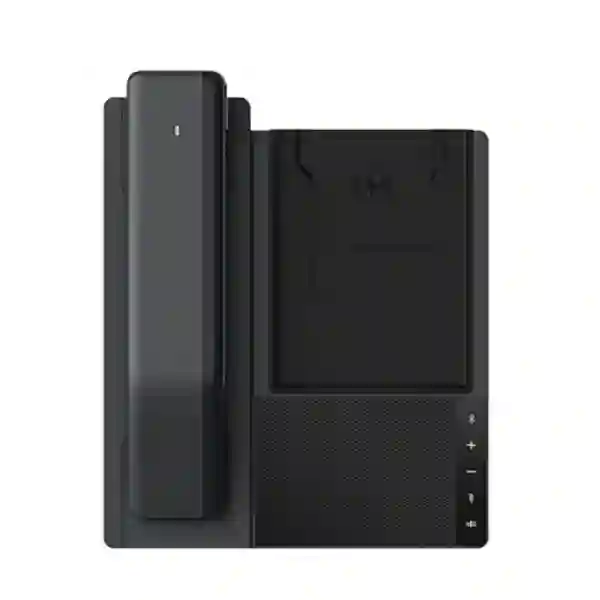
LINKVIL DB20-H All-in-One Phone Station
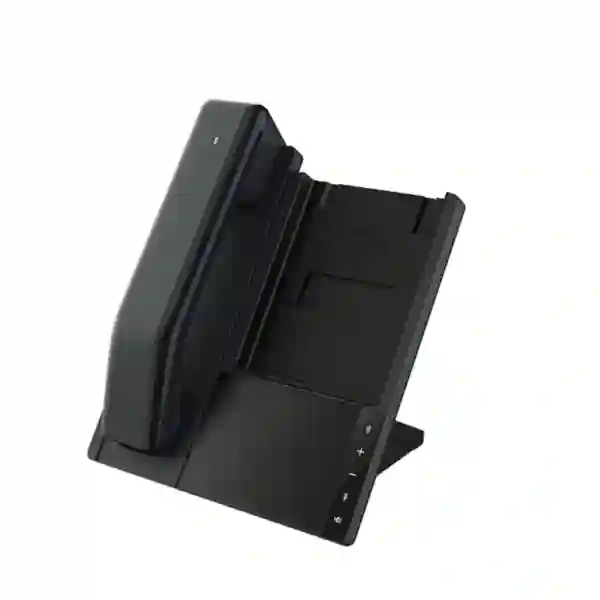
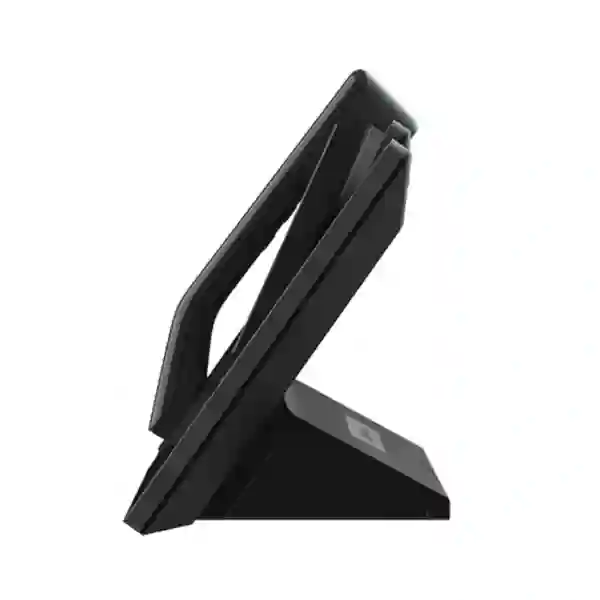
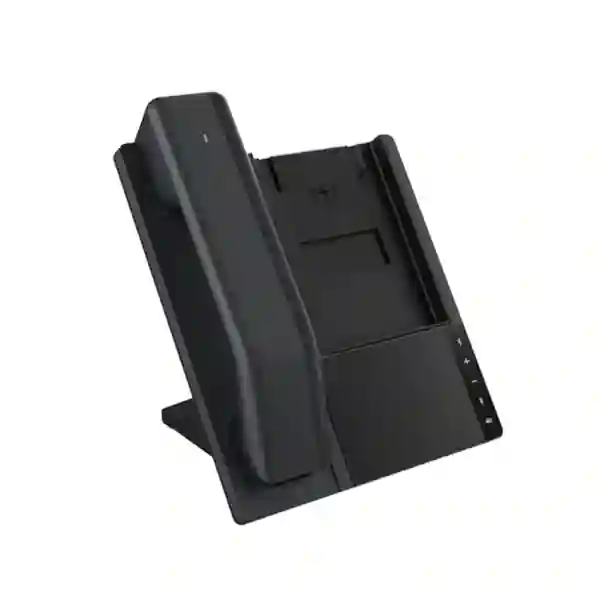
The LINKVIL DB20-H brings several everyday communication tools into one organized desktop station. Instead of using a separate USB speakerphone, mobile handset cradle, charging pad and call-control device, the DB20-H combines PC and smartphone audio, a wireless handset, a full-duplex speakerphone and wireless phone charging in one compact platform. For businesses in Tanzania evaluating a practical device for hybrid work, executive desks, customer-facing teams or small collaboration spaces, the DB20-H is designed to reduce desktop clutter while making it easier to move between private and hands-free conversations.
Quick answer: Choose the DB20-H when you want one desk device for USB-C PC audio, Bluetooth smartphone connectivity, a cordless handset, speakerphone calling and 10W wireless phone charging.
What the LINKVIL DB20-H is designed to solve
Modern business calls increasingly happen through laptops and smartphones rather than through one fixed desk telephone. That flexibility is useful, but it can create a messy collection of accessories: a USB speakerphone for online meetings, a Bluetooth headset or handset for private calls, a phone charger, device-selection controls and cables. The LINKVIL DB20-H addresses that workflow by providing a single physical communication station around a PC and mobile device. Its purpose is not to replace every enterprise telephony platform. Instead, it acts as an audio and call-control endpoint that works with compatible softphone and unified-communications applications on mainstream platforms.
The official LINKVIL specifications identify USB-C and Bluetooth connectivity for the base, Bluetooth connectivity for the wireless handset, Bluetooth 5.4 with an operating range of up to 10 metres, and support for pairing up to eight devices with two simultaneous connections. That makes the product especially relevant to users who work across a notebook and smartphone during the same day. A manager can keep the PC connected for UC meetings while also maintaining a Bluetooth relationship with a mobile phone, reducing the need to repeatedly unplug audio accessories or switch headsets.
The station also incorporates a 3W speaker, two omnidirectional base microphones, beamforming, environmental noise cancellation, adjustable noise suppression, automatic gain control and reverberation reduction. Those are important characteristics for individual offices, executive workspaces and compact meeting areas where hands-free voice pickup must remain intelligible. For private calls, the wireless handset provides a familiar telephone-style experience without tethering the user to the base.
Bluetooth 5.4
The base supports Bluetooth 5.4 with A2DP, HSP and HFP profiles in the current official datasheet, a pairing list of up to eight devices and two simultaneous connections.
USB-C PC connection
Connect the base to a computer over USB-C and select the DB20-H as the computer’s audio input and output device for supported softphone or UC workflows.
Wireless handset
A separate Bluetooth handset lets users switch from hands-free speakerphone use to a more private conversation without adding a traditional wired receiver.
10W wireless charging
The integrated charging surface provides up to 10W wireless charging for compatible smartphones, helping reduce the number of separate desk accessories.
Verified technical highlights
| Area | Verified DB20-H specification |
|---|---|
| Base connectivity | USB-C and Bluetooth |
| Wireless handset | Bluetooth handset, Hearing Aid Compatible, 300mAh lithium-polymer battery |
| Bluetooth | Bluetooth 5.4; up to 10m/33ft operating range; pairing list up to 8 devices; 2 simultaneous connections |
| Base microphones | 2 omnidirectional analog microphones; 1.5m stated voice pickup range; beamforming, ENC, ANS, AGC and reverberation reduction |
| Speaker | 40mm, 4Ω, 3W rated speaker |
| Wireless charging | Single charging coil, up to 10W output for compatible mobile phones |
| Handset battery timing | 18 hours stated talk time in the current official datasheet, 3.4-hour charging time and 21-hour standby; the handset powers off after 10 minutes without operation when disconnected |
| Power | 12V/1.5A power supply; maximum power consumption 18W |
| Operating environment | -10°C to +60°C working temperature and 10% to 95% RH working humidity |
Specifications can change by hardware revision or document revision. Confirm the current manufacturer datasheet and intended softphone/UC application before procurement.
Who should consider the DB20-H?
The DB20-H makes the most sense where one employee regularly works with both a computer and smartphone and wants a consistent physical calling experience. Executive offices are an obvious example. A director may spend part of the day in Teams, Zoom, Webex or another softphone environment, then receive mobile calls that still need a comfortable handset. Instead of keeping two headsets, a separate charging pad and a desktop speakerphone, the user can centralize several tasks around one station.
Hybrid workers can also benefit when a laptop is the primary work device. The USB-C connection provides a stable computer-audio path while Bluetooth offers mobile flexibility. In a hot-desk or shared-office scenario, a DB20-H can give a workstation a more deliberate business-communication setup without installing a conventional SIP endpoint for every use case. The station can also suit customer service supervisors, consultants, finance teams, project managers and other roles where lengthy calls are common but complete contact-centre hardware would be unnecessary.
For meeting spaces, the DB20-H is best understood as a compact personal or small-area communication endpoint rather than a large-room conference system. Its base microphone specification states a 1.5-metre pickup range, so buyers should match the product to room size and seating pattern. Larger rooms, training facilities and boardrooms may require dedicated room audio, ceiling microphones or professional conferencing systems. FourTeck Tanzania’s business technology portfolio provides the broader context for deciding whether a desktop collaboration station or a larger installed audio solution is the better fit.
Compatibility and deployment guidance
The DB20-H is described by LINKVIL as compatible with applications and UC services from mainstream softphone platforms. That wording is important: it should not be treated as a promise that every call-control button behaves identically in every application. Before a larger rollout, test the exact operating system, UC client, browser environment and mobile device combination used by your organization. Confirm that microphone selection, speaker selection, mute, call answering and handset switching operate as expected in the target workflow.
For PC use, connect the station over USB-C, then choose the DB20-H as the computer’s input and output device. For a smartphone, enter Bluetooth pairing mode and select the device from the phone’s Bluetooth list. Because the base can maintain two simultaneous Bluetooth connections, dual-device workflows are practical, but IT teams should still define which device is expected to handle each type of call. This avoids confusion when both the computer and mobile phone are active.
Businesses planning a wider voice strategy can also review FourTeck Tanzania’s technology services and deployment support. A USB/Bluetooth communication station can complement an IP PBX or unified-communications deployment, but it serves a different role from a native SIP desk phone. The correct architecture depends on whether users need extension registration, PBX feature keys, direct SIP operation, mobility or primarily computer/mobile audio.
LINKVIL DB20-H Tanzania
Businesses searching for the LINKVIL DB20-H in Tanzania are often trying to simplify hybrid calling rather than build a traditional desk-phone environment. The product is particularly relevant where laptops, mobile phones and cloud communication applications have become the everyday tools of executives and knowledge workers. In that environment, users still value the physical feel of a handset for confidential or extended conversations, but they also need speakerphone flexibility for quick team discussions and online meetings. The DB20-H combines these roles without demanding that the user change devices for every call.
For a Tanzania procurement project, begin by identifying the users who genuinely need an all-in-one station. Executive desks, department heads, sales managers, account teams and hybrid staff are stronger candidates than users who already have a well-integrated SIP desk phone and no requirement for mobile or computer audio. Check laptop ports, operating systems, softphone platforms and smartphone models. If wireless charging is important, confirm that the intended phone supports compatible wireless charging and that cases or accessories do not prevent reliable coil alignment.
Power planning also matters. The base uses a 12V/1.5A supply and does not rely on a base battery, so the station should be connected to stable power. In offices where short power interruptions are common, organizations may choose to protect communication workstations with appropriate UPS infrastructure. The handset contains its own battery, but the overall station requires the powered base for normal operation and charging. Buyers should therefore treat the DB20-H as part of the desk technology environment rather than as a fully independent cordless phone.
When requesting a Tanzania quote, provide quantity, target application, computer operating system, main UC or softphone platform, smartphone types and whether deployment support is required. That information allows a supplier to validate fit before purchase. FourTeck Tanzania can also help position the DB20-H alongside broader telecom, collaboration and IT infrastructure requirements so the endpoint is chosen as part of a workable communication design rather than as an isolated accessory.
LINKVIL DB20-H Dar es Salaam
In Dar es Salaam, the DB20-H can suit organizations with a high concentration of office-based, client-facing and hybrid roles. Corporate headquarters, professional-services firms, logistics companies, technology businesses, property groups and regional offices frequently combine laptop-based collaboration with mobile communication. For those users, the question is often not whether they need a telephone line, but how they can make computer and smartphone calls feel more organized and professional throughout the workday.
A Dar es Salaam deployment should be planned around desk density and communication habits. In open offices, a hands-free speakerphone may not be appropriate for every call because nearby conversations can interfere with privacy and concentration. The wireless handset is useful in those circumstances because it lets a user move from the base speaker to a more private receiver. The stated Bluetooth range of up to 10 metres provides reasonable movement around a private office or workstation area, but actual performance depends on partitions, radio conditions and nearby wireless devices.
For management offices and meeting pods, the integrated wireless charging area can reduce cable clutter while keeping a compatible phone accessible. The 3W speaker and dual base microphones support hands-free voice use, while the USB-C connection can keep the computer workflow straightforward. Businesses should test their preferred collaboration platform before standardizing a large quantity, especially if call-answer and mute controls need to work consistently across different software clients.
Procurement teams in Dar es Salaam should request a quotation with exact quantities and the target user profile. If the requirement is actually for SIP extension registration, shared reception handling, multiple line keys or PBX-specific functions, a native IP phone may be more appropriate. FourTeck can help compare the DB20-H’s collaboration-station role with other business voice endpoints and broader IP telephony options before an order is finalized.
LINKVIL DB20-H Mwanza
For businesses in Mwanza, the LINKVIL DB20-H can be considered when managers and office teams depend on both laptop communication and mobile calling. Branch offices, distribution operations, healthcare administration, hospitality management and regional commercial teams can all encounter the same challenge: employees participate in online meetings from PCs, then shift immediately to phone calls without wanting separate audio accessories for each device. The DB20-H provides a consistent physical endpoint for both environments.
Before purchasing, map the intended communication flow. If a user spends most of the day on laptop-based UC calls but also receives mobile calls, the combined base, handset and charging surface can be useful. If the user instead relies on a conventional office extension registered directly to a PBX, the DB20-H may need to complement rather than replace the existing IP phone. Clear workflow analysis avoids buying an attractive device that does not match the actual telephony architecture.
For Mwanza locations with multiple workstations, standardization can reduce support effort. IT teams can define a common USB connection method, default audio-device settings and Bluetooth-pairing procedure. They can also document what to do if the computer does not automatically route audio to the station. The manufacturer guidance is straightforward: select the DB20-H as the system’s audio input and output. A simple onboarding note can prevent many user-support calls after deployment.
When planning a quote for Mwanza, include the number of users, workstation types, operating systems and collaboration tools. Consider whether spare power adapters, cable-management accessories or UPS protection are needed for business continuity. The purchasing objective should be a predictable desk setup that staff can use confidently, not just a list of hardware specifications.
LINKVIL DB20-H Arusha
Arusha organizations with travel, tourism, NGO, consulting and professional-service workflows often need staff to communicate across laptops and mobile phones throughout the day. The DB20-H is relevant to that style of work because it provides both speakerphone and handset modes while supporting PC and smartphone connectivity. An employee can join a scheduled online call at the desk, then handle a mobile conversation privately without changing to an unrelated headset or device family.
For customer-facing or executive roles, the handset can make longer calls feel more familiar than speaking through a laptop. At the same time, the base supports quick hands-free communication and can function as a physical anchor for the user’s mobile device. The integrated 10W wireless charging capability is useful where compatible phones remain on the desk for long periods, although charging performance should always be validated with the actual phone and case combination.
Arusha buyers should pay attention to room acoustics. The DB20-H includes beamforming, noise-control functions and reverberation reduction, but those features do not make a small desktop station equivalent to a professionally designed conference-room system. A quiet executive office or small meeting pod is a much better fit than a large training room with distant participants. Matching device scale to room scale is one of the most important deployment decisions.
A useful procurement brief should state whether the DB20-H is for personal desks, shared workpoints or small meeting spaces. It should also name the softphone or UC service in use. That information allows compatibility and call-control expectations to be reviewed before rollout, helping Arusha organizations avoid assumptions about software behavior that may vary by platform.
LINKVIL DB20-H Dodoma
In Dodoma, the LINKVIL DB20-H can support office environments where administrative, professional and project teams increasingly rely on computer-based communications. Government-related offices, contractors, consultancies, education administration and enterprise branches may have users who alternate between video meetings, voice calls and mobile communication. A combined station can create a cleaner, more consistent workplace experience for those roles.
The primary buying decision should be whether users need a collaboration peripheral or a native business telephone. The DB20-H connects to a PC and mobile device and works with mainstream softphone applications; it is not positioned as a standalone SIP desk phone. If a project requires direct extension registration, programmable PBX line keys or PoE-powered Ethernet telephony, buyers should evaluate dedicated IP phone models instead. If the goal is comfortable audio for a laptop and smartphone, the DB20-H is more directly aligned.
For institutional deployments, configuration consistency matters. IT teams can create a short standard operating procedure covering USB-C connection, Bluetooth pairing, microphone and speaker selection, handset charging and use of the base controls. The station can pair with multiple Bluetooth devices, but a documented device-assignment policy is still useful when equipment is shared. Naming conventions and asset labels also help support teams identify which station belongs to which desk.
Dodoma procurement teams should include quantity, intended room or desk type, UC application, smartphone mix and required support scope in requests for quotation. If the wider project also involves IP PBX, network upgrades or collaboration-room systems, evaluating the endpoint together with the broader architecture will produce a better result than purchasing individual accessories independently.
LINKVIL DB20-H UAE
For UAE offices, the DB20-H is relevant to hybrid-work environments where employees frequently use cloud collaboration platforms alongside smartphones. Regional headquarters, consulting firms, technology companies, trading businesses and service organizations often maintain a laptop-first communication model while still depending heavily on mobile calling. The DB20-H can consolidate those workflows into one desktop endpoint and reduce the need for multiple accessories.
The station’s two simultaneous Bluetooth connections are particularly useful for dual-device users, while USB-C provides a direct computer connection. Procurement teams should nevertheless test the exact software stack used by the organization, especially in managed Windows or macOS environments where device permissions and application-specific audio settings may be centrally controlled. A pilot deployment with a few users can confirm both audio quality and call-control behavior before a broader purchase.
Desk aesthetics can also matter in client-facing offices. The all-in-one concept removes a separate charging pad and provides a place for a compatible smartphone while preserving access to a private wireless handset. For users who regularly change between hands-free calls and confidential conversations, that arrangement can be more practical than a speakerphone alone.
Organizations coordinating procurement across Tanzania and the Gulf may also review FourTeck’s regional technology resources through FourTeck UAE. Cross-region standardization can help multinational teams adopt the same user experience, but availability, warranty handling and final commercial terms should be confirmed for each country at quotation stage.
LINKVIL DB20-H Uganda
Uganda buyers evaluating the LINKVIL DB20-H should look first at user workflow rather than at the product category name. This device is strongest where a PC and smartphone are already central to daily communication. It provides a wireless handset for private calls, speakerphone mode for hands-free work and a wireless charging surface for compatible phones. Those combined features can be valuable to managers, consultants, branch supervisors and hybrid workers who want fewer separate devices on the desk.
The official Bluetooth specification provides up to a 10-metre operating range in suitable conditions, but office partitions, interference and device placement can affect real-world performance. During a pilot, test the handset at the distances users actually expect to move. Also verify the computer’s USB-C connectivity and the intended softphone application. If the PC has limited ports, docking-station behavior should be checked rather than assumed.
For multi-branch organizations, the DB20-H can be standardized as a collaboration accessory for selected roles while native SIP phones remain in reception, contact-centre or shared extension positions. This mixed approach recognizes that different users need different endpoints. A receptionist handling many PBX lines has different needs from a regional manager who mainly joins online meetings and answers mobile calls.
FourTeck’s Uganda presence can provide regional context through FourTeck Uganda. When requesting pricing, include user count, application environment and whether configuration guidance is required. This makes it easier to distinguish hardware supply from broader communication-system design.
LINKVIL DB20-H Kampala
Kampala offices often combine formal business communications with mobile-first working habits. The DB20-H can bridge those patterns by giving users a stable desk station without forcing every conversation through a traditional telephone. Staff can connect their computer for softphone and UC audio, pair a smartphone over Bluetooth and use either the base speakerphone or wireless handset depending on privacy and context.
For professional-services firms and regional corporate teams, the wireless handset can be especially useful during lengthy or confidential conversations. It offers the familiar ergonomics of a receiver while allowing the base to remain connected to the user’s other devices. The handset’s built-in battery means it can be lifted and used wirelessly, then returned to the station for charging. Organizations should include charging practice in user guidance so handsets remain ready during the workday.
Kampala IT teams should also consider acoustic conditions. Open-plan offices may require headsets for many users even when the DB20-H is available, because speakerphone use can disturb nearby colleagues. In private offices and small meeting corners, the built-in dual microphones and speaker are more appropriate. The device should therefore be assigned based on workspace as well as job title.
When comparing options, identify whether the requirement is primarily personal collaboration, conventional telephony or room conferencing. The DB20-H sits between these categories as an all-in-one personal station. Correctly defining the use case will make pricing comparisons more meaningful and prevent a lower-cost but unsuitable endpoint from being selected solely on purchase price.
LINKVIL DB20-H Arua
For Arua offices and regional operations, the DB20-H can help standardize communication for staff who depend on laptops and smartphones but still prefer a physical handset for some calls. Branch managers, project coordinators, NGO teams and administrative personnel can use a single station rather than keeping separate USB audio devices and phone chargers. The value is less about adding new communication platforms and more about making existing platforms easier to use from the desk.
A sensible Arua deployment should begin with a small compatibility check. Connect the station to the target computer, select it as the default microphone and speaker, test the main UC application, then pair the intended smartphone. Confirm that users understand when calls are routed to the base speakerphone and when they are using the wireless handset. Basic training can eliminate confusion during the first days of use.
Because the base requires continuous external power, branch offices should factor desk power into the installation. Cable routing should keep the power lead and USB connection protected from accidental disconnection. Where business continuity is important, the workstation and communication peripherals can be considered alongside UPS planning, especially if the laptop itself remains operational during short outages.
Arua buyers should request commercial information using the exact model name DB20-H and specify quantities. Avoid assuming stock, lead time or warranty conditions until they are confirmed in writing for the order. For institutional procurement, include any documentation, tax, delivery or support requirements in the RFQ so the supplier can respond accurately.
LINKVIL DB20-H Mbarara
Mbarara organizations considering the DB20-H may be looking for a cleaner communication setup for management desks, finance offices, sales teams or branch administration. The station is particularly useful where a laptop already handles online meetings and a smartphone remains essential for direct calls. Instead of treating those as separate audio environments, the DB20-H provides one base with both hands-free and handset modes.
For procurement teams, the key distinction is between collaboration-device features and PBX features. The DB20-H does not need to be judged by the number of SIP accounts or Ethernet ports because its role is different. It connects through USB-C and Bluetooth and works with software-based communications. If your project requires network-registered extensions, choose a native IP phone. If your project requires better ergonomics for PC and mobile calling, the DB20-H is the more relevant comparison.
The wireless charging function can improve day-to-day convenience, but it should be treated as an additional workstation feature rather than the sole purchase reason. Wireless charging depends on phone compatibility and alignment. Users with thick protective cases or non-compatible devices may still need wired charging. The station remains useful even when the charging pad is not used because its core value is audio and handset integration.
For larger Mbarara orders, ask for a pilot unit or compatibility validation where possible before committing to full standardization. Document the tested PC models, operating systems, collaboration software and mobile phones. That creates a clear baseline for deployment and gives support teams a known-good configuration when troubleshooting later.
LINKVIL DB20-H Gulu
Gulu businesses and organizations can use the DB20-H as a personal communication station where mobile and computer calling overlap. The all-in-one design is suitable for desks where space matters and where employees would otherwise keep several separate accessories. A wireless handset, speakerphone and charging surface are integrated around the same base, which can simplify both the physical workspace and daily calling routine.
For branch operations, simplicity is valuable because remote support may not always be immediately available. The DB20-H’s setup is comparatively direct: power the base, connect the computer by USB-C, pair mobile devices by Bluetooth and choose the station in the computer’s sound settings. Organizations can create a one-page internal guide showing those steps and basic controls such as mute, call, volume and speakerphone.
Where calls involve confidential client or employee information, the wireless handset provides a more private alternative to hands-free audio. In shared spaces, users should still consider surroundings and organizational privacy rules. The station improves flexibility but does not eliminate the need for sensible call etiquette or appropriately separated work areas.
Gulu procurement should be based on verified requirements rather than generic claims about universal compatibility. State the softphone or UC application in use and ask for confirmation of expected operation. If a wider voice upgrade is planned, compare the DB20-H with native SIP phones, headsets and meeting-room systems so each user receives the endpoint type that matches their actual work pattern.
LINKVIL DB20-H Kenya
For Kenya deployments, the DB20-H fits modern workplaces where employees use cloud collaboration tools, laptops and smartphones as parallel communication channels. Regional companies can standardize the station for executives, client managers and hybrid staff while retaining conventional IP phones in roles that need direct PBX registration. That role-based approach usually produces a better user experience than forcing one endpoint type across every desk.
The device’s current official specifications include Bluetooth 5.4, two simultaneous connections, a 10-metre stated operating range, USB-C PC connectivity and a wireless handset. These characteristics are practical for users who move between devices during the day. However, corporate security policies may restrict Bluetooth or USB peripherals on managed computers, so IT approval should be part of procurement when endpoints are centrally controlled.
In small offices and executive rooms, the full-duplex speakerphone can reduce dependence on a headset for short calls. For longer discussions or situations requiring privacy, the handset gives users another option. Large meeting rooms should still use purpose-designed room audio. Selecting the DB20-H for the right acoustic setting will produce better results than trying to stretch a personal station beyond its intended scale.
Organizations coordinating Tanzania and Kenya purchasing can also explore FourTeck Kenya for local-market context. Cross-border projects should verify commercial terms and availability independently by country even when the technical specification is standardized.
LINKVIL DB20-H Kuwait
Kuwait organizations looking for a premium-looking but practical desk communication accessory can consider the DB20-H for users who divide their time between softphone meetings and mobile calls. The product’s all-in-one concept is attractive in executive offices, client-facing workspaces and hybrid environments because it reduces the visual and operational clutter created by separate chargers, speakerphones and handsets.
The station should be evaluated as part of the endpoint strategy. A company that has standardized on cloud UC may find the DB20-H suitable for selected users because the computer remains the primary communications platform. A company relying on a traditional SIP PBX may still need desk phones for extension registration and may deploy the DB20-H only where mobile and laptop integration adds value. This distinction affects both functionality and budget.
Environmental and desk planning should also be considered. Although the manufacturer specifies a broad operating-temperature range, devices should still be installed in normal indoor office environments with appropriate power, ventilation and protection from direct heat or moisture. The wireless charging surface should remain accessible and clear so phone alignment is reliable.
Regional buyers can review FourTeck Kuwait for local technology sourcing context. For quotation accuracy, provide model name, quantity, expected deployment date and the UC or softphone environment that needs to be supported.
LINKVIL DB20-H Ghana
Ghana businesses can consider the LINKVIL DB20-H when users need a single desk station for computer and mobile communication. The integrated handset and speakerphone provide two very different interaction modes without requiring users to change ecosystems. That flexibility suits professionals who may start a call on a UC application, take a smartphone conversation and then return to a hands-free online meeting during the same working session.
For company-wide adoption, segment users according to role. Staff who mainly need contact-centre headsets or direct SIP desk phones may not benefit from the DB20-H. Executives, consultants and mobile-first users are more likely to appreciate the combined functionality. A role-based device catalogue can reduce overbuying and simplify support because each hardware category has a clear purpose.
Compatibility checks should include the computer’s USB-C implementation, device-management restrictions and target softphone software. Bluetooth policies should also be reviewed in organizations with strict information-security controls. The fact that a device can technically pair does not automatically mean corporate policy allows it. Including IT security in a pilot keeps deployment aligned with internal governance.
Ghana procurement teams should request confirmed availability and warranty details rather than relying on assumptions from other markets. The DB20-H’s technical specification can be standardized globally, but commercial conditions vary by supplier and region. A well-structured RFQ should include quantity, delivery location, required documentation and whether installation or end-user onboarding is needed.
LINKVIL DB20-H Nigeria
Nigeria organizations with distributed teams, cloud collaboration and smartphone-intensive workflows may find the DB20-H useful as a standardized personal communication endpoint. Its strength is integration at the user’s desk: USB-C for a computer, Bluetooth for mobile connectivity, a dedicated wireless handset, speakerphone controls and wireless charging. For executives and commercial teams who spend much of the day communicating, combining those functions can make the workspace easier to manage.
Large organizations should avoid treating the DB20-H as a universal replacement for every telephony endpoint. Contact-centre agents may be better served by professional headsets and software controls. Reception teams may require multi-line SIP consoles. Boardrooms may need installed conferencing systems. The DB20-H is strongest for personal workstations and compact collaboration areas where flexibility across PC and smartphone calls matters most.
Before rollout, test actual call scenarios: incoming smartphone calls, outgoing softphone calls, mute operation, switching between handset and base speaker, audio-device recovery after laptop sleep and behavior after reconnecting a docking station. These everyday events matter more to user satisfaction than isolated specifications. Documenting known-good settings can significantly improve support after deployment.
Nigeria buyers should request a commercial quote that clearly identifies the DB20-H model, quantity and support expectations. Procurement teams can compare the total workstation experience rather than only unit price, especially when the device replaces several separate accessories. Final availability, warranty and logistics should be confirmed for the specific order.
LINKVIL DB20-H Seychelles
In Seychelles, the DB20-H can suit hospitality management offices, professional firms, enterprise branches and administrative teams that need reliable desktop communication across computers and smartphones. The compact all-in-one format is useful where desk space is limited and where users prefer a clean workstation rather than several disconnected accessories. A single powered base provides charging, speakerphone and handset functions while remaining connected to the user’s communication devices.
For island environments and distributed operations, procurement planning should account for spare units, power supplies and logistics because replacement lead times can be more important than in larger metropolitan markets. The DB20-H itself is simple to deploy, but organizations purchasing multiple units should consider how they will support users if a cable, adapter or handset is damaged. Keeping a small approved spare pool can be more effective than improvising different accessories later.
The product is also useful where mobile phones are central to customer communication but employees still want a desk-based experience. Bluetooth pairing lets the smartphone remain part of the workflow while the wireless handset gives a conventional private-call option. The computer connection supports softphone and UC use, helping the same desk accommodate internal meetings and external calls.
Seychelles buyers should confirm compatibility, availability and warranty details at quotation stage. If the requirement expands to full IP telephony, Wi-Fi, switching or meeting-room collaboration, the DB20-H should be evaluated alongside the wider infrastructure so endpoint choices remain consistent with the organization’s communications strategy.
Buying checklist for LINKVIL DB20-H
Identify whether the station is for an executive, hybrid worker, branch manager, consultant or small meeting area.
State the exact softphone or UC application and operating system to be used.
Verify USB-C access directly or through the intended docking setup.
Confirm Bluetooth policy and whether the smartphone supports the desired wireless charging behavior.
Use it for personal desks or compact spaces rather than assuming large-room conferencing performance.
Ask for current price, availability, warranty, delivery and support terms for your location and quantity.
DB20-H versus a SIP desk phone
The most common buying mistake is to compare the DB20-H directly with an Ethernet SIP telephone as if they are interchangeable. A SIP desk phone normally registers directly to an IP PBX or hosted voice platform and may offer line keys, BLF, transfer controls, PoE and network provisioning. The DB20-H is different. Its value comes from acting as a communication peripheral for a PC and smartphone. It gives software-based calling a physical handset and speakerphone without requiring the station itself to become the core telephony platform.
That distinction affects deployment. If the employee’s identity and extension live in a softphone on the computer, the DB20-H can improve ergonomics without changing the underlying phone system. If the employee needs an always-on desk extension that remains operational independently of a computer, choose a native SIP endpoint instead. Some organizations may deploy both categories: SIP phones at reception and shared service points, DB20-H stations for executives and laptop-centric staff, and professional headsets for contact-centre users.
FourTeck can help evaluate the whole endpoint mix rather than assuming one model should cover every requirement. The Tanzania technology-services overview is useful when the purchase forms part of a wider voice, network or collaboration project.
Frequently asked questions
Is the LINKVIL DB20-H a SIP IP phone?
The DB20-H is positioned as an all-in-one phone station for PC and smartphone communication. Its base uses USB-C and Bluetooth connectivity. If your requirement is direct SIP registration to an IP PBX, verify a dedicated SIP desk phone instead.
Can the DB20-H connect to both a computer and smartphone?
Yes. The base supports USB-C and Bluetooth, and the manufacturer specifies two simultaneous Bluetooth connections. Exact behavior should still be tested with your operating system and communication applications.
What Bluetooth version does the DB20-H use?
The current official datasheet lists Bluetooth 5.4 with A2DP, HSP and HFP profiles and an operating range of up to 10 metres or 33 feet under suitable conditions.
Does the station charge smartphones wirelessly?
Yes. The official specification lists one wireless-charging coil with up to 10W output. Charging requires a compatible phone and suitable alignment with the charging area.
How long does the wireless handset battery last?
The current manufacturer datasheet states an 18-hour talk time, 3.4-hour charging time and 21-hour standby time. Earlier documents showed a shorter talk-time figure, so buyers should use the current datasheet for the hardware revision being supplied.
Is the handset hearing-aid compatible?
Yes. LINKVIL lists the DB20-H wireless handset as Hearing Aid Compatible (HAC).
Can the DB20-H be used in a large conference room?
It is better suited to personal desks and compact collaboration spaces. The official base microphone pickup range is stated as 1.5 metres, so large rooms should be evaluated for dedicated conferencing audio.
How do I request a DB20-H quotation in Tanzania?
Provide the model name, quantity, delivery location, target softphone or UC application, computer environment and any support requirements through the FourTeck Tanzania contact page. Current pricing and availability should be confirmed at quotation stage.
Why source the DB20-H as part of a complete communication plan?
A successful endpoint deployment depends on more than choosing a device with attractive specifications. Users need the correct audio routing, application configuration, desk power, connectivity and operating procedure. In a wider unified-communications environment, endpoint standards should also align with security policy, device management, network design and support capability. FourTeck’s value is in connecting the product decision with those broader requirements where needed.
For a small order, that may simply mean confirming that the DB20-H matches the user’s laptop and smartphone workflow. For a larger rollout, it can mean piloting the device, documenting settings, defining which user roles receive it and planning supporting voice or network infrastructure. The goal is to make the endpoint predictable for both employees and IT support.
Use the verified FourTeck Tanzania contact page to request a quotation, compatibility discussion or deployment guidance. Stock, pricing, warranty and lead time are order-specific and should be confirmed rather than assumed.
Quotation checklist
For a faster and more accurate quotation, include the following information in your enquiry: exact product name LINKVIL DB20-H, required quantity, delivery city and country, preferred delivery timeline, end-user roles, PC operating system, main softphone or UC application, smartphone platform, whether wireless charging is a required feature, and whether you need only product supply or also configuration assistance. For multi-site organizations, list quantities by location so deployment planning can be discussed clearly.
If the DB20-H is being evaluated as part of a telephony refresh, also state whether the organization already has an IP PBX, hosted PBX or cloud UC platform. Mention whether existing SIP desk phones will remain in place, whether users require direct extension registration, and whether reception or contact-centre roles need different endpoints. These details make it easier to recommend the DB20-H only where its PC-and-smartphone collaboration model is a strong fit.
For large quantities, request confirmation of the current hardware revision and manufacturer datasheet supplied with the proposed units. This is especially useful because earlier DB20-H documents listed slightly different values for some specifications. Aligning the quotation to the current revision keeps technical expectations clear before purchase.
Decision recap
Choose the LINKVIL DB20-H when the user’s primary communication tools are a PC and smartphone and the objective is to make those tools more comfortable and organized at the desk. The combination of USB-C, Bluetooth 5.4, wireless handset, full-duplex speakerphone and 10W wireless phone charging is particularly well suited to executives, hybrid workers and professionals who frequently alternate between private and hands-free calls.
Do not choose it simply because you need an IP telephone. If direct SIP registration, Ethernet networking, PoE and PBX line-key features are central requirements, compare dedicated SIP phones. If the requirement is a large conference room, compare purpose-designed room audio. The DB20-H is strongest when used for the role it was built to fill: a compact, all-in-one communication station around a laptop and mobile device.
For Tanzania purchasing, confirm final compatibility, current availability and commercial terms before ordering. FourTeck can help you assess the endpoint within the broader workplace communication environment and prepare a quotation based on your quantity and deployment needs.




Reviews
There are no reviews yet.