
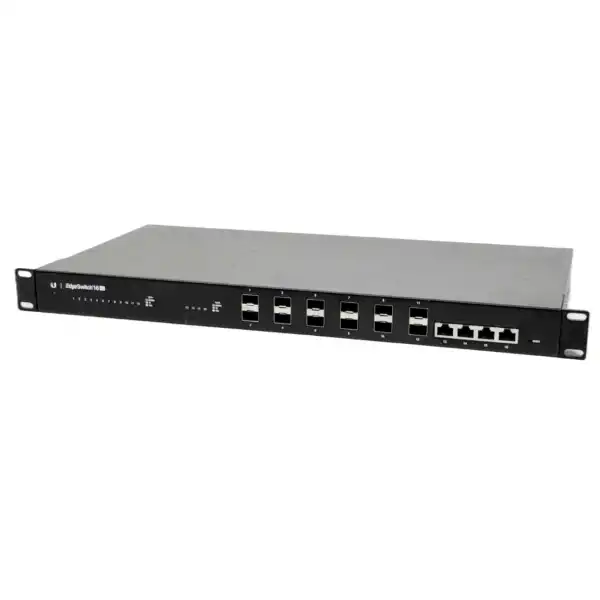
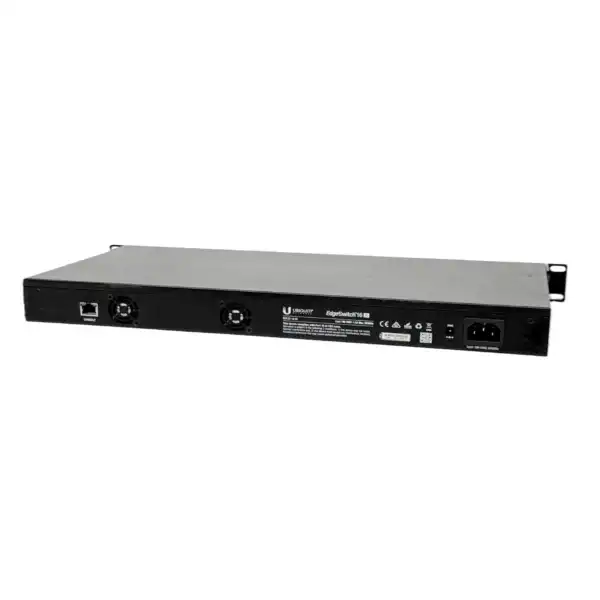
Ubiquiti EdgeSwitch 16 XG ES-16-XG in Tanzania
Build a more capable high-speed aggregation layer with a managed 16-port switch combining twelve 1/10GbE SFP+ interfaces and four 1/10GbE RJ45 connections. Check the exact interface requirements, optics, rack layout and operational needs before requesting a quotation.
Verified technical specifications
| Model | ES-16-XG |
|---|---|
| Product family | Ubiquiti EdgeSwitch / EdgeMAX |
| SFP+ data ports | 12 × 1/10 GbE |
| RJ45 data ports | 4 × 1/10 GbE |
| Console | RJ45 serial |
| Non-blocking line rate | 160 Gbps |
| Switching capacity | 320 Gbps |
| Forwarding rate | 238.10 Mpps |
| Rack size | 1U |
| Dimensions | 443 × 221 × 43 mm |
| AC input | 100–240 V AC, 50/60 Hz |
| DC input | 16–25 V DC, suitable 56 W source |
| Maximum device consumption | 36 W, excluding optical modules |
| Operating temperature | -5 to 40 °C |
Figures are from the manufacturer’s ES-16-XG technical specification, datasheet and quick start guide. Verify transceiver compatibility and exact commercial bundle before purchase.
Why choose the EdgeSwitch 16 XG for a growing network?
When several access switches, servers, storage appliances and network gateways need to communicate at higher speeds, the aggregation layer becomes important. The Ubiquiti EdgeSwitch 16 XG ES-16-XG is a managed 10-gigabit aggregation switch intended to bring those connections together in a compact rack-mount form. Twelve SFP+ interfaces are suited to planned fibre links or compatible direct-attach connections, while four 10GBASE-T RJ45 interfaces accommodate copper-based equipment. This mix makes the model worth considering where a site has both optical and copper infrastructure. The right purchasing decision depends on link distance, installed cabling, transceiver selection, management requirements and what the connected devices can actually deliver. A ten-gigabit connection does not automatically make an application ten times faster; storage media, host interfaces, routing, server workloads and network design can all impose limits. Start by mapping which devices require more bandwidth and which remain adequately served by 1 GbE. The ES-16-XG is particularly relevant when the goal is to aggregate multiple high-speed links rather than provide low-speed desk ports for an entire office.
At a glance: the exact model and port mix
The ES-16-XG is an EdgeMAX-family EdgeSwitch product, not the similarly named UniFi Switch 16 XG. Its sixteen data interfaces are divided into twelve SFP+ ports and four RJ45 ports. Ubiquiti lists both interface groups as supporting 1 Gbps and 10 Gbps Ethernet connections, subject to compatible media and equipment. An additional RJ45 serial connector is a management console, not a seventeenth Ethernet data port. This distinction matters when comparing switch specifications or planning cabling. The advertised 160 Gbps total non-blocking line rate describes aggregate unidirectional traffic capacity across the sixteen 10G data interfaces; the manufacturer’s datasheet separately cites 320 Gbps switching capacity and 238.10 million packets per second forwarding rate. These figures describe the switching platform under specified conditions, not guaranteed real-world throughput for each application or end-to-end service. Compare the ES-16-XG against your required port counts and the actual link speeds before committing. If most connections use RJ45 and only a few use SFP+, a different port mix may reduce the need for additional adapters.
A practical role in business and campus networks
A typical topology places the EdgeSwitch 16 XG between multiple distribution or access switches and the network’s routing or security boundary. Each lower-level switch can use a suitable uplink to reach a shared aggregation layer. Servers and network-attached storage may also connect directly where that simplifies the design. This does not remove the need for firewalls, routers, network segmentation or appropriate endpoint security; the switching device serves a different role from an internet gateway. Before deciding how many high-speed uplinks are needed, sketch the traffic pattern between users, applications, storage systems and external connections. Some applications exchange most data locally, while others depend primarily on internet or WAN access. Where clients move large files between local servers, the uplink and server-side connection may be valuable. Where application latency originates elsewhere, an aggregation switch upgrade alone may not resolve it. Document which ports carry individual systems, which ports are reserved for growth, and how a failure at the aggregation point would affect business operations.
SFP+ connectivity: plan the media, not only the sockets
The twelve SFP+ cages provide flexible connectivity options, but they should not be treated as twelve ready-to-use fibre connectors without supporting components. SFP+ optics and any direct-attach copper assemblies must be chosen to match the link endpoints, supported operating speed, fibre type, connector format and intended reach. A short rack-to-rack or rack-internal connection may call for a different medium than a link to another building. Single-mode and multimode fibre are not interchangeable simply because both terminate at an optical interface. Verify the optic and cable specifications on each side of a link and make sure the optical budget fits the physical run. For installations involving existing patch panels, inspect patch lead cleanliness and connector condition as well as available fibre pairs. Keep an accurate port-to-fibre schedule so later maintenance does not disconnect the wrong service. Because the switch supports 1G and 10G connectivity, speed and module compatibility should be confirmed before deployment rather than assumed from the connector shape. Compatible transceivers can also affect power and thermal planning.
RJ45 10GBASE-T connections
Four copper RJ45 data ports provide a direct option for equipment such as servers, storage appliances or nearby switches with compatible 1GbE or 10GbE Ethernet interfaces. The copper ports are distinct from the twelve SFP+ cages and may help retain an existing structured-cabling approach. A connection can only negotiate speeds supported by both ends and the complete channel. The ES-16-XG official interface listing names 1 Gbps and 10 Gbps; do not assume intermediate 2.5 or 5 Gbps operation without exact supported documentation. For a 10GBASE-T design, review the category, installation quality and length of every cable run. Manufacturer documentation refers to Cat6 or higher cabling; practical link suitability still depends on distance and the installation environment. Use certification results where available, especially for older cable plant with uncertain termination quality. Allow room in the rack for sensible patch-cord bends and labelling. If a planned design needs more than four high-speed copper connections, compare the expense and suitability of compatible interface alternatives with a switch built for a larger RJ45 port count.
What the throughput specifications mean
Ubiquiti publishes a total non-blocking line rate of 160 Gbps for the EdgeSwitch 16 XG, as well as 320 Gbps switching capacity and a forwarding rate of 238.10 Mpps in the model datasheet. These are related but different engineering measures. The non-blocking figure reflects the device’s ability to handle the combined line rates of its ports; switching capacity accounts for bidirectional forwarding capacity. The packet-per-second figure helps describe forwarding under small-packet workloads. None of these values guarantees that a particular file copy, backup or application transaction will operate at a headline rate. End systems, protocol overhead, congestion, queuing and competing traffic affect results. A realistic deployment plan examines traffic between specific endpoints and identifies places where oversubscription is acceptable. For example, multiple access switches feeding a shared server do not each receive a dedicated ten-gigabit path to the same one-gigabit server interface. Benchmark with representative workloads after installation and monitor port utilisation during busy periods. It is better to solve a measured bottleneck than to buy against a capacity number in isolation.
Layer 2 features for orderly segmentation
The manufacturer’s datasheet identifies VLAN-related features, link aggregation, spanning-tree variants, IGMP snooping and DHCP snooping among the operating system capabilities. These tools can help administrators separate classes of traffic and manage switching behavior in a multi-device environment. VLAN segmentation is useful for creating logical boundaries, but a VLAN alone is not a complete security policy. Traffic passing between zones should still traverse an appropriate policy enforcement point where required. Link aggregation can provide additional aggregate bandwidth or resilience between supported devices; it does not turn every single application flow into a combined multi-link connection. Spanning-tree settings help mitigate switching loops when a topology contains redundant paths, but they must be applied consistently to avoid unexpected blocked ports or outages. Multicast and DHCP-related features can assist in networks that need them, provided they are properly configured. Plan the management VLAN, trunk membership, allowed networks and port naming before connecting production equipment. Record the intended configuration so a future technician can distinguish deliberate policy from an accidental mismatch.
Layer 3 capabilities and routing expectations
The ES-16-XG datasheet lists static routing and other Layer 3 functionality, which can be useful for selected network designs. However, a managed switch offering routing features should not automatically be treated as a replacement for a dedicated firewall, WAN router or full-featured dynamic routing platform. Establish exactly which route types, interface functions, controls and firmware-supported capabilities your deployment requires. Some designs keep the aggregation switch primarily at Layer 2 and use an upstream router or security appliance for inter-VLAN routing and policy enforcement. Others use supported static routes in narrowly defined environments. Compare these approaches against the expected volume of cross-subnet traffic, fault tolerance requirements, troubleshooting skills and security rules. If your application depends on advanced routing protocols, granular access policy, tunnelling, network address translation or VPN features, verify whether another device is needed. Good architecture assigns each networking component a clear role rather than relying on an ambiguous phrase such as Layer 3 capable. A simple diagram of gateway placement and traffic flow is often the fastest way to avoid incorrect purchasing assumptions.
Management through browser, console and UISP
The EdgeSwitch family provides a browser-based configuration interface and command-line management options. The ES-16-XG includes an RJ45 serial console connection for local administration, and the official setup guide also describes UISP management for configuration, monitoring, software upgrades and backups. This is a meaningful distinction from UniFi-adopted switching products; buyers should not assume that an EdgeSwitch is managed in exactly the same way as a UniFi switch. Check the preferred administrative workflow before purchasing, especially when an organisation already standardises on a central management platform. For secure operations, restrict administrative reachability, change initial credentials, use supported secure management protocols and maintain a documented recovery procedure. Keep version-controlled configuration backups where operational policy allows. If a network team manages multiple sites, ensure staff can monitor alarms, interface status and configuration drift using their chosen tools. Confirm current software support and available update paths through Ubiquiti’s official product support documentation before deploying into a security-sensitive production environment. Management convenience should never come at the expense of an exposed administration interface.
Power input, backup planning and continuity
The manufacturer lists a universal 100–240 V AC, 50/60 Hz power input and an internal 56 W power supply. There is also a 16–25 V DC input rated for a suitable 56 W source with a 2.5 mm inline connector. The quick start guide describes the DC source as a possible redundant hot spare when appropriately installed; that separate supply is not presented as included. Ubiquiti states a maximum device consumption of 36 W excluding SFP and SFP+ modules. Do not confuse this value with the total draw of every fully populated configuration. Budget additional power and heat for transceivers and adjacent equipment. If an installation depends on continuous network connectivity, assess UPS runtime, upstream circuit protection, safe power distribution and any available secondary power architecture. The presence of a backup input does not mean that every component in the wider network is redundant: upstream switches, routers, optical paths and connected servers also affect availability. Confirm correct polarity, voltage and connector requirements for any DC design using the installation instructions, and have qualified personnel handle rack power arrangements.
Physical fit, airflow and rack preparation
With a listed chassis size of 443 × 221 × 43 mm, the ES-16-XG is intended for a 1U rack position. The published weight is approximately 2.6 kg without mounting brackets and 2.7 kg with them. These dimensions are important when an existing enclosure has limited usable depth, crowded power strips or tightly routed cabling. Measure available space rather than assuming every nominal 19-inch rack has adequate clearance behind the front rail. Keep optical fibres protected from excessive bend radius and pressure. Use labelled patch panels or cable management hardware where the density warrants them. Review airflow, ambient temperature and the heat output of nearby devices, especially in compact communication cabinets. The official ambient operating range is -5 to 40 degrees Celsius and humidity of 5–95 percent non-condensing. These are equipment environmental limits, not an assurance that an unventilated cabinet will remain within specification. In warm or dusty environments, plan ventilation, dust control and regular equipment checks. The switch belongs in an appropriately protected indoor network space rather than openly exposed to rain or outdoor conditions.
Tanzania deployment considerations
For organisations planning a high-speed network in Tanzania, practical readiness begins with the site rather than the product label. Review available rack space, power quality, backup arrangements and the condition of any existing fibre or structured cabling. For facilities with multiple communications rooms, document the route and medium of every intended 10G uplink. For server rooms, check whether the network adapters and storage systems can use ten-gigabit links effectively. If a link passes between buildings, consider fibre-path protection, appropriate installation practice and the operational consequences of a cable cut. It is also prudent to check whether replacement optics, compatible patch cords and trained support resources can be obtained for the intended deployment. None of these considerations should be interpreted as a claim about local stock, guaranteed delivery, approval status or installation service from FourTeck. Confirm the commercial particulars through an actual quotation. A carefully defined bill of materials should include the switch, suitable connection modules, cabling and any power accessories that are not already available at the site.
Network-attached storage and backup traffic
A storage network is one reason to evaluate the Ubiquiti EdgeSwitch 16 XG ES-16-XG. An NAS appliance or a backup server with a compatible ten-gigabit interface can connect to a high-speed aggregation point, allowing multiple users or systems to share storage traffic. The benefit depends on whether the storage subsystem, disks, controller, CPU and protocols can sustain the required workload. Connecting a NAS to a 10G port does not by itself make slow disks operate at 10G line rate. Decide which workloads need throughput, which need low latency and which are constrained by the source or destination. Backups and large-file transfers can compete with interactive applications if they share links during peak periods. Administrators should plan traffic scheduling and any relevant quality-of-service treatment accordingly. Where data integrity and recovery are critical, the switching layer complements rather than replaces a backup strategy. Test restored data, monitor link errors and make sure required replication or recovery processes are not hidden behind an assumed network capacity figure. Keep records of which storage interfaces connect to which switch ports.
Virtualisation and server consolidation
Virtualised environments may concentrate traffic from several logical machines onto a smaller number of physical network adapters. A ten-gigabit aggregation switch can provide an infrastructure option for hosts that need higher-speed network connectivity, particularly when server-to-server and server-to-storage traffic share the same physical domain. Planning should account for the installed NIC speed, hypervisor configuration, VLAN tagging, redundancy approach and host teaming compatibility. A switch port configured incorrectly for a tagged VLAN may make an otherwise healthy virtual network unavailable. Similarly, dual host uplinks require a clearly designed method for failover or load distribution; they do not automatically create application redundancy. Consider how maintenance windows will affect active virtual machines when the aggregation switch is upgraded, rebooted or isolated. For small installations, a single aggregation switch may be an acceptable cost and complexity tradeoff. For systems with strict uptime targets, analyse whether separate network paths and devices are needed. The purchase decision should reflect recovery objectives and change-management capacity, not merely the number of high-speed ports.
Fibre uplinks between distribution switches
A site with multiple distribution or access switches may use SFP+ uplinks to carry traffic back to an aggregation rack. The twelve SFP+ sockets on this device create several connection opportunities, but an uplink plan still needs to account for spare ports, redundant topology and future expansion. Before specifying fibre modules, record the fibre standard, strand availability, termination type, distance and endpoints. Confirm that both sides support the intended speed and optic combination. Different buildings or floors may use different cable generations, and a link described casually as fibre could require closer examination before a new module is selected. If two or more logical routes exist between switches, spanning-tree or link-aggregation design becomes relevant. A physical loop without a carefully configured control plane can disrupt large parts of the network. Organise the cabling so a technician can trace a specific uplink quickly, and include labels in network diagrams. During commissioning, record negotiated speed, link status, error counters and baseline traffic levels so later faults can be distinguished from the original installation state.
Understanding port availability and growth
Sixteen 10G-capable data interfaces can seem generous until a network architecture consumes several ports for uplinks, servers, storage and standby paths. Build a port schedule with the current workload and at least one realistic expansion scenario. A pair of switches connected for resilient topology may occupy more aggregate interfaces than a simple diagram suggests. Dedicated management infrastructure, if used, also needs planning even though the switch has a serial management console. Consider whether copper ports are needed for existing hardware and how many SFP+ sockets must be reserved for upcoming fibre connections. Do not count the serial console as an additional high-speed uplink. If the expected growth concentrates on copper 10GbE, check whether an RJ45-heavy model would be more economical or operationally straightforward. Conversely, where fibre links dominate, the ES-16-XG’s twelve SFP+ sockets may be better aligned with the use case. A purchase comparison should include optics, patching, rack space, power, serviceability and ongoing management rather than evaluating the chassis in isolation.
Security and administrative separation
High-speed traffic still requires basic controls. Administrators should restrict management access to authorised systems, choose suitable authentication methods and maintain a process for changing credentials when staff roles change. The manufacturer’s datasheet lists security-related capabilities such as 802.1X, RADIUS, TACACS+, MAC filtering and access control lists; exact policy behavior should be evaluated against the deployed firmware and network design. These features offer configuration tools, not an automatic security outcome. Where sensitive and ordinary workloads share the same switching fabric, carefully planned VLANs and upstream security rules may reduce accidental exposure. Avoid assuming that a management interface is safe simply because it is located on a private address. Separate administration from user traffic where feasible and document who can reach the device. Keep a known-good configuration and record changes to critical trunk, routing and access settings. Review management logs and monitoring notifications as part of operational maintenance. Any security-sensitive deployment should also verify the vendor’s current security-update situation before the switch is placed into service.
Quality of service and application prioritisation
Not every network packet has the same operational importance. Voice, interactive applications, backup transfers, surveillance and large files can have different sensitivity to delay or packet loss. Ubiquiti’s EdgeSwitch datasheet lists DiffServ and class-of-service functionality, allowing suitably designed networks to classify or prioritise traffic. This capability does not eliminate congestion where a downstream link is fundamentally smaller than incoming traffic. First identify where traffic queues actually build and whether application marking is reliable. Align switch settings with adjacent equipment so traffic classes do not change meaning unexpectedly at a trunk boundary. Avoid prioritising every application, as doing so removes the distinction that makes prioritisation useful. Where service performance is business-critical, measure latency, loss and utilisation during normal and peak conditions rather than relying on a configuration checkbox. For an aggregation switch, policy clarity is particularly important because several source networks converge in one place. Keep a concise map of the classes used and make updates through a controlled change process.
Link aggregation and resilience design
The datasheet identifies link aggregation and spanning-tree options, useful for designs that require multiple connections or alternate network paths. Link aggregation may distribute independent flows over member links and can provide connectivity resilience when an individual member fails, subject to matching configuration and the health of the remaining path. It does not guarantee that a single transfer will run at the sum of the speeds of all members. Spanning tree can help prevent forwarding loops where redundant links are present, but convergence and failure behavior should be tested with the intended topology. If the entire switch is a single physical aggregation point, redundant links to that same device cannot protect against its complete failure. Consider whether a second aggregation switch, independent power or diverse fibre paths would be needed for important services. These additions also increase complexity and maintenance responsibilities. Document what type of failure each element is intended to tolerate, then test a representative failure during a controlled window. This is more useful than calling a network redundant without explaining the actual boundaries of protection.
Monitoring after installation
Commissioning should include a useful operational baseline, not just confirmation that link LEDs illuminate. Collect an inventory of port assignments, firmware version, administrative access method and expected speeds. Verify that each active interface negotiates as planned and review errors, discards and utilisation under representative workloads. Where management software is used, assign clear device names and meaningful alerts so a failed uplink can be identified quickly. The quick start guide describes UISP support for central monitoring, configuration, upgrades and backups. Whether UISP or another supported management approach is used, responsibility for alerts and corrective action should be clear. Confirm that the system clock and logging processes support troubleshooting. Keep configuration backups associated with change records so rollback can be considered following a problem. Revisit utilisation as new cameras, servers, access switches or storage systems are connected. A ten-gigabit aggregation layer can remain useful for years, but it still needs capacity reviews and routine inspection of optical links and power arrangements.
How to evaluate transceiver and cable costs
The visible switch price is only one part of a high-speed network purchase. For every intended SFP+ link, identify whether an optic or direct-attach assembly is required. Determine the fibre medium, connector, length and compatible endpoint hardware before requesting a quotation. Unnecessary adapter chains can introduce avoidable complexity and create more points to troubleshoot. Copper paths also require verification of cable category and installation quality. For a rack-based project, include labelled patch leads, cable organisation materials and any replacement spares that a business chooses to hold. A contingency optic can be valuable when a failed module would take an important service offline, but the correct spare type must match the deployed medium. If redundancy is required, budget both ends of the second path, not just a spare switch port. Ask for an itemised bill of materials to distinguish included chassis accessories from separately priced connection hardware. Do not assume that optical transceivers, every patch lead or a standalone DC backup source are automatically supplied with the switch.
What to confirm before requesting a quotation
A useful request for the ES-16-XG should specify the exact model, desired quantity, deployment location in broad terms, planned link count and whether copper or optical connectivity predominates. Include the expected number of SFP+ modules and their proposed link distances, or ask for compatibility advice if the network design is not final. State any rack constraints, power continuity requirements and preferred management platform. If the switch will replace existing equipment, provide the models and interface speeds of neighboring switches, routers and servers. For existing fibre, report whether the plant is single-mode or multimode when that is known. Request clarification of product condition, included accessories, commercial availability, warranty coverage and any applicable support terms in writing. These commercial details cannot be inferred from the manufacturer’s technical datasheet. A precise specification request reduces the risk of purchasing the right chassis with the wrong connection modules. FourTeck Tanzania can be contacted for an availability and quotation discussion; any delivery, installation, service or pricing commitments should be confirmed directly rather than presumed from this page.
Common configuration mistakes to avoid
One frequent mistake is assuming a fibre socket works with any transceiver that physically fits. Compatibility, wavelength, optical standard and matching link endpoints matter. Another is confusing the management console with a standard Ethernet data port. A third is treating the four copper interfaces as supporting all intermediate multigigabit speeds, when the published specification identifies 1G and 10G. Incorrectly configured tagged and untagged VLAN membership can interrupt services even though the physical links appear healthy. An aggregation loop without coordinated spanning-tree settings can have a much wider impact than a fault at a single desk. Avoid changing management addressing without a documented recovery method. Before moving critical services, verify the firmware version and keep a secure backup of the configuration. Make changes in a logical sequence, testing the uplink and endpoint connectivity after each stage. Finally, do not use synthetic speed-test results alone to declare success: actual storage workloads, backups and application transactions are needed to establish whether the original network problem has been addressed.
Comparing EdgeSwitch and UniFi switching environments
Although Ubiquiti supplies both product families, EdgeSwitch and UniFi switches should not be treated as interchangeable products. The ES-16-XG belongs to the EdgeSwitch or EdgeMAX lineage and has its own configuration and management workflow, including the browser interface and UISP-related guidance. A similarly described UniFi switch may offer a different software integration model even when port counts look familiar. If your organisation already uses UniFi Network to administer access points and switches, verify the practical implications of adding an EdgeSwitch before ordering. Determine whether operations staff can support a separate management interface, firmware lifecycle and backup procedure. Conversely, for a network already managed around EdgeMAX equipment, the EdgeSwitch approach may be familiar. Compare exact technical specifications rather than assuming that one product’s features and lifecycle apply to the other. The decision should reflect the support team’s skills, monitoring needs, planned configuration automation and required networking functions as much as physical ports. A good management fit can make everyday troubleshooting faster than a superficially similar switch that creates an extra unsupported workflow.
Planning for operations and product lifecycle
An infrastructure switch often remains installed longer than the applications connected to it. This makes software maintenance and replacement planning part of the buying decision. Check current manufacturer documentation for firmware availability, release notes, security advisories and the management features supported by the specific software build. Do not assume that a product’s continuing appearance in a catalogue guarantees a particular length of software support or local spare-part availability. Record the date and version installed, and assess updates within a controlled process that includes backups and rollback planning. Consider the effect of taking the aggregation point offline for maintenance. Where outages would have major consequences, schedule a suitable window and keep configuration and cabling records accessible. Evaluate replacement options before the network reaches maximum port use. The goal is not to replace a working device prematurely, but to avoid discovering too late that its support model or physical capacity no longer matches business requirements. Ask for written commercial terms for the actual item being offered.
FAQ: Is this a 16-port 10G switch?
Yes. The manufacturer specifies sixteen Ethernet data interfaces comprising twelve SFP+ and four RJ45 ports. All are identified as 1/10 Gbps capable in the technical specification. The separate RJ45 serial connector is for management and is not counted as a data interface. Usable link speed depends on compatible devices and connection media.
FAQ: Does it include Power over Ethernet?
Do not select the ES-16-XG to power access points, cameras or telephones through its RJ45 connectors. The documented ports are high-speed Ethernet data connections, not advertised PoE output ports. If endpoint power delivery is required, plan a suitable PoE switch or approved injector separately. This distinction is important because 10G aggregation and PoE access switching serve different purposes.
FAQ: Can it connect one-gigabit equipment?
The official networking interface specification lists 1 Gbps as well as 10 Gbps for the SFP+ and RJ45 data ports. However, verify module choice, media, device capability and negotiation for every planned connection. The fact that an SFP+ cage can support a 1G connection under supported conditions does not make every optical module compatible. Run a link test before making production cutovers.
FAQ: Is it suitable for a network core?
It may serve as a compact aggregation or switching element in a suitably sized network. Whether it should be part of a core depends on the required redundancy, routing functions, security architecture, port density and tolerance for downtime. A core designed for critical services may need capabilities or fault domains beyond a single switch. Assess the topology against operational requirements rather than the marketing label alone.
FAQ: Can it replace a router or firewall?
The EdgeSwitch datasheet documents certain Layer 3 functions including static routing, but this does not mean the switch provides every routing, security or WAN feature a dedicated appliance might offer. Verify required protocols and policies before assigning it gateway responsibilities. Many deployments retain separate routers and firewalls and use the ES-16-XG primarily to move traffic among high-speed network interfaces.
FAQ: How is it configured?
The official quick start guide describes a browser-based configuration interface, a serial console and UISP management support. Its initial management address normally comes from DHCP, with a documented fallback mechanism if DHCP is unavailable. Administrators should follow the official current instructions, replace default credentials and establish a secure management network. Configuration and recovery procedures should be documented before production services depend on the device.
FAQ: Does the switch include transceivers?
Do not assume that the SFP+ sockets arrive populated with optical modules. Ask the supplier to identify what is included in the exact offer and quote any necessary modules, compatible direct-attach cables and patch leads separately. The required module type depends on distance, fibre medium and peer interfaces. A complete link requires a correct component selection at both ends.
FAQ: What are the power and cooling requirements?
Ubiquiti specifies universal AC input, an optional DC input architecture and up to 36 W maximum device consumption excluding SFP/SFP+ modules. It also lists operation from -5 to 40 degrees Celsius in non-condensing humidity conditions. Size backup power and enclosure ventilation for the fully configured rack rather than using the bare-switch number alone. Any additional DC source must meet the official electrical and connector requirements.
FAQ: Is the ES-16-XG the same as the US-16-XG?
No. Similar model names can lead to confusion, but the EdgeSwitch ES-16-XG and UniFi-family US-16-XG are different products. Verify the precise manufacturer model number on any quote and make sure management expectations, supported software and port requirements match that exact model. A quotation that simply says sixteen-port 10G Ubiquiti switch is not sufficiently precise for purchasing.
FAQ: What should a Tanzania buyer confirm?
Confirm the exact product designation, commercial availability, item condition, included accessories, applicable warranty, quoted price and delivery terms with the supplier. For a full deployment, also list transceivers, fibre or copper links, mounting requirements and the planned power arrangement. The technical specifications here are manufacturer-derived; they do not establish local inventory, regulatory approval or an offer price.
Request a suitable ES-16-XG quotation
If your project calls for twelve SFP+ aggregation links, four copper 10GbE connections or a mixed set of high-speed ports, use the model number ES-16-XG when requesting product details. Share the topology, port requirements, transceiver types and the equipment that will connect to the switch. This enables a focused discussion of component fit and avoids confusion with similarly named products. Ask FourTeck Tanzania to confirm availability, price, delivery conditions, included accessories and applicable warranty for the exact offer. No local stock or pricing is asserted on this page. The next step is to verify that the selected chassis, connectivity components, management approach and support expectations suit the complete network project.




Reviews
There are no reviews yet.