
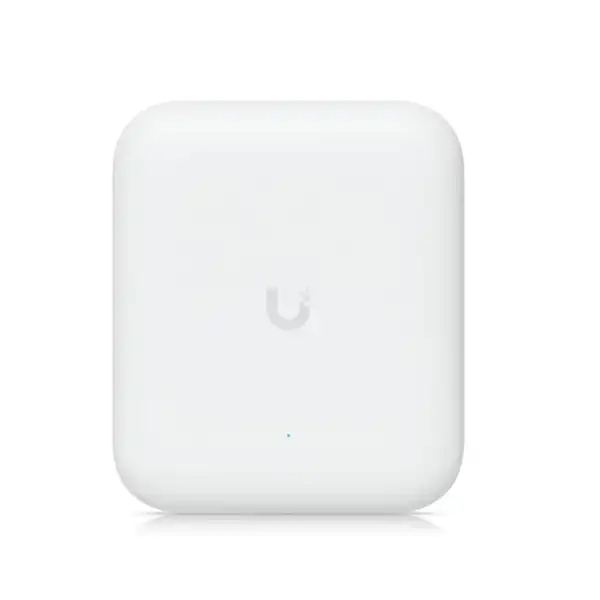
Ubiquiti U7 Pro Outdoor — WiFi 7 access point for designed outdoor coverage
Extend a managed UniFi network to a courtyard, campus walkway, hotel terrace or work area with a weather-oriented access point that combines a directional antenna, PoE+ power and a 2.5 GbE uplink. The Ubiquiti U7 Pro Outdoor is best selected through a coverage and network assessment, not just a headline wireless-speed figure.
Important for Tanzania: 6 GHz is a hardware capability, but current Ubiquiti guidance does not establish outdoor 6 GHz/AFC availability in Tanzania. Confirm country rules and supported configuration before relying on that band.
Key specifications at a glance
| Wireless technology | WiFi 7 (802.11be); six spatial streams across 2.4, 5 and 6 GHz hardware radios |
|---|---|
| Manufacturer’s coverage reference | 465 m² (5,000 ft²), dependent on layout, clients and conditions |
| Manufacturer’s client reference | 300+ connected clients; not a simultaneous throughput guarantee |
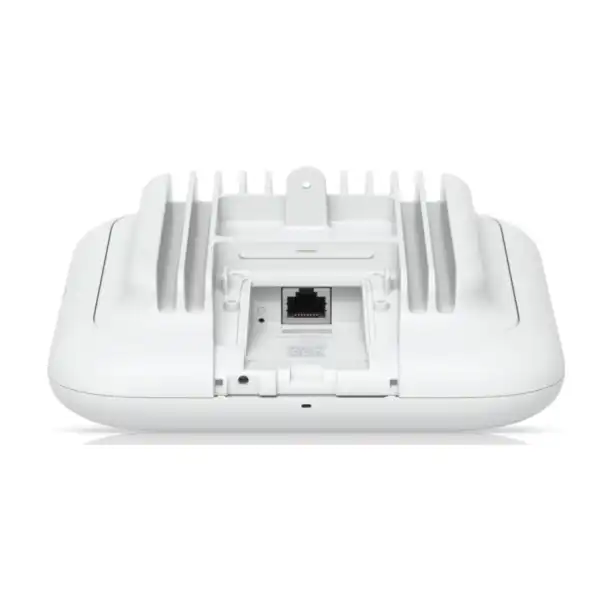
| Ethernet interface | One 1/2.5 GbE RJ45 port |
| Power | PoE+; 21 W maximum device consumption |
| Antenna options | Integrated directional; external omni options for 2.4 and 5 GHz |
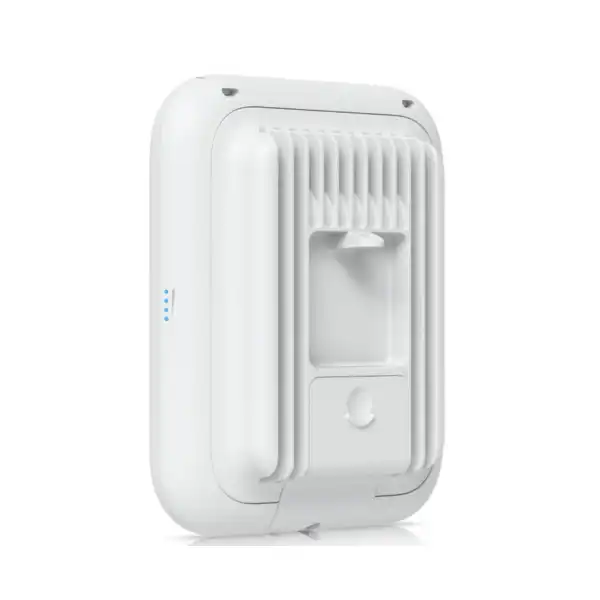
| Mounting | Wall or pole; pole diameter approximately 25–63.5 mm |
| Outdoor protection | IPX6; IP67 when fitted with the cable-gland door kit |
| UniFi Network | Manufacturer lists version 9.0.114 and later |
| Tanzania 6 GHz position | Do not assume outdoor operation or AFC is available; verify first |
Manufacturer reference figures depend on regional support, firmware, radio configuration, site conditions and client equipment. Confirm the exact regional hardware before ordering.
Who this outdoor access point is for
The Ubiquiti U7 Pro Outdoor is intended for organizations that need managed WiFi beyond the walls of a building. Typical projects include hotel courtyards, school grounds, office campuses, open-air customer spaces, gated properties, warehouses with exterior loading zones, and outdoor gathering areas. Instead of trying to push an indoor router signal through walls, the design places a purpose-built access point where outdoor clients actually use the network. That approach can improve signal quality and gives administrators more control over access, roaming, and capacity.
This is a professional UniFi access point rather than an all-in-one internet router. It connects to an existing wired network through Ethernet, takes power through PoE+, and can be managed alongside other UniFi devices. Buyers should account for the upstream internet service, gateway, switch or injector, cabling, and suitable mounting position. Its strongest value comes from a planned network, not from treating its maximum specifications as a guarantee of coverage at every corner of a property.
What the U7 Pro Outdoor actually includes
The exact model family is U7 Pro Outdoor, identified as U7-Pro-Outdoor. Ubiquiti specifies WiFi 7 technology with six spatial streams across three radio bands, a 1/2.5 GbE RJ45 interface, PoE+ power, wall and pole mounting, and an integrated directional antenna. The manufacturer also lists optional external omnidirectional antenna operation for the 2.4 GHz and 5 GHz radios. These are concrete design choices: the installer can choose to concentrate coverage toward a target area or distribute it around a mounting point where that fits the site.
The unit has a compact, weather-oriented enclosure and a manufacturer-listed maximum operating temperature of 60°C. It is not a battery-powered hotspot or a mobile network modem, and it will not create internet access without an upstream connection. A 2.5 GbE connection helps avoid limiting all wireless users to a single 1 GbE wired interface when the rest of the network is equipped appropriately. Actual user speeds still depend on clients, channels, interference, and upstream links.
WiFi 7: useful advantages without exaggerated promises
WiFi 7 introduces newer radio capabilities that can improve efficiency and available throughput with compatible clients. For a business, the relevant question is not simply whether a phone displays a WiFi 7 icon. It is whether the access point can support the mix of current laptops, phones, tablets, handheld devices, and guest equipment at the intended distances and during busy periods. A newer wireless standard is most valuable when paired with a good RF plan, sensible channel configuration, and a reliable wired network.
The U7 Pro Outdoor is backward compatible with earlier WiFi generations covered by Ubiquiti’s published radio support. An existing WiFi 5 or WiFi 6 client does not need to be replaced merely to associate with the network. However, older clients do not gain WiFi 7 features simply by connecting to a new access point. Very high published PHY rates describe radio-link capabilities under suitable conditions; they are not promises of internet download speeds or sustained throughput to every connected device.
Understand the three radio bands before ordering
The hardware provides 2.4 GHz, 5 GHz, and 6 GHz radios, each listed as 2×2 MU-MIMO, which together account for six spatial streams. The 2.4 GHz band is often useful for legacy devices and challenging distances, although local interference can be substantial. The 5 GHz band is commonly the main workhorse for modern laptops and phones where compatible channels and adequate signal are available. Six-gigahertz capability is part of the hardware design, but local permission and software support determine whether it can be used.
Do not buy this product for Tanzania on the assumption that all three radios will operate outdoors. Ubiquiti’s published guidance currently identifies outdoor 6 GHz AFC availability only for the United States and Canada. Tanzanian spectrum requirements and the actual UniFi country profile must be checked before any six-gigahertz deployment. For practical Tanzania planning, evaluate the project’s requirements against permitted 2.4 GHz and 5 GHz operation first, and treat outdoor 6 GHz as unavailable unless the necessary approvals and manufacturer support are independently confirmed.
Directional coverage versus all-around coverage
The integrated directional antenna is designed to concentrate radio energy into a defined sector. That makes sense when an access point is mounted on a building facing a courtyard, across an outdoor seating area, or toward a walkway. It is less suitable when users are evenly distributed on every side of a central pole, because a directional pattern is not the same thing as 360-degree coverage. The mounting angle and facing direction matter as much as the location selected on a drawing.
Ubiquiti lists external omnidirectional antenna options for the 2.4 GHz and 5 GHz radios, allowing an alternative coverage pattern. The manufacturer’s 6 GHz antenna specification is for the integrated directional antenna, not those external omni antennas. Select antenna mode from a survey of the actual site rather than from the word ‘outdoor’ alone. A sector-oriented placement can deliver a better result than omnidirectional transmission when buildings, fences, and customer movement create a clear target zone.
What 465 square metres of coverage means
Ubiquiti publishes a coverage-area figure of 465 m², equivalent to approximately 5,000 ft². This is a planning reference, not a guarantee that every client in an identically sized area will achieve a particular speed. Outdoor coverage varies with mounting height, antenna orientation, vegetation, walls, competing access points, client radio quality, and the throughput required by each application. A large open space and a subdivided courtyard with masonry walls are very different radio environments.
Designers should test the weakest relevant client, not only the newest smartphone used by the installer. WiFi communication is two-way: a powerful access point cannot compensate indefinitely for a low-power handset that struggles to transmit back. For large grounds, two carefully positioned access points may be more dependable than one unit pushed to the edge of its advertised area. Survey the real walking paths, workstations, gathering points, and shaded areas where people will actually connect.
Plan for client count, not just headline capacity
The manufacturer lists support for more than 300 connected clients. That statement helps establish the product’s management and radio class, but it does not mean that 300 people can all stream high-resolution video at full speed simultaneously. Connected-client capacity and useful application capacity are different engineering questions. Shared airtime, device capabilities, contention, traffic direction, backhaul, and access to the internet all influence the experience.
For a restaurant terrace, guest capacity might be driven by many phones doing light browsing. At an event, hundreds of devices may upload images and videos at once. For warehouse handhelds, stability during roaming can matter more than peak data rate. Estimate concurrent active users and application demand, allow room for peak events, and distribute load across properly placed access points where needed. Network design should specify a user experience target rather than relying solely on the advertised client number.
Radio speeds versus real application speeds
Ubiquiti’s published maximum radio data rates are 688 Mbps at 2.4 GHz, 4.3 Gbps at 5 GHz, and 5.8 Gbps at 6 GHz under the respective stated channel conditions. Those figures represent maximum link-rate capabilities for the specified radio configurations. They are not additive internet speeds, and they do not mean one user will receive their sum. In particular, radio overhead, interference, client limitations, and narrower channels can substantially reduce usable application throughput.
The single Ethernet uplink supports up to 2.5 GbE and provides an important practical ceiling for wired traffic passing through the access point. A 2.5 GbE-capable switch port and properly rated cabling are needed to take advantage of that link rate. If the upstream switch negotiates at 1 GbE, the AP may still deliver useful WiFi service, but its wired uplink is correspondingly constrained. Match performance claims to the complete network path rather than just the radio specification.
Why PoE+ matters for installation
The access point is powered through Power over Ethernet Plus, commonly called PoE+. Ubiquiti lists a maximum power consumption of 21 W and a supported voltage range of 42.5 to 57 V DC. This lets a properly rated network cable carry both data and operating power, avoiding the need for a separate mains socket at the mounting point. The feeding switch or injector must support the required PoE+ standard and sufficient power budget.
Before purchasing, check whether your existing switch has an available PoE+ port and enough remaining budget after powering cameras, phones, or other access points. If a separate injector is planned, confirm its electrical and multi-gigabit networking compatibility. Do not assume that an injector, outdoor-rated cable, lightning protection, or the rest of the network equipment is included with the access point. Establish an accessory list based on the actual installation rather than an incomplete product photograph.
Choosing the correct Ethernet backhaul
A wired Ethernet backhaul is the predictable choice for an outdoor access point serving important business applications. It carries the traffic back to a gateway or network switch without consuming a second wireless hop. A cable run should be evaluated for length, installation route, expected environmental exposure, protection, and termination quality. Outdoor-rated cable and weather-appropriate containment may be warranted; the best specification depends on whether the run is exposed, buried, or routed through a building.
Consider the complete data path. A multi-gigabit access port is valuable only when other equipment can support the intended throughput, but reliable 1 GbE switching may still be adequate for a lighter deployment. Validate link negotiation during commissioning, document switch-port assignments, and test both the AP and its upstream connection. If a cable must cross between buildings, have a qualified designer review grounding, surge risk, and whether an optical connection would be more appropriate.
Weather protection: IPX6 and IP67 are not identical
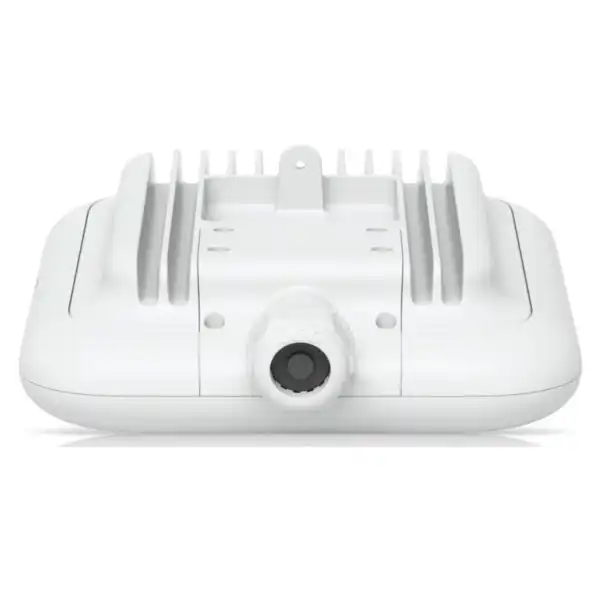
The manufacturer specifies IPX6 weather protection and identifies IP67 protection when the cable-gland door kit is installed. That distinction matters. A product should not be described as fully IP67 under every installation condition while omitting the required sealing configuration. Follow the official mechanical installation guidance, use the intended seals and cable entry components, and check that the enclosure is correctly closed before exposing the unit to rain and dust.
Weather resistance is only one part of a durable outdoor installation. Cable jackets, connectors, conduit, mounting hardware, surge mitigation, and the building entry point must all be suitable for their environment. Salt exposure, pooling water, direct sun, wind vibration, and maintenance access deserve attention at the site-survey stage. Routine inspection after severe weather is prudent. An IP rating does not remove the need for correct installation or guarantee protection against every real-world environmental hazard.
Wall and pole mounting decisions
Ubiquiti lists included wall and pole mounting options, with a supported pole diameter of approximately 25 to 63.5 mm. The articulation mounting arrangement helps an installer aim the directional antenna at the area to be served. That is particularly useful when the installation point is constrained by existing structures. Check the manufacturer’s mounting method and ensure the wall, pole, or bracket is strong enough for the device and local environmental loads.
A mounting location should balance coverage, cable routing, physical security, maintenance access, and radio visibility. A very high installation is not always best for people standing close to a building because the antenna’s vertical pattern may miss nearby users. Likewise, a low mounting position can expose equipment to tampering or obstruction by vehicles. Agree on a practical height and angle, survey from the customer-use area, and record the final orientation for future service work.
Wind, temperature, and mounting environment
The official specification lists an ambient operating temperature from -30°C to 60°C, 5–95% noncondensing humidity, and a published wind-loading reference for the unit. These are hardware design specifications, not evidence that every accessory or mounting structure is suitable for every outdoor location. Sun-heated enclosures, poorly ventilated cavities, and reflective roof surfaces can create conditions that differ from a standard ambient-temperature reading.
Installers should assess the surface on which the unit is mounted, the strength of fixings, the effect of prevailing weather, and the accessibility of the cable-gland assembly. Where the property is near a coast or an industrial area, select appropriate fasteners and inspect for corrosion as part of the maintenance plan. Do not interpret published temperature or wind figures as a substitute for local structural requirements. A mechanically sound installation protects network uptime as surely as correct radio settings.
Managing the AP with UniFi Network
The U7 Pro Outdoor belongs to Ubiquiti’s UniFi ecosystem. Ubiquiti’s technical specification lists UniFi Network version 9.0.114 or later as an application requirement, with compatible mobile applications also specified. The controller can provide a central place to adopt devices, manage wireless networks, monitor connectivity, and apply configuration across multiple access points. This is useful for sites that already operate UniFi switches, gateways, or other managed wireless equipment.
Confirm the available controller version and firmware compatibility before scheduling an upgrade. An access point is not the same as a gateway: routing, internet failover, firewall policy, and DHCP may be provided by other infrastructure. Small installations may have different practical management options from multi-building organizations, so document where the UniFi Network application runs and who is responsible for updates, configuration backups, administrative credentials, and monitoring. A well-managed system is easier to support than an undocumented stand-alone deployment.
Guest WiFi, staff networks, and segmentation
Public-facing sites commonly need different policies for guests and employees. Ubiquiti lists guest isolation, client isolation, private pre-shared keys, WiFi schedules, hotspot portal features, and dynamic RADIUS-assigned VLAN support among its software capabilities. These options help network administrators design logical separation, but they need correct upstream switch, gateway, identity, and firewall configuration to deliver the intended security result.
For example, a hotel could create a guest SSID for outdoor visitors and keep staff terminals on a separate network with access limited to the systems they need. A campus may provide a managed wireless service for authorized users while isolating public event traffic. Before relying on a feature, confirm the exact UniFi software version and any infrastructure dependencies. Security is a whole-network outcome; turning on a guest network by itself should not be taken as proof that sensitive systems are protected.
Roaming between indoor and outdoor zones
Many users will move between reception areas, corridors, patios, and open spaces. When indoor and outdoor access points are designed together, devices can remain on a familiar SSID and transition between coverage areas. Ubiquiti lists radio-management and roaming-related capabilities such as 802.11k, 802.11v, and 802.11r. Their usefulness depends on client compatibility and overall network design rather than on an automatic promise of uninterrupted real-time applications.
Plan overlap where people move, then verify behavior with real client devices. Too much overlap at high power can increase interference and encourage devices to remain connected to a distant AP. Too little overlap can create a dead zone at doors and outdoor walkways. Consider voice calls, mobile payment terminals, and scanning equipment separately because each has different sensitivity to delay or packet loss. Test movement in both directions, including while a service is actively in use.
Hotel gardens, poolside seating, and resorts
Hospitality networks often need to cover scattered spaces without filling the property with visible equipment. The directional antenna can be useful when a mounting point faces a garden terrace or poolside customer area. Weather-appropriate mounting makes it possible to place the radio closer to guests than an indoor AP separated by exterior walls. The result still depends on the property layout, building materials, furniture, and where guests typically sit.
A useful plan starts with the actual seating map, expected occupancy, and services guests use: booking systems, messaging, work calls, or general browsing. Provide separate staff access where required, review guest traffic controls, and avoid promising room coverage from an outdoor-only design. If the pool area has electrical and safety constraints, involve qualified installers for the cable route and mounting details. Guest satisfaction comes from consistent service in the intended areas, not from the maximum published wireless rate.
Schools, universities, and training campuses
An educational campus may have students using devices between buildings, in outdoor learning spaces, or around shared courtyards. A managed outdoor AP can extend an established campus network to those zones while helping administrators maintain consistent SSID and access policies. Coverage planning should identify where users gather at breaks, whether laptops need stable video access, and whether outdoor events temporarily create higher demand.
Educational sites should also consider physical security, maintenance windows, and separation of student, staff, and visitor traffic. A single access point cannot automatically resolve crowded RF conditions around several buildings. Place radios according to a survey, balance channel use with neighboring APs, and test older client devices that may remain in service for years. The objective is a dependable learning and administration network with documented limits rather than a claim that every user receives the same speed.
Business parks and office courtyards
Business facilities may want reliable connectivity in common outdoor spaces, across pedestrian routes, or at entry points where employees use authenticated mobile devices. The U7 Pro Outdoor can form part of a coordinated UniFi deployment that extends coverage from the building to selected exterior areas. A directional placement is often practical when the radio can face a walkway or courtyard from a suitable wall location.
Before installation, identify whether the use case is simple web access, voice calls, workforce applications, or the connection of business devices. Include outdoor meeting areas and accessible routes in the survey, and avoid overlooking corners blocked by metal facades or landscaping. If different tenants or departments share the location, plan appropriate network separation at the gateway. Document which organization owns the AP and its maintenance, since long-term support responsibilities can otherwise be unclear.
Warehouses, loading bays, and logistics areas
Outdoor loading areas present challenges that are not obvious from a clean coverage diagram. Forklifts, trucks, metal containers, doors, and stored goods can alter the radio path throughout the day. A professionally mounted outdoor AP can support handheld workflows and connected devices where a building’s indoor wireless signal is inconsistent. The correct solution may require multiple APs positioned to cover actual operating lanes rather than a single central location.
Define the critical application first: inventory scanning, dispatch coordination, work-order access, or routine employee internet. Test the weakest supported device at representative locations and at different times when vehicles or equipment are present. Account for safety clearances, cable protection, and maintenance access. If an operation depends on near-continuous roaming, set measurable acceptance criteria and test those journeys rather than assuming a client will always switch at the ideal moment.
Event venues and outdoor gathering areas
An outdoor venue can have modest daily use followed by occasional concentrated demand. A six-stream access point and UniFi management may be appropriate for part of the coverage design, but a manufacturer client-count figure is not an event-capacity guarantee. At a busy gathering, interference, simultaneous uploads, and the internet uplink can constrain user experience before a nominal association limit is reached.
Estimate the number of active devices, application profile, and duration of peak loading. Consider dedicated connectivity for ticket validation, staff operations, or payment terminals instead of putting critical workflows on a heavily shared public SSID. Multiple properly designed AP cells may be more effective than increasing the transmit power of one unit. Temporary structures, stages, and crowd movement can also change propagation, so review the layout and retest before important events.
Residential estates and large private properties
Large properties sometimes need connectivity across a garden, driveway, security post, or detached outdoor gathering space. The U7 Pro Outdoor can be considered where the owner wants a managed network and is prepared to install Ethernet and PoE+ infrastructure. Its design is more involved than plugging a consumer extender into a wall socket, but it offers intentional coverage placement and integration with other UniFi access points.
For a private property, decide whether the goal is general browsing, smart-device reach, work-from-home activity in a garden office, or service for visitors. Obstacles, distance, and client transmit power determine what is realistic. Avoid using a single outdoor AP as a substitute for correctly positioned indoor coverage, and do not assume that it can replace a dedicated point-to-point bridge for a distant building. A simple property sketch and an on-site test can prevent buying equipment for the wrong use case.
Antenna orientation and beamwidth in practice
Ubiquiti lists directional antenna gain of 8 dBi at 2.4 GHz, 11 dBi at 5 GHz, and 10 dBi at 6 GHz, with different beamwidths for each band. The specified external omni antennas for 2.4 GHz and 5 GHz have their own gain and vertical pattern. Higher antenna gain does not mean energy is created; it generally means radiation is concentrated in a different spatial pattern. For design, that distinction matters more than a gain figure viewed in isolation.
A narrow vertical pattern can leave users under or above a poorly aimed installation. Aim the radio at the occupied zone and survey both the near edge and far edge, including transitions near building doors. Nearby vegetation and moving objects may affect results. If outdoor 6 GHz is unavailable in the operating country, do not use the 6 GHz directional specification to justify a coverage promise. Select antenna mode for the permitted and actually enabled bands.
Site-survey questions that prevent costly mistakes
Before specifying quantities, record the dimensions of the areas to be served, likely mounting points, clear lines of sight, available network and power infrastructure, and the expected number of simultaneously active users. Ask which applications matter most and what minimum experience constitutes success. A courtyard used for messaging and social media has different requirements from an outdoor workforce running time-sensitive operational applications.
Also check which buildings need coverage, where doors open, how paths are used, and whether changes in season or occupancy alter the environment. A survey should include channel occupancy and practical client tests, not just a visual inspection. Where a customer’s access or mounting route is constrained, note that before finalizing equipment quantities. A good purchase decision is based on a coverage objective and site constraints, with the device selected as one element of a planned solution.
A realistic network architecture for one AP
A typical installation connects the U7 Pro Outdoor by Ethernet to a suitable PoE+ switch, which in turn connects to the existing gateway and internet service. UniFi Network provides management according to the chosen controller arrangement. The AP broadcasts one or more configured wireless networks into its planned service area. This architecture keeps the access point’s role clear: it supplies WiFi, while the rest of the infrastructure supplies routing, security policy, internet access, and network services.
Check whether the gateway can route the intended amount of traffic and whether existing switches support VLANs if separate staff and guest networks are required. Consider switch-port PoE budget and uplink capacity at the same time; buying an AP with a 2.5 GbE port will not upgrade a constrained upstream router. Document the equipment, cable route, management location, and escalation contact. This architecture review is often more valuable to a buyer than another unqualified headline-speed number.
Meshing when a cable route is difficult
Ubiquiti identifies wireless meshing as a supported feature. That can be helpful in circumstances where a secondary AP needs to connect over a wireless link to the managed network. However, wireless backhaul uses radio resources, introduces additional path dependencies, and may be more sensitive to interference and placement than Ethernet. It should be treated as a design option rather than the default solution for a business-critical outdoor installation.
Confirm the availability of a reliable power source at every AP even if the backhaul is wireless, and validate that the specific UniFi topology supports the intended configuration. Model expected client loads together with backhaul requirements. For separated buildings or long distances, a purpose-built wireless bridge or fiber connection may be more suitable than an access point mesh hop. The presence of a mesh feature does not automatically establish suitability for any distance or building arrangement.
Selecting channels, widths, and transmit power
Radio configuration should be based on the local rules and the RF conditions found at the site. Wide channels can increase the theoretical link rate but also use more spectrum, which may be counterproductive when nearby networks or neighboring APs compete for airtime. High transmit power may extend a downlink while making roaming less predictable or failing to solve weak client uplinks. There is no single channel-width and power combination that is ideal for every outdoor property.
Start with manufacturer-supported, legally permitted settings and an interference survey. Check radio behavior after adopting the AP to the correct UniFi country configuration. Tune for consistent real-world service rather than the highest figure in a speed-test screenshot. Where several APs operate near one another, their channel and power choices should be coordinated. Revisit settings when outdoor seating, nearby networks, or the physical layout changes substantially.
Tanzania spectrum and AFC considerations
The U7 Pro Outdoor is advertised internationally with 6 GHz and Automated Frequency Coordination capabilities. Those are hardware and ecosystem characteristics, not a universal authorization to transmit on the 6 GHz band outdoors. Ubiquiti’s current published AFC guidance names the United States and Canada for outdoor operation. TCRA’s WLAN and LPWAN frequency guidance must be considered independently, alongside the software and hardware regional configuration used in Tanzania.
Project specifications and purchase quotations should therefore avoid treating outdoor 6 GHz as an available Tanzania feature without written verification. This is particularly important if a deployment plan assumes 320 MHz channels, extended-range 6 GHz, or specific AFC behavior. Confirm the current regulatory requirements and Ubiquiti’s supported country functionality before promising the feature. Where the buyer’s immediate requirement is dependable outdoor WiFi, design around a verified operating configuration rather than an unverified radio capability.
Commissioning and acceptance testing
After mounting and cabling, verify that the AP receives adequate PoE+ power, comes online reliably, negotiates the intended Ethernet link, and can be adopted into the planned UniFi Network environment. Confirm that its firmware and country setting match the deployment. Check all intended SSIDs, security settings, guest separation, DHCP service, and access to approved applications before declaring the installation finished.
Walk through each coverage zone with representative devices, including older hardware and the applications that matter to the customer. Record signal and practical throughput where relevant, and test roaming at doors or between AP cells. Check performance during realistic loads rather than only when the network is empty. Photograph the finished mounting and cable seal, document serial and configuration details in the customer’s asset register, and establish a procedure for future firmware updates and fault response.
Operational maintenance and fault diagnosis
Outdoor wireless networks benefit from periodic inspection. Review physical fixings, protective cable entries, and any signs of environmental damage, especially after severe weather or building work. Track connectivity and client experience in UniFi Network where monitoring is available. A problem seen as slow WiFi may originate from upstream internet congestion, a switch port negotiating at a lower rate, damaged cabling, excessive radio interference, or poor client placement.
Troubleshooting should isolate the layers one at a time. Verify AP power and wired connectivity first, then gateway and internet health, then radio conditions and client association. Compare a wired test with wireless tests from known locations. Avoid changing multiple radio settings at once because that obscures the cause of improvement or deterioration. Maintain backups and a change record so a technician can restore a known-good configuration after an unsuccessful adjustment.
What to confirm in a buying quotation
Ask for the exact product designation U7-Pro-Outdoor and confirm the regional hardware variant if it matters to the intended deployment. Verify which mounting and cable-entry components are part of the offered package and which accessories must be purchased separately. Request an equipment schedule that includes a compatible PoE+ source, switch-port capabilities, outdoor cable requirements, network protection, and any management infrastructure required by the project.
Commercial details such as Tanzania stock, price in TZS, delivery arrangements, warranty terms, and installation availability should be confirmed against a specific quotation, not inferred from international product pages. A responsible proposal will also clarify whether the existing network can support the new AP or needs upgrades. Ask the supplier to define coverage assumptions and acceptance criteria, particularly if the unit will serve outdoor payment, business, or operational workflows.
Common purchase mistakes to avoid
Do not confuse the U7 Pro Outdoor with the differently specified U7 Outdoor, the indoor U7 Pro, or similarly named access points. Model names are close, but their antenna systems, available radio capabilities, dimensions, and intended environments are not interchangeable. Equally, do not assume that a headline client count means identical throughput for every client, or that a listed open-space area is guaranteed coverage through walls and landscaping.
Other avoidable mistakes include overlooking the PoE+ power source, expecting an outdoor access point to act as a router, forgetting guest-network isolation, and treating international 6 GHz advertising as a local authorization. A rushed installation can also leave the weather sealing incomplete or the directional antenna facing away from the client area. Checking these items before ordering reduces the risk of adding expensive remedial equipment after deployment.
Choosing between one AP and several APs
One U7 Pro Outdoor may suit a clearly defined open-air zone where a good mounting location faces the intended users. Multiple units may be necessary where the property wraps around buildings, includes several separate courtyards, or demands reliable performance at peak occupancy. The decision cannot be made responsibly from area alone. User density, walls, interference, client classes, antenna patterns, and application requirements are just as important.
For a multi-AP design, plan cell boundaries and coordinated channel use rather than placing identical devices at equal distances on a map. Consider wired backhaul availability at each location, switch capacity, and maintenance access. Validate the minimum signal and experience needed for business use at the intended service points. If project requirements change later, a scalable UniFi arrangement can make expansion more manageable, provided the original network design allows for it.
What this device is not designed to replace
An outdoor WiFi access point should not be confused with a cellular internet modem, a long-distance dedicated point-to-point bridge, a network firewall, or a universal solution for all indoor rooms. The U7 Pro Outdoor still requires an upstream network. It cannot overcome every obstruction with transmit power, and no radio design eliminates interference or client limitations. These distinctions are important for buyers seeking dependable infrastructure rather than a device with the largest number on its specification sheet.
Where the main requirement is connectivity between distant buildings, compare a dedicated bridge or fiber design. Where the problem is insufficient indoor coverage, plan indoor AP placement as well. If the task is isolated power in a remote location, design an appropriate power and connectivity system. A successful purchase matches the product category to the real problem and clarifies which complementary equipment and services are needed.
How to evaluate the delivered result
Agree on measurable acceptance criteria before installation. They may include availability at specified outdoor locations, working access to named business applications, expected roaming behavior, and satisfactory user performance under a realistic amount of load. Avoid using a single internet speed test as the entire acceptance standard. It cannot by itself prove adequate coverage, security separation, stable wired links, or performance during a busy event.
Use site documentation to compare the design against measured results. Note test devices, approximate client locations, radio configuration, and relevant network conditions. If the result falls short, determine whether the issue is placement, configuration, interference, insufficient AP density, or a bottleneck elsewhere. This approach gives the customer a clear basis for deciding whether the equipment meets its intended purpose and what practical changes would improve the deployment.
Frequently asked questions
These answers distinguish hardware capabilities from real-world deployment conditions so that a purchasing decision is based on suitable infrastructure and verified operating requirements.
Is the U7 Pro Outdoor really an outdoor WiFi 7 access point?
Yes. Ubiquiti identifies U7-Pro-Outdoor as an outdoor access point using WiFi 7 radio technology. Its enclosure and mounting system are intended for outdoor deployments. Correct weather sealing and installation remain essential. It is an access point connected to an existing network, not an independent mobile-data router.
Does outdoor 6 GHz work with this product in Tanzania?
Do not assume it does. Ubiquiti’s published outdoor AFC support currently identifies the United States and Canada, and a hardware 6 GHz radio does not establish local permission or software availability. Obtain current confirmation of Tanzanian regulatory rules, the exact regional model, and supported UniFi functionality before specifying outdoor 6 GHz.
What power supply does the access point require?
It requires a compatible PoE+ power source over its Ethernet connection. Ubiquiti lists maximum device power use at 21 W. Confirm the chosen switch or injector has the correct PoE+ capability and remaining power budget. A standard non-PoE switch port by itself will not power the access point.
Can it connect to a 1 GbE switch?
Its Ethernet interface supports 1 GbE and 2.5 GbE link operation. A suitable 1 GbE connection can serve many ordinary workloads, but it limits the wired uplink to that negotiated link rate. If your design expects more wired capacity, choose compatible multi-gigabit infrastructure and verify cable quality and power support.
Does 300+ clients mean 300 fast video streams?
No. The published maximum connected-client count is not a promise of useful throughput for 300 simultaneous high-bandwidth sessions. Actual performance depends on airtime, channel selection, signal quality, traffic patterns, clients, and wired and internet capacity. Design for anticipated active usage and test during representative load conditions.
How much outdoor space does one unit cover?
Ubiquiti’s reference figure is up to 465 square metres, or about 5,000 square feet. It is not a guaranteed radius or universal performance result. Buildings, foliage, weather exposure, antenna aim, interference, and client hardware all influence coverage. A site survey is the best way to determine the required number and placement of access points.
Is IP67 protection automatic?
The manufacturer distinguishes IPX6 protection from IP67 protection when the cable-gland door kit is installed. Follow the specified sealing and installation procedure. Do not depend on an IP67 claim if the required cable-entry components are missing or fitted incorrectly. Other outdoor cables and accessories must also be suitable for the environment.
Can I mount it on a pole or outside wall?
Yes. Ubiquiti lists wall and pole mounts and supports poles with approximately 25 to 63.5 mm diameter. Check the supplied mounting components, structure, cable route, and prevailing weather conditions. Aim the integrated directional antenna toward the planned service area and verify the result with a real device test.
What is the difference between directional and omni antennas?
The integrated directional antenna focuses coverage toward a sector, often useful from a wall facing a courtyard or path. The external omnidirectional option for 2.4 GHz and 5 GHz spreads coverage around the mounting point with a different vertical pattern. The hardware specification does not list external omni gain for 6 GHz. Choose based on site geometry.
Will older WiFi phones and laptops connect?
The product supports older WiFi standards as listed by Ubiquiti, so many existing compatible clients can use it without being WiFi 7 devices. Those clients operate within their own wireless capabilities and the networks configured by the administrator. Always test business-critical handhelds, tablets, and legacy devices before committing to a full rollout.
Do I need an existing UniFi network?
The device is designed for management through the UniFi ecosystem, and a suitable UniFi Network environment is strongly relevant to professional deployments. Verify the controller and mobile management options for your exact operating setup. A gateway, switch, and internet service may still be required even though the AP handles the wireless connection.
Does it provide guest WiFi features?
Ubiquiti lists guest isolation, hotspot portal functionality, client isolation, and other network management features. The usable configuration depends on UniFi software and other network equipment. Plan guest policies, VLANs, firewall rules, and authentication together rather than assuming the access point alone performs every security function.
Can I use wireless meshing instead of Ethernet backhaul?
Ubiquiti lists wireless meshing as a feature, but a wireless backhaul has performance and reliability tradeoffs. It still needs suitable power at the remote location, and its radio path must be tested. For important workloads, wired Ethernet, fiber, or a purpose-built bridge may be better depending on building layout and distance.
What should a hotel or school check before buying?
Start with the locations that need service, expected active users, indoor-to-outdoor transitions, guest versus staff access, existing network capacity, and available mounting or cable routes. Then assess whether one directional unit or several coordinated APs are required. Confirm the supplier’s quotation, regional hardware, supported bands, and installation accessories separately.
Is the 2.5 GbE port the same as 2.5 Gbps internet?
No. The port describes an Ethernet link capability between the access point and upstream equipment. Internet performance also depends on the service provider, router, uplinks, shared traffic, WiFi conditions, and client capabilities. A 2.5 GbE interface can reduce a local bottleneck without guaranteeing a particular broadband speed.
Can the AP be installed near the sea?
The device has manufacturer-stated outdoor protection and materials, but a coastal installation needs particular attention to mounting fasteners, cable protection, corrosion exposure, sealing, and inspection. Confirm the site’s environmental conditions and select appropriate installation materials. Do not treat an ingress rating as a blanket guarantee against long-term salt-related deterioration.
Does the device include the internet router and PoE switch?
No. It is an access point, not a complete end-to-end network package. The specification confirms PoE+ operation and Ethernet uplink but should not be taken to imply that a gateway, internet subscription, switch, injector, or outdoor cabling is bundled. Confirm the exact package contents and any separately priced accessories in the offer.
What should be verified before requesting a Tanzania quotation?
Confirm model U7-Pro-Outdoor, hardware region, product accessories, PoE+ power, suitable switch ports, installation conditions, coverage goals, controller compatibility, and locally permitted operating bands. Ask separately for the verified selling price, stock position, warranty terms, and delivery or installation arrangements. These commercial details depend on the specific supplier quotation.
Request a project-specific U7 Pro Outdoor quotation
Tell FourTeck Tanzania about the outdoor areas to be covered, estimated active users, existing gateway and switch, available Ethernet routes and mounting conditions. Ask for a proposal identifying the exact U7-Pro-Outdoor variant, PoE+ requirements, installation materials and relevant local operating constraints. Price, availability, warranty and delivery terms require confirmation for the actual offer.
Next step: request a tailored equipment quotation and site assessment before deployment.




Reviews
There are no reviews yet.