
Provider networking
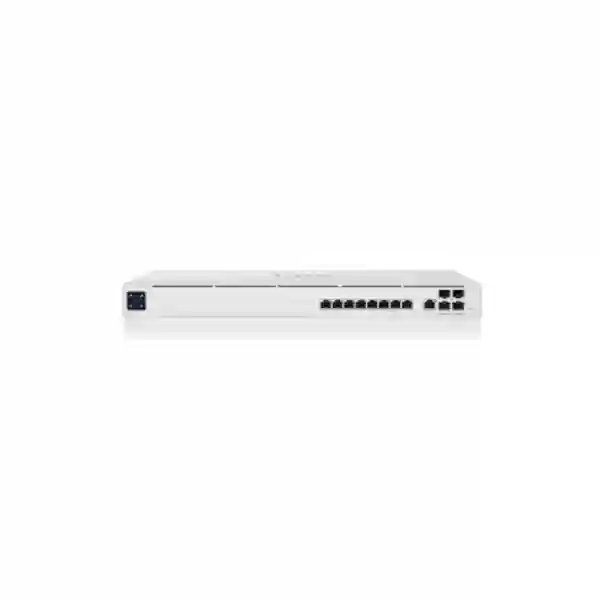
Ubiquiti UISP Router Pro (UISP-R-Pro)
Four 1/10G SFP+ interfaces and nine Gigabit RJ45 ports for ISP and WISP wired network designs.
Planning a fibre handoff or a new POP in Tanzania? Check your topology, software requirements and optics before requesting a configuration-specific quote.
Verified specifications
| Model | UISP-R-Pro |
|---|---|
| Copper | 8 × GbE RJ45 LAN; 1 × GbE RJ45 WAN |
| SFP+ | 4 × 1/10G interfaces |
| Processor | Quad-core ARM Cortex-A57 at 1.7 GHz |
| Memory and storage | 4 GB DDR4, 16 GB eMMC |
| Management | Ethernet, Bluetooth, UISP version 1.4.5+ |
| Touchscreen | 1.3 inches |
| AC power | 100–240V AC |
| DC power | 27V DC Power TransPort, 2.2A |
| Maximum consumption | 50W |
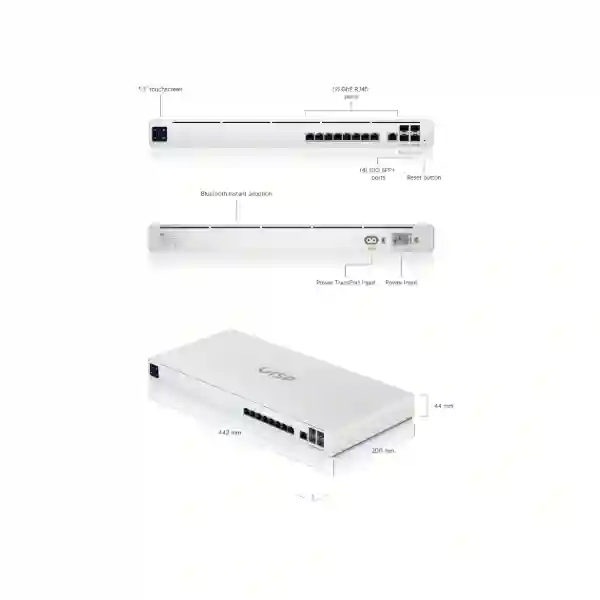
| Dimensions | 442.4 × 200 × 43.7 mm |
| Weight | 3.3 kg |
| Environment | -10 to 50°C; 5–95% noncondensing humidity |
Choosing the right role
The Ubiquiti UISP Router Pro (UISP-R-Pro) is a wired routing platform intended for internet service provider applications. Buyers should first decide whether the device will operate at a distribution site, an aggregation point, an upstream handoff or another routed boundary. Each role calls for specific physical links, routing behavior, operations processes and capacity. A technically advanced router may still be unsuitable when its port mix does not match the actual topology.
The product is especially relevant when a network design can use four 1/10G SFP+ interfaces alongside a group of Gigabit copper ports. It does not provide wireless access by itself. ISP and WISP operators in Tanzania should assess the entire solution, including upstream connectivity, switches, optics, electrical protection, cabling and ongoing management. Ask for a configuration-specific quotation rather than assuming every accessory is included.
For this decision, document the specific requirement and the evidence used to confirm it. Make a distinction between published hardware specifications, software capabilities that need version-specific validation and site conditions that can only be checked locally. Before any purchase or network change, agree on the responsible engineer, acceptance criteria and any outstanding compatibility questions. A clear written record helps the procurement and operations teams assess whether the chosen equipment matches the intended installation and reduces avoidable rework during commissioning.
Gigabit copper ports
Ubiquiti lists eight Gigabit RJ45 LAN ports and one Gigabit RJ45 WAN port, for nine Gigabit copper connections in total. These interfaces help organize local handoffs, but they should not be mistaken for 10GbE RJ45 ports. A proposed service that terminates over 10G copper needs special scrutiny because the published copper specifications are limited to Gigabit Ethernet. Record which link connects to which port and check that the peer interface supports the expected speed.
Create a port schedule before installation and label every cable. Include intended peer devices, management connections, the direction of each handoff and any reserved spare ports. Check cable testing, negotiation status and link stability during commissioning. The manufacturer does not describe these RJ45 interfaces as PoE outputs, so do not assume the router can directly power an outdoor radio or an access point. Use verified separate powering equipment when needed.
For this decision, document the specific requirement and the evidence used to confirm it. Make a distinction between published hardware specifications, software capabilities that need version-specific validation and site conditions that can only be checked locally. Before any purchase or network change, agree on the responsible engineer, acceptance criteria and any outstanding compatibility questions. A clear written record helps the procurement and operations teams assess whether the chosen equipment matches the intended installation and reduces avoidable rework during commissioning.
Four SFP+ interfaces
The four SFP+ ports support 1G or 10G connections according to the manufacturer. This is a notable difference from the Gigabit copper interfaces and can be useful for fibre-facing distribution, interconnection and uplink plans. However, a port marked 10G does not prove that every routing workload achieves 10Gbps throughput. Processing behavior depends on the enabled software features, traffic mix and rest of the network.
A successful fibre link requires compatible modules and equipment on both ends. Confirm speed, connector, distance, single-mode or multimode fibre, optical budget and any current vendor guidance on supported transceivers. The router specification does not mean optical modules are necessarily included. Add the necessary optics, patch leads and spares to an itemized materials request instead of assuming the router alone completes a backhaul connection.
For this decision, document the specific requirement and the evidence used to confirm it. Make a distinction between published hardware specifications, software capabilities that need version-specific validation and site conditions that can only be checked locally. Before any purchase or network change, agree on the responsible engineer, acceptance criteria and any outstanding compatibility questions. A clear written record helps the procurement and operations teams assess whether the chosen equipment matches the intended installation and reduces avoidable rework during commissioning.
Network aggregation
An ISP aggregation point can collect traffic from multiple network segments and forward it toward upstream infrastructure. The UISP-R-Pro may fit a design that needs several copper-facing handoffs and higher-speed SFP+ connections. A WISP can connect outdoor infrastructure through appropriate switches and physical links, while a fibre network may use the router alongside optical aggregation devices. The routing platform does not itself provide radio coverage or substitute for every access-layer component.
Draw the end-to-end architecture before choosing the router. Specify where customer networks are separated, where address translation occurs and which system controls bandwidth. Identify responsibility for routing, monitoring, security policies and link restoration. Avoid assigning overlapping responsibilities to devices without a tested design. Verify every mandatory feature against the exact firmware release rather than extrapolating from another UISP or UniFi product.
For this decision, document the specific requirement and the evidence used to confirm it. Make a distinction between published hardware specifications, software capabilities that need version-specific validation and site conditions that can only be checked locally. Before any purchase or network change, agree on the responsible engineer, acceptance criteria and any outstanding compatibility questions. A clear written record helps the procurement and operations teams assess whether the chosen equipment matches the intended installation and reduces avoidable rework during commissioning.
Backhaul capacity
The fastest physical port should not determine the entire network investment. A 10G link is useful only when the paths and services on both sides can take advantage of it. Congestion may instead exist in a provider service, an access radio, a downstream switch or another routed boundary. Review peak and sustained utilization over representative busy hours before concluding that a new router or uplink will solve a performance problem.
Compare observed network demand against each segment of the route, leaving appropriate operational margin. Test latency, packet loss and throughput with realistic traffic. If the network uses accounting, traffic control or security functions, include them in the acceptance workload. No fixed real-world subscriber capacity or guaranteed routing throughput is claimed by this listing, because such results require configuration-specific evidence.
For this decision, document the specific requirement and the evidence used to confirm it. Make a distinction between published hardware specifications, software capabilities that need version-specific validation and site conditions that can only be checked locally. Before any purchase or network change, agree on the responsible engineer, acceptance criteria and any outstanding compatibility questions. A clear written record helps the procurement and operations teams assess whether the chosen equipment matches the intended installation and reduces avoidable rework during commissioning.
Routing software fit
A router purchase is also a software decision. Your design may depend on static routes, dynamic route exchange, filtering, address translation, traffic shaping or other capabilities. The detailed availability and behavior of these features must be confirmed against current UISP Router documentation and the firmware being deployed. Do not assume a function is present simply because another Ubiquiti gateway supports it.
Make a list of mandatory and optional software functions before requesting equipment. Include the relevant traffic direction, expected scale and recovery behavior for each. Test requirements in a controlled environment if they are critical to revenue-generating services. A clear acceptance checklist prevents last-minute surprises during migration, especially when network teams are replacing a device from another manufacturer or management ecosystem.
For this decision, document the specific requirement and the evidence used to confirm it. Make a distinction between published hardware specifications, software capabilities that need version-specific validation and site conditions that can only be checked locally. Before any purchase or network change, agree on the responsible engineer, acceptance criteria and any outstanding compatibility questions. A clear written record helps the procurement and operations teams assess whether the chosen equipment matches the intended installation and reduces avoidable rework during commissioning.
UISP management
The manufacturer identifies UISP management application version 1.4.5 and later for this model, with Ethernet and Bluetooth listed as management interfaces. UISP is associated with service-provider infrastructure workflows. Before deployment, establish how the management environment will be maintained, which staff will have administrative roles and how authorized changes will be tracked. Management software is part of the operational design, not simply a feature badge.
Keep the UISP and UniFi product families distinct. They have different management workflows and should not be treated as interchangeable because they share a manufacturer. Review current onboarding guidance, plan management connectivity and document a recovery path for loss of remote access. Store credentials securely and avoid attaching private configuration files to public quote requests or product comments.
For this decision, document the specific requirement and the evidence used to confirm it. Make a distinction between published hardware specifications, software capabilities that need version-specific validation and site conditions that can only be checked locally. Before any purchase or network change, agree on the responsible engineer, acceptance criteria and any outstanding compatibility questions. A clear written record helps the procurement and operations teams assess whether the chosen equipment matches the intended installation and reduces avoidable rework during commissioning.
Hardware platform
Ubiquiti specifies a quad-core ARM Cortex-A57 CPU running at 1.7 GHz, 4 GB DDR4 RAM and 16 GB eMMC onboard storage. These figures are useful for identifying the precise hardware model but are not substitutes for a measured routing capacity test. CPU frequency and memory size alone cannot define how a device will behave with specific routing tables, packet sizes, policy processing and monitoring loads.
Where site performance is business critical, develop a representative benchmark with the features that will be active. Observe interface utilization and relevant system health metrics, and compare results with the service’s acceptance criteria. Record the installed hardware and software versions for future troubleshooting. An evidence-based capacity plan is more dependable than a claim derived solely from the specifications of the processor.
For this decision, document the specific requirement and the evidence used to confirm it. Make a distinction between published hardware specifications, software capabilities that need version-specific validation and site conditions that can only be checked locally. Before any purchase or network change, agree on the responsible engineer, acceptance criteria and any outstanding compatibility questions. A clear written record helps the procurement and operations teams assess whether the chosen equipment matches the intended installation and reduces avoidable rework during commissioning.
Physical installation
The chassis measures 442.4 × 200 × 43.7 mm and weighs 3.3 kg. Ubiquiti identifies SGCC steel and polycarbonate/ABS enclosure materials. Confirm the cabinet or rack arrangement, supporting hardware, depth and cable access before ordering. The precise package contents and required mounting accessories should be checked in a quotation or current installation guide instead of being assumed.
Allocate space for optical patching, cable labels and safe technician access. Keep fibre leads within appropriate bending limits and avoid blocking ventilation with bundles of copper cables. A clear rack layout can reduce the possibility of accidental disconnection when an adjacent unit is replaced. Photograph the completed installation where permitted and retain an accurate as-built connection schedule.
For this decision, document the specific requirement and the evidence used to confirm it. Make a distinction between published hardware specifications, software capabilities that need version-specific validation and site conditions that can only be checked locally. Before any purchase or network change, agree on the responsible engineer, acceptance criteria and any outstanding compatibility questions. A clear written record helps the procurement and operations teams assess whether the chosen equipment matches the intended installation and reduces avoidable rework during commissioning.
Power inputs
Ubiquiti specifies universal 100–240V AC input and a separate 27V DC Power TransPort input rated at 2.2A. The internal power supply is listed as 60W, while maximum power consumption is listed as 50W. These values are important for power budgeting. They do not prove that a battery, redundant feed or uninterrupted operation is included with the base router.
Plan electrical continuity around the actual site environment. Confirm the supported power accessories, suitable protection, backup capacity and maintenance procedure. Follow the vendor installation guide before using a secondary input. For distributed network infrastructure, define how technicians will diagnose and restore a loss of power. The ability to connect a power source is not equivalent to a tested resilience strategy.
For this decision, document the specific requirement and the evidence used to confirm it. Make a distinction between published hardware specifications, software capabilities that need version-specific validation and site conditions that can only be checked locally. Before any purchase or network change, agree on the responsible engineer, acceptance criteria and any outstanding compatibility questions. A clear written record helps the procurement and operations teams assess whether the chosen equipment matches the intended installation and reduces avoidable rework during commissioning.
Environmental conditions
The published ambient operating temperature is -10°C to 50°C, and permitted humidity is 5–95 percent noncondensing. These specifications describe operational limits under suitable conditions. They do not indicate that the device is weatherproof or intended for open outdoor exposure. An enclosed communications space should protect the router from water, condensation, airborne contaminants and accidental physical interference.
Review heat from other equipment, ventilation clearance and the impact of failed cooling. Measure the conditions at the actual equipment location, not only general outdoor temperatures. Establish an inspection schedule and a process for responding to environmental alarms. Even a correctly configured network can become unreliable when cabinets are too hot, power connections are unstable or moisture reaches the equipment.
For this decision, document the specific requirement and the evidence used to confirm it. Make a distinction between published hardware specifications, software capabilities that need version-specific validation and site conditions that can only be checked locally. Before any purchase or network change, agree on the responsible engineer, acceptance criteria and any outstanding compatibility questions. A clear written record helps the procurement and operations teams assess whether the chosen equipment matches the intended installation and reduces avoidable rework during commissioning.
Onsite visibility
The UISP Router Pro includes a 1.3-inch touchscreen and interface indicators for speed, link and activity. These features support rapid local orientation when a technician visits the site. They do not replace deeper diagnosis: an active light may coexist with broken upstream routing, incorrect addressing or an inaccessible service. Operators should combine physical checks with traffic tests and management observations.
Adopt a consistent troubleshooting sequence beginning with the power source, cable or optic and peer interface. Then check addressing, routes and the intended traffic policy. Record the port number, observed symptom, test outcome and any configuration changes. This helps different technicians follow the same reasoning and avoids making repeated disruptive adjustments to live infrastructure.
For this decision, document the specific requirement and the evidence used to confirm it. Make a distinction between published hardware specifications, software capabilities that need version-specific validation and site conditions that can only be checked locally. Before any purchase or network change, agree on the responsible engineer, acceptance criteria and any outstanding compatibility questions. A clear written record helps the procurement and operations teams assess whether the chosen equipment matches the intended installation and reduces avoidable rework during commissioning.
Network security
A service-provider router can form a boundary between networks with different security requirements. Define which interfaces are upstream, customer-facing and management-facing. Confirm the actual software supports the planned filtering and segmentation requirements, and test both permitted and blocked traffic. Security should never be inferred from a device name or interface speed.
Restrict administrative access to responsible personnel, manage credentials securely and retain a record of authorized configuration changes. Plan firmware maintenance, backups and a rollback procedure. Avoid publishing customer IP details, management addresses or authentication secrets in product requests. Before each significant change, identify the maintenance window and the validation steps needed to protect service continuity.
For this decision, document the specific requirement and the evidence used to confirm it. Make a distinction between published hardware specifications, software capabilities that need version-specific validation and site conditions that can only be checked locally. Before any purchase or network change, agree on the responsible engineer, acceptance criteria and any outstanding compatibility questions. A clear written record helps the procurement and operations teams assess whether the chosen equipment matches the intended installation and reduces avoidable rework during commissioning.
Routing versus switching
A router and an access switch can serve very different functions. The router moves traffic between IP networks, while a switch often supplies the Ethernet density needed to connect many local endpoints. Buying a routing appliance does not necessarily remove the need for a dedicated switching layer. The design should make clear which device handles aggregation, local access and endpoint power.
Where outdoor radio equipment or cameras require PoE, select a suitable powered switch or injector against the exact voltage, standards and total power budget. The UISP Router Pro specification does not identify its RJ45 ports as PoE outputs. Avoid assuming that feature from other UISP products. Separating the routing and power requirements makes the bill of materials easier to verify and reduces deployment mistakes.
For this decision, document the specific requirement and the evidence used to confirm it. Make a distinction between published hardware specifications, software capabilities that need version-specific validation and site conditions that can only be checked locally. Before any purchase or network change, agree on the responsible engineer, acceptance criteria and any outstanding compatibility questions. A clear written record helps the procurement and operations teams assess whether the chosen equipment matches the intended installation and reduces avoidable rework during commissioning.
Router versus Wi-Fi gateway
This device is intended for wired ISP routing, not as an integrated Wi-Fi gateway. Its published networking interfaces do not include a wireless radio. An office or campus that needs wireless coverage must plan separate access points, supporting connectivity and management. A consumer gateway offering built-in Wi-Fi may be better suited to a completely different task, even if its advertised internet speed looks similar.
Choose the platform by defining what it must do. For a provider POP, fibre-capable connections and routing controls may be priorities. For a small office, integrated wireless coverage and simplified management may take precedence. Avoid selecting the more specialized product purely because it has more ports or a professional label; evaluate features, maintenance skills and the total solution cost.
For this decision, document the specific requirement and the evidence used to confirm it. Make a distinction between published hardware specifications, software capabilities that need version-specific validation and site conditions that can only be checked locally. Before any purchase or network change, agree on the responsible engineer, acceptance criteria and any outstanding compatibility questions. A clear written record helps the procurement and operations teams assess whether the chosen equipment matches the intended installation and reduces avoidable rework during commissioning.
Tanzania handoff checks
For a Tanzania installation, confirm the exact physical and logical requirements with the relevant network owner or upstream service provider. Document the handoff medium, speed, addressing, routing expectations and escalation procedure. This page does not claim compatibility with a named local operator, local regulatory approval, local stock or service availability. Those details need direct evidence for the particular deployment.
Check electrical conditions, cabinet security, climate control and accessibility of the actual site. If the handoff uses fibre, verify modules at both ends and obtain a clear demarcation document. If a project spans several sites, ensure technicians use a consistent port-naming and monitoring convention. Reliable implementation depends on these practical details as much as the router itself.
For this decision, document the specific requirement and the evidence used to confirm it. Make a distinction between published hardware specifications, software capabilities that need version-specific validation and site conditions that can only be checked locally. Before any purchase or network change, agree on the responsible engineer, acceptance criteria and any outstanding compatibility questions. A clear written record helps the procurement and operations teams assess whether the chosen equipment matches the intended installation and reduces avoidable rework during commissioning.
Acceptance testing
Develop a commissioning test plan before connecting production traffic. Confirm hardware identity, connections and software onboarding, then validate each required network path. Test routing reachability, security policies, link negotiation, performance metrics and monitoring visibility according to the approved design. Record initial software versions and baseline measurements to support future troubleshooting.
Include a safe recovery or rollback procedure for important changes. Where resilience is a contractual requirement, test the documented response to failure rather than assuming a power connector or spare port guarantees continuity. At handover, retain an as-built diagram and agreed support process. A network installation should be considered complete only after the intended functions have been verified.
For this decision, document the specific requirement and the evidence used to confirm it. Make a distinction between published hardware specifications, software capabilities that need version-specific validation and site conditions that can only be checked locally. Before any purchase or network change, agree on the responsible engineer, acceptance criteria and any outstanding compatibility questions. A clear written record helps the procurement and operations teams assess whether the chosen equipment matches the intended installation and reduces avoidable rework during commissioning.
Ongoing maintenance
Network equipment requires attention beyond initial installation. Establish a process for reviewing relevant vendor software releases, configuration changes, operational alerts and support documentation. Maintain a private asset record including model, location, firmware and ownership. Do not assume future features or an indefinite support period without explicit vendor confirmation.
Watch for recurring interface errors, unexpected resets, power instability and congestion patterns. Keep approved spare parts according to the risk and recovery needs of the site. A technician arriving with correct optical components and a documented procedure may restore service more safely than one attempting unplanned replacements. Review the capacity plan periodically as customer traffic and topology evolve.
For this decision, document the specific requirement and the evidence used to confirm it. Make a distinction between published hardware specifications, software capabilities that need version-specific validation and site conditions that can only be checked locally. Before any purchase or network change, agree on the responsible engineer, acceptance criteria and any outstanding compatibility questions. A clear written record helps the procurement and operations teams assess whether the chosen equipment matches the intended installation and reduces avoidable rework during commissioning.
Buying and quotation
A commercial comparison should cover the complete deployment, not just the router. Possible additional items include compatible optics, fibre patch leads, copper cabling, switches, power backup, mounting accessories and installation work. Ask for every component to appear as an explicit line item where applicable. That avoids discovering missing dependencies after the main hardware arrives.
For Tanzania purchases, confirm price, applicable taxes, stock, lead time, delivery arrangements and warranty in the current written quotation. None of these commercial details is asserted on this page without evidence. Describe the intended site role and port requirements to help FourTeck Tanzania assess suitability. Never send private passwords, security tokens or sensitive internal network credentials with a public product inquiry.
For this decision, document the specific requirement and the evidence used to confirm it. Make a distinction between published hardware specifications, software capabilities that need version-specific validation and site conditions that can only be checked locally. Before any purchase or network change, agree on the responsible engineer, acceptance criteria and any outstanding compatibility questions. A clear written record helps the procurement and operations teams assess whether the chosen equipment matches the intended installation and reduces avoidable rework during commissioning.
Growth planning
Future expansion is easier when it follows measured traffic and documented network changes. Track busy-hour utilization, new access locations, expected circuit upgrades and changing management requirements. Reserve appropriate interface capacity where justified, but avoid buying around arbitrary subscriber counts or theoretical maximums. The presence of four SFP+ ports supports certain topologies without guaranteeing that every software workload will scale identically.
Evaluate the whole path when considering an upgrade. A faster interface on one router will not correct congestion in a wireless backhaul or a downstream service. Compare alternatives against verified requirements, supported firmware, electrical load and total ownership costs. The final selection should provide enough capability for forecast demand while remaining practical for the team that must operate and maintain it.
For this decision, document the specific requirement and the evidence used to confirm it. Make a distinction between published hardware specifications, software capabilities that need version-specific validation and site conditions that can only be checked locally. Before any purchase or network change, agree on the responsible engineer, acceptance criteria and any outstanding compatibility questions. A clear written record helps the procurement and operations teams assess whether the chosen equipment matches the intended installation and reduces avoidable rework during commissioning.
Frequently asked questions
What is the Ubiquiti UISP Router Pro?
A wired routing device designed for ISP-focused networks, using Gigabit copper ports and four 1/10G SFP+ interfaces.
How many Gigabit RJ45 ports are included?
Eight LAN ports and one WAN port, making nine Gigabit RJ45 ports altogether.
Does it have four 10G ports?
It has four SFP+ ports supporting 1G or 10G links with suitable compatible hardware.
Are the copper ports 10GbE?
No. The manufacturer lists the RJ45 ports as Gigabit Ethernet.
Does the device include Wi-Fi?
No integrated Wi-Fi radio is identified in the published networking interfaces.
Can it power radios using PoE?
PoE outputs are not specified for these ports; plan suitable powered equipment separately.
Is it managed using UniFi Network?
It belongs to the UISP family. UISP management application version 1.4.5 and later is specified.
What processing hardware does it use?
A quad-core 1.7 GHz ARM Cortex-A57 CPU, 4 GB DDR4 memory and 16 GB eMMC storage.
How much power does it consume?
The manufacturer states maximum power consumption of 50W.
How is the router powered?
Using a 100–240V AC input or a supported 27V DC Power TransPort input.
Is it waterproof?
No weatherproof rating is asserted here; use a protected installation appropriate to the operating specifications.
Can any SFP+ module be used?
Check compatibility, link speed, fibre type, distance and the connected equipment before ordering.
Is 10Gbps routing performance guaranteed?
No. Real throughput varies with software, configuration, features and traffic.
Is a Tanzania price confirmed?
No target-listing Tanzania price has been verified. Request a current written quotation.
Is stock or delivery confirmed?
Neither stock nor delivery terms have been verified for this request.
What should I include in a quote request?
Share the exact model, site role, copper and fibre port needs, optics and mandatory routing features.
Request a FourTeck Tanzania quotation
Contact FourTeck Tanzania about the Ubiquiti UISP Router Pro UISP-R-Pro. Provide the site role, interface requirements, fibre characteristics and any critical routing features. Ask for an itemized current offer confirming price, relevant accessories, availability, warranty and delivery details. The model should be purchased only after the intended network design and mandatory capabilities have been checked.
Request a deployment-specific quote.




Reviews
There are no reviews yet.