
Managed networking • Tanzania product guide
Ubiquiti Pro Max 16 (USW-Pro-Max-16) Layer 3 Switch
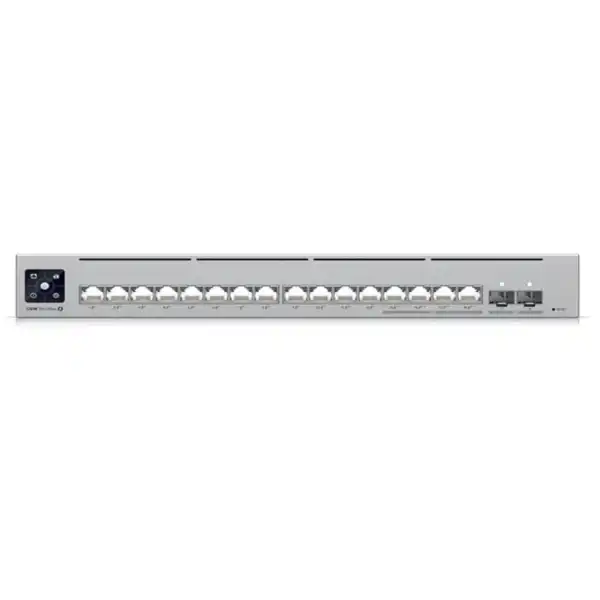
Build a more capable wired network with twelve Gigabit ports, four 2.5 GbE ports and two 10G SFP+ links. This compact, fanless UniFi-managed switch is designed for selective multi-gigabit upgrades, structured VLANs and practical uplink capacity. Important: this exact model does not provide PoE output.
Planning a business network? Request model confirmation, a complete accessories list and a Tanzania quotation from FourTeck.
Technical specifications at a glance
The following figures refer to the exact non-PoE Pro Max 16 model, based on Ubiquiti technical specifications. They should not be mixed with specifications of the USW-Pro-Max-16-PoE.
| Model | Ubiquiti UniFi Pro Max 16 — USW-Pro-Max-16 |
|---|---|
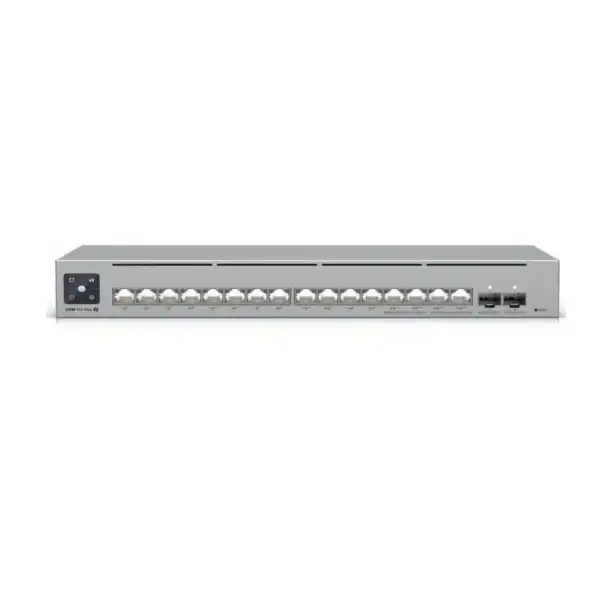
| Copper interfaces | 12 × 1 GbE RJ45; 4 × 2.5 GbE RJ45 |
| Additional interfaces | 2 × 10G/1G SFP+ |
| Power over Ethernet | No PoE output |
| Switching capacity | 84 Gbps |
| Non-blocking throughput | 42 Gbps |
| Forwarding rate | Approximately 62 Mpps |
| Local routing | Layer 3 functions for locally managed networks |
| Management | UniFi Network 8.1.127 or later |
| Power | Included external 25 W adapter; USB-C 5 V DC, 5 A input |
| Cooling | Fanless |
| Display | 1.3-inch touchscreen |
| Dimensions | 325.1 × 160 × 43.7 mm |
| Weight | 1.95 kg |
| Operating environment | −5 to 40 °C; 10–90% non-condensing humidity |
| Mounting | Desktop, wall, or 1U rack with the appropriate accessory |
Who should choose the Pro Max 16
The Ubiquiti USW-Pro-Max-16 is intended for a network that needs more than ordinary Gigabit switching but does not need every copper device to run at multi-gigabit speed. It combines twelve standard 1 GbE RJ45 connections with four 2.5 GbE RJ45 connections, plus two 10G SFP+ interfaces for higher-speed links. That mixed layout is often more practical than buying a switch with high-speed ports everywhere. It lets an office reserve its faster connections for workstations, storage, compatible wireless infrastructure or an important aggregation link while continuing to connect everyday clients at Gigabit speed.
The decision starts with a port plan, not a headline switching number. Count the devices that need wired connections today, identify their negotiated speeds and allow room for a few additions. Next, identify whether any devices expect power over their Ethernet cable. This exact model does not provide PoE output. It is best evaluated as a managed data switch for powered endpoints or a downstream switch paired with separate PoE infrastructure. A buyer in Tanzania can request a quotation and confirm the proposed bill of materials before committing to a deployment.
The port layout, explained clearly
The product name refers to sixteen RJ45 data ports. Twelve are standard copper Gigabit Ethernet interfaces for desktops, printers, conventional servers, routers and other compatible equipment. Four additional RJ45 interfaces support up to 2.5 GbE and can also negotiate lower common Ethernet speeds. This arrangement accommodates a gradual upgrade because an existing Gigabit client can be moved to a faster port even before its network interface is replaced. The two SFP+ slots are separate from those sixteen RJ45 interfaces; they offer 10G or 1G connectivity with an appropriate supported module or cable.
Do not interpret the SFP+ slots as additional ordinary RJ45 sockets. Connecting a copper Ethernet device to an SFP+ slot generally requires a suitable transceiver, with its own compatibility, reach and thermal considerations. Likewise, the presence of two 10G ports does not make every connected computer a 10G client. An end-to-end path is limited by the connected network interfaces, cabling, upstream equipment and application workload. A simple diagram of which device connects to each port is an effective first step toward buying the correct switch.
Understanding the four 2.5 GbE ports
A multi-gigabit port is useful when the endpoint and traffic justify more than one Gigabit per second. Examples include a capable workstation moving large project files, a network-attached storage device with a 2.5 GbE interface, or a wireless access point with a matching Ethernet connection. The switch’s four 2.5 GbE sockets allow these devices to share a managed network with lower-speed equipment. They do not upgrade a 1 GbE laptop or printer automatically; the other end must support the faster rate and the physical link must negotiate it correctly.
When planning which devices deserve the four fast ports, consider sustained traffic rather than only occasional benchmark results. A workstation that downloads small files infrequently may gain little, while a small group moving video footage or large engineering files might notice the extra capacity. At 2.5 GbE, good cabling and properly terminated connectors still matter. Check the existing cable plant against relevant Ethernet requirements and test any run that exhibits errors or downshifts before assuming the switch is the limiting factor.
Plan those faster ports before installation
Allocate the multi-gigabit interfaces according to real needs. One reasonable design might reserve a fast port for a shared storage appliance, another for a graphics workstation, one for a compatible multi-gigabit access point connected through suitable external power equipment, and the last for future growth. That example is a planning illustration, not a mandatory wiring scheme. A different office may benefit more by dedicating two ports to its busiest desktop users. Survey the available client adapters and expected traffic before assigning fixed roles.
Think about contention as well. Several busy clients may attempt to reach a single storage system that has only one 1 GbE connection. Giving the clients faster access links will not remove that storage bottleneck. Conversely, a storage system with a fast link can provide more headroom when several Gigabit users access it at once, although actual throughput remains subject to the storage hardware, protocol and network design. Recording each proposed endpoint, speed and destination helps explain both the purchase and the expected benefit to the organisation.
What the two 10G SFP+ interfaces are for
The pair of SFP+ slots is a key reason to choose this switch instead of a basic sixteen-port model. An appropriately equipped port can connect to a core switch, aggregation switch, gateway or server over a compatible 10G link. This is especially useful when many of the copper clients need access to a shared service or central network. A higher-capacity uplink can reduce the likelihood that busy users overwhelm a single Gigabit path during backups, file transfers or other concentrated traffic. However, available throughput still depends on the remote device and complete network architecture.
Decide early whether an uplink will use fibre with an optical transceiver or a supported direct-attach copper cable. Check distance, connector type, optic specifications, switch compatibility, and patching arrangements. Two SFP+ ports can be assigned to separate destinations, or a supported design may use aggregation where both ends permit it. Never assume that connecting two links without proper configuration will automatically double the speed of one transfer. Document the intended topology and verify the correct port settings during commissioning.
Reading the performance figures responsibly
Ubiquiti specifies 84 Gbps switching capacity and 42 Gbps total non-blocking throughput for this model, with a forwarding rate of approximately 62 million packets per second. These figures describe the switch hardware’s forwarding capability and are useful when comparing switch classes. They are not promises that one connected computer can transfer at 42 or 84 Gbps. Each physical interface has its own negotiated speed, and traffic patterns, frame sizes, competing flows and upstream infrastructure determine practical results. It is important to distinguish backplane specifications from internet speed and from end-user application performance.
For most buyers, the meaningful questions are whether a path is oversubscribed, whether a server or gateway can keep pace, and whether the intended network segmentation introduces routing constraints. A 10G uplink can be valuable even when all twelve standard client ports remain at Gigabit speed, because several users may be active simultaneously. For a single desktop-to-desktop transfer, the slowest interface in the path usually provides the first clear capacity limit. Match performance expectations to the actual design instead of quoting headline figures in isolation.
A non-PoE switch: an essential distinction
The USW-Pro-Max-16 does not deliver Power over Ethernet to attached equipment. This matters for access points, IP cameras, telephones and other devices that commonly obtain electrical power through network cabling. They can exchange data through the switch when connected correctly, but they still require an appropriate separate power solution such as a compatible injector, a power adapter, or a different PoE-capable switch. Do not connect a device expecting PoE and assume that link activity indicates it will receive operating power. Verify each powered device’s electrical requirements independently.
The similarly named USW-Pro-Max-16-PoE is a different product with a different power-delivery specification. Before ordering, compare the full model suffix and the quantity and class of powered devices. A non-PoE switch may be a cost-conscious fit when nearly all endpoints have their own adapters, yet it can create extra complexity if an office relies on numerous ceiling access points and cameras. The correct choice depends on cabling, power distribution, installation locations and future additions rather than on switch-port count alone.
How it fits beside existing PoE equipment
A business does not always need to replace its entire access network to use the Pro Max 16. It can act as a managed data aggregation or distribution device while an existing PoE switch supplies the endpoints that need cable-delivered power. In that layout, the PoE switch powers the cameras, access points or phones and the Pro Max 16 provides selected data paths or higher-speed uplinks. The precise links and VLANs must be planned so traffic reaches the correct upstream gateway without creating redundant uncontrolled loops.
If using individual PoE injectors, verify the required standard and wattage for every device and make sure the injector itself is suitable for the link speed. A mismatched or lower-speed injector can prevent a fast access point from negotiating its intended Ethernet rate. Factor additional injectors, adapters, outlets and surge protection into the real project cost. A lower initial switch price is not always a lower finished installation cost when many devices need separate power. Include the entire powered-endpoint schedule when requesting a quote so the final network is functional, not merely connected.
UniFi Network management and adoption
This is a managed UniFi switch, intended to be administered through the UniFi Network application rather than through an ordinary standalone consumer-switch interface. Ubiquiti lists UniFi Network version 8.1.127 or later as the application requirement for the model. Before installing, check the version and supported deployment approach of the organisation’s existing UniFi console or self-hosted Network application. An older controller may need to be upgraded before the switch can be adopted and configured. Plan that change under the organisation’s normal maintenance procedures.
At commissioning, connect the switch to the appropriate network, provide the included power adapter, and identify the device in the UniFi management environment. Adoption, firmware updates and port configuration should be performed by an authorised administrator. Management network reachability, DHCP, VLAN membership and permitted control traffic matter when devices are separated by routers or firewalls. Record who administers the site and how configuration backups are retained. This avoids a common operational problem: installed hardware that is healthy but effectively inaccessible because the managing environment or credentials were never included in the handover.
VLANs for a more organised network
Virtual LANs let administrators separate logical groups without installing a completely separate physical switch for each group. An office might divide staff devices, guest access, voice services, and a dedicated equipment network into different VLANs. The Pro Max 16 supports managed switching features used for port VLAN assignment and tagged uplinks, allowing selected traffic to pass along appropriately configured trunks. VLAN segmentation is not a substitute for a security policy, however. Traffic permitted between groups depends on routing and access controls elsewhere or on relevant Layer 3 policies.
Design the native VLAN and allowed tagged networks deliberately for each uplink and endpoint port. An ordinary workstation port usually needs a straightforward access configuration, while a link toward an access point or another managed switch may need multiple tagged networks. A mismatch on a trunk can isolate clients, management or entire rooms. Keep an accurate VLAN table that states purpose, ID, addressing and routing owner. This small amount of documentation is particularly helpful during upgrades when a switch is introduced into an existing mixed-brand environment.
Layer 3 switching: useful, with boundaries
Ubiquiti identifies the model as Layer 3 capable. Its published feature set includes routing between locally managed VLAN networks, static routing for local networks, DHCP server functions for local networks and DHCP relay. These functions can help distribute local traffic without sending every inter-VLAN flow through an external gateway. They do not turn the device into a complete substitute for an internet firewall, a WAN router or every advanced gateway service. Routing responsibilities should be defined before the switch is assigned an IP network as the routing point.
A sensible design begins by identifying where each VLAN’s default gateway will live. If a UniFi gateway already enforces application controls, content policy or internet security rules, moving local routing to the switch may change which traffic the gateway can inspect. Ubiquiti’s Layer 3 guidance notes feature implications for networks routed by switches. Review those tradeoffs, along with DHCP behaviour, static routes, return paths and isolation rules. For a small office, keeping routing on its existing gateway may be simpler even though the Pro Max 16 supports local Layer 3 functions.
Security controls on access ports
The supported Layer 2 and access-control tools go beyond basic on/off switching. Ubiquiti documents 802.1X control, DHCP snooping and guarding, MAC-based restrictions, access-control lists, port isolation and device or network isolation features. These can support a deliberate network access policy when configured in a suitable environment. For example, an administrator may want guest devices isolated from infrastructure or an equipment port limited to an expected client role. Every such rule should be validated against real business applications, because a misapplied policy can block legitimate communications.
Remember that a switch-level ACL and a perimeter firewall serve different purposes. The switch is well positioned to regulate selected local traffic, while broader internet security, remote access and threat prevention typically remain responsibilities of other systems. 802.1X also depends on appropriate authentication services and compatible clients. Write a basic policy for each port type, document approved exceptions, and test a sample endpoint before applying controls at scale. Segmentation is most useful when administrators can clearly explain which flows are allowed and why.
Loop prevention and network reliability
Managed switches provide tools that help prevent cabling mistakes from turning into network-wide incidents. The Pro Max 16 supports spanning-tree mechanisms including STP and RSTP, plus loop-protection features, storm control and rate limiting for some categories of unwanted traffic. These are particularly important when several switches have multiple physical paths between them or when patch panels make accidental reconnection possible. They require sensible design, not merely enabled feature labels. A network with uncontrolled loops can still experience disruption if topology, priorities or connected devices are handled poorly.
Mark uplink cables clearly, record intentional redundant paths and confirm that all switches in a shared topology use compatible spanning-tree settings. Avoid linking spare ports together as an informal test. When enabling storm controls, choose settings that suit expected broadcast or multicast loads instead of imposing arbitrary limits. Monitor logs and port changes after the switch is introduced. In a business environment, repeatable cabling records and a simple recovery procedure can do as much for operational reliability as an impressive hardware specification.
Link aggregation and its limitations
LACP support allows compatible endpoints or switches to negotiate a link aggregation group when the topology and configuration permit it. Administrators sometimes consider aggregation for servers or switch-to-switch links that carry traffic from many users. Used correctly, this can distribute distinct flows across multiple member links and can assist with link resilience, depending on the configuration. It does not necessarily make one file transfer run at the sum of all member-port rates. The distribution algorithm, destination, traffic mix and remote equipment matter.
Before enabling an aggregation group, confirm that both ends support compatible settings, that the chosen ports are valid members and that cable paths are understood. Do not assume a storage appliance with two interfaces supports the required aggregation mode simply because it has two sockets. The Pro Max 16’s fast SFP+ interfaces may provide a cleaner capacity upgrade in some scenarios than bonding multiple slower links. Compare actual throughput, spare port usage, expected failure behaviour and configuration complexity. Test failover deliberately if the application depends on continuous reachability during a cable or link interruption.
Voice networks and IP telephony
Business voice installations can benefit from a managed switch because voice VLAN assignment, LLDP-MED, traffic classification and related configuration are supported in the UniFi feature set for this model. An administrator may separate voice devices from general staff traffic and apply suitable policies at the gateway and switch. But the Pro Max 16 is not a PoE source, so any IP telephone that requires power through Ethernet will need another compatible power arrangement. Include headset bases, conference phones and reception devices in the power audit rather than assuming every telephone uses the same standard.
Voice quality depends on more than the switch. Delay, jitter, upstream congestion, internet service quality, SIP configuration and phone-system design all affect calls. An office using cloud telephony should confirm that its router and WAN connection handle real-time traffic appropriately. Keep the VLAN tagging and priority settings consistent across phone ports, uplinks and routing infrastructure. Where a PC is connected through a phone’s pass-through port, review how the voice and data VLANs are assigned to avoid unexpectedly placing both endpoints in the same network.
Multicast and professional AV networks
For sites carrying video streams or other multicast applications, the switch offers IGMP snooping and advanced IGMP configuration options in the current published feature list. Properly configured multicast control helps limit forwarding to intended receivers rather than indiscriminately flooding every access port. Ubiquiti also lists professional AV profile capabilities for recognised AV-over-IP ecosystems. These features make the model relevant to some conference-room, training, production and digital-signage networks, but they are not a guarantee of compatibility with every encoder, decoder or proprietary transport.
Start with the requirements of the actual AV devices: link speed, multicast addressing, synchronization method, packet rate and topology. Determine where the multicast querier will operate and whether routes between VLANs are required. Validate IGMP behaviour with a small pilot rather than connecting a full system and hoping default settings suffice. High-bandwidth AV traffic can consume a considerable part of a Gigabit endpoint port even when the switch backplane has headroom. Use 2.5 GbE or 10G links where the overall design and supported hardware justify them.
Etherlighting as an operational aid
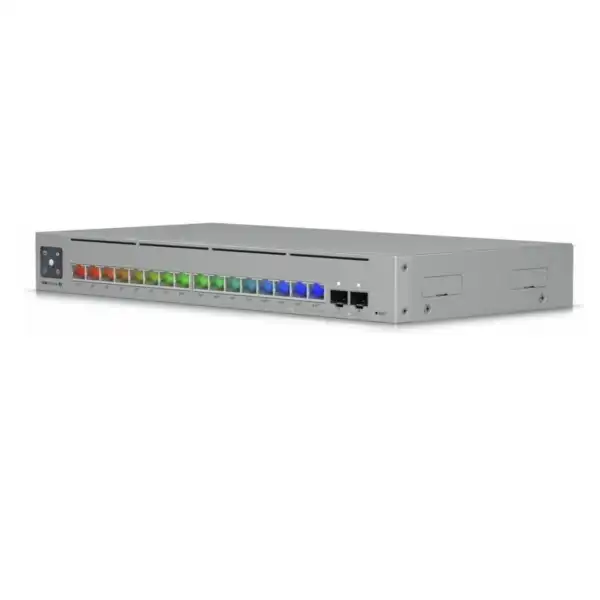
Etherlighting is a visible distinguishing feature of the Pro Max range. The switch can illuminate relevant Ethernet and SFP+ port indicators to help administrators identify port location, link speed or network assignment. In a crowded cabinet or on a workbench, that immediate visual context can save time when tracing connections. It does not replace a proper cable schedule or management inventory, but it can make troubleshooting less dependent on remembering which cable was moved. Ubiquiti notes that matching Etherlighting patch cables can improve the effect.
A practical setup should still label both ends of important links and record their interface names in a port map. Lighting is most helpful when staff understand what the selected colours or indications mean in their chosen management configuration. A visual indicator may show a connection state without confirming that an application or route is working. For serious faults, confirm speed negotiation, errors, VLAN membership and upstream connectivity through the management system. Treat Etherlighting as an efficient orientation tool rather than as an independent diagnostic verdict.
Touchscreen and local status
The hardware includes a 1.3-inch touchscreen. It provides a useful local reference when standing beside the equipment, especially during physical installation, port checks or maintenance. A technician can correlate the displayed device information with what appears in the UniFi Network application. The display is an additional convenience, not a reason to omit normal configuration management. Administrative changes, security policies and the historical health of the wider network should be handled in the appropriate management environment by staff with suitable permissions.
The small display is also a reminder to place the device where technicians can see and reach it safely. A switch hidden behind a desk or mounted in an awkward cabinet can be harder to service regardless of its software capabilities. Leave clear access to the reset control, Ethernet connectors, SFP+ modules and rear power input. In a shared office, restrict physical access to network infrastructure so an accidental disconnection or reset does not interrupt everyone. Keep a record of its location and equipment ownership for future support visits.
Fanless cooling and modest power requirements
The Pro Max 16 uses a fanless cooling design and Ubiquiti lists a maximum power consumption of 25 watts. Fanless operation makes it appealing where mechanical fan noise would be unwelcome, such as a small office, meeting room or studio. It should not be described as producing no heat, however. Network equipment still dissipates energy, and a switch installed in a closed enclosure can experience elevated temperatures even without moving parts. Ubiquiti specifies an ambient operating range of minus 5 to 40 degrees Celsius and a non-condensing humidity range of 10 to 90 percent.
For a Tanzania deployment, pay attention to the actual installation environment rather than making assumptions about conditions across the country. Check enclosure ventilation, ambient heat, dust, moisture exposure and the position of surrounding equipment. Avoid direct sunlight or locations where heat accumulates. The maximum wattage is an equipment figure, not a complete electricity-cost estimate: actual power use changes with operating conditions, while UPS runtime also depends on other connected devices and battery health. Provide stable power and a sensible location before deciding the cabinet layout.
Power supply and operational continuity
Ubiquiti specifies a 5 V DC, 5 A USB Type-C power input and an included external 25 W adapter for this exact model. This is the switch’s own input supply, not a PoE output budget. Use the supplied or manufacturer-approved power arrangement and check the installation instructions before substituting adapters. A visually similar USB-C connector does not prove an arbitrary charger meets the intended electrical and operational requirements. Route the power cable so it is not strained, disconnected by furniture movement or pinched when a wall cabinet is closed.
Where local business continuity matters, include the switch in the site’s broader backup-power plan. A UPS must be sized for the full connected load, including gateway, internet access equipment, any PoE devices and storage that must remain available. Keeping only the switch powered will not preserve service if the upstream gateway is offline. Plan graceful shutdown for storage and other sensitive systems where relevant. Confirm adapter inputs, plug arrangements, grounding and protection with a qualified installer for the specific premises; do not assume one building’s electrical design represents all locations.
Mounting choices and physical dimensions
The enclosure measures 325.1 by 160 by 43.7 millimetres and weighs approximately 1.95 kilograms. Ubiquiti lists desktop, wall and 1U rack mounting as supported form factors. The compact width is useful in a small installation, but it is not the same as a full-width rack switch that fits standard rack rails without additional planning. Ubiquiti markets a separate Pro Max 16 rack-mount accessory for supported rack installations. Confirm its availability and inclusion in the quote rather than assuming the accessory is in the switch carton.
On a desk or shelf, keep enough clearance for connected patch leads, the rear power cable and service access. On a wall, choose fixings suited to the surface and follow the manufacturer’s installation instructions. For a rack, verify accessory compatibility, depth, ventilation, cable management and any neighbouring equipment. Plan for the bend radius of fibre or direct-attach cables connected to SFP+ ports. A good mechanical installation reduces accidental disconnections and avoids the expense of relocating equipment when the first set of cables is connected.
Choosing copper cabling for every port
A network upgrade often exposes weaknesses in old patch leads and terminations. The Pro Max 16 accepts ordinary compatible RJ45 Ethernet connections, but the final negotiated link rate depends on both connected devices and the installed cabling. The four multi-gigabit ports can serve 2.5 GbE endpoints when the complete link supports that rate. Existing cable runs should be checked against the applicable Ethernet specifications, their actual installation quality and the environment. A printed category marking alone is not a substitute for sensible testing on a troublesome run.
When a device links at 1 GbE instead of the expected 2.5 GbE, verify its adapter capability, port selection and driver or firmware settings before replacing the switch. Next examine patch cords, wall jacks, intermediate couplers and cable distance. Repeated errors or renegotiation under load may indicate a physical issue. Keep uplink and endpoint cables separated and labelled where practical. In a mixed network with legacy equipment, avoid promises that every historical cable path will achieve a particular rate without a site assessment.
Fibre optics, DACs and SFP+ planning
The two SFP+ interfaces can be used for high-speed connections with suitable compatible media. A direct-attach cable is often considered for a short equipment-to-equipment path, while optics and fibre are relevant to layouts where the devices are further apart or connected through structured fibre cabling. The best choice depends on distance, fibre type, connectors, module compatibility and serviceability. Choose both ends of a link together: a nominal 10G module does not guarantee interoperability with any arbitrary peer module or switch.
For fibre runs, specify the transceiver class and cable type explicitly, and check patching and cleaning procedures. For DACs, confirm approved length and compatibility before purchase. If the remote port runs only at 1 GbE, the available link will not become 10G simply because the Pro Max 16 has an SFP+ cage. Record fibre identifiers, optical modules and port numbers in the site documentation. Reserve spare capacity only when it represents a genuine future plan, and protect installed fibre against tight bends and unnecessary handling.
A compact-office deployment example
Imagine a growing office with reception computers, finance workstations, a few printers, an application server and shared storage. Twelve 1 GbE ports can accommodate conventional wired equipment while the four faster interfaces are reserved for the endpoints that move larger files. One 10G SFP+ connection can be considered for the upstream core or a supported server link. That arrangement provides a path for selective improvement without requiring every desk to be rewired for the highest possible speed at once. The actual number of devices must be counted before the layout is approved.
In this example, the existing gateway continues to provide the internet connection and agreed security policy. If wireless access points or IP phones need PoE, they use an appropriate PoE switch or injectors rather than drawing power from the Pro Max 16. VLANs can keep employee devices and other network roles organised, subject to the design. This is an illustration of how the hardware might fit, not evidence of a completed FourTeck installation or a promise that a particular workload will reach a quoted throughput.
A file-sharing and creative-work scenario
Teams working with photography, video, architectural models or other large datasets may experience congestion on shared storage links. The Pro Max 16 offers a way to introduce some 2.5 GbE access connections while retaining Gigabit ports for administrative devices. The network designer should first verify that the storage device, disk subsystem and file-sharing protocol can actually serve data fast enough to benefit. If the NAS has only a single Gigabit port and cannot be upgraded, changing the workstation-facing switch ports alone may not solve the bottleneck.
A high-speed SFP+ path toward capable storage or aggregation equipment may provide more aggregate headroom for concurrent users. But each link should be evaluated alongside disk performance, server configuration, endpoint adapters and the real file sizes involved. Before purchase, gather a few representative transfer measurements during normal business hours and identify where utilization peaks. Then plan the minimum necessary ports and media. This makes a better business case than assuming that every creative workload needs a completely new 10G network.
An access-network refresh scenario
An organisation replacing an older unmanaged switch may value centrally defined port profiles, VLANs and better visibility more than raw speed. The Pro Max 16 can provide these capabilities through UniFi Network, making it suitable for an environment already adopting that management approach. Before migrating, inventory the current IP networks, gateways, static assignments, switch uplinks, phone settings and any unmanaged devices hidden behind desks. A simple switch replacement can unexpectedly change connectivity if existing cabling depends on undocumented loop paths or inconsistent VLAN tags.
Prepare a migration map showing each existing port and its destination. Configure management and uplinks first, then move a small set of test devices. Check that staff systems receive addresses correctly, reach their required services and remain in the intended security zones. Migrate the remaining ports in manageable groups, with an agreed rollback route. If the original switch powered endpoints through PoE, the non-PoE Pro Max 16 is not a direct replacement without a separate plan for device power. That detail can determine the correct variant before any equipment is purchased.
A network for a training or meeting facility
Meeting facilities, training rooms and studios can contain a mixture of ordinary laptops, presentation equipment, dedicated AV systems and guest connectivity. A managed switch can help separate device groups and provide appropriate uplink capacity. The Pro Max 16 offers fanless operation, a compact enclosure, configurable switching features and selected multi-gigabit access ports. Its professional AV and multicast capabilities may also be useful after validation against the installed device ecosystem. A meeting room with mostly Gigabit clients does not necessarily need all sixteen ports to run at 2.5 GbE.
A facilities team should plan temporary users and physical accessibility carefully. Publicly accessible wall plates may need dedicated VLANs and port restrictions, while presentation sources could require discovery or multicast behaviours that conflict with overly broad isolation rules. Test actual conference hardware with the agreed policy before a busy session. Protect switching equipment from accidental unplugging and identify who can restore the network after a configuration change. The outcome depends on the full system design, not just on a switch’s published feature list.
Pre-purchase checklist for a Tanzania project
Begin by confirming the exact model text, USW-Pro-Max-16, on the proposed quote. Then count all copper endpoints and distinguish Gigabit devices from those requiring 2.5 GbE. Record the number of planned SFP+ links, their distances and the compatible transceivers or cables required. List every powered device, particularly access points, IP cameras and IP phones, because this model does not supply PoE. Check that the installation has a supported UniFi Network management environment and a clear network administrator. A purchaser should also identify whether mounting hardware and backup power form part of the project.
Commercial details should be confirmed for the exact Tanzania quotation instead of inferred from overseas listings. Ask for the quoted price and currency, itemised accessories, stock position, applicable delivery arrangements, warranty terms and any installation or support scope. None of those details can be established safely from the model number alone. Sharing the site diagram, endpoint list and target date with the seller makes it easier to evaluate a complete solution rather than merely checking whether a switch can be supplied.
A step-by-step commissioning approach
Before connecting users, document the management network, uplink port, VLAN plan and any intended static routes. Inspect the hardware and included adapter, choose a stable mounting location, and complete the physical installation according to the manufacturer instructions. Connect one approved upstream path and adopt the switch using a compatible UniFi Network version. Review its firmware and management settings under the organisation’s change-control procedure. Label each copper and SFP+ connection as it is installed. Confirm that the device appears correctly in the controller before migrating critical services.
Bring up representative clients first: one ordinary Gigabit endpoint, one intended 2.5 GbE endpoint and any required trunked or isolated network. Verify negotiated speeds, DHCP leases, gateway reachability and application access. If local Layer 3 routing is enabled, test both permitted and denied inter-VLAN paths. If the device belongs to a larger spanning-tree topology, verify the intended root and forwarding paths. Capture a baseline so future troubleshooting can distinguish an old problem from something introduced during the upgrade.
How to test the finished network
A successful deployment needs more than green link indicators. Begin by checking that the correct clients appear on the intended VLAN and obtain the expected network configuration. Verify that any access controls permit approved traffic and deny traffic that should stay isolated. Test DNS, internet connectivity and internal services as separate functions. For high-speed connections, inspect negotiated rates and error counters, then use representative transfers between capable endpoints. Throughput tests should be interpreted alongside CPU, storage, remote endpoint and competing network traffic.
Next, test the practical failure scenarios that matter to the business. Disconnect a noncritical test link to confirm alarms and documented recovery behaviour, or move a test endpoint to ensure port profiles behave as expected. Where aggregated or redundant links are deployed, test their intended response carefully and only within an approved maintenance window. Finally, save the finished port map, VLAN schedule, management details and software version. The value of a managed switch increases when later administrators can understand and reproduce the original configuration.
Troubleshooting the common surprises
If a new access point remains offline, ask whether it requires PoE before investigating VLANs; this model does not power it. If a 2.5 GbE client connects at a slower speed, check that it is attached to one of the four multi-gigabit ports and confirm the remote adapter and cabling. If an SFP+ uplink will not establish a link, examine the module, cable, peer-port configuration and supported speed on both ends. If a switch cannot be adopted, confirm the UniFi Network version, IP addressing and permitted management communication.
If staff lose access after a VLAN change, compare native and tagged VLAN settings across the entire path from endpoint to router. If broadcasts or unusual congestion appear, inspect potential loops and the spanning-tree topology. When a service works locally but not across VLANs, check routing ownership, ACLs and firewall policies rather than automatically replacing hardware. Record symptoms and test results before changing multiple variables at once. Careful fault isolation is faster and less disruptive than assuming all connectivity problems originate at the switch.
Capacity planning beyond the first installation
Sixteen RJ45 ports can be sufficient for a small deployment but will not remain sufficient if new devices are added without planning. Count fixed users, shared equipment, access points, servers and unanticipated items such as time-attendance terminals or building controls. Reserve a realistic margin for expansion and remember that an uplink or connected intermediate switch changes the number of directly available ports. The two SFP+ interfaces provide options for higher-capacity links, but they do not eliminate the need for a deliberate network hierarchy as a site grows.
Future plans may also change the power requirement. A mostly wired office might initially use few PoE devices but later add wireless coverage or surveillance. In that case, determine whether a dedicated PoE switch or a different Pro Max variant will be more suitable. Review whether four 2.5 GbE ports are enough for projected endpoints, especially if more workstations or access points receive multi-gigabit adapters. Buying the exact capacity needed for a known development plan is usually clearer than assuming higher port-speed numbers are universally beneficial.
Questions to ask when comparing alternatives
Compare switches using a requirements table instead of brand names alone. Record copper-port count, 1 GbE and 2.5 GbE needs, number of SFP+ uplinks, PoE class and budget, management platform, local routing requirements, physical size and expected noise level. The Pro Max 16 is compelling when the requirement is a compact UniFi-managed data switch with a small multi-gigabit pool and two fast uplinks. A full-PoE access switch can be a better match for powering many edge devices, while a switch with more multi-gigabit or 10G access ports may suit a very different workload.
Also evaluate lifecycle factors: who updates software, how configuration is backed up, which transceivers are acceptable and how faults will be diagnosed. An unfamiliar management ecosystem can create additional training work, while a switch that fits existing UniFi administration may be simpler to operate. Ask for an itemised proposal that distinguishes included hardware from optional accessories. Do not infer prices, availability or compatibility from a product family name. Compare the final deployable design, not just an isolated equipment specification.
What to include in a quotation request
A useful quotation request identifies the exact Ubiquiti USW-Pro-Max-16, the number of units, intended mounting arrangement, expected RJ45 client count and any 2.5 GbE endpoints. Include the planned destinations for the two SFP+ links with approximate cable lengths, along with fibre type or DAC preference if known. Name the existing gateway and UniFi management environment, state whether a controller upgrade is anticipated, and list any required configuration services. Highlight devices requiring PoE so a separate power solution can be priced accurately.
For the Tanzania project, request confirmation of the specific supplied variant, accessories, commercial terms and any locally relevant fulfilment details. If the requirement is still exploratory, a simple network sketch and list of endpoint types are enough to begin a meaningful discussion. Avoid making a purchasing decision based on an unverified assumption about stock, warranty coverage or delivery time. The next step is to confirm the complete bill of materials and deployment scope with FourTeck Tanzania, rather than assume the switch by itself includes every component.
Frequently asked questions
Does the USW-Pro-Max-16 supply PoE?
No. This exact model is a non-PoE switch. Use properly matched external power, injectors or a separate PoE switch for endpoints that need power over Ethernet.
How many Ethernet ports does it have?
It has sixteen RJ45 ports: twelve standard Gigabit ports and four ports capable of up to 2.5 GbE. It also has two separate 10G SFP+ slots.
Is the Pro Max 16 a Layer 3 switch?
Yes. Ubiquiti lists local inter-VLAN routing, static local routing, local DHCP server functions and DHCP relay. It is not a complete replacement for an internet security gateway.
Will a 1 GbE laptop work on a 2.5 GbE port?
Yes, a compatible connection can negotiate a lower supported Ethernet rate. The laptop will not gain multi-gigabit capability until its own network interface supports that speed.
Can I connect a 10G server?
A supported 10G SFP+ link may be used if the server or its intermediate equipment has compatible interfaces and media. The ordinary RJ45 ports on this model do not provide 10GBASE-T access.
What software is required?
Ubiquiti specifies UniFi Network version 8.1.127 or later. Confirm the controller or console environment before adoption and verify any current firmware requirements.
Can it be installed in a rack?
Ubiquiti supports rack mounting using the appropriate Pro Max 16 accessory. Confirm whether that optional accessory is included in the proposed quote.
Is it quiet enough for an office?
It has a fanless design, which avoids normal cooling-fan noise. Provide ventilation and observe the published temperature and humidity limits.
What does Etherlighting do?
Etherlighting can help visually identify port location, link speed or network assignment. It supports maintenance but does not replace port labels and managed-network diagnostics.
Does it improve internet speed?
Not automatically. It can improve local switching capacity where existing links are a bottleneck, but internet speed remains limited by the service, gateway and complete traffic path.
Is a 10G SFP+ module supplied?
Do not assume that optical transceivers or DAC cables are supplied. Verify the precise package contents and required compatible accessories in the quotation.
What should a Tanzanian buyer verify before ordering?
Confirm the exact non-PoE model, local quote terms, controller compatibility, optional mounting parts, SFP+ media, device power requirements and the intended installation scope.
Request a Pro Max 16 quotation
Tell FourTeck Tanzania how many wired endpoints you have, which need 2.5 GbE, whether you require SFP+ links, and whether any endpoints need PoE. Ask for confirmation of the exact USW-Pro-Max-16 model, compatible accessories, available supply terms, and the complete proposed bill of materials. No price, stock or delivery commitment is implied on this information page.
Contact FourTeck Tanzania to discuss the right switching configuration for your network.




Reviews
There are no reviews yet.