
48-port managed switching | Tanzania buying guide
Ubiquiti Pro Max 48 (USW-Pro-Max-48) Managed Layer 3 Switch in Tanzania
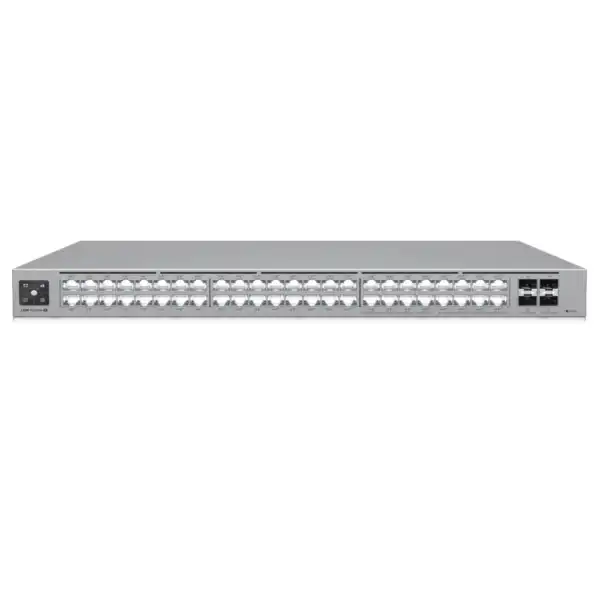
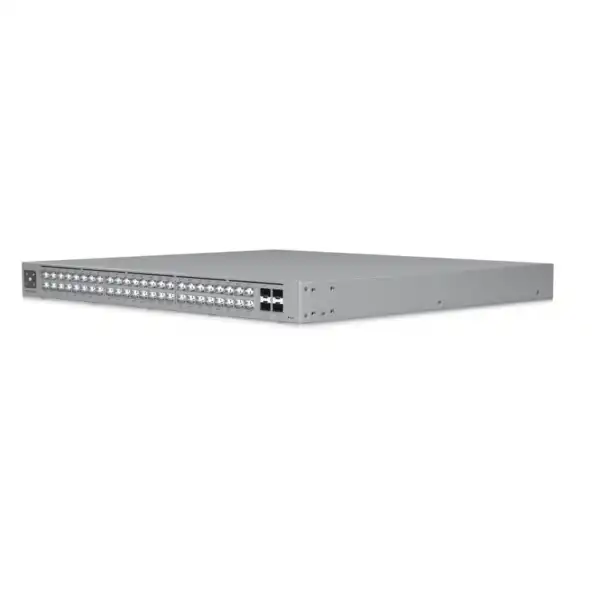
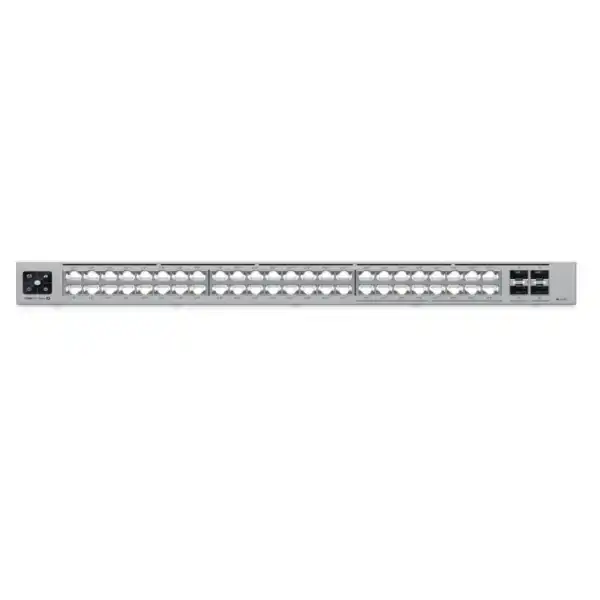
The Ubiquiti Pro Max 48 is a non-PoE, rackmount UniFi switch with 32 Gigabit RJ45 ports, 16 multigigabit 2.5 GbE RJ45 ports, four 10G SFP+ interfaces, Layer 3 functionality, and Etherlighting. Designed for managed business networks, it helps teams upgrade selected endpoints without losing a full forty-eight-port copper access layer. Confirm the exact non-PoE model and required uplink accessories before requesting a quotation for Tanzania.
Quick buying decision: choose it when the fit is right
- You need a full 48-port managed copper access layer.
- Up to sixteen selected devices benefit from 2.5 GbE access.
- Your aggregation or backbone design benefits from four 10G SFP+ interfaces.
- Your equipment is self-powered or receives PoE from another appropriate source.
- You can manage this switch using a compatible UniFi Network installation.
Choose a different model if the requirement is built-in PoE, more than sixteen 2.5G copper clients, or ordinary 10G RJ45 access ports.
Verified technical specifications at a glance
Use these exact-model specifications to verify a quotation or compare architectural options. They are manufacturer hardware specifications, not local commercial claims.
| Manufacturer / model | Ubiquiti / USW-Pro-Max-48 |
|---|---|
| Copper access ports | 32 × 1 GbE RJ45 + 16 × 2.5 GbE RJ45 |
| Uplink / high-speed ports | 4 × 10G SFP+ (10G/1G) |
| Power over Ethernet | Not supported on this non-PoE model |
| Switching capacity | 224 Gbps |
| Total non-blocking throughput | 112 Gbps |
| Forwarding rate | 167 Mpps |
| VLAN capacity (published) | 1,000 supported VLANs |
| Layer 3 features | Local-network inter-VLAN routing, static routing, DHCP server and relay |
| Other management features | Etherlighting; 1.3-inch touchscreen; UniFi Network |
| UniFi Network application | Version 8.0.24 or later |
| Power input / maximum draw | 100–240V AC, 50/60Hz; 100W maximum |
| Backup-power interface | USP-RPS DC input for compatible system |
| Dimensions | 442 × 325 × 44 mm; 1U rackmount |
| Weight | 4.8 kg without brackets; 4.9 kg with brackets |
| Ambient operating limits | -5°C to 40°C; 10–90% RH noncondensing |
Who this switch is designed for
The UniFi Pro Max 48 is intended for network administrators planning a dense, managed wired access layer without purchasing PoE on every port. It is a sensible candidate for a headquarters floor, training laboratory, school administration block, office network room, or structured-cabling cabinet where many desktop computers, printers, network storage devices, and other externally powered endpoints need predictable connections. The mix of thirty-two Gigabit access ports and sixteen 2.5 Gigabit ports creates room for a gradual transition to faster client equipment without requiring all forty-eight endpoints to run at multigigabit speed.
For a buyer comparing 48-port switches in Tanzania, the essential question is not simply the total port count. It is how many endpoints genuinely need 2.5 GbE, where their traffic must travel, whether power over Ethernet is necessary, and how the switch will be managed. This product is especially attractive when an organization already uses the UniFi management ecosystem, needs four 10G uplinks, and can provide its own power for connected devices. Ask for a configuration review against your port schedule before selecting the switch for a new network or a refresh.
Port architecture: 48 copper ports plus four 10G uplinks
The front-panel copper allocation is exact: 32 RJ45 ports support 10/100/1000 Mbps Ethernet, and 16 RJ45 ports support 10/100/1000/2500 Mbps. This is a forty-eight-port access switch; the four additional SFP+ interfaces are uplinks or other high-speed connections, not four extra 2.5G copper sockets. A purchase specification that says “52 ports” may be counting all interfaces, while a specification that says “48 ports” is generally describing the copper access connections. Make the distinction explicit in network drawings and quotations.
An organized port plan helps avoid wasting the sixteen faster interfaces. Assign them to network-attached storage with compatible adapters, higher-speed workstations, performance-sensitive lab machines, or access points that use independent PoE injectors when appropriate. Reserve ordinary Gigabit ports for typical office PCs, printers, telephones supplied through an appropriate separate power path, and other 1G equipment. A 2.5G port can negotiate down to the supported common speed with a compatible client, but it cannot force an older 1G network interface to run faster.
Keep physical label, patch-panel identifier, VLAN, device owner, negotiated speed, and expected traffic category in the port register. That documentation is useful throughout the switch’s life and makes troubleshooting more reliable than relying on the port number alone.
Why 2.5 GbE can matter
A 2.5 GbE connection provides a nominal link rate two and a half times a 1 GbE connection. That does not mean every application becomes two and a half times faster: file servers, storage disks, client NICs, patch cables, upstream interfaces, security controls, and the applications themselves can be limiting factors. Nevertheless, 2.5G access links can remove an obvious port-speed bottleneck for selected endpoints when the rest of the network can sustain the traffic.
Consider a design office transferring large media files, a technical lab moving virtual-machine images, or an administrative workstation that routinely backs up large datasets to a local server. Those workloads may justify a multi-gig access connection even if most staff are comfortable on Gigabit Ethernet. The switch lets the network designer allocate 2.5G only where it creates value, rather than applying the cost and design implications of faster connections to every desk.
Check the actual client adapter, auto-negotiation, cable quality, patch length, server link, and available network capacity. Existing cable infrastructure should be assessed rather than assumed suitable simply because an older connection works at 1G. For applications that need full 10GbE copper access, this model’s standard RJ45 ports are not the correct choice.
Four 10G SFP+ interfaces for the uplink design
The four SFP+ ports support 10G and 1G operation according to Ubiquiti’s published port layout. They can connect the access switch toward an aggregation switch, suitable router, server, or another compatible high-speed endpoint. The right optical module or direct-attach cable depends on link distance, fiber type, connector, compatibility, and the interfaces at both ends. Do not assume that every SFP+ module or copper transceiver will suit every installation.
A simple deployment may use one 10G uplink to an aggregation layer. Another may use two suitable links in a supported LACP bundle where both endpoints and the topology are configured accordingly. Link aggregation can increase total capacity for multiple flows, but it does not normally transform one ordinary single flow into a 20G transfer. Link design also needs to account for failures, loops, VLAN trunk settings, and upstream bandwidth.
Inventory each uplink’s purpose before purchasing optics. Include spare fiber strands where appropriate, separate physical paths when practical, and an agreed failover test. Four uplink sockets provide design flexibility; they do not by themselves guarantee independent internet circuits, uninterrupted service, or end-to-end redundancy.
Non-PoE is a defining purchase decision
USW-Pro-Max-48 does not supply Power over Ethernet through its RJ45 ports. An access point, security camera, VoIP handset, or another PoE-powered endpoint therefore needs a compatible external injector, another PoE switch, or an independent supported power source. The distinction is important because “Pro Max 48” and “Pro Max 48 PoE” are different Ubiquiti models with different power-delivery capabilities and acquisition considerations.
A non-PoE switch can be the right choice for an installation dominated by desktop PCs, printers, servers, or devices with their own power supplies. It may also make sense when PoE is already handled in another rack or by a separate access switch. Conversely, for dozens of powered wireless access points or cameras, the cabling and electrical design may be simpler with a purpose-built PoE model after evaluating its port-level power classes and total PoE budget.
Calculate powered-device quantities and wattages before ordering. The 100W maximum power consumption listed for this switch describes the switch itself and is not a PoE budget available to endpoints. Do not confuse the unit’s electrical input with deliverable power over network cables.
What Layer 3 capabilities actually provide
Ubiquiti lists inter-VLAN routing, local-network static routing, DHCP server operation, and DHCP relay among the Pro Max 48 Layer 3 functions. These features can help an appropriately designed UniFi environment keep selected internal traffic local to the switching layer and avoid unnecessarily returning every internal packet to an upstream router. The value depends on which VLANs, routes, and management functions the deployed software and architecture actually support.
Layer 3 capability should not be read as a promise that this switch replaces a full security gateway or internet edge firewall. Internet access policy, advanced firewall inspection, VPN termination, internet-provider handoff, and other edge functions may still require a suitable gateway or additional services. Plan which device owns default gateways, route advertisements, DHCP scopes, inter-VLAN controls, and upstream connectivity before implementation.
For an office with separate employee, finance, guest, and operational networks, Layer 3 decisions deserve careful review. Routing can improve the internal traffic path, but it must be paired with explicit access policy. The correct outcome is not merely that VLANs can exchange packets; it is that only the required services can reach each other.
VLAN design for useful business separation
Virtual LANs allow administrators to divide a shared physical switching environment into logical networks. Common boundaries include corporate workstations, guest connectivity, voice systems, managed infrastructure, surveillance equipment, and test equipment. The published technical specification lists support for up to 1,000 VLANs, but the appropriate practical design should be driven by operational needs, address planning, policy, and manageability rather than the upper limit.
Document each VLAN name, numerical identifier, IP subnet, gateway placement, DHCP responsibility, permitted applications, and uplink carriage. On an access port, verify the intended native or untagged network; on a trunk, confirm exactly which tagged networks should cross to the next switch or gateway. A VLAN misconfiguration can appear as an intermittent connectivity fault or an unintentional path between security zones.
Use a naming standard and change record that the support team can understand. Keep network-management reachability separate from general guest traffic, and test client onboarding after changes. A clear VLAN scheme also makes Etherlighting’s native-network indication more useful because the color or status corresponds to documented network ownership rather than an undocumented convention.
Layer 2 functions that support stable networks
Beyond routing, the Pro Max 48 includes familiar managed-switch features for building a controlled Ethernet environment. Ubiquiti documents LACP port aggregation, STP and RSTP, IGMP snooping, advanced IGMP configuration, DSCP-based QoS, flow control, jumbo frames, port mirroring, voice VLAN support, and other Layer 2 facilities. These capabilities can matter as much as raw interface speeds when numerous users share the same switching fabric.
Spanning-tree settings help address unintended Layer 2 loops, but they require a coherent topology and role choices across the wider network. Aggregation groups must match on both ends. Multicast settings require particular attention in AV or video distribution networks, where unwanted flooding can waste bandwidth and poorly configured filtering can prevent traffic from reaching a legitimate receiver.
Do not activate every advanced feature by default. Choose only those needed by the documented design, confirm support in the installed UniFi Network version, and test one change at a time. A small set of consistently applied policies is easier to audit and support than a long configuration assembled from unrelated examples.
Security controls and access policy
The manufacturer lists 802.1X control, DHCP snooping and guarding, MAC-based access lists, IP-based access lists, device or port isolation, storm control, and MAC address blocking among supported switch features. These tools can help limit unwanted network behavior, strengthen onboarding, and reduce accidental exposure between devices. They are configuration facilities rather than a substitute for a complete cybersecurity program.
802.1X access-control deployment requires the right authentication infrastructure, endpoint settings, and exception plan for devices unable to authenticate. DHCP protection depends on accurately identifying trusted paths and understanding which network device provides addresses. Isolation policies should reflect actual business workflows, especially for printers, conferencing systems, inventory terminals, and management servers that require controlled cross-network communication.
Before enforcement, run a discovery phase. Record device ownership, business-critical communications, and fallback procedures. Keep administrative credentials protected, assign least-privilege management roles, back up the configuration where supported, and validate monitoring and recovery. These procedures often have a greater effect on operational security than ticking the maximum number of feature boxes.
Etherlighting: visible help at the rack
Etherlighting is a distinctive feature of this Pro Max switch. The illuminated Ethernet and SFP+ ports can help technicians identify locations and understand configured indicators for link or speed and native VLAN or network status. In a tightly packed rack, being able to match a logical port to a physical connector can reduce confusion during maintenance and provide a useful cross-check before moving cables.
The visual system is best treated as an aid to disciplined documentation, not a replacement for labels or diagnostics. A port light cannot tell an administrator everything about a bad patch cord, a client driver problem, a firewall rule, or application-layer performance. Visual appearance may also depend on the active feature mode and suitable cabling or accessories. Validate the operation in the actual environment instead of assuming every color conveys the same meaning in every context.
Create a port-label convention that corresponds to UniFi Network descriptions and patch-panel records. During a change window, use Etherlighting alongside LLDP information where available and confirmed switch-port statistics. This makes an otherwise cosmetic-looking feature part of a practical maintenance workflow.
Central administration with UniFi Network
The Pro Max 48 is managed through UniFi Network, with Ubiquiti specifying application version 8.0.24 or later for the model. Organizations operating other compatible UniFi switches, gateways, or wireless infrastructure may value the consistent interface for adopting hardware, assigning network profiles, monitoring link states, and handling configuration changes. Management topology and available features still depend on the chosen UniFi console or hosting arrangement.
Before installation, verify that the intended controller environment is supported and at an appropriate software version. Plan management IP addressing, DNS, reliable time synchronization, administrative access, backups, and documented updates. In networks with multiple sites, decide which administrators may view or change each environment and how those changes will be approved.
Central management makes a large estate easier to oversee but introduces responsibilities. Losing access to the controller, forgetting device credentials, or changing uplink VLAN settings without a recovery path can delay service restoration. Keep an out-of-band or on-site recovery procedure and maintain current records for switch adoption, firmware maintenance, and critical port assignments.
Rack installation and physical planning
The manufacturer states dimensions of 442 × 325 × 44 mm and a 1U rackmount form factor. The chassis weighs approximately 4.8 kg without mounting brackets and 4.9 kg with them. Rack layout should allow for cabling, transceiver clearance, air movement, reliable electrical distribution, and access to the rear of the enclosure. Confirm the intended rack depth and installation hardware with the current manufacturer instructions and the equipment supplied.
A network room should have sufficient patch-panel capacity for the forty-eight copper connections and a tidy route for the 10G uplinks. Plan for cable bend radius, separation from unnecessary electrical interference, durable labeling, and enough service loops to replace modules without disturbing neighboring equipment. Avoid packing cable bundles so tightly that every maintenance action requires disconnecting unrelated circuits.
The stated operating environment is -5°C to 40°C and 10% to 90% noncondensing relative humidity. Those figures do not justify installing the equipment in direct rain, dust-laden areas, or uncontrolled enclosures. Site conditions, cabinet ventilation, and access security remain important even when the network hardware is correctly specified.
AC input and optional DC backup design
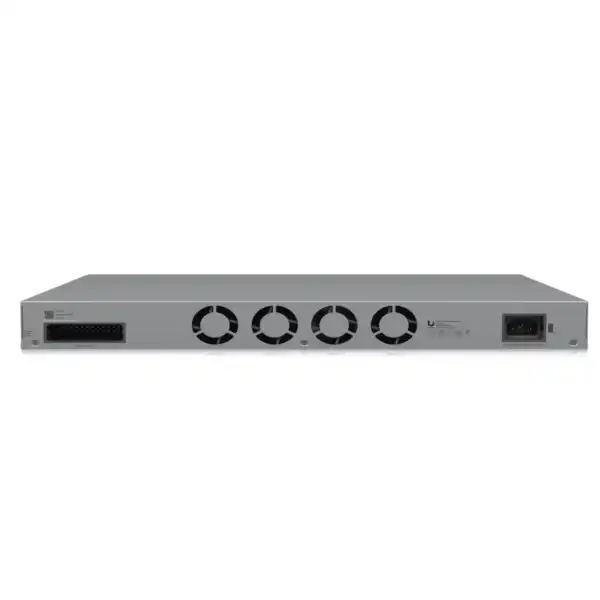
USW-Pro-Max-48 uses an internal 100W AC/DC power supply, with an AC input range of 100–240V at 50/60Hz and a stated maximum consumption of 100W. Ubiquiti also documents a USP-RPS DC input for backup-power readiness. That means a compatible redundancy arrangement can be considered, not that a separate backup unit is included with the switch or that an unconfigured DC socket automatically protects the network.
Assess the availability objectives of the site before selecting supporting equipment. A UPS may address interruptions at the AC distribution point, while a supported redundant power arrangement has a different role in the overall resilience design. The chosen strategy should account for upstream routers, optical equipment, management systems, storage, and access devices. Backing up only one switch will not preserve network service if a gateway or fiber device loses power.
For installations in Tanzania, confirm actual voltage quality, earthing, protective devices, environmental conditions, and the maintenance arrangement with a qualified local electrical professional. Do not assume that the advertised input range alone solves every power-quality or surge-protection concern.
Understanding the performance figures
Ubiquiti publishes 224 Gbps switching capacity, 112 Gbps total non-blocking throughput, and a forwarding rate of 167 million packets per second. These are hardware capability specifications. They are not promises that any single computer will download at 112 Gbps or that a shared internet connection becomes faster simply because this switch has a large switching number.
Switching capacity and non-blocking throughput use different conventions, so they should not be presented as interchangeable metrics. In procurement evaluation, compare like with like and examine the actual port mix: thirty-two 1G copper, sixteen 2.5G copper, and four 10G SFP+ links. This distribution defines the physical connection choices and where traffic could converge on shared uplinks.
Practical performance depends on packet sizes, forwarding policies, network topology, traffic distribution, connected endpoint limitations, and software configuration. Workloads such as large backups or simultaneous workstation transfers should be measured under representative conditions. A meaningful acceptance test looks at loss, latency, negotiated speeds, and application response, not just the headline bandwidth number.
Professional AV and multicast environments
The technical specification lists Pro AV profiles for technologies including Dante, Q-SYS, NDI, AES67, SDVoE, Shure, Crestron, and Play. It also lists advanced IGMP configuration and multicast handling. This can make the switch relevant to professional audio, video, collaboration, and production environments where multicast behavior and predictable switching policies matter.
A listed profile is not a blanket guarantee that every product in an AV ecosystem will interoperate without planning. Some designs require specific timing arrangements, VLAN boundaries, multicast queriers, traffic priorities, or validated firmware combinations. The total bandwidth of cameras, encoders, screens, and audio interfaces also varies widely. Estimate the aggregate traffic instead of treating support for a protocol name as a complete network design.
Document endpoints, multicast groups, timing requirements, failover expectations, and stream counts. Where a venue is business-critical, test representative traffic before a live event. If the system depends on PoE-powered AV endpoints, arrange a separate appropriate power solution because this particular switch provides no PoE output.
Scenario: a growing office campus
A growing organization may need dozens of dependable wired connections for desktop PCs, printers, meeting rooms, shared storage, and a few performance-oriented workstations. The Pro Max 48 allows most everyday clients to remain on 1G while a selected set uses 2.5G. A 10G SFP+ link can connect the access layer to a capable aggregation point, subject to compatible transceivers and the design of the rest of the network.
Separate staff, visitors, facilities equipment, and management systems into documented networks. Determine whether the switch’s supported local Layer 3 functions or an upstream gateway will handle the relevant routing. When remote branches are involved, remember that a fast campus switch cannot overcome a slow wide-area or internet connection.
This is a good scenario for central management, labeling, and controlled change procedures. It is less suitable as a direct substitute for a PoE access switch if the office cabling serves a large number of cameras and powered wireless access points. Create a port and power schedule for the real room, not a generic office diagram.
Scenario: computer training and technical labs
A training facility, engineering laboratory, or technology classroom may have many similar workstations and a small number of shared high-performance systems. The 32 Gigabit ports can support ordinary learners or desktops, while the 16 multi-gig ports can be allocated to instructor stations, imaging systems, or demanding storage-connected machines where the endpoint supports 2.5G. The switch can also carry separate lab and administration VLANs when correctly configured.
A lab environment often changes frequently. Devices are reimaged, users connect new equipment, and experiments may generate unusual broadcast or multicast traffic. Keep a repeatable port-profile library, document temporary exceptions, and use storm-control and network-isolation features thoughtfully. The goal is to protect shared infrastructure without preventing legitimate teaching or testing.
Consider peak class size, the performance of imaging servers, and the impact of simultaneous downloads. Test the busiest session rather than assuming nominal port speeds will resolve every capacity problem. If laboratories use experimental network devices, keep them in an intentionally separated test segment with defined access rules.
Scenario: content creation and local storage
Teams editing large photographs, video, architectural files, or engineering projects may benefit from a fast local access layer when workstations and storage systems support it. The Pro Max 48 provides a measured upgrade path: connect selected client machines at 2.5G and place suitable shared infrastructure behind a well-designed 10G connection. This can reduce one class of workstation bottleneck without committing every user to 10G copper hardware.
The details of a file workflow matter. A single shared storage appliance may become the bottleneck if its disks, network card, or protocol settings cannot keep up. A switch with excellent throughput will not fix slow mechanical storage, overloaded servers, or inefficient application access patterns. Establish representative transfer sizes, concurrency, and acceptable performance before selecting equipment.
Plan backup traffic separately from business-hour editing demand where possible. Evaluate the traffic direction through the aggregation layer and the security model for sensitive project data. The right result is faster collaboration that remains easy to monitor, maintain, and restore.
Scenario: mixed-purpose institutional networks
Administrative offices, clinics, education facilities, and similar institutions may share a building while having different needs for privacy, operational continuity, and network access. This switch can act as a managed wired access component for externally powered computers, printers, and selected multi-gig devices. It is not a medical device, does not establish regulatory compliance, and does not by itself provide all security functions an institution may need.
Separate critical management and operational traffic from general users through a well-defined architecture. Confirm that any specialized connected system supports the desired switch features and has a documented vendor-approved network configuration. If a connected endpoint has special availability, isolation, or certification requirements, follow that system’s own technical and legal obligations.
For procurement, request a network diagram and equipment schedule rather than buying solely from a port-count list. Include backup power, commissioning tests, support responsibilities, and spare-parts strategy. A considered infrastructure choice should remain serviceable as the institution adds users or changes its operating processes.
Planning step 1: audit the existing network
Begin with a physical and logical inventory. Count occupied copper ports, unpatched but required positions, currently powered endpoints, expected growth, uplink interfaces, and connected device speeds. Separate devices with their own electrical supply from devices that must receive PoE. This is the quickest way to determine whether the non-PoE Pro Max 48 matches the real requirement or only appears attractive on paper.
Collect existing switch configurations, VLAN lists, patch-panel maps, IP ranges, gateway details, management credentials under an approved secure process, and the latest network diagram. Record critical systems that cannot tolerate a prolonged interruption. Identify which existing cables and transceivers can be reused only after checking compatibility and condition.
Translate the audit into a procurement matrix with port type, required throughput, endpoint power, destination network, and redundancy requirement. A clear matrix reduces purchasing errors and creates a baseline for acceptance testing after cutover. It also shows when a smaller model or a PoE alternative would be more appropriate.
Planning step 2: allocate ports and growth capacity
Build a table of individual endpoints rather than reserving all sixteen 2.5G sockets for equipment that might never need them. Assign high-speed ports first to confirmed multi-gig clients and future upgrades with a credible plan. Put general-purpose Gigabit endpoints on 1G access ports. Keep a modest documented reserve for changes in user count, room layout, or equipment type.
Remember that the four SFP+ ports have a separate purpose. Do not consume them casually without deciding whether they are needed for aggregation, an additional connected switch, a high-speed server, or a resilient topology. Estimate busy-hour loads and the number of concurrent users whose traffic will cross each uplink.
If a design requires more than sixteen 2.5G RJ45 clients, this switch will not satisfy that requirement merely because its switching fabric has substantial capacity. Compare a model with a different copper-port mix, or distribute faster endpoints across multiple appropriate switches. Physical interfaces, not marketing claims, ultimately determine the available connection options.
Planning step 3: specify optics, cabling, and patching
For each 10G path, list both endpoint interfaces, fiber or copper medium, estimated link distance, module type, and routing through the building. SFP+ direct-attach cables may suit some short cabinet-to-cabinet connections; optical modules may be preferred for other distances or infrastructure layouts. The exact choice requires compatibility validation and attention to the optical characteristics at both ends.
For copper access runs, inspect termination quality, patch cords, structured-cabling certification where available, and negotiated link speed. A successful 1G link does not automatically prove that every installed run meets the desired 2.5G service level in its particular environment. Avoid promising upgrade speed until the link is tested with the actual endpoint and switch.
Document fiber polarity, connector type, spare ports, and patch-panel references. Include a physical labeling method and a port-name convention within UniFi Network. These details make initial commissioning smoother and reduce the chance of disconnecting a production service during future maintenance.
Planning step 4: design segmentation and routing
Create an approved logical network plan before plugging in all the endpoints. Define access VLANs, trunk VLANs, management networks, DHCP scopes, addressing, route ownership, and permitted communication between segments. In a multi-switch environment, consistency matters: a VLAN configured on the access switch but missing from the upstream trunk can be difficult to diagnose after a hurried migration.
Decide which routing should occur on the switch and which remains on a UniFi gateway or other suitable router. Test required services such as file sharing, printing, identity systems, management software, and backups across their intended boundaries. Restrict guest or untrusted traffic according to the organization’s policy rather than allowing broad access merely because a route exists.
Change management should include a rollback plan. Before cutover, save current configurations in an approved location and identify who can restore connectivity if the administration interface becomes inaccessible. After the change, verify DNS, DHCP, gateways, access-control rules, and service availability for representative user groups.
Planning step 5: commission and test
A structured commissioning process begins with a supported UniFi Network environment and a confirmed software version. Adopt the switch using the intended management method, review firmware, apply only the required configurations, and record the final asset information. Check physical port status against the patch schedule before declaring the work complete.
Test at least one ordinary Gigabit endpoint, one genuine 2.5G endpoint, and each commissioned 10G uplink. Confirm negotiated speed, packet-loss behavior, VLAN assignment, reachability, and expected application performance. Verify spanning-tree and aggregation behavior when those features are part of the design. Check client connectivity after a controlled link interruption where appropriate.
For critical installations, test power-recovery behavior under an approved maintenance procedure, including any installed UPS or compatible redundant power system. Do not test a live business network by casually pulling cables or power without authorization. Sign off results with the technical owner, retain the tested configuration, and record known limitations or future changes.
Planning step 6: operations and maintenance
Once the switch is in service, the task shifts from installation to predictable operation. Assign ownership for updates, configuration backup, alert review, asset tracking, and change approval. Monitor uplink utilization and error counters so the team can identify developing problems before they create widespread complaints. A quiet switch room should not mean the environment goes unobserved.
Maintain a list of supported firmware and controller versions appropriate to the organization’s change policy. Apply security and stability updates in planned windows, with a tested path for recovery. Review unused ports, unauthorized devices, access exceptions, and legacy VLANs regularly. When users move desks or departments, update the port register at the same time as the physical patch.
Keep a short troubleshooting checklist: identify the physical port, verify the endpoint power source, inspect negotiated speed and VLAN, check uplinks, review relevant UniFi events, and determine whether the fault belongs to the client, network, service, or upstream provider. This reduces unproductive switch replacements.
How to compare the nearby UniFi choices
The best alternative depends on the constraint that is most important. A Pro Max 48 PoE is a different model to consider if powered endpoints must receive energy over Ethernet; its price, electrical needs, and port-level PoE support should be assessed separately. A smaller Pro Max model may suit a site with fewer endpoints, while a switch with a larger proportion of multigigabit or 10G copper access ports may better fit a specialized high-performance environment.
Do not compare models only by headline “48-port” labels. Compare the distribution of 1G and 2.5G ports, uplink speed and quantity, PoE capability, supported routing features, management fit, rack space, power design, and total installed cost. For PoE products, power budgets and endpoint classes are essential comparison columns; for non-PoE products, they are not applicable.
An organization already using UniFi may prioritize management consistency, while a mixed-vendor network may prioritize protocol interoperability and operational standards. The technical design should document the required behavior without assuming that brand alignment alone solves every integration issue.
Tanzania procurement and deployment considerations
For a Tanzania-based purchase decision, begin with the exact model string: USW-Pro-Max-48, without the PoE suffix. Obtain a written quotation that identifies the model, any separately required SFP+ modules, patching materials, rack accessories, and commissioning work. Ask the seller to confirm the quotation’s commercial terms, stock position, warranty conditions, taxes, delivery arrangement, and support responsibilities rather than relying on assumptions or foreign-market pricing.
Site-readiness questions are equally important. Confirm suitable electrical distribution, grounding, backup power, cable runs, rack ventilation, and secure administrator access. Consider how the business would continue operating if an internet circuit, upstream router, optical uplink, or power source failed. Those dependencies determine overall service resilience more than the switch specification in isolation.
If equipment is being integrated into a regulated or specialized network, the purchaser and responsible technical team should verify the relevant local obligations for the completed system. No local authorization, certification, supply availability, or on-site service promise is implied by the manufacturer’s international product specifications.
What to include in a request for quotation
A useful quotation request should specify quantity, exact manufacturer model, site type, current managed-network platform, number of active wired endpoints, anticipated growth, and whether any connected device requires PoE. Add a breakdown of 1G, 2.5G, and 10G connections and identify the expected uplink media. This allows a technical response to address the intended architecture rather than merely listing a switch price.
Ask whether compatible optics, cabling, rack mounting, UPS or redundant-power hardware, configuration, testing, and handover are included. Request clear separation between equipment and optional project services. Where an existing network is being replaced, outline downtime constraints and who has authority to approve changes.
Before accepting a quotation, check that the model has not accidentally been changed to the PoE version or another 48-port family member. Confirm the scope of supply and support in writing. A good purchase decision compares the installed and supportable solution, not only the unit price.
Summary: the right fit and the next step
Ubiquiti Pro Max 48 Tanzania buyers evaluating the USW-Pro-Max-48 should focus on three advantages: forty-eight managed copper access ports, selective 2.5 GbE connections for faster clients, and four 10G SFP+ interfaces for a capable upstream design. Layer 3 functions, Etherlighting, and UniFi Network administration add value when they match the real management and segmentation requirements.
The chief limitation is equally clear: this is not a PoE switch, and it does not provide 10G RJ45 access on its regular copper ports. Buyers who need powered devices throughout the premises or a very large number of multi-gig clients should evaluate alternative port and power mixes before ordering.
Request a tailored quotation for the Ubiquiti Pro Max 48 Tanzania deployment with your port count, uplink plan, location requirements, and required accessories. FourTeck Tanzania can use that information to assess the proposed product configuration during the quotation process; availability, commercial conditions, and any services must be confirmed before purchase.
Frequently asked questions about USW-Pro-Max-48
Is USW-Pro-Max-48 a PoE switch?
No. The USW-Pro-Max-48 is the non-PoE Pro Max 48. It has 48 RJ45 Ethernet ports but does not provide PoE power through them. Choose a separately specified power arrangement for powered endpoints or evaluate a PoE-capable switch model. Model suffixes matter, so check the exact manufacturer part number on a quote and on the delivered unit.
How many 2.5G ports does it have?
It has 16 RJ45 ports capable of 2.5 GbE and 32 RJ45 ports for Gigabit Ethernet. The 2.5G ports also negotiate supported lower Ethernet speeds with compatible devices. A 1G-only computer will remain limited by its own network adapter. Reserve the faster ports for devices with a documented need and a compatible end-to-end connection.
Are the four SFP+ ports counted within the forty-eight?
The 48-port access description refers to the copper RJ45 Ethernet ports. There are four additional 10G SFP+ interfaces. They can be used for a suitable high-speed network design after selecting compatible connectivity media. Count them separately when planning physical access ports versus uplink capacity, and specify the required transceivers or cables in the bill of materials.
Can it be used for VLAN routing?
Ubiquiti lists inter-VLAN routing, static routing, DHCP server operation, and DHCP relay for local networks among the supported Layer 3 functions. Whether a particular deployment should route at this switch depends on its gateway architecture, control policies, and software environment. Plan the routing responsibility and test authorized communication between network segments before putting users into production.
Does the switch replace a firewall?
No. Having Layer 3 features does not make a switch a complete security perimeter device. Internet filtering, VPN functions, firewall inspection, provider connectivity, and some policy functions may require an appropriate gateway or other security components. Design the routing and security architecture together, with explicit limits on communication between important VLANs and a controlled management plane.
What version of UniFi Network is needed?
The official technical specification states UniFi Network 8.0.24 or later. Before deployment, check the compatibility of the specific UniFi console or software-hosted controller and the firmware selected for the switch. Maintain a supported upgrade and recovery procedure, particularly where a shared controller manages many production devices or remote network locations.
What is Etherlighting used for?
Etherlighting illuminates compatible Ethernet and SFP+ ports to support visual identification and status awareness, including location, link or speed information, and native-network indication. It can save time in a densely cabled rack. The precise presentation depends on configuration and environment, so use it alongside permanent labels, switch statistics, and the current port schedule rather than as the only diagnostic method.
Can I connect a 10G copper workstation directly to an RJ45 port?
Not at 10G over the standard RJ45 access ports on this model. Its fastest RJ45 interfaces are specified for 2.5 GbE. The four higher-speed interfaces are SFP+ ports supporting 10G and 1G. A 10G endpoint design may use a suitable compatible SFP+ connection or a different switch with the required 10G copper access, after validating hardware and transceivers.
How much power does it use?
Ubiquiti states a maximum switch power consumption of 100W and a 100–240V AC, 50/60Hz input. That figure is the device’s own maximum consumption, not power available to network endpoints. Budget separately for optical equipment, routers, storage, powered devices, UPS efficiency and runtime, and the rest of the rack’s electrical load.
Does it support redundant power?
The manufacturer lists a USP-RPS DC backup input, so a supported backup-power design can be planned with compatible equipment. This should not be interpreted as an included second power supply or complete end-to-end failover. Verify exactly what equipment, cables, and operating configuration the chosen redundancy arrangement needs, and test it within an approved maintenance process.
Can it serve an AV or multicast network?
The official specifications include IGMP controls and a set of Pro AV profiles. That makes the model relevant to some professionally designed AV environments, but compatibility depends on actual endpoint requirements and the full network architecture. Evaluate multicast forwarding, bandwidth, clocking, firmware, VLANs, and the necessary power arrangements before treating it as suitable for a specific production installation.
Where can I confirm Tanzania pricing, stock, and delivery?
Request a current quotation for the exact USW-Pro-Max-48 model and its required accessories. Manufacturer listings from other countries do not establish a Tanzania price, tax position, warranty, stock level, or delivery schedule. Confirm those details, including any installation or support services, directly through the intended commercial quotation process before committing to the purchase.
Request a model-specific Tanzania quotation
Share your required switch quantity, access-port plan, whether PoE devices are present, 10G uplink media, intended UniFi management setup, and installation conditions. Ask FourTeck Tanzania to confirm the exact USW-Pro-Max-48 configuration, commercial terms, and separately required accessories. No local price or availability is assumed here.
Next step: request a quotation and technical fit check for the non-PoE Pro Max 48.




Reviews
There are no reviews yet.