
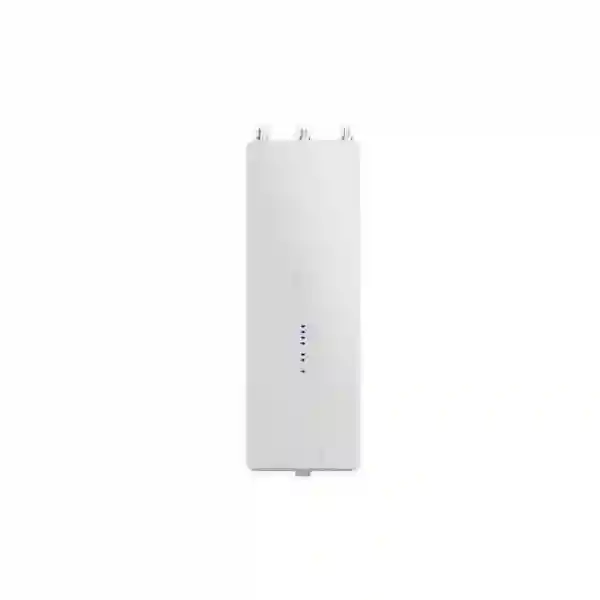
Ubiquiti Wave MLO6 (Wave-MLO6) in Tanzania
The Ubiquiti Wave MLO6 (Wave-MLO6) is a Wi-Fi 7-based professional outdoor wireless radio designed for high-capacity point-to-point links. With 5 GHz and 6 GHz Multi-Link Operation capabilities, manufacturer-listed 8+ Gbps total throughput, 10 GbE and SFP+ interfaces, and UISP support, it suits careful evaluation for ISP transport and enterprise site connectivity. Actual performance and 6 GHz use depend on applicable regulatory permissions, region settings, antenna choice and link engineering. For Tanzanian projects, begin with a spectrum and site suitability assessment, then request a complete equipment and installation quotation.
*Manufacturer specification, not a guaranteed site result. Verify Tanzania spectrum permissions and 6 GHz internet requirements.
At-a-glance technical specifications
Tanzania deployment warning
Do not commission the radio on an unverified frequency. Ubiquiti says the 6 GHz radio is disabled by default and requires a permanent internet connection; local permission and device support must be checked. Manufacturer FCC and IC certifications do not demonstrate TCRA approval. Seek model-specific regulatory and engineering confirmation before an outdoor installation.
What the Wave MLO6 does
The Ubiquiti Wave MLO6 (Wave-MLO6) is a professional outdoor wireless radio for point-to-point network links. It serves teams that need a high-capacity connection between two fixed locations without immediately constructing a fibre route. Its Wi-Fi 7-based radio platform works across 5 GHz and 6 GHz using Multi-Link Operation, subject to permitted frequencies and operational requirements. This is network infrastructure rather than a conventional indoor Wi-Fi access point. A complete link needs compatible equipment at both ends, appropriate antennas, suitable mounting, power, switching and a carefully planned radio path. Buyers should begin with their required traffic capacity and reliability target, not a headline speed figure.
For a Tanzanian deployment, the procurement discussion should include the proposed sites, cable and fibre alternatives, spectrum permissions, expected service growth and the engineering responsibility for installation. Consider how the link will connect to routers, optical networks or distribution switches and what happens when power or internet access is interrupted. The right question is not simply whether Wave MLO6 is fast, but whether it is operationally suitable and permitted for the intended path. Request a model-specific engineering and compatibility review before budgeting the complete connection.
Who should consider this radio
Internet service providers may evaluate Wave MLO6 for capacity-focused transport between towers, aggregation points or other fixed network locations. Enterprise network teams may assess it for building-to-building connectivity, campus segments or a dedicated link between facilities. Systems integrators might use it as part of a larger solution carrying business applications, voice traffic or surveillance data. These are illustrative applications, not promises that the device will meet a particular SLA or interoperate with every third-party component. Its published software specification lists point-to-point operation; do not assume that other advertised family-level applications are available on this exact configuration.
A buyer is more likely to benefit from Wave MLO6 when conventional wireless capacity is insufficient and the network can take advantage of a 10-gigabit connection. Smaller networks may not need this level of headroom. If the site has an excellent fibre route or a modest traffic requirement, compare total installation and maintenance costs before deciding. Consider antenna compatibility, support skills, weather exposure, tower space and the lifetime cost of the path.
Multi-Link Operation explained
Multi-Link Operation, or MLO, is a capability associated with Wi-Fi 7 that allows an appropriately configured system to use more than one radio link. Wave MLO6 combines 5 GHz and 6 GHz capabilities for higher aggregate capacity and resilience-oriented link design. This is not the same as saying that every user device receives 8 Gbps or that a network will maintain full speed when one band becomes impaired. Both endpoints, firmware, permitted channels and practical RF conditions matter. The design should distinguish a theoretical radio capability from usable application throughput.
A good acceptance test should measure end-to-end data delivery, latency, jitter, packet loss and behavior during interference or a link transition. It should include representative packet sizes and concurrent traffic classes rather than relying only on a single local speed test. Think of MLO as an available engineering tool: it does not replace sound path planning, legal spectrum selection or adequate network equipment.
5 GHz and 6 GHz planning
The combination of 5 GHz and 6 GHz makes Wave MLO6 attractive for engineers who can legally deploy both bands and manage their different propagation and interference conditions. However, 6 GHz access is not a universal entitlement. Ubiquiti states that the 6 GHz radio ships disabled and that a permanent internet connection is necessary for 6 GHz link operation. The available channels, transmit limits and outdoor permissions depend on country-specific requirements and device configuration. Do not assume that US or Canadian frequency tables automatically apply in Tanzania.
Before procuring equipment for a Tanzanian outdoor deployment, determine which bands and channel widths can legally be used at the proposed site and whether any licence or type approval is required. Check the current TCRA framework and the manufacturer’s supported country settings. Ask the project engineer to document the actual permitted operating frequency, channel bandwidth, antenna gain and allowable transmit power. If the 6 GHz portion cannot be authorized or enabled, revisit the business case for the MLO6 rather than counting on performance that the installation cannot deliver.
Throughput: reading 8+ Gbps correctly
Ubiquiti publishes 8+ Gbps total throughput for the Wave MLO6. This is a manufacturer performance specification, not an assured end-user internet speed, and it must be interpreted in the context of the complete point-to-point system. Real throughput can be affected by available channels, antenna design, alignment, distance, interference, modulation rates, traffic overhead, host equipment and network configuration. Even a high-speed radio cannot compensate for a congested upstream connection or a slower interface elsewhere in the path.
When comparing proposals, ask for expected usable bidirectional throughput at the intended distance and chosen regulatory settings. Establish whether the performance objective is aggregate transport, one-direction burst speed or a sustained service-level target. Specify measurement methods in advance. If a project needs capacity for many subscribers or multiple departments, build a forecast that includes peak use, growth and safety margin. A field survey and link budget are more actionable than a marketing number alone.
Distance and line-of-sight expectations
The published maximum range is 100 km, but that headline should never be treated as a guaranteed feasible path. A radio link of substantial length requires a carefully designed combination of antennas, terrain clearance, Fresnel-zone clearance, signal margin and tower structures. Earth curvature and local terrain can become important on long paths, while nearby trees and buildings can affect much shorter ones. The correct antenna arrangement is essential because Wave MLO6 uses external RF connections rather than relying on a built-in long-range directional antenna.
A site survey should record precise proposed mounting heights, obstruction profiles, rooftop or tower access and physical security. For longer paths, use a professional propagation model and validate assumptions with on-site testing. Strong, clear alignment also supports more predictable modulation and lower retransmission rates. If the customer has no safe line of sight, investigate an alternate relay, another site, fibre or a different wireless design instead of assuming the maximum published range is achievable.
Choosing the right antenna
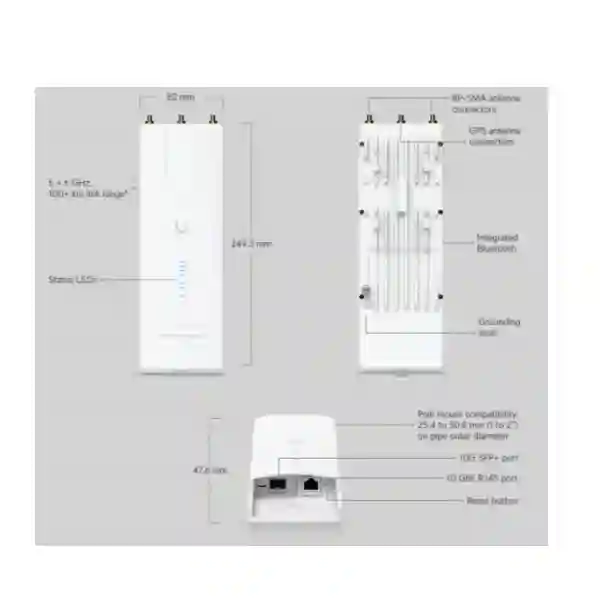
Wave MLO6 has two waterproof RP-SMA RF connections and a separate waterproof GPS connection. Antenna selection is therefore a core part of the solution, not a cosmetic accessory decision. Ubiquiti presents UISP dish and horn antenna options in its product ecosystem, but compatibility must be established for the exact antenna, radio, mounting hardware, cable arrangement and frequency band. The correct choice depends on intended distance, beamwidth, available mast space, environmental exposure and potential interference from nearby links.
A narrow-beam antenna may improve spatial isolation and gain at a long-distance site, but it also makes alignment more demanding. A wider-beam option may suit another geometry, yet could offer different gain and interference exposure. Confirm both polarization paths and manufacturer-approved mounting instructions. Include suitable weatherproof connectors, mechanical retention and grounding practices in the installation plan. The antenna package should be documented in the quotation so the radio price is not mistaken for the complete deployed link.
10 GbE and SFP+ connectivity
On the wired side, the manufacturer lists one 10 GbE RJ45 network port and one 10G SFP+ port. These interfaces support integration with high-capacity switches, aggregation equipment and optical distribution, depending on the selected transceiver and cabling. They do not automatically guarantee full throughput through a particular switch or router. The interfaces are particularly useful when the network already uses ten-gigabit aggregation or when fibre backhaul terminates near a tower cabinet.
Specify the exact port that will carry data and power, the optics or copper cable required, the switch port speed and the expected link topology. Verify whether a transceiver is suitable for the platform and environment. At the planning stage, reserve sufficient switching capacity and consider how traffic will be segmented and monitored. A complete bill of materials may require surge protection, shielded cabling, optical modules, patch leads, switch capacity and cabinet space in addition to the radio itself.
Power design and passive PoE
Ubiquiti specifies a maximum power consumption of 20 W and lists a 54 V DC, 0.56 A 10 GbE PoE adapter as included. The hardware has defined passive-PoE wiring and voltage arrangements; this is not a licence to substitute any available PoE switch or injector. Incorrect power sourcing can damage equipment or create an unsafe installation. Match the exact adapter, voltage, polarity and pair requirements to the manufacturer’s current installation guidance.
Where the link supports essential services, design appropriate backup power for the entire chain: radio, upstream switching, router and any equipment needed for required internet connectivity. Check UPS sizing with realistic load, battery condition and power-loss objectives. Outdoor cabling should follow site electrical practices, equipment protection requirements and appropriate lightning or surge mitigation. Confirm mains and earthing design with qualified personnel and include recurring maintenance in the operating budget.
Outdoor enclosure and installation
The Wave MLO6 enclosure combines aluminum alloy and UV-resistant polycarbonate and carries an IPX6 water-resistance rating. The manufacturer specifies an operating temperature range of minus 40 to 60 degrees Celsius and humidity of 5 to 95 percent non-condensing. Those figures describe the listed equipment limits, not a guarantee against all environmental damage or improper mounting. The radio uses a pole-mount arrangement for compatible pole diameters from 25.4 to 50.8 mm.
Outdoor installation quality determines much of a link’s service life. Inspect mast stability, wind exposure, water drainage, cable bend radius, strain relief and access for maintenance. Do not place connectors under tension or rely on an IP rating to compensate for poor sealing practices. Verify that any tower work is performed safely by competent personnel. Record installation photographs and a commissioning baseline so future service teams can identify changes in orientation, obstruction or equipment condition.
GPS, indicators and alignment
The radio includes GPS and front-panel indicators for power, Ethernet, GPS and signal strength. These support installation and maintenance, but do not replace an RF survey and objective performance measurements. The manufacturer’s software tools also list antenna alignment and site survey utilities. A disciplined installation uses those tools with a documented test procedure rather than stopping when an indicator first suggests a workable signal.
Commissioning records should include endpoint identification, firmware versions, radio channels, antenna orientation, measured receive levels, traffic results and any environmental constraints. Store credentials securely and preserve configuration backups according to the operator’s standards. Record who is responsible for periodic checks, fault triage and replacement planning. These practical details make a complex network more supportable, especially when technicians return to a remote location months after installation.
UISP network monitoring
Wave MLO6 supports the UISP management ecosystem. For a service provider or enterprise team, central management can help organize network visibility and make device administration more consistent. The manufacturer’s listed utilities include ping, traceroute, speed test, discovery, NTP client and ping watchdog features. How these are used should follow the current software version, security policy and operational procedures. Verify available dashboard views and features before promising a specific automation or alert.
In the service design, define who can administer the device, how firmware is approved, which events are monitored and how faults are escalated. Include regular review of link health, utilization, signal changes and configuration drift. Management access should not be exposed casually to untrusted networks. UISP compatibility is valuable, but it is only one part of a properly monitored service; upstream routing, power, equipment cabinets and customer-facing quality must also be considered.
Security and traffic handling
Ubiquiti lists WPA3-PSK with AES for radio encryption and bridge mode as a network function. This provides a security foundation for the wireless hop, not a complete security architecture for the organization. Networks still require suitable access controls, credential management, management-plane protection, firewall rules and appropriate segmentation. Do not assume that any wireless link alone satisfies a regulatory or corporate security standard.
For business applications, classify the data crossing the bridge and determine whether additional encryption or private-network controls are needed. Plan credential changes, firmware updates, administrative account ownership and recovery access. Where surveillance, payment systems, customer traffic or internal business systems share the path, apply segmentation and capacity planning according to real operating requirements. Test security controls and document approved management methods before the link enters production.
Link reliability and redundancy
A good wireless backhaul plan addresses both normal operation and failure. Interference, site access, damaged cable, storms, power disruptions, configuration errors and upstream outages can all affect availability. MLO may help with multi-radio operating strategies when supported and configured, but it should not be sold as a substitute for a genuinely independent backup path. The appropriate resiliency design depends on how costly an outage would be to the customer.
For mission-critical sites, consider whether there is a second radio path, fibre route, different building entry or other independent service. Include failover testing, spare equipment strategy and an operational contact matrix. Review how far the backup shares the primary path’s power, tower, switch and internet dependencies; shared infrastructure can become a common failure point. Establish realistic recovery procedures before selecting a resilience claim for a customer contract.
Evaluating interference
Both 5 GHz and 6 GHz are subject to real-world RF conditions, and operating permissions vary by jurisdiction. A site that appears clear during an office-hour survey may behave differently at peak demand or when other links are later installed nearby. Channel width is a tradeoff: wider channels can offer more capacity, but they also need more available spectrum and can interact with interference and regulatory constraints. The manufacturer lists multiple supported channel widths for its two radios; these are selectable only within applicable supported and authorized configurations.
Survey relevant channels at both ends and evaluate neighboring networks, directional antenna placement and anticipated future growth. Record the settings used in the assessment. A change in antenna, power or channel plan may require revisiting authorization and the link budget. Avoid presenting an indoor access-point survey as sufficient evidence for a long outdoor link. Experienced RF engineering is particularly valuable where multiple operators share nearby tower infrastructure.
Network architecture choices
A point-to-point bridge connects two selected network locations. That is different from providing wireless access to many ordinary phones or laptops, and it should not be confused with a consumer Wi-Fi mesh system. Design the transport path around business requirements: VLANs, uplink capacity, IP addressing, monitoring, traffic classes, maintenance windows and future expansion. Review which functions are handled by the radio and which must remain on upstream switches, firewalls and routers.
Where an enterprise needs to connect branches or several buildings, map the sites and decide whether a single bridge, multiple independent bridges or a central distribution approach makes operational sense. Confirm that every hop can carry the intended load. A network drawing should show radios, switches, backhaul services, power sources and failure domains. This prevents a powerful radio from being placed into an otherwise undersized network.
What to include in a quotation
An accurate quotation should distinguish the Wave MLO6 radio itself from the finished wireless connection. A two-ended link ordinarily needs equipment at both sites, and the full solution may also require antennas, brackets, power, cabling, compatible optics, switches, mounting hardware, protective devices and professional services. Do not assume that a listed radio includes every accessory shown in promotional photography. Verify the exact contents of the regional package and the intended antenna options.
Request a clear statement of hardware quantities, supported model variants, site survey work, installation scope, commissioning tests and post-installation responsibilities. Ask whether the quote includes transportation, tower access, licensing review, power work, documentation and training. Confirm pricing and availability for Tanzania through the quotation process; no local price, delivery promise or stock claim is made here. A transparent scope makes competing proposals easier to compare.
Tanzania spectrum and authorization
Tanzania’s telecommunications spectrum is regulated by the Tanzania Communications Regulatory Authority (TCRA). It publishes national allocation information and band plans for relevant radio services, including fixed wireless applications. These documents should be considered when evaluating outdoor 5 GHz and 6 GHz equipment. An international product specification, an FCC or IC certification, or a radio’s ability to select a channel does not itself establish authorization for a Tanzanian installation.
Before operation, ask the responsible engineer or regulatory specialist to confirm the relevant local equipment approval, frequency assignment or licence requirements, permitted antenna gain and installation conditions. Retain the documented basis for any selected channels. This page intentionally does not claim that Wave MLO6 is TCRA type-approved or that all its supported 6 GHz channels may be used outdoors in Tanzania. Regulatory suitability is a go/no-go part of procurement, not an item to leave until after installation.
6 GHz internet connectivity dependency
A particularly important buying detail is Ubiquiti’s notice that 6 GHz operation requires a permanent internet connection and that the 6 GHz radio is disabled by default. Teams designing isolated private networks, disaster-recovery connections or links with intermittent upstream access should assess this dependency early. It would be misleading to promise unrestricted offline 6 GHz operation based on radio hardware alone. Confirm the current manufacturer mechanism, supported region and behavior under the exact proposed deployment.
If the link itself is supposed to supply the only external connectivity to a remote site, document how this dependency will be satisfied. Consider the implications for installation, commissioning and fault recovery. Ask the installer to demonstrate the intended startup and recovery sequence in a controlled test. Where 6 GHz is unsuitable, evaluate whether a different architecture or equipment choice better matches the site’s independence and availability requirements.
Performance acceptance testing
A reliable project should have measurable acceptance criteria. Recommended test categories include traffic throughput, latency under load, packet loss, recovery after planned reboot, behavior under representative interference and link utilization at peak periods. Exact target values must be chosen for the project; they cannot be inferred from a manufacturer’s aggregate throughput claim. A one-minute benchmark is not enough to characterize a network carrying business-critical applications throughout the day.
Create a commissioning plan with named test endpoints, traffic direction, test tools, physical conditions and pass/fail thresholds. Separate the radio hop from upstream ISP throughput to avoid misattributing a bottleneck. Record firmware and channel settings during the test so results can be repeated. For long-distance or business-critical links, a staged burn-in and follow-up inspection may be appropriate. Ensure the agreement identifies who resolves a failed test and whether additional equipment would be needed.
Business continuity and power
In some locations, unstable power or an unavailable upstream service can be a larger source of network disruption than the radio’s theoretical capacity. The network design should include the actual site power arrangement, UPS or backup strategy, grounding, switch availability and physical security. This is especially important when a wireless bridge connects sites that are otherwise difficult to reach. The power and connectivity prerequisites need to be realistic for both endpoints.
A continuity review can consider how long critical users can tolerate an outage and what operational response is possible. It may be economical to carry a suitable spare or arrange accessible replacement units, but such arrangements should be scoped and quoted. Do not assume any specific warranty, service response time or local spares availability without written confirmation. An operationally maintainable design provides more value than a specification sheet alone.
Wave MLO6 versus Wave MLO5
The two Wave MLO models target different RF requirements. Ubiquiti describes Wave MLO6 as a 5 GHz plus 6 GHz solution with 8+ Gbps total throughput, while Wave MLO5 is a dual-5 GHz solution with a lower published aggregate capacity. Wave MLO6 is therefore worth evaluating when the permitted spectrum, required capacity and connectivity conditions make the additional band useful. It should not automatically be specified for every point-to-point link simply because its headline speed is higher.
If outdoor 6 GHz is not approved for the intended site, or the necessary connection requirement cannot be met, the procurement team should consider the practical value of the MLO6’s extra capability. Compare equipment, antenna and licensing requirements as well as usable performance, not only radio purchase cost. Verify every exact-model feature using current manufacturer documents and request a project-specific design if the two alternatives appear close.
Wave MLO6 versus fibre
Fibre is often attractive where an existing route is accessible and long-term demand is substantial. A wireless bridge can be attractive when trenching, rights of way, distance or construction complexity make a wired path difficult. Neither choice is universally better. A realistic comparison looks at design and installation costs, ongoing maintenance, performance targets, redundancy options, regulatory obligations and the practical ability to repair faults.
Calculate the whole-of-life cost and assess the consequences of failure. An exposed tower site may be easier to activate than digging a fibre route but may also require tower access and weather-related maintenance. Fibre may offer a different operational profile while involving construction delays or physical route risk. In many networks, the strongest design combines wireless and wired systems where each solves a different problem. Choose according to the actual sites and service objectives.
Procurement checklist
Before ordering, confirm that the intended part is Wave-MLO6 rather than a similarly named Wave radio. Record the proposed deployment country, endpoints, required throughput, target uptime and any constraints on spectrum. Confirm that the planned installation has a legal operating configuration, suitable antennas and mounting, clear line of sight and a power scheme that matches the published electrical requirements. Check the needed 10-gigabit interfaces and whether existing switches can handle the connection.
Then request the full material list, implementation schedule, responsibilities and measurable commissioning criteria. Confirm regional compatibility, software support, regulatory documentation, local price and availability in writing from the seller or project team. Ask for assumptions and exclusions to be visible in the quote. If key prerequisites remain uncertain, start with a survey and design assessment instead of treating the radio as a plug-and-play purchase.
Installation workflow
A practical deployment generally begins with a desk-based feasibility study, followed by a physical site survey and regulatory review. Engineers then select the candidate antenna and mount arrangements, plan the transmission path and specify switching and power requirements. Only after the system is designed should the final equipment quantity and complete bill of materials be approved. This approach helps prevent purchasing a high-capacity device that cannot be used at the actual sites.
During installation, technicians should mount and secure the equipment, use correct cabling and power practices, align the link, record all settings and run the agreed performance checks. Handover should include the equipment inventory, logical topology, management ownership, test results and maintenance guidance. This is a recommended workflow, not a claim that a specific installation service is included with a purchase.
Network growth and upgrades
When planning a multi-gigabit connection, think about traffic growth beyond the first month. The Wave MLO6’s 10-gigabit wired interfaces give a high-capacity integration option, but the rest of the network must be appropriately designed to realize that value. Review switch backplanes, router capacity, optical uplinks, security processing and monitoring. A wireless hop may have adequate nominal performance while an upstream device becomes the true bottleneck.
Prepare a traffic forecast with expected users or services, peak utilization and room for operational headroom. Keep a record of current radio conditions to distinguish demand growth from RF degradation. Future expansion may call for a different frequency plan, more sites, another link or an upgraded wired network. The useful design is one that makes those changes understandable and manageable.
Support and maintenance planning
Outdoor wireless links should not be treated as maintenance-free after initial alignment. A sensible operations plan covers software updates, credential security, inspection of mounting and cabling, checking moisture ingress and monitoring changing RF conditions. The maintenance interval should be selected for site access, exposure, criticality and organizational policy. A network with good documentation is easier to repair when the original installer is unavailable.
For an ISP or enterprise team, identify how users report service problems and how the operations team determines whether a fault lies in radio transport, routing, power or upstream connectivity. Keep configurations and network diagrams current. If a replacement unit is planned, verify compatibility and provisioning procedures in advance. These steps improve operational discipline without implying that any manufacturer-rated device has a guaranteed lifetime or service availability.
Designing for real business traffic
The applications carried by a bridge influence how it should be engineered. Ordinary office data may tolerate different performance variation than voice, video conferencing or continuous surveillance streams. Business traffic can be bursty, whereas aggregation links may carry sustained demand from many users. Evaluate traffic patterns and decide which service classes, capacity reserves and monitoring signals matter to the organization.
Document the desired application experience alongside radio metrics. Low packet loss and consistent latency may matter more to some real-time applications than peak benchmark throughput. For a provider, subscriber aggregation and upstream contention are part of the design; for an enterprise, department separation and critical application prioritization may be important. Avoid treating a single throughput figure as a substitute for understanding service requirements.
Site safety and physical access
Radio selection is only one component of an outdoor network project. Towers, rooftops and exposed pole locations raise safety and physical-access questions. Determine who owns the site and who is permitted to work there. Review structural mounting suitability, cable routing, weather exposure, access restrictions and the presence of other RF equipment. Use trained personnel for work at height and coordinate with site owners as appropriate.
Good documentation should include safe shutdown arrangements, equipment identification and access instructions. Physical security helps prevent accidental disconnection, tampering or unauthorized configuration changes. In business-critical deployments, consider whether an incident at a shared mast can affect multiple services. These are general planning considerations; the specific engineering and legal requirements depend on the site and should be assessed locally.
Questions to ask a supplier
A useful product discussion begins with the required link endpoints and service objective. Ask whether the proposed frequency plan is permitted in Tanzania, whether 6 GHz operation is supported for this deployment and what its permanent-internet prerequisite means for your topology. Ask which antennas are suitable, what range and capacity a site-specific link budget predicts, and which wired interfaces, power components and protection devices will be supplied.
Also ask about commissioning evidence, applicable regional approvals, firmware management and ongoing support boundaries. Request written confirmation of the package contents, local pricing, any availability constraints and the assumptions behind the quote. If the answers require a survey, that is a normal part of responsible engineering. A complete answer should make risks visible before installation, not merely recite the highest published product specifications.
Final buying guidance
The Ubiquiti Wave MLO6 is most compelling as a candidate for engineered, high-capacity fixed wireless connections where its 5 GHz and 6 GHz features can actually be used. Its published 8+ Gbps throughput, dual high-speed wired interfaces, outdoor enclosure and UISP support make it relevant for professional networking teams. Yet the best purchasing decision depends on local authorization, antenna and link design, power, internet dependencies and whole-system cost.
For Tanzania, begin with a qualified feasibility and regulatory assessment rather than assuming that an international product listing establishes local suitability. Share the two site locations, approximate distance, line-of-sight information, capacity target and existing network interfaces when requesting a quote. A precise design and quotation can then distinguish what the radio provides from what the complete working link requires.
Frequently asked questions
Is Wave MLO6 an indoor Wi-Fi access point?
No. It is a professional outdoor radio intended for a designed fixed wireless network link. It should not be purchased as a substitute for ordinary indoor client Wi-Fi coverage.
Does Wave MLO6 support 5 GHz and 6 GHz?
Yes, the manufacturer specifies 5 GHz and 6 GHz radio capabilities. Actual use depends on supported region settings and applicable local spectrum authorization.
Will it always deliver 8 Gbps?
No. Ubiquiti states 8+ Gbps total throughput as a product specification. Field results depend on spectrum, RF conditions, antennas, alignment, path length and the rest of the network.
Can the 6 GHz radio run without internet?
Ubiquiti states that a permanent internet connection is required for 6 GHz link operation and that 6 GHz is disabled by default. Verify current device behavior for your design.
Is 6 GHz automatically approved for outdoor use in Tanzania?
No such claim is made. The relevant TCRA rules, permitted frequency assignment, equipment approval and device configuration require verification before operation.
How far can the radio reach?
The published maximum range is 100 km, but feasibility at a particular site requires a professional link budget, suitable antennas and a clear radio path.
What antenna comes with it?
The manufacturer specifies external waterproof RP-SMA connections. Confirm the exact box contents and approved antenna selection with the supplier; do not assume a complete antenna system is included.
Does it offer 10-gigabit connectivity?
Yes. The listed wired interfaces include one 10 GbE RJ45 port and one 10G SFP+ port. End-to-end capacity depends on the connected network equipment.
How is Wave MLO6 powered?
It uses specified passive PoE arrangements; the manufacturer lists a 54 V, 0.56 A 10 GbE PoE adapter as included. Follow its exact current installation instructions.
Is the device weatherproof?
Ubiquiti specifies IPX6 water resistance and an outdoor-oriented enclosure. Installation details, sealing, cable routing and protection remain essential.
Can it be monitored in UISP?
Yes. Manufacturer specifications list UISP support and network diagnostic utilities. Confirm the relevant software version and operational setup for your environment.
Does the radio replace fibre?
It may be an alternative or complement for certain fixed links. The right design depends on construction access, capacity, resilience, regulations and whole-life cost.
Is a Tanzanian price available here?
No verified local selling price or stock status was supplied. Request a quotation that identifies the complete radio, antenna, power and installation scope.
What information is needed for a quote?
Provide both site locations, approximate distance, line of sight, capacity goal, available mounting and power, network interfaces and any known operating constraints.
Request a Wave MLO6 solution quotation
Share the proposed link endpoints, distance, required capacity, power and site conditions. Ask for a project-specific compatibility, spectrum and feasibility review plus an itemized hardware and installation quotation. Pricing, availability, local approval and service coverage must be confirmed for the exact offer.
Ask FourTeck Tanzania about Wave-MLO6 and the complete planned link.




Reviews
There are no reviews yet.