
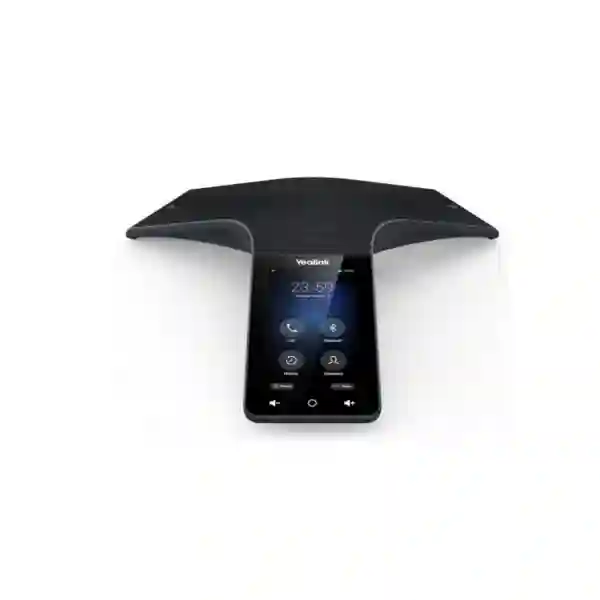
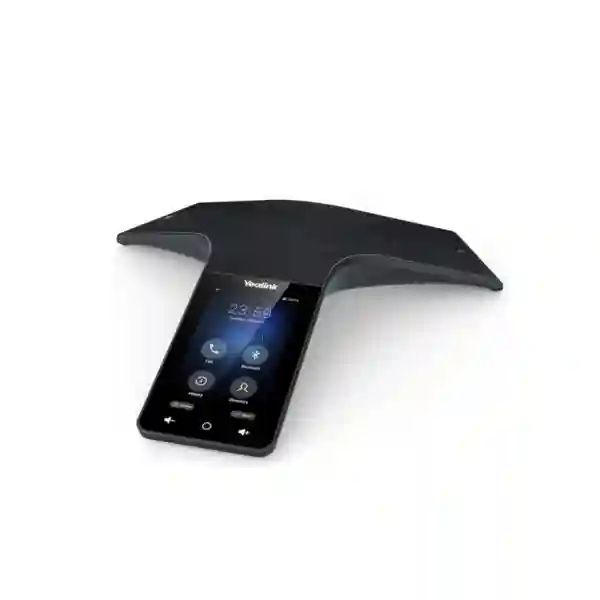

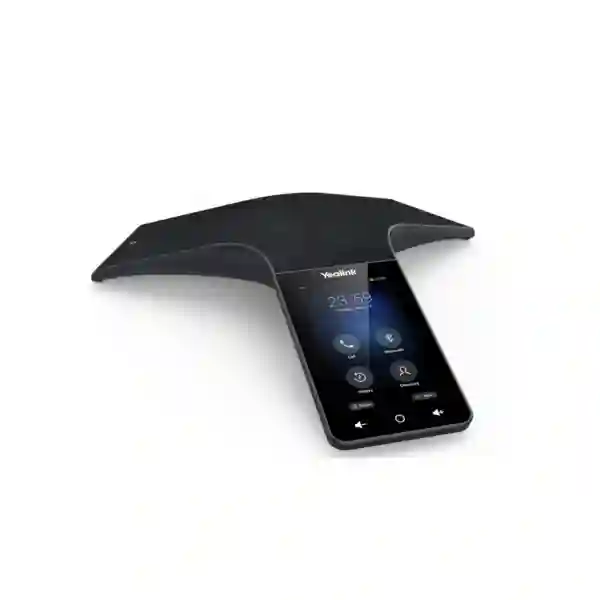
Yealink CP965 Teams Conference Phone
Yealink CP965 Teams Conference Phone is designed for organisations that want a dedicated Microsoft Teams audio endpoint in medium to large meeting rooms. Yealink’s current Teams datasheet identifies a 5-inch 720 × 1280 multi-touch display, a 12-microphone pickup array plus one additional microphone for noise reduction, 360-degree voice pickup reaching up to 20 feet or 6 metres, full-duplex audio, dual-band Wi-Fi, Bluetooth 4.2 and centralized device-management support. For Tanzania buyers, the practical value is not only the specification list: the device can provide a consistent meeting-room experience for teams that already use Microsoft 365 and Teams and need staff to join scheduled meetings without relying on a personal laptop or improvised speakerphone.
Before ordering, confirm room size, seating layout, Teams tenant readiness, PoE availability, Wi-Fi policy, network segmentation, quantity and whether any expansion microphone or accessory requirement is part of the project.
A 12-microphone voice-pickup array is specified for all-around table coverage, with maximum pickup up to 6 metres.
The Teams-tailored interface supports meeting and calling workflows, including one-touch joining and calendar-oriented operation.
Built-in dual-band 2.4/5 GHz Wi-Fi, 10/100 Ethernet and PoE support give IT teams practical deployment choices.
The device supports Microsoft, Yealink and Unify Square device-management platforms for provisioning and administration.
What the Yealink CP965 Teams Conference Phone solves
Meeting rooms often fail for simple operational reasons rather than lack of features. A laptop may be at the wrong end of the table, a USB speakerphone may not reach everyone, users may lose time selecting microphones and speakers, or staff may join a scheduled Teams meeting through different interfaces every week. CP965 addresses this by putting a dedicated Teams-oriented audio endpoint at the centre of the room. The screen gives users a familiar touch interface, while the microphone array is designed to hear participants around the table instead of depending on a single directional microphone.
For an IT manager, the value is repeatability. A standardized conference phone can be documented, provisioned, monitored and supported as part of the business communications environment. For procurement, the device can be evaluated against room size, collaboration platform, network readiness and user behaviour rather than purchased as an isolated gadget. For users, the aim is faster meeting entry, clearer speech and fewer ad-hoc cable changes. FourTeck Tanzania’s broader IT, telecom and collaboration portfolio is relevant where the conference phone must work alongside switching, Wi-Fi, IP telephony, displays and other meeting-room infrastructure.
Verified CP965 Teams technical highlights
| Room positioning | Medium to large conference rooms |
| Display | 5-inch, 720 × 1280 multi-touch screen |
| Microphones | 12-microphone voice-pickup array plus 1 microphone for noise reduction |
| Pickup coverage | 360 degrees, up to 20 feet / 6 metres |
| Audio | Yealink Optimal HD audio, full-duplex speakerphone, echo cancellation and background-noise suppression |
| Network | 1 × RJ45 10/100M Ethernet, IPv4/IPv6, dual-band Wi-Fi |
| Wireless | Bluetooth 4.2 and 2.4/5 GHz Wi-Fi |
| Power | Power over Ethernet; optional external Yealink PoE adapter depending on project requirements |
| Management | Browser/phone/auto-provisioning plus supported Microsoft, Yealink and Unify Square management platforms |
Procurement note: firmware, platform features and packaged accessories can vary by product revision and regional bundle. Confirm the exact current Teams edition, included accessories and licensing or tenant requirements in the quotation before purchase.
Compatibility, network and deployment planning
A conference phone should be planned as part of the room and network. The CP965 Teams version is centered on Microsoft Teams use, so organisations should verify the Microsoft 365 and Teams account model they intend to use, the device sign-in process, any calling-plan or Teams Phone requirements, and corporate policies for device enrollment. Network teams should decide whether the phone will use wired Ethernet or approved corporate Wi-Fi, and should review VLAN, DHCP, DNS, firewall, QoS and internet-access policies. PoE can simplify cabling, but the switch port must provide the required power standard and should be documented with the voice or collaboration VLAN where applicable.
Room acoustics remain important even with a strong microphone array. A hard-walled boardroom with glass, tile and little acoustic treatment can create reflections; a long table can place participants beyond the optimum voice range; air-conditioning noise can affect perceived clarity. The 6-metre maximum pickup figure is useful for screening, but seating geometry should still be checked. For larger or irregular layouts, discuss whether supported expansion options or a different room solution would be more appropriate rather than assuming one tabletop unit will cover every environment.
Customers combining audio conferencing with visual collaboration can also review FourTeck Tanzania’s meeting-room and communications capabilities from the main site. Where branch offices operate across East Africa, FourTeck’s Uganda business communications portfolio and Kenya IT and unified communications portfolio provide useful regional planning paths for multi-country standards.
Yealink CP965 Teams Conference Phone Tanzania
For Tanzania organisations, Yealink CP965 Teams Conference Phone procurement is most useful when the requirement starts with the meeting workflow rather than the model name alone. A bank branch, professional-services firm, NGO, university, healthcare organisation, government department, logistics company or corporate head office may all use Teams differently. Some rooms host short internal calls throughout the day, while others support scheduled executive meetings with participants in several countries. The CP965 Teams edition is positioned for medium to large rooms where a dedicated tabletop audio device can provide 360-degree pickup and a consistent touch-based Teams interface. Before quotation, buyers should state the approximate room dimensions, table shape, number of seats, average participant count and whether the room already has a display or video system.
Network readiness is equally important in Tanzania. If the organisation plans to use wired Ethernet, confirm an available switch port, VLAN policy and PoE capability. If Wi-Fi is preferred, confirm signal quality at the actual table position and whether corporate security policy allows the device onto the required SSID. Stable internet is essential for cloud collaboration, so the room should be assessed in the context of the office’s broader WAN and firewall design. Organisations with multiple branches can standardize device naming, provisioning and support procedures so users encounter the same meeting workflow in Dar es Salaam, Arusha, Dodoma or Mwanza.
FourTeck can use the enquiry stage to separate device supply from room-solution needs. A straightforward request may only require the conference phone and compatible network connection; a larger project may involve PoE switching, wireless coverage, Microsoft Teams configuration planning, displays, cabling and support. Tanzania buyers should request an itemized quotation that identifies the exact CP965 Teams edition, accessories, any optional power device, quantity and project services. This reduces ambiguity and gives procurement teams a clearer basis for comparing offers without relying on assumptions about stock, license inclusion or installation scope.
Yealink CP965 Teams Conference Phone Dar es Salaam
Dar es Salaam has a broad mix of corporate offices, financial institutions, logistics and shipping businesses, technology companies, education providers, healthcare organisations, hotels and professional-services firms that increasingly depend on cloud meetings. In these environments, the CP965 Teams phone can be considered for boardrooms and larger collaboration spaces where audio must reach people seated around a shared table. Its 360-degree microphone architecture is more appropriate than a laptop microphone for rooms in which several participants speak from different positions. The dedicated Teams interface can also reduce the need for staff to connect personal notebooks simply to start a scheduled audio meeting.
A Dar es Salaam deployment should be checked against the building’s network design. High-rise offices and multi-tenant buildings often have structured switching, segmented networks and centralized internet security. The CP965 can use Ethernet with PoE, which is attractive where the meeting table has a network outlet or concealed floor box. Where wiring is difficult, dual-band Wi-Fi may offer flexibility, but a site survey or at least signal validation at the table is sensible before standardizing the room. IT teams should also consider how Teams devices are enrolled, how firmware updates are governed, and who owns first-line support when users cannot join a meeting.
For procurement, specify the number of rooms rather than only the number of devices. Different rooms may need different solutions: a small huddle room might be better served by a compact speakerphone or video bar, while an executive boardroom may need a fuller audiovisual design. FourTeck Tanzania’s verified contact page lists Dar es Salaam as one of its existing office locations, and organisations can use the Tanzania technology enquiry form to submit room size, quantity, Teams requirement and timeline. The aim should be a room-by-room bill of materials that avoids overbuying for small spaces and under-specifying larger ones.
Yealink CP965 Teams Conference Phone Mwanza
Businesses and institutions in Mwanza may use Microsoft Teams to connect regional operations with head offices, suppliers, customers, project partners and field teams. A dedicated Yealink CP965 Teams Conference Phone can make sense for meeting spaces where several local participants gather around one table and need to communicate with remote attendees without passing a laptop around the room. The 12-microphone pickup array and 360-degree coverage are designed for shared-table participation, while the additional noise-focused microphone and full-duplex audio processing support more natural conversation when people need to speak and respond quickly.
For Mwanza procurement, resilience and supportability should be planned alongside the device. Cloud meetings depend on reliable internet, local switching and DNS access, so IT teams should verify the route from the conference phone to Microsoft cloud services and confirm whether corporate firewall or proxy policies require special handling. If PoE is available, a single Ethernet cable can simplify table installation; where Wi-Fi is used, the chosen band and access-point coverage should be tested during busy periods rather than only when the office is quiet. Documentation should record device names, room names, network assignment and sign-in ownership so future troubleshooting is straightforward.
A good Mwanza quotation request should include the exact CP965 Teams model wording, quantity, intended rooms and any planned accessories. Buyers should avoid assuming that every CP965 listing is the Teams edition because Yealink also has non-Teams CP965 variants with different software positioning. Confirm the shipping revision, package contents and current firmware support. For organisations with headquarters elsewhere in Tanzania, standardizing on one Teams room workflow can simplify user training, but the physical room layout should still be assessed locally. FourTeck can help translate the requirement into device, network and room-integration questions before a final bill of materials is prepared.
Yealink CP965 Teams Conference Phone Arusha
Arusha organisations often coordinate with regional, international and project-based teams, making reliable conferencing important for management meetings, training, hospitality operations, education, NGOs and professional services. The Yealink CP965 Teams Conference Phone is relevant where Microsoft Teams is already the preferred collaboration platform and the meeting room needs a dedicated audio device rather than a portable accessory. The 5-inch touch display gives users direct access to Teams-oriented meeting controls, while the circular pickup design helps participants around the table contribute without repositioning a microphone.
Room design should guide selection. A medium boardroom with a conventional rectangular or oval table is a natural candidate when all participants remain within the specified pickup range. A long training room or U-shaped seating layout may require a different approach or expansion planning. Buyers should therefore provide dimensions, seating plan and typical headcount when requesting a quote. If the room has hard reflective surfaces, acoustic conditions should also be considered. Good collaboration audio depends on more than microphone quantity; reverberation, background HVAC noise and speaker placement can affect what remote users hear.
The verified FourTeck Tanzania contact page identifies an Arusha office location, so local project discussions can begin with a structured requirement rather than an incomplete product-only request. Include whether the network switch offers PoE, whether Wi-Fi is permitted for Teams devices, the collaboration account strategy and whether the phone will be part of a broader video-conferencing upgrade. For multi-room projects, label each room by capacity and purpose. This helps distinguish executive spaces, training rooms and everyday team rooms and supports more accurate model selection and quotation preparation.
Yealink CP965 Teams Conference Phone Dodoma
Dodoma buyers evaluating the Yealink CP965 Teams Conference Phone may include government departments, public institutions, education organisations, NGOs, consulting teams and businesses that coordinate work with other cities or countries. A dedicated Teams conference phone can provide a predictable way to join scheduled meetings and can reduce dependence on personal laptops for room audio. The CP965 Teams model is designed for medium to large rooms and combines a touch interface with full-duplex voice processing and 360-degree microphone pickup, making it suited to round-table discussions and formal meetings where several people need equal access to the microphone.
For institutional procurement, documentation matters. Tender or purchase requests should state the exact model and Teams edition, minimum required features, required accessories and whether configuration or installation services are included. Avoid inserting assumptions about warranties, subscription inclusion or delivery dates unless they are confirmed in the supplier quotation. Microsoft Teams account requirements should also be clarified with the organisation’s tenant administrator. The device can support the meeting interface, but the correct user or resource account design and organisational policies remain part of the Microsoft environment rather than something the hardware automatically supplies.
The FourTeck Tanzania contact page verifies Dodoma as one of the existing office locations. When requesting CP965 guidance, include room measurements, quantity, current switch model or PoE capability, internet connectivity and whether the location already runs Teams on desktops. This information helps identify whether the project is a simple endpoint supply or needs network preparation. For public-sector or multi-site rollouts, consider creating a standard deployment sheet covering asset naming, MAC registration if used, switch port assignment, room account, update policy and support escalation so each room can be deployed and maintained consistently.
Yealink CP965 Teams Conference Phone UAE
For organisations in the UAE, the Yealink CP965 Teams Conference Phone is relevant to companies standardizing Microsoft Teams calling and meetings across corporate offices, branch locations, project sites and client-facing boardrooms. The device is strongest where a room needs professional shared audio but does not necessarily require a complete camera system at every table. Its 5-inch Teams-tailored touch interface supports a more consistent user experience than connecting whichever laptop happens to be available, and its 360-degree pickup design is intended for rooms with participants seated around the conference table.
UAE deployments commonly sit within managed enterprise networks, so procurement should involve both collaboration and network teams. Decide whether the endpoint will use wired PoE or corporate Wi-Fi, determine the correct VLAN and QoS policy, and confirm the Microsoft Teams resource-account and device-management approach. Centralized management is especially useful for organisations with offices in Dubai, Abu Dhabi and other emirates because administrators can standardize settings, updates and room naming. If the CP965 is being introduced alongside desk phones, headsets and video rooms, create an endpoint standard that maps each device family to the appropriate room or user type.
Regional customers can also use the broader FourTeck UAE technology portfolio for associated communication and infrastructure projects. A quotation should clearly separate the CP965 Teams hardware, accessories, optional PoE equipment, implementation services and any Microsoft licensing that is handled separately. This keeps procurement transparent and avoids assuming that a hardware purchase automatically includes cloud subscriptions. Where the room also requires video, content sharing or display integration, assess a complete Teams Rooms architecture rather than forcing an audio-only endpoint to solve a visual-collaboration requirement.
Yealink CP965 Teams Conference Phone Uganda
Uganda organisations considering the CP965 Teams Conference Phone may be connecting headquarters, branch offices, NGOs, financial institutions, schools, hospitals and regional operations through Microsoft Teams. The device can be a practical choice when a meeting room regularly hosts several in-room participants and needs more consistent audio pickup than a laptop. Yealink positions the Teams edition for medium to large rooms, with a 12-microphone array for 360-degree pickup and a dedicated additional microphone used in noise reduction. This architecture is intended to make speech from different table positions easier for remote attendees to follow.
A Uganda deployment should start with connectivity. Teams audio quality depends on stable internet, sensible QoS where the network is congested, and predictable LAN or WLAN performance. Wired PoE is often attractive for permanent rooms because it reduces dependence on power adapters and can make support more deterministic. Wi-Fi remains useful when cabling is difficult, but signal strength and roaming behaviour should be tested at the table. IT teams should document the device’s network path, account ownership and update policy so meeting-room incidents do not become difficult to diagnose.
For multi-site customers, FourTeck’s Uganda site provides a regional path for IP PBX, VoIP and unified communications planning. The CP965 Teams phone can form one part of that broader environment, especially where organisations combine cloud collaboration with traditional telephony. Before ordering, specify the exact Teams model, room quantity, expected participants, network method and accessory needs. If video is also required, state that explicitly so the procurement conversation includes the right room camera or Teams Rooms system rather than only the tabletop audio endpoint.
Yealink CP965 Teams Conference Phone Kampala
Kampala offices often need meeting rooms that can connect local teams with regional branches, customers, vendors and international stakeholders. For companies using Microsoft Teams as the normal collaboration platform, the Yealink CP965 Teams Conference Phone can give users a fixed, room-ready interface rather than a collection of personal headsets and laptop microphones. Its touch display is intended for Teams meeting and calling interactions, while the 360-degree microphone arrangement is designed for participants seated around a shared table. This can help make meetings more inclusive when several people in the room contribute.
Procurement teams in Kampala should treat room capacity as a design input. A 6-metre maximum pickup specification does not mean every room with a six-metre dimension will automatically perform equally well. Table position, seat distance, ceiling height, reflective surfaces and ambient noise influence the result. Provide the room dimensions and a simple seating description when asking for a quote. If the room is unusually long or has classroom seating, ask whether a different conferencing architecture is recommended. Correct product sizing is more useful than buying the highest-feature model without reference to the environment.
Network administrators should also confirm PoE availability, switch configuration and internet path before installation day. Where the endpoint is placed on a voice or collaboration VLAN, ensure DHCP, DNS and required cloud access are available. If Wi-Fi is chosen, validate coverage under normal office load. A documented deployment process can include device name, room account, switch port, firmware policy and support contact. This is particularly valuable for Kampala organisations with several rooms or branches because it reduces configuration drift and makes troubleshooting repeatable.
Yealink CP965 Teams Conference Phone Arua
In Arua, the Yealink CP965 Teams Conference Phone may suit organisations that rely on Microsoft Teams to coordinate with central offices, development partners, project teams or suppliers outside the city. A dedicated room device can be valuable when meetings involve several local participants, because everyone can use the same central audio endpoint rather than crowding around one laptop. The CP965’s 360-degree microphone pickup and full-duplex processing are designed to make two-way conversation feel more natural, while the Teams-oriented touchscreen provides a consistent control point for joining and managing meetings.
Connectivity planning is especially important wherever bandwidth is shared across many office applications. Before deploying the phone, confirm that Teams traffic has stable internet access and that the local switch or Wi-Fi network is reliable at the room location. If the office uses PoE switching, the phone can be powered through Ethernet, reducing the need for a separate local power adapter. If not, confirm the appropriate power option before shipment. Buyers should not assume that every online listing includes the same accessories, so package contents need to be checked on the actual quotation.
For an Arua project, send a concise requirement that includes room size, number of seats, quantity of devices, Microsoft Teams usage, preferred wired or wireless connection and deployment timeline. If several remote offices need the same standard, identify them together so configuration and support can be planned consistently. The decision should also account for whether meetings are audio-only or need video and content sharing. Where visual collaboration is essential, CP965 may be one component in a wider room setup rather than the complete solution.
Yealink CP965 Teams Conference Phone Mbarara
Mbarara businesses, education institutions, healthcare organisations and regional offices can consider the Yealink CP965 Teams Conference Phone when they need a dependable shared audio endpoint for Microsoft Teams. Medium and larger meeting rooms often expose the limitations of laptop microphones, particularly when participants sit on both sides of a long table or speak from different distances. CP965’s built-in microphone array is designed to capture sound around the device, and its Teams interface gives users a purpose-built way to enter scheduled meetings and manage core call controls without reconfiguring a personal computer each time.
Selection should still be based on the room. A smaller meeting space may not need a premium conference phone, while a very large or acoustically challenging room may require additional audio engineering. Measure the table, note the furthest seat from the proposed device position and identify persistent noise sources such as HVAC systems or adjacent open-office activity. These details make procurement more accurate. Where expansion capability is under consideration, confirm which accessories are supported by the current Teams edition and firmware rather than relying on specifications from the SIP version of CP965.
IT teams in Mbarara should also decide how the phone will be connected and managed. Wired PoE offers a clean permanent installation when the table has structured cabling; Wi-Fi may be useful where physical cable routes are difficult. In either case, cloud access, DNS, security policy and update management should be defined. Procurement can request a single bill of materials showing the exact phone edition, power arrangement and services. This is preferable to comparing offers solely on headline unit price, because different bundles may include different accessories or implementation scope.
Yealink CP965 Teams Conference Phone Gulu
For Gulu organisations using Microsoft Teams to communicate with national or international partners, the CP965 Teams Conference Phone provides a dedicated audio-conferencing option for rooms where multiple people meet together. Its design places the microphone array at the centre of the discussion and provides a touch interface for meeting control. This is useful for project reviews, management calls, education sessions and branch coordination where a shared laptop would otherwise be used as both the meeting computer and the room microphone. A dedicated endpoint can make the room easier for different departments to use consistently.
Before purchase, check whether the intended room fits the medium-to-large positioning. Count typical participants, measure the table and note whether speakers sit beyond the stated 6-metre maximum pickup range. Do not size the solution by room area alone: furniture layout and acoustic surfaces matter. If the conference space doubles as a training room, participants may face a screen rather than the centre table, which can change the best microphone strategy. Share these details during quotation so the recommendation matches the use pattern.
The deployment plan should include connectivity, power and account setup. PoE can simplify cabling if the switch supports it, while dual-band Wi-Fi provides another option when a wired port is unavailable. Microsoft Teams sign-in and device policy should be coordinated with the organisation’s administrator. For Gulu branches connected to a Kampala headquarters or another central office, using a standard device and naming scheme across rooms can simplify support. Record room name, device serial details after delivery, network port, assigned account and configuration owner as part of handover documentation.
Yealink CP965 Teams Conference Phone Kenya
Kenya businesses with Microsoft Teams-centric collaboration can evaluate the Yealink CP965 Teams Conference Phone for medium and large audio meeting rooms. In Nairobi and other commercial centres, many organisations already use Microsoft 365 on employee laptops but still experience inconsistent room audio because each meeting depends on whichever notebook connects first. A dedicated conference phone changes that workflow by providing a fixed microphone, speaker and Teams control surface in the room. The 360-degree pickup design is suited to shared tables where several participants need to speak naturally without leaning toward one microphone.
For a Kenya rollout, organisations should segment rooms by type. Small huddle spaces, general meeting rooms and executive boardrooms may not need the same endpoint. CP965 can fit the middle-to-larger audio-conferencing tier, but video requirements should be addressed separately. If remote participants need to see in-room attendees or shared physical content, include a video-room requirement in the project brief. The strongest procurement outcome is a standard that defines which hardware belongs in each room profile rather than buying the same device everywhere.
FourTeck Kenya’s site covers VoIP business phones, IP PBX, video conferencing and unified communications, giving multi-country customers a related regional planning route. Technical preparation should include PoE or power planning, wired versus wireless policy, Microsoft tenant readiness, network segmentation and support ownership. For organisations connecting Kenyan and Tanzanian offices, using consistent Teams room endpoints can simplify user training. Still, each local room should be validated for acoustics, connectivity and seating geometry before finalizing quantity.
Yealink CP965 Teams Conference Phone Kuwait
Kuwait organisations can consider Yealink CP965 Teams Conference Phone for boardrooms and shared meeting spaces where Microsoft Teams is the primary collaboration platform. The device’s combination of a 5-inch touch display, all-around microphone pickup and full-duplex speakerphone is intended to provide a purpose-built room experience instead of relying on a consumer speaker or personal notebook. This can be particularly useful in professional offices, education, healthcare, trading companies and project organisations where many different users need to enter the same meeting room and start calls with minimal setup.
A Kuwait deployment should account for network management and room fit. PoE simplifies permanent cabling, while built-in Wi-Fi can provide flexibility where structured cabling is not available at the table. Corporate IT should confirm security policies, required cloud access and how the endpoint is managed. Yealink’s current Teams documentation lists support for Microsoft, Yealink and Unify Square management platforms, which is relevant to organisations that want centralized provisioning or monitoring. Firmware policy should be coordinated with Teams requirements rather than updated ad hoc by room users.
FourTeck’s Yealink Kuwait business communications page provides a regional reference for related desk phones, headsets and meeting devices. Buyers should request a quote that identifies whether the required unit is specifically the Teams edition, because non-Teams CP965 versions also exist. Confirm package contents, power requirements and any optional accessories. If the room also requires camera coverage, presentation sharing or intelligent video features, compare CP965 against a broader Teams Rooms solution rather than judging it as a complete audiovisual system.
Yealink CP965 Teams Conference Phone Ghana
Ghana organisations using Microsoft Teams for inter-office meetings, client calls and hybrid collaboration can evaluate the CP965 Teams Conference Phone for rooms that need stronger shared audio than a laptop can provide. The device is designed around medium and large conference-room use, with a 12-microphone pickup array, 360-degree coverage and a touch interface tailored to Teams workflows. This makes it relevant for corporate headquarters, financial institutions, NGOs, education providers and professional organisations where people frequently gather in one room to speak with remote attendees.
Procurement teams should distinguish the collaboration requirement from the connectivity requirement. The hardware may be suitable for the room, but Teams performance still depends on reliable internet and a correctly configured network. Confirm whether the endpoint will use PoE Ethernet or Wi-Fi, review VLAN and firewall policy, and define the Microsoft account used by the room. Where offices have multiple locations, a standardized configuration template can reduce support effort. Device naming, room naming, update policy and escalation contacts should be documented as part of deployment.
Room acoustics and seating should be reviewed before purchase. The maximum 6-metre pickup distance is a useful guide, but every physical space behaves differently. High ceilings, reflective glass and open-plan background noise can change perceived quality. For a Ghana quote, provide the intended room dimensions, seating capacity and whether expansion audio or video is expected. A complete project may include switching, wireless, displays and network security in addition to the conference phone, so procurement can benefit from considering the room as an integrated system rather than comparing a single device in isolation.
Yealink CP965 Teams Conference Phone Nigeria
Nigeria businesses with distributed offices and frequent Microsoft Teams usage may need meeting rooms that are easy for many departments to share. Yealink CP965 Teams Conference Phone addresses the audio side of that requirement with a dedicated Teams user interface, 360-degree microphone pickup and full-duplex voice processing. In a Lagos, Abuja or regional corporate office, the practical benefit can be consistency: staff enter the room and use the same device for scheduled meetings rather than troubleshooting personal laptop audio, Bluetooth speakers or different USB peripherals each time.
For enterprise deployment, confirm network and account architecture before ordering at scale. The phone can operate on Ethernet with PoE and also includes dual-band Wi-Fi, but organisations should choose a standard method for each room category. Wired connectivity may simplify support in fixed boardrooms; Wi-Fi can help where cabling cannot reach the table. The security team should review required Teams connectivity, segmentation and update processes, and the Microsoft administrator should confirm room sign-in and licensing requirements. Hardware alone does not replace tenant-side planning.
A Nigeria procurement request should identify the exact Teams edition, quantity, room profile and whether other collaboration hardware is involved. If the requirement includes video meetings, shared content and intelligent camera framing, ask for a Teams Rooms design rather than assuming an audio conference phone is the whole room system. If the need is primarily high-quality shared audio, CP965 can be evaluated directly against room size and seating. For multi-country African organisations, using the same room naming and support documentation across Tanzania, Uganda, Kenya, Ghana and Nigeria can make operations easier while still allowing local network conditions to be addressed.
Yealink CP965 Teams Conference Phone Seychelles
Seychelles organisations in hospitality, finance, government, education, professional services and multi-island operations can use Microsoft Teams to reduce travel and coordinate with partners abroad. A dedicated Yealink CP965 Teams Conference Phone can support rooms where several local participants sit around one table and need consistent audio. Its all-around microphone pickup is better aligned with group discussion than a typical laptop microphone, while the touch display provides a fixed meeting interface. This can simplify shared-room use when the same space is booked by different teams throughout the day.
Because island connectivity and office network design can vary by site, internet quality should be evaluated as part of conferencing procurement. Teams audio generally uses less bandwidth than high-definition video, but stability, latency and packet loss still affect the meeting experience. The room endpoint should be connected through a reliable LAN or approved Wi-Fi network and should have appropriate DNS and cloud access. If PoE is used, confirm switch capacity and port availability. If Wi-Fi is selected, test the actual meeting table location under normal load.
Seychelles buyers should provide room measurements, seat count, quantity and expected collaboration pattern in the quotation request. A hotel conference facility may have different needs from an internal executive room, and a training space may require broader microphone or video coverage than CP965 alone. Confirm the exact Teams model, package contents and accessories before purchase. Where several sites need the same equipment, create a small deployment standard defining device name, room account, network connection, update policy and support owner. This gives users a familiar experience while helping IT teams maintain the rooms consistently.
Buying guidance: CP965 Teams versus a full Teams Room
Choose CP965 Teams when the primary requirement is shared-room audio conferencing with a dedicated Teams endpoint and the room does not need a complete camera-and-display control architecture from the same device. Consider a full Microsoft Teams Rooms solution when remote attendees must see the room clearly, intelligent camera framing is important, users need structured content sharing, or the room needs coordinated control of displays, cameras and microphones. In many organisations both categories coexist: audio conference phones in general meeting rooms, video bars or modular Teams Rooms in customer-facing and executive spaces, and personal headsets for individual desks.
Do not choose solely by participant count. The correct product depends on room dimensions, seating geometry, acoustic treatment, collaboration platform, network, support model and future expansion. A smaller room may perform well with simpler equipment; a long or acoustically difficult room can need distributed microphones even if the participant count is modest. FourTeck can use these inputs to help narrow the room category before quotation.
Quotation checklist for Yealink CP965 Teams Conference Phone
Frequently asked questions
Is the Yealink CP965 Teams Conference Phone suitable for medium and large rooms?
Yes. Yealink positions the CP965 Teams audio phone for medium to large conference rooms. Room dimensions, seating and acoustics should still be checked because product positioning is not a substitute for room assessment.
What is the microphone pickup range?
Yealink specifies a 20-foot or 6-metre, 360-degree voice-pickup range using the built-in microphone array. Actual perceived performance depends on seating distance, acoustics and background noise.
Does CP965 Teams support Wi-Fi?
Yes. The Teams model supports built-in dual-band 2.4 GHz and 5 GHz Wi-Fi. For permanent meeting rooms, organisations should choose wired or wireless connectivity according to security, coverage and support policy.
Can the CP965 Teams phone use Power over Ethernet?
Yes. Yealink documents PoE support. Confirm the switch power standard and available budget on the specific network port before deployment, and verify whether any optional PoE adapter is required for the planned installation.
Is Microsoft Teams licensing included with the hardware?
Do not assume so. Microsoft licensing and tenant configuration should be confirmed separately with the quotation and the organisation’s Microsoft administrator. Hardware bundle contents and cloud subscriptions are separate procurement questions.
What information should I send FourTeck for a CP965 quote?
Send the model name, quantity, room dimensions, seating capacity, Microsoft Teams usage, preferred wired or wireless connection, current PoE capability, accessory requirements and whether installation or a wider conferencing solution is needed.
Decision recap
Yealink CP965 Teams Conference Phone is a strong candidate for organisations that need a dedicated Microsoft Teams audio endpoint for medium to large rooms, value 360-degree tabletop voice pickup and want centralized device management. The purchase decision should be based on room geometry, Teams tenant readiness, network quality, PoE or Wi-Fi strategy and whether video collaboration is also required. Confirm the exact Teams edition, package contents, accessories and project services on the quotation rather than assuming details from a generic CP965 listing.
Plan the room before you buy the endpoint
Share your room size, seating arrangement, expected participant count, Microsoft Teams environment, network method and quantity with FourTeck Tanzania. This allows the quotation to address the actual meeting-room requirement and helps distinguish a straightforward CP965 purchase from a broader collaboration deployment involving switching, Wi-Fi, displays or video equipment.




Reviews
There are no reviews yet.