
Yealink EN300 AV over IP Encoder
The Yealink EN300 is a professional AVoIP encoder designed to move high-quality audio, video and USB workflows onto a managed IP network. It is built for business spaces that need more flexibility than point-to-point HDMI extension can provide, including boardrooms, divisible rooms, training rooms, executive meeting spaces and multi-display collaboration environments. Yealink documents the EN300 as the encoder component of its AVoIP architecture, paired with the DE300 decoder and other room devices where required.
For organizations in Tanzania evaluating AV distribution, the EN300 offers a practical path to scalable source routing, BYOD/BYOM connectivity and professional-room integration while keeping the transport layer on Gigabit Ethernet. FourTeck can help buyers assess source count, display count, room topology, managed-switch requirements, cabling, conferencing-platform integration and expansion plans before confirming the bill of materials.
Choose the EN300 when you need a network-based AV transmitter/encoder that can accept professional presentation sources, distribute one encoded stream to one or more compatible decoders, and support integrated USB and conferencing workflows. The final design should always be checked against the required number of sources, displays, network switches, room-control functions and firmware compatibility.
What the Yealink EN300 is designed to do
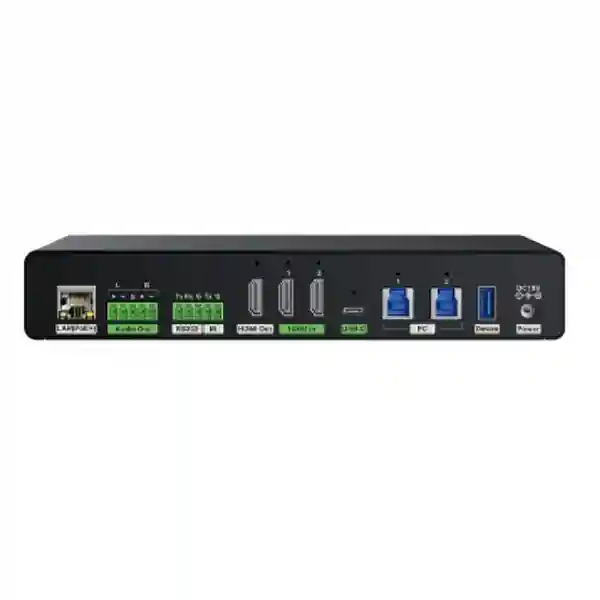
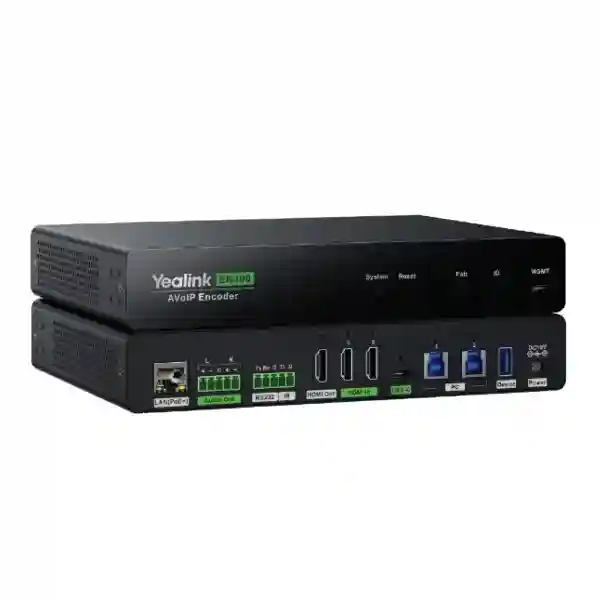
The EN300 is the source-side device in Yealink’s AV over IP architecture. In simple terms, it takes audio and video from presentation or conferencing sources and places that content on the network so it can be delivered to compatible decoding endpoints. Yealink’s design guidance describes the EN300 as supporting local video switching and network-based encoder/decoder matrix routing. The device provides one USB-C input and two HDMI inputs for source connectivity, together with an HDMI output and network output path. This gives integrators flexibility when a room has multiple presentation sources or needs both local and distributed video paths.
Yealink states that the EN300 supports a single video encoding channel, meaning one network video stream is transmitted by each encoder at a time. One encoder’s stream can be received by multiple decoders, making the architecture useful for rooms with several displays that need to show the same selected source. For projects with multiple simultaneous source streams, the system design should include the appropriate number of EN300 encoders rather than assuming one unit can encode several independent network streams at once.
The platform is especially relevant where the room is expected to evolve. Traditional AV extension often becomes difficult when every new display or source requires another dedicated point-to-point cable path. AVoIP changes that model by making the managed network part of the signal-routing fabric. That does not remove the need for design discipline: multicast behavior, switch capability, bandwidth, PoE power, firmware consistency, VLANs and physical cabling still matter. It simply gives integrators a more scalable way to build routing and distribution around standard Ethernet principles.
4K professional video
Yealink specifies lossless 4K@60Hz video with 4:4:4 chroma sampling and ultra-low latency below one frame, supporting sharp text, detailed presentation content and responsive visual workflows.
Multiple source inputs
A full-featured USB-C connection plus two HDMI inputs gives system designers several ways to connect room PCs, laptops and presentation devices while retaining source-switching flexibility.
BYOD and BYOM workflows
USB over IP and network-enabled peripheral access can support bring-your-own-device and bring-your-own-meeting scenarios where a user’s laptop needs to access room cameras or audio resources.
Scalable IP distribution
A single encoded stream can be received by multiple compatible decoders, allowing the design to distribute a selected source to multiple displays without reproducing a separate source-side encoder for every screen.
Verified technical points buyers should know
Yealink’s current support documentation identifies the EN300 as the encoder in its AVoIP solution and the DE300 as the matching decoder. The official design guidance describes local source switching with USB-C and HDMI inputs, a single network encoding channel per EN300, and one-to-many delivery from an encoder to multiple decoders. The same guidance covers AES67, Dante, standard AVoIP audio and Yealink’s own audio mechanisms for different integration requirements.
For network planning, Yealink requires AVoIP devices to operate on a Gigabit managed AV network with IGMP support. Yealink’s RCH80 and RCH240 managed AV switches are listed as AVoIP-capable options, and its current compatibility information identifies EN300 and DE300 support on those switch families. This means procurement should consider the switch as an active part of the AV system rather than as generic connectivity.
Power planning also deserves attention. Yealink documentation lists the EN300 as supporting DC or PoE power, while reverse laptop power over USB-C requires the encoder itself to be powered through its DC input. Any quotation that includes BYOM and laptop charging should therefore specify how the encoder will be powered, what cable types are required and how the room’s switching power budget is allocated.
EN300 deployment planning: source count, display count and network design
A good EN300 project starts with a signal-flow drawing, not with a unit count. List every source that users may present from: fixed room PC, laptop, conferencing computer, content camera, media player or other AV source. Then list every display, confidence monitor or destination that must receive content. Mark whether different displays must show different content simultaneously. Those answers determine how many independent encoding and decoding channels are actually required.
Yealink recommends one encoder per video input source when independent flexibility is required, although one EN300 can accept several local inputs and switch among them. That distinction is important. Three physical inputs on one encoder do not equal three simultaneous network streams. If a boardroom must place three different source feeds on three separate display zones at the same time, the design needs additional encoding capacity. If users only choose one source at a time and distribute that selected source across several displays, fewer encoders may be appropriate.
The network should then be validated for managed multicast operation, switch compatibility and cabling quality. High-bandwidth AVoIP devices in cascaded designs should be placed according to Yealink’s published switch guidance, and firmware versions should be kept consistent across EN300 and DE300 devices. These details influence reliability more than superficial comparisons based only on the number of ports.
Useful FourTeck Tanzania resources for an EN300 project
Business technology shopUse the shop as a starting point for related conferencing, switching, display and infrastructure requirements.
IT and integration servicesExplore design, installation, configuration and lifecycle services relevant to meeting-room and network deployment.
About FourTeck TanzaniaUnderstand the integrated approach to IT, telecom, networking and business technology projects.
Yealink EN300 AV over IP Encoder Tanzania
Organizations searching for the Yealink EN300 AV over IP Encoder in Tanzania are typically planning more than a simple point-to-point display connection. The requirement is often a boardroom, training room, executive meeting space or flexible collaboration environment where several presentation sources must be switched and distributed with consistent quality. In these projects, the EN300 should be evaluated as part of a complete signal path that includes sources, decoders, displays, managed AV switching, conferencing devices, control interfaces and structured cabling. The strongest procurement approach is therefore to identify the room workflow first: who presents, from what device, to which display, and whether users need to access room cameras or audio peripherals from their own laptops.
For Tanzania deployments, network readiness is a central design question. Yealink’s AVoIP architecture expects a Gigabit managed switch environment with suitable multicast handling. That makes existing switch capability, available ports, PoE budget and rack organization relevant before the encoder is ordered. A room may already have Ethernet cabling, but the installation still needs to confirm cable quality, switch management features and whether the network should be dedicated or logically segmented. If the meeting room is part of a wider office network, IT teams should agree how AV traffic will be managed, documented and supported.
Power and resilience should also be planned for local operating conditions. The EN300 can be powered by DC or PoE, but certain USB-C laptop charging workflows depend on DC power at the encoder. A quotation should therefore state the intended powering method and include the necessary power accessories. Where the room is business-critical, UPS-backed switching and clean rack power can improve resilience during short power interruptions. Ventilation, cable management and labeling make future troubleshooting easier, especially when several encoders and decoders are installed together.
FourTeck Tanzania can assist buyers by turning a room requirement into a structured bill of materials rather than treating the EN300 as an isolated SKU. Useful information to share includes room dimensions, source quantity, display quantity, conferencing platform, desired BYOM behavior, switch model, cabling routes and future expansion plans. This allows the proposal to address the full AV path and helps avoid under-sizing the encoder/decoder count or overlooking required network infrastructure.
Yealink EN300 AV over IP Encoder Dar es Salaam
In Dar es Salaam, EN300 projects are likely to appear in corporate headquarters, boardrooms, professional-services offices, hotels, training facilities, education environments and organizations modernizing hybrid meeting spaces. These locations often need a cleaner way to route content among several screens without building a separate physical extension path for every source and destination. The EN300 is relevant when the room specification calls for high-quality 4K presentation distribution, low-latency operation and integration with USB-based collaboration workflows.
A Dar es Salaam procurement team should begin by separating the AV requirements from the purchasing shorthand. Instead of asking only for “one EN300,” define whether the room needs one or several simultaneous source feeds. A single EN300 provides multiple physical source inputs but one encoded network stream at a time. If a boardroom requires independent content on different zones, several encoders may be necessary. Likewise, each destination display should be mapped to the correct decoder and room-control path. This helps the integrator build an accurate topology rather than discovering functional gaps during commissioning.
Many city offices already have managed network infrastructure, but AV traffic still needs deliberate planning. Confirm that the switch supports the required multicast and IGMP functions, that Gigabit connectivity is available end to end, and that the PoE budget is suitable for the selected endpoints. For larger meeting suites, keeping high-bandwidth AV devices on the recommended switching architecture reduces avoidable troubleshooting. IT departments should also establish device naming, VLAN or segmentation policies, firmware standards and documentation practices before handover.
When requesting a quotation for Dar es Salaam, provide floor plans or room sketches, screen locations, rack location, expected source devices, platform requirements and any need for BYOM or laptop charging. These details allow FourTeck to discuss the EN300 together with compatible decoders, managed AV switches, displays, conferencing endpoints, cabling and installation scope. The goal is a room users can operate predictably, not simply a collection of high-specification AV components.
Yealink EN300 AV over IP Encoder Mwanza
Businesses in Mwanza considering the Yealink EN300 may be upgrading meeting spaces for regional management, training, branch coordination or customer presentations. In these environments, the value of AVoIP is often its ability to use a managed Ethernet fabric for flexible signal distribution rather than relying on long dedicated HDMI runs. The EN300 can serve as the encoder at the source side, while compatible decoders receive the selected stream near displays. This can make future expansion more structured when additional screens or room layouts are introduced.
The first Mwanza design question should be whether the room is a simple single-display space or a genuine multi-zone AV environment. A small meeting room may not need the complexity of AVoIP at all, while a training room with several displays, multiple presenters and BYOM requirements can benefit significantly from networked routing. Matching the technology to the room prevents overengineering. The EN300 is most compelling where scalable routing, low-latency 4K content and integrated USB workflows solve a real operational problem.
Network and power resilience should be included in the project brief. Managed switching with IGMP support is a documented requirement for Yealink AVoIP. If the room depends on an existing office LAN, confirm available bandwidth, switch model, firmware, uplink design and management access. If the project uses a dedicated AV switch, plan the rack position, patching and UPS strategy. For USB-C laptop charging, note that the EN300 requires DC power to provide reverse power to a connected computer, so the power design should be explicit in the bill of materials.
A complete Mwanza quotation request should specify the number of rooms, source devices, displays, simultaneous content needs and conferencing platform. Include any requirements for remote administration, room partitioning, control automation or integration with existing cameras and audio. FourTeck can use that information to align encoder and decoder quantities with the actual workflow and reduce the risk of purchasing hardware that does not match the room’s intended use.
Yealink EN300 AV over IP Encoder Arusha
Arusha organizations in hospitality, tourism, professional services, education and regional administration may use advanced meeting and training spaces for both internal collaboration and guest-facing events. The Yealink EN300 is relevant where those spaces need reliable 4K source distribution, fast source switching and flexible network-based routing. It can be particularly useful when meeting rooms have multiple presentation inputs or when content must reach several displays while remaining integrated with Yealink collaboration systems.
Hospitality and training environments often change layout more frequently than a conventional boardroom. A room may operate as one larger space for an event and later be divided into smaller sections. Yealink’s broader AVoIP architecture includes support for divisible-room designs when used with the appropriate control and sensor components. The EN300 is one building block in that topology. The specific quantity should be based on the number of independent source streams and zones, not simply the floor area of the venue.
For Arusha installations, integrators should assess the existing network before committing to the design. Gigabit managed switching, IGMP behavior, endpoint placement and cable quality are central to predictable AVoIP performance. If AV devices share switching infrastructure with other services, traffic policies and documentation become more important. If the room uses its own AV switching layer, rack capacity, power and uplinks should still be planned for future growth. Firmware consistency across EN300 and DE300 units should be maintained as part of commissioning and support.
When requesting pricing, buyers should include the intended room mode, maximum number of active sources, number of displays, conferencing platform, BYOM expectations and any need for laptop charging or control integration. FourTeck can then help frame the EN300 within the larger room solution, including decoders, switches, displays, audio, cameras, controllers and structured cabling. That approach is especially useful for venues where the same room must support meetings, presentations and training without repeated manual reconfiguration.
Yealink EN300 AV over IP Encoder Dodoma
In Dodoma, the Yealink EN300 can suit organizations building formal meeting rooms, public-sector collaboration spaces, institutional training rooms and executive presentation environments where dependable audio-video distribution is important. Its role is to encode a selected source for transport over the IP network, supporting high-quality 4K presentation content and low-latency operation. The system can then route that stream to compatible decoding endpoints according to the room design.
Institutional procurement often benefits from clearer technical documentation before the tender or quotation stage. For an EN300-based system, the specification should state the number of source inputs, simultaneous streams, display endpoints, room-control requirements, supported conferencing platform and managed-switch expectations. Avoid describing the requirement only as “4K AV over IP,” because different architectures may meet that phrase while offering very different integration behavior. Naming the required functionality produces more comparable proposals.
Commissioning should include network verification as well as image testing. The managed switch must provide the required Gigabit and multicast features. Each encoder and decoder should be labeled, addressed and documented. Firmware compatibility should be checked across the complete Yealink solution. If the room is connected to a broader institutional LAN, network administrators should understand which VLANs and policies carry AV traffic and which interfaces are used for management. This reduces support ambiguity after handover.
Dodoma buyers should also plan lifecycle needs such as firmware updates, spares, configuration backups and change control. A professional AV system may remain in service for years while laptops, conferencing applications and display devices evolve. By documenting the EN300 topology and associated switch settings from the beginning, IT teams can make later changes more confidently. FourTeck can assist with selection and quotation planning based on room drawings, functional requirements and the existing network environment.
Yealink EN300 AV over IP Encoder UAE
For organizations with operations in the UAE as well as Tanzania, the Yealink EN300 can support a standardized professional AV architecture across executive rooms, meeting suites and training environments. Standardization is valuable when regional IT teams want similar user behavior and support procedures across offices. The EN300’s combination of 4K@60Hz 4:4:4 video, low-latency AVoIP transport, HDMI source connectivity and USB-C/BYOM capabilities can form part of a repeatable room design when paired with the correct decoders, managed switches and collaboration devices.
The UAE market frequently includes sophisticated fit-out and integration projects where AV is coordinated with interior design, structured cabling, room automation and enterprise collaboration platforms. In those projects, the EN300 should be positioned during the design stage rather than added after the cable schedule is fixed. Rack location, network-switch capacity, display routes, USB paths, furniture interfaces and control requirements all affect the final result. Early coordination also helps determine whether copper links are sufficient or whether the wider network needs fiber uplinks between equipment locations.
Buyers comparing proposals should verify whether each quote includes the same system scope. One proposal may include only the encoder while another includes decoders, managed AV switching, control, cabling and commissioning. Compare the complete signal path, not only the EN300 unit price. Also confirm whether DC power is included where USB-C reverse charging is required, and whether the selected network design follows Yealink’s recommendations for managed Gigabit switching and IGMP.
For multi-country procurement, it is useful to create a standard room bill of materials and then adapt quantities to each location. FourTeck can help customers align the Tanzania and UAE requirements around consistent naming, firmware policy, AV network architecture and user workflows. That consistency can reduce support time while still allowing each site to adjust for room size, display count and local infrastructure.
Yealink EN300 AV over IP Encoder Uganda
Organizations in Uganda evaluating the Yealink EN300 are often looking for a scalable way to distribute high-quality presentation and conferencing content across one or more displays. The EN300 is suited to professional AV scenarios where the network becomes the transport layer for selected audio and video streams. It supports 4K@60Hz 4:4:4 content with ultra-low latency and integrates with Yealink’s broader AVoIP and conferencing ecosystem.
A national or multi-branch organization can benefit from defining a standard architecture before buying individual units. Start by categorizing rooms: small collaboration room, medium meeting room, executive boardroom, training room or divisible space. The EN300 is not automatically necessary in every room. It is most useful where source switching, extended distribution, multiple displays or BYOM integration justify an AVoIP design. This room-type approach controls cost while preserving a repeatable support model.
Uganda projects should verify the switching environment carefully. Yealink requires Gigabit managed AV switching with IGMP support for AVoIP devices. Existing enterprise switches may have the necessary features, but compatibility and configuration should be confirmed rather than assumed. Dedicated Yealink AV switch models can also be considered when the room design calls for a self-contained AV network. In either case, document switch ports, IP addresses, device names, firmware versions and traffic policies.
A request for quotation should include the number of source devices, displays, simultaneous streams, platform integrations and any USB-C charging requirements. It is also helpful to state whether installation, testing and handover documentation are needed. FourTeck can help turn those inputs into a clearer encoder/decoder and network bill of materials, which is particularly valuable when the project covers several branches or meeting rooms and must remain consistent over time.
Yealink EN300 AV over IP Encoder Kampala
Kampala businesses, development organizations, financial institutions, corporate offices and training centers may require meeting rooms that handle more sources and displays than a basic USB video bar can manage. The Yealink EN300 addresses this higher-complexity layer by providing an AVoIP encoding endpoint for professional source routing. When paired with compatible decoders and suitable switching, it can distribute a selected source around the room or across several screens while supporting integrated USB workflows.
For a Kampala boardroom, a useful design exercise is to map the user journey. A participant may connect a laptop by USB-C, present 4K content, use the room camera and audio in a personal conferencing application, then disconnect so a fixed room system takes over. Those transitions should be defined before the integrator programs switching behavior. The EN300 supports the physical connectivity needed for such scenarios, but the room’s overall control logic, decoder routing and conferencing system determine whether the experience feels simple.
The AV network should be treated as production infrastructure. Managed Gigabit switching with proper IGMP handling is mandatory for a reliable design. If the room shares a campus LAN, coordinate with the network team on VLANs, multicast boundaries and uplink capacity. If the room uses dedicated AV switches, ensure they have adequate port count and PoE capacity and that all connected devices are supported. Firmware management across the EN300 and DE300 fleet should become part of routine maintenance.
When procuring in Kampala, compare proposals based on functionality and completeness rather than only the encoder price. Ask whether the quotation includes decoder quantity, AV switch model, power supplies, mounting, control, cabling, commissioning and documentation. FourTeck can help customers create a requirement list so competing technical options are evaluated against the same room workflow and expansion expectations.
Yealink EN300 AV over IP Encoder Arua
Arua organizations using regional offices, training facilities or conference spaces may consider the Yealink EN300 when they need professional content distribution beyond a single direct cable link. The encoder can accept HDMI and USB-C sources and place the selected feed on an AVoIP network for compatible receivers. This makes it possible to design rooms where displays are positioned away from the source equipment or where the layout is expected to evolve.
For Arua projects, simplicity and serviceability should be design priorities. A sophisticated AV system is valuable only if local users can operate it and technical teams can diagnose faults. That means the system should have clear device labels, a documented switch configuration, consistent firmware and an understandable signal-flow drawing. Avoid unnecessary complexity where a simpler topology meets the requirement. Conversely, if the room truly needs multiple zones and BYOM flexibility, plan enough encoder and decoder channels from the beginning.
Power and network resilience deserve attention. The EN300 can use DC or PoE, while DC power is required when reverse charging a connected PC through USB-C. Managed Gigabit switching with IGMP is also required for the AVoIP architecture. A well-prepared quotation should therefore state the power method, switch model and cabling requirements instead of leaving those items for installation day. If the site has a UPS strategy, AV switches and critical room components can be incorporated into it where appropriate.
Buyers should provide room dimensions, display positions and expected meeting workflows when requesting the EN300. If the site connects to other branches, describe whether there is a wider conferencing standard or centralized support team. FourTeck can then help assess whether the room should follow the same architecture as larger regional sites or whether a simpler design is more practical for the local requirement.
Yealink EN300 AV over IP Encoder Mbarara
Mbarara businesses and institutions can use the Yealink EN300 in professional meeting rooms, teaching spaces or training environments where source flexibility and display distribution matter. Because the encoder works over a Gigabit AVoIP architecture, it can reduce dependence on dedicated long-distance video extension paths and create a cleaner basis for future expansion. The real benefit appears when the room needs routing flexibility, not simply when it needs one source connected to one screen.
Education and training scenarios illustrate the difference. An instructor may need to switch between a laptop, fixed PC and content source, while several displays show the selected material. The EN300’s local inputs support source choice, and one encoded stream can be delivered to multiple decoders. If different classrooms or display zones must show independent content simultaneously, additional encoders are required. Designing around the teaching workflow prevents mistaken assumptions based on connector count alone.
For Mbarara deployments, consider how the AV system will be supported after installation. Managed switch access, firmware files, configuration backups and device documentation should be handed over to the responsible IT team. AVoIP devices require a compatible managed Gigabit network with IGMP, and Yealink recommends keeping related units on compatible firmware. Where several high-bandwidth devices are used, follow the vendor’s switch-placement guidance rather than distributing them randomly across a cascaded network.
A procurement request should state whether the project includes only hardware supply or also installation, configuration and user handover. Include the number of presentation sources, required display endpoints, BYOM expectations, control functions and existing switch model. FourTeck can use that information to create a clearer design and avoid hidden dependencies such as insufficient PoE budget, missing DC power for laptop charging or an unmanaged switch that cannot support the required multicast behavior.
Yealink EN300 AV over IP Encoder Gulu
In Gulu, professional AV requirements may arise in education, administration, healthcare, NGOs and regional business operations where hybrid meetings and training have become routine. The Yealink EN300 can be considered when those spaces need 4K source distribution, low-latency presentation and network-based flexibility. It is a specialized encoder, so the decision to use it should be tied to a defined room workflow rather than simply to a desire for newer technology.
A good Gulu design distinguishes between conferencing transport and in-room AV transport. The EN300 handles the local AVoIP side: capturing a selected source and making it available to compatible endpoints on the managed network. The conferencing platform still depends on the room computer, camera, audio system and internet connection. Treating these layers separately makes troubleshooting easier because technicians can determine whether a problem originates in the local AV path, the conferencing endpoint or the WAN connection.
The local AV network must meet Yealink’s requirements for Gigabit managed switching and IGMP. The switch should have enough ports and PoE budget for the full device set, not only the encoder. Cable routes and rack power should be planned before installation. If USB-C reverse charging is part of the user experience, the EN300 needs DC power. These are small design details that can materially affect the finished room.
Gulu buyers can improve quotation accuracy by supplying a simple room diagram showing the rack, table, screens and source positions. Add information about expected users, whether guest laptops are common and whether the room will expand. FourTeck can then help determine whether an EN300/DE300 architecture is appropriate and identify the switching, control and supporting infrastructure needed for a maintainable deployment.
Yealink EN300 AV over IP Encoder Kenya
Kenyan organizations with advanced collaboration spaces can use the Yealink EN300 as part of a standardized AVoIP design for boardrooms, training rooms and multi-display environments. Its ability to deliver lossless 4K@60Hz 4:4:4 video with very low latency is useful where detailed presentation content, dashboards or visual material must remain sharp. USB-C, HDMI and USB-over-IP functions also make the encoder relevant to rooms that combine fixed conferencing systems with guest-laptop workflows.
For Nairobi headquarters or other multi-floor offices, the primary advantage may be architecture rather than one product feature. A managed AV network can create a more scalable distribution fabric than many independent extenders. However, that flexibility requires network discipline. Switches must support the required multicast behavior, port and PoE capacity must be calculated, and high-bandwidth AV endpoints should be positioned according to the vendor’s topology guidance. AV and network teams should agree on ownership before the room goes live.
Organizations operating in both Kenya and Tanzania can gain efficiency by standardizing room templates. A medium-room template might define one EN300, one or more decoders, a specific switch class, display interfaces, control method and cabling standard. A boardroom template may use several encoders for independent sources. Standard templates simplify procurement and support while still allowing site-specific changes for screen count, room dimensions and existing infrastructure.
When requesting a Kenya quotation, provide the required room behavior and ask suppliers to state assumptions clearly. Confirm whether encoder and decoder firmware, managed switching, DC power, mounting and commissioning are included. FourTeck can help cross-border customers keep the architecture consistent with Tanzania projects so documentation, device naming and support procedures remain familiar to regional IT teams.
Yealink EN300 AV over IP Encoder Kuwait
Kuwait meeting-room projects often combine high-quality displays, enterprise conferencing, room control and structured AV infrastructure. The Yealink EN300 fits environments where those systems need IP-based source distribution with professional 4K video and flexible USB integration. It can act as the source-side encoder in Yealink’s AVoIP topology, delivering a selected stream across a managed Gigabit network to compatible decoding endpoints.
For executive rooms, the key design question is how many independent sources must be active at the same time. The EN300 has multiple source connectors but one encoded network channel. If users switch between a room PC and a guest laptop, one encoder may cover that workflow. If several source feeds must appear on different displays simultaneously, the design should include additional encoders. This distinction should be captured in the consultant specification and bill of quantities.
Kuwait projects may also involve centralized racks and longer cable pathways. The AVoIP network can help separate source location from display location, but switch topology, uplinks and structured cabling remain critical. Yealink requires a Gigabit managed AV switch with IGMP support. The selected switch must also meet the required PoE budget and be compatible with the endpoint mix. Network configuration should be documented as part of the AV handover rather than treated as an invisible installer setting.
Procurement teams should compare complete room solutions rather than isolated unit prices. Ask each supplier to identify encoders, decoders, switching, power, mounting, cables, control, commissioning and warranty scope separately. For organizations with other FourTeck projects in Tanzania or East Africa, a common room standard can simplify lifecycle management and make future expansions easier to plan.
Yealink EN300 AV over IP Encoder Ghana
Ghanaian businesses and institutions modernizing meeting rooms can consider the Yealink EN300 where high-quality presentation distribution and flexible AV routing are required. Rather than extending one fixed HDMI source to one display, the EN300 enables a network-based architecture that can route a selected source to compatible decoders. This is useful in boardrooms, training suites and multi-screen spaces where the system may grow over time.
A Ghana project should start with a functional brief. Define whether the room uses Microsoft Teams, Zoom, another conferencing platform or a BYOM approach. Identify whether guest laptops need USB access to the room camera and audio. Count the displays and note whether they always show the same content or require independent sources. The EN300’s physical inputs and single encoding channel should then be matched to that workflow so the architecture is neither under-specified nor unnecessarily complex.
The managed network is a core component. Yealink’s guidance calls for Gigabit switching with IGMP support for AVoIP devices. Existing network infrastructure should be evaluated for compatibility and configuration, while dedicated AV switches can be selected where isolation and simpler ownership are priorities. A project should also include rack space, patching, UPS considerations and device labeling. For USB-C laptop charging, ensure DC power is included at the encoder.
When requesting a quotation in Ghana, include room drawings, source and display quantities, conferencing equipment, switch details and expansion expectations. Ask for a signal-flow diagram if the project is complex. FourTeck can use this information to shape a complete proposal around the EN300, decoders, switching and room infrastructure rather than treating the encoder as a standalone product purchase.
Yealink EN300 AV over IP Encoder Nigeria
Nigeria’s larger corporate and institutional environments often include boardrooms, command spaces, training rooms and executive briefing areas with several displays and presentation sources. The Yealink EN300 is relevant to this class of project because it brings high-quality source encoding, HDMI and USB-C connectivity and network-based AV distribution into one professional endpoint. Its low-latency 4K capability can support detailed presentations and responsive source switching when the rest of the system is correctly designed.
For Lagos, Abuja and other business centers, the scale of a room can vary substantially. One boardroom may need a single selected source sent to two screens, while another may need separate feeds for presentation, conferencing and dashboards. The EN300 supports one encoded stream per unit, so simultaneous independent feeds require multiple encoders. A design team should model those streams explicitly and avoid counting physical input connectors as separate network channels.
Nigeria deployments should also consider operational resilience. Managed switching, clean power, rack ventilation and UPS coverage may be more important to user satisfaction than adding features that are rarely used. Yealink requires Gigabit managed AV switching with IGMP support. Keep firmware aligned across AVoIP endpoints and maintain configuration records so the support team can recover after equipment replacement or network changes. If USB-C laptop charging is part of the room experience, remember that reverse charging requires DC power to the EN300.
Procurement teams should ask suppliers to describe the complete signal path and maintenance responsibilities. A quotation should identify encoders, decoders, switches, power, cables, control interfaces and commissioning. FourTeck can help regional customers align Nigerian meeting-room standards with Tanzania and other markets, making it easier for central IT teams to understand and support a consistent AV architecture.
Yealink EN300 AV over IP Encoder Seychelles
In Seychelles, hotels, resorts, corporate offices, public institutions and conference venues may need meeting spaces that combine high-quality presentation with flexible room layouts. The Yealink EN300 can be useful when the AV design requires network-based distribution from laptops, fixed PCs or conferencing sources to one or more displays. Its 4K@60Hz 4:4:4 performance and low-latency architecture make it suitable for professional visual content when paired with the correct decoding and network components.
Hospitality environments can benefit from designing rooms for several modes: internal meeting, guest presentation, conference call and training session. The EN300’s HDMI and USB-C connectivity supports multiple source options, while network-based routing can make it easier to serve displays in different positions. However, the room-control logic should be simple enough for staff and guests to operate without technical assistance. Clear presets and documented workflows are more valuable than exposing every routing option to the user.
Island projects also benefit from careful lifecycle planning because replacement visits and spare logistics may require more coordination. Keep the system architecture documented, use compatible managed Gigabit switching with IGMP, and maintain consistent firmware across encoders and decoders. Consider keeping critical accessories or standardized replacement components available according to the organization’s own support policy. Where USB-C charging is required, include the EN300’s DC power arrangement in the design from the beginning.
A Seychelles quotation request should include the room use cases, display count, source count, expected conferencing platform, control needs and network details. For divisible conference spaces, explain how partitions change the required routing behavior. FourTeck can help build a complete design around the EN300 so procurement includes the endpoints, switching and installation dependencies required for predictable operation.
Compatibility and integration guidance
Yealink’s current compatibility documentation lists the EN300 and DE300 among devices supported by the CT200/CT300 management platform and by Yealink RoomConnect 2.0. These relationships can simplify administration when the AVoIP endpoints are part of a wider Yealink room ecosystem. Compatibility should still be checked at the time of deployment because firmware requirements and supported combinations can change.
Audio integration can use several methods depending on the wider system. Yealink’s AVoIP design guide describes AES67 for cross-vendor network-audio integration, Dante for compatible professional audio ecosystems, standard AVoIP audio streams for decoder-based delivery and Yealink’s proprietary audio method for tighter integration with selected Yealink devices. The correct method depends on the DSP, room audio architecture and whether BYOM behavior is required.
USB integration is equally important. Local USB control can support keyboard and mouse connections, remote USB control can extend those devices over IP between encoder and decoder, and BYOD/BYOM modes can give a user’s computer access to room peripherals. These functions should be tested against the actual laptop types, conferencing applications and room hardware used by the customer rather than assumed from a generic diagram.
Who should choose the EN300?
Boardrooms
Ideal when several source options, premium displays and integrated conferencing require clean routing and flexible expansion.
Training rooms
Useful when instructors switch among multiple sources and distribute the selected content to several displays around the room.
Divisible spaces
Relevant where room states change and source/display routing must adapt to merged and separated layouts with the correct control components.
BYOM-enabled rooms
Suitable where guest laptops need an integrated path to room cameras, audio and presentation infrastructure without rebuilding the room around each device.
Quotation checklist for Yealink EN300 projects
Before requesting a final quotation, provide enough information for the system to be sized correctly. This avoids comparing proposals that make different assumptions.
- Number of rooms and room types.
- Number of independent video sources and whether they operate simultaneously.
- Number and location of displays.
- Required conferencing platform and existing Yealink devices.
- BYOD/BYOM requirements and whether USB-C laptop charging is needed.
- Existing switch model, available ports, PoE budget and network topology.
- Rack location, cable distances and any fiber uplink requirements.
- Need for room control, automation, partition sensors or display control.
- Installation, configuration, testing and documentation scope.
- Expected future expansion so encoder, decoder and switch capacity can be planned.
Frequently asked questions
What is the Yealink EN300?
The EN300 is Yealink’s professional AV over IP encoder. It accepts presentation sources and encodes a selected audio-video stream for transport across a managed Gigabit network to compatible decoding endpoints.
Does the EN300 support 4K?
Yes. Yealink specifies lossless 4K@60Hz video with 4:4:4 chroma sampling and ultra-low latency below one frame for the EN300 AVoIP platform.
How many streams can one EN300 encode?
One EN300 supports one network video encoding channel at a time. It has multiple physical source inputs for switching, but independent simultaneous network streams require additional encoders.
Can one EN300 feed several displays?
Yes. Yealink’s design guidance states that a video stream from one encoder can be received by multiple decoders. Each decoder receives one encoder stream at a time, so the overall routing requirement determines decoder quantity.
What network switch does the EN300 need?
Yealink requires AVoIP devices to use a Gigabit managed AV switch with IGMP support. The vendor lists its RCH80 and RCH240 as compatible AVoIP switches, and other supported managed AV switches may be used when they meet the published requirements.
Can the EN300 support BYOM?
Yes. Yealink documents network-enabled BYOD/BYOM functions using USB connectivity so a laptop can access room peripherals through the AVoIP architecture when the system is configured for that workflow.
Can the EN300 charge a laptop through USB-C?
The EN300 supports laptop power through its full-featured USB-C connection. Yealink notes that reverse power to a connected PC requires the EN300 itself to be powered through its DC input, so this should be included in the power design.
Is the EN300 suitable for a small meeting room?
It can be, but AVoIP may be unnecessary for a very simple room. The EN300 is most valuable where source switching, longer-distance distribution, multiple displays, BYOM or future scalability justify the additional network architecture.
Decision recap
The Yealink EN300 is a strong fit when a professional room needs low-latency 4K AVoIP, multiple physical source options, BYOM/USB workflows and scalable network distribution. It should not be purchased in isolation. The final design must include the correct number of encoders and decoders, a compatible managed Gigabit AV switch, adequate PoE and DC power planning, suitable cabling and a control strategy users can understand.
For Tanzania customers, the most useful next step is to share the room layout, number of sources, number of displays and conferencing requirements. FourTeck can then help translate the requirement into a practical topology and quotation rather than guessing from a model number alone.
Consult FourTeck Tanzania about your EN300 room design
Share your room size, source devices, display count, switch model and expected BYOM or conferencing workflow. A design discussion can help confirm whether the EN300 is appropriate, how many encoders and decoders are required, what managed switching is needed and which supporting room components should be included in the quotation.




Reviews
There are no reviews yet.