
YEALINK AV MOUNTING ACCESSORY
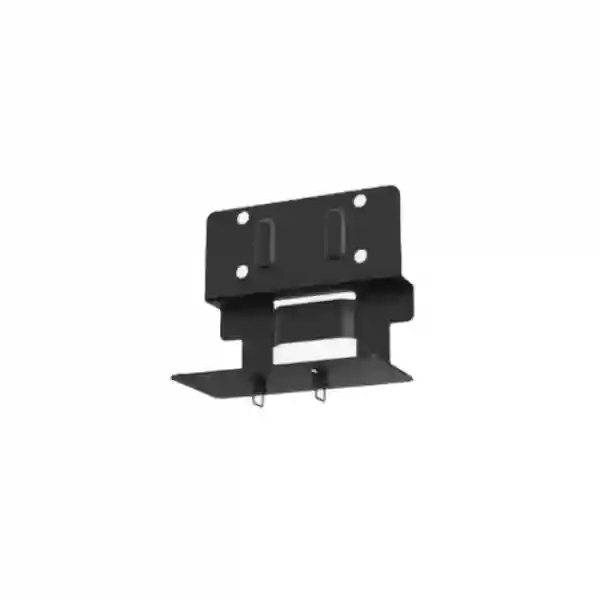
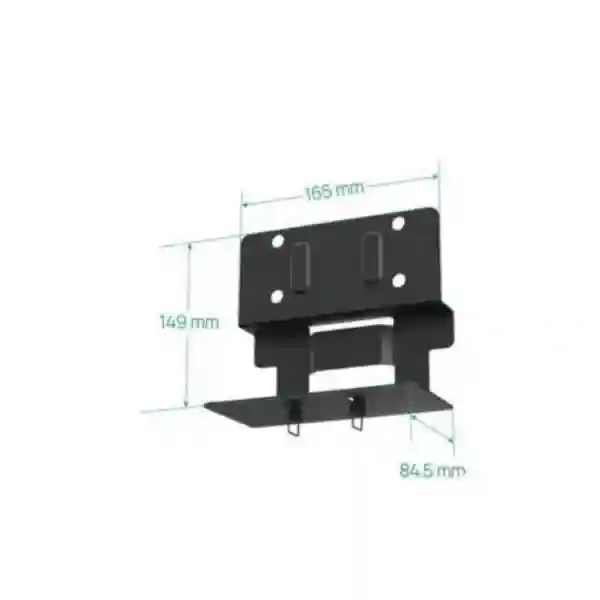
Yealink MD-AVBracket-S
The Yealink MD-AVBracket-S is an optional mounting accessory for selected Yealink MeetingDisplay and collaboration-room components. It is intended for installations where compatible audio or video hardware needs to be positioned as part of a clean display-and-conferencing setup. FourTeck Tanzania can help buyers check the exact Yealink device combination, room layout, display size and mounting approach before quotation.
What is MD-AVBracket-S?
MD-AVBracket-S is a Yealink bracket used as an optional accessory in compatible MeetingDisplay and meeting-room configurations. Rather than treating a bracket as a generic piece of metalwork, procurement teams should confirm the specific Yealink devices that will be mounted and how the final room should be assembled. Official Yealink compatibility guidance is the correct basis for that decision.
Verified compatibility highlights
Yealink lists MD-AVBracket-S as optional with MeetingDisplay 55, 65, 75 and 86. It is also listed with MeetingBar A25 and A40, SmartVision 40 and MSpeaker Pro in Yealink mounting compatibility information. Compatibility should still be checked against the complete room design, because a display, camera, video bar, speaker and stand can have different mounting requirements.
Why a compatible AV bracket matters
A meeting-room installation is judged by more than the electronics. The camera or video bar must sit where remote participants can see the room naturally, speakers need a sensible acoustic position, displays should remain visible from the intended seats, and cables should be routed so they do not create a maintenance problem. A purpose-matched bracket helps the installer create a more integrated result than improvising with unrelated hardware. For organisations standardising multiple meeting rooms, using the correct bracket also simplifies documentation because the mounting arrangement can be repeated consistently.
Before ordering, confirm the exact Yealink display and collaboration device, whether the screen will be wall mounted or installed on a mobile stand, the preferred placement above or below the display where applicable, and any constraints caused by furniture, wall structure, cable pathways or room sightlines. FourTeck Tanzania’s broader video conferencing and integrated IT planning can help connect the accessory choice to the complete room requirement rather than treating it as an isolated part.
Compatibility and room-planning guidance
MeetingDisplay
Official Yealink documentation identifies MD-AVBracket-S as an optional bracket for MeetingDisplay 55, MeetingDisplay 65, MeetingDisplay 75 and MeetingDisplay 86. This makes it relevant when the display is part of an integrated room solution rather than used only as a standalone screen.
MeetingBar A25 / A40
Yealink compatibility tables list MD-AVBracket-S as optional for MeetingBar A25 and MeetingBar A40. The final selection should consider display size, whether the installation is wall-based or stand-based, and how the video bar should align with the participants.
SmartVision 40
SmartVision 40 appears in Yealink’s bracket compatibility list with MD-AVBracket-S as an optional mounting accessory. Buyers should check the intended display and installation method so all required mounts and accessory parts are included in the room bill of materials.
MSpeaker Pro
Yealink also lists MD-AVBracket-S as an optional bracket for MSpeaker Pro. Audio placement should be planned together with screen position, microphone coverage and seating so the bracket contributes to a tidy, serviceable room rather than creating a visual or acoustic compromise.
Buying checklist for Yealink MD-AVBracket-S
For a useful quotation, provide the exact Yealink display model, the video bar or camera model, any speaker model, the number of rooms, and whether each room uses a wall mount, mobile stand or another installation method. Include room photographs or a simple sketch when the wall surface, display position or furniture could affect mounting. If you are upgrading an existing room, list the hardware that will remain so compatibility can be checked against the installed equipment.
A bracket purchase is usually inexpensive relative to the conferencing equipment it supports, but an incorrect accessory can stop an installation on the day of deployment. Confirming the complete room bill of materials therefore protects schedule and avoids unnecessary reordering. FourTeck can also review related display, cabling, network and conferencing requirements through its Tanzania technology enquiry page.
Yealink MD-AVBracket-S Tanzania
Businesses searching for Yealink MD-AVBracket-S Tanzania are usually not looking for a bracket in isolation; they are completing a meeting-room installation built around a Yealink display, video bar, camera or speaker. The practical first step is to identify the exact endpoint combination. Yealink’s current compatibility information lists MD-AVBracket-S as an optional accessory with MeetingDisplay 55, 65, 75 and 86, and with selected collaboration hardware including MeetingBar A25, MeetingBar A40, SmartVision 40 and MSpeaker Pro. That verified relationship gives buyers a reliable starting point, while the final room design determines how the accessory should be used.
For Tanzania projects, procurement teams should document room type, display size, mounting surface, furniture layout and the conferencing platform being deployed. A boardroom may prioritize camera eye line and clear sightlines across a long table, while a compact meeting room may prioritize a simple display-and-video-bar arrangement with minimal cabling. Training rooms and shared collaboration areas can add another requirement: the installation should remain stable and easy to operate even when different teams use the room each day. In all cases, it is helpful to decide early whether hardware will be mounted on the wall, supported by a mobile stand, or integrated with another Yealink mounting system.
The bracket is one part of a wider collaboration environment. Network quality, internet reliability, display placement, microphone pickup, acoustic conditions and lighting can all affect the experience more than the bracket itself. FourTeck Tanzania’s business technology solutions cover video conferencing, audio conferencing, commercial displays, networking and structured infrastructure, making it possible to review these dependencies together. When requesting a quotation, include the desired quantity of MD-AVBracket-S and the exact Yealink equipment it will be paired with. This helps distinguish a straightforward accessory requirement from a complete room deployment that may need additional mounts, cables, network preparation or installation planning.
Yealink MD-AVBracket-S Dar es Salaam
In Dar es Salaam, Yealink MD-AVBracket-S enquiries often fit into office meeting-room upgrades, corporate headquarters, customer presentation spaces, training rooms and branch-standardisation projects. The city has a wide mix of office environments, from new commercial interiors with planned AV cabling to older rooms where displays and power outlets were installed before modern video conferencing became a daily requirement. That difference matters because a compatible bracket is only useful when the surrounding installation can support the intended equipment position safely and cleanly.
A Dar es Salaam buyer preparing a Yealink MeetingDisplay room should confirm the display model and the companion collaboration device first. MD-AVBracket-S is listed by Yealink as optional for MeetingDisplay 55, 65, 75 and 86. Where the room uses MeetingBar A25 or MeetingBar A40, SmartVision 40 or MSpeaker Pro, Yealink also documents MD-AVBracket-S compatibility. The installer can then consider whether the hardware should sit above or below the display where the supported configuration permits, how the camera view aligns with seated participants, and whether cable routes remain accessible for maintenance.
For a multi-room office, consistency is valuable. Recording the bracket model, display model, room-system model and installation method in a standard bill of materials makes future expansion easier. It also reduces the risk of different rooms being assembled with improvised mounts that look different or are harder to service. Buyers can use the FourTeck Tanzania contact page to submit room count, current equipment and target configuration. If the requirement is broader than the bracket, include preferred meeting platform, approximate room dimensions, seating arrangement and whether displays are already installed. A more complete brief enables the quotation to cover the components that actually make the room functional, rather than merely supplying an accessory without checking the rest of the system.
Yealink MD-AVBracket-S Mwanza
For organisations in Mwanza, the Yealink MD-AVBracket-S can be relevant when building a consistent collaboration room for management meetings, remote coordination, customer discussions, training or connections with teams in other cities. The useful procurement question is not simply whether the bracket can be ordered, but whether it matches the Yealink equipment selected for the room. Official Yealink compatibility information should remain the reference point. MD-AVBracket-S is documented as an optional accessory for the MeetingDisplay range and for selected collaboration devices such as MeetingBar A25, MeetingBar A40, SmartVision 40 and MSpeaker Pro.
Mwanza sites may be operating as standalone offices, regional branches, healthcare or education environments, hospitality properties, distribution operations or project locations. Each room type can have different constraints. A management room may have a fixed display wall and a permanent conferencing system. A training room may use flexible furniture and benefit from equipment mounted in a way that remains aligned even when seating changes. A branch office may prioritize standardization with a head-office room so users see the same controls and layout everywhere. These considerations influence whether the bracket should be included with other Yealink mounting accessories and how the full solution should be documented.
Before requesting a quote, note the display model, conferencing device, room quantity and mounting method. If the display is already installed, include its height and whether there is adequate space around it for the planned Yealink hardware. If the room is new, it is better to coordinate bracket selection with electrical outlets, network points and cable conduits before finishing the wall. This reduces exposed cabling and avoids moving the display later. FourTeck can assess the requirement alongside related collaboration and network needs, while the FourTeck Africa technology portfolio provides additional regional context for organisations operating across multiple African markets.
Yealink MD-AVBracket-S Arusha
Yealink MD-AVBracket-S Arusha requirements can arise in hospitality offices, tourism businesses, NGOs, professional services, education, conference facilities and multi-site organisations that use video meetings to connect with staff and partners elsewhere. A well-planned meeting room should allow users to join calls without adjusting equipment manually each time. Correct physical mounting contributes to that consistency by keeping the camera, video bar or speaker in a predictable relationship to the display and seating area.
Yealink’s published compatibility list identifies MD-AVBracket-S as optional for MeetingDisplay 55, 65, 75 and 86. It also identifies compatibility with MeetingBar A25 and A40, SmartVision 40 and MSpeaker Pro. Buyers should not infer that every Yealink device uses the same bracket. Other products in the portfolio can require different mounts, including larger AV brackets or PTZ-specific brackets. This is why the exact model list should accompany any quotation request. Where several rooms are being equipped, label each room and list the display and conferencing device assigned to it.
Arusha meeting spaces may also face practical interior-design constraints. A hotel boardroom may require discreet cabling and a polished visual finish. An NGO office may need a robust, repeatable setup that visiting users can understand immediately. A training venue may need clear camera coverage across a wider seating arrangement. The MD-AVBracket-S should therefore be viewed as one component in a room design that also includes display height, camera framing, microphone pickup, speaker placement, lighting and network performance. FourTeck Tanzania’s technology shop can be used as a starting point for related equipment research, while the contact team can help verify the bracket against the intended Yealink configuration before purchase.
Yealink MD-AVBracket-S Dodoma
In Dodoma, organisations evaluating Yealink MD-AVBracket-S may be planning collaboration rooms for administrative teams, public-sector offices, education, professional services, project coordination or branch communications. These environments often benefit from a clearly documented room standard because equipment may be used by many people, supported by a central IT team or replicated across departments. Choosing the correct bracket is a small but important part of maintaining that standard.
The MD-AVBracket-S is documented by Yealink as an optional bracket for MeetingDisplay 55, 65, 75 and 86. Yealink also lists it as an optional accessory with MeetingBar A25, MeetingBar A40, SmartVision 40 and MSpeaker Pro. These facts help establish product fit, but the installer still needs to check the overall mounting plan. For example, a mobile-stand deployment can require different supporting accessories from a wall installation, and the position of the conferencing device must remain appropriate for the room’s viewing and camera angles.
Dodoma buyers can reduce procurement risk by requesting the bracket together with a room-level bill of materials rather than as an unnamed accessory. State the exact display, video bar or camera, speaker if applicable, and whether any existing stand or wall mount will be reused. Include the number of identical rooms and any rooms that differ. That information allows compatibility review before the equipment arrives. The FourTeck Tanzania enquiry process specifically encourages customers to describe room type, quantity and existing equipment, which is useful for conferencing projects. Where network readiness, display sourcing or structured cabling are also part of the requirement, they can be considered together so the finished room is not delayed by missing infrastructure.
Yealink MD-AVBracket-S UAE
For UAE projects, Yealink MD-AVBracket-S is relevant to organisations standardising Microsoft Teams, Zoom or other collaboration environments around Yealink room hardware, particularly when MeetingDisplay and compatible AV components need a coordinated mounting approach. Corporate offices in Dubai, Abu Dhabi, Sharjah and other emirates frequently use glass-fronted meeting rooms, boardrooms, huddle spaces and training areas where the physical finish of an AV installation is as visible as its technical performance. A compatible manufacturer accessory can help installers maintain a cleaner and more predictable design.
The key is to verify the device combination rather than assume all Yealink room products use MD-AVBracket-S. Yealink identifies this bracket as optional with MeetingDisplay 55, 65, 75 and 86 and with selected products including MeetingBar A25, MeetingBar A40, SmartVision 40 and MSpeaker Pro. Other Yealink devices can use different mounting products, so an equipment schedule should list every component precisely. For fit-out projects, the AV schedule can be coordinated with wall reinforcement, power outlets, data points and cable containment before partitions are closed.
Regional organisations with offices in both the UAE and East Africa may benefit from maintaining the same room standard where practical. A consistent combination of display, room system, mounting accessories and documented cable layout makes training and support easier across locations. FourTeck’s UAE technology solutions site can support broader UAE requirements, while Tanzania projects can be coordinated through the Tanzania site. When requesting MD-AVBracket-S, specify whether it is for a new room, replacement, standardisation project or expansion. The more complete the model list, the easier it is to verify that the bracket is the right accessory for the exact Yealink configuration.
Yealink MD-AVBracket-S Uganda
Businesses seeking Yealink MD-AVBracket-S Uganda may be connecting teams between Kampala, regional branches and international offices. Video collaboration can reduce unnecessary travel, but the room still needs a physical setup that is easy for users to understand and stable enough for regular operation. A correctly selected AV bracket helps place compatible Yealink hardware in a repeatable position relative to the display, supporting cleaner camera alignment, speaker placement and cable routing.
Yealink’s official compatibility guidance lists MD-AVBracket-S as optional for MeetingDisplay 55, 65, 75 and 86, as well as MeetingBar A25, MeetingBar A40, SmartVision 40 and MSpeaker Pro. This information is useful for procurement teams preparing bills of materials for one or several rooms. It also highlights the importance of model-level confirmation: Yealink has multiple mounting accessories, and nearby product families may require another bracket. The quotation request should therefore include full device names instead of simply asking for a “Yealink display bracket.”
Uganda projects can include corporate offices, NGOs, finance, education, healthcare, hospitality and distributed field operations. A small room may use a compact all-in-one collaboration setup, while a larger room may use a separate display, camera, microphones and speakers. The mounting plan changes accordingly. Before ordering, decide how the display will be supported, identify the intended camera or video bar position, check cable pathways and document the room’s network connection. For organisations operating within Uganda, the FourTeck Uganda IT solutions site provides regional support context, while multi-country projects can use a common specification so compatible Yealink accessories are procured consistently across branches.
Yealink MD-AVBracket-S Kampala
Kampala has a high concentration of head offices, professional services, financial institutions, NGOs, universities and regional management teams, making reliable video conferencing an important part of daily collaboration. For a Yealink room based on MeetingDisplay or supported collaboration devices, MD-AVBracket-S can be one of the accessories required to create a tidy, integrated installation. It should be selected only after the complete device list and physical room plan are known.
Official Yealink documentation shows that MD-AVBracket-S can be used as an optional accessory with MeetingDisplay 55, 65, 75 and 86. Yealink also lists it with MeetingBar A25, MeetingBar A40, SmartVision 40 and MSpeaker Pro. A Kampala procurement team that already knows the exact models can therefore submit a concise request containing product name, quantity and room count. If models are still being selected, it is better to describe the room requirement first so the right display and conferencing equipment can be chosen together with the correct mount.
Installation planning should cover more than the bracket. Display height needs to suit the viewing distance. The camera should not be placed so high that remote participants see an unnatural angle. Speakers should remain unobstructed, and cables should be serviceable without removing large parts of the installation. Where the room relies heavily on cloud conferencing, wired network connectivity and stable internet performance are also worth checking. For businesses with offices in Kampala and elsewhere in East Africa, using one documented room template can simplify procurement, support and user training. The FourTeck Uganda platform can support local project discussions, while FourTeck Tanzania can coordinate related requirements for Tanzanian branches.
Yealink MD-AVBracket-S Arua
In Arua, a meeting-room solution may serve organisations coordinating regional operations, education, healthcare, logistics, development programmes or multi-site business teams. Video conferencing can be especially valuable when decision-makers and specialists are not always in the same location. The room should therefore be dependable and easy to recover if a device needs servicing. Using a documented, compatible mounting accessory such as Yealink MD-AVBracket-S can contribute to that serviceability by avoiding improvised installation hardware.
Yealink lists MD-AVBracket-S as an optional bracket for MeetingDisplay 55, 65, 75 and 86. It is also shown as optional for MeetingBar A25 and A40, SmartVision 40 and MSpeaker Pro. These compatibility relationships should be checked against the exact system being supplied. If another camera, video bar or speaker is selected, do not assume the same bracket remains suitable. Requesting model-by-model confirmation is particularly helpful for sites where replacement parts or installer visits may require advance coordination.
For an Arua deployment, include a simple installation record with room name, display model, conferencing-device model, bracket model, network connection and cable route. Photographing the completed installation can also assist remote troubleshooting later. If the site uses a mobile stand, document that stand as part of the system rather than treating it as furniture. If it is wall mounted, the wall construction and fixing method should be appropriate for the combined equipment arrangement. The goal is a room that local users can operate without adjusting hardware before each call. Organisations with branches elsewhere in Uganda can reference the FourTeck Uganda service context when standardising collaboration rooms across cities.
Yealink MD-AVBracket-S Mbarara
Yealink MD-AVBracket-S Mbarara searches may come from branch offices, hospitals, universities, hospitality operations, distributors and professional teams that want a dedicated collaboration room rather than relying on portable webcams and temporary cables. A fixed installation can improve daily usability because the display and compatible Yealink devices remain correctly positioned and connected. The bracket becomes part of that permanent room infrastructure, so matching it to the correct hardware is essential.
According to Yealink’s mounting compatibility documentation, MD-AVBracket-S is optional for MeetingDisplay 55, 65, 75 and 86 and for selected devices including MeetingBar A25, MeetingBar A40, SmartVision 40 and MSpeaker Pro. The bracket should therefore be specified with its companion device in the purchase order or bill of materials. This avoids confusion with other Yealink brackets that are intended for different products. For replacement projects, provide the model of the existing display and room system even if the bracket itself is the only part currently being requested.
Mbarara projects can benefit from practical installation preparation. Ensure power and data points are available near the equipment position, decide how cables will be protected, and check that the display location is visible from every intended seat. If users frequently share laptops or external content, plan accessible connections without leaving loose leads hanging around the mount. Where a room will host external clients or remote executives, lighting and acoustic control can improve the meeting experience as much as the AV hardware. Buyers can combine a bracket quotation with related networking or conferencing requirements so the whole room is reviewed as one system. For cross-border organisations, FourTeck’s Uganda and Tanzania sites can provide a consistent framework for documenting similar installations in both countries.
Yealink MD-AVBracket-S Gulu
For Gulu organisations, a Yealink room system can support coordination with headquarters, partner agencies, customers and distributed teams. The most effective rooms are usually the ones that remain physically unchanged between meetings: camera position is fixed, audio equipment is correctly placed, and users do not need to reconnect or balance devices each time. MD-AVBracket-S can support that kind of permanent configuration when it is paired with hardware that Yealink officially lists as compatible.
The bracket is documented as an optional accessory for MeetingDisplay 55, 65, 75 and 86. Yealink also associates MD-AVBracket-S with MeetingBar A25, MeetingBar A40, SmartVision 40 and MSpeaker Pro. This does not make it a universal Yealink mount. Project teams should maintain a clear parts list and verify any change in the selected camera, bar, display or speaker before procurement. Doing so can prevent an otherwise complete room installation from being delayed by one mismatched accessory.
A Gulu site may also need to think about operational resilience. If IT support is centralised elsewhere, label cables and document the connections so local staff can describe issues accurately. Consider whether the conferencing system is connected by wired Ethernet or Wi-Fi and whether network performance remains stable during busy periods. Protect the room equipment with appropriate power arrangements and keep the installation accessible enough for maintenance. These steps are general room-planning practices rather than bracket specifications, but they determine whether the final solution is dependable. Where a business maintains several Ugandan offices, the FourTeck Uganda solutions site can be used to coordinate a common approach, with the MD-AVBracket-S included only in rooms where the Yealink device combination supports it.
Yealink MD-AVBracket-S Kenya
In Kenya, Yealink MD-AVBracket-S can be relevant to businesses fitting out meeting rooms in Nairobi and other commercial centres, as well as organisations standardising rooms across East African offices. Corporate workplaces increasingly treat collaboration rooms as shared infrastructure, not personal equipment. That means the mounting solution should be consistent, visually clean and based on officially supported accessory combinations. A documented bracket is easier to support than an improvised mount whose origin or load assumptions are unknown.
Yealink identifies MD-AVBracket-S as an optional bracket for MeetingDisplay 55, 65, 75 and 86. It is also listed with MeetingBar A25, MeetingBar A40, SmartVision 40 and MSpeaker Pro. For a Kenya quotation, provide the exact model names, quantity and installation method. If the room uses a different Yealink video bar, camera or display, ask for compatibility confirmation rather than assuming that the “S” bracket fits. Some Yealink products use other mounting accessories, and an accurate bill of materials should capture that distinction.
Kenyan projects often involve a mix of new office fit-outs and upgrades to existing rooms. In a new fit-out, coordinate the mount with wall reinforcement, power, data, cable containment and furniture before final finishes. In an upgrade, inspect the existing display location and confirm there is sufficient space for the planned collaboration device. Camera height and microphone coverage should suit the seating geometry, while the network should provide stable connectivity for cloud meetings. Organisations procuring across Kenya can use the FourTeck Kenya IT solutions site for regional requirements. Companies with branches in both Kenya and Tanzania can standardise device naming, room documentation and accessory selection to make support more consistent across the two markets.
Yealink MD-AVBracket-S Kuwait
Yealink MD-AVBracket-S Kuwait requirements commonly fit corporate offices, government-related environments, education, healthcare, hospitality and professional-service meeting rooms where fixed collaboration systems are preferred over portable equipment. The climate outside is not the primary concern for an indoor bracket; instead, the important factors are room layout, interior finish, screen placement and compatibility with the selected Yealink components. A carefully planned mount can help maintain a polished installation in spaces where AV equipment is always visible.
Official Yealink mounting guidance lists MD-AVBracket-S as optional for MeetingDisplay 55, 65, 75 and 86. Yealink also lists MeetingBar A25, MeetingBar A40, SmartVision 40 and MSpeaker Pro among compatible devices for this bracket. Procurement should preserve these exact model names and avoid substituting an apparently similar accessory without checking. If the conferencing system changes during project design, review the mounting parts at the same time rather than carrying the old bracket into a new bill of materials automatically.
For Kuwait projects, AV coordination with interior contractors can be particularly useful. Confirm the final wall finish, display centerline, cable outlet positions and service access before installation. For rooms with decorative panels or stone finishes, fixing requirements should be addressed by the installer and building team rather than after the display is mounted. If a mobile stand is used, check the corresponding Yealink stand and bracket combination for the specific display. Multi-country organisations can maintain a room standard while still adapting mounting details to each site. The MD-AVBracket-S should be treated as a verified component within that standard, not as a generic bracket. Include room drawings or photographs with the quotation request if the physical environment could affect the recommended approach.
Yealink MD-AVBracket-S Ghana
For Ghanaian businesses, MD-AVBracket-S can support Yealink collaboration-room projects where supported MeetingDisplay and AV components need an integrated mounting method. Accra-based headquarters, regional offices, education providers, hospitality groups, healthcare teams and professional firms may all use video conferencing to connect branches and external partners. A consistent room arrangement helps users focus on the meeting rather than on cables, device positioning or last-minute setup.
Yealink’s current compatibility information lists MD-AVBracket-S as optional for MeetingDisplay 55, 65, 75 and 86, and for MeetingBar A25, MeetingBar A40, SmartVision 40 and MSpeaker Pro. Buyers should use these official model relationships as the basis for purchasing. If a room contains another Yealink camera or bar, verify the accessory separately because other mounts exist for other products. The safest quotation request contains the complete device schedule, not only the bracket name.
Ghana projects can also benefit from planning for future maintenance. Leave enough service access to remove or replace connected equipment without dismantling unnecessary parts of the room. Label data and power connections, record the installed device serial information in the organisation’s asset system, and document the room layout. If multiple rooms use the same design, create a repeatable installation checklist so each one is delivered consistently. For organisations operating in Ghana, the FourTeck Ghana technology site covers wider IT and communication requirements, while FourTeck Tanzania supports Tanzanian projects. A shared specification across offices can reduce procurement errors and make support teams more familiar with the equipment they encounter in each location.
Yealink MD-AVBracket-S Nigeria
Nigeria has a broad range of enterprises using video collaboration across headquarters, branches, regional teams and client-facing rooms. For a Yealink installation, MD-AVBracket-S can be one of the small components that determines whether the finished room looks intentional and remains easy to support. The bracket should be purchased as part of a defined room design rather than as a generic accessory selected only by brand name.
Yealink officially lists MD-AVBracket-S as optional for MeetingDisplay 55, MeetingDisplay 65, MeetingDisplay 75 and MeetingDisplay 86. It is also listed for MeetingBar A25, MeetingBar A40, SmartVision 40 and MSpeaker Pro. That gives procurement teams a clear compatibility baseline. However, a room that uses another Yealink bar or PTZ camera may require a different bracket. Verify changes whenever the equipment schedule is revised, especially in larger tenders where substitutions can occur between design and delivery.
For Nigerian offices, it is helpful to plan AV mounting alongside network and power resilience. A stable video meeting depends on internet performance and local LAN quality, while the equipment itself benefits from appropriate power protection and organised cabling. None of these factors change the bracket’s official compatibility, but they strongly influence the finished room’s reliability. In larger offices, document the room standard with photos, model numbers and cable labels so support teams can troubleshoot remotely before scheduling a site visit. If several offices use the same Yealink configuration, standardise the approved bracket and mounting method as well. The FourTeck Nigeria technology site can support broader regional IT discussions, while the Tanzania site remains the contact point for Tanzanian deployments and related East African procurement.
Yealink MD-AVBracket-S Seychelles
In Seychelles, Yealink MD-AVBracket-S may be specified for corporate offices, hotels and resorts, government-related workplaces, education, professional services and other organisations that depend on video meetings with off-island partners or distributed management teams. Meeting rooms in hospitality and executive environments often have strong aesthetic requirements, so the physical integration of the display and collaboration equipment matters. A manufacturer-supported bracket can help deliver a cleaner result than a makeshift mounting arrangement.
Yealink documentation lists MD-AVBracket-S as an optional accessory for MeetingDisplay 55, 65, 75 and 86. It is also shown as compatible with MeetingBar A25, MeetingBar A40, SmartVision 40 and MSpeaker Pro. These are specific compatibility statements, not an indication that every Yealink device can use the same bracket. If the room design changes, the accessory schedule should be reviewed at the same time. That is particularly important where equipment is being consolidated into a single shipment and missing parts could delay installation.
For Seychelles installations, create a complete room pack before procurement: display model, collaboration device, bracket, stand or wall mount, cabling, network requirement and any audio accessories. Where the installation is in a hotel or public-facing space, coordinate with interior designers and facilities staff so cable routes and device positions fit the room finish. If technical support may be provided remotely, document the final installation thoroughly with labelled photos. Organisations operating across islands or across multiple countries can reduce complexity by using standard Yealink room designs where the physical environment allows. FourTeck’s Africa technology solutions platform provides a regional reference point for wider infrastructure needs, while compatibility for MD-AVBracket-S should always remain tied to the exact Yealink models being installed.
Related FourTeck resources
A bracket is useful only as part of a functioning room. For Tanzania, review FourTeck Tanzania integrated IT and conferencing solutions, browse the Tanzania technology shop, or submit the exact device list through the Tanzania contact and quotation page. Regional organisations can also reference FourTeck Kenya, FourTeck Uganda, FourTeck UAE, FourTeck Ghana and FourTeck Africa when standardising collaboration environments across markets.
Frequently asked questions
Is Yealink MD-AVBracket-S compatible with MeetingDisplay?
Yes. Yealink’s official compatibility information lists MD-AVBracket-S as an optional bracket for MeetingDisplay 55, 65, 75 and 86. The complete room configuration should still be checked because the display may be combined with different cameras, bars, speakers, stands or wall mounts.
Which Yealink collaboration devices are listed with MD-AVBracket-S?
Current Yealink mounting guidance lists MD-AVBracket-S as optional for MeetingBar A25, MeetingBar A40, SmartVision 40 and MSpeaker Pro. This list should not be extended by assumption to other models; verify each intended device.
Can I use MD-AVBracket-S with MeetingBar A50?
Yealink’s current bracket compatibility table does not list MD-AVBracket-S for MeetingBar A50; it lists a different bracket option for that product. Confirm the full MeetingBar A50 mounting plan before ordering accessories.
What information should I send for a quotation?
Send the exact Yealink display and collaboration-device models, bracket quantity, number of rooms, whether the display is wall mounted or on a stand, and any existing equipment that will remain. Room photos or dimensions can help when the requirement includes installation planning.
Does FourTeck publish live stock or fixed pricing for MD-AVBracket-S?
This page does not claim live stock, fixed pricing or a delivery commitment. Request a quotation so availability, commercial terms and the exact compatible configuration can be confirmed for the intended project.
Quotation checklist
Include: exact Yealink model numbers; MeetingDisplay size; video bar, camera and speaker models; bracket quantity; room count; wall or stand installation; current mounting hardware; room photographs where useful; preferred project timing; and any wider requirement for displays, cabling, networking or installation.
Decision recap
Choose MD-AVBracket-S when the exact Yealink configuration is officially compatible and the bracket fits the planned room installation. Do not substitute based only on appearance or brand. A model-level compatibility check before purchase is the simplest way to avoid installation delays.
Plan the complete Yealink meeting-room setup
If you already know you need Yealink MD-AVBracket-S, send the quantity and companion Yealink models for quotation. If you are still designing the room, share the display size, room dimensions, seating layout and preferred collaboration platform so the bracket can be checked as part of the complete solution. FourTeck Tanzania can discuss conferencing, displays, audio, network readiness and physical installation together.




Reviews
There are no reviews yet.