
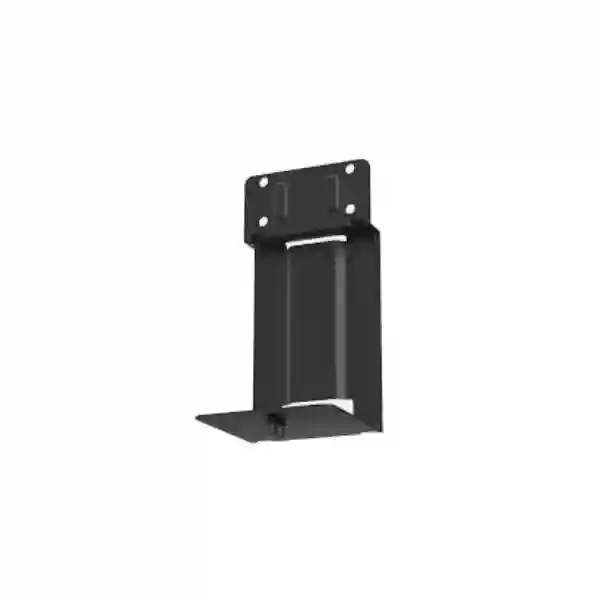
Yealink meeting-room deployment accessory
Yealink MD-PTZBracket Tanzania
The Yealink MD-PTZBracket is a dedicated optional bracket for mounting a compatible Yealink PTZ camera to a Yealink MeetingDisplay installation. Yealink’s current documentation identifies the UVC86 and SmartVision 80 as supported camera choices for this bracket and lists MD-PTZBracket support across MeetingDisplay 55, 65, 75 and 86. For organizations building Microsoft Teams Rooms, Zoom Rooms or other Yealink-based collaboration spaces, the bracket helps keep the camera mechanically associated with the display rather than treating the camera as a separate wall-mounted item.
FourTeck Tanzania can help procurement teams confirm the exact room-system combination before ordering. This matters because a bracket is useful only when the selected camera, display, mounting plan and room layout are all compatible. The objective is a clean installation that supports the intended camera position, safe cable routing and a predictable final room design.
Verified product facts
Official Yealink data describes the MD-PTZBracket as an optional MeetingDisplay bracket for UVC86 or SmartVision 80.
Bracket dimensions: 145 mm × 139.6 mm × 288.5 mm.
Hole spacing: 100 mm × 45 mm.
Published net weight per carton: 1.296 kg.
Published gross weight per carton: 1.723 kg.
What the Yealink MD-PTZBracket solves
Meeting-room installations often become untidy when the display, camera and compute platform are purchased as independent items without a mounting plan. A camera may end up too high, too low, offset from the display or attached to a wall that is difficult to drill. The MD-PTZBracket gives planners a manufacturer-defined mounting option for supported Yealink camera and MeetingDisplay combinations. That is particularly useful where the room design calls for the camera to move with the display assembly or where a standardized deployment is being repeated across several rooms.
The bracket should not be treated as a universal camera mount. Yealink publishes specific compatibility, and buyers should validate the camera model and MeetingDisplay model before purchase. Current Yealink compatibility information marks MD-PTZBracket as optional for UVC86 and SmartVision 80 and also lists compatibility with MeetingDisplay 55, 65, 75 and 86. Yealink’s wider mounting compatibility table also identifies UVC84 as compatible with the MD-PTZBracket, but the dedicated product description and MeetingDisplay documentation emphasize UVC86 and SmartVision 80. For a quotation, FourTeck recommends stating the exact camera and MeetingDisplay models so the final bill of materials can be checked against current Yealink documentation.
Cleaner camera placement
The bracket is designed to position a supported PTZ camera as part of the MeetingDisplay installation, reducing the need to create a separate mounting concept for the camera.
Standardized room rollouts
Organizations deploying several similar rooms can use a repeatable camera-and-display mounting approach, provided each room uses the same verified compatible components.
Procurement clarity
By naming the exact bracket in a room-system bill of materials, procurement teams can distinguish the camera mounting accessory from display wall mounts, carts, AV brackets and other Yealink accessories.
Technical specifications and compatibility
| Product | Yealink MD-PTZBracket |
| Purpose | Optional bracket for mounting a supported PTZ camera to a MeetingDisplay installation |
| Core camera compatibility | UVC86 and SmartVision 80 according to the dedicated Yealink datasheet and MeetingDisplay guidance |
| MeetingDisplay compatibility | MeetingDisplay 55, 65, 75 and 86 are marked compatible in Yealink’s current bracket compatibility list |
| Dimensions | 145 mm × 139.6 mm × 288.5 mm |
| Hole spacing | 100 mm × 45 mm |
| Carton measurement | 352 mm × 186 mm × 200 mm |
| Net weight / carton | 1.296 kg (2.86 lb) |
| Gross weight / carton | 1.723 kg (3.80 lb) |
Compatibility references can change as vendors update product families. For a current quotation, provide the complete room-system model list instead of assuming that any MeetingDisplay and any Yealink camera will fit the same bracket.
Installation planning for a professional meeting room
A bracket is a small item in the bill of materials, but it affects camera position, serviceability and final room appearance. Before installation, confirm the MeetingDisplay size, camera model, display support method, viewing height, camera eye line and the path for USB, network and power cabling. If the display is wall mounted, the wall structure and display mounting hardware must be suitable for the full installation. If the display is installed on a compatible stand, the bracket and camera should be included in the mechanical planning so movement remains safe and cables are not placed under strain.
Yealink’s MVC S80 deployment guidance recommends using MeetingDisplay, MD-WallMount and MD-PTZBracket together in relevant configurations, and it states that the MD-PTZBracket is required when SmartVision 80 is mounted on the MeetingDisplay. That makes the bracket particularly relevant in integrated room projects where the display, camera and Microsoft Teams Rooms components are designed as one coordinated system. The camera position should also be reviewed against seating layout. A physically correct mount can still produce a poor meeting experience if the display is installed at the wrong height or the camera sightline is blocked by furniture.
For broader meeting-room design guidance, review FourTeck Tanzania’s business technology and video-conferencing overview. The page explains how room size, camera framing, microphones, display visibility and network quality work together. This is useful because the MD-PTZBracket should be selected as part of a complete room design rather than as an isolated metal accessory.
Buying guidance: what to confirm before requesting a quote
Start with the exact camera model. If the project uses UVC86 or SmartVision 80, the dedicated Yealink datasheet directly supports the bracket choice. Next, confirm the MeetingDisplay model and how the display itself will be mounted. Then document the number of rooms, whether the rooms are new or existing, and whether each location needs the same mounting approach. If multiple rooms use different displays or cameras, separate the requirements by room instead of assuming one accessory list will cover all spaces.
Also confirm whether the project requires only the bracket or a full room-system quotation. A full quotation can include the camera, display, compute unit, touch controller, microphones, speakers, mounting hardware, cabling and installation requirements as appropriate. FourTeck’s Tanzania technology shop can be used as a starting point for broader product sourcing, while the FourTeck Tanzania services page explains the wider planning and integration scope available for business technology projects.
Yealink MD-PTZBracket Tanzania
For organizations in Tanzania, the Yealink MD-PTZBracket is best understood as a component of a planned collaboration-room deployment rather than a stand-alone purchase decision. Procurement teams often focus on the camera and display because those are the most visible products, but mounting hardware determines whether the final installation looks intentional and is serviceable. If a business is specifying UVC86 or SmartVision 80 with a Yealink MeetingDisplay, the MD-PTZBracket gives the design team a documented accessory option for bringing those components together. Before ordering, list the exact MeetingDisplay size, camera model, room count and display support method. That information allows a reseller or integrator to validate the bracket against the current manufacturer compatibility data instead of relying on a generic assumption.
Tanzania projects can range from executive boardrooms and training rooms to conference spaces in hotels, education, professional services and multi-branch organizations. Each environment has different physical constraints. A boardroom may require a precise camera eye line that follows a long table; a training room may prioritize a wide view; a management room may emphasize a minimal visual footprint. The bracket does not solve room acoustics, lighting or network quality, but it contributes to a coordinated camera position. Buyers should therefore combine the mechanical decision with a review of microphone pickup, speaker placement, display viewing distance and the connectivity required by the chosen collaboration platform.
Power quality and cable management are also practical considerations. Where the camera is integrated with the display assembly, cables should have enough service loop for installation and maintenance without being loose or exposed. Any cart or stand movement should be considered when routing cables. If the room system uses wired network connectivity, verify data outlets and switch capacity before installation day. A well-prepared room allows technicians to mount, connect, test and document the system efficiently. For procurement, a useful quotation request includes quantity, delivery location, exact compatible devices and whether installation or configuration is required. FourTeck can then discuss the bracket in the context of the complete meeting-room requirement without making assumptions about stock, lead time or compatibility.
Yealink MD-PTZBracket Dar es Salaam
Businesses in Dar es Salaam often plan meeting rooms for headquarters, customer-facing offices, financial teams, consulting firms, project offices and regional management functions. In these environments, the mounting approach matters because the room may be used every day by different people who expect the conferencing system to work without manual adjustment. The Yealink MD-PTZBracket can support a cleaner installation when the specified camera is UVC86 or SmartVision 80 and the project uses a compatible MeetingDisplay. By keeping the camera associated with the display structure, the room design can avoid an additional independent camera-mounting point, subject to the final installation method and manufacturer guidance.
For a Dar es Salaam boardroom, start by checking the room width, table length and seating position relative to the display. The bracket itself does not determine camera framing, but it fixes where the camera sits in relation to the screen, so the display location becomes part of camera planning. If the room has glass partitions or strong daylight, lighting can affect video quality even when mounting is perfect. If the room is long, verify that the chosen camera model is suitable for the required framing and tracking behavior. Where a SmartVision 80 is part of an MVC S80 design, Yealink specifically documents the MD-PTZBracket for MeetingDisplay mounting, making it an important line item in the room bill of materials.
Procurement teams should request quotations using complete model names rather than descriptions such as “camera bracket.” Include the MeetingDisplay size, camera model, number of rooms, preferred installation date and whether the project includes wall mounting or a mobile stand. If the site already has displays, provide model details and photos of the installation area so compatibility can be checked. If the project is a new room, a simple floor plan can help determine display and camera position before hardware is delivered. This reduces the risk of finding during installation that the display is too high, the camera line is obstructed, or cables cannot be routed cleanly. The objective is a room that is easy to use, looks professional and remains maintainable after handover.
Yealink MD-PTZBracket Mwanza
Organizations in Mwanza considering Yealink video conferencing may be connecting local teams with colleagues, suppliers, customers or management in other cities. A dependable meeting room needs more than a camera and software subscription: the physical installation should protect equipment, keep cables organized and place the camera at a consistent viewing height. The MD-PTZBracket is relevant where a compatible Yealink MeetingDisplay is paired with UVC86 or SmartVision 80 and the design calls for the camera to mount as part of the display assembly. This can be valuable in rooms where wall surfaces should not be used for a separate camera mount or where a consistent installation standard is preferred.
Before purchasing for Mwanza, review whether the room is permanent or likely to be rearranged. A fixed executive room may favor a wall-mounted display, while a multi-purpose training or presentation space may use a stand or cart. In either case, the camera mounting method should be planned together with cable length, network access, power protection and service access. If the display is moved, any attached camera and cable path must remain mechanically safe. If the room is fixed, installers should still leave enough access to remove or service the camera without disturbing the entire system.
A strong quotation request should state how many MD-PTZBrackets are needed and identify every camera/display pair. If the business is standardizing rooms across Mwanza and another Tanzanian city, include both sites in one scope so the same room template can be reviewed for consistency. This also helps procurement teams separate common hardware from location-specific installation items. Avoid assuming that a bracket listed online is automatically available locally or suitable for every Yealink display generation. Ask for current compatibility confirmation and commercial terms at quotation stage. The result should be a bill of materials based on verified combinations, with installation decisions made before equipment arrives rather than improvised during deployment.
Yealink MD-PTZBracket Arusha
In Arusha, meeting spaces may serve tourism, hospitality, non-governmental organizations, professional services, education, logistics and regional operations. These users often need collaboration rooms that can be operated by staff without an AV technician present for every call. A clean camera-and-display installation helps reduce visual clutter and makes the room easier to understand. The Yealink MD-PTZBracket can be considered when the selected Yealink camera is UVC86 or SmartVision 80 and the display belongs to the supported MeetingDisplay family. It is an accessory rather than a complete mounting solution, so the design must still include the correct display wall mount or stand as well as safe cable and power arrangements.
Arusha projects that host external guests may put particular emphasis on room appearance. A camera that appears loosely placed on furniture or attached with an improvised bracket can undermine an otherwise professional room. Manufacturer-defined mounting hardware creates a more deliberate installation path. At the same time, aesthetics should not override camera performance. Confirm that the camera position provides a useful angle for the seating plan, that the display is not mounted too high, and that room lighting does not create strong backlight. For large tables, test the full seating view and speaker tracking behavior after installation.
For hospitality or training spaces, room flexibility may be important. If furniture is frequently rearranged, consider whether the camera should remain fixed to the display or whether a different mounting method better supports the use case. If a mobile display stand is selected, confirm the stand’s compatibility and load limits with the full display assembly. Quotations should identify whether the requirement is product-only or includes onsite installation, cable management and testing. Providing exact room details at the beginning allows the MD-PTZBracket to be evaluated as one element of the total collaboration system, reducing rework and ensuring the final design reflects how the room will actually be used.
Yealink MD-PTZBracket Dodoma
Dodoma organizations planning government, education, project-management, administrative or corporate meeting rooms can use a standardized mounting approach to make conferencing spaces easier to deploy and support. The Yealink MD-PTZBracket is designed as an optional accessory for supported MeetingDisplay and PTZ camera combinations. When used with UVC86 or SmartVision 80, it can help create an integrated display-and-camera assembly that is easier to specify consistently across multiple rooms. Standardization is especially useful where several departments or floors need similar rooms because procurement can work from a repeatable bill of materials instead of creating a new accessory list for every location.
A repeatable standard should still allow room-specific adjustments. One Dodoma boardroom may have a long table and high ceiling, while a smaller committee room may have fewer seats and a shorter viewing distance. The same bracket can be part of both designs only if the camera and MeetingDisplay combination is supported and the installation position works for each room. During planning, verify display size, wall structure, furniture line, camera view and service access. If a mobile stand is required, include the stand in the compatibility review. If wall mounting is required, ensure the wall mount and wall structure are appropriate for the display and that electrical and data outlets are located where cables can be routed cleanly.
For procurement, ask for current pricing and lead time rather than relying on prices displayed by international retailers. Those figures may reflect another country, tax regime or stock position and do not establish Tanzania availability. A better request identifies quantity, exact camera and display models, delivery destination and whether installation support is required. If the room system includes Microsoft Teams Rooms or Zoom Rooms components, include the complete system family as well. That allows the bracket to be checked alongside compute, controller and audio requirements so the final purchase supports a coherent room architecture rather than a collection of individually compatible parts.
Yealink MD-PTZBracket UAE
For businesses operating in the UAE, the Yealink MD-PTZBracket can be relevant to standardized conference-room programs that use Yealink MeetingDisplay together with UVC86 or SmartVision 80. UAE offices frequently place strong emphasis on clean interior finishes, structured AV integration and consistent user experience across meeting rooms. A camera bracket may seem minor compared with the display or conferencing platform, but it influences how the camera aligns with the screen and how easily the installation can be maintained. Using a manufacturer-defined bracket reduces the need for improvised mounting and supports a more repeatable room build when the hardware combination is verified.
Multi-site organizations should consider whether the same room standard will be used in Dubai, Abu Dhabi or other UAE locations and whether those rooms must match sites in Tanzania or elsewhere. A shared standard can simplify support documentation, spare planning and technician familiarity. Record the display size, camera model, bracket, wall mount or stand, compute platform and touch controller for each room type. Also document cable paths and network requirements. If different room sizes use different cameras, avoid forcing the same bracket into every template simply for consistency; compatibility and camera performance should drive the selection.
Commercial terms such as local price, stock and delivery should be confirmed at quotation stage because online availability changes. Where customers need a broader UAE IT or collaboration discussion alongside a Tanzania deployment, the regional FourTeck network can help coordinate requirements across markets. The priority is to keep the bill of materials traceable to the actual Yealink system design and to identify who is responsible for display mounting, camera installation, cable routing, configuration and final testing. A well-defined scope prevents small accessories from becoming last-minute blockers on an otherwise complete meeting-room deployment.
Yealink MD-PTZBracket Uganda
Ugandan businesses with regional teams can use video conferencing to reduce travel between offices and make management, sales, training and project meetings more frequent. When a Yealink room design uses a compatible MeetingDisplay and UVC86 or SmartVision 80, the MD-PTZBracket can provide a defined mounting method for the camera. This is useful in new rooms where the display wall is being planned from the beginning and in upgrade projects where an existing display position needs to accommodate a more capable PTZ camera. The accessory should be checked against the exact system configuration before purchase because Yealink maintains several different mounting products for different cameras and meeting devices.
For Uganda-wide projects, procurement teams should create a simple room schedule. List the city, room name, seating capacity, display model, camera model, mounting method and whether the room is fixed or mobile. This schedule helps determine whether every room needs MD-PTZBracket or whether some locations require a different mounting accessory. The same exercise also reveals shared needs such as network outlets, power protection and room audio. If the installation is being carried out at multiple sites, standardized naming and photographic documentation can make remote support easier after handover.
Regional buyers should avoid assuming that product listings in another market prove Uganda stock or lead time. Ask for a current quote that identifies the exact accessory and quantity. For organizations coordinating Tanzania and Uganda deployments, consistent specifications can reduce procurement confusion, but the physical room should still be reviewed at each site. Local wall construction, furniture, display height and cabling can differ even when the hardware list is identical. The best result comes from using the MD-PTZBracket where it genuinely fits the camera-and-display design, supported by a room plan that addresses the rest of the conferencing environment.
Yealink MD-PTZBracket Kampala
Kampala offices often need collaboration rooms that connect decision-makers, branch teams and external partners without adding complexity for users. The Yealink MD-PTZBracket is relevant to projects that place UVC86 or SmartVision 80 with a compatible Yealink MeetingDisplay. Instead of planning a separate wall point for the camera, the design can keep the camera mechanically linked to the display assembly, subject to the supported installation combination. This approach can help create a clean front wall and simplify visual alignment between the screen and camera, although final camera framing must still be tested against the seating plan.
In an executive Kampala room, the display is often the visual center of the space. Mounting height should allow comfortable viewing while keeping the camera near a natural eye line. If the display is installed too high, an attached camera may also sit too high, creating an unnatural view of participants. The room designer should therefore choose display height and camera placement together. In a training room, the priority may be different: the camera might need a wider view or a location that captures a presenter and participants. The bracket gives a defined mounting option, but room geometry determines whether that option is best.
Before ordering, include the exact camera model, MeetingDisplay size, room quantity and mounting method in the request. If a systems integrator will install the room, clarify whether mounting hardware, cabling, configuration and testing are included in the scope. It is also useful to define acceptance criteria: stable camera mounting, tidy cables, correct framing, successful platform login and verified audio/video operation. Treating these outcomes as part of procurement makes the accessory choice easier to evaluate and reduces the risk that the room is technically complete but visually or operationally unsatisfactory.
Yealink MD-PTZBracket Arua
Arua organizations may use conferencing to connect with headquarters, project partners and regional teams where travel is less convenient. In this context, a meeting room should be designed for reliability and straightforward support. The Yealink MD-PTZBracket can be part of that design when a supported Yealink MeetingDisplay is used with UVC86 or SmartVision 80. The practical benefit is not simply that the bracket holds a camera; it creates a defined relationship between the camera and display so the installation can be documented and repeated. This can matter in locations where onsite troubleshooting resources are limited and technicians benefit from a clear, standardized hardware arrangement.
For Arua, logistics and installation planning deserve early attention. Confirm all small accessories before a technician travels to site, because a missing bracket can delay a complete room even when the expensive core equipment is already available. The bill of materials should therefore include the camera mount, display mount or stand, required cables and any other accessories referenced by the chosen Yealink room system. A pre-installation checklist can confirm wall condition, power outlets, network point, display height and cable path. Photos of the intended wall or room are often helpful for remote planning.
When requesting a quote, state whether the bracket is for a new room or an existing Yealink deployment. For an existing room, include the installed MeetingDisplay and camera model numbers. For a new room, provide the planned system family and room size. Avoid relying on a generic description such as “PTZ bracket,” because Yealink has multiple accessories serving different devices. Exact naming reduces ordering errors. Once the hardware is installed, record the final layout and cable routing so future support teams can understand the room without starting from zero. This documentation turns a small mounting accessory into part of a maintainable collaboration-room standard.
Yealink MD-PTZBracket Mbarara
Mbarara businesses, education institutions and professional organizations may need conferencing rooms that support regular communication with Kampala, neighboring countries or international partners. A tidy and predictable room setup encourages users to trust the technology. The Yealink MD-PTZBracket offers a manufacturer-defined mounting route for compatible Yealink PTZ cameras on MeetingDisplay installations. If the room uses UVC86 or SmartVision 80, this accessory should be evaluated alongside the display mounting system and the complete conferencing architecture. The bracket’s published dimensions and hole spacing can also help installers understand the physical space required during planning.
Room design should begin with the people using it. Determine how many seats the camera must cover, where the display will be viewed from and whether presenters move around the room. Then check that the selected camera provides the required field of view and tracking behavior from the intended bracket position. A mount cannot compensate for an incorrectly chosen camera or a display placed in a poor location. Acoustic treatment, microphone pickup and network quality should also be considered because a visually clean installation does not guarantee a successful meeting experience.
For procurement in Mbarara, group related accessories with the primary room hardware so compatibility can be verified before dispatch. If only the bracket is being added to an existing system, provide the exact model details and preferably a photo of the current installation. If several rooms are being upgraded, identify whether they are physically identical or just use similar hardware. Small differences in wall position, furniture and cable access can affect installation labor. A detailed request helps suppliers quote the right accessory and helps installers arrive with the information needed to complete the job efficiently rather than discovering constraints after equipment is already onsite.
Yealink MD-PTZBracket Gulu
In Gulu, collaboration rooms may support NGO coordination, education, healthcare administration, business management or regional operations. These environments can benefit from standardized hardware that is easy to identify, document and replace. The Yealink MD-PTZBracket is specifically relevant when the room design combines a supported Yealink MeetingDisplay with UVC86 or SmartVision 80. By using a named accessory from the same ecosystem, the installation team has a clearer reference point than an improvised universal mount, and future support staff can identify the part from the project documentation.
Site readiness is important. Before equipment is shipped or technicians are scheduled, verify the display mounting location, electrical points, wired network availability, wall structure and cable path. If the display will use a mobile stand, confirm that the stand is compatible with the MeetingDisplay and that the additional camera mounting arrangement remains stable. In rooms where power interruptions are a concern, consider suitable power protection for the conferencing equipment and network infrastructure. The bracket itself does not require power, but the camera and display depend on a stable supporting environment.
A Gulu quotation request can be kept simple but should be specific: exact product name, quantity, camera model, MeetingDisplay size, site location and whether installation is part of the requirement. If the room needs a complete Yealink system, include the collaboration platform and approximate seating capacity so the camera and audio design can be checked as a whole. Avoid ordering accessories solely from photos because visually similar brackets may serve different device families. Exact model verification is the safer approach. Once installed, test the camera framing from every key seat and confirm that cables are protected and strain-free. These small checks help ensure the room remains reliable after the installation team leaves.
Yealink MD-PTZBracket Kenya
Kenyan organizations managing regional offices, client meetings and hybrid workspaces can use the Yealink MD-PTZBracket when a room is based on a compatible Yealink MeetingDisplay and UVC86 or SmartVision 80. In Nairobi and other business centers, conferencing spaces are often designed alongside office fit-outs, making it easier to coordinate mounting height, cable routes and network outlets before walls and furniture are finalized. Including the bracket in the original bill of materials avoids the common situation where the main video equipment arrives but the correct mounting accessory is missing.
For customers standardizing both Kenya and Tanzania locations, a shared room template can improve support. The template might specify a small-room, medium-room and boardroom configuration, with each configuration listing the display, camera, bracket, compute platform, controller and audio accessories. The MD-PTZBracket should appear only in templates where the camera and display combination is supported. If a different camera family is used in smaller rooms, select the appropriate Yealink mounting accessory instead. Consistency is valuable, but it should never override manufacturer compatibility.
FourTeck’s Kenya IT and video-conferencing site provides regional context for organizations with requirements on both sides of the border. For a quotation, specify which country each room is in, quantity per site and whether installation is required. This helps separate hardware requirements from location-dependent services and logistics. Do not use retailer prices from unrelated markets as a definitive Kenya benchmark because currency, freight, tax and channel conditions differ. The practical goal is a verified, complete room specification that can be procured and installed without last-minute accessory substitutions.
Yealink MD-PTZBracket Kuwait
Kuwait-based enterprises, government-related organizations and professional offices often operate formal meeting rooms where presentation quality and installation finish matter. The Yealink MD-PTZBracket can support this type of environment when UVC86 or SmartVision 80 is used with a compatible MeetingDisplay. Integrating the camera with the display assembly can produce a cleaner front-of-room arrangement and may simplify visual alignment compared with a separately improvised camera mount. The final decision should still be based on the exact Yealink system design and the desired camera sightline.
In a new fit-out, involve the AV or IT team before wall finishes are completed. They should confirm display height, bracket access, data and power outlet placement, and whether the room needs wall mounting or a mobile display stand. For existing rooms, check whether the current display position can accommodate the camera without creating an excessively high or low viewpoint. If furniture will change, review how that affects framing. A meeting room is successful when remote participants can see and hear people naturally; mounting hardware is one part of achieving that experience.
For procurement, request current channel pricing and availability rather than assuming international listings apply locally. Include the exact model name MD-PTZBracket and state the paired camera and MeetingDisplay. If the requirement is part of a multi-country deployment, keep a shared equipment schedule but separate local logistics, installation and commercial terms. This makes comparisons easier while preserving accountability for each site. Installation documentation should include photos and a component list so the room can be supported later without guessing which bracket was used. A small accessory becomes much easier to manage when it is specified, labeled and documented as part of the full collaboration system.
Yealink MD-PTZBracket Ghana
Ghanaian businesses implementing hybrid meeting rooms may use Yealink systems to connect head offices, branches and remote participants. Where a compatible MeetingDisplay is paired with UVC86 or SmartVision 80, the MD-PTZBracket offers a documented way to mount the camera as part of the display arrangement. This can be particularly useful for boardrooms and management spaces where loose tabletop cameras are undesirable and the front wall should remain organized. The bracket does not replace the display mount, and it should be specified together with the correct wall mount or stand for the overall installation.
A good Ghana project brief should include room dimensions, table position, seating count and planned display size. These details help determine whether the selected camera and its bracket position will cover the room effectively. If the camera is mounted relative to the display, changing the display height also changes the camera viewpoint. For that reason, the room designer should check both viewing comfort and camera framing at the same time. Cable routes should allow maintenance access, and installers should avoid tight bends or tension that could be caused by attaching the camera after the display has already been fixed in place.
Buyers should also distinguish between verified product compatibility and reseller claims. Use the Yealink documentation as the main technical reference and treat third-party listings as secondary evidence. For a quotation, include the complete model pair and required quantity. If multiple Ghana locations are involved, create a site list so shipment and installation requirements are clear. If the organization also operates in Tanzania, the same room standard can be discussed across both locations while still validating each site’s physical conditions. This approach makes procurement more controlled and helps avoid delays caused by a missing or incorrect camera-mounting accessory.
Yealink MD-PTZBracket Nigeria
Nigeria’s large corporate and multi-branch environments often require collaboration rooms that are repeatable across offices. In a standardized Yealink deployment, the MD-PTZBracket can be assigned to room types using UVC86 or SmartVision 80 with compatible MeetingDisplay hardware. Repeatability is useful for support teams because technicians know where the camera is mounted, how it relates to the display and which accessory is needed if a room is relocated or rebuilt. However, a standard should be based on current manufacturer compatibility and not on the assumption that every Yealink camera shares the same mounting design.
For large deployments, build a room matrix. Include room name, seating capacity, platform, display size, camera, bracket, microphones, speakers, controller and network requirements. This provides procurement with a clear quantity calculation and gives installers a checklist. Where offices differ significantly, retain the same documentation structure even if the hardware changes. It is better to have two validated room standards than one forced standard that performs poorly in half the spaces. For the MD-PTZBracket specifically, confirm the exact MeetingDisplay generation and camera model when the purchase order is raised.
Commercially, buyers should ask for a quote that separates hardware, logistics and installation rather than relying only on an online unit price. Availability can change and may differ between cities or project dates. If the bracket is required for an urgent room completion, identify that dependency early so it can be sourced together with the camera and display. After installation, test camera framing, stability and cable movement, then store the final bill of materials with room documentation. This disciplined process helps a small accessory support a larger goal: predictable, maintainable video conferencing across a distributed organization.
Yealink MD-PTZBracket Seychelles
Seychelles businesses in hospitality, professional services, public administration and distributed operations may use video conferencing to reduce travel and maintain contact with international partners. In island environments, advance planning can be especially important because a missing accessory may take time to replace. The Yealink MD-PTZBracket should therefore be identified during the initial room design whenever a compatible MeetingDisplay is being paired with UVC86 or SmartVision 80. Including it in the original procurement list is preferable to discovering after delivery that the selected camera requires a specific display-mounting accessory.
For hospitality or executive settings, visual quality matters alongside technical performance. The camera should appear integrated with the display rather than added as an afterthought. At the same time, the room should remain serviceable. Installers need access to fasteners and cables, and the camera should be removable for maintenance without unnecessary disruption to the display. If a mobile stand is used, ensure the entire assembly remains stable and that cable lengths support movement. If wall mounted, consider the wall material and how power and data cables will be concealed or managed.
A Seychelles quotation request should state the exact models, quantity, destination and whether the project includes installation. If shipping lead time is important, ask for a current estimate at quotation stage rather than relying on retailer availability in another country. For multi-property or multi-office deployments, order from a validated room schedule and consider a controlled spare strategy only where justified by the number of rooms and procurement lead times. The MD-PTZBracket has a simple role, but its absence can prevent a polished room from being completed. Planning it together with the display, camera and installation hardware reduces that risk.
Compatibility and integration checklist
1. Confirm the camera
Record the exact Yealink camera model. The dedicated MD-PTZBracket documentation identifies UVC86 and SmartVision 80 as the principal supported cameras.
2. Confirm the display
Record the MeetingDisplay model and screen size. Current Yealink compatibility information lists MeetingDisplay 55, 65, 75 and 86 with the bracket.
3. Confirm the display support
Identify whether the MeetingDisplay will be wall mounted or supported on a compatible stand and verify the full mechanical arrangement.
4. Confirm camera sightline
Check the final camera height against the room seating plan. Camera mounting should support useful framing rather than merely fit the hardware.
5. Confirm cables
Plan USB, network and power routes before mounting. Keep cables protected, maintainable and free of strain.
6. Confirm current vendor guidance
Use the current Yealink datasheet and bracket compatibility list when finalizing a purchase order because product families and accessory guidance can evolve.
Frequently asked questions
What is the Yealink MD-PTZBracket used for?
It is an optional bracket intended to mount supported Yealink PTZ cameras to a Yealink MeetingDisplay installation. Yealink’s dedicated datasheet identifies UVC86 and SmartVision 80 for this purpose.
Which cameras are compatible with the MD-PTZBracket?
The dedicated product documentation specifies UVC86 and SmartVision 80. Yealink’s broader current mount compatibility table also marks UVC84 as compatible. Because accessory guidance can vary by system configuration, buyers should confirm the exact camera and MeetingDisplay combination before ordering.
Which MeetingDisplay sizes support MD-PTZBracket?
Yealink’s current bracket compatibility list marks MeetingDisplay 55, 65, 75 and 86 as supporting the MD-PTZBracket as an optional accessory.
What are the bracket dimensions?
Yealink publishes dimensions of 145 mm × 139.6 mm × 288.5 mm and hole spacing of 100 mm × 45 mm.
Do I still need a display wall mount or stand?
Yes. The MD-PTZBracket is a camera-mounting accessory for the MeetingDisplay arrangement; it does not replace the support hardware used to mount or stand the display itself.
Can FourTeck quote a complete Yealink meeting room rather than only the bracket?
A quotation can be discussed in the context of the complete requirement. Provide the room size, seating capacity, collaboration platform, existing equipment and preferred Yealink models so the accessory requirement can be evaluated with the camera, display, audio and mounting plan.
How do I request current Tanzania pricing or availability?
Use the FourTeck Tanzania contact page and include the exact product name, quantity, paired camera and MeetingDisplay model, delivery location and whether installation is required. Current pricing, stock and lead time should be confirmed in the quotation rather than inferred from overseas retailer listings.
Quotation checklist
For a useful Yealink MD-PTZBracket quotation, provide as many of the following details as possible:
✓ Quantity of MD-PTZBracket units required.
✓ Exact camera model: UVC86, SmartVision 80 or another model requiring verification.
✓ Exact MeetingDisplay model and size.
✓ Whether the display will be wall mounted or installed on a stand.
✓ Number and size of meeting rooms.
✓ City and delivery location.
✓ Whether installation, cable management or room-system configuration is needed.
✓ Any existing Yealink equipment that must remain in use.
Decision recap
Choose the Yealink MD-PTZBracket when your verified room design requires a compatible Yealink PTZ camera to be integrated with a supported MeetingDisplay. The strongest buying case is a deployment using UVC86 or SmartVision 80 where the camera should be mounted as part of the display assembly. Confirm the MeetingDisplay model, final display support, camera sightline and cable route before ordering. Do not treat the bracket as a universal camera accessory or assume price and availability from another market applies to Tanzania.
For a broader technology discussion, FourTeck Tanzania can review the room requirement in the context of conferencing, displays, networking and installation rather than only the bracket. This helps procurement teams convert a small accessory request into a complete and verifiable deployment plan when needed.
Consultation panel
If you already know that MD-PTZBracket is the required accessory, send the product name and quantity for quotation. If you are still planning the room, include the camera, MeetingDisplay, room dimensions and seating layout so the mounting approach can be checked before purchase. FourTeck Tanzania’s contact and quotation page explains the project details that help produce a more useful response.




Reviews
There are no reviews yet.