
Yealink Zoom Rooms Appliance • Tanzania
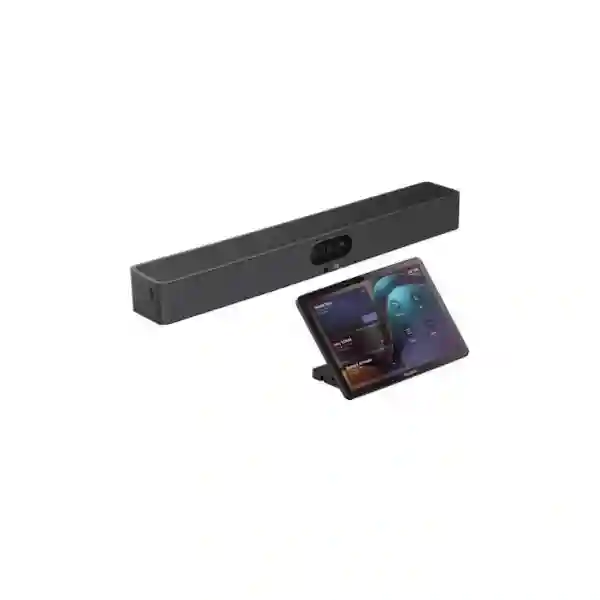
Yealink MeetingBar A50 Zoom Rooms System
The Yealink MeetingBar A50 is an all-in-one video collaboration bar built for medium-to-large meeting rooms that need a cleaner Zoom Rooms deployment without assembling a separate camera, microphone array, loudspeaker system and room computer. It combines three 50MP cameras, a 16-MEMS microphone array, four integrated speakers, Android 13, AI-assisted video features and remote device management in one purpose-built platform.
Best suited to buyers who need:
A professional Zoom Room for a boardroom, executive conference room, training space or larger collaboration room where camera reach, voice pickup, dual displays and a consistent room experience matter more than consumer-style USB conferencing.
What the Yealink MeetingBar A50 solves
A larger meeting room creates a different collaboration problem from a small huddle room. Participants sit farther from the display, the table is longer, voices originate from a wider area, and a single ultra-wide camera can make people at the far end appear too small. The MeetingBar A50 addresses that problem with a three-camera architecture that combines one wide-angle camera with two telephoto cameras. That design gives the system more visual information for framing people across a deeper room while retaining the simplicity of an integrated bar.
For audio, Yealink specifies a 16-MEMS microphone array with a pickup distance of up to 10 metres and support for expansion microphones. This is important when an organization wants a single platform that can begin as an integrated room appliance but still accommodate greater microphone coverage when the room layout or acoustics demand it. Four integrated speakers provide the room audio output, while AI-enhanced noise suppression, acoustic echo cancellation, automatic gain control and full-duplex audio processing are designed to help conversations feel natural when people on both sides speak and respond quickly.
The A50 also reduces operational complexity. Native Zoom Rooms operation means the room can be designed around the collaboration workflow rather than around a general-purpose PC. Centralized management through Zoom Device Management and Yealink management platforms can help IT teams monitor, configure and update devices across multiple rooms. For businesses with standardized meeting spaces, this repeatability can be as valuable as the camera specifications themselves.
Verified MeetingBar A50 technical highlights
Camera system
Three 50MP cameras: one wide-angle lens and two telephoto lenses. Yealink lists a 98° horizontal field of view for the wide camera, 41.6° for the tele cameras, up to 8× digital zoom and video output up to 4K.
AI video
IntelliFocus, Auto Framing, Speaker Tracking, People Counting and Picture-in-Picture are supported, with Smart Gallery available for Zoom. These functions help the room adapt the view without constant manual camera control.
Microphones
A built-in 16-MEMS microphone array provides a specified pickup distance of up to 10 metres. The platform supports up to three expansion microphones for rooms needing additional coverage.
Speakers
Four built-in 5W speakers provide integrated playback, backed by full-duplex processing, acoustic echo cancellation, automatic gain control and AI-enhanced noise suppression.
Connectivity
Gigabit Ethernet, Wi-Fi 6, Bluetooth 5.0, dual HDMI outputs, USB connectivity, two Yealink VCH ports, line input/output and a security lock slot support practical meeting-room integration.
Management
Zoom Device Management, Yealink HTTPS web management, Yealink Device Management Platform and Yealink Management Cloud Service provide options for centralized administration and firmware maintenance.
Zoom Rooms deployment and room design
The right A50 deployment starts with the room rather than the product box. FourTeck recommends confirming the seating pattern, maximum participant count, distance from the first and last seat to the camera, display count, display size, mounting height, network outlet location, Wi-Fi conditions, available power and any need for table or ceiling microphones. A long narrow boardroom can require different audio and camera planning from a wide training room even when both have a similar floor area.
The A50 supports two HDMI outputs, making it suitable for room designs where one display can show remote participants and another can be used for shared content, subject to the Zoom Rooms workflow and configured layout. The CTP25 touch console is an important optional control component for organizations that want a dedicated room interface. Yealink’s one-cable approach can simplify the connection between the bar and controller, and USB-C connectivity from the controller can be used for content-sharing and BYOD scenarios in supported configurations.
Network readiness should be part of commissioning. A room system depends on reliable DNS, internet access, stable switching, appropriate firewall policy and enough sustained bandwidth for the intended meeting quality. The Yealink datasheet recommends 10Mbps or more bandwidth for the endpoint. That figure should not be treated as the entire site requirement: simultaneous meetings, cloud applications, backups and general office traffic also need capacity. Where collaboration is business-critical, the LAN and internet path should be evaluated as part of the project.
Buying guidance before requesting a quotation
When requesting a Yealink MeetingBar A50 Zoom Rooms System quotation, specify whether you need the bar only or a complete room package. A complete project may include the A50, CTP25 room controller, one or two business displays, suitable wall or TV mounting, structured cabling, network switching, UPS protection and optional expansion audio. It may also include room installation, configuration, firmware updates, Zoom Rooms sign-in, display setup and handover testing.
Do not select expansion microphones simply because the room is called “large.” First consider the table dimensions, ceiling height, acoustic treatment, HVAC noise and typical participant positions. The A50’s built-in 10-metre pickup specification can be sufficient for many rooms, but an acoustically difficult environment can still benefit from additional microphone placement. Likewise, an excellent camera cannot compensate for harsh backlighting or a display installed too high. Good room design treats video, audio, lighting, displays, networking and user controls as one system.
Yealink MeetingBar A50 Zoom Rooms System Tanzania
For organizations evaluating the Yealink MeetingBar A50 Zoom Rooms System in Tanzania, the strongest use case is a medium-to-large meeting room where hybrid collaboration is routine and the room must be easy for different staff members to operate. Corporate headquarters, financial institutions, professional-services firms, government departments, universities, NGOs, healthcare administration teams, hospitality groups and regional operations can all benefit from a dedicated room appliance when meetings happen frequently and ad-hoc laptop setups create inconsistency. The A50 brings the primary camera, microphone and loudspeaker functions into one integrated bar while still supporting optional controllers, microphones and content-sharing accessories.
A Tanzania deployment should start with a practical survey of the room. The A50 is officially positioned for medium-to-large rooms, but the label alone is not enough. The important questions are where people sit, how far the last participant is from the display, whether the room is narrow or wide, how reflective the surfaces are, whether air-conditioning noise is present and how many displays are required. The triple-camera system is particularly relevant when a boardroom has depth because the two telephoto cameras can support more useful participant views than a single wide-angle lens alone. For audio, the 16-MEMS array and 10-metre pickup provide a strong built-in starting point, while expansion microphone support leaves room for more demanding layouts.
Procurement teams should also plan the infrastructure around the A50. Stable Ethernet is normally preferable for a permanently installed conference room, even though Wi-Fi 6 is available. The network should provide reliable internet access, predictable DNS, the necessary cloud connectivity and sufficient bandwidth for Zoom meetings alongside normal business traffic. If the organization operates multiple branches, standardizing controller placement, display configuration, naming, network settings and management policies can make support easier. FourTeck’s broader Tanzania IT and collaboration solutions cover the surrounding meeting-room infrastructure, including displays, networking, Wi-Fi and integrated support planning.
For a quotation, buyers should provide room dimensions, approximate participant capacity, preferred Zoom Rooms licensing approach, display count, existing network information and whether installed microphones or BYOD use are required. This allows the proposed system to be matched to the room rather than priced as an isolated bar. No stock, delivery-time or local inventory assumption should be made until availability is confirmed for the specific project.
Yealink MeetingBar A50 Zoom Rooms System Dar es Salaam
Businesses searching for a Yealink MeetingBar A50 Zoom Rooms System in Dar es Salaam are often planning collaboration rooms for head offices, executive suites, regional management teams, consulting firms, logistics companies, banks, hotels or organizations coordinating with international partners. These environments benefit when the meeting room behaves like a dedicated business facility rather than a shared collection of cables and personal laptops. The A50’s native Zoom Rooms workflow can help create a repeatable experience where staff enter the room, use a dedicated control surface when configured, see remote participants on one or two displays and conduct the meeting without reconnecting a camera and speakerphone every time.
Room geometry is especially important in executive boardrooms. A long table can place the last participant many metres from the display. The A50 combines one wide camera with two telephoto cameras, giving its AI framing and speaker-focused views more flexibility across depth than a basic webcam. IntelliFocus, Auto Framing and Speaker Tracking can reduce the need for manual camera operation, while Smart Gallery support in Zoom can present people in a more participant-centered layout. The electric privacy shutter is also useful in rooms where users want a visible physical privacy mechanism when meetings are not active.
Dar es Salaam deployments should also consider the room’s network path and power environment. A fixed collaboration appliance deserves a properly terminated Ethernet connection, suitable switching and a UPS strategy for the network and display components when continuity is important. Internet capacity should be assessed against real usage, not only the A50 endpoint. If several Zoom Rooms, cloud backups and large file transfers share the same WAN connection, the overall design should prevent business traffic from competing unnecessarily with real-time collaboration. Firewall rules, DNS reliability and content-sharing workflows should be tested during commissioning.
A useful quotation request should include a sketch or dimensions of the room, the number and size of existing displays, seating capacity, wall construction, nearest data point and whether the organization requires a CTP25 controller, expansion microphones or a BYOD option. That information allows the project to include the necessary mounts, cables and infrastructure rather than leaving installation details to be solved after the hardware arrives.
Yealink MeetingBar A50 Zoom Rooms System Mwanza
For organizations in Mwanza, the Yealink MeetingBar A50 Zoom Rooms System can serve as a standardized collaboration endpoint for regional offices, healthcare administration, education, mining and industrial support teams, NGOs, hospitality operations and companies that regularly connect with head offices or external specialists. The business value is strongest when remote meetings are operationally important and the room must deliver a predictable experience for users who may not have dedicated AV knowledge. Integrating the camera, microphones and speakers into a single bar reduces device sprawl and makes the room easier to document and support.
Before procurement, the organization should identify whether the room is truly within the A50’s intended medium-to-large category and whether the built-in audio coverage suits the seating layout. Yealink specifies a 10-metre pickup distance from the 16-MEMS array, but real room performance still depends on acoustics, background noise and participant direction. Training rooms with rows of seats can behave differently from boardrooms where everyone sits around one table. If the room needs broader pickup, the A50 supports expansion microphones, including Yealink table or ceiling options in supported designs.
Connectivity planning matters when a Mwanza site depends on cloud meetings across long-distance links. The local LAN should be stable and appropriately segmented, and the internet service should be sized for all simultaneous cloud applications rather than a single conference. Where link resilience is important, the business can evaluate internet redundancy at the network level. A room appliance should not be expected to solve upstream congestion, unstable routing or insufficient bandwidth. Remote management can nevertheless make multi-site support easier because the A50 can be administered through Zoom Device Management and Yealink management tools without requiring every routine maintenance task to begin with a physical visit.
For procurement, include any requirement for dual screens, wireless or wired sharing, controller placement and expansion microphones. Also confirm mounting options early. Yealink supports wall mounting and offers additional TV/table mounting approaches depending on the selected accessory. A complete room bill of materials should include the mount, display interfaces, network cabling, power arrangement and commissioning work so the system is usable at handover.
Yealink MeetingBar A50 Zoom Rooms System Arusha
In Arusha, the Yealink MeetingBar A50 Zoom Rooms System is well aligned with organizations that conduct frequent international and regional meetings, including hospitality groups, conference facilities, NGOs, development organizations, education institutions, professional firms and management teams serving operations across northern Tanzania. A dedicated Zoom Room can improve the experience for both local and remote participants because the room no longer depends on whichever laptop and USB accessories happen to be available on the day of the meeting.
The A50’s triple-camera arrangement is useful when meetings involve several people spread along a table. The wide lens can establish room context, while the telephoto lenses support closer participant views through Yealink’s AI features. Speaker Tracking and IntelliFocus can help remote attendees follow the conversation when different people speak. For formal meetings, the ability to keep the camera experience automatic is valuable because staff can focus on the discussion rather than manually pan, tilt or zoom the room camera. Smart Gallery support for Zoom can further improve person-level views in compatible Zoom Rooms experiences.
Hospitality and event-related spaces require additional caution. The A50 is a room collaboration appliance, not a full production AV system for a large ballroom. If a venue has widely distributed seating, lecterns, audience microphones, multiple cameras or reinforcement speakers, a larger integrated AV design may be more appropriate. The A50 works best when the room dimensions and seating remain within its intended medium-to-large meeting-room use. Room acoustics should be checked because glass walls, hard floors and high ceilings can create reverberation that affects intelligibility even when the microphone electronics are capable.
Arusha buyers should define the primary workflow: native Zoom Rooms, occasional BYOD use, local presentation, dual-screen conferencing or a mixture. They should also confirm whether a CTP25 is required, whether staff need wired USB-C sharing, and whether the room network can support centralized management. A carefully scoped quotation should therefore combine the A50 with the exact control, display, mounting, network and audio components required for the room rather than using a generic package.
Yealink MeetingBar A50 Zoom Rooms System Dodoma
The Yealink MeetingBar A50 Zoom Rooms System can support organizations in Dodoma that need a professional hybrid meeting room for administration, government, education, professional services, corporate management or inter-office coordination. In these environments, reliability and consistency are often more important than novelty. A dedicated room appliance creates a defined endpoint with predictable camera, microphone, speaker and management behavior, which can simplify user training and technical support compared with a room assembled from personal computers and unrelated USB devices.
For formal boardrooms, the A50’s 4K-capable triple 50MP camera architecture and AI features can help keep participants visible without needing an operator. The wide camera covers the room while telephoto lenses provide additional reach for people seated farther away. Auto Framing can adjust the composition as participants enter or leave; Speaker Tracking can direct attention to the active speaker; IntelliFocus can create close-up views of recent speakers; and the physical privacy shutter provides a clear privacy state after meetings. These functions are particularly useful where the room may host different teams throughout the day.
A Dodoma deployment should include network and environmental planning. Fixed conferencing equipment should ideally have a permanent, labeled Ethernet path and managed switching. The organization should verify that firewall policy allows the Zoom Rooms services it uses and that the internet connection is sufficient for concurrent video calls across the site. UPS protection can be considered for the network, display and conferencing equipment where short power interruptions would otherwise terminate important meetings. The A50 itself should be mounted at an appropriate eye line relative to the primary display so participants appear naturally aligned with the remote audience.
For procurement, include room dimensions, seating capacity, display size and count, desired controller location, network readiness and any requirement for additional microphones. If the organization is standardizing several rooms, the quotation can also account for a repeatable mounting, cabling, naming and management standard. That approach can reduce support variability when new rooms are added later.
Yealink MeetingBar A50 Zoom Rooms System UAE
Organizations evaluating the Yealink MeetingBar A50 Zoom Rooms System for UAE offices often need a room standard that can be repeated across Dubai, Abu Dhabi and other business locations while remaining easy for international teams to use. The A50 suits medium-to-large conference rooms where native Zoom Rooms operation, dual displays, centralized management and strong participant framing are more important than a simple USB webcam. Its integrated architecture can reduce the number of separate AV components mounted around the room, which is useful in executive spaces where clean installation and predictable operation matter.
The UAE market also includes many multi-country organizations. Standardizing a common room platform can help global IT teams apply consistent device naming, firmware processes, account configuration, controller placement and support documentation. Zoom Device Management provides a central administrative layer, while Yealink’s own management tools can support device configuration and maintenance. The exact management approach should be aligned with the organization’s security and operational policies rather than simply enabling every available cloud service.
Meeting-room design should still be based on physical conditions. Glass partitions, open office noise and modern hard surfaces can create acoustic challenges, so the 10-metre microphone pickup specification should be evaluated alongside actual reverberation and seating. If required, the A50 can support expansion microphone options. Dual HDMI outputs make the bar suitable for two-display layouts, while the CTP25 can provide a dedicated touch controller for room operation. BYOD and content-sharing needs should be clarified before installation so the correct cabling is available at the table.
For UAE-specific infrastructure and broader regional technology requirements, buyers can review FourTeck UAE IT and infrastructure solutions. A quotation should confirm the requested A50 package, room controller, displays, mounting, microphones and installation scope. Availability, commercial terms and project schedule should be confirmed at the time of enquiry rather than assumed from generic product listings.
Yealink MeetingBar A50 Zoom Rooms System Uganda
For businesses and institutions in Uganda, the Yealink MeetingBar A50 Zoom Rooms System can provide a dedicated medium-to-large meeting-room endpoint for management meetings, international collaboration, training, education and multi-branch coordination. The primary advantage is not merely video resolution; it is the ability to turn a room into a predictable collaboration space with integrated cameras, microphones, speakers and remote management. That consistency can be valuable when different departments use the room and there is limited time to troubleshoot personal laptop settings before each call.
The three-camera design is particularly relevant for deeper rooms. A single wide camera often captures everyone but can make distant participants appear small. The A50 adds two telephoto cameras to its wide camera and uses AI-powered views such as Speaker Tracking and IntelliFocus. For Zoom Rooms, Smart Gallery can help present participants as individual or grouped views depending on the supported Zoom experience. This can make a hybrid discussion feel more balanced because remote attendees can see speakers more clearly.
Uganda deployments should also account for bandwidth, network resilience and room power. A dedicated Zoom Room should have a stable Ethernet connection whenever practical, with Wi-Fi available as an additional interface rather than the only design assumption. The site should verify internet capacity for concurrent meetings, cloud applications and normal user traffic. If the room is business-critical, redundant internet design can be considered at the firewall or WAN layer. UPS protection for switching, displays and room equipment can help reduce disruption during short power events, depending on site requirements.
Organizations with operations in Uganda can also reference FourTeck Uganda business IT solutions when planning surrounding networking and communications infrastructure. A suitable A50 quotation should include the room size, participant capacity, number of displays, controller requirement, preferred sharing method and any need for expansion microphones or installed audio.
Yealink MeetingBar A50 Zoom Rooms System Kampala
A Kampala office considering the Yealink MeetingBar A50 Zoom Rooms System is typically trying to improve a boardroom or main conference room used for regional management, customer meetings, project reviews or calls with international headquarters. The system is strongest when the room hosts enough participants that a laptop webcam or compact huddle-room bar no longer provides useful participant framing or consistent audio pickup. With triple 50MP cameras, the A50 is designed to handle more room depth and provide AI-assisted views without requiring a separate PTZ camera operator.
Audio planning should be based on the table and room acoustics. Yealink specifies up to 10 metres of voice pickup from the built-in 16-MEMS array, and the platform supports expansion microphones for more demanding arrangements. A long executive table may still perform differently from a training room with participants facing forward, so the room should be tested or modeled around real seating. Hard walls and glass can increase reverberation; HVAC systems can add steady background noise. The A50 includes AI-enhanced noise suppression and echo-cancellation processing, but physical acoustics remain an important part of professional room design.
For user experience, consider adding the CTP25 touch controller. A dedicated controller lets users interact with the Zoom Room without handling the main appliance or relying on a personal device. Display placement should allow users to see both remote participants and shared content comfortably. Dual HDMI outputs support two-screen room concepts, while the exact Zoom layout can be configured according to the organization’s preferred meeting workflow.
Kampala procurement teams should request a complete bill of materials covering the A50, controller, mounting, HDMI cabling, network cabling, display interfaces, power protection and optional microphones. They should also provide information about existing switching and internet service. A professional handover should verify camera framing, microphone pickup, speaker level, Zoom sign-in, content sharing, firmware and remote management rather than treating installation as complete when the hardware is merely mounted.
Yealink MeetingBar A50 Zoom Rooms System Arua
For organizations in Arua, the Yealink MeetingBar A50 Zoom Rooms System can be useful where a regional office, institution, project site or management team depends on reliable video meetings with Kampala, neighbouring countries or international partners. The integrated format reduces the number of separate devices that need to be configured and supported in the room. This is helpful when the objective is a repeatable appliance-style experience rather than a meeting setup that changes according to whichever laptop a user brings into the room.
The A50 should be selected because the room needs its medium-to-large-room capabilities, not simply because it is the newest model. Buyers should measure the distance from the camera to the farthest regular participant, review the table layout and estimate the expected meeting size. The combination of a wide camera and two telephoto cameras is intended to improve coverage across deeper spaces. AI-assisted views can then focus on active speakers or groups. If the room is actually compact, a smaller MeetingBar model may be sufficient and could simplify the project further.
Connectivity requires particular attention for cloud collaboration. The endpoint can only perform as well as the network path that connects it to Zoom. The A50 supports Gigabit Ethernet and Wi-Fi 6, and the Yealink datasheet indicates a bandwidth recommendation of 10Mbps or more. For a complete site design, the organization should consider every simultaneous application, the stability of the ISP link and any backup connectivity. Network troubleshooting should distinguish local LAN problems from upstream internet issues rather than assuming the conferencing appliance is the cause of every quality problem.
Arua buyers should also plan practical installation details such as display size, wall construction, cable routing and controller placement. If expansion microphones are needed, their cable or network path should be planned before the room is finished. A quotation that includes installation scope and handover requirements gives procurement teams a clearer project cost than a hardware-only figure that omits the work needed to make the room operational.
Yealink MeetingBar A50 Zoom Rooms System Mbarara
The Yealink MeetingBar A50 Zoom Rooms System can support Mbarara organizations that need a professional central meeting room for executive communication, education, healthcare administration, commercial operations or collaboration with distributed teams. Moving from laptop-based conferencing to a dedicated room appliance can reduce the number of steps users must perform before each meeting. The camera, microphones and speakers become part of the room, while a controller can provide a common user interface for staff regardless of which department scheduled the call.
For larger meeting tables, the A50’s telephoto cameras are an important design characteristic. A wide field of view alone is useful for showing the full room but can reduce the apparent size of people sitting farther away. Yealink’s three-camera system gives the endpoint multiple perspectives that support IntelliFocus, Speaker Tracking and Auto Framing. This is especially useful when a meeting is discussion-heavy and the active speaker changes frequently. Remote participants receive a more intentional view without someone in the room manually steering the camera.
The audio design should reflect actual conditions. The built-in array is specified for up to 10 metres of pickup and includes advanced echo and noise processing, but room acoustics and participant behavior matter. A high ceiling or reflective surfaces may require a different microphone strategy from a furnished boardroom. The A50 supports additional microphones, so the deployment can expand beyond the integrated array when necessary. Buyers should also confirm whether local presentation and BYOD are part of the workflow because those needs influence table cabling and accessory selection.
Mbarara projects should include network and power planning. Use a stable wired LAN for the fixed endpoint where possible, confirm Zoom connectivity through the firewall and check the WAN for adequate capacity during peak usage. Consider UPS support for the conferencing appliance, displays and network if continuity matters. A quotation should state whether installation, configuration, firmware, account setup, testing and user handover are included so the business can compare proposals on a like-for-like basis.
Yealink MeetingBar A50 Zoom Rooms System Gulu
In Gulu, a Yealink MeetingBar A50 Zoom Rooms System can be a practical choice for organizations that regularly coordinate with remote offices, donors, project teams, headquarters or external specialists. A dedicated Zoom Room creates a consistent location for high-value meetings and reduces dependence on individual laptops. The A50’s integrated camera, microphone and speaker design also means fewer separate USB devices to inventory, connect and troubleshoot, which can simplify day-to-day use and technical documentation.
The product should be matched to the room. Yealink positions the A50 for medium-to-large meeting spaces and provides a 98-degree horizontal field of view on the wide camera together with two telephoto cameras. That combination supports both room coverage and closer speaker views. If users frequently sit at the far end of a long table, the telephoto perspectives and AI functions can be more useful than a very wide single-camera image. If participants move around the room or present from different positions, framing should be tested during commissioning so the system’s automatic behavior matches expectations.
Audio and connectivity deserve equal attention. The 16-MEMS microphone array is specified for 10-metre pickup, and expansion microphones can be added when a room requires more coverage. Full-duplex processing allows participants to speak naturally without the room audio being designed around push-to-talk behavior. On the network side, stable Ethernet and sufficient internet capacity are important for sustained Zoom calls. Remote management can be particularly valuable for distributed operations because firmware and device status can be monitored centrally through supported platforms.
For procurement in Gulu, define whether the system will use one or two displays, whether a CTP25 controller is required, whether the room needs wired content sharing or BYOD, and whether expansion audio is necessary. Include mounting, structured cabling and power protection in the scope if they are not already available. The result should be a room solution with a clear commissioning checklist rather than only a boxed video bar.
Yealink MeetingBar A50 Zoom Rooms System Kenya
Kenyan businesses considering the Yealink MeetingBar A50 Zoom Rooms System may be standardizing collaboration across corporate offices, regional branches, universities, hotels, consultancies, technology companies and other organizations that work with distributed teams. The A50 is suited to medium-to-large meeting rooms where the organization wants an appliance-style Zoom Room rather than a room that depends on users connecting a laptop to a loose camera and speakerphone. Its integrated architecture can support a cleaner installation, while remote management helps IT teams maintain multiple rooms more consistently.
The triple 50MP camera system is a key reason to select the A50 over a simpler bar. In deeper rooms, participants at the far end of the table need more than a wide room view. Two telephoto cameras complement the wide camera and provide additional perspectives for AI features such as IntelliFocus and Speaker Tracking. For Zoom users, Smart Gallery support can improve the experience by creating participant-focused views. Camera placement should still be close to eye level and aligned with the main display so remote participants experience a natural line of sight.
Organizations deploying several rooms should build a standard around more than the endpoint. Define the display sizes, mount type, controller position, network VLAN, naming convention, Zoom Rooms account process, firmware policy and support ownership. Centralized management then becomes more effective because each room is built from a repeatable template. The same approach applies to audio: the A50’s 10-metre pickup can cover many boardrooms, while expansion microphones can be included in the standard for rooms that exceed the baseline acoustic profile.
For broader collaboration and infrastructure planning in the country, organizations can also review FourTeck Kenya video conferencing and IT solutions. A procurement request should include room dimensions, participant count, Zoom licensing status, existing displays and network details so the final quotation reflects the real deployment rather than a generic equipment bundle.
Yealink MeetingBar A50 Zoom Rooms System Kuwait
The Yealink MeetingBar A50 Zoom Rooms System can fit Kuwait boardrooms, executive meeting suites, training rooms and regional collaboration spaces where users need a native Zoom Rooms experience with stronger camera and audio coverage than a compact huddle-room device. Its value is in combining several core room functions inside one appliance: triple cameras, integrated microphones, loudspeakers, Android-based room operation and centralized management. This can reduce AV clutter and make the room easier to operate for staff who simply need to join meetings and share content.
For organizations with large conference tables, the A50’s camera architecture deserves attention. The wide camera provides the room overview while two telephoto cameras add reach. Automatic framing and speaker-focused modes can then produce more useful views of participants sitting farther from the display. The system supports up to 4K video output and dual HDMI connections, allowing a professional dual-display room design where required. The exact display arrangement should be planned around viewing distance and the room’s main seating positions.
Audio planning should address both electronics and acoustics. The A50 provides a built-in 16-MEMS microphone array with up to 10 metres of pickup and supports additional microphones. In reflective boardrooms with glass walls or hard finishes, acoustic treatment or alternative microphone placement may still be necessary. Air-conditioning noise should also be considered. AI noise suppression is helpful, but it should complement good room design rather than replace it.
Kuwait procurement teams should define whether the system is part of a single-room purchase or a wider standard across several offices. For multiple rooms, standardizing displays, controller layouts, mounting and network policy can simplify training and maintenance. A complete quotation should include the selected A50 package, CTP25 if required, mounting, cabling, optional microphones and commissioning services. Commercial availability and delivery schedule should be confirmed for the requested configuration at the time of enquiry.
Yealink MeetingBar A50 Zoom Rooms System Ghana
For Ghana organizations, the Yealink MeetingBar A50 Zoom Rooms System can support medium-to-large conference rooms used by corporate teams, financial institutions, education providers, NGOs, energy and industrial companies, professional services and regional headquarters. A native room appliance is especially useful when meetings involve senior staff, customers or international participants and the organization wants to avoid inconsistent ad-hoc setups. The A50 brings the essential camera and audio functions into a single device and can be paired with a dedicated controller for easier daily operation.
The A50’s three-camera design is intended to improve participant visibility across larger rooms. The wide lens provides context, while two telephoto cameras can support closer views through AI features. This is relevant for long tables because the farthest participants should not become tiny figures inside a single ultra-wide shot. IntelliFocus can create close-ups of recent speakers, Speaker Tracking can direct attention to the active person and Auto Framing can adapt as the group changes. For Zoom Rooms, Smart Gallery offers an additional supported viewing option.
The network environment should be planned before the room goes live. The A50 supports Gigabit Ethernet, Wi-Fi 6 and centralized management. For a fixed room, wired Ethernet is a strong default because it provides a predictable network path. Bandwidth should be assessed across the entire site, particularly if several rooms or cloud applications operate simultaneously. Remote management through Zoom Device Management or Yealink tools can help IT teams maintain room settings and firmware across multiple locations.
Ghana buyers should also decide whether the built-in microphone array is sufficient. Yealink specifies up to 10 metres of pickup, but large or reverberant rooms may need expansion microphones. The quotation should therefore state the room dimensions, ceiling height, seating layout, display requirements, controller preference and any local sharing or BYOD needs. That information makes it possible to propose a balanced room solution instead of overspending on unnecessary accessories or missing components needed for installation.
Yealink MeetingBar A50 Zoom Rooms System Nigeria
In Nigeria, the Yealink MeetingBar A50 Zoom Rooms System can serve as the collaboration centerpiece for medium-to-large boardrooms in corporate offices, banks, consulting firms, energy companies, education institutions, technology businesses and multi-site enterprises. These organizations often need rooms that can be used by many teams without every meeting beginning with device troubleshooting. A native Zoom Room appliance, dedicated controller and fixed displays can create a more standardized environment than a loose collection of webcams, speakerphones and HDMI adapters.
The A50’s cameras are designed for room coverage and participant detail. Yealink specifies three 50MP sensors, with a 98-degree horizontal field of view on the wide camera and 41.6 degrees on the telephoto cameras. This architecture supports AI-assisted framing and speaker views that can be particularly useful when executives sit at different distances from the display. The camera system also includes an electric privacy cover, providing a visible physical privacy mechanism when the meeting room is not in use.
Network capacity and resilience should form part of the Nigerian deployment design. A meeting room is a real-time cloud workload, so its user experience depends on LAN stability, firewall configuration and WAN quality. Large offices should evaluate concurrent meeting traffic, cloud applications and backup jobs together rather than using a single-endpoint bandwidth estimate. Where business continuity requires it, dual-WAN or other resilience can be addressed at the network level. The A50’s remote management capabilities can then support centralized administration across multiple rooms and branches.
For a complete procurement request, include the A50 configuration, controller requirement, one- or two-display layout, mounting method, cabling, power protection and any additional microphones. Buyers should also specify whether BYOD is necessary for non-Zoom meetings. Where an organization operates across several African markets, FourTeck Africa technology solutions provide a broader reference point for connected IT, network and communications planning around the room system.
Yealink MeetingBar A50 Zoom Rooms System Seychelles
The Yealink MeetingBar A50 Zoom Rooms System can be relevant in Seychelles for hotels, resorts, corporate offices, government organizations, financial services, professional firms and institutions that need a polished hybrid meeting experience for international collaboration. In environments where remote stakeholders frequently join meetings, an integrated room system can help create a consistent standard and reduce the dependence on temporary laptop setups. The A50’s all-in-one design is especially useful when clean room aesthetics matter because the primary camera, microphone array and speakers are consolidated in one bar.
Room selection should be disciplined. The A50 is designed for medium-to-large rooms, and its wide-plus-telephoto camera architecture is most valuable where participants are distributed across depth. A compact meeting room may not need this level of camera system. For larger executive rooms, however, the telephoto cameras and AI features can produce more meaningful participant views. The microphone array’s specified 10-metre pickup can cover many meeting-table layouts, while expansion microphone support provides a route for rooms with wider seating or challenging acoustics.
Hotels and hospitality environments should distinguish between a fixed corporate meeting room and a multipurpose event space. The A50 can be excellent for a boardroom or dedicated conference suite, but an event room with audience microphones, stage presenters and multiple camera positions may require a larger AV solution. Display size and mounting should also match the viewing distance. The A50 supports dual HDMI output, which can enable a two-display collaboration layout where remote participants and shared content both need strong visibility.
Seychelles procurement teams should provide room dimensions, seating plans, existing display information, network details and the intended Zoom Rooms workflow when requesting a quote. They should also identify whether the room needs a CTP25 controller, expansion microphones, local presentation or BYOD. Because island projects can involve coordination of hardware, accessories and installation materials, confirming the complete bill of materials before shipment is more reliable than treating the video bar as a standalone purchase.
Compatibility, accessories and deployment choices
The MeetingBar A50 supports native Zoom Rooms operation and can also support other platform or BYOD workflows depending on configuration. For customers buying specifically for Zoom Rooms, the controller and sharing method should be selected around the Zoom experience first. The CTP25 is the most relevant touch-console option for the A50, providing a 10.1-inch interface and supporting wired content sharing/BYOD functions in supported deployments. Optional audio products include Yealink expansion microphones and ceiling-audio components for rooms that exceed the built-in pickup strategy.
Mounting options include the supplied wall-mount arrangement and other compatible TV or tabletop accessories depending on project requirements. Mounting should preserve camera eye line and service access. Dual displays can be supported through the two HDMI outputs, and HDMI CEC is available. Network integration includes Gigabit Ethernet, IPv4/IPv6, DHCP or static addressing, Wi-Fi 6 and Bluetooth 5.0. Management can be performed through Zoom Device Management as well as Yealink management tools.
For multinational organizations, related branch infrastructure may also be planned through the broader FourTeck regional network. The Africa technology solutions site, Kenya IT solutions site, Uganda IT solutions site and UAE technology solutions site can help procurement teams maintain a common technology conversation across locations while still adapting each room to local infrastructure.
Quotation checklist for the Yealink MeetingBar A50
Length, width, ceiling height and distance from the display wall to the farthest regular participant.
Maximum participants, table shape, presenter positions and whether users move around the room.
One or two screens, size, resolution, available HDMI inputs and mounting status.
Confirm whether a CTP25 touch controller is required and where it will be located.
Identify reflective surfaces, background noise and any need for expansion or ceiling microphones.
Ethernet availability, internet capacity, VLAN/firewall requirements and desired management approach.
State whether users need local presentation, wired USB-C sharing, wireless sharing or BYOD.
Define installation, configuration, Zoom Rooms sign-in, testing, documentation and user handover requirements.
Frequently asked questions
Is the Yealink MeetingBar A50 designed for Zoom Rooms?
Yes. Yealink publishes a dedicated MeetingBar A50 Zoom Rooms appliance product page, and the platform supports Zoom Device Management. It is designed as an all-in-one collaboration bar for medium-to-large rooms.
How many cameras does the A50 have?
The A50 has three 50MP cameras: one wide-angle camera and two telephoto cameras. This architecture supports room coverage and AI-assisted close-up views across larger spaces.
What is the microphone pickup range?
Yealink specifies up to 10 metres of pickup from the built-in 16-MEMS microphone array. Actual room performance depends on acoustics, seating and background noise, and expansion microphones can be added where needed.
Can the A50 use two displays?
Yes. The A50 includes two HDMI outputs and supports video output up to 4K30. A dual-screen room can be planned for remote participants and shared content according to the configured Zoom Rooms layout.
Does the A50 support Wi-Fi?
Yes. The A50 supports dual-band Wi-Fi 6 as well as Gigabit Ethernet. For a permanently installed business room, wired Ethernet is often preferred because it provides a more predictable network path.
Can extra microphones be connected?
Yes. Yealink states that the A50 supports up to three expansion microphones. The appropriate microphone type and quantity should be selected from room dimensions and acoustics rather than added automatically.
What bandwidth should be planned?
Yealink lists a bandwidth requirement of 10Mbps or more for the endpoint. Site planning should also consider concurrent meetings, cloud applications, backups and other traffic, so the WAN connection may need substantially more total capacity.
What information is needed for an A50 quotation?
Provide room dimensions, seating capacity, display count and size, Zoom Rooms licensing status, network readiness, controller preference, microphone requirements, sharing/BYOD needs and installation scope. This allows the quotation to be built around the complete room.
Decision recap: when the A50 is the right fit
Choose the Yealink MeetingBar A50 when the room is genuinely medium to large, participants may sit several metres from the display, native Zoom Rooms operation is preferred, and the organization values an integrated camera/audio platform with centralized management. Its strongest differentiators are the triple 50MP camera architecture, 10-metre built-in voice pickup, support for expansion microphones, dual display output and AI-assisted participant views.
Consider a smaller MeetingBar if the space is compact and the A50’s camera reach would be unnecessary. Consider a larger modular AV architecture if the room is an auditorium, training hall or event space that requires several cameras, distributed speakers or complex microphone zones. The best result comes from matching the platform to the physical room and collaboration workflow rather than buying on model number alone.
Consult FourTeck Tanzania for room sizing and configuration
FourTeck Tanzania can help translate room dimensions, meeting behavior and infrastructure into a practical A50 configuration. The consultation can cover display count, camera placement, controller choice, microphone expansion, cable routes, network readiness, power protection and the installation scope required to make the room usable. This is particularly useful for procurement teams that want to compare complete room costs rather than only the price of the video bar.
For the most useful response, include a room photo or floor plan, room length and width, participant capacity, existing display details and whether the organization already has Zoom Rooms licensing. That information helps determine whether the A50 is appropriately sized and what accessories should be included in the proposed bill of materials.




Reviews
There are no reviews yet.