
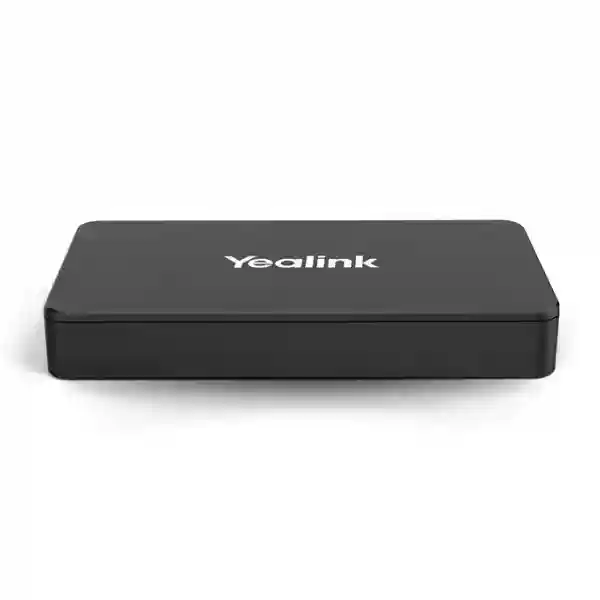
Yealink MVC content sharing accessory
Yealink MShare E2 Tanzania
Yealink MShare E2 is an MVC screen sharing box designed to move the wired presentation connection away from the room touch console and closer to the presenter. For organisations building or refining Microsoft Teams Rooms based on Yealink MVC systems, that separation can solve a very practical room-design problem: the touch console may sit where it is best for meeting control, while laptop users need HDMI or USB-C access at a different point on the table. MShare E2 provides that dedicated sharing point in a compact form that can be positioned in proximity to participants and integrated into conference-table cable management.
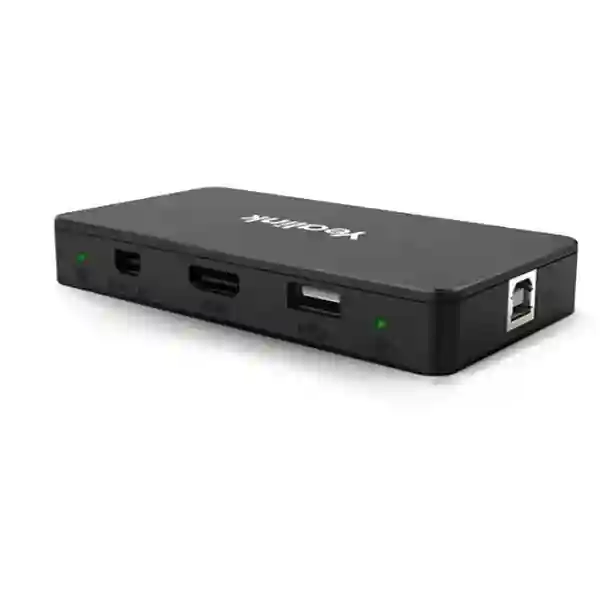
Official Yealink information specifies up to 1080p at 30 frames per second Full HD screen sharing, audio sharing, one USB Type-B female port, one HDMI input, one USB-C input and an LED status light. The package includes the MShare E2, USB-C cable, HDMI cable, USB Type-A cable and quick-start guide. Its role is focused: reliable wired presentation sharing for compatible Yealink MVC room deployments, with flexible placement and a cleaner meeting-room layout.
1080p/30fps sharing
Officially specified for Full HD wired screen sharing at up to 1080p and 30 frames per second, suitable for presentations, documents, dashboards and normal meeting-room content.
HDMI + USB-C input
Presenters can connect through the available HDMI input or USB-C input, giving meeting rooms a practical choice for common laptop connection methods.
Separate deployment
The sharing box is designed separately from the touch console, so integrators can place the content connection where users actually need it instead of forcing the room-control position to determine cable access.
Clear status indication
A bi-colour LED provides a visual indication of wired auxiliary-stream casting status, helping presenters understand whether sharing is active.
What the Yealink MShare E2 solves
Conference-room design often creates a small but frustrating gap between where the control panel belongs and where presenters connect their laptops. A room controller may be placed at the centre or end of a table for easy meeting control, while the person sharing content may sit several seats away. Extending the wrong cable, leaving adapters loose on the table or repeatedly moving the touch panel can make a professionally equipped room feel improvised. Yealink positions MShare E2 as the accessory for this situation. It provides a dedicated wired content-sharing point that can be located nearer to the presenter while remaining part of the MVC room environment.
This separation can also help when the meeting table uses built-in cable wells, floor boxes or an HDMI matrix. Instead of exposing multiple long cables from the room controller, the MShare E2 can be incorporated into the furniture or cable-management design. That makes the room easier to understand for visitors: they see a clear HDMI or USB-C presentation connection at the place where they are expected to sit. The LED status indication adds immediate feedback, while audio sharing means presentation sound can accompany shared content when the deployment and source device support it.
The MShare E2 should be selected as part of an MVC room design rather than as a generic standalone presentation switch. Before ordering, confirm the exact Yealink MVC system, touch-console generation, cabling route, presenter locations, display arrangement and intended source devices. Buyers who need wireless content sharing, general BYOD switching or multi-platform room transformation should compare the MShare E2 requirement with Yealink’s other collaboration accessories instead of assuming one accessory performs every sharing function.
Verified Yealink MShare E2 specifications
| Item | Verified detail |
|---|---|
| Product type | MVC screen sharing box / USB sharing box for MVC Series |
| Screen sharing | Up to 1080p/30fps Full HD |
| Audio | Audio sharing supported |
| Ports | 1 × USB Type-B female, 1 × HDMI input female, 1 × USB-C input female |
| Indicator | Bi-colour LED status light |
| Operating temperature | 0–40 °C |
| Operating humidity | 10–95% |
| Package | MShare E2, USB-C cable, HDMI cable, USB Type-A cable and quick-start guide |
Planning the right meeting-room deployment
A successful MShare E2 deployment begins with room geometry. Identify the normal presenter seats, guest seating, touch-console position and the route between the table and the room system. In a compact room, the difference may be only a metre or two, but in a larger boardroom the presenter position can be far enough from the controller that a separate sharing point materially improves usability. If the table already contains cable boxes, determine whether the MShare E2 can be placed where users can reach the HDMI and USB-C connections without creating tight bends or exposed cable loops.
Next, check source-device behaviour. Modern laptops vary widely in their USB-C capabilities. A physical USB-C connector does not automatically mean a laptop can output video over that port. Procurement teams should therefore validate the actual notebook models used by employees and frequent visitors. HDMI remains a useful common denominator for many business laptops, but thinner devices may require an adapter. A room can be made more user-friendly by documenting which connection to use and by keeping any organisation-approved adapters available where appropriate.
Finally, treat the MShare E2 as one part of the room. Camera framing, microphone pickup, speaker coverage, display size, network quality and the Teams Rooms configuration still determine the overall meeting experience. FourTeck Tanzania’s technology services overview explains how collaboration rooms depend on these connected elements, while the business technology shop provides a broader route for sourcing conferencing and supporting infrastructure. For a room-specific quotation, use the FourTeck Tanzania contact page.
Yealink MShare E2 Tanzania
For organisations in Tanzania, the Yealink MShare E2 is most relevant when a Yealink MVC meeting room needs a more convenient wired presentation point than the existing touch-console position provides. Corporate headquarters, financial institutions, professional-services firms, education organisations, public-sector offices, hotels and project teams often have meeting rooms where different presenters bring laptops to the table. In these environments, predictable content sharing matters because meetings lose momentum when participants search for adapters, stretch cables across the table or move the control console simply to share a slide deck. The MShare E2 addresses the physical placement aspect of that workflow by separating the sharing interface from the touch console.
A Tanzania procurement request should specify the exact Yealink MVC room system in use or planned, the room size, the touch-console model, the desired presenter position and the source devices that will normally connect. It is also helpful to state whether the table is fixed furniture, whether there are cable wells or floor boxes, whether an HDMI matrix is already installed and how far the cable path runs between the presentation point and the room equipment. These details allow the accessory to be assessed as part of the actual room rather than as an isolated part number.
The product’s officially stated 1080p/30fps sharing capability is well aligned with common business content such as PowerPoint presentations, spreadsheets, web applications, dashboards and training material. Organisations should nevertheless distinguish between presentation sharing and other use cases. If the requirement is wireless casting, personal-device video conferencing, arbitrary platform switching or a full room redesign, different Yealink accessories or systems may be required. Clear requirements prevent the common mistake of buying a sharing accessory for a job it was not designed to perform.
FourTeck Tanzania can place the MShare E2 requirement within a broader collaboration design that also considers displays, camera coverage, room audio, table connectivity, cable management and network readiness. The FourTeck Tanzania technology solutions page outlines this integrated approach. Buyers requesting a quotation should include quantity, MVC model, room count and any installation dependencies so the commercial scope can distinguish product supply from configuration, cabling or room-integration work.
Yealink MShare E2 Dar es Salaam
Dar es Salaam organisations frequently operate meeting spaces that support headquarters teams, visiting partners, regional management and hybrid collaboration. In that setting, a small accessory such as the Yealink MShare E2 can have disproportionate practical value when it removes friction from the presentation workflow. Boardrooms and client meeting rooms are often designed around a central touch console, but the person presenting may sit at another position. By creating a dedicated wired sharing point with HDMI and USB-C input, the room can keep meeting control in one logical place while providing content connectivity where users naturally need it.
For a Dar es Salaam deployment, room planners should inspect the conference table before finalising the accessory position. Permanent boardroom furniture may contain cable troughs, pop-up boxes or under-table raceways that can conceal the MShare E2 and preserve a clean visual finish. Where an HDMI matrix or other source-switching arrangement is already installed, the MShare E2 should be reviewed within that topology so the signal path is clear and support teams know which component controls each stage. The product’s bi-colour LED can then provide useful local feedback about wired casting status without asking the presenter to interpret the entire room system.
Procurement teams should also list the laptops that dominate the room. Some executive notebooks rely mainly on USB-C, while guest devices may still use HDMI. A mixed-device environment benefits from keeping both options visible and clearly labelled, while any required adapters should be standardised rather than collected randomly over time. Remember that USB-C connector shape alone does not guarantee display output, so test representative devices during commissioning. The 1080p/30fps sharing specification should be evaluated against the type of material the room normally presents rather than compared only with headline display resolution.
When preparing a Dar es Salaam quotation, provide room count, MVC system details, table layout, existing display count, controller position, preferred sharing location and whether installation is part of the request. This lets the supplier assess the MShare E2 as a room-design component and reduces the chance that cable lengths, adapters or furniture integration become late surprises.
Yealink MShare E2 Mwanza
Businesses and institutions in Mwanza considering the Yealink MShare E2 should begin with the meeting workflow rather than the accessory itself. Ask where presenters sit, how they currently connect laptops, which MVC room components are already installed and what typically goes wrong during content sharing. If the main problem is that the touch-console casting cable does not reach the useful presenter position, MShare E2 directly addresses that physical limitation by placing a dedicated sharing box nearer to the user while leaving the room controller where it makes sense for meeting operation.
This can be particularly helpful in fixed boardrooms where furniture and cabling were designed before the final collaboration workflow was understood. Rather than leaving an extension cable across the tabletop, planners can examine whether the MShare E2 belongs inside a table well, below the surface or close to a connection panel. The compact format is intended for flexible and concealable placement, which supports a tidier room when installation is carefully planned. The HDMI and USB-C inputs accommodate common presentation-source patterns, while USB Type-B forms part of the product’s room-system connection design.
For Mwanza organisations with multiple meeting rooms, standardisation is worth considering. Using a consistent presenter location, cable labelling approach and connection instructions can reduce support calls because users learn one routine that works across rooms. Standardisation does not mean every room must use identical equipment; a huddle room and a boardroom may need different cameras, microphones and displays. It means that where MShare E2 is appropriate, the user-facing sharing experience should be predictable.
A procurement request should avoid assumptions about stock, delivery time, warranty or compatibility. Instead, ask for the exact accessory, quantity, confirmed compatible MVC environment, included package components and any separate installation materials. Include photos or a simple room diagram when cable routing is important. This gives the supplier enough context to quote the correct scope and identify whether the requirement is purely product supply or part of a larger meeting-room integration project.
Yealink MShare E2 Arusha
Arusha has many organisations that host external guests, project stakeholders, training sessions and regional meetings, making intuitive room technology especially important. A visitor should not need to understand the architecture of a Teams Room simply to present a document. The Yealink MShare E2 can simplify the physical connection experience in compatible MVC rooms by placing HDMI and USB-C sharing access close to the person presenting rather than tying that access to the touch-console location.
For guest-heavy rooms, plan around device diversity. Company-managed laptops may use a standard USB-C dock and known video capabilities, while visitors may arrive with HDMI, USB-C, or devices that need adapters. The room owner should decide which connections are officially supported and make that choice visible. A neat cable box with clearly identified HDMI and USB-C leads is more dependable than a drawer containing assorted untested adapters. The MShare E2’s LED status indication can help the presenter confirm that wired sharing is active, reducing uncertainty during hand-offs between speakers.
Training and workshop rooms create another consideration: presenter positions may change. If the room is frequently reconfigured, verify whether a permanently concealed sharing point is appropriate or whether the cable layout needs more flexibility. In fixed executive or boardroom furniture, concealment may be ideal. In multipurpose spaces, access for maintenance and repositioning may matter more. The accessory should therefore be located according to the room’s operating pattern, not simply where it is easiest to install on day one.
For quotation preparation in Arusha, identify the Yealink MVC system, touch console, number of rooms, display arrangement and table type. State whether content audio is required and whether there are existing matrix switchers or AV distribution components. The more accurately the current room is described, the easier it is to determine whether MShare E2 is the correct addition or whether a different sharing architecture is better suited to the requirement.
Yealink MShare E2 Dodoma
In Dodoma, organisations planning formal meeting spaces can use the Yealink MShare E2 to improve the physical presentation connection within compatible MVC deployments. The use case is straightforward: meeting control and content sharing do not always belong at the same position on the table. A touch panel should be accessible to the person managing the room, while a presentation connector should be accessible to whoever is sharing content. Separating those two functions can make a room easier to use without changing the core meeting platform.
Formal boardrooms often prioritise a clean tabletop, predictable seating and controlled cabling. MShare E2’s compact design supports placement in proximity to the presenter and can be concealed as part of the table or cable-management system. That does not remove the need for careful access. Service technicians should still be able to reach the unit and its connections without dismantling furniture. Cable strain relief, bend radius and clear labelling are simple details that improve reliability over the life of the room.
The accessory officially supports up to 1080p/30fps Full HD screen sharing and audio sharing. For typical office presentations, this is a useful specification, but buyers should judge it against their intended content. A meeting room used for documents, slide decks and dashboards has different needs from a room intended for high-frame-rate creative review or specialised visualisation. Defining the real workload makes it easier to decide whether the MShare E2 meets the sharing requirement or whether the room needs an alternative solution.
Dodoma procurement teams should include compatibility verification in the purchase process. Record the MVC system model, controller, firmware environment and existing accessory set. Request confirmation of included cables and identify any additional installation materials separately. This disciplined approach is particularly useful for organisations that require clear asset records and repeatable standards across departments, because it distinguishes the product specification from site-specific integration decisions.
Yealink MShare E2 UAE
For UAE meeting-room projects, the Yealink MShare E2 fits best as a purposeful accessory within an MVC system rather than as a general-purpose AV switch. Modern offices in the UAE often combine high-quality furniture, concealed cabling, room scheduling, Teams Rooms controls and large displays. In that environment, placing the wired sharing connection exactly where presenters need it is part of the user experience. The MShare E2 allows the sharing point to be separated from the touch console, supporting cleaner table layouts and more deliberate integration.
Integrators should review the complete signal path when HDMI matrices, table boxes or AV distribution equipment are involved. The official Yealink positioning specifically highlights improved integration in scenarios where the touch-console casting cable is insufficient and where the accessory can be concealed near the conference table. That makes cable planning a central part of the design. Confirm the route, connector accessibility and maintenance access before furniture fabrication or final fit-out whenever possible.
UAE buyers often manage standard device fleets, which creates an opportunity to validate USB-C behaviour before room rollout. Test representative laptops for display output, charging expectations and any adapters required by the organisation. HDMI should also be tested with common guest devices. A simple room instruction card can then tell users which connector to choose. The goal is not only technical compatibility but predictable behaviour for employees and visitors who enter the room with limited time before a meeting.
For regional collaboration requirements beyond Tanzania, buyers can also review FourTeck UAE for broader technology sourcing and integration context. When requesting MShare E2, include exact MVC compatibility details, quantity, room type and whether the request covers hardware only or a complete conference-room scope.
Yealink MShare E2 Uganda
Uganda organisations using or planning Yealink MVC meeting rooms can evaluate the MShare E2 when wired content sharing needs to be available at a position separate from the touch console. This is common in boardrooms where the controller sits centrally for meeting management while the presenter may use a seat at the end of the table or beside a display. Rather than treating this as a minor cabling inconvenience, planners should design the presenter connection intentionally so every meeting follows the same routine.
The product provides HDMI and USB-C inputs, along with USB Type-B connectivity to the room system, and supports Full HD sharing up to 1080p/30fps with audio. Those specifications should be matched to the room’s normal content. Business presentations, training material and collaborative documents are typical scenarios. If users expect wireless casting, device-agnostic BYOD or support for platforms outside the room’s normal workflow, the requirement should be expanded and the accessory choice reconsidered rather than assuming MShare E2 covers every collaboration mode.
For multi-site organisations, a standard room checklist can improve procurement. Record room dimensions, seating count, display count, camera model, microphone arrangement, controller position and presenter connection point. Then identify which rooms actually need MShare E2. This prevents unnecessary accessories in rooms where the controller cable already reaches comfortably, while prioritising rooms where presentation ergonomics are weak.
Customers with Uganda requirements can also review FourTeck Uganda for regional technology context. Always request current confirmation of compatibility, commercial terms and delivery scope rather than relying on assumptions based on another room or country deployment.
Yealink MShare E2 Kampala
Kampala businesses with busy hybrid-meeting schedules often need rooms that work consistently for employees, clients and visitors. The Yealink MShare E2 can improve that consistency in compatible MVC rooms by giving presenters a dedicated wired sharing point close to their seat. This reduces dependence on where the touch console has been positioned and can help avoid temporary cable extensions that make the room look untidy or introduce support problems.
The design process should begin with the meeting table. Identify where users naturally open laptops, where power outlets are available and how existing cable trays are arranged. If the MShare E2 is concealed under or within the table, ensure the HDMI and USB-C leads emerge at a comfortable location and remain easy to replace. Avoid trapping the accessory where technicians cannot reach it, because future troubleshooting may require checking physical connections before examining software or platform settings.
Kampala organisations that host many external presenters should test a representative mix of devices. USB-C capabilities differ between laptops, and some devices may need HDMI adapters. A room standard that clearly identifies supported connection methods can reduce delays. The product’s status LED adds a simple visual cue, while audio sharing supports presentations that include video or other sound, subject to the room-system configuration and source device.
When comparing quotations, look beyond the accessory price. Confirm what cables are included, what installation materials are separate, whether configuration or testing is included, and whether the scope covers integration with an existing MVC room or supply for a new deployment. This makes commercial comparisons more meaningful and helps avoid a low initial price that excludes necessary room work.
Yealink MShare E2 Arua
For meeting rooms in Arua, the Yealink MShare E2 should be considered when the physical presentation workflow is the limiting factor in an otherwise suitable MVC setup. A long table, fixed room controller or restricted cable route can make the standard sharing connection inconvenient. Deploying MShare E2 closer to the presenter can improve usability without requiring users to reposition the touch console each time someone shares content.
Room owners should document the intended connection method before installation. HDMI remains widely understood and can be useful for guest devices, while USB-C offers a convenient single connector on many modern laptops. Because not every USB-C port carries video, the organisation should test its standard laptop fleet and communicate any limitations. Keeping the room instructions simple is more valuable than offering many untested connection combinations.
The official sharing limit of up to 1080p/30fps is sufficient for many standard office presentation tasks. If the room is used for specialised graphics, engineering content or high-motion media review, state that requirement during procurement so the complete room system can be evaluated. Display resolution alone does not determine the resolution of shared content, and expectations should be aligned before the product is selected.
For Arua purchasing, provide the exact MVC system, number of rooms and whether the accessory will be added to an existing installation. Photos of the table, controller and cable route can be useful in remote planning. Ask the supplier to separate hardware supply from optional installation or integration services so the quotation is clear and can be compared consistently.
Yealink MShare E2 Mbarara
Mbarara organisations evaluating Yealink collaboration rooms can use the MShare E2 to make wired presentation access more practical in compatible MVC environments. The product is especially useful when the touch console’s location has been chosen for meeting control but is not a convenient place for laptop connectivity. Separating the sharing box allows the room to preserve both priorities: intuitive control and accessible presentation input.
During design, check whether the conference table is likely to be moved or replaced. A permanently integrated cable solution works well for fixed boardrooms, but multipurpose training rooms may need a more accessible or adaptable position. The MShare E2 is compact, yet the surrounding installation still needs enough space for connectors and safe cable bends. Good cable management should protect the ports from repeated pulling and keep the user-facing leads easy to replace if they wear over time.
The product’s HDMI and USB-C inputs provide useful flexibility, and the LED light helps show the status of the wired auxiliary stream. Buyers should also note what the product is not: it should not be treated as proof of wireless casting capability, general-purpose video switching or complete BYOD functionality. Those requirements need their own compatibility review. This distinction is important when procurement teams receive a broad request such as “make every laptop work in the meeting room,” because that phrase can involve several different technologies.
For a Mbarara quotation, include the source-device mix, the room’s current Yealink components and any cabling constraints. Request a compatibility check before purchase and confirm the package contents. Clear documentation at procurement stage makes installation easier and gives internal IT teams a reliable reference for future room support.
Yealink MShare E2 Gulu
In Gulu, the Yealink MShare E2 can support organisations that want a straightforward wired content-sharing point in an MVC meeting room without placing that connection at the touch console. This can be valuable for executive rooms, training spaces and institutional meeting rooms where the presenter normally uses a defined seat or lectern position. The accessory is designed around flexible placement, so the physical room layout should guide where it is installed.
A good deployment separates user-facing simplicity from technical complexity. The participant should see a clearly labelled HDMI or USB-C cable and know what to connect. Behind the scenes, the cable path, room-system connection, display configuration and MVC compatibility should already be validated. The bi-colour LED provides additional local status feedback, but it should complement—not replace—clear room instructions and proper system testing.
Gulu buyers should also think about supportability. If a room is far from the primary IT team, standardising connectors and documenting the installation can make remote troubleshooting easier. Keep a record of the product model, connection path, MVC system, firmware environment and any adapters supplied with the room. If users report that a laptop does not share, the support team can first check whether the source device actually supports video through the selected port before assuming the room system has failed.
When requesting commercial terms, distinguish between accessory supply, shipping, installation, configuration and testing. Do not assume that any of these are included unless they are stated. A clear scope protects both the buyer and supplier and helps ensure the MShare E2 is delivered as part of a working room plan rather than as an isolated component with unresolved dependencies.
Yealink MShare E2 Kenya
Kenya organisations using Microsoft Teams Rooms with Yealink MVC hardware can consider MShare E2 when they need a dedicated wired presentation connection positioned away from the touch console. Nairobi offices, regional branches, training centres and boardrooms often have carefully planned furniture where the controller is optimised for meeting control but the presenter sits elsewhere. The accessory allows those two user tasks to be treated independently, improving room ergonomics without changing the fundamental MVC workflow.
Before procurement, map the room. Note the controller location, main presenter seat, table cable boxes, display position and any AV rack or HDMI matrix. Then confirm how HDMI and USB-C source devices will reach the MShare E2 and how the unit connects back into the room system. This basic diagram is useful for both purchasing and support because it exposes cable-distance or furniture-access issues before installation begins.
The 1080p/30fps Full HD specification is appropriate for normal business presentations, but organisations should document if they have unusual requirements. Creative teams, design review rooms or specialised visualisation may have different expectations for resolution, frame rate or colour handling. The correct decision is based on use case, not simply on whether a product is newer or has a familiar connector.
For Kenya sourcing and related regional IT requirements, customers can review FourTeck Kenya. When requesting MShare E2, ask for exact compatibility confirmation and a written scope covering the accessory, included cables, any additional installation items and testing expectations.
Yealink MShare E2 Kuwait
Kuwait meeting rooms often combine premium furniture, large displays and structured AV systems, making presentation connectivity an important part of the room design. Yealink MShare E2 is useful where the Yealink MVC touch console and the preferred laptop-sharing location are different. By separating the wired sharing box from the controller, integrators can keep the touch panel in the best position for meeting operation while placing HDMI and USB-C connections closer to users.
This approach works best when planned early. If a conference table is being manufactured or modified, define the sharing position before cable holes, grommets and under-table trays are finalised. Ensure there is access for future service and enough space for connectors. Where an HDMI matrix is used, document the signal path so facilities and IT teams understand whether a source passes through the MShare E2, matrix or other switching equipment before reaching the collaboration system.
Kuwait organisations should also define the expected presenter devices. HDMI is common across many enterprise laptops and adapters, while USB-C is increasingly standard on thinner notebooks. However, USB-C video capability varies, so test corporate models during commissioning. If wireless casting or BYOD conferencing is also required, specify it separately because the MShare E2’s primary function is wired screen sharing within the MVC environment.
For broader Kuwait technology enquiries, customers can visit FourTeck Kuwait. A useful MShare E2 quotation request includes room quantity, MVC system details, presenter connection method, table integration requirements and whether installation and commissioning are included.
Yealink MShare E2 Ghana
Ghana businesses deploying Yealink MVC rooms can use MShare E2 to resolve a common physical-layout issue: the best position for the room controller may not be the best place for a presenter to connect a laptop. The accessory creates a separate sharing point and supports HDMI and USB-C inputs, allowing integrators to place content connectivity closer to participants while keeping the touch console focused on meeting control.
For Accra offices and multi-site corporate environments, consistent room standards can make the technology easier to support. If several rooms use MShare E2, use the same cable labels, connection instructions and presenter-side layout whenever possible. This reduces user uncertainty and gives support teams a common troubleshooting sequence. Where rooms differ significantly in size or furniture, standardise the user experience even if the underlying cable route changes.
The product supports up to 1080p/30fps sharing and audio sharing, which aligns with typical meeting content. Buyers should verify exact MVC compatibility and not extrapolate compatibility from another Yealink product or room. Yealink’s portfolio includes multiple sharing, BYOD and collaboration accessories with different purposes, so confirming the intended architecture is more reliable than selecting based only on connector types.
When requesting a Ghana quotation, share the room system model, quantity, existing controller, cable-distance concern and the intended presenter device mix. If the room is still in design, include table and display information so the accessory can be incorporated cleanly. If the room is already operational, photos of the current controller and connection point can help identify whether MShare E2 directly addresses the problem.
Yealink MShare E2 Nigeria
Nigeria organisations with high meeting volumes can benefit from reducing small usability issues that repeatedly interrupt presentations. In a compatible Yealink MVC room, MShare E2 addresses one such issue by providing a wired sharing point that does not have to occupy the same location as the touch console. This allows the room controller to remain accessible for meeting management while HDMI and USB-C connections can be positioned where presenters naturally use their laptops.
For Lagos, Abuja and multi-branch organisations, room standardisation can make support much easier. Document the normal presenter connection, source-device requirements, room-controller position and accessory layout. If a user moves from one office to another, a similar room workflow reduces training. IT teams also gain a repeatable support procedure: confirm source output, cable connection, LED status, MVC configuration and display behaviour in a logical sequence.
MShare E2’s Full HD sharing capability should be compared with actual application needs. Most slide decks, spreadsheets and web demonstrations are well suited to 1080p/30fps, but specialised media workflows may require another approach. The same principle applies to connectivity: HDMI and USB-C cover many laptops but do not automatically guarantee every device will work without adapters or source configuration. Procurement should therefore specify the device fleet and intended use rather than relying on generic “universal compatibility” language.
A strong Nigeria quotation request includes product quantity, compatible MVC room model, installation location, cabling constraints and whether the room uses additional AV switching. Ask the supplier to identify exactly what is included and what services are optional. This creates a cleaner comparison between proposals and reduces the risk of discovering missing integration work after the hardware arrives.
Yealink MShare E2 Seychelles
Seychelles organisations such as hospitality groups, corporate offices, government entities and professional services teams may use meeting rooms for both internal collaboration and external presentations. In a Yealink MVC room, the MShare E2 can improve the wired sharing experience when guests or employees need HDMI or USB-C access at a point different from the touch console. This is especially useful in visually refined rooms where loose extension cables would undermine the design and create avoidable support issues.
Because island environments can make replacement logistics more consequential, the installation should emphasise maintainability. Do not permanently trap the MShare E2 behind furniture without service access. Keep user-facing cables replaceable, label the connection path and record the MVC compatibility information. Small documentation steps make future troubleshooting faster and help local IT teams distinguish a source-device problem from a cable or room-system issue.
The accessory’s 1080p/30fps sharing, audio support, HDMI input, USB-C input, USB Type-B connection and LED status indication provide a focused set of features for wired presentation sharing. If the room requires wireless presentation from phones, BYOD operation on third-party meeting platforms or other advanced source routing, list those needs separately during design. Doing so avoids stretching the MShare E2 beyond its intended role and leads to a more complete collaboration solution.
For Seychelles procurement, share room photos or drawings, system details and the normal device types used by presenters. Confirm the supply scope, included cables, any adapters, installation responsibilities and testing process before purchase. A well-defined request improves both commercial accuracy and the final user experience.
MShare E2 buying and compatibility checklist
Confirm the MVC system: Record the exact Yealink MVC room model and controller generation. Do not assume that an accessory described for the MVC family will behave identically in every historical or future configuration.
Define the presenter position: Measure where users actually sit and share content. The value of MShare E2 comes from placing the wired sharing interface where it improves the room workflow.
Check source devices: Identify whether users rely on HDMI, USB-C or adapters. Verify that standard USB-C laptops support video output through the relevant port.
Review the furniture: Decide whether the box will be visible, under-table, inside a cable well or part of another AV connection panel. Preserve service access and avoid cable strain.
Document additional sharing needs: If the room also needs wireless casting, BYOD conferencing or complex source switching, include those requirements so the correct Yealink accessories can be evaluated together.
Clarify commercial scope: Separate the product, included cables, extra adapters, installation materials, integration, configuration and testing so procurement understands exactly what the quotation covers.
Related FourTeck resources
Review the wider IT, collaboration, networking and infrastructure portfolio that can support a complete meeting-room project.
FourTeck Tanzania shop
Explore business technology categories including video conferencing, displays, computers, networking and supporting infrastructure.
Technology services
Understand how meeting rooms fit into a wider design covering audio, video, cabling, network quality and lifecycle support.
FourTeck Uganda
Regional technology resource for Uganda-based requirements and related business infrastructure.
FourTeck Kenya
Regional technology resource for Kenya procurement, deployment and solution planning.
Frequently asked questions
What is the Yealink MShare E2?
It is a Yealink MVC screen sharing box designed to provide a separate wired content-sharing point from the touch console in compatible MVC meeting-room deployments.
What resolution does MShare E2 support?
Yealink specifies up to 1080p at 30 frames per second Full HD screen sharing.
Does MShare E2 share audio?
Yes. Audio sharing is included in Yealink’s published key features for the MShare E2.
Which ports are available?
The MShare E2 provides one USB Type-B female port, one HDMI input female port and one USB-C input female port, plus an LED status light.
Is MShare E2 a wireless presentation device?
Its documented role is wired MVC screen sharing. If your requirement is specifically wireless casting, discuss that separately so the correct Yealink wireless-sharing option and room compatibility can be assessed.
Why use MShare E2 instead of the touch-console sharing cable?
The main reason is placement flexibility. When the touch-console cable does not reach the preferred presenter position, MShare E2 can create a separate sharing point closer to the user.
What should I provide for a quotation?
Provide quantity, exact MVC system, touch-console details, room count, presenter position, preferred HDMI or USB-C connection, table layout and whether you need hardware only or installation and testing as well.
Quotation checklist for Yealink MShare E2
For a useful quotation, include the exact product name, requested quantity, Yealink MVC room-system model, touch-console model, room count, table layout and the distance between the desired presentation point and existing room equipment.
State which presenter devices are used, whether HDMI and USB-C are both required, and whether the room already contains an HDMI matrix, cable cubby or under-table AV system. If installation is required, describe furniture access and existing cable routes.
Ask the quotation to distinguish product supply, included package contents, extra cables or adapters, installation, configuration, testing and any other services. This gives procurement a clear comparison and reduces hidden assumptions.
Decision recap
Choose the Yealink MShare E2 when your compatible MVC meeting room needs a dedicated wired presentation point separate from the touch console. Its strongest value is deployment flexibility: HDMI and USB-C access can be positioned near presenters, while the room controller remains where it is most useful for meeting operation.
Before ordering, verify MVC compatibility, source-device behaviour and the physical cable route. If the real requirement includes wireless presentation, BYOD platform switching or broader AV routing, state those needs so the room can be designed with the appropriate additional components rather than forcing the MShare E2 to solve a different problem.
Talk to FourTeck about your meeting room
Share your Yealink MVC model, room layout, presenter position and required quantity. FourTeck can use those details to help determine whether MShare E2 fits the intended wired-sharing workflow and what supporting room-integration items should be considered.




Reviews
There are no reviews yet.