
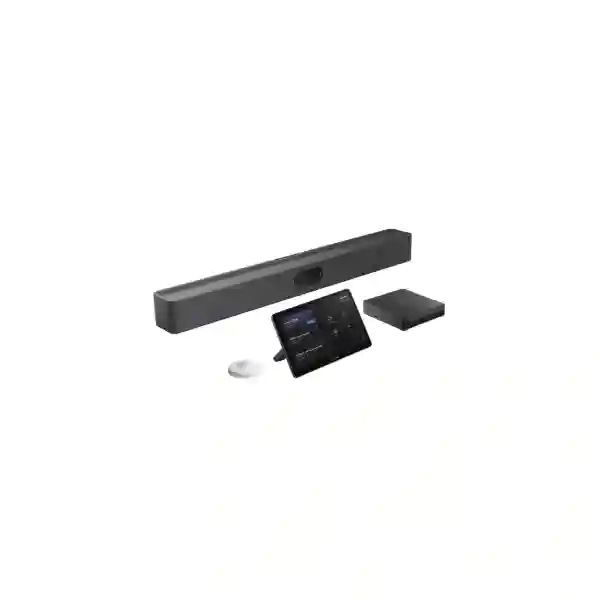
Yealink MVC S50 Teams Rooms System
The Yealink MVC S50 Teams Rooms System is a coordinated room solution built around the MeetingBar A50, MCore 4 mini-PC, MTouch Plus touch console and RoomSensor. It is positioned by Yealink for medium to large meeting spaces and gives organizations a native Microsoft Teams Rooms environment with intelligent camera framing, integrated room audio, simple touch control, wired content sharing and optional wireless sharing. For organizations in Tanzania standardizing hybrid meeting spaces, the MVC S50 can provide a practical path from improvised laptop-based meetings to a dedicated room experience that is easier for employees to enter, join and operate consistently.
Confirm room size, seating layout, display count, mounting position, network connectivity, Microsoft Teams Rooms account, content-sharing method and any microphone expansion before ordering. A display is required but is not part of the standard MVC S50 bundle.
Triple 50MP camera architecture, wide and telephoto views, integrated speakers, 16 MEMS microphones and AI-assisted meeting features.
Intel Core Ultra 5 125H platform with 16GB DDR5, 256GB SSD, Windows 11 IoT Enterprise and dedicated room-system connectivity.
11.6-inch 1920 × 1080 touch interface supporting room control, wired sharing and optional WPP30 wireless presentation workflows.
BLE-based sensing for occupancy and environmental information including temperature, humidity and light-related room data.
What the Yealink MVC S50 solves
Many meeting rooms evolve through separate purchases: a USB camera, a speakerphone, a display cable, a mini-PC and perhaps a tablet. That can work for occasional calls, but it often creates inconsistent user experiences, cable confusion, device-selection problems and support overhead. The MVC S50 is designed as a purpose-built Microsoft Teams Rooms system in which the main video bar, room computer, touch controller and room sensor are intended to operate together. This makes the room easier to standardize and gives IT teams a clearer device set to document, update and support.
The system is especially relevant when an organization wants a dedicated Teams room rather than asking every meeting organizer to connect a personal laptop. The MTouch Plus provides a fixed interface for meeting controls, while the MCore 4 runs the room environment. The MeetingBar A50 handles front-of-room capture and audio. The RoomSensor adds room-awareness functions. Buyers should still treat displays, mounts, network readiness, room acoustics and Microsoft licensing as separate planning items. A complete quotation should show what is included, what is optional and what must already exist at the site.
For a broader view of collaboration infrastructure and other business technology dependencies, buyers can review FourTeck Tanzania business technology solutions. The relationship matters because a Teams room depends on more than the conference device itself: internet quality, switching, Wi-Fi design where used, firewall policy, display integration, cabling and power protection can all influence the user experience.
Verified MVC S50 technical highlights
| MeetingBar A50 camera | Three 50MP lenses: one wide camera with 98° HFOV / 81° VFOV and two telephoto cameras with 41.6° HFOV / 31.8° VFOV |
| Camera intelligence | IntelliFocus, speaker tracking, Video Fence, people counting, picture-in-picture and auto framing |
| Audio | Four built-in 5W speakers, 16 MEMS microphone array, up to 10 m pickup distance, full duplex, echo cancellation and AI-enhanced noise suppression |
| MCore 4 processor | Intel Core Ultra 5 125H with built-in NPU |
| MCore 4 memory and storage | 16GB DDR5 and 256GB SSD |
| Display output | Three HDMI video outputs with CEC support; HDMI input is available for content sharing |
| MTouch Plus | 11.6-inch IPS screen, 1920 × 1080 resolution, HDMI/USB-C input and flexible table or wall deployment |
| RoomSensor | Occupancy, temperature, humidity and light detection with Bluetooth BLE 5.2 |
| Basic room prerequisites | A compatible display, Microsoft Teams Rooms account and wired network environment are identified by Yealink as minimum requirements |
Camera, audio and meeting equity
The MeetingBar A50 is the most visible component of the MVC S50. Instead of relying on a single fixed lens, it uses a triple-camera arrangement that combines a wider perspective with two telephoto views. This architecture is intended to maintain useful coverage across a room where people may sit at different distances from the display. The physical privacy shutter gives users a clear privacy mechanism when the camera is not required. AI-assisted features such as IntelliFocus, speaker tracking, auto framing and Video Fence can reduce the need for manual camera adjustment, although room layout and seating geometry should still be considered during installation.
Audio is built around a 16 MEMS microphone array and four integrated speakers. Yealink specifies a pickup distance of up to 10 metres and support for expansion microphones. In practice, that does not mean every room will behave identically. Glass walls, hard floors, high ceilings, HVAC noise, long tables and unusual seating patterns can affect intelligibility. The strongest procurement approach is to assess the room acoustically and decide whether the built-in array is sufficient or whether external microphone options should be added.
The aim of a professional Teams room is meeting equity: remote participants should be able to follow who is speaking, understand conversation clearly and see shared content without repeatedly asking the room to adjust equipment. The MVC S50 provides the core tools for that objective, while installation quality, lighting, network performance and user practices determine how successfully the room performs day to day.
Deployment, displays and content sharing
Yealink documents several deployment options for the MVC S50 components. The MCore 4 can be positioned on a wall, on a television, on a table or on compatible meeting-display hardware. The MTouch Plus can sit on a table, be fixed to the table or mounted to a wall. The MeetingBar A50 can be wall mounted, placed on a tabletop stand or integrated with compatible mounting accessories. The RoomSensor can be mounted on a wall or ceiling. These choices allow the system to fit different room designs, but mounting hardware and display compatibility should be confirmed in the quotation rather than assumed.
Content sharing can be wired through the supported HDMI and USB-C paths, while wireless sharing can be enabled with the optional Yealink WPP30. A dedicated room computer also means the Teams Rooms environment can remain attached to the room rather than to one employee. This matters for spaces used by multiple departments because the room experience becomes more repeatable.
For buyers planning several meeting spaces, the broader Yealink MVC S Series Africa planning page provides a useful family-level reference for matching different MVC systems to different room categories. Standardizing around a family can simplify support, but each room should still be sized on its real dimensions, seating and audio requirements.
Buying and quotation checklist
Provide room dimensions, seating capacity, table shape, camera-to-farthest-seat distance, ceiling height and whether the space is divisible.
Confirm one or more displays, screen size, mounting method, available HDMI paths and whether the display is already installed.
Confirm wired Ethernet at the room, internet stability, DNS and firewall readiness, cable routing and any VLAN or access-control requirements.
Identify the Microsoft 365 tenant, Teams Rooms account and applicable licensing plan. Licensing should appear as a separate, explicit quotation item where needed.
Decide whether the built-in audio coverage is sufficient or whether tabletop or ceiling microphone expansion is appropriate.
Clarify cabling, wall work, brackets, commissioning, Teams sign-in, firmware updates, testing, user orientation and handover documentation.
Yealink MVC S50 Teams Rooms System Tanzania
Organizations searching for the Yealink MVC S50 Teams Rooms System Tanzania are usually trying to solve a business collaboration problem rather than simply buy a camera. The useful starting point is to define the meeting room: how many people normally attend, how far the farthest seat is from the display, whether one or two screens are planned, and whether the room is used mainly for internal Teams meetings, client calls, training or executive collaboration. The MVC S50 provides a dedicated Windows-based Teams Rooms architecture with the MeetingBar A50, MCore 4, MTouch Plus and RoomSensor, but the surrounding room infrastructure determines whether users experience it as a polished system or as another piece of equipment.
For Tanzanian businesses with hybrid teams, regional offices or international partners, a dedicated room system can make scheduled meetings easier to run. Users do not need to decide which laptop should host the call, which camera to select or which speakerphone cable belongs to the room. The touch console provides a consistent control point, while the A50 handles video and room audio. IT managers can plan the system as part of the room infrastructure, with documented network ports, screen connections and mounting positions.
Procurement teams should request a quotation that clearly separates the standard MVC S50 bundle from displays, mounts, WPP30 wireless sharing, microphone expansion, Microsoft licensing and installation work. Tanzania projects can vary significantly in existing cabling, internet resilience, power quality and room construction, so a bill of materials should reflect the actual site rather than a generic package. FourTeck can help structure that assessment and align the conferencing system with switching, internet, firewall, display and power requirements without making assumptions about stock or delivery dates before a written quotation is prepared.
Yealink MVC S50 Teams Rooms System Dar es Salaam
For buyers considering the Yealink MVC S50 Teams Rooms System Dar es Salaam, the most common use case is a professional meeting room in a head office, project office, hotel, professional-services firm, technology company or regional branch where Teams calls are frequent and the room must be ready for different users throughout the day. Dar es Salaam offices often operate as coordination points for national and international teams, so a dedicated room environment can reduce the friction associated with connecting personal laptops and ad-hoc USB devices.
A deployment should begin with a room survey or a detailed room brief. Camera placement should give the A50 a clear view of the table and participant positions. The display should be large enough for the viewing distance and should be mounted so remote participants and shared content remain readable. Wired Ethernet should be available at the room, and the network should be checked for stable access to Microsoft cloud services. If a company uses segmented networks, IT should confirm the correct VLAN, firewall rules and DNS behaviour before commissioning day.
Audio planning deserves equal attention. Meeting rooms with glass partitions, hard surfaces or strong air-conditioning noise can create reflections that make even a capable microphone system sound less natural. The A50 includes a 16 MEMS array and Yealink specifies up to 10 metres of pickup, but room acoustics should guide whether expansion microphones are needed. A Dar es Salaam quotation should therefore identify the MVC S50 bundle, screen and mount requirements, cable routes, optional WPP30 sharing, licensing, installation, testing and user handover as separate scope items. That structure helps facilities, procurement and IT teams compare proposals on a like-for-like basis.
Yealink MVC S50 Teams Rooms System Mwanza
Businesses evaluating the Yealink MVC S50 Teams Rooms System Mwanza may include financial services, education, healthcare administration, logistics, mining-related operations, regional offices and growing commercial organizations that need a reliable bridge between local teams and colleagues elsewhere. In these environments, the value of a dedicated Teams room is consistency. A meeting space that starts the same way every time can reduce wasted minutes, support executive and operational calls and make the room easier for local IT teams to maintain.
The MVC S50 should be sized against the physical room rather than against the city or company headcount. The triple-camera A50 is designed to provide intelligent framing across medium and larger collaboration spaces, while MTouch Plus gives users a fixed control interface. The MCore 4 provides the Windows room-computing platform and multiple display outputs, which can be useful when a room requires more than one screen. Before equipment is ordered, the customer should document screen sizes, mounting surfaces, available power outlets, Ethernet points, cable containment and the distance from the camera wall to the farthest participant.
Mwanza projects may also benefit from careful resilience planning. If video meetings are business-critical, network and power dependencies should be considered together with the room system. A UPS for the room computer, display and network path may help during short power interruptions, while dependable switching and internet connectivity reduce avoidable call disruption. This does not change the capabilities of the MVC S50 itself, but it determines how reliably the complete meeting service operates. A well-structured quotation should therefore cover required hardware, optional microphones or WPP30, Microsoft Teams Rooms licensing, installation responsibilities and post-install testing without assuming availability or lead time until confirmed in writing.
Yealink MVC S50 Teams Rooms System Arusha
The Yealink MVC S50 Teams Rooms System Arusha is relevant to organizations that host frequent hybrid meetings with partners, clients, head offices and distributed teams. Arusha has a broad mix of hospitality, tourism, NGOs, education, professional services and regional coordination functions, and many of these environments need rooms that can support presentations and scheduled video meetings without a technician being present for every call. A dedicated Teams Rooms interface helps make the meeting process more predictable for rotating users.
For a boardroom or medium conference room, camera eye-line and seating layout should be planned before brackets are installed. The MeetingBar A50 combines a wide camera and telephoto cameras with AI-assisted framing, but it still needs a sensible front-of-room position. Lighting should avoid strong backlight behind participants, and the screen should not be mounted so high that users appear to look away from the camera. The MTouch Plus can be placed on a table or mounted according to the workflow of the room, while the RoomSensor can support occupancy-aware room behaviour.
For Arusha buyers comparing Teams room proposals, the key commercial question is whether the quotation is complete. One proposal may include only the MVC bundle, while another may add displays, mounts, cabling, microphone expansion, wireless sharing, installation and licensing. The totals cannot be compared fairly until the scope is normalized. FourTeck can help prepare a room-specific bill of materials and document what is standard, optional and customer-provided. Where the organization operates across borders, the system can also be incorporated into a consistent room standard so users encounter similar controls in Tanzania and other regional offices.
Yealink MVC S50 Teams Rooms System Dodoma
Organizations searching for the Yealink MVC S50 Teams Rooms System Dodoma may be planning collaboration spaces for administration, education, professional services, public-sector related work, project offices or national organizations that need dependable communication with teams outside the capital. A dedicated Microsoft Teams Rooms system is useful when the room itself needs to be a managed collaboration endpoint rather than a collection of accessories connected to whoever brings a laptop.
The MVC S50 architecture separates the room-computing role from the front-of-room video bar. The MCore 4 runs the Teams Rooms environment, while the A50 provides the main video and audio functions. This can make troubleshooting more structured because IT teams can treat the room as a known system with defined components. MTouch Plus offers a fixed user control surface, reducing the number of steps required to join scheduled Teams meetings. The RoomSensor adds smart-room functions that can support a more automated meeting experience.
A Dodoma installation plan should confirm network access, screen connections, wall construction, cable pathways and power protection. If the room will host training sessions or long tables, audio coverage should be reviewed carefully. Yealink supports microphone expansion on the A50, so the system can be adapted when the built-in array is not enough for the seating pattern. Procurement documentation should also state whether a display, mounting hardware, WPP30, licensing and installation are included. This level of detail protects the buyer from assuming that every item shown in a room diagram ships in the standard box and helps establish a clear acceptance checklist for commissioning.
Yealink MVC S50 Teams Rooms System UAE
The Yealink MVC S50 Teams Rooms System UAE is often considered by multinational companies that want a consistent Microsoft Teams meeting-room standard across headquarters, branch offices and regional operations. The value of standardization is not only visual. A repeatable room design can simplify user training, configuration templates, support procedures, accessory choices and spare planning. When employees travel between offices, a familiar MTouch interface and predictable Teams Rooms workflow can reduce meeting-start friction.
For UAE projects, buyers should define whether the room is a standard medium conference room, a larger collaboration space or part of a multi-room rollout. The MVC S50 can support a strong medium-room design, but very large spaces may need a different MVC model or a more modular ProAV approach. The correct choice depends on room geometry, participant count, camera distance and audio needs rather than a generic label. The A50 supports microphone expansion, and the MCore 4 provides multiple HDMI outputs, which gives designers flexibility when a room requires additional displays or expanded audio coverage.
Organizations connecting UAE and East African operations can use a shared room specification while allowing local installation details to differ. Screen brands, wall structures, power standards, cable routes and available network infrastructure may change from site to site. The useful standard is therefore a documented functional design: agreed room size band, collaboration platform, core MVC bundle, display count, sharing method, microphone strategy, licensing and commissioning process. Buyers should request written confirmation of stock, lead time, warranty and local services from the supplying entity rather than relying on generic web claims, especially for multi-country procurement.
Yealink MVC S50 Teams Rooms System Uganda
The Yealink MVC S50 Teams Rooms System Uganda can suit organizations building formal video collaboration spaces for head offices, NGOs, education, finance, logistics and multi-site businesses. When the same meeting room is used by many departments, a dedicated Teams Rooms system reduces dependence on individual laptops and makes the room easier to operate consistently. The MVC S50 combines the room PC, front-of-room video bar, touch controller and sensor in a designed system rather than a mixed set of unrelated endpoints.
Uganda buyers should look beyond the product name and confirm the exact room design. A display is required but not included in the standard MVC S50 package. Wired network access is also identified by Yealink as a minimum requirement. The organization needs a suitable Microsoft Teams Rooms account, and wireless presentation with WPP30 is optional rather than assumed. These details should be visible in procurement documents so project stakeholders understand what must be supplied by the integrator and what already exists at the site.
For companies coordinating deployments in Uganda and Tanzania, a consistent procurement method can be more valuable than simply buying identical hardware. Define room classes, minimum display sizes, cable standards, network requirements, microphone expansion rules and acceptance tests. The FourTeck Uganda technology page provides regional context for related communication and network requirements. A unified design approach helps support teams understand the room even when local installation conditions differ, and it gives purchasing teams a clearer basis for comparing quotations across sites.
Yealink MVC S50 Teams Rooms System Kampala
For the Yealink MVC S50 Teams Rooms System Kampala market, typical demand comes from headquarters, financial institutions, professional firms, technology companies, NGOs, education organizations and regional operations that need frequent Microsoft Teams meetings. Kampala offices may have several meeting spaces of different sizes, making it important to standardize by room class rather than purchase the same device for every room. The MVC S50 is particularly useful where a dedicated Windows Teams Rooms experience is required and the room is large enough to benefit from the A50’s triple-camera design.
A site survey should document table dimensions, number of seats, display wall, camera position, cable pathways and ambient room noise. The A50’s built-in audio may meet the need in many medium spaces, while longer tables or challenging acoustics may justify expansion microphones. The MTouch Plus can provide the main meeting control interface without users needing to operate the Windows desktop directly. That separation is important for shared rooms because it keeps the user workflow focused on joining, controlling and sharing during meetings.
Kampala procurement teams should also ask whether the quotation includes installation and commissioning. A professional room rollout may include mounting, structured cabling adjustments, network configuration, Teams Rooms account sign-in, firmware and Windows update checks, camera framing tests, audio tests and a user handover. None of those tasks should be assumed simply because the hardware is sold as a bundle. The clearest project documentation lists each responsibility, records the final room settings and establishes whom the customer should contact for device, network or Microsoft-account issues after handover.
Yealink MVC S50 Teams Rooms System Arua
The Yealink MVC S50 Teams Rooms System Arua may be considered by organizations that need structured collaboration between a regional site and teams in Kampala, other East African cities or international offices. In a regional location, reliability can depend as much on the supporting infrastructure as on the room appliance. A dedicated Teams room can simplify user interaction, but the network, power, display and cabling path all need to be stable enough to support business video without avoidable interruption.
Before selecting the MVC S50, the customer should confirm that the room size and seating arrangement suit the A50’s camera and audio approach. The triple-lens camera system is designed to keep participants visible across a medium or larger conference environment, while AI framing features can reduce manual intervention. If a meeting room is unusually long or has strong acoustic reflections, an integrator should assess whether additional microphone hardware is needed. The objective is to design for clear remote participation rather than simply maximize the number of features listed on a specification sheet.
Arua projects should also plan supportability. Equipment labels, cable documentation, network port assignments and a record of Microsoft Teams Rooms credentials and ownership processes can make future troubleshooting much faster. Power protection may be sensible where short interruptions would otherwise reboot the room PC, display and network equipment. A quotation should indicate any UPS, display, wall mount, WPP30 or microphone expansion separately so procurement teams can approve the complete room cost. Written confirmation of lead time and logistics should be obtained for the specific project rather than inferred from availability in another city or country.
Yealink MVC S50 Teams Rooms System Mbarara
For organizations searching for the Yealink MVC S50 Teams Rooms System Mbarara, the buying decision should begin with the type of meetings the room will host. A regional office that mainly connects management teams may have different priorities from a training room, university space or healthcare administration room. The MVC S50 offers a strong core platform for native Microsoft Teams Rooms, but the complete design should be matched to the actual participants, content-sharing patterns and support resources available at the site.
The A50 combines video and audio at the front of the room, which can reduce the number of separate devices installed around the table. The MTouch Plus gives users a dedicated control surface, and MCore 4 provides the Windows computing environment. If employees regularly present from laptops, the design should determine whether wired USB-C or HDMI sharing is sufficient or whether WPP30 wireless sharing should be added. This decision affects both user convenience and the bill of materials, so it should be documented before purchasing.
For Mbarara sites, network readiness is particularly important when Teams traffic shares links with business applications, backups, cloud services and guest internet access. Quality of Service, adequate internet capacity and sensible scheduling of bandwidth-heavy tasks can help protect call quality. The meeting-room project should therefore involve both collaboration and network stakeholders. A handover checklist can include camera framing, microphone pickup, speaker playback, content sharing, Teams sign-in, room calendar visibility and reboot recovery. This turns the procurement from a hardware purchase into an operationally ready meeting room that staff can use with less dependence on ad-hoc technical assistance.
Yealink MVC S50 Teams Rooms System Gulu
The Yealink MVC S50 Teams Rooms System Gulu can support businesses, institutions, NGOs and distributed organizations that rely on regular Microsoft Teams communication between regional and central offices. A dedicated room platform is useful when meetings are too important to depend on whichever personal device happens to be available. The fixed MTouch Plus interface, room computer and front-of-room A50 help create a predictable starting point for users, while RoomSensor adds occupancy-aware room functions.
A system design for Gulu should be practical about infrastructure. Confirm that the room has an appropriate display, secure mounting surfaces, suitable power points and wired network access. If cable routes are long or pass through shared building spaces, cabling should be planned and labelled before installation. The A50 can support microphone expansion, which is useful for room layouts that extend beyond the most effective pickup zone of the built-in array. The placement of the camera should also avoid obstructions and capture participants near the ends of the table without forcing unnatural seating.
Resilience planning is equally useful. If the room supports management meetings, project coordination or external stakeholders, teams should understand what happens when internet or power is interrupted. A secondary internet service, UPS or documented fallback process may be appropriate depending on business criticality, but these are infrastructure decisions rather than MVC S50 specifications. A complete quotation should keep those categories separate. That gives the buyer transparency: the customer can see the Yealink room bundle, optional collaboration accessories, local infrastructure work and ongoing licensing as distinct cost areas and can make informed trade-offs without confusing one-time hardware with recurring or site-specific requirements.
Yealink MVC S50 Teams Rooms System Kenya
The Yealink MVC S50 Teams Rooms System Kenya is relevant to enterprises that want standardized Microsoft Teams meeting rooms across offices in Nairobi, regional branches and cross-border operations. Kenya-based organizations frequently coordinate with partners and colleagues across East Africa, the Gulf and global markets, which makes meeting-room consistency valuable. The MVC S50 provides a Windows Teams Rooms foundation with a dedicated mini-PC, touch controller, intelligent room sensor and A50 video bar rather than relying on a shared laptop.
Multi-room projects should classify spaces before hardware is selected. Small rooms may require a different system, while the MVC S50 is positioned for medium and larger collaborative areas. Very large boardrooms may be better served by another MVC architecture with more modular camera and audio options. For the rooms that fit the S50 profile, the main design questions are display count, camera distance, acoustic conditions, microphone expansion, sharing workflow and mounting. These choices determine both performance and total installed cost.
For customers coordinating Kenya and Tanzania deployments, the FourTeck Kenya technology solutions page can provide regional context for video conferencing, networking and unified communications requirements. A cross-border rollout should still use written country-specific quotations because logistics, services and available accessories can differ. The recommended approach is to keep the functional standard consistent while allowing local implementation details to vary. Documented room profiles, approved accessories, Microsoft licensing requirements and commissioning tests help ensure that each site reaches the same user outcome even when the physical rooms and underlying networks are different.
Yealink MVC S50 Teams Rooms System Kuwait
The Yealink MVC S50 Teams Rooms System Kuwait can be considered by corporate offices, engineering firms, financial organizations, project teams and regional businesses that conduct frequent Microsoft Teams sessions with colleagues across the Gulf, Africa and other international markets. A dedicated room system can reduce the inconsistent experience of laptop-based conferencing by giving every user the same controller, camera, audio and display workflow whenever they enter the room.
Room conditions in a modern office may look visually suitable while still creating acoustic or camera challenges. Glass partitions can increase reflections, bright windows can create backlight and long boardroom tables can place some participants far from the front wall. The MVC S50’s A50 video bar includes AI-assisted framing and a 16-microphone array, but design decisions should still reflect the physical room. Expansion microphones can be considered where needed, and the camera should be mounted at a height and position that produces a natural eye line for remote participants.
Kuwait procurement should also distinguish between the product bundle and a complete meeting-room project. Displays, mounting, cabling, room licenses, wireless sharing accessories, installation and training may all be separate. For organizations buying systems for multiple countries, a centrally defined room standard can make procurement more efficient, but each quotation should document local scope, delivery terms and warranty handling. This protects the project from assumptions and makes technical acceptance easier because all parties know which components and services are expected at commissioning. The result should be a usable room system, not simply a box of collaboration hardware.
Yealink MVC S50 Teams Rooms System Ghana
The Yealink MVC S50 Teams Rooms System Ghana is suited to organizations that need a formal Microsoft Teams room for executive meetings, client calls, training, project coordination and hybrid work. In Accra and other commercial centres, many businesses operate across multiple countries or rely on remote specialists. A room that uses a dedicated Teams Rooms computer and controller can make these meetings easier for non-technical staff and can reduce variability between departments.
Planning should begin with room scale and user behaviour. If participants typically sit close to a single display, the standard A50 coverage may be straightforward. If the room is long, wide or used for training, the design should review camera sight lines and audio pickup more carefully. The triple-camera architecture gives the A50 a combination of wide and telephoto perspectives, while AI features can assist framing and speaker focus. The MCore 4 provides multiple display outputs, which is useful when the room is designed for a dual-screen experience.
The FourTeck Ghana business IT page provides related regional context for networking, communications and supporting infrastructure. For Ghana buyers, the strongest quotation format lists every dependency: Teams Rooms bundle, displays, mounts, Ethernet and power readiness, optional WPP30, microphone expansion, Microsoft licensing, installation and testing. Organizations should avoid assuming that web-advertised stock or delivery conditions in another market apply locally. Written project confirmation allows procurement teams to plan accurately and ensures that the room is accepted against clear technical and functional criteria rather than a vague description of a video conferencing package.
Yealink MVC S50 Teams Rooms System Nigeria
The Yealink MVC S50 Teams Rooms System Nigeria can serve organizations that run frequent hybrid meetings between offices, clients, project teams and international partners. Nigeria’s large enterprise market often includes multi-site operations, making a consistent room standard valuable for IT teams. A standardized system reduces the number of room-specific instructions employees need to remember and makes support workflows more repeatable across locations.
The MVC S50 should be selected where its medium-to-larger-room design aligns with the actual space. The A50 uses a triple 50MP camera design and built-in audio, while MCore 4 provides the Windows Teams Rooms computing layer. MTouch Plus is the main room controller, and RoomSensor supports occupancy and environmental sensing. These components form the standard core, but the display itself is separate. Optional content-sharing and audio-expansion accessories should be selected according to the room workflow instead of automatically adding every accessory.
For Nigerian enterprises with multiple rooms, governance matters. Define who owns Microsoft Teams Rooms accounts, who approves firmware and Windows updates, how room names are structured, how incidents are escalated and which accessories are considered standard. Network teams should confirm adequate internet capacity and security policies so meeting traffic is not unintentionally blocked or degraded. Where power continuity is important, the room system and its supporting switch and display can be assessed for appropriate UPS protection. Procurement teams should request local written confirmation for warranty, logistics and services. This approach creates an auditable deployment and helps organizations expand the meeting-room standard without losing consistency as more offices are added.
Yealink MVC S50 Teams Rooms System Seychelles
The Yealink MVC S50 Teams Rooms System Seychelles can be relevant to hospitality groups, professional services, public and private organizations, education providers and regional businesses that need a reliable Microsoft Teams room for collaboration with mainland offices and international partners. In island environments, meeting technology often becomes an important substitute for travel, so room usability and resilience can carry greater operational value than a simple equipment comparison suggests.
A Seychelles deployment should carefully define logistics and site readiness before equipment is dispatched. The display type, mounting method, wall construction, cable lengths, network outlets and available power should be known in advance so the project does not depend on discovering missing accessories during installation. The MVC S50’s core bundle includes the room computer, controller, sensor and A50 video bar, but screens and some accessories are separate. If the room needs wireless presentation, WPP30 can be evaluated; if it needs greater microphone coverage, expansion options can be planned.
Support planning is also important where replacement logistics may take longer than in a large mainland city. Good documentation, configuration backups where applicable, spare cable planning and clear escalation paths can reduce downtime. Organizations should confirm project-specific lead time, warranty procedures and service options in writing rather than infer them from another market. For multi-country businesses, the Seychelles room can follow the same functional standard as rooms in Tanzania, Kenya, Uganda or the UAE, while local logistics and infrastructure are treated independently. This combination of standardized user experience and localized project planning is generally more reliable than forcing identical physical implementations in every office.
Compatibility, management and IT ownership
The MVC S50 is a Microsoft Teams Rooms system, so the Microsoft environment is part of the deployment. The room requires an appropriate Teams Rooms account, and organizations should plan identity, room-calendar configuration and licensing before commissioning. The MCore 4 ships with Windows 11 IoT Enterprise and the Microsoft Teams Rooms application according to Yealink documentation. Yealink RoomConnect is also included for device-related management and configuration workflows.
Device management should be assigned to a clear owner. In a small organization this may be one IT administrator; in a larger enterprise responsibility may be split between collaboration, endpoint, network and facilities teams. The important point is to avoid a room that belongs to nobody. Firmware, Windows updates, Teams application changes, account credentials and peripheral settings should follow documented processes. Remote management capabilities can assist, but they do not replace good ownership and change control.
Compatibility decisions should be based on the exact system version and planned accessories. Mounts, displays, microphone systems and wireless sharing devices should be confirmed against current Yealink documentation and the quotation. This is particularly important for customers comparing older MVC generations with the current MVC S50 because names can remain similar while underlying components change. Procurement documents should identify the exact bundle generation and component names so support teams know what has actually been installed.
Decision recap: when the MVC S50 is a strong fit
The Yealink MVC S50 is a strong candidate when an organization wants a dedicated Windows-based Microsoft Teams Rooms system for a medium or larger collaboration space, prefers an integrated front-of-room camera and audio bar, needs a fixed touch controller and values a coordinated bundle rather than a collection of unrelated USB devices. The triple-camera A50, 16-microphone array, MCore 4 computing platform and MTouch Plus control experience provide a modern foundation for hybrid meetings.
It may not be the right choice for every room. Very small focus rooms may justify a smaller Teams Rooms system, while very large boardrooms, classrooms or ProAV spaces may require more modular camera and audio designs. The purchasing decision should therefore begin with the room and user workflow, then select the device. FourTeck can help convert those requirements into a bill of materials, identify the optional items that matter and prepare a quotation that distinguishes the Yealink bundle from screens, mounts, licensing, network work and installation.
Frequently asked questions
What is included in the Yealink MVC S50?
The current MVC S50 bundle documented by Yealink includes the MCore 4 mini-PC, MTouch Plus touch console, RoomSensor and MeetingBar A50 all-in-one video collaboration bar. A display is required for the room but is not listed as part of the standard bundle.
Is the MVC S50 designed for Microsoft Teams Rooms?
Yes. Yealink positions the MVC S50 as a Microsoft Teams Rooms on Windows solution. The MCore 4 is supplied with Windows 11 IoT Enterprise and the Microsoft Teams Rooms application.
Does the MVC S50 support wireless presentation?
Yes, optional wireless presentation can be enabled with the Yealink WPP30. Wired content sharing is also supported through the documented HDMI and USB-C sharing paths.
How many microphones are built into the MeetingBar A50?
Yealink specifies a 16 MEMS microphone array with up to 10 metres of pickup distance, together with full-duplex audio, echo cancellation and AI-enhanced noise suppression. Actual room performance still depends on acoustics and seating layout.
Can the audio be expanded for a larger table?
Yes. Yealink documents support for expansion microphones on the A50. The correct microphone type and quantity should be selected after reviewing room dimensions, table layout and acoustic conditions.
What does the customer need before installation?
At minimum, Yealink identifies a display, a Microsoft Teams Rooms account and a wired network environment. A real deployment also needs mounting, power, cable routing, internet readiness and any required Microsoft licensing to be confirmed.
How should I request a quotation for Tanzania?
Provide the room dimensions, number of seats, display requirements, photos or a floor plan, current network information, preferred content-sharing method and whether installation is required. This allows the quotation to separate the core MVC S50 bundle from optional accessories, displays, licensing and installation work.
Consultation panel
A useful pre-sales consultation should answer five questions: Is the MVC S50 the right room class? Are the built-in camera and audio capabilities enough for the seating layout? Which displays, mounts and sharing accessories are required? What Microsoft Teams Rooms account and license will be used? What installation and network work must be completed before commissioning?
When those answers are documented, procurement becomes simpler and the risk of missing accessories is lower. FourTeck can use your room information to prepare a clearer quotation and help align conferencing hardware with the supporting IT environment.




Reviews
There are no reviews yet.