
Yealink UH44 USB Headset Tanzania
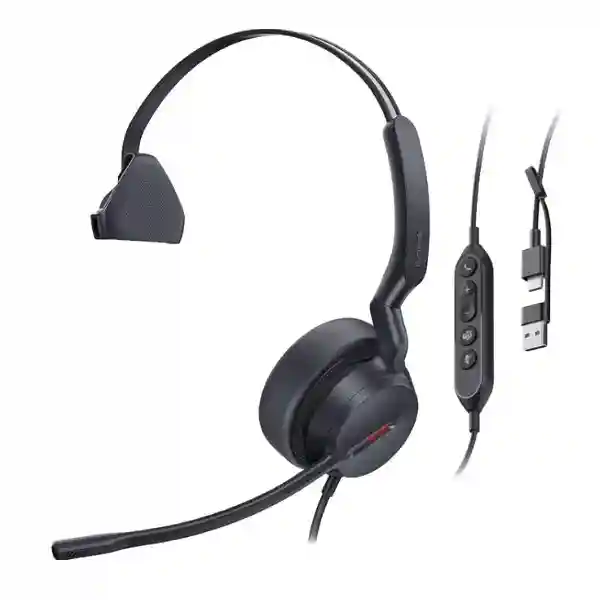
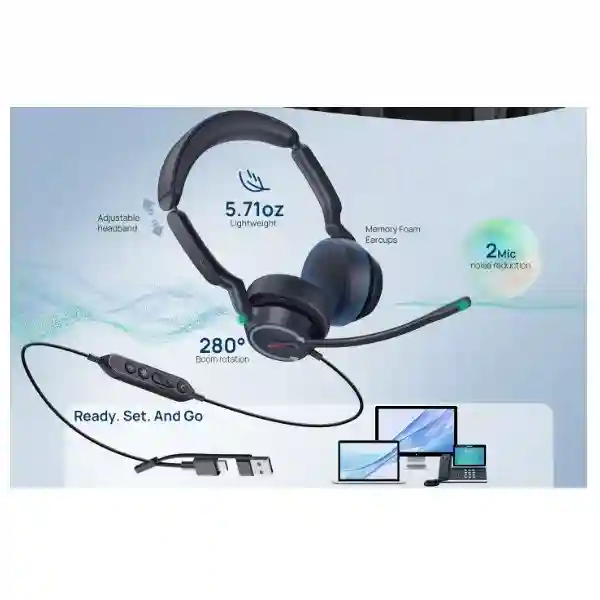
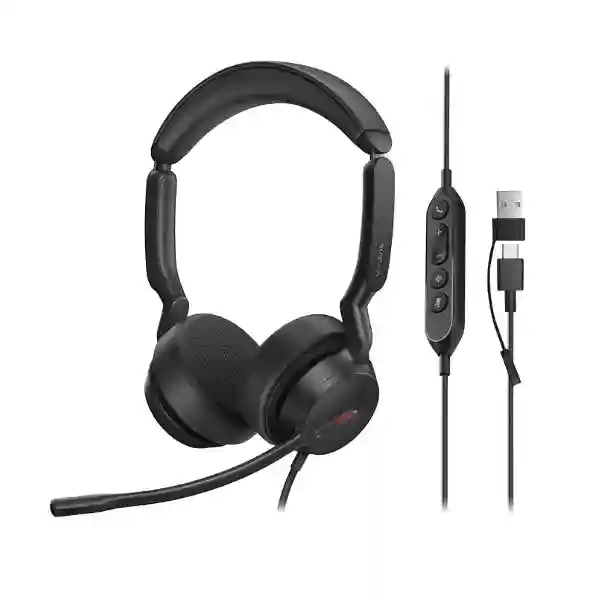
The Yealink UH44 USB Headset is built for professionals who spend a meaningful part of the working day on voice calls, online meetings, customer conversations or internal collaboration. It is a wired on-ear business headset that connects through USB-C and includes a USB-A adapter, making it practical for mixed fleets of laptops, desktops and supported desk-phone environments. Yealink combines a dual-microphone voice pickup system with Acoustic Shield 3.0 processing, 35 mm speakers, an inline controller, a single busylight and a boom arm that can be lifted to mute. The result is a straightforward headset platform for organisations that value predictable connectivity, clear speech pickup and simpler user training without the charging routines associated with wireless devices.
What the Yealink UH44 is designed to solve
In busy offices, customer-service teams and shared workspaces, call quality is affected by more than the quality of an internet connection. Keyboard noise, nearby conversations, office movement and poor microphone positioning can reduce speech intelligibility for the person at the other end of the call. The UH44 addresses this with two microphones and Yealink Acoustic Shield 3.0 voice-isolation technology. The system is designed to focus on the wearer’s voice while reducing surrounding distractions transmitted into the conversation. This is especially useful for staff who regularly speak with customers, suppliers, remote colleagues or branch teams and need their speech to remain understandable without continually moving to a quiet room.
The wired architecture also solves a practical operational issue: availability. There is no battery to recharge before a shift, and the USB-C connection with supplied USB-A adapter allows the same headset family to fit many current and older business computers. Inline controls provide direct access to call, volume and mute functions, while lifting the boom microphone can mute the headset. A visible busylight gives colleagues a simple signal that the user is engaged on a call. For organisations standardising many desks, these physical controls can reduce training effort because users do not need to search for software buttons for routine call actions.
Voice clarity
Two microphones work with Yealink Acoustic Shield 3.0 to isolate speech and reduce unwanted background sound reaching remote participants.
Comfort for long sessions
The on-ear design uses soft memory foam, generously sized cushions and a headband structure intended to distribute pressure for prolonged business use.
Straightforward connectivity
A USB-C cord with USB-A adapter supports plug-and-play deployment across common workplace computers and compatible Yealink phone environments.
Physical call control
Inline buttons support answer, end, reject, volume and mute functions, with LED indicators and a boom arm that can be raised to mute.
Verified Yealink UH44 specifications
| Specification | UH44 detail |
|---|---|
| Wearing style | On-ear; Mono and Dual variants |
| Microphones | 2 microphones with Yealink Acoustic Shield 3.0 |
| Speaker size | 35 mm |
| Speaker frequency response | 20 Hz–20 kHz |
| Connection | USB-C cord with USB-A adapter |
| Cable length | 0.65 m headset-to-controller; 1.5 m controller-to-USB plug |
| Management | Yealink USB Connect (PC) and Yealink Management Cloud Service |
| Package contents | Headset, carrying bag and quick-start guide |
Yealink lists UH44 versions for Microsoft Teams and UC use, including Dual Teams USB-C/A, Dual UC USB-C/A and Mono USB-C/A part-number variants. Exact part number should be confirmed against the required wearing style and collaboration environment before ordering.
Compatibility, deployment and fleet management
Yealink positions the UH44 for use with mainstream business communication platforms and operating systems. The official datasheet lists Microsoft Windows and Apple macOS support, while Yealink states that the headset family works across more than one hundred platforms and operating systems. Compatibility should still be checked at the exact application and device level because call-control integration can vary by platform, client version, phone model and administrator policy. For organisations using Yealink desk phones, Yealink’s published headset compatibility guidance includes the UH44 among supported USB wired headsets on multiple T-series phone families and newer compatible endpoints.
For larger deployments, Yealink USB Connect on PC can support configuration and device management tasks, while Yealink Management Cloud Service is intended for centralised fleet management. This becomes useful when an organisation needs consistent headset settings, firmware control or visibility across many users rather than treating every USB accessory as an unmanaged peripheral. Procurement teams should therefore identify not only quantity but also the selected Teams or UC variant, Mono versus Dual preference, target computers or desk phones, collaboration application, user role and any central management requirement.
Related FourTeck technology resources
A headset normally sits inside a wider communication environment. Browse the FourTeck Tanzania technology shop when the project also includes IP phones, conferencing equipment, computers or network infrastructure. For deployment planning, the FourTeck Tanzania services page provides context for integrated IT, telecom and support requirements. Multi-country organisations can also review FourTeck Kenya and FourTeck Uganda when standardising communication hardware across East African branches.
Yealink UH44 USB Headset Tanzania
For buyers in Tanzania, the Yealink UH44 is relevant where employees need a dependable wired headset for voice-intensive work without introducing battery management into the daily routine. Typical environments include customer-service desks, sales teams, finance departments, reception areas, support desks, hybrid workers, training teams and managers who participate in frequent online meetings. The USB-C connection with USB-A adapter is useful when an organisation operates a mixed estate of newer USB-C laptops and older desktops or docking stations that still expose USB-A ports. This can simplify standardisation because procurement does not necessarily need two separate headset families solely for connector differences.
Tanzanian organisations planning a fleet purchase should start with user roles. A Dual model can be preferred when staff need stronger acoustic focus in open-plan areas, while a Mono model may suit users who need to remain aware of nearby colleagues or counter activity. Teams and UC variants should be aligned with the organisation’s collaboration software and call-control needs. For computer-based calling, confirm the operating system, softphone or meeting platform, available USB port type and any endpoint-management policies. For Yealink desk phones, confirm the exact phone model against Yealink’s current compatibility documentation rather than assuming every USB-equipped phone behaves identically.
In Tanzania, procurement may also need to account for multi-site deployment. A company with offices, branches, service desks or remote teams can benefit from standardising the headset, controller behaviour, naming convention and support process. The UH44’s wired design means spare units can be swapped quickly without pairing procedures. Yealink USB Connect and Yealink Management Cloud Service can also be considered where central management is required. This is particularly useful when IT teams are responsible for dozens or hundreds of endpoints and need a repeatable way to manage peripherals alongside computers and phones.
When requesting a Tanzania quotation, provide the required quantity, Mono or Dual preference, Teams or UC environment, target device types and any deployment deadline. FourTeck can then help position the headset within the wider communication setup rather than treating it as an isolated accessory. Buyers can use the FourTeck Tanzania contact page to request product availability, commercial terms and compatibility guidance without relying on unsupported assumptions about current stock or delivery timing.
Yealink UH44 USB Headset Dar es Salaam
In Dar es Salaam, organisations often combine head-office functions, customer-facing teams, shared offices and regional management in the same workplace. The Yealink UH44 is suited to these environments when staff need reliable headset audio for cloud meetings, softphone calls and day-to-day business communication. The two-microphone design with Acoustic Shield 3.0 helps reduce the amount of surrounding office noise transmitted to the far end, which is useful in open-plan spaces where several employees may be speaking simultaneously. A visible busylight can also reduce interruptions by giving nearby colleagues a simple indication that the user is on a call.
For Dar es Salaam procurement teams, connector flexibility can matter because office technology is rarely replaced all at once. Newer laptops may offer USB-C while established desktops, monitors and docking stations may still rely on USB-A. UH44 uses a USB-C cord and includes a USB-A adapter, allowing the headset to be deployed across mixed hardware fleets with less need for additional conversion accessories. This is particularly useful when an organisation is refreshing computers in phases or supporting both fixed workstations and mobile staff.
The choice between Mono and Dual should be matched to the workspace. A Dual headset can help a user remain focused during long customer or internal calls, whereas Mono can make sense for reception, operations or supervisory roles where awareness of nearby people remains important. The inline controller provides direct access to volume, mute and call actions, while lift-to-mute offers a fast physical gesture that users can learn easily. For call-centre style seating, these controls may reduce dependence on on-screen buttons during high call volumes.
Before placing a Dar es Salaam order, confirm quantity, target applications, required version, user preference and whether the headset will connect to computers or supported Yealink desk phones. If the project includes IP phones, conferencing equipment or workstation upgrades, bundling those requirements into one bill of materials can help procurement identify compatibility issues before equipment arrives. FourTeck can review these factors and prepare a quotation based on the actual requirement rather than assuming one configuration suits every desk.
Yealink UH44 USB Headset Mwanza
Businesses in Mwanza may use USB headsets across branch offices, customer-service points, finance teams, administrative desks, education environments, healthcare administration and distributed operations. The Yealink UH44 is a practical option when the goal is to improve the consistency of voice communication without introducing wireless charging schedules. Its wired USB architecture is simple to move between compatible computers, and the combination of USB-C with a supplied USB-A adapter supports mixed generations of workplace hardware. For branch deployment, that reduces the number of connector-specific headset types that IT may need to stock.
Audio performance matters most when remote colleagues or customers must clearly understand the wearer. The UH44 uses two microphones and Yealink Acoustic Shield 3.0 to isolate the user’s voice from ambient sound. In Mwanza offices where several people share a room, that can improve the experience for remote participants by reducing distracting background speech. The 35 mm speakers are designed for both call and general audio use, and Yealink supports dynamic equalisation between call and music scenarios. The headset also provides hearing-protection functions documented by the manufacturer, which can be relevant for organisations with staff who wear headsets for long periods.
For multi-branch companies, deployment consistency is often more valuable than selecting different accessories for every location. A standard UH44 configuration can simplify onboarding, spare management and user guidance. IT teams can document the correct USB connection, platform settings, microphone position and inline-controller functions once, then repeat the process across branches. Where centralised management is required, Yealink USB Connect and Yealink Management Cloud Service provide supported management paths for the headset family.
A Mwanza quotation request should identify whether users need Mono or Dual headsets, the expected quantity, operating systems, collaboration platforms, target desk-phone models if applicable and any broader telephony project. This lets the supplier assess compatibility before delivery and helps buyers compare proposals on complete scope rather than unit price alone. Confirm the exact Yealink part number on the quotation so purchasing records match the required variant.
Yealink UH44 USB Headset Arusha
Arusha organisations that coordinate tourism, hospitality, professional services, administration, education, NGOs, logistics or regional operations often depend heavily on calls with customers and colleagues outside the local office. The Yealink UH44 supports this communication pattern with a professional wired design that prioritises predictable connectivity and voice pickup. Two microphones combined with Acoustic Shield 3.0 are intended to reduce surrounding noise sent into calls, which can be valuable where staff share open work areas or support customers from busy front-office environments.
The physical design also matters for roles that spend several hours each day in meetings. Yealink uses soft memory foam, enlarged ear cushions and an ergonomic headband intended to distribute pressure more evenly. A Dual model can be selected for users who need greater focus, while Mono can preserve awareness of nearby colleagues. The boom microphone can be worn on either side and lifted to mute, providing an intuitive action for staff moving frequently between calls and in-person conversations.
For Arusha IT managers, the UH44 is particularly easy to evaluate because its requirements are straightforward: a compatible USB connection, supported operating system or phone, and the correct software/client environment. There is no wireless pairing or battery lifecycle to manage. That can simplify help-desk troubleshooting when the organisation has users at multiple properties, offices or remote work locations. The supplied USB-A adapter also helps bridge newer USB-C computers and older USB-A hardware.
When procuring for hospitality or distributed service teams, consider whether each role should receive Mono or Dual, whether Microsoft Teams-specific variants are required, and whether the headset will be used only with computers or also with supported Yealink desk phones. Buyers should also include replacement/spare strategy, user onboarding and asset labelling in the project. A structured quote request with these details reduces the chance of receiving a technically correct headset variant that does not fit the intended workflow.
Yealink UH44 USB Headset Dodoma
For organisations in Dodoma, professional USB headsets can support administrative teams, call-handling staff, public-facing service desks, education, consulting and corporate functions that depend on regular remote communication. The Yealink UH44 provides a wired approach with fewer day-to-day dependencies than a wireless headset: users connect through USB-C or the included USB-A adapter, select the device in their collaboration application and use the inline controller for common call functions. This can suit organisations that prefer equipment with simple operating procedures and minimal charging management.
The two-microphone pickup system is one of the most important UH44 features for offices where several people may be working nearby. Yealink Acoustic Shield 3.0 is designed to reduce ambient sounds transmitted during calls while preserving the user’s voice. The busylight adds a basic but useful visual cue to colleagues, and the lift-to-mute boom gives users a quick way to silence the microphone when discussing something locally. These features can improve call etiquette without requiring complex software workflows.
In larger Dodoma deployments, standardisation should include the endpoint as well as the headset. Confirm whether staff use Windows or macOS, what softphone or meeting application is standard, whether USB ports are exposed directly or through docks, and whether any Yealink desk phones will be involved. Yealink publishes compatibility guidance for supported phones and provides USB Connect and cloud-based management capabilities that may be relevant for central IT teams.
Procurement should request the exact variant on every quotation: Mono or Dual, Teams or UC as required, and the matching manufacturer part number. Where several departments have different working styles, a small role-based pilot can help decide which wearing style fits each group before a larger rollout. FourTeck can incorporate the headset into wider IP telephony, workstation or conferencing requirements and prepare a bill of materials based on the intended user environment.
Yealink UH44 USB Headset UAE
The Yealink UH44 is also relevant for organisations with operations in the UAE that want to standardise a professional wired headset across regional teams. Multi-country consistency can simplify IT support because users in Tanzania and the UAE can follow the same headset-control conventions, microphone positioning guidance and USB connection process. The USB-C cable and USB-A adapter are especially useful in regional organisations where laptop and desktop standards differ by branch or renewal cycle.
For busy UAE office environments, the dual-microphone design with Acoustic Shield 3.0 can help customer-facing and internal users reduce surrounding speech reaching remote participants. The inline call controller with LED indication, busylight and lift-to-mute boom gives the user clear physical feedback. Teams and UC options allow procurement to align the headset with the organisation’s chosen communication platform, but the exact variant should be confirmed before ordering rather than inferred from the product family name.
Regional buyers should also consider whether a wired endpoint is strategically preferable to wireless. Wireless headsets provide mobility, but they also introduce batteries, charging and pairing. For fixed desks, reception points, contact centres and users who work primarily at a computer, the UH44’s wired design can be easier to support. Spares can be moved between workstations quickly, and there is no charging state to diagnose when an employee starts a shift.
When preparing a UAE requirement, list quantity, Teams or UC environment, Mono or Dual preference, device types and whether central device management is expected. If the same hardware will be deployed in East Africa and the Gulf, define a common approved specification and part number so purchasing teams do not unintentionally mix variants. This makes user training, documentation and replacement planning more predictable across locations.
Yealink UH44 USB Headset Uganda
In Uganda, the Yealink UH44 can serve organisations that need a consistent professional headset for offices, service desks, education, finance, support teams and distributed business operations. The headset’s wired USB approach suits users who remain primarily at a workstation and want immediate availability without battery checks. USB-C connectivity plus the supplied USB-A adapter helps organisations support newer laptops and established desktop fleets with one headset family.
For voice quality, two microphones and Acoustic Shield 3.0 are designed to isolate the wearer’s speech and suppress surrounding noise. This can be valuable in shared offices where several simultaneous calls occur. The 35 mm speakers provide full-range audio for calls and general computer sound, while the inline controller offers answer, end, reject, volume and mute functions. Raising the microphone boom mutes the headset, and the busylight creates a visual signal that the wearer is engaged.
Ugandan organisations with branches can treat the UH44 as part of a standard endpoint profile. For example, a call-handling profile may specify a Dual UH44, a supported Yealink phone or PC, a standard collaboration client and documented audio settings. A reception or supervisory role could use the Mono version where awareness of the room remains important. Role-based standardisation makes purchasing and help-desk support more repeatable.
Before ordering in Uganda, confirm the exact device environment and part number. Teams and UC variants should not be mixed casually when an organisation wants predictable native controls. If a deployment includes Yealink desk phones, check each model against Yealink’s current headset compatibility documentation. Organisations with cross-border operations can also use FourTeck Uganda as a regional reference while keeping the same approved user specification across Tanzania and Uganda.
Yealink UH44 USB Headset Kampala
Kampala has many office environments where voice communication is a core productivity tool: customer support, sales, professional services, financial operations, education, technology teams and regional coordination. The Yealink UH44 is designed for these desk-based communication roles, providing a wired connection, two-microphone noise reduction and physical call controls in a headset that does not depend on charging. For teams running back-to-back meetings or customer calls, that predictability can be more important than wireless mobility.
Open-plan offices introduce a particular challenge because microphones can transmit nearby conversations. Yealink’s Acoustic Shield 3.0 uses the UH44’s two microphones to focus on the speaker’s voice and reduce unrelated sound. This is intended to improve what the far-end participant hears rather than simply isolating the wearer. The Dual model can additionally help the user concentrate by covering both ears, while the Mono model leaves one ear free for local awareness.
Kampala IT teams should evaluate the headset as part of the entire communication endpoint. Check whether calls are made through a browser, desktop softphone, Microsoft Teams, another UC platform or a supported Yealink desk phone. Confirm USB-port availability and whether users connect through docking stations. In managed estates, consider Yealink USB Connect or Yealink Management Cloud Service for configuration and lifecycle administration where appropriate.
For a quotation, provide a clear split of user types instead of requesting only a total quantity. A buyer might need Dual units for contact-centre users and Mono units for supervisors, with separate Teams or UC versions depending on the platform. This allows suppliers to quote the correct part numbers and reduces substitutions that could complicate standardisation. Include expected growth if the organisation intends to keep a pool of spares for onboarding or replacement.
Yealink UH44 USB Headset Arua
For organisations in Arua, a wired USB headset can be a practical choice when simplicity and predictable day-to-day operation are priorities. The Yealink UH44 connects directly to supported computers and compatible devices using USB-C, with a USB-A adapter included for broader hardware compatibility. This can reduce the number of chargers, pairing steps and battery-related support issues compared with a wireless headset fleet, which is useful when IT support resources are shared across locations.
The UH44’s communication features are aimed at professional voice use. Its two microphones work with Yealink Acoustic Shield 3.0 to reduce surrounding noise reaching the remote participant. The inline controller gives the wearer direct access to call and volume functions, and the boom can be raised to mute. A busylight also helps co-workers understand when the user is occupied on a call. These features are simple, but they can contribute to more orderly call handling in shared offices.
For Arua branch deployments, procurement can benefit from treating headsets as managed workplace assets rather than ad-hoc accessories. Specify the wearing style, collaboration environment and expected endpoint. Keep at least one known-good spare in locations where voice communication is business-critical, and document basic troubleshooting such as checking the selected audio device, USB connection and application permissions. Where the organisation manages devices centrally, review Yealink’s management tools as part of the deployment plan.
A quote request should state exact quantities and application requirements. If the headset is intended to work with desk phones, the exact Yealink phone model should be supplied for compatibility verification. If the organisation plans to use the same UH44 profile in Kampala, Mbarara, Gulu, Tanzania or other branches, establish one approved part number per user role so purchasing remains consistent even when orders are placed at different times.
Yealink UH44 USB Headset Mbarara
Mbarara businesses and institutions that rely on frequent computer-based communication can use the Yealink UH44 as a standard wired headset for staff who spend substantial time on calls. USB-C plus the included USB-A adapter supports common workplace computer configurations without requiring separate connector-specific models. This flexibility is useful when some employees use newer notebooks while others work from desktop PCs or docking stations retained from an earlier equipment cycle.
In noisy or shared workspaces, microphone performance can determine whether customers and colleagues clearly understand the user. The UH44 uses two microphones and Yealink Acoustic Shield 3.0 to reduce non-speech background sound transmitted into the call. For the wearer, 35 mm speakers and soft ear cushions are intended to support extended sessions. The inline controller and lift-to-mute boom keep routine controls immediately accessible, reducing reliance on the software interface during a busy call queue.
Organisations should select Mono or Dual according to job function. Dual is well suited to concentrated desk-based work, while Mono can be preferable where staff need to listen for visitors, colleagues or local announcements. The correct Teams or UC version should also be identified before purchase. This is not merely a naming detail: standardising the intended variant helps keep user experience and call controls consistent across the fleet.
For Mbarara procurement, include the headset within the broader endpoint plan. If users are receiving new laptops, docks, IP phones or collaboration software at the same time, verify the final connection path before ordering. The supplier can then confirm the best UH44 variant and quantity, and the IT team can prepare a standard setup guide for every user. This approach reduces avoidable compatibility questions after deployment.
Yealink UH44 USB Headset Gulu
In Gulu, the Yealink UH44 can support administrative offices, service teams, education, NGOs, branch operations and businesses that depend on regular communication with customers or remote colleagues. The headset’s wired format makes it easy to keep ready for use throughout the day. There is no battery state to monitor, and the USB-C cord with USB-A adapter gives IT teams flexibility when deploying to a mixed set of computers.
The two-microphone system is designed to improve speech capture in environments where there may be other voices or office sounds nearby. Yealink Acoustic Shield 3.0 focuses on the wearer’s voice and reduces unwanted background sound sent to the far end. For teams that regularly work from shared rooms, this can make conversations sound more professional and reduce repeated requests from customers to repeat information. The busylight and lift-to-mute function also support clear call etiquette among co-workers.
A branch office can gain additional value by standardising not only the product but also how it is used. IT can define whether the Mono or Dual model applies to each role, specify the correct Teams or UC variant, document headset placement and microphone position, and confirm the default audio device in the approved collaboration application. If one unit needs replacement, the spare can then be connected with the same expected behaviour instead of introducing a different user interface.
When requesting a Gulu quote, state quantity, user roles, target operating systems and whether computers or Yealink desk phones are involved. Avoid relying on a generic request such as “UH44 headset” when the environment requires a specific variant. Exact part-number control improves purchasing accuracy, especially for organisations buying in several waves or distributing equipment across multiple locations.
Yealink UH44 USB Headset Kenya
Kenyan organisations evaluating the Yealink UH44 can use it as a standard wired communication headset across offices, service teams, sales desks, support centres and hybrid workers. The design is particularly appropriate where staff are mostly desk-based and value reliable USB connectivity over wireless mobility. A USB-C connection with USB-A adapter helps accommodate mixed workplace hardware and can simplify procurement across departments that use different computer generations.
The UH44’s two microphones and Acoustic Shield 3.0 focus on clear voice transmission. In open offices or contact-centre areas, that can help reduce distracting background speech reaching customers. The 35 mm speakers support call and general audio use, while the inline controller provides direct call management. Users can raise the boom to mute, and the busylight signals call status to people nearby. These predictable physical controls are useful when users need to operate quickly between conversations.
For businesses with operations in both Kenya and Tanzania, standardising the same headset family can simplify cross-border support. IT can maintain one setup guide, one approved spare pool strategy and one troubleshooting workflow. Procurement can also negotiate around consolidated quantities while keeping part-number control. Teams and UC variants should be mapped to the organisation’s communications platform, and Mono versus Dual should be selected by role instead of buying one style for every employee automatically.
Before purchasing in Kenya, verify exact quantities, connection requirements, operating systems, phone compatibility if relevant and the desired variant. If the project extends beyond headsets to IP phones, conferencing or workstation refreshes, assess those components together. This avoids situations where the headset is compatible in isolation but the final desk setup lacks an accessible USB port or uses an unsupported connection path. FourTeck Kenya can serve as a regional reference for organisations coordinating East African deployments.
Yealink UH44 USB Headset Kuwait
For businesses in Kuwait, the Yealink UH44 provides a professional wired headset option for customer service, corporate administration, help desks, sales teams and employees using cloud collaboration tools. The main operational advantage of a wired design is consistency: connect the headset, select it as the audio device and begin work without battery or pairing management. The included USB-A adapter helps organisations use the same model across USB-C laptops and older USB-A workstations.
Voice isolation is handled through two microphones and Yealink Acoustic Shield 3.0. This is intended to suppress surrounding office noise sent to remote participants and keep the speaker’s voice prominent. The inline controller places answer, end, reject, volume and mute actions on the cable, while the microphone boom itself can be lifted to mute. A visible busylight helps reduce interruptions in open offices where co-workers can see that a user is occupied.
Kuwait-based IT teams with regional offices can benefit from using a common UH44 standard across locations. A standard can define the exact part number, collaboration platform, Mono or Dual wearing style and deployment process. This matters because the UH44 family includes Teams and UC variants, and a generic model name on a purchase order may not provide enough detail for repeatable procurement. Exact identification also simplifies spares and warranty administration through the selected supplier channel.
For a Kuwait quotation, include user counts, device environment and expected application. If employees connect to Yealink desk phones, give the exact phone model so compatibility can be checked against current Yealink documentation. If headsets are being purchased together with PCs, docking stations or phones, validate the complete desk connection path. This prevents connector or call-control surprises after the equipment reaches users.
Yealink UH44 USB Headset Ghana
The Yealink UH44 is a practical wired headset for Ghanaian organisations that need clear voice communication for customer service, administration, remote collaboration and internal support. Because it uses USB rather than a wireless link, it can suit fixed desks and shared workplace environments where straightforward operation is more important than roaming around the office. The supplied USB-A adapter gives additional flexibility for organisations running a combination of older and newer computers.
For offices where background conversation is a concern, two microphones and Yealink Acoustic Shield 3.0 are designed to reduce surrounding noise sent to the remote side of a call. This can improve clarity for customers without requiring the employee to move to a dedicated quiet room for every conversation. The 35 mm speakers, soft cushions and ergonomic fit support longer wearing periods, while inline controls make volume, mute and call actions easy to reach.
Ghana-based organisations with multiple branches should consider standard deployment profiles. A customer-service profile could specify Dual UH44 units, while reception or supervisory profiles may use Mono. Teams and UC versions should be aligned with the organisation’s collaboration environment. Central IT can then document the default audio settings and common troubleshooting steps. Where fleet management is needed, Yealink USB Connect and Yealink Management Cloud Service can be assessed as part of the management strategy.
A procurement request should include the expected quantity, model variant, platform, operating system and target endpoint. This helps suppliers quote accurately and allows procurement to compare like-for-like offers. If an organisation also has Tanzania, Kenya or Uganda operations, the same headset specification can be reused across regions where appropriate, creating consistency for users and reducing the variety of spare accessories the IT team must maintain.
Yealink UH44 USB Headset Nigeria
Nigerian businesses with customer-service teams, sales departments, support desks, financial operations and distributed offices often need communication equipment that can be deployed consistently at scale. The Yealink UH44 fits this requirement as a wired USB headset with direct controls and no battery dependence. Its USB-C connection with supplied USB-A adapter makes the platform suitable for mixed workplace hardware and can reduce the need for separate headset inventory based only on connector type.
The headset uses two microphones and Yealink Acoustic Shield 3.0 to focus on the speaker’s voice while reducing surrounding noise transmitted into calls. For large open offices or contact-centre layouts, this can improve the experience for customers and colleagues on the far end. The Dual model can improve user focus, while Mono allows continued awareness of the room. A busylight communicates call status visually, and lift-to-mute provides a fast physical method to silence the microphone.
At scale, configuration discipline matters. Nigerian organisations should decide which UH44 version is approved for each user group and keep the manufacturer part number in procurement records. Where Microsoft Teams is the primary platform, choose the corresponding variant required by the deployment. Where broader UC applications are used, identify the appropriate UC model. If supported Yealink desk phones are involved, verify the exact phone model and USB-headset compatibility before ordering large quantities.
For a quotation, provide headset quantity by role, target application, operating system and rollout locations. Include any need for spares or phased deployment. If the organisation operates across West and East Africa, standardising the same endpoint family can simplify regional support, but local purchasing teams should still confirm commercial availability and exact variants rather than assuming one market’s stock or pricing applies elsewhere.
Yealink UH44 USB Headset Seychelles
For organisations in Seychelles, the Yealink UH44 can support hospitality administration, reservations, customer service, corporate offices, finance teams, government functions and businesses that frequently communicate with regional partners. A wired headset is useful where employees work primarily at a computer and need dependable availability throughout the day. USB-C with a USB-A adapter provides flexibility across different workstation generations and helps reduce accessory complexity.
The two-microphone design with Acoustic Shield 3.0 is aimed at clearer voice pickup in the presence of ambient office noise. This can be especially helpful for reservation desks or administrative teams where several employees may be speaking nearby. The UH44 also offers 35 mm speakers, an inline controller, lift-to-mute and a busylight. Those controls are visible and tactile, which can make the headset easier to use during busy call periods without navigating application menus.
For Seychelles procurement, it is sensible to consider spares and standardisation from the beginning. Organisations that depend on regular international calls may want spare units available so a damaged headset does not interrupt a critical role. Defining one approved Mono or Dual version and the required Teams or UC variant helps ensure that replacements behave consistently. IT staff can also prepare one setup guide covering USB connection, audio-device selection, microphone positioning and basic troubleshooting.
When requesting a quote, include user count, device types, collaboration software and expected deployment schedule. If the same organisation operates in Tanzania, Kenya, Uganda or Gulf markets, use a consistent specification where possible but verify local procurement conditions separately. The objective is to standardise the technical endpoint while avoiding unsupported assumptions about market-specific stock, warranty or delivery.
Industries and roles that can benefit from UH44
Contact centres
Dual microphones, lift-to-mute and visible call status suit high-volume customer conversations where clear voice transmission and consistent controls are important.
Sales and support
Teams that move through scheduled meetings, customer calls and internal conversations can use the inline controller to handle routine actions quickly.
Hybrid workers
USB-C/A flexibility makes the headset practical for employees who alternate between notebooks, docks and established desktop environments.
Branch offices
A standard wired model can simplify asset support where IT manages communication devices across several sites.
Buying guide: choosing the correct UH44 variant
Choose Mono or Dual by role. Mono leaves one ear open and can suit reception, supervisors or staff who need to remain aware of the local environment. Dual covers both ears and is often preferred by call-intensive users who need additional focus. Neither style is universally better; the correct choice depends on the job.
Confirm Teams or UC requirements. Yealink lists Teams and UC versions within the UH44 family. Keep the exact part number on the purchase order to avoid receiving an unintended variant. For standardised corporate environments, test the chosen model with the approved collaboration client before a large rollout.
Check the endpoint. For computer use, verify USB connectivity, operating system and application. For Yealink desk phones, match the exact phone model to Yealink’s current compatibility list. Do not assume that every phone with a USB port supports identical headset control behaviour.
Plan management and spares. If many units will be deployed, decide who owns firmware, configuration, asset tracking and replacements. Yealink USB Connect and Yealink Management Cloud Service may be relevant to central administration, and spare units can reduce downtime for call-critical roles.
Quotation checklist
To receive a more accurate Yealink UH44 quotation, include the following information in the request:
• Required quantity and rollout locations.
• Mono or Dual preference by user role.
• Teams or UC requirement.
• Primary operating system and collaboration application.
• Computer, docking station or Yealink desk-phone models where relevant.
• Whether central device management is required.
• Whether spare units should be included for business-critical users.
• Any related requirement for IP phones, conferencing devices, computers or IT services.
Frequently asked questions about the Yealink UH44
Is the Yealink UH44 a wired or wireless headset?
The UH44 is a wired USB headset. It uses a USB-C cord and includes a USB-A adapter, so it does not require Bluetooth pairing or battery charging.
Does the UH44 reduce background noise?
Yes. Yealink equips the UH44 with two microphones and Acoustic Shield 3.0 voice-isolation technology designed to reduce ambient noise transmitted to remote participants.
Can I use the Yealink UH44 with USB-A computers?
Yes. The headset uses a USB-C cord and is supplied with a USB-A adapter, allowing connection to compatible USB-A devices.
Does Yealink offer Mono and Dual versions?
Yes. The UH44 family includes Mono and Dual wearing styles. The exact version and manufacturer part number should be confirmed when ordering.
Can the microphone be muted by moving the boom?
Yes. Yealink documents a lift-to-mute function: moving the microphone boom up mutes the microphone, and lowering it returns it to the operating position.
Can IT manage UH44 headsets centrally?
Yealink lists Yealink USB Connect for PC and Yealink Management Cloud Service as management options. The appropriate management method depends on the organisation’s environment and scale.
What should I send when requesting a FourTeck quote?
Send the required quantity, target location, Mono or Dual preference, Teams or UC requirement, computer or phone models and the applications users will call through. This gives the sales team enough information to confirm the intended configuration.
Decision recap
Choose the Yealink UH44 when users need a professional wired USB headset with two-microphone voice isolation, USB-C/A flexibility, physical call controls, a busylight and a choice of Mono or Dual wearing styles. It is especially well suited to desk-based calling, shared offices, customer service and organisations that value straightforward deployment without battery management.
Before ordering, confirm the exact Teams or UC variant, manufacturer part number, endpoint compatibility and user-role preference. A well-defined specification is more useful than buying on model name alone because it keeps the rollout consistent and simplifies future replacement.
Consult FourTeck about your UH44 requirement
If you are planning a single headset purchase or a larger rollout, share the quantity, user roles, collaboration platform and device environment. FourTeck can help you confirm the correct UH44 variant and align it with related IP phone, conferencing or workstation requirements. Use the verified Tanzania contact page for quotation and compatibility enquiries.




Reviews
There are no reviews yet.